Image Processing Project: Automated Jelly Bean Quality Control System

Verified

Added on  2022/09/12

|10
|1041
|17
Project
AI Summary
This project details the development of image processing software designed for automated quality control within a confectionary manufacturing setting. The software, built using Matlab, processes images of jelly beans to assess their quality prior to packaging or rejection. The process begins with importing an image and displaying normalized RGB histograms. Histogram stretching is then performed, and the RMS contrast is calculated before and after the operation to assess image enhancement. The software then employs image thresholding to generate binary images for each jelly bean color, followed by combining these images and applying them as masks to the original image. Further steps involve cleaning up the binary images to remove noise, counting pixels of specific colors, determining the area of each bean, and calculating the Euclidean distance from the image center. Finally, the software counts beans of each color and extracts individual jelly beans, rotating them for length measurement. The goal is to provide a comprehensive system that aids in various aspects of the manufacturing process, from initial image analysis to the final assessment of bean characteristics, ensuring adherence to quality standards.
Document Page
Programming
Computer science
Student Name –
Student ID –
tabler-icon-diamond-filled.svg

Paraphrase This Document

Need a fresh take? Get an instant paraphrase of this document with our AI Paraphraser
Document Page
Image Processing
Here, an image processing software has to be developed to be used by a confectionary
manufacturer for quality control purpose which is automated. A group of jelly beans need to
be examined before sealing or rejection. The image considered for this study is named
‘def1.jpg’.
1) Initially, the image ‘def1.jpg’ is read into the software Matlab using the command
‘imread’. The normalised RGB histograms are displayed for the jelly bean image
originally taken on a single axis for R, G and B. Next, histogram stretch is performed
on the image and the RGB histograms are displayed again. The RMS contrast value is
calculated and displayed before and after the performance of stretch operation.
The Figure 1 shows the original image and the associated RGB histogram on a a
single axis.
Document Page
Figure 1
Document Page
Figure 2
The Figure 2 shows the image after histogram stretch is performed. The RGB histogram is
also plotted on the same axis. On comparing the Figure 1 and Figure 2, it can be seen that the
histogram has shifted towards the right hand side.
MATLAB Results :
contrast_1 =
255
tabler-icon-diamond-filled.svg

Paraphrase This Document

Need a fresh take? Get an instant paraphrase of this document with our AI Paraphraser
Document Page
contrast_2 =
65535
The contrast value for original image is 255 and that for the image obtained after histogram
stretch is 65535. It has increased to a great extent.
2) Next, the histogram stretched image obtained is used to obtain a set of binary images
using image thresholding concept. This is done for each jellybean colour. A ‘1’ is
assigned to favourable colour and a ‘0’ is assigned to the rest parts. The threshold
values have been chosen after due consideration. But the results obtained are not
perfect and contain some noise. The same is done for calibration chip used.
The Figure 3 shows the binary image. The threshold limits need to be chosen wisely
to obtain the desired results.
Figure 3
Document Page
3) In this step, a union is produced of the various binary images obtained in the previous
step. Next, the binary images and union of binary images is multiplied with the
original image taken. The binary image is used as mask for the selection of the
original pixels. In case of poor quality results, the threshold values can be changed in
the previous stages.
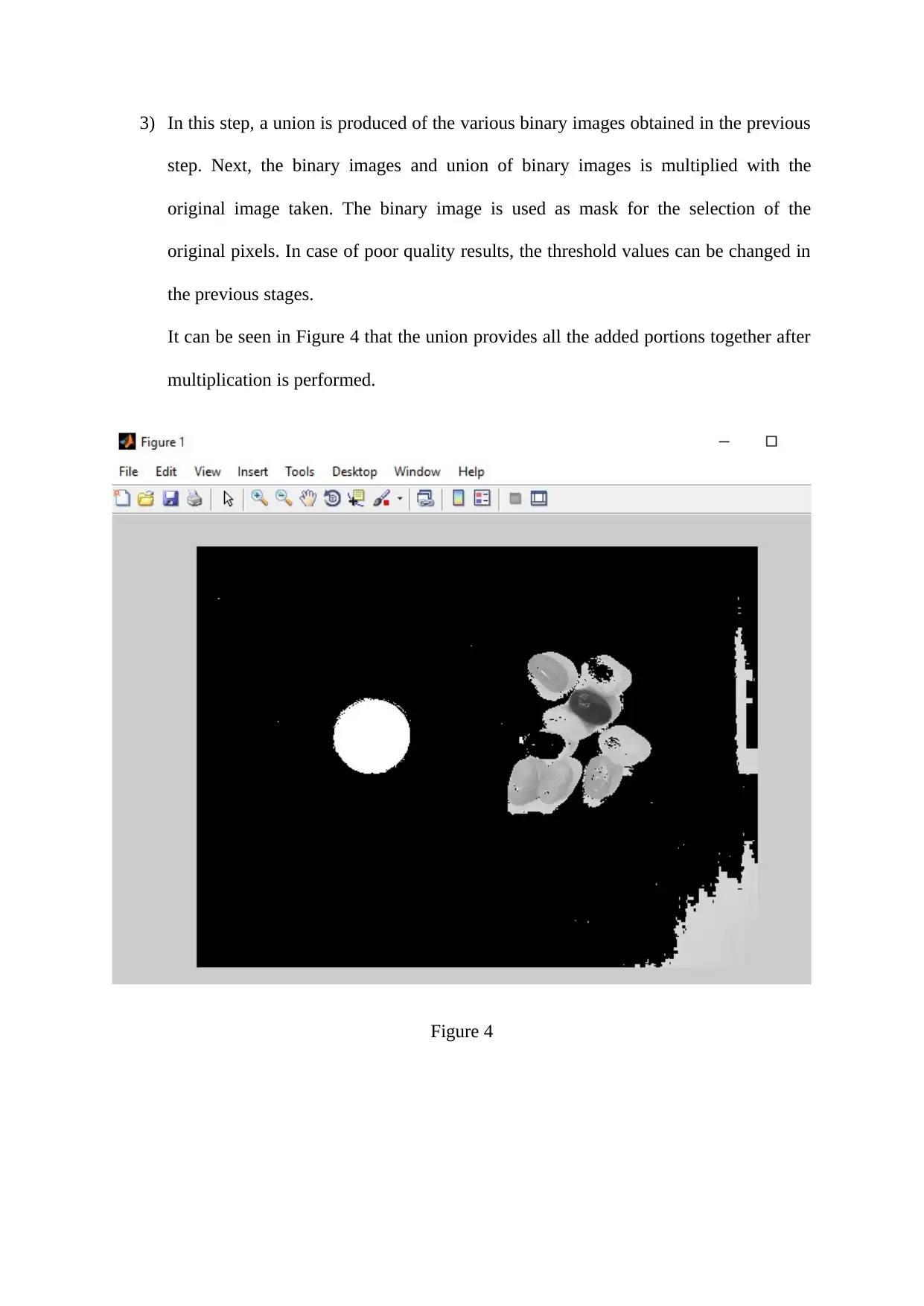
It can be seen in Figure 4 that the union provides all the added portions together after
multiplication is performed.
Figure 4
Document Page
4) In this step, the binary image is tidied up. The pixels which belong to a particular
jellybean colour are separated from the rest of the unwanted pixels. Various structural
elements can be used for the same.
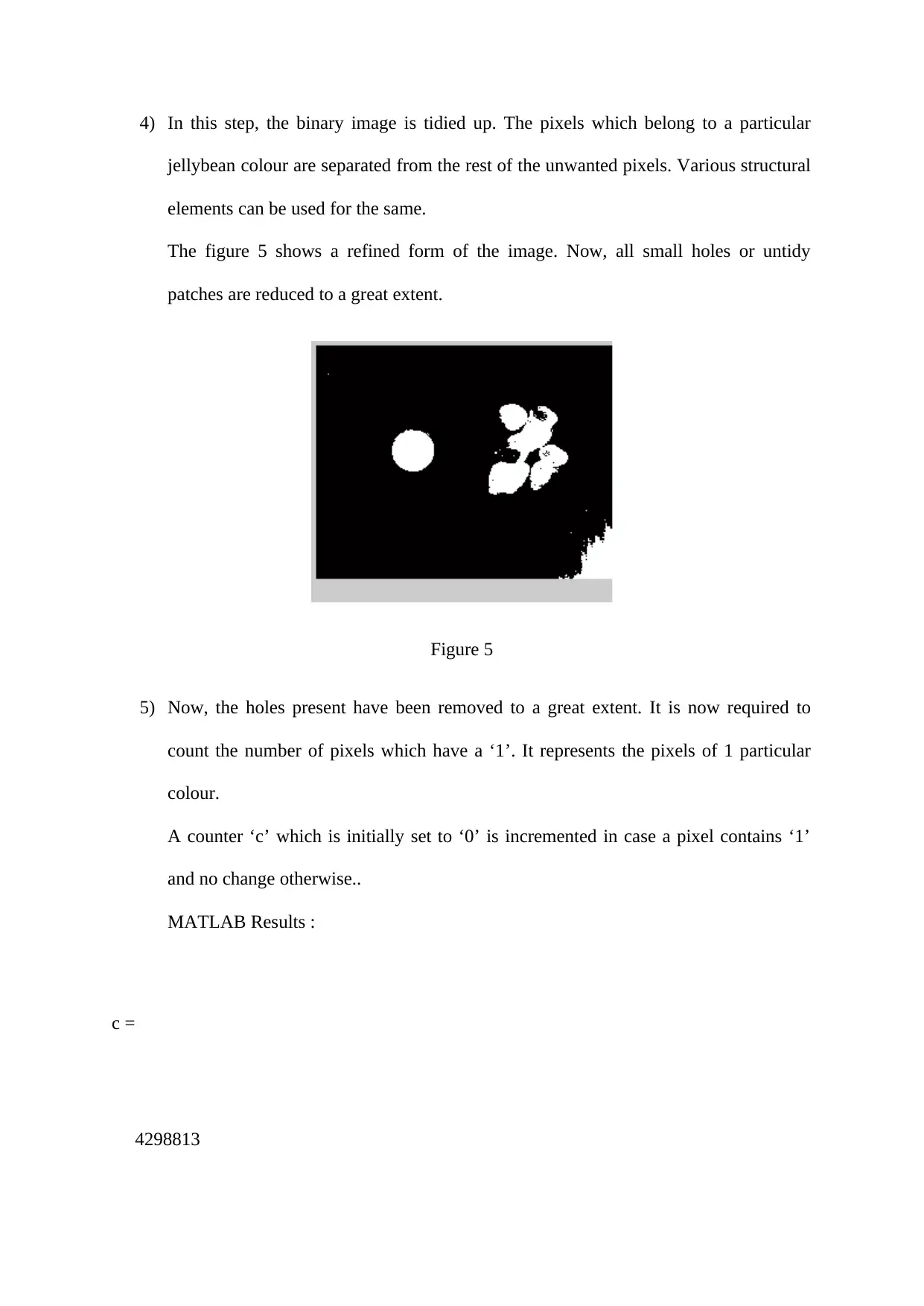
The figure 5 shows a refined form of the image. Now, all small holes or untidy
patches are reduced to a great extent.
Figure 5
5) Now, the holes present have been removed to a great extent. It is now required to
count the number of pixels which have a ‘1’. It represents the pixels of 1 particular
colour.
A counter ‘c’ which is initially set to ‘0’ is incremented in case a pixel contains ‘1’
and no change otherwise..
MATLAB Results :
c =
4298813
tabler-icon-diamond-filled.svg

Paraphrase This Document

Need a fresh take? Get an instant paraphrase of this document with our AI Paraphraser
Document Page
>>
The value of count ‘c’ obtained using Matlab is 42298813.
6) Next, the area of every bean is determined in mm2. Any small or large sized beans
need to be rejected. Hence, a range of acceptable areas can be set.
MATLAB Results :
Area
ar =
4298813
7) In this step, the Euclidean and city block distance of the centre of each bean is
calculated to the centre of the image. This is required to ensure that the jelly beans are
aligned towards conveyer’s middle part for the prevention of jams.
MATLAB Results :
Eucledian distance
d =
Document Page
295.1694
The Eucledian distance is found to be 295.1694 using Matlab.
8) The number of beans of each colour are then counted in the image. This is done to avoid
more number of beans of a particular colour.
MATLAB Results :
Red beans
ans =
2
There are 2 red beans observed here which is correct.
9)
In this step, each individual jelly bean is extracted by obtained a sub matrix which
bounds the box around it. These images are then rotated to bring the longest
dimension of the bean in the vertical direction and length is found. Then , these
images are arranged side by side.
The Figure 6 shows the original image and the red jelly beans extracted from the
complete original image.
Document Page
Figure 6
Hence, the various tasks have been implemented successfully.
Initially , the original image of jelly beans was taken and imported to the software for further
analysis. The RGB histogram is plotted on a single axis. The histogram stretch operation is
then performed. The RGB histogram is again plotted. The RMS contrast values are then
determined for both the cases. It is found that the contrast value increases by the histogram
stretch operation. After this, the binary images were produced by assigning ‘1’ to the pixels
of a particular colour and ‘0’ to the rest by using the concept of thresholding. Then , the
binary image is tidied up to remove any holes etc. This may be used as a mask to generate an
image which contains only a particular colour’s beans. Also, the Eucledian distance is found
and the number of a particular colour’s beans has been found. This helps to ensure that any
particular group does not contain large number of same coloured jelly beans which can lead
to rejection. All the steps have been designed to assist in the manufacturing process.
chevron_up_icon
1 out of 10
circle_padding
hide_on_mobile
zoom_out_icon
[object Object]