Artificial Intelligence: Critter Simulation Project - Ecosystem
VerifiedAdded on 2019/09/13
|10
|3584
|307
Project
AI Summary
This project involves creating a critter simulation in Java, simulating the movement, fighting, and dying of various species within a 2D world. Students will implement classes like Location, Bird, and the core Simulation class, utilizing concepts such as inheritance, 2D arrays, and ArrayLists. The simulation includes species like ants, birds, hippos, and vultures, each with unique movement patterns and attack strategies. The project requires students to handle critter interactions, edge cases, and the overall ecosystem dynamics. Students are expected to understand and apply object-oriented programming principles, including class design, method implementation, and the use of enumerated types. The project culminates in a functional simulation with a graphical user interface, displaying critter locations, species statistics, and step-by-step evolution of the ecosystem. The project focuses on the use of ArrayLists and two-dimensional arrays to maintain and process collections of objects and to develop an application with multiple interacting classes and understanding the concept of inheritance.
Critter Simulation
Project Due Date
The latest submission for this project is the last day of classes
Before Starting the Project
This is a complex project! It is important that you read this entire project description and
get started right away.
Write one method at a time and compile as you go.
Learning Objectives
After completing this project you should be able to:
use ArrayLists to maintain and process collections of objects
use two-dimensional arrays to maintain and process collections of objects
develop an application with multiple interacting classes
describe the concept of inheritance
Class Inheritance
You need a basic understanding of class inheritance to complete this project. Inheritance is a
programming strategy used when multiple classes are similar to each other. For example, trucks,
cars and dune buggies all have similar characteristics shared by many vehicles. Elephants, dogs
and monkeys have similar traits shared by other mammals. Instance members and methods
shared by all classes are combined into a special class called the base class.
public class DerivedClass extends BaseClass{
// define instance variables shares by all derived classes
// define methods shared by all derived classes
// define virtual methods if a derived class must implement
CIS 162 Project 5 – Fall 2016 Page 1 of 10
Project Due Date
The latest submission for this project is the last day of classes
Before Starting the Project
This is a complex project! It is important that you read this entire project description and
get started right away.
Write one method at a time and compile as you go.
Learning Objectives
After completing this project you should be able to:
use ArrayLists to maintain and process collections of objects
use two-dimensional arrays to maintain and process collections of objects
develop an application with multiple interacting classes
describe the concept of inheritance
Class Inheritance
You need a basic understanding of class inheritance to complete this project. Inheritance is a
programming strategy used when multiple classes are similar to each other. For example, trucks,
cars and dune buggies all have similar characteristics shared by many vehicles. Elephants, dogs
and monkeys have similar traits shared by other mammals. Instance members and methods
shared by all classes are combined into a special class called the base class.
public class DerivedClass extends BaseClass{
// define instance variables shares by all derived classes
// define methods shared by all derived classes
// define virtual methods if a derived class must implement
CIS 162 Project 5 – Fall 2016 Page 1 of 10

Paraphrase This Document
Need a fresh take? Get an instant paraphrase of this document with our AI Paraphraser
Our Critter Simulation
Computers are often used to simulate complex scenarios such as weather patterns, nuclear
reactions, climate change and potential spread of infectious diseases. For this project you will
create an application to simulate critters moving, fighting and dying in a two-dimensional world.
A biologist can use the simulation to study migration patterns in natural habitats. The simulation
supports five species: ants, birds, hippos, vultures and a species of your own design. Each
species moves in a unique pattern and it fights to the death when encountering other species.
The simulation moves forward one step at a time. During each step, every critter has an
opportunity to move one space and fight if it encounters another critter. Once started, the
simulation continues forever but the biologist can pause and resume the simulation as desired.
Critter Location
Critters exist in a 2D world using a row/column position. The world has a specified number of
rows and columns (e.g. 50x50). Consider Figure 1, critter A is at row=1 and column=1 (1,1), B
is at location (5,4) and C is at location (2,5).
0 1 2 3 4 5
0
1 A
2 C
3
4 D
5 B
Figure 1. 2D simulation world
Critter Movement
Critters attempt to move to a neighboring location during each simulation step. Possible
directions include north, south, east and west. For example, a move to the east increases the
critter's column position by one. A move to the west decreases the column position by one. If a
critter attempts to step off the world's edge it reenters from the opposite edge. For example,
critter C is currently at location (2,5). Moving East would cause the critter to leave the world
and reenter from the left at location (2,0).
Critter Fights
Critters of different species fight if they share a location. They attack using one of four possible
actions: roar, scratch, pounce or forfeit.
Fight results include: 1) pounce beats roar, 2) roar beats scratch 3) scratch beats pounce
and 4) forfeit loses to everything. You may be familiar with the (r)ock, (p)aper (s)cissors
game? Use the initials to help you remember which attack strategy wins. The losing
critter is removed from the simulation.
Two critters of the same species do not fight if asked to share a location. Instead, they
maintain their current locations and do not move during the current step.
But what if two critters use the same attack strategy and are from different species? The
simulation picks a random winner between the two and the unlucky one dies.
CIS 162 Project 5 – Fall 2016 Page 2 of 10
Computers are often used to simulate complex scenarios such as weather patterns, nuclear
reactions, climate change and potential spread of infectious diseases. For this project you will
create an application to simulate critters moving, fighting and dying in a two-dimensional world.
A biologist can use the simulation to study migration patterns in natural habitats. The simulation
supports five species: ants, birds, hippos, vultures and a species of your own design. Each
species moves in a unique pattern and it fights to the death when encountering other species.
The simulation moves forward one step at a time. During each step, every critter has an
opportunity to move one space and fight if it encounters another critter. Once started, the
simulation continues forever but the biologist can pause and resume the simulation as desired.
Critter Location
Critters exist in a 2D world using a row/column position. The world has a specified number of
rows and columns (e.g. 50x50). Consider Figure 1, critter A is at row=1 and column=1 (1,1), B
is at location (5,4) and C is at location (2,5).
0 1 2 3 4 5
0
1 A
2 C
3
4 D
5 B
Figure 1. 2D simulation world
Critter Movement
Critters attempt to move to a neighboring location during each simulation step. Possible
directions include north, south, east and west. For example, a move to the east increases the
critter's column position by one. A move to the west decreases the column position by one. If a
critter attempts to step off the world's edge it reenters from the opposite edge. For example,
critter C is currently at location (2,5). Moving East would cause the critter to leave the world
and reenter from the left at location (2,0).
Critter Fights
Critters of different species fight if they share a location. They attack using one of four possible
actions: roar, scratch, pounce or forfeit.
Fight results include: 1) pounce beats roar, 2) roar beats scratch 3) scratch beats pounce
and 4) forfeit loses to everything. You may be familiar with the (r)ock, (p)aper (s)cissors
game? Use the initials to help you remember which attack strategy wins. The losing
critter is removed from the simulation.
Two critters of the same species do not fight if asked to share a location. Instead, they
maintain their current locations and do not move during the current step.
But what if two critters use the same attack strategy and are from different species? The
simulation picks a random winner between the two and the unlucky one dies.
CIS 162 Project 5 – Fall 2016 Page 2 of 10
Adding Critters
Critters are added to the world at random locations. The biologist can insert multiple critters of
the same species. For example, ten birds could be added followed by thirty hippos.
Simulation Results
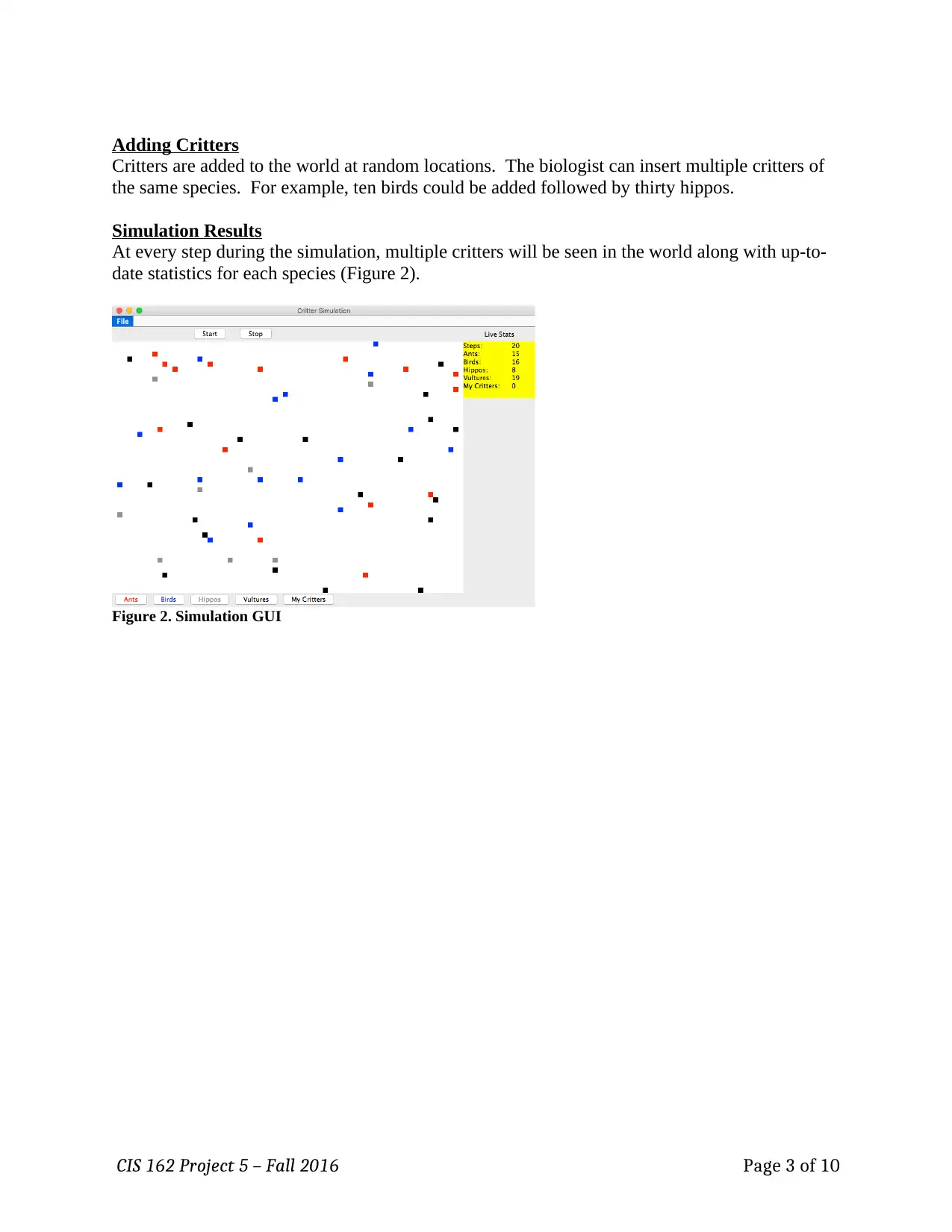
At every step during the simulation, multiple critters will be seen in the world along with up-to-
date statistics for each species (Figure 2).
Figure 2. Simulation GUI
CIS 162 Project 5 – Fall 2016 Page 3 of 10
Critters are added to the world at random locations. The biologist can insert multiple critters of
the same species. For example, ten birds could be added followed by thirty hippos.
Simulation Results
At every step during the simulation, multiple critters will be seen in the world along with up-to-
date statistics for each species (Figure 2).
Figure 2. Simulation GUI
CIS 162 Project 5 – Fall 2016 Page 3 of 10
⊘ This is a preview!⊘
Do you want full access?
Subscribe today to unlock all pages.

Trusted by 1+ million students worldwide
Step 1: Create a BlueJ project doing the following: Download the Project5.zip
file from Blackboard and extract all the files. This will create a BlueJ project with
the following classes: GVcritter.java, Ant.java,
Simulation.java and CritterGUI.java
Step 2: Create a class Location (0 pts – but required)
Implement a Location class to maintain the row/column location of a critter. Define two instance
variables for the row and column.
public Location (int r, int c) – initialize the instance variables.
public void setRow (int r) – set the row number.
public void setCol (int c) – set the column number.
public int getRow () – get the row number.
public int getCol () – get the column number.
Step 3: Use the provided class GVcritter
Rather than writing your own GVcritter class, we are providing the completed class for you.
This class should compile with no errors after writing the Location class in step #2. Do not make
any changes to this code. However, you should read the internal documentation to understand
how it will be used in this project.
GVcritter includes several enumerated types to improve readability of the code (zyBook 5.14).
Names are given for directions, species and attack strategies.
public static enum Direction {
NORTH, SOUTH, EAST, WEST
};
public static enum Attack {
ROAR, POUNCE, SCRATCH, FORFEIT
};
public static enum Species {
NONE, ANT, BIRD, HIPPO, VULTURE, LAKER
};
These names are accessed differently from within GVcritter derived classes
compared to other classes.
Within GVcritter derived classes:
Direction d = Direction.NORTH;
Within other classes:
GVcritter.Direction d = Direction.EAST;
CIS 162 Project 5 – Fall 2016 Page 4 of 10
file from Blackboard and extract all the files. This will create a BlueJ project with
the following classes: GVcritter.java, Ant.java,
Simulation.java and CritterGUI.java
Step 2: Create a class Location (0 pts – but required)
Implement a Location class to maintain the row/column location of a critter. Define two instance
variables for the row and column.
public Location (int r, int c) – initialize the instance variables.
public void setRow (int r) – set the row number.
public void setCol (int c) – set the column number.
public int getRow () – get the row number.
public int getCol () – get the column number.
Step 3: Use the provided class GVcritter
Rather than writing your own GVcritter class, we are providing the completed class for you.
This class should compile with no errors after writing the Location class in step #2. Do not make
any changes to this code. However, you should read the internal documentation to understand
how it will be used in this project.
GVcritter includes several enumerated types to improve readability of the code (zyBook 5.14).
Names are given for directions, species and attack strategies.
public static enum Direction {
NORTH, SOUTH, EAST, WEST
};
public static enum Attack {
ROAR, POUNCE, SCRATCH, FORFEIT
};
public static enum Species {
NONE, ANT, BIRD, HIPPO, VULTURE, LAKER
};
These names are accessed differently from within GVcritter derived classes
compared to other classes.
Within GVcritter derived classes:
Direction d = Direction.NORTH;
Within other classes:
GVcritter.Direction d = Direction.EAST;
CIS 162 Project 5 – Fall 2016 Page 4 of 10
Paraphrase This Document
Need a fresh take? Get an instant paraphrase of this document with our AI Paraphraser
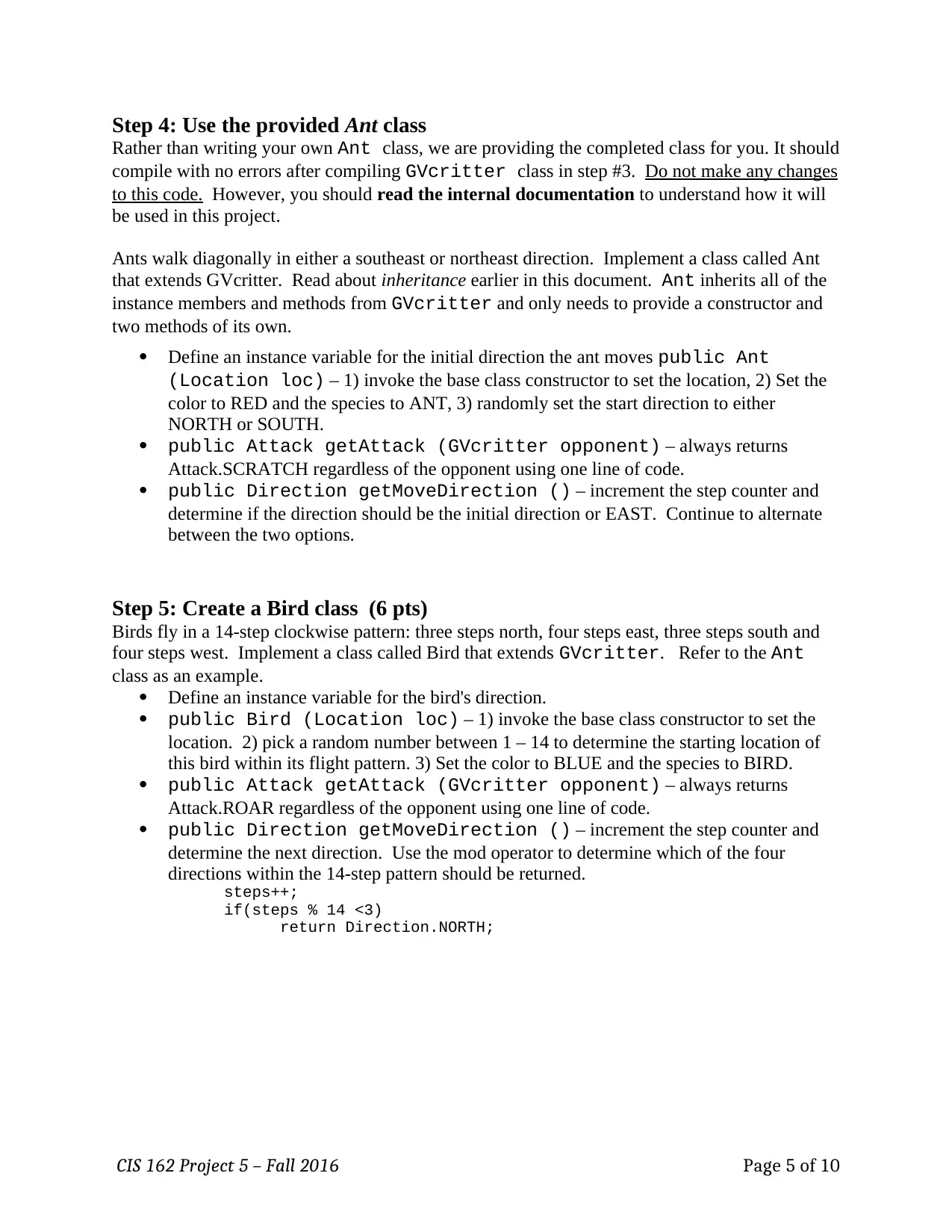
Step 4: Use the provided Ant class
Rather than writing your own Ant class, we are providing the completed class for you. It should
compile with no errors after compiling GVcritter class in step #3. Do not make any changes
to this code. However, you should read the internal documentation to understand how it will
be used in this project.
Ants walk diagonally in either a southeast or northeast direction. Implement a class called Ant
that extends GVcritter. Read about inheritance earlier in this document. Ant inherits all of the
instance members and methods from GVcritter and only needs to provide a constructor and
two methods of its own.
Define an instance variable for the initial direction the ant moves public Ant
(Location loc) – 1) invoke the base class constructor to set the location, 2) Set the
color to RED and the species to ANT, 3) randomly set the start direction to either
NORTH or SOUTH.
public Attack getAttack (GVcritter opponent) – always returns
Attack.SCRATCH regardless of the opponent using one line of code.
public Direction getMoveDirection () – increment the step counter and
determine if the direction should be the initial direction or EAST. Continue to alternate
between the two options.
Step 5: Create a Bird class (6 pts)
Birds fly in a 14-step clockwise pattern: three steps north, four steps east, three steps south and
four steps west. Implement a class called Bird that extends GVcritter. Refer to the Ant
class as an example.
Define an instance variable for the bird's direction.
public Bird (Location loc) – 1) invoke the base class constructor to set the
location. 2) pick a random number between 1 – 14 to determine the starting location of
this bird within its flight pattern. 3) Set the color to BLUE and the species to BIRD.
public Attack getAttack (GVcritter opponent) – always returns
Attack.ROAR regardless of the opponent using one line of code.
public Direction getMoveDirection () – increment the step counter and
determine the next direction. Use the mod operator to determine which of the four
directions within the 14-step pattern should be returned.
steps++;
if(steps % 14 <3)
return Direction.NORTH;
CIS 162 Project 5 – Fall 2016 Page 5 of 10
Rather than writing your own Ant class, we are providing the completed class for you. It should
compile with no errors after compiling GVcritter class in step #3. Do not make any changes
to this code. However, you should read the internal documentation to understand how it will
be used in this project.
Ants walk diagonally in either a southeast or northeast direction. Implement a class called Ant
that extends GVcritter. Read about inheritance earlier in this document. Ant inherits all of the
instance members and methods from GVcritter and only needs to provide a constructor and
two methods of its own.
Define an instance variable for the initial direction the ant moves public Ant
(Location loc) – 1) invoke the base class constructor to set the location, 2) Set the
color to RED and the species to ANT, 3) randomly set the start direction to either
NORTH or SOUTH.
public Attack getAttack (GVcritter opponent) – always returns
Attack.SCRATCH regardless of the opponent using one line of code.
public Direction getMoveDirection () – increment the step counter and
determine if the direction should be the initial direction or EAST. Continue to alternate
between the two options.
Step 5: Create a Bird class (6 pts)
Birds fly in a 14-step clockwise pattern: three steps north, four steps east, three steps south and
four steps west. Implement a class called Bird that extends GVcritter. Refer to the Ant
class as an example.
Define an instance variable for the bird's direction.
public Bird (Location loc) – 1) invoke the base class constructor to set the
location. 2) pick a random number between 1 – 14 to determine the starting location of
this bird within its flight pattern. 3) Set the color to BLUE and the species to BIRD.
public Attack getAttack (GVcritter opponent) – always returns
Attack.ROAR regardless of the opponent using one line of code.
public Direction getMoveDirection () – increment the step counter and
determine the next direction. Use the mod operator to determine which of the four
directions within the 14-step pattern should be returned.
steps++;
if(steps % 14 <3)
return Direction.NORTH;
CIS 162 Project 5 – Fall 2016 Page 5 of 10
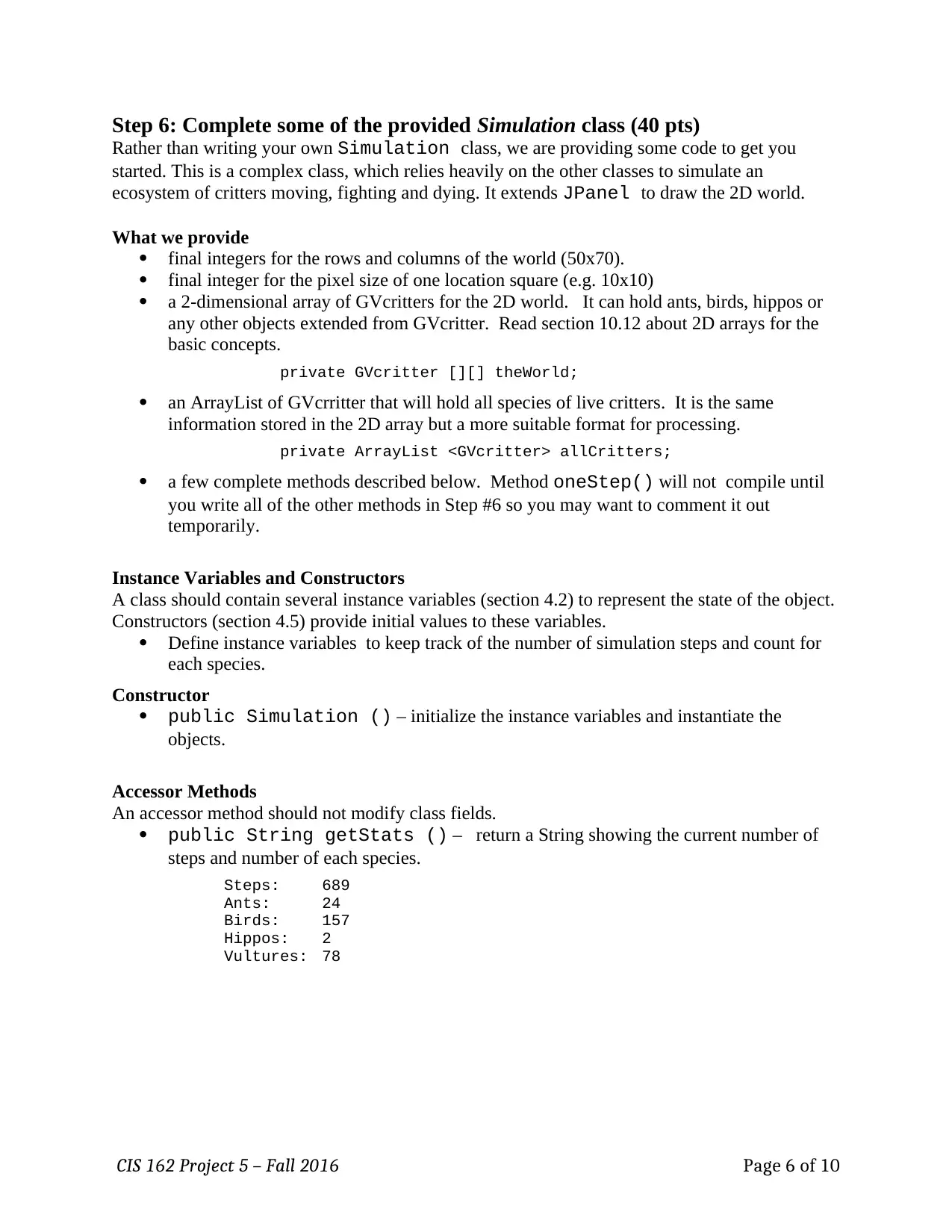
Step 6: Complete some of the provided Simulation class (40 pts)
Rather than writing your own Simulation class, we are providing some code to get you
started. This is a complex class, which relies heavily on the other classes to simulate an
ecosystem of critters moving, fighting and dying. It extends JPanel to draw the 2D world.
What we provide
final integers for the rows and columns of the world (50x70).
final integer for the pixel size of one location square (e.g. 10x10)
a 2-dimensional array of GVcritters for the 2D world. It can hold ants, birds, hippos or
any other objects extended from GVcritter. Read section 10.12 about 2D arrays for the
basic concepts.
private GVcritter [][] theWorld;
an ArrayList of GVcrritter that will hold all species of live critters. It is the same
information stored in the 2D array but a more suitable format for processing.
private ArrayList <GVcritter> allCritters;
a few complete methods described below. Method oneStep() will not compile until
you write all of the other methods in Step #6 so you may want to comment it out
temporarily.
Instance Variables and Constructors
A class should contain several instance variables (section 4.2) to represent the state of the object.
Constructors (section 4.5) provide initial values to these variables.
Define instance variables to keep track of the number of simulation steps and count for
each species.
Constructor
public Simulation () – initialize the instance variables and instantiate the
objects.
Accessor Methods
An accessor method should not modify class fields.
public String getStats () – return a String showing the current number of
steps and number of each species.
Steps: 689
Ants: 24
Birds: 157
Hippos: 2
Vultures: 78
CIS 162 Project 5 – Fall 2016 Page 6 of 10
Rather than writing your own Simulation class, we are providing some code to get you
started. This is a complex class, which relies heavily on the other classes to simulate an
ecosystem of critters moving, fighting and dying. It extends JPanel to draw the 2D world.
What we provide
final integers for the rows and columns of the world (50x70).
final integer for the pixel size of one location square (e.g. 10x10)
a 2-dimensional array of GVcritters for the 2D world. It can hold ants, birds, hippos or
any other objects extended from GVcritter. Read section 10.12 about 2D arrays for the
basic concepts.
private GVcritter [][] theWorld;
an ArrayList of GVcrritter that will hold all species of live critters. It is the same
information stored in the 2D array but a more suitable format for processing.
private ArrayList <GVcritter> allCritters;
a few complete methods described below. Method oneStep() will not compile until
you write all of the other methods in Step #6 so you may want to comment it out
temporarily.
Instance Variables and Constructors
A class should contain several instance variables (section 4.2) to represent the state of the object.
Constructors (section 4.5) provide initial values to these variables.
Define instance variables to keep track of the number of simulation steps and count for
each species.
Constructor
public Simulation () – initialize the instance variables and instantiate the
objects.
Accessor Methods
An accessor method should not modify class fields.
public String getStats () – return a String showing the current number of
steps and number of each species.
Steps: 689
Ants: 24
Birds: 157
Hippos: 2
Vultures: 78
CIS 162 Project 5 – Fall 2016 Page 6 of 10
⊘ This is a preview!⊘
Do you want full access?
Subscribe today to unlock all pages.
Trusted by 1+ million students worldwide
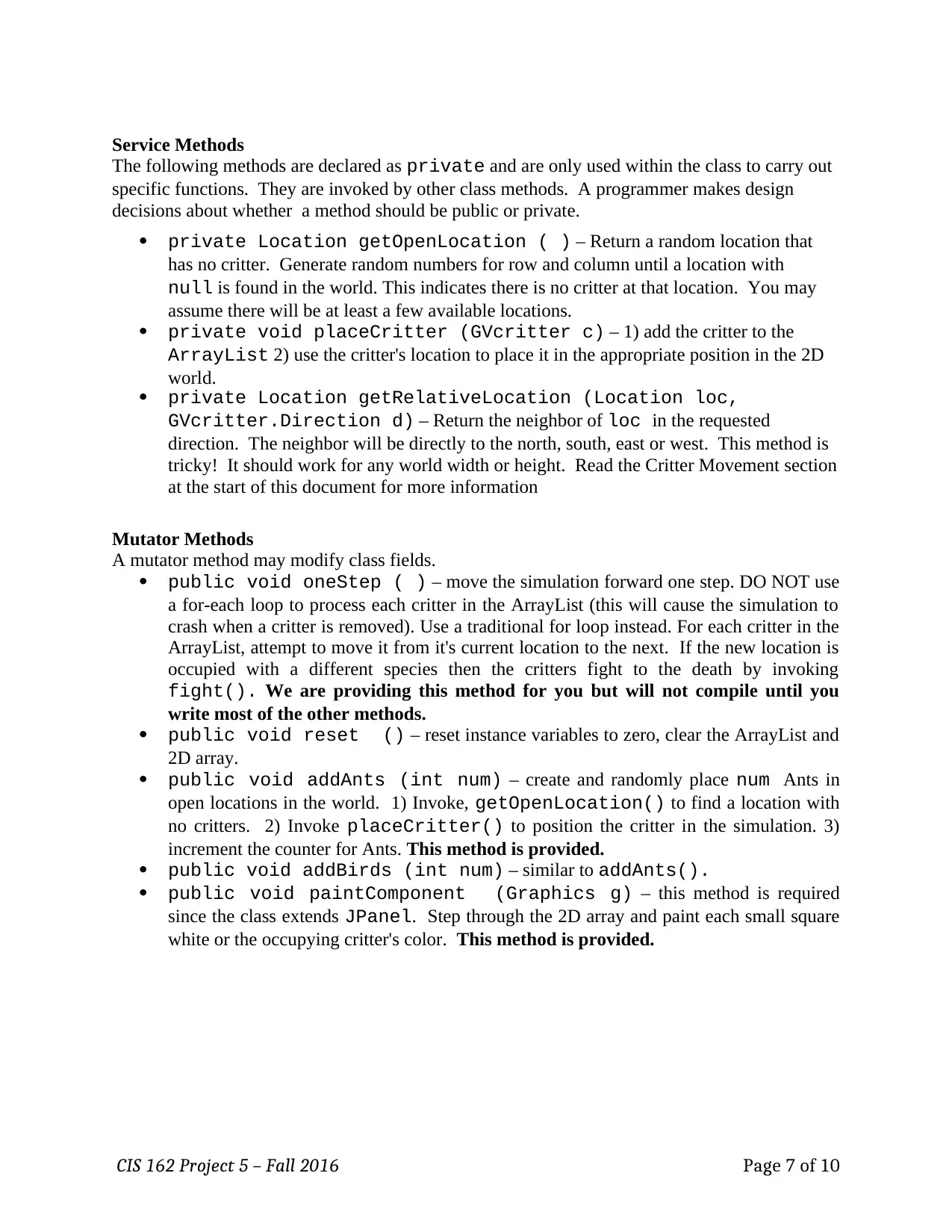
Service Methods
The following methods are declared as private and are only used within the class to carry out
specific functions. They are invoked by other class methods. A programmer makes design
decisions about whether a method should be public or private.
private Location getOpenLocation ( ) – Return a random location that
has no critter. Generate random numbers for row and column until a location with
null is found in the world. This indicates there is no critter at that location. You may
assume there will be at least a few available locations.
private void placeCritter (GVcritter c) – 1) add the critter to the
ArrayList 2) use the critter's location to place it in the appropriate position in the 2D
world.
private Location getRelativeLocation (Location loc,
GVcritter.Direction d) – Return the neighbor of loc in the requested
direction. The neighbor will be directly to the north, south, east or west. This method is
tricky! It should work for any world width or height. Read the Critter Movement section
at the start of this document for more information
Mutator Methods
A mutator method may modify class fields.
public void oneStep ( ) – move the simulation forward one step. DO NOT use
a for-each loop to process each critter in the ArrayList (this will cause the simulation to
crash when a critter is removed). Use a traditional for loop instead. For each critter in the
ArrayList, attempt to move it from it's current location to the next. If the new location is
occupied with a different species then the critters fight to the death by invoking
fight(). We are providing this method for you but will not compile until you
write most of the other methods.
public void reset () – reset instance variables to zero, clear the ArrayList and
2D array.
public void addAnts (int num) – create and randomly place num Ants in
open locations in the world. 1) Invoke, getOpenLocation() to find a location with
no critters. 2) Invoke placeCritter() to position the critter in the simulation. 3)
increment the counter for Ants. This method is provided.
public void addBirds (int num) – similar to addAnts().
public void paintComponent (Graphics g) – this method is required
since the class extends JPanel. Step through the 2D array and paint each small square
white or the occupying critter's color. This method is provided.
CIS 162 Project 5 – Fall 2016 Page 7 of 10
The following methods are declared as private and are only used within the class to carry out
specific functions. They are invoked by other class methods. A programmer makes design
decisions about whether a method should be public or private.
private Location getOpenLocation ( ) – Return a random location that
has no critter. Generate random numbers for row and column until a location with
null is found in the world. This indicates there is no critter at that location. You may
assume there will be at least a few available locations.
private void placeCritter (GVcritter c) – 1) add the critter to the
ArrayList 2) use the critter's location to place it in the appropriate position in the 2D
world.
private Location getRelativeLocation (Location loc,
GVcritter.Direction d) – Return the neighbor of loc in the requested
direction. The neighbor will be directly to the north, south, east or west. This method is
tricky! It should work for any world width or height. Read the Critter Movement section
at the start of this document for more information
Mutator Methods
A mutator method may modify class fields.
public void oneStep ( ) – move the simulation forward one step. DO NOT use
a for-each loop to process each critter in the ArrayList (this will cause the simulation to
crash when a critter is removed). Use a traditional for loop instead. For each critter in the
ArrayList, attempt to move it from it's current location to the next. If the new location is
occupied with a different species then the critters fight to the death by invoking
fight(). We are providing this method for you but will not compile until you
write most of the other methods.
public void reset () – reset instance variables to zero, clear the ArrayList and
2D array.
public void addAnts (int num) – create and randomly place num Ants in
open locations in the world. 1) Invoke, getOpenLocation() to find a location with
no critters. 2) Invoke placeCritter() to position the critter in the simulation. 3)
increment the counter for Ants. This method is provided.
public void addBirds (int num) – similar to addAnts().
public void paintComponent (Graphics g) – this method is required
since the class extends JPanel. Step through the 2D array and paint each small square
white or the occupying critter's color. This method is provided.
CIS 162 Project 5 – Fall 2016 Page 7 of 10
Paraphrase This Document
Need a fresh take? Get an instant paraphrase of this document with our AI Paraphraser
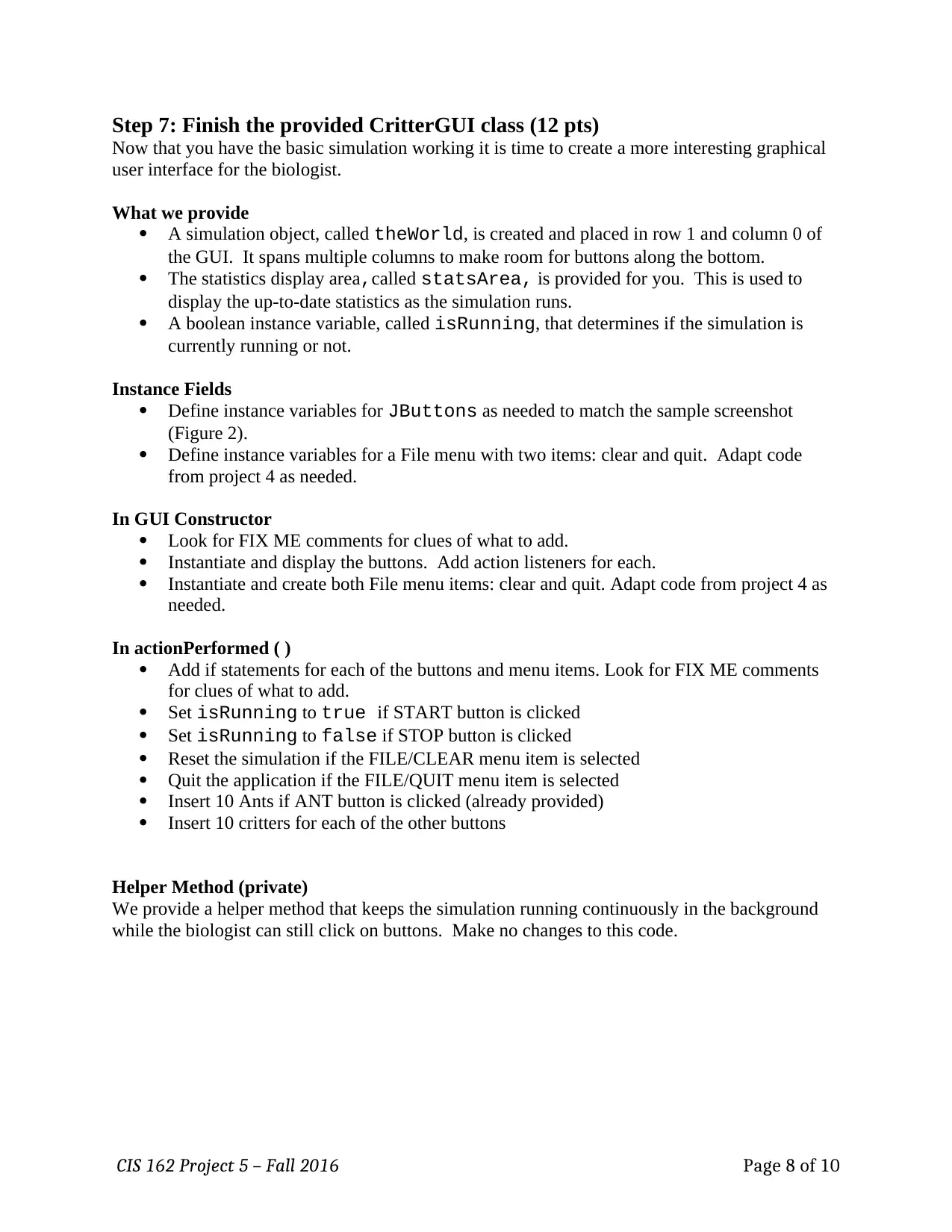
Step 7: Finish the provided CritterGUI class (12 pts)
Now that you have the basic simulation working it is time to create a more interesting graphical
user interface for the biologist.
What we provide
A simulation object, called theWorld, is created and placed in row 1 and column 0 of
the GUI. It spans multiple columns to make room for buttons along the bottom.
The statistics display area,called statsArea, is provided for you. This is used to
display the up-to-date statistics as the simulation runs.
A boolean instance variable, called isRunning, that determines if the simulation is
currently running or not.
Instance Fields
Define instance variables for JButtons as needed to match the sample screenshot
(Figure 2).
Define instance variables for a File menu with two items: clear and quit. Adapt code
from project 4 as needed.
In GUI Constructor
Look for FIX ME comments for clues of what to add.
Instantiate and display the buttons. Add action listeners for each.
Instantiate and create both File menu items: clear and quit. Adapt code from project 4 as
needed.
In actionPerformed ( )
Add if statements for each of the buttons and menu items. Look for FIX ME comments
for clues of what to add.
Set isRunning to true if START button is clicked
Set isRunning to false if STOP button is clicked
Reset the simulation if the FILE/CLEAR menu item is selected
Quit the application if the FILE/QUIT menu item is selected
Insert 10 Ants if ANT button is clicked (already provided)
Insert 10 critters for each of the other buttons
Helper Method (private)
We provide a helper method that keeps the simulation running continuously in the background
while the biologist can still click on buttons. Make no changes to this code.
CIS 162 Project 5 – Fall 2016 Page 8 of 10
Now that you have the basic simulation working it is time to create a more interesting graphical
user interface for the biologist.
What we provide
A simulation object, called theWorld, is created and placed in row 1 and column 0 of
the GUI. It spans multiple columns to make room for buttons along the bottom.
The statistics display area,called statsArea, is provided for you. This is used to
display the up-to-date statistics as the simulation runs.
A boolean instance variable, called isRunning, that determines if the simulation is
currently running or not.
Instance Fields
Define instance variables for JButtons as needed to match the sample screenshot
(Figure 2).
Define instance variables for a File menu with two items: clear and quit. Adapt code
from project 4 as needed.
In GUI Constructor
Look for FIX ME comments for clues of what to add.
Instantiate and display the buttons. Add action listeners for each.
Instantiate and create both File menu items: clear and quit. Adapt code from project 4 as
needed.
In actionPerformed ( )
Add if statements for each of the buttons and menu items. Look for FIX ME comments
for clues of what to add.
Set isRunning to true if START button is clicked
Set isRunning to false if STOP button is clicked
Reset the simulation if the FILE/CLEAR menu item is selected
Quit the application if the FILE/QUIT menu item is selected
Insert 10 Ants if ANT button is clicked (already provided)
Insert 10 critters for each of the other buttons
Helper Method (private)
We provide a helper method that keeps the simulation running continuously in the background
while the biologist can still click on buttons. Make no changes to this code.
CIS 162 Project 5 – Fall 2016 Page 8 of 10
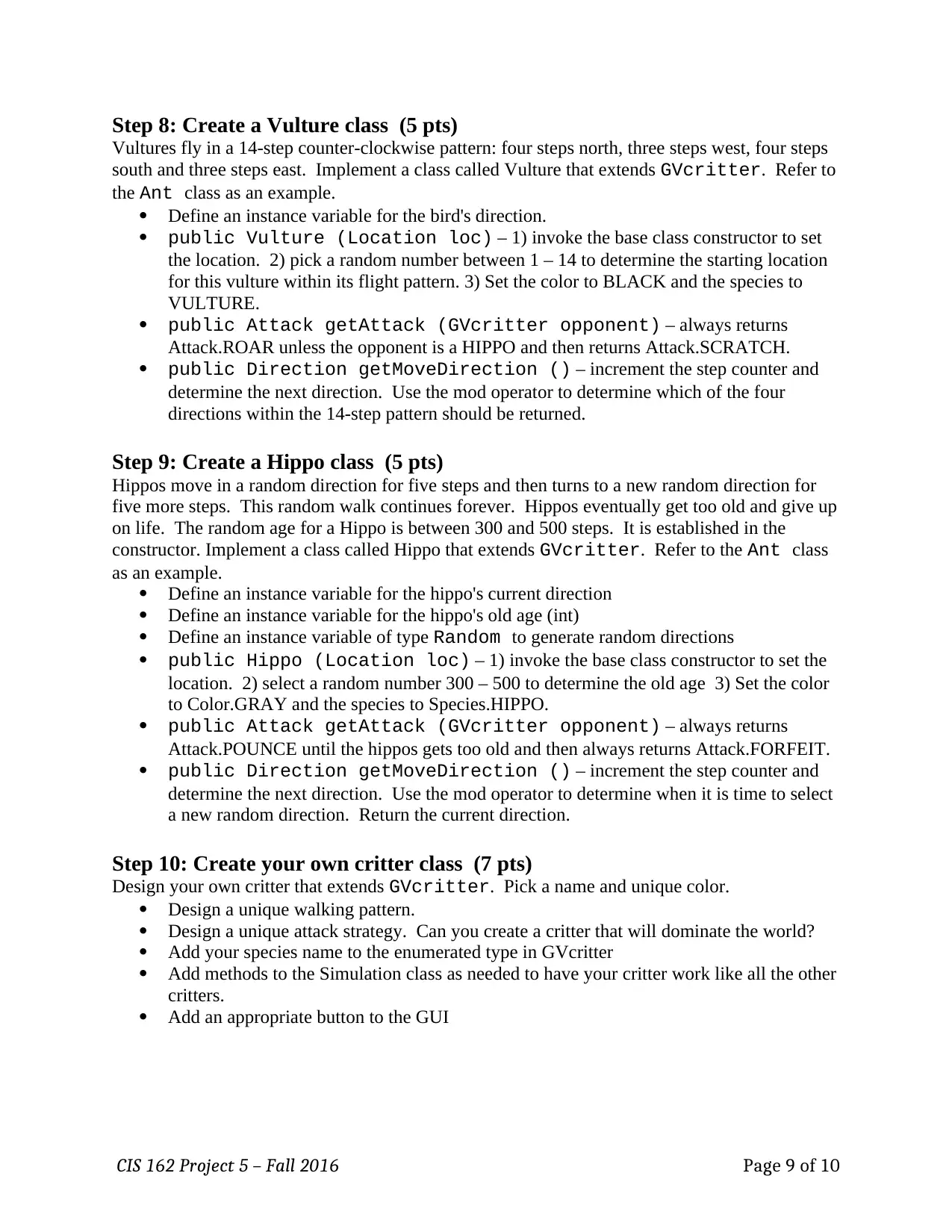
Step 8: Create a Vulture class (5 pts)
Vultures fly in a 14-step counter-clockwise pattern: four steps north, three steps west, four steps
south and three steps east. Implement a class called Vulture that extends GVcritter. Refer to
the Ant class as an example.
Define an instance variable for the bird's direction.
public Vulture (Location loc) – 1) invoke the base class constructor to set
the location. 2) pick a random number between 1 – 14 to determine the starting location
for this vulture within its flight pattern. 3) Set the color to BLACK and the species to
VULTURE.
public Attack getAttack (GVcritter opponent) – always returns
Attack.ROAR unless the opponent is a HIPPO and then returns Attack.SCRATCH.
public Direction getMoveDirection () – increment the step counter and
determine the next direction. Use the mod operator to determine which of the four
directions within the 14-step pattern should be returned.
Step 9: Create a Hippo class (5 pts)
Hippos move in a random direction for five steps and then turns to a new random direction for
five more steps. This random walk continues forever. Hippos eventually get too old and give up
on life. The random age for a Hippo is between 300 and 500 steps. It is established in the
constructor. Implement a class called Hippo that extends GVcritter. Refer to the Ant class
as an example.
Define an instance variable for the hippo's current direction
Define an instance variable for the hippo's old age (int)
Define an instance variable of type Random to generate random directions
public Hippo (Location loc) – 1) invoke the base class constructor to set the
location. 2) select a random number 300 – 500 to determine the old age 3) Set the color
to Color.GRAY and the species to Species.HIPPO.
public Attack getAttack (GVcritter opponent) – always returns
Attack.POUNCE until the hippos gets too old and then always returns Attack.FORFEIT.
public Direction getMoveDirection () – increment the step counter and
determine the next direction. Use the mod operator to determine when it is time to select
a new random direction. Return the current direction.
Step 10: Create your own critter class (7 pts)
Design your own critter that extends GVcritter. Pick a name and unique color.
Design a unique walking pattern.
Design a unique attack strategy. Can you create a critter that will dominate the world?
Add your species name to the enumerated type in GVcritter
Add methods to the Simulation class as needed to have your critter work like all the other
critters.
Add an appropriate button to the GUI
CIS 162 Project 5 – Fall 2016 Page 9 of 10
Vultures fly in a 14-step counter-clockwise pattern: four steps north, three steps west, four steps
south and three steps east. Implement a class called Vulture that extends GVcritter. Refer to
the Ant class as an example.
Define an instance variable for the bird's direction.
public Vulture (Location loc) – 1) invoke the base class constructor to set
the location. 2) pick a random number between 1 – 14 to determine the starting location
for this vulture within its flight pattern. 3) Set the color to BLACK and the species to
VULTURE.
public Attack getAttack (GVcritter opponent) – always returns
Attack.ROAR unless the opponent is a HIPPO and then returns Attack.SCRATCH.
public Direction getMoveDirection () – increment the step counter and
determine the next direction. Use the mod operator to determine which of the four
directions within the 14-step pattern should be returned.
Step 9: Create a Hippo class (5 pts)
Hippos move in a random direction for five steps and then turns to a new random direction for
five more steps. This random walk continues forever. Hippos eventually get too old and give up
on life. The random age for a Hippo is between 300 and 500 steps. It is established in the
constructor. Implement a class called Hippo that extends GVcritter. Refer to the Ant class
as an example.
Define an instance variable for the hippo's current direction
Define an instance variable for the hippo's old age (int)
Define an instance variable of type Random to generate random directions
public Hippo (Location loc) – 1) invoke the base class constructor to set the
location. 2) select a random number 300 – 500 to determine the old age 3) Set the color
to Color.GRAY and the species to Species.HIPPO.
public Attack getAttack (GVcritter opponent) – always returns
Attack.POUNCE until the hippos gets too old and then always returns Attack.FORFEIT.
public Direction getMoveDirection () – increment the step counter and
determine the next direction. Use the mod operator to determine when it is time to select
a new random direction. Return the current direction.
Step 10: Create your own critter class (7 pts)
Design your own critter that extends GVcritter. Pick a name and unique color.
Design a unique walking pattern.
Design a unique attack strategy. Can you create a critter that will dominate the world?
Add your species name to the enumerated type in GVcritter
Add methods to the Simulation class as needed to have your critter work like all the other
critters.
Add an appropriate button to the GUI
CIS 162 Project 5 – Fall 2016 Page 9 of 10
⊘ This is a preview!⊘
Do you want full access?
Subscribe today to unlock all pages.
Trusted by 1+ million students worldwide
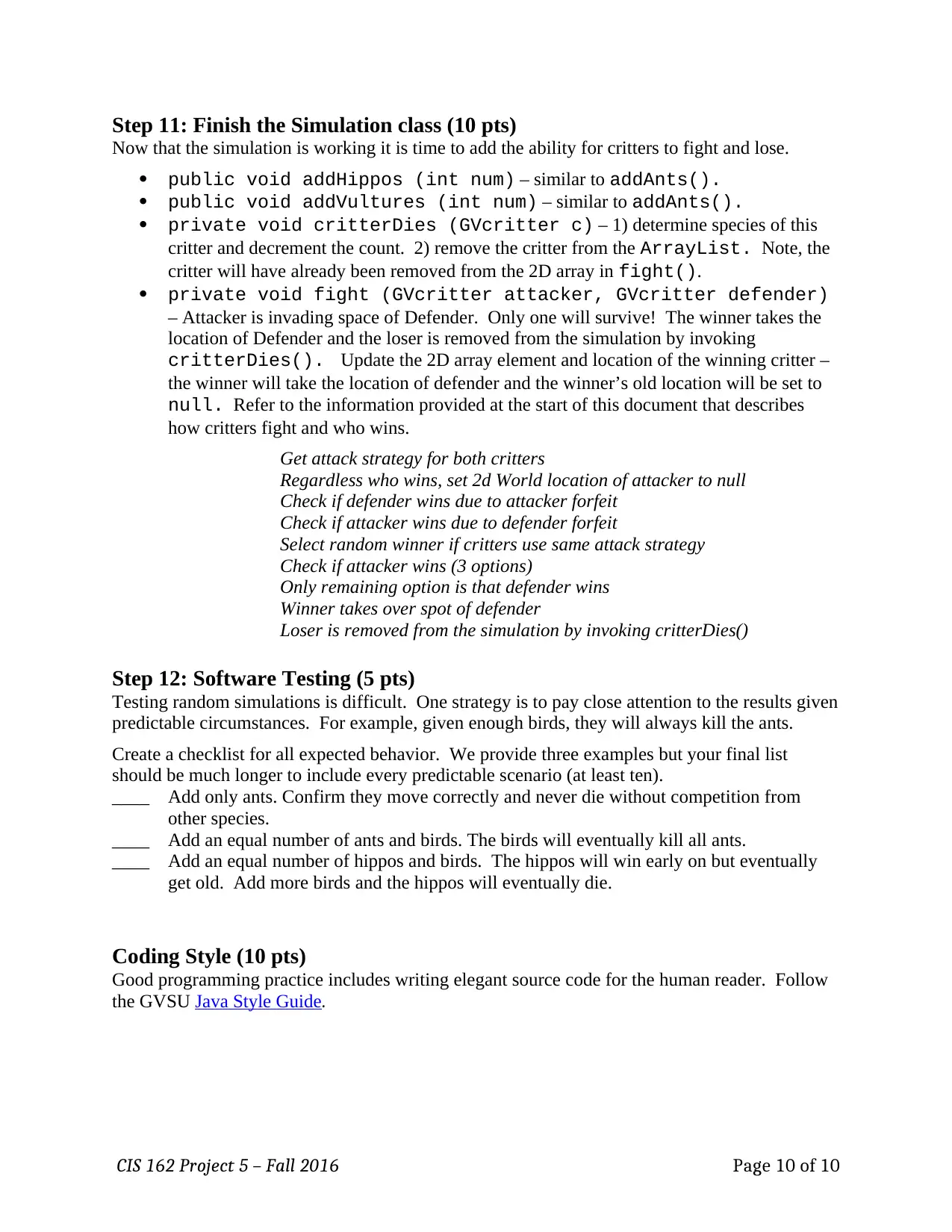
Step 11: Finish the Simulation class (10 pts)
Now that the simulation is working it is time to add the ability for critters to fight and lose.
public void addHippos (int num) – similar to addAnts().
public void addVultures (int num) – similar to addAnts().
private void critterDies (GVcritter c) – 1) determine species of this
critter and decrement the count. 2) remove the critter from the ArrayList. Note, the
critter will have already been removed from the 2D array in fight().
private void fight (GVcritter attacker, GVcritter defender)
– Attacker is invading space of Defender. Only one will survive! The winner takes the
location of Defender and the loser is removed from the simulation by invoking
critterDies(). Update the 2D array element and location of the winning critter –
the winner will take the location of defender and the winner’s old location will be set to
null. Refer to the information provided at the start of this document that describes
how critters fight and who wins.
Get attack strategy for both critters
Regardless who wins, set 2d World location of attacker to null
Check if defender wins due to attacker forfeit
Check if attacker wins due to defender forfeit
Select random winner if critters use same attack strategy
Check if attacker wins (3 options)
Only remaining option is that defender wins
Winner takes over spot of defender
Loser is removed from the simulation by invoking critterDies()
Step 12: Software Testing (5 pts)
Testing random simulations is difficult. One strategy is to pay close attention to the results given
predictable circumstances. For example, given enough birds, they will always kill the ants.
Create a checklist for all expected behavior. We provide three examples but your final list
should be much longer to include every predictable scenario (at least ten).
____ Add only ants. Confirm they move correctly and never die without competition from
other species.
____ Add an equal number of ants and birds. The birds will eventually kill all ants.
____ Add an equal number of hippos and birds. The hippos will win early on but eventually
get old. Add more birds and the hippos will eventually die.
Coding Style (10 pts)
Good programming practice includes writing elegant source code for the human reader. Follow
the GVSU Java Style Guide.
CIS 162 Project 5 – Fall 2016 Page 10 of 10
Now that the simulation is working it is time to add the ability for critters to fight and lose.
public void addHippos (int num) – similar to addAnts().
public void addVultures (int num) – similar to addAnts().
private void critterDies (GVcritter c) – 1) determine species of this
critter and decrement the count. 2) remove the critter from the ArrayList. Note, the
critter will have already been removed from the 2D array in fight().
private void fight (GVcritter attacker, GVcritter defender)
– Attacker is invading space of Defender. Only one will survive! The winner takes the
location of Defender and the loser is removed from the simulation by invoking
critterDies(). Update the 2D array element and location of the winning critter –
the winner will take the location of defender and the winner’s old location will be set to
null. Refer to the information provided at the start of this document that describes
how critters fight and who wins.
Get attack strategy for both critters
Regardless who wins, set 2d World location of attacker to null
Check if defender wins due to attacker forfeit
Check if attacker wins due to defender forfeit
Select random winner if critters use same attack strategy
Check if attacker wins (3 options)
Only remaining option is that defender wins
Winner takes over spot of defender
Loser is removed from the simulation by invoking critterDies()
Step 12: Software Testing (5 pts)
Testing random simulations is difficult. One strategy is to pay close attention to the results given
predictable circumstances. For example, given enough birds, they will always kill the ants.
Create a checklist for all expected behavior. We provide three examples but your final list
should be much longer to include every predictable scenario (at least ten).
____ Add only ants. Confirm they move correctly and never die without competition from
other species.
____ Add an equal number of ants and birds. The birds will eventually kill all ants.
____ Add an equal number of hippos and birds. The hippos will win early on but eventually
get old. Add more birds and the hippos will eventually die.
Coding Style (10 pts)
Good programming practice includes writing elegant source code for the human reader. Follow
the GVSU Java Style Guide.
CIS 162 Project 5 – Fall 2016 Page 10 of 10

1 out of 10


Your All-in-One AI-Powered Toolkit for Academic Success.
+13062052269
info@desklib.com
Available 24*7 on WhatsApp / Email
![[object Object]](/_next/static/media/star-bottom.7253800d.svg)
Unlock your academic potential
Copyright © 2020–2026 A2Z Services. All Rights Reserved. Developed and managed by ZUCOL.