HS2021 Database Design and Use: Implementing Melbourne Public Library
VerifiedAdded on 2023/04/26
|13
|2808
|79
Report
AI Summary
This report details the database design and implementation for the Melbourne Public Library, addressing the project requirements, ER diagrams, business rules, and normalization processes. It covers the creation of tables, insertion of data, and SQL commands necessary for managing the library's database. The design emphasizes efficiency and data integrity, ensuring that library operations such as member management, book rentals, and fine tracking are accurately represented and easily accessible. The report includes functional dependencies and normalization to the third normal form, which prevents data anomalies. The document, contributed by a student and available on Desklib, serves as a comprehensive guide for implementing a relational database system for library management.
Running head: DATABASE DESIGN AND IMPLEMENTATION
Database Design and Implementation
Name of the Student
Name of the University
Author’s note:
Database Design and Implementation
Name of the Student
Name of the University
Author’s note:

Paraphrase This Document
Need a fresh take? Get an instant paraphrase of this document with our AI Paraphraser
1DATABASE DESIGN AND IMPLEMENTATION
Table of Contents
Project Description:.....................................................................................................................................2
Library Database Design Requirements:.................................................................................................2
Entity Relationship Diagram:...................................................................................................................4
Business Rules:........................................................................................................................................4
Normalization Process:............................................................................................................................5
Functional Dependencies:.......................................................................................................................5
Query, Report and Forms:.......................................................................................................................5
Implementing Library Database Design:......................................................................................................6
Create Tables:.........................................................................................................................................6
Insert Data:..............................................................................................................................................8
SQL Commands:........................................................................................................................................10
Bibliography:.............................................................................................................................................12
Table of Contents
Project Description:.....................................................................................................................................2
Library Database Design Requirements:.................................................................................................2
Entity Relationship Diagram:...................................................................................................................4
Business Rules:........................................................................................................................................4
Normalization Process:............................................................................................................................5
Functional Dependencies:.......................................................................................................................5
Query, Report and Forms:.......................................................................................................................5
Implementing Library Database Design:......................................................................................................6
Create Tables:.........................................................................................................................................6
Insert Data:..............................................................................................................................................8
SQL Commands:........................................................................................................................................10
Bibliography:.............................................................................................................................................12
2DATABASE DESIGN AND IMPLEMENTATION
Project Description:
Library Database Design Requirements:
The database can be considered as the set of data associated to a specific purpose or subject. The
database is either installed in a computer or in a cloud. The relational database system is the most popular
database type. The relational database is based on implementing relation among the entities stored in the
database. Prior to design the database, the designer must design the whole database. Without a good design it
is not possible to implement a fully functioning and scalable database. The database design include the entity
relationship diagram, relationships, attributes, constraints and many other things.
The fundamental steps for designing a complete database are as following.
i. Determining the database implementation purpose
ii. Identifying the entities required to support the purpose
iii. To recognize the attributes that can be the basic structure of the entities
iv. To understand the constraints that will be applied to the attributes
v. Recognizing the relationships among the tables
vi. Making the database entities in 3rd Normal form
vii. Adding data to the entities so that it can be meaningful
Determining the Database Purpose: The database is prepared for storing the data and activities done
in the library. The database will be storing the details of the members, books and rents mainly. However, the
other process associated with the library will need to be recorded. Taken as an example, a member can search
books of a specific writer. Therefore, storing the information of each author and which books they have
written is important. The library also impose fines when the books are not returned on time. Therefore the
database will also store the fine related information. It is essential to complete the planning part before start
implementing the database in Oracle. It is because, planning can seem to be time consuming but if not planned
properly a complex database can take ten times more time to be completed without planning.
Determining the Tables: This is considered to be one of the trickiest parts in the whole database
design process. This part is extremely tricky as the outcome of the database does not provide any assumptions
regarding the structure of it. The structure has to be done from scratch without having no idea of what can be
the outcome, up to a certain point. This process needs to be done by an extremely skilled and experienced
person. It is essential that database structure can prevent storing same data twice. However, for meeting the
purpose few data will be used various time but this repetitive data must be restricted only one in the whole
table. All the columns of the table must be related to the purpose of the database. Taken as an example, if the
Project Description:
Library Database Design Requirements:
The database can be considered as the set of data associated to a specific purpose or subject. The
database is either installed in a computer or in a cloud. The relational database system is the most popular
database type. The relational database is based on implementing relation among the entities stored in the
database. Prior to design the database, the designer must design the whole database. Without a good design it
is not possible to implement a fully functioning and scalable database. The database design include the entity
relationship diagram, relationships, attributes, constraints and many other things.
The fundamental steps for designing a complete database are as following.
i. Determining the database implementation purpose
ii. Identifying the entities required to support the purpose
iii. To recognize the attributes that can be the basic structure of the entities
iv. To understand the constraints that will be applied to the attributes
v. Recognizing the relationships among the tables
vi. Making the database entities in 3rd Normal form
vii. Adding data to the entities so that it can be meaningful
Determining the Database Purpose: The database is prepared for storing the data and activities done
in the library. The database will be storing the details of the members, books and rents mainly. However, the
other process associated with the library will need to be recorded. Taken as an example, a member can search
books of a specific writer. Therefore, storing the information of each author and which books they have
written is important. The library also impose fines when the books are not returned on time. Therefore the
database will also store the fine related information. It is essential to complete the planning part before start
implementing the database in Oracle. It is because, planning can seem to be time consuming but if not planned
properly a complex database can take ten times more time to be completed without planning.
Determining the Tables: This is considered to be one of the trickiest parts in the whole database
design process. This part is extremely tricky as the outcome of the database does not provide any assumptions
regarding the structure of it. The structure has to be done from scratch without having no idea of what can be
the outcome, up to a certain point. This process needs to be done by an extremely skilled and experienced
person. It is essential that database structure can prevent storing same data twice. However, for meeting the
purpose few data will be used various time but this repetitive data must be restricted only one in the whole
table. All the columns of the table must be related to the purpose of the database. Taken as an example, if the
⊘ This is a preview!⊘
Do you want full access?
Subscribe today to unlock all pages.

Trusted by 1+ million students worldwide
3DATABASE DESIGN AND IMPLEMENTATION
database just wants to store member data then it is not required to store parent data. However, in case of
hospital system it is essential to have a relative data so that in case emergency he/she can be contacted. Each
data in the table must in proper data type. Just because Varchar2 can store almost all kind of data, a designer
can use only Varchar2. Taken as an example, in case of money decimal or similar data type must be used.
The indexing has been introduced into the database for optimizing the performance of the database.
This achieved through reducing the number of disks required to access for executing a query. The index can be
considered as a type of data structure which can be used for locating and accessing the data within a database
very efficiently. The indexing methods are four types such as ordered indices, primary indices, clustering
indices and secondary indices. The primary indices can be further be categorized into dense and sparse indices.
If the name column of the member is indexed, then the database can easily search the name as the table will
reduced to the name column only. This way the efficient identification of data is achieved through the indexing
method.
Determining the Fields: The attributes serves as the basic static structure of the entities. The attributes
represent different characteristics of real world representation of attributes. The attributes should have single
value. The reason will be demonstrated in the normalization step.
Constraints: Constraints can be of many types like unique, primary, referential, check, not null and
many more. The declaration of constraints are extremely important for defining the dynamic nature of the
database entities. Each of the mentioned constraints define a specific characteristic of the attribute. It is not
necessary that every attribute must have a constraint but to make an entity fully operational and correct it is
essential to add constraints at required attributes.
Relationships: The relationships determines how the database would respond to user request. The
relationships can be divided into two parts, such as cardinality and optionality. The cardinality means one or
many row of an entity can be related to one or many rows in another table. Taken as an example, one member
can rent many books. The optionality means a row may be related to row to another table. Zero means can or
cannot be related and One means that row have to be associated to at least one row of another table. Taken
as an example, a book may not borrowed by any member. In this case, the book will have zero optionality with
the rent entity. However, a rented book has to be from the book entity in this case rent will have One
optionality with book.
Normalization: Normalization is the process of preventing any data anomalies from the database. The
normalization has up to 5 normal form. However, for most of the databases, 3rd normal form is taken into
consideration. The firs normal form states that the tables must have atomic values (no multivalued attributes
database just wants to store member data then it is not required to store parent data. However, in case of
hospital system it is essential to have a relative data so that in case emergency he/she can be contacted. Each
data in the table must in proper data type. Just because Varchar2 can store almost all kind of data, a designer
can use only Varchar2. Taken as an example, in case of money decimal or similar data type must be used.
The indexing has been introduced into the database for optimizing the performance of the database.
This achieved through reducing the number of disks required to access for executing a query. The index can be
considered as a type of data structure which can be used for locating and accessing the data within a database
very efficiently. The indexing methods are four types such as ordered indices, primary indices, clustering
indices and secondary indices. The primary indices can be further be categorized into dense and sparse indices.
If the name column of the member is indexed, then the database can easily search the name as the table will
reduced to the name column only. This way the efficient identification of data is achieved through the indexing
method.
Determining the Fields: The attributes serves as the basic static structure of the entities. The attributes
represent different characteristics of real world representation of attributes. The attributes should have single
value. The reason will be demonstrated in the normalization step.
Constraints: Constraints can be of many types like unique, primary, referential, check, not null and
many more. The declaration of constraints are extremely important for defining the dynamic nature of the
database entities. Each of the mentioned constraints define a specific characteristic of the attribute. It is not
necessary that every attribute must have a constraint but to make an entity fully operational and correct it is
essential to add constraints at required attributes.
Relationships: The relationships determines how the database would respond to user request. The
relationships can be divided into two parts, such as cardinality and optionality. The cardinality means one or
many row of an entity can be related to one or many rows in another table. Taken as an example, one member
can rent many books. The optionality means a row may be related to row to another table. Zero means can or
cannot be related and One means that row have to be associated to at least one row of another table. Taken
as an example, a book may not borrowed by any member. In this case, the book will have zero optionality with
the rent entity. However, a rented book has to be from the book entity in this case rent will have One
optionality with book.
Normalization: Normalization is the process of preventing any data anomalies from the database. The
normalization has up to 5 normal form. However, for most of the databases, 3rd normal form is taken into
consideration. The firs normal form states that the tables must have atomic values (no multivalued attributes
Paraphrase This Document
Need a fresh take? Get an instant paraphrase of this document with our AI Paraphraser
4DATABASE DESIGN AND IMPLEMENTATION
are accepted) and each entity must have a primary key. The second normal form describes how the entity
prevents partial dependency among its attributes. The partial dependency occurs when non-key attributes are
dependent on another non-key attributes. The final stage is third normal form. In this normalization stage,
transitive dependency is eliminated. The normalization process divides the set of raw data into various tables.
The relationship among the tables define the purpose of the raw data and if properly traced then every raw
data can be accessed from the tables.
Adding Data: Data are real meaningful element of the database. The data are entered through GUI or
command lines. Most of the RDBMSs use similar kind of insert queries to fill the tables with data. Based on the
constraints, data types and other few predefined elements, the database management system validates the
entered data.
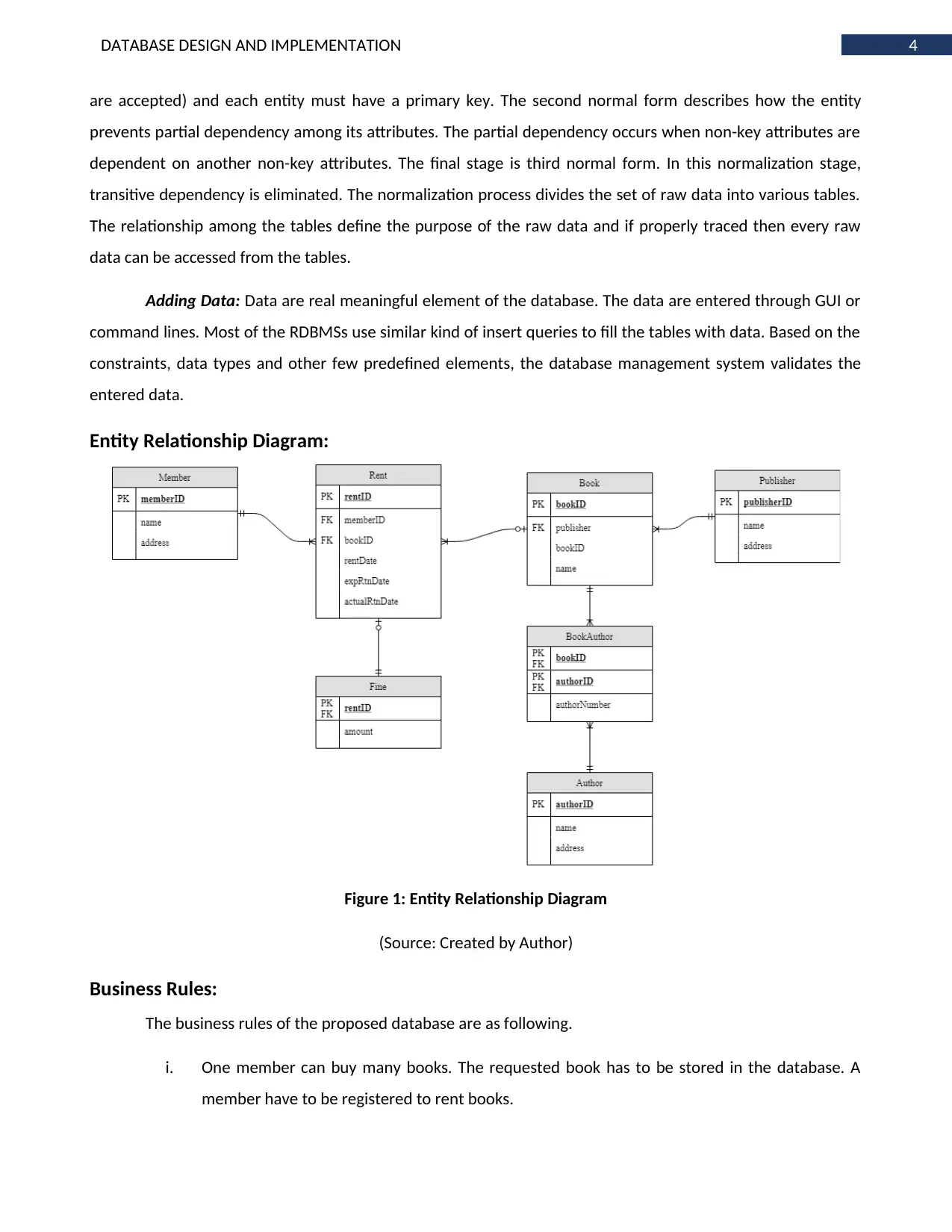
Entity Relationship Diagram:
Figure 1: Entity Relationship Diagram
(Source: Created by Author)
Business Rules:
The business rules of the proposed database are as following.
i. One member can buy many books. The requested book has to be stored in the database. A
member have to be registered to rent books.
are accepted) and each entity must have a primary key. The second normal form describes how the entity
prevents partial dependency among its attributes. The partial dependency occurs when non-key attributes are
dependent on another non-key attributes. The final stage is third normal form. In this normalization stage,
transitive dependency is eliminated. The normalization process divides the set of raw data into various tables.
The relationship among the tables define the purpose of the raw data and if properly traced then every raw
data can be accessed from the tables.
Adding Data: Data are real meaningful element of the database. The data are entered through GUI or
command lines. Most of the RDBMSs use similar kind of insert queries to fill the tables with data. Based on the
constraints, data types and other few predefined elements, the database management system validates the
entered data.
Entity Relationship Diagram:
Figure 1: Entity Relationship Diagram
(Source: Created by Author)
Business Rules:
The business rules of the proposed database are as following.
i. One member can buy many books. The requested book has to be stored in the database. A
member have to be registered to rent books.
5DATABASE DESIGN AND IMPLEMENTATION
ii. One book can be rented many times. It is not mandatory that every available book has to be
rented at least once.
iii. Each book will have only one publisher
iv. One book can have many authors and one author can write many books
v. One rent may have a fine if the expected return date is overdue
Normalization Process:
First Normal Form: According to first normal form, every column that has multivalued attribute has to
be made atomic valued attribute. The main primary key is considered to be memberID. Now the whole
database perception is based on member view. If every column is made atomic then member, book, author
and publisher details will be repeated every time a rent is made.
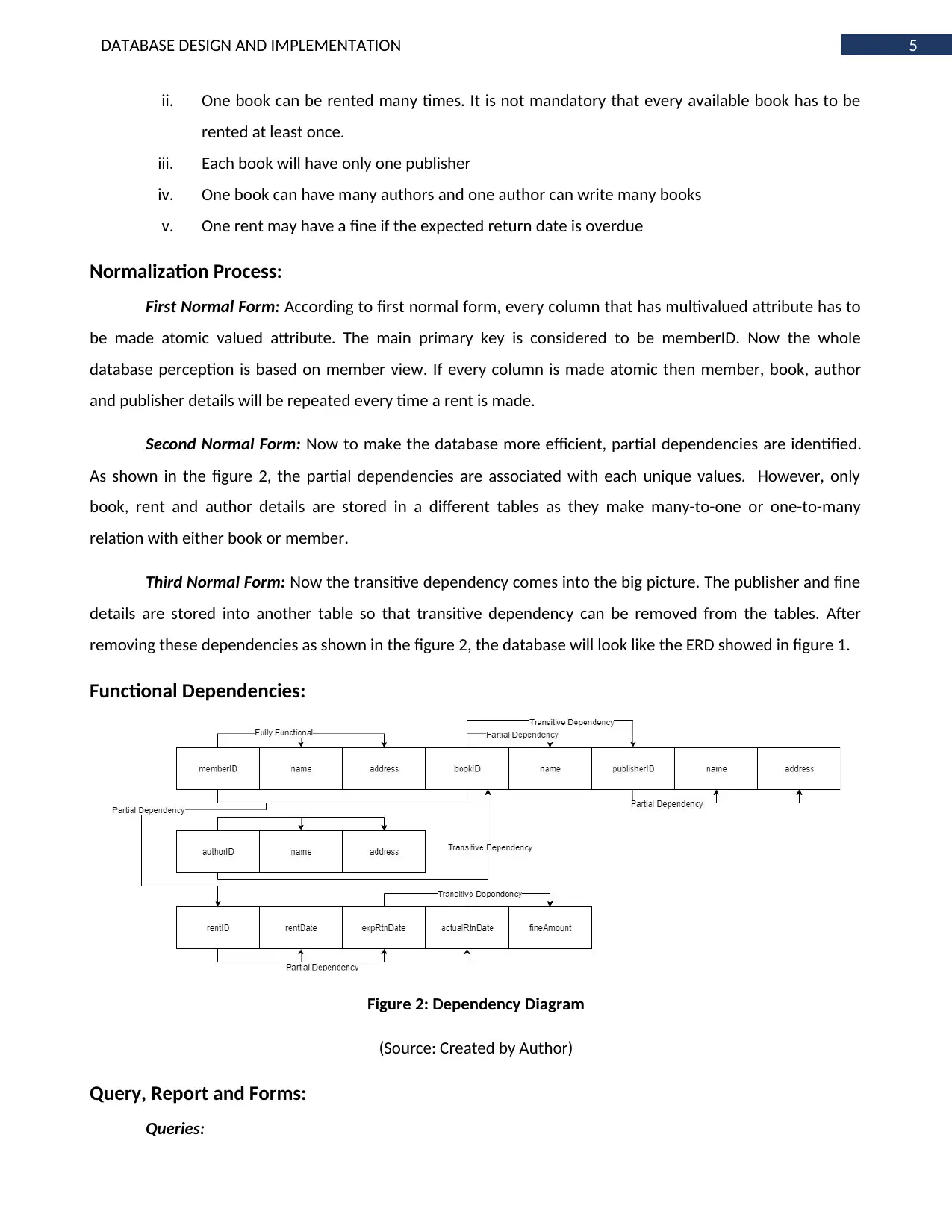
Second Normal Form: Now to make the database more efficient, partial dependencies are identified.
As shown in the figure 2, the partial dependencies are associated with each unique values. However, only
book, rent and author details are stored in a different tables as they make many-to-one or one-to-many
relation with either book or member.
Third Normal Form: Now the transitive dependency comes into the big picture. The publisher and fine
details are stored into another table so that transitive dependency can be removed from the tables. After
removing these dependencies as shown in the figure 2, the database will look like the ERD showed in figure 1.
Functional Dependencies:
Figure 2: Dependency Diagram
(Source: Created by Author)
Query, Report and Forms:
Queries:
ii. One book can be rented many times. It is not mandatory that every available book has to be
rented at least once.
iii. Each book will have only one publisher
iv. One book can have many authors and one author can write many books
v. One rent may have a fine if the expected return date is overdue
Normalization Process:
First Normal Form: According to first normal form, every column that has multivalued attribute has to
be made atomic valued attribute. The main primary key is considered to be memberID. Now the whole
database perception is based on member view. If every column is made atomic then member, book, author
and publisher details will be repeated every time a rent is made.
Second Normal Form: Now to make the database more efficient, partial dependencies are identified.
As shown in the figure 2, the partial dependencies are associated with each unique values. However, only
book, rent and author details are stored in a different tables as they make many-to-one or one-to-many
relation with either book or member.
Third Normal Form: Now the transitive dependency comes into the big picture. The publisher and fine
details are stored into another table so that transitive dependency can be removed from the tables. After
removing these dependencies as shown in the figure 2, the database will look like the ERD showed in figure 1.
Functional Dependencies:
Figure 2: Dependency Diagram
(Source: Created by Author)
Query, Report and Forms:
Queries:
⊘ This is a preview!⊘
Do you want full access?
Subscribe today to unlock all pages.
Trusted by 1+ million students worldwide
6DATABASE DESIGN AND IMPLEMENTATION
i. All the details of the members
ii. Book name and its authors
iii. Number of books published by a publisher
iv. How many times each member has made fines
v. Books and its publisher details
Reports:
i. The first report is active rents
ii. The total amount of fine per month
iii. Details of every book that has not been returned ever
iv. Details of each member
v. Details of most five frequent members
Forms:
i. Forms for member registration
ii. Forms for new book detail insertion
iii. Forms for new author identification\
iv. Form for new publisher details
v. Form for renting books
vi. Form for paying fine
Implementing Library Database Design:
Create Tables:
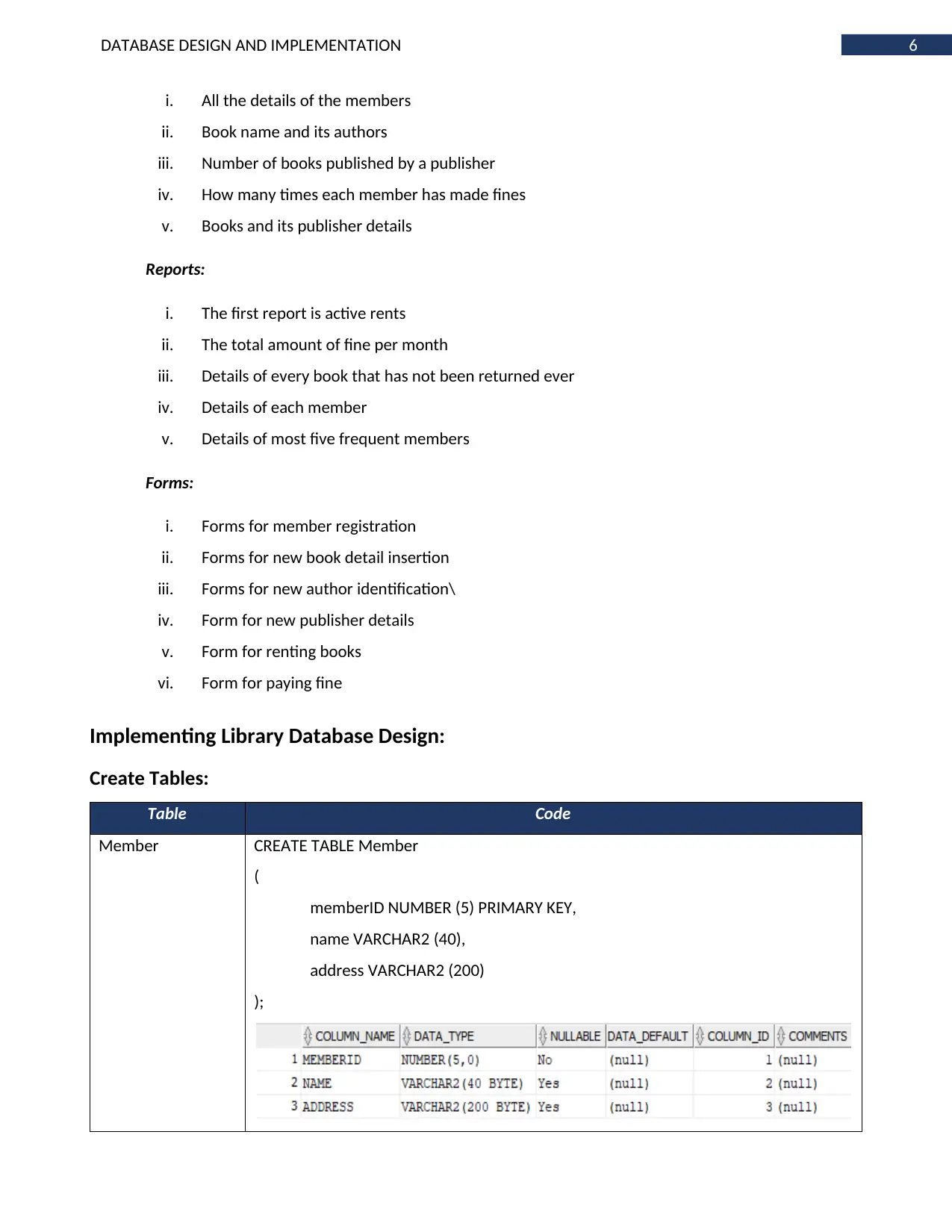
Table Code
Member CREATE TABLE Member
(
memberID NUMBER (5) PRIMARY KEY,
name VARCHAR2 (40),
address VARCHAR2 (200)
);
i. All the details of the members
ii. Book name and its authors
iii. Number of books published by a publisher
iv. How many times each member has made fines
v. Books and its publisher details
Reports:
i. The first report is active rents
ii. The total amount of fine per month
iii. Details of every book that has not been returned ever
iv. Details of each member
v. Details of most five frequent members
Forms:
i. Forms for member registration
ii. Forms for new book detail insertion
iii. Forms for new author identification\
iv. Form for new publisher details
v. Form for renting books
vi. Form for paying fine
Implementing Library Database Design:
Create Tables:
Table Code
Member CREATE TABLE Member
(
memberID NUMBER (5) PRIMARY KEY,
name VARCHAR2 (40),
address VARCHAR2 (200)
);
Paraphrase This Document
Need a fresh take? Get an instant paraphrase of this document with our AI Paraphraser
7DATABASE DESIGN AND IMPLEMENTATION
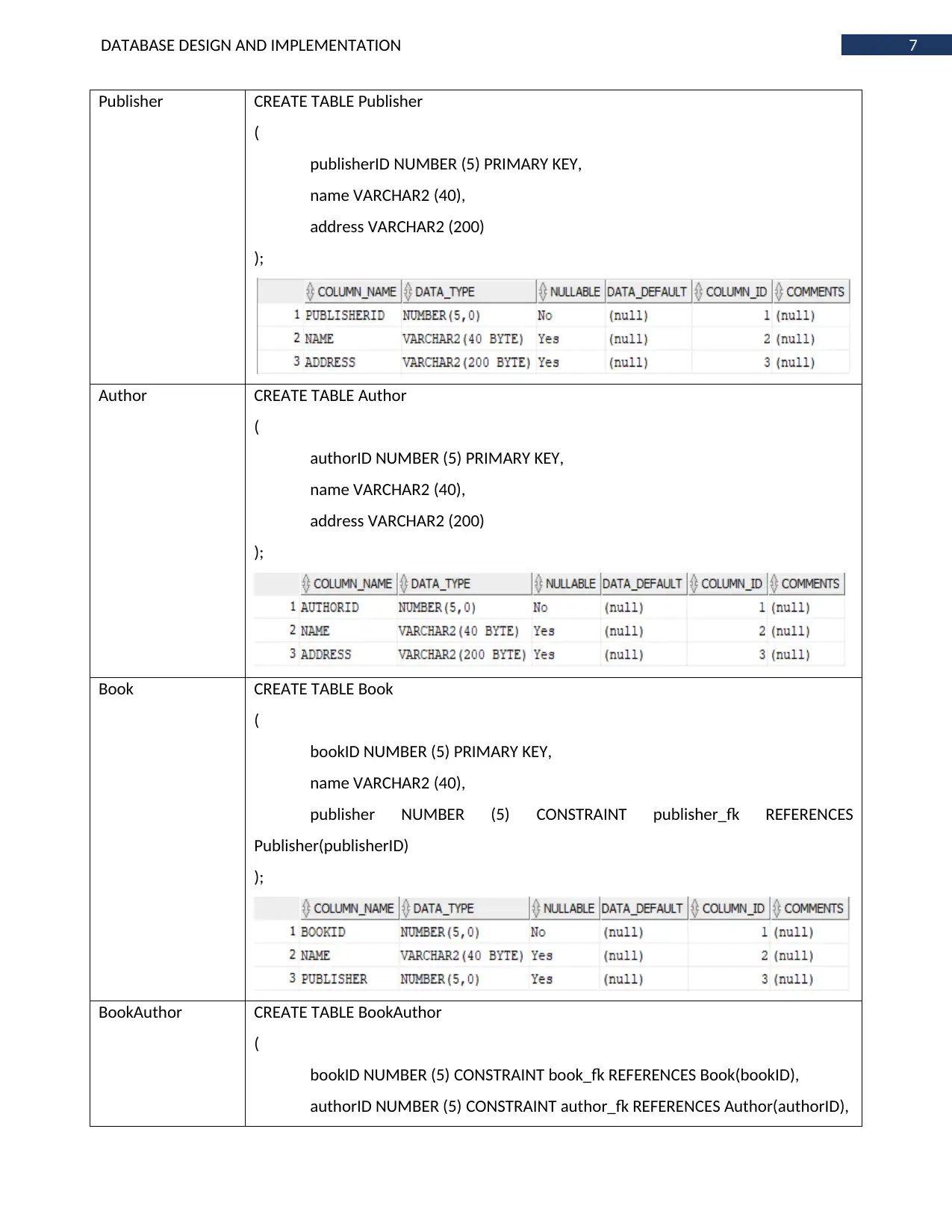
Publisher CREATE TABLE Publisher
(
publisherID NUMBER (5) PRIMARY KEY,
name VARCHAR2 (40),
address VARCHAR2 (200)
);
Author CREATE TABLE Author
(
authorID NUMBER (5) PRIMARY KEY,
name VARCHAR2 (40),
address VARCHAR2 (200)
);
Book CREATE TABLE Book
(
bookID NUMBER (5) PRIMARY KEY,
name VARCHAR2 (40),
publisher NUMBER (5) CONSTRAINT publisher_fk REFERENCES
Publisher(publisherID)
);
BookAuthor CREATE TABLE BookAuthor
(
bookID NUMBER (5) CONSTRAINT book_fk REFERENCES Book(bookID),
authorID NUMBER (5) CONSTRAINT author_fk REFERENCES Author(authorID),
Publisher CREATE TABLE Publisher
(
publisherID NUMBER (5) PRIMARY KEY,
name VARCHAR2 (40),
address VARCHAR2 (200)
);
Author CREATE TABLE Author
(
authorID NUMBER (5) PRIMARY KEY,
name VARCHAR2 (40),
address VARCHAR2 (200)
);
Book CREATE TABLE Book
(
bookID NUMBER (5) PRIMARY KEY,
name VARCHAR2 (40),
publisher NUMBER (5) CONSTRAINT publisher_fk REFERENCES
Publisher(publisherID)
);
BookAuthor CREATE TABLE BookAuthor
(
bookID NUMBER (5) CONSTRAINT book_fk REFERENCES Book(bookID),
authorID NUMBER (5) CONSTRAINT author_fk REFERENCES Author(authorID),
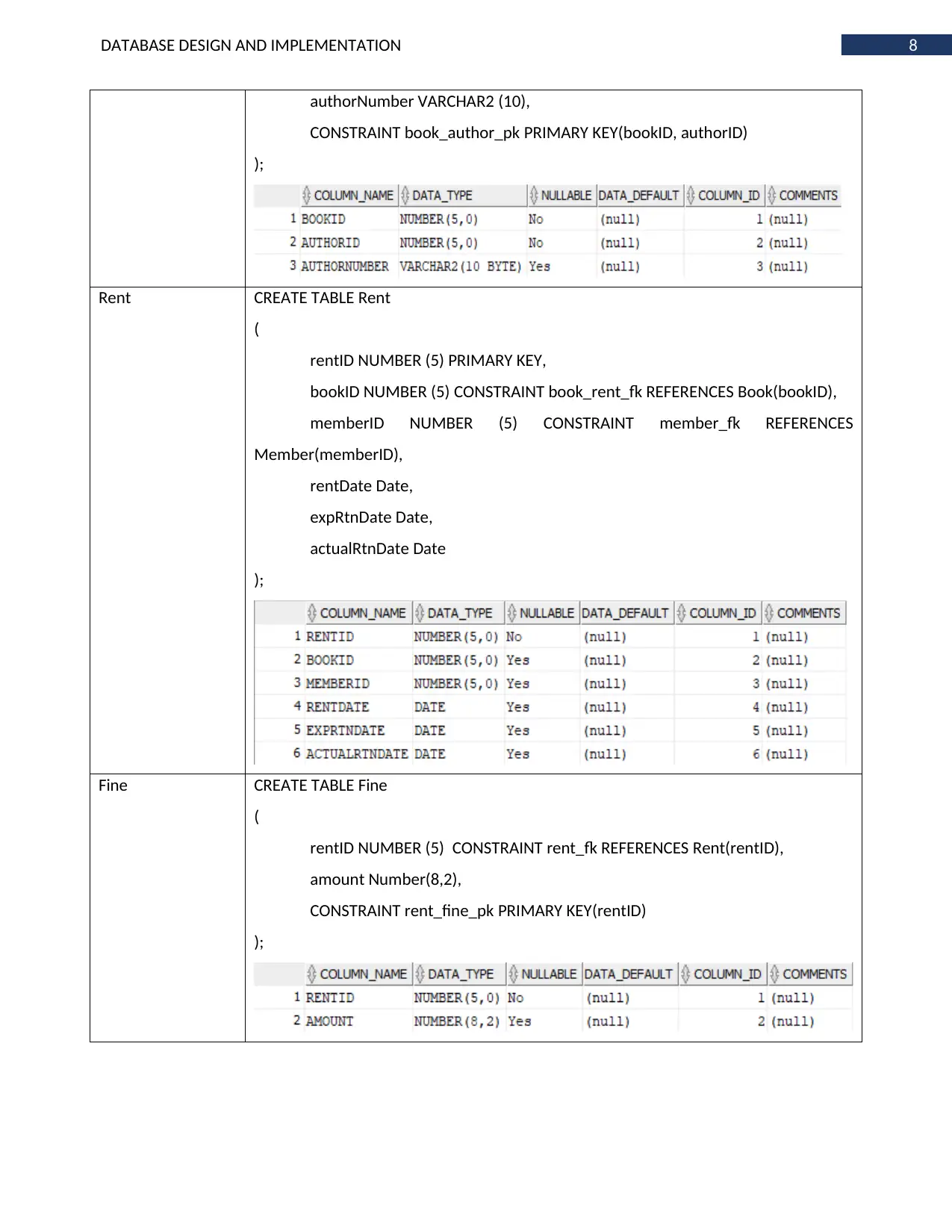
8DATABASE DESIGN AND IMPLEMENTATION
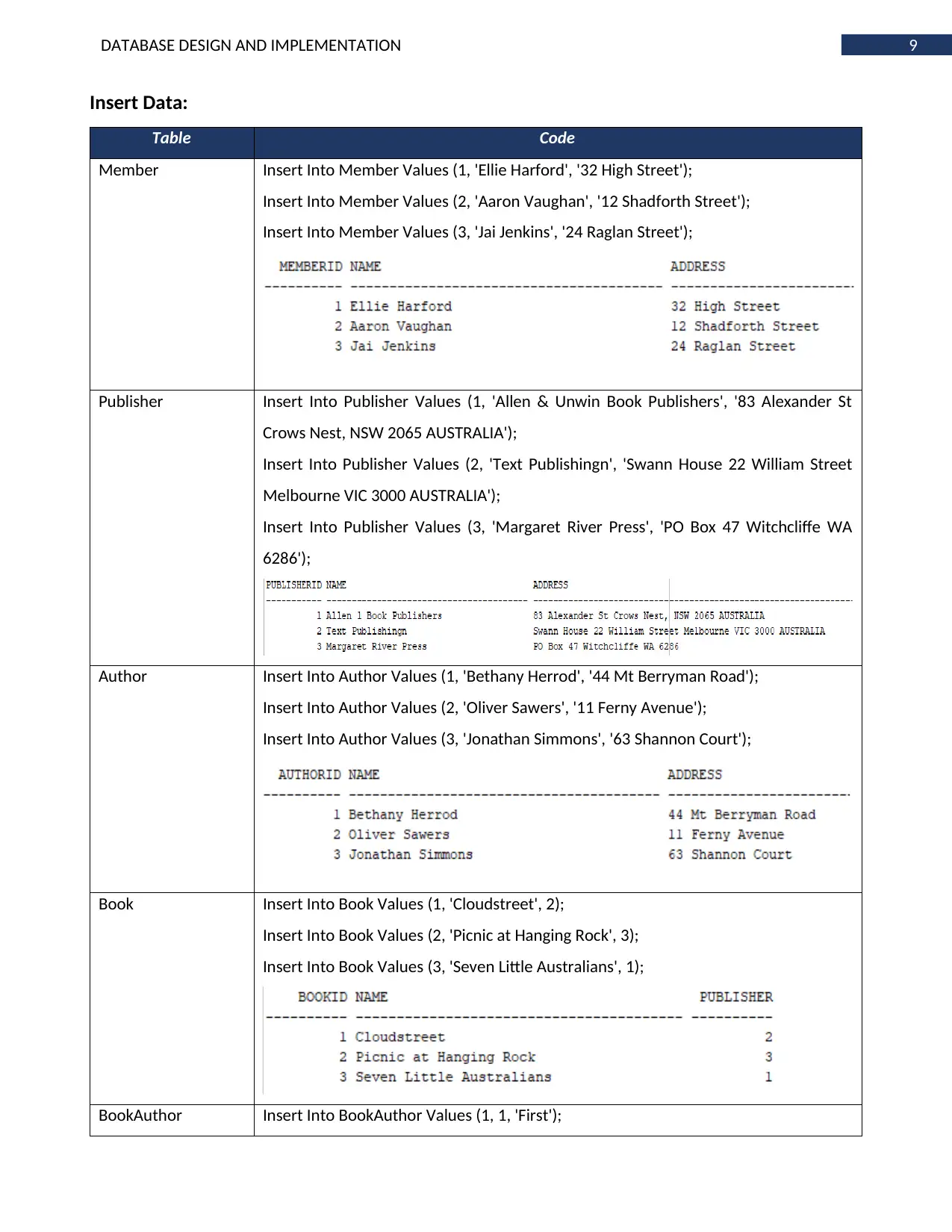
authorNumber VARCHAR2 (10),
CONSTRAINT book_author_pk PRIMARY KEY(bookID, authorID)
);
Rent CREATE TABLE Rent
(
rentID NUMBER (5) PRIMARY KEY,
bookID NUMBER (5) CONSTRAINT book_rent_fk REFERENCES Book(bookID),
memberID NUMBER (5) CONSTRAINT member_fk REFERENCES
Member(memberID),
rentDate Date,
expRtnDate Date,
actualRtnDate Date
);
Fine CREATE TABLE Fine
(
rentID NUMBER (5) CONSTRAINT rent_fk REFERENCES Rent(rentID),
amount Number(8,2),
CONSTRAINT rent_fine_pk PRIMARY KEY(rentID)
);
authorNumber VARCHAR2 (10),
CONSTRAINT book_author_pk PRIMARY KEY(bookID, authorID)
);
Rent CREATE TABLE Rent
(
rentID NUMBER (5) PRIMARY KEY,
bookID NUMBER (5) CONSTRAINT book_rent_fk REFERENCES Book(bookID),
memberID NUMBER (5) CONSTRAINT member_fk REFERENCES
Member(memberID),
rentDate Date,
expRtnDate Date,
actualRtnDate Date
);
Fine CREATE TABLE Fine
(
rentID NUMBER (5) CONSTRAINT rent_fk REFERENCES Rent(rentID),
amount Number(8,2),
CONSTRAINT rent_fine_pk PRIMARY KEY(rentID)
);
⊘ This is a preview!⊘
Do you want full access?
Subscribe today to unlock all pages.
Trusted by 1+ million students worldwide
9DATABASE DESIGN AND IMPLEMENTATION
Insert Data:
Table Code
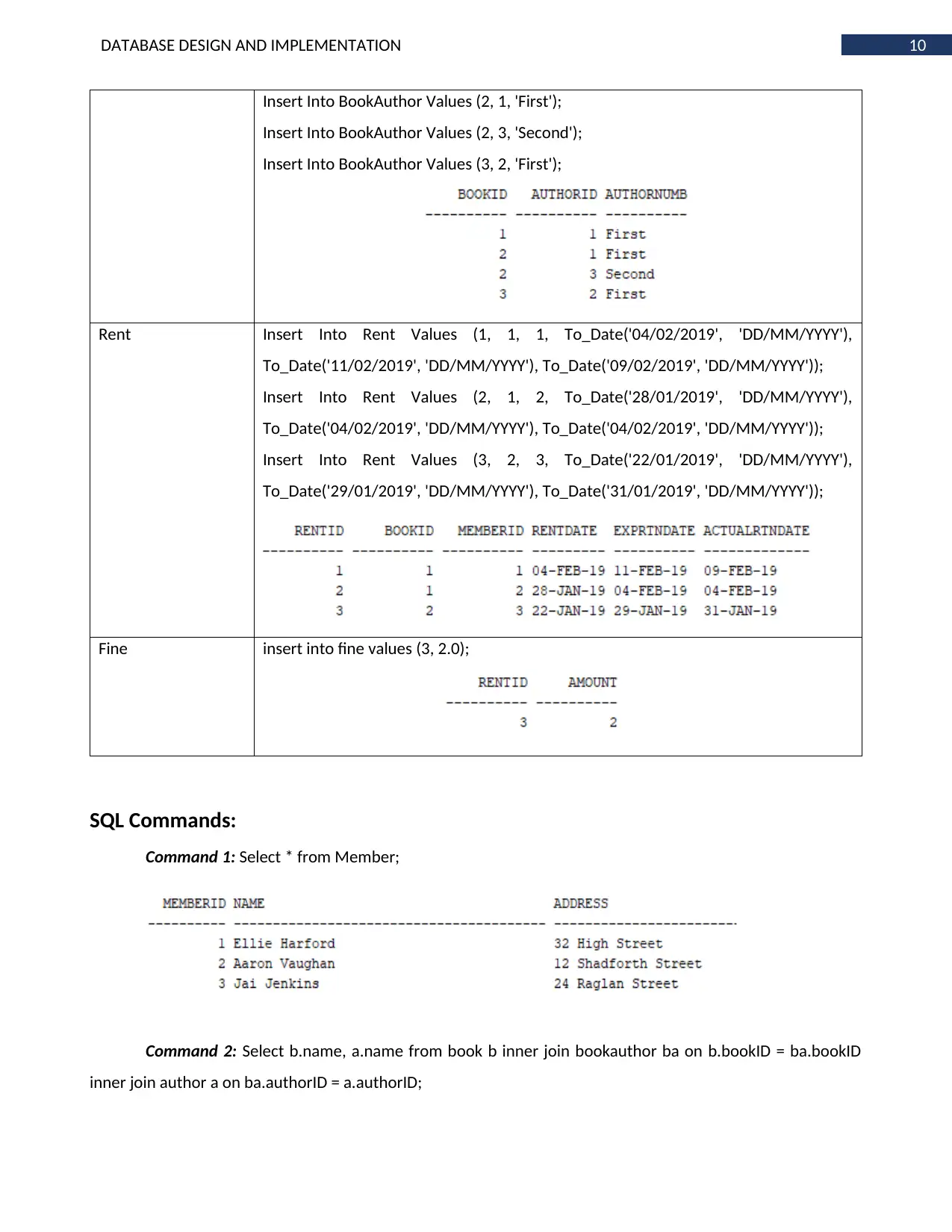
Member Insert Into Member Values (1, 'Ellie Harford', '32 High Street');
Insert Into Member Values (2, 'Aaron Vaughan', '12 Shadforth Street');
Insert Into Member Values (3, 'Jai Jenkins', '24 Raglan Street');
Publisher Insert Into Publisher Values (1, 'Allen & Unwin Book Publishers', '83 Alexander St
Crows Nest, NSW 2065 AUSTRALIA');
Insert Into Publisher Values (2, 'Text Publishingn', 'Swann House 22 William Street
Melbourne VIC 3000 AUSTRALIA');
Insert Into Publisher Values (3, 'Margaret River Press', 'PO Box 47 Witchcliffe WA
6286');
Author Insert Into Author Values (1, 'Bethany Herrod', '44 Mt Berryman Road');
Insert Into Author Values (2, 'Oliver Sawers', '11 Ferny Avenue');
Insert Into Author Values (3, 'Jonathan Simmons', '63 Shannon Court');
Book Insert Into Book Values (1, 'Cloudstreet', 2);
Insert Into Book Values (2, 'Picnic at Hanging Rock', 3);
Insert Into Book Values (3, 'Seven Little Australians', 1);
BookAuthor Insert Into BookAuthor Values (1, 1, 'First');
Insert Data:
Table Code
Member Insert Into Member Values (1, 'Ellie Harford', '32 High Street');
Insert Into Member Values (2, 'Aaron Vaughan', '12 Shadforth Street');
Insert Into Member Values (3, 'Jai Jenkins', '24 Raglan Street');
Publisher Insert Into Publisher Values (1, 'Allen & Unwin Book Publishers', '83 Alexander St
Crows Nest, NSW 2065 AUSTRALIA');
Insert Into Publisher Values (2, 'Text Publishingn', 'Swann House 22 William Street
Melbourne VIC 3000 AUSTRALIA');
Insert Into Publisher Values (3, 'Margaret River Press', 'PO Box 47 Witchcliffe WA
6286');
Author Insert Into Author Values (1, 'Bethany Herrod', '44 Mt Berryman Road');
Insert Into Author Values (2, 'Oliver Sawers', '11 Ferny Avenue');
Insert Into Author Values (3, 'Jonathan Simmons', '63 Shannon Court');
Book Insert Into Book Values (1, 'Cloudstreet', 2);
Insert Into Book Values (2, 'Picnic at Hanging Rock', 3);
Insert Into Book Values (3, 'Seven Little Australians', 1);
BookAuthor Insert Into BookAuthor Values (1, 1, 'First');
Paraphrase This Document
Need a fresh take? Get an instant paraphrase of this document with our AI Paraphraser
10DATABASE DESIGN AND IMPLEMENTATION
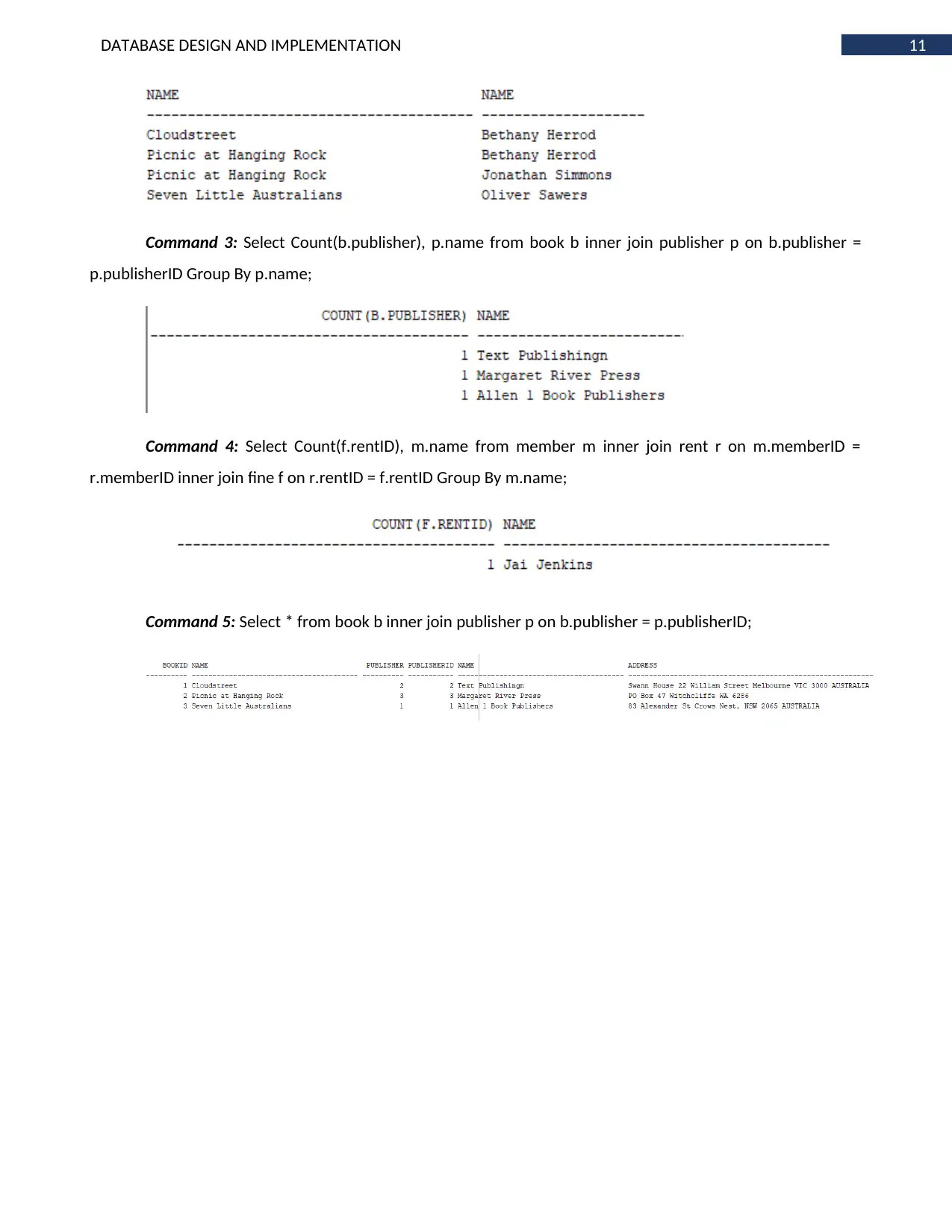
Insert Into BookAuthor Values (2, 1, 'First');
Insert Into BookAuthor Values (2, 3, 'Second');
Insert Into BookAuthor Values (3, 2, 'First');
Rent Insert Into Rent Values (1, 1, 1, To_Date('04/02/2019', 'DD/MM/YYYY'),
To_Date('11/02/2019', 'DD/MM/YYYY'), To_Date('09/02/2019', 'DD/MM/YYYY'));
Insert Into Rent Values (2, 1, 2, To_Date('28/01/2019', 'DD/MM/YYYY'),
To_Date('04/02/2019', 'DD/MM/YYYY'), To_Date('04/02/2019', 'DD/MM/YYYY'));
Insert Into Rent Values (3, 2, 3, To_Date('22/01/2019', 'DD/MM/YYYY'),
To_Date('29/01/2019', 'DD/MM/YYYY'), To_Date('31/01/2019', 'DD/MM/YYYY'));
Fine insert into fine values (3, 2.0);
SQL Commands:
Command 1: Select * from Member;
Command 2: Select b.name, a.name from book b inner join bookauthor ba on b.bookID = ba.bookID
inner join author a on ba.authorID = a.authorID;
Insert Into BookAuthor Values (2, 1, 'First');
Insert Into BookAuthor Values (2, 3, 'Second');
Insert Into BookAuthor Values (3, 2, 'First');
Rent Insert Into Rent Values (1, 1, 1, To_Date('04/02/2019', 'DD/MM/YYYY'),
To_Date('11/02/2019', 'DD/MM/YYYY'), To_Date('09/02/2019', 'DD/MM/YYYY'));
Insert Into Rent Values (2, 1, 2, To_Date('28/01/2019', 'DD/MM/YYYY'),
To_Date('04/02/2019', 'DD/MM/YYYY'), To_Date('04/02/2019', 'DD/MM/YYYY'));
Insert Into Rent Values (3, 2, 3, To_Date('22/01/2019', 'DD/MM/YYYY'),
To_Date('29/01/2019', 'DD/MM/YYYY'), To_Date('31/01/2019', 'DD/MM/YYYY'));
Fine insert into fine values (3, 2.0);
SQL Commands:
Command 1: Select * from Member;
Command 2: Select b.name, a.name from book b inner join bookauthor ba on b.bookID = ba.bookID
inner join author a on ba.authorID = a.authorID;
11DATABASE DESIGN AND IMPLEMENTATION
Command 3: Select Count(b.publisher), p.name from book b inner join publisher p on b.publisher =
p.publisherID Group By p.name;
Command 4: Select Count(f.rentID), m.name from member m inner join rent r on m.memberID =
r.memberID inner join fine f on r.rentID = f.rentID Group By m.name;
Command 5: Select * from book b inner join publisher p on b.publisher = p.publisherID;
Command 3: Select Count(b.publisher), p.name from book b inner join publisher p on b.publisher =
p.publisherID Group By p.name;
Command 4: Select Count(f.rentID), m.name from member m inner join rent r on m.memberID =
r.memberID inner join fine f on r.rentID = f.rentID Group By m.name;
Command 5: Select * from book b inner join publisher p on b.publisher = p.publisherID;
⊘ This is a preview!⊘
Do you want full access?
Subscribe today to unlock all pages.
Trusted by 1+ million students worldwide

1 out of 13


Related Documents


Your All-in-One AI-Powered Toolkit for Academic Success.
+13062052269
info@desklib.com
Available 24*7 on WhatsApp / Email
![[object Object]](/_next/static/media/star-bottom.7253800d.svg)
Unlock your academic potential
Copyright © 2020–2026 A2Z Services. All Rights Reserved. Developed and managed by ZUCOL.