Railroad Yard Simulation Program: CS Project, Fall Semester 2024

Verified

Added on  2019/09/20

|4
|1034
|186
Project
AI Summary
This Java project simulates a railroad yard, where the program determines if incoming cars can be rearranged to match a desired outgoing order. The user inputs incoming and outgoing car sequences, and the program uses stacks and queues to model the waiting line and car movements. The solution adheres to specific Google Java Style Guide rules. The program takes input until "DONE" is entered and uses only Scanner, Stack, Queue, and LinkedList (via Queue interface) from the Java API, avoiding direct list usage. The project emphasizes data structure implementation, specifically using stacks and queues to solve a control system problem. The program's core functionality involves comparing incoming cars with the desired outgoing order and moving cars between incoming and waiting lines. The solution demonstrates efficient use of data structures and problem-solving skills. This is a student submission for Desklib.
Document Page
File Submission Standards
For this final assignment you are asked to follow a restrict subset of the rules
given in the Google Java Style Guide
(https://google.github.io/styleguide/javaguide.html). See below for specifics:
1 Introduction
o Sections: all.
2 Source file basics
o Sections: 2.1
3 Source file structure
o Sections: 3.1*, 3.2, 3.3.1-2, 3.4
4 Formatting
o Sections: 4.1, 4.2, 4.3, 4.4, 4.5, 4.8.2, 4.8.3, 4.8.4, 4.8.6, 4.8.7
o
*This is where you should include a description of your program as well as
your name.
In this project, you will be implementing a railroad yard simulation program.
The user will provide a set of incoming cars, and then a desired outgoing
order. Your program will determine if the given incoming cars can be
rearranged to the desired outgoing order or not.
Background: This is an example of a control/management system: in order to
deliver specific resources to specific destinations, we have to guarantee that
those resources are available at their destinations. Consider: the easiest car
to detact from a train transporting materials is the back most one. Thus, it
would ideal to arrange the train's cars in such a way that the order of
destinations visited, matches the order of the cars. If the required car is in
the middle of the train, there will be trouble! Our goal is to address this by
trying to arrange the cars into the order of the destinations they will visit
("desired outgoing order").
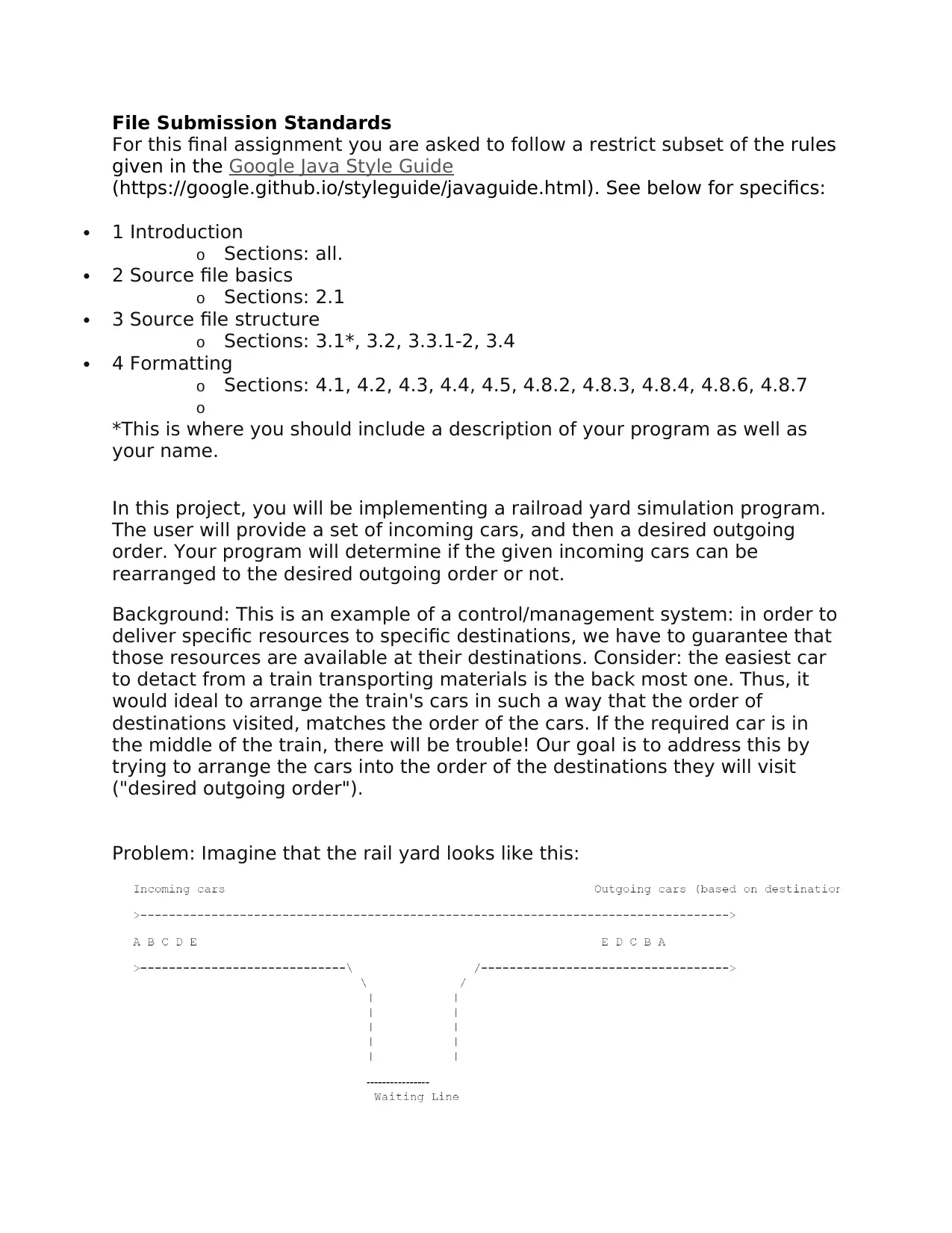
Problem: Imagine that the rail yard looks like this:
tabler-icon-diamond-filled.svg

Paraphrase This Document

Need a fresh take? Get an instant paraphrase of this document with our AI Paraphraser
Document Page
In this example, the incoming cars come in the order E, D, C, B and A. The
desired outgoing order (since the track moves only to the right) is A, B, C, D
and E. Our program considers the first incoming car, vs the desired outgoing
car. Since E != A, E must go into the waiting line. Now our program will
consider both the car at the top of the waiting line (since it is blocking all the
others cars) as well as the incoming car each time. Again, E != A but also D !
= A, so D gets put in the waiting line, blocking E in the process. This will
continue until A is the only car left in the incoming line, and it will be sent
out. This leaves nothing incoming, but B would be the top car in the waiting
line. Since B == B, B gets taken from the waiting line and sent out. This will
repeat until all cars are gone, meaning the input was successfully matched
to the output. An example that does NOT match is UGTA to AGTU. A, T and G
would go into the waiting line. U would be sent out, but then the next
required outgoing car is T. There would be nothing left in the incoming line,
and the top car in the waiting line would be G. So, the match fails.
Program Features:
1. You must take in incoming cars from the user until they input "DONE".
2. You must take in outgoing cars from the user until they have given as many
cars as they did in step 1.
3. You must print out whether or not the given input cars can be matched to
the given output.
Java API Usage Requirements:
You may import the following packages: Scanner, Stack, Queue, LinkedList.
No other packages are allowed.
For LinkedList, you may only use it via Queue interface. Your program must
not use lists directly but instead rely on stacks and queues.
When using the Queue collection, use only the following methods: add,
remove, peek, isEmpty, size.
When using the Stack collection, use only the following methods: push, pop,
peek, isEmpty, size.
Requirements and Notes:
Don't use arrays to store trains and move cars. Use stack(s) and queue(s).
You may not ask the user to specify the number of cars ahead of time.
The user must provide at least one incoming car. Print a message if they
don't and then allow the user to type in incoming cars again.
"Cars" is a loose term. The user should be allowed to type in anything as a
car. An example of three incoming cars might be: A, honda, 10101
You may not reorder the incoming, outgoing or waiting line.
Cars cannot go from the waiting line back to the incoming line.
You do not need to verify that the user typed in the same outgoing items as
incoming. (i.e. They said the only incoming car is A and the only outgoing
one is B. Your program should report that it cannot be matched, but you do
not need to display a special error message or anything else)
Document Page
Make sure you test your program thoroughly. You are encouraged to use the
provided examples, but you should verify that your program works with
several of your own examples.
Sample Outputs:
Sample 1
Sample 2
Sample 3
Submission Process: The file/class containing your main method MUST be
named Railroad.java. You may create other files as you see fit. Please zip
all of your source code (.java) files together as "Project.zip." Be sure that
Document Page
you use the correct compression format - if you do not use the right format,
we may be unable to open your submission. Do NOT include your project
files.
chevron_up_icon
1 out of 4
circle_padding
hide_on_mobile
zoom_out_icon
[object Object]