Graphical User Interface Design Methodology for Modern Applications
VerifiedAdded on 2020/05/16
|10
|1970
|473
AI Summary
This report delves into the critical role graphical user interfaces (GUIs) play in modern software applications by exploring key design methodologies. The document begins by defining GUI and its significance in enhancing user interaction and productivity. It examines various existing designs, referencing studies from Avdiienko et al., 2017; Dang et al., 2014; and others to highlight successful implementations and challenges faced. The report outlines a comprehensive design methodology, focusing on front-end and back-end components, including informative tabs and headers, ensuring all elements contribute meaningfully to the user experience. Evaluation methods are discussed, stressing continuous client feedback for iterative improvements until satisfactory quality is achieved. This analysis not only aids in understanding GUI development processes but also serves as a guide for developing functional and appealing interfaces.

Running head: GUI INTERACTIONS
GUI interactions
Name of the student
Name of the University
Author note
GUI interactions
Name of the student
Name of the University
Author note

Paraphrase This Document
Need a fresh take? Get an instant paraphrase of this document with our AI Paraphraser
1GUI INTERACTIONS
4. GUI Design
4.1 GUI Interaction Design Process
A GUI or the graphical user interface is termed as an interface which is considered to be
graphics oriented. The main consideration of this format was adopted for keeping the graphics in
the programming languages and other applications1. As the old methods of application userface
was considered to be text based the need for graphical interfaces were adopted.
A graphical user interface uses many metaphors which denote the use of objects. It may
use desktops or views or even the physical layout considered in a building. The main elements of
a graphical user interface are considered to be pulling down menus, windows, buttons, and
images as icons, scroll bars, wizards and many other things which help in giving shape to the
structure. According to the integration pipeline of the SIA interface, there are two paths to the
service points. One is the normal path without the presence of any routing processes and the
other is the one with a routing process.
The graphical user interface interaction process is adopted as it aims to create an
interactive design considering the developers of the system and the users of the system2. Another
major objective of implementing the GUI process is to provide simple level of interaction with
the users. The main functionalities included in the interaction process of the GUI are:
1 Nilsson, Michael. "Konfigurationsverktyg för SIA." (2016).
2 Drucker, Johanna. Graphesis: Visual forms of knowledge production. Harvard University Press, 2014.
4. GUI Design
4.1 GUI Interaction Design Process
A GUI or the graphical user interface is termed as an interface which is considered to be
graphics oriented. The main consideration of this format was adopted for keeping the graphics in
the programming languages and other applications1. As the old methods of application userface
was considered to be text based the need for graphical interfaces were adopted.
A graphical user interface uses many metaphors which denote the use of objects. It may
use desktops or views or even the physical layout considered in a building. The main elements of
a graphical user interface are considered to be pulling down menus, windows, buttons, and
images as icons, scroll bars, wizards and many other things which help in giving shape to the
structure. According to the integration pipeline of the SIA interface, there are two paths to the
service points. One is the normal path without the presence of any routing processes and the
other is the one with a routing process.
The graphical user interface interaction process is adopted as it aims to create an
interactive design considering the developers of the system and the users of the system2. Another
major objective of implementing the GUI process is to provide simple level of interaction with
the users. The main functionalities included in the interaction process of the GUI are:
1 Nilsson, Michael. "Konfigurationsverktyg för SIA." (2016).
2 Drucker, Johanna. Graphesis: Visual forms of knowledge production. Harvard University Press, 2014.
2GUI INTERACTIONS
Developing of a system by adopting a user centered approach
Evaluating the prototypes after making a successful design format
The usability criteria of the aspects are always to be considered
The design of the specific parameters are to be focused on utilizing the ease level so that
a better understanding of the application processes will be utilized.
The major objectives of this process are the development and design of a web application
for a client at Sigma. This will be considered from the perspective of a designer3. The client is an
employee of the company concerned. The user of this web application is the potential customers
that the company deals with. Lastly, the designer is the author who will be responsible for the
design of the web application. The needs and requirements of the client associated will be
analyzed and a structured solution of the process will be given so that the perspective is
enhanced. For the design process, the interactive design theory is to be followed. This design
prospective will show some graphic pictures of the website in this report. The website will
include various texts and images that are mainly to be used to grab the attention of the traffic that
it will engage upon.
4.2 GUI Implementation
To make an implementation of the GUI designs, a prototype will be developed. The first
method involves development of a low level implementation which will be termed as the Low-fi.
3 Ma, Joyce, Lisa Sindorf, Isaac Liao, and Jennifer Frazier. "Using a tangible versus a multi-touch graphical user
interface to support data exploration at a museum exhibit." In Proceedings of the Ninth International Conference on
Tangible, Embedded, and Embodied Interaction, pp. 33-40. ACM, 2015.
Developing of a system by adopting a user centered approach
Evaluating the prototypes after making a successful design format
The usability criteria of the aspects are always to be considered
The design of the specific parameters are to be focused on utilizing the ease level so that
a better understanding of the application processes will be utilized.
The major objectives of this process are the development and design of a web application
for a client at Sigma. This will be considered from the perspective of a designer3. The client is an
employee of the company concerned. The user of this web application is the potential customers
that the company deals with. Lastly, the designer is the author who will be responsible for the
design of the web application. The needs and requirements of the client associated will be
analyzed and a structured solution of the process will be given so that the perspective is
enhanced. For the design process, the interactive design theory is to be followed. This design
prospective will show some graphic pictures of the website in this report. The website will
include various texts and images that are mainly to be used to grab the attention of the traffic that
it will engage upon.
4.2 GUI Implementation
To make an implementation of the GUI designs, a prototype will be developed. The first
method involves development of a low level implementation which will be termed as the Low-fi.
3 Ma, Joyce, Lisa Sindorf, Isaac Liao, and Jennifer Frazier. "Using a tangible versus a multi-touch graphical user
interface to support data exploration at a museum exhibit." In Proceedings of the Ninth International Conference on
Tangible, Embedded, and Embodied Interaction, pp. 33-40. ACM, 2015.
⊘ This is a preview!⊘
Do you want full access?
Subscribe today to unlock all pages.

Trusted by 1+ million students worldwide
3GUI INTERACTIONS
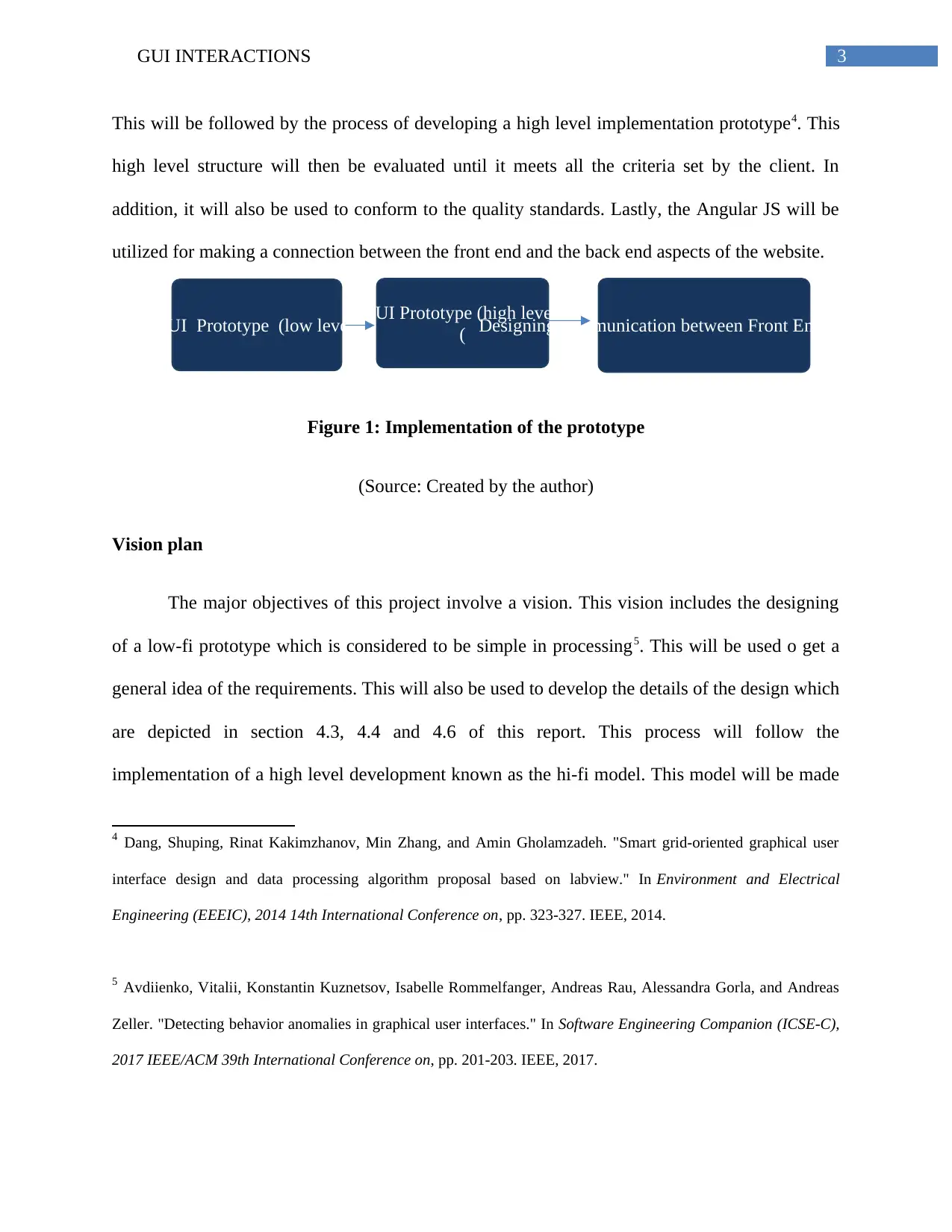
GUI Prototype (low level) GUI Prototype (high level)
( Designing communication between Front End and Backend
This will be followed by the process of developing a high level implementation prototype4. This
high level structure will then be evaluated until it meets all the criteria set by the client. In
addition, it will also be used to conform to the quality standards. Lastly, the Angular JS will be
utilized for making a connection between the front end and the back end aspects of the website.
Figure 1: Implementation of the prototype
(Source: Created by the author)
Vision plan
The major objectives of this project involve a vision. This vision includes the designing
of a low-fi prototype which is considered to be simple in processing5. This will be used o get a
general idea of the requirements. This will also be used to develop the details of the design which
are depicted in section 4.3, 4.4 and 4.6 of this report. This process will follow the
implementation of a high level development known as the hi-fi model. This model will be made
4 Dang, Shuping, Rinat Kakimzhanov, Min Zhang, and Amin Gholamzadeh. "Smart grid-oriented graphical user
interface design and data processing algorithm proposal based on labview." In Environment and Electrical
Engineering (EEEIC), 2014 14th International Conference on, pp. 323-327. IEEE, 2014.
5 Avdiienko, Vitalii, Konstantin Kuznetsov, Isabelle Rommelfanger, Andreas Rau, Alessandra Gorla, and Andreas
Zeller. "Detecting behavior anomalies in graphical user interfaces." In Software Engineering Companion (ICSE-C),
2017 IEEE/ACM 39th International Conference on, pp. 201-203. IEEE, 2017.
GUI Prototype (low level) GUI Prototype (high level)
( Designing communication between Front End and Backend
This will be followed by the process of developing a high level implementation prototype4. This
high level structure will then be evaluated until it meets all the criteria set by the client. In
addition, it will also be used to conform to the quality standards. Lastly, the Angular JS will be
utilized for making a connection between the front end and the back end aspects of the website.
Figure 1: Implementation of the prototype
(Source: Created by the author)
Vision plan
The major objectives of this project involve a vision. This vision includes the designing
of a low-fi prototype which is considered to be simple in processing5. This will be used o get a
general idea of the requirements. This will also be used to develop the details of the design which
are depicted in section 4.3, 4.4 and 4.6 of this report. This process will follow the
implementation of a high level development known as the hi-fi model. This model will be made
4 Dang, Shuping, Rinat Kakimzhanov, Min Zhang, and Amin Gholamzadeh. "Smart grid-oriented graphical user
interface design and data processing algorithm proposal based on labview." In Environment and Electrical
Engineering (EEEIC), 2014 14th International Conference on, pp. 323-327. IEEE, 2014.
5 Avdiienko, Vitalii, Konstantin Kuznetsov, Isabelle Rommelfanger, Andreas Rau, Alessandra Gorla, and Andreas
Zeller. "Detecting behavior anomalies in graphical user interfaces." In Software Engineering Companion (ICSE-C),
2017 IEEE/ACM 39th International Conference on, pp. 201-203. IEEE, 2017.
Paraphrase This Document
Need a fresh take? Get an instant paraphrase of this document with our AI Paraphraser
4GUI INTERACTIONS
utilizing the HTML language and this model will be more detailed with extended features. This
part is depicted in the section 4.5 of this report. The third step will involve the use of the angular
JS which will basically be used to get the JSON data from the backend process of the website.
The website will be mainly used to capture the attention of the customers6. In addition, as the
website is involved with both the front end process and the backend process, it will be used to
capture the data of the customers.
The activities of the simulation pipeline will involve testing the valves between the entry
point and the service point. Each of the valve processes will be tested before entry is guaranteed
to the service point. In case of the configuration tool, the angular.Js JavaScript framework will be
used for making the required framework. In a similar manner, the bootstrap.css will be used for
web request part of the interface. The bootstrap framework will enable various other features like
iconic images or other processes while the angular structure will enable the framework of the
structure.
The front end process will be utilized for capturing the traffic and making them signup in
the process. The backend will present the accounts page of the user. This will provide a sense of
security to the website. Lastly, the HTML code of the page will be linked to the JSON data
which will be in turn linked to the PDF box, such that any required file can be obtained in the
PDF format as well.
6 Fotouhi, Abbas, Neda Shateri, Daniel J. Auger, Stefano Longo, Karsten Propp, Rajlakshmi Purkayastha, and Mark
Wild. "A MATLAB graphical user interface for battery design and simulation; from cell test data to real-world
automotive simulation." In Synthesis, Modeling, Analysis and Simulation Methods and Applications to Circuit
Design (SMACD), 2016 13th International Conference on, pp. 1-6. IEEE, 2016.
utilizing the HTML language and this model will be more detailed with extended features. This
part is depicted in the section 4.5 of this report. The third step will involve the use of the angular
JS which will basically be used to get the JSON data from the backend process of the website.
The website will be mainly used to capture the attention of the customers6. In addition, as the
website is involved with both the front end process and the backend process, it will be used to
capture the data of the customers.
The activities of the simulation pipeline will involve testing the valves between the entry
point and the service point. Each of the valve processes will be tested before entry is guaranteed
to the service point. In case of the configuration tool, the angular.Js JavaScript framework will be
used for making the required framework. In a similar manner, the bootstrap.css will be used for
web request part of the interface. The bootstrap framework will enable various other features like
iconic images or other processes while the angular structure will enable the framework of the
structure.
The front end process will be utilized for capturing the traffic and making them signup in
the process. The backend will present the accounts page of the user. This will provide a sense of
security to the website. Lastly, the HTML code of the page will be linked to the JSON data
which will be in turn linked to the PDF box, such that any required file can be obtained in the
PDF format as well.
6 Fotouhi, Abbas, Neda Shateri, Daniel J. Auger, Stefano Longo, Karsten Propp, Rajlakshmi Purkayastha, and Mark
Wild. "A MATLAB graphical user interface for battery design and simulation; from cell test data to real-world
automotive simulation." In Synthesis, Modeling, Analysis and Simulation Methods and Applications to Circuit
Design (SMACD), 2016 13th International Conference on, pp. 1-6. IEEE, 2016.
5GUI INTERACTIONS
Designing of the application
The major elements of the bootstarp.css are mainly used for creating a layout of the
interactive models in the website. This includes using the drop-down features of the website
along with changing the layout to meet the needs of the client7. These features are mainly
followed to adopt the interactive features of the application. For addressing such requirements,
the overall accountability of the elements in this website must be carefully monitored. This
process will help in accounting for any changes required in the development process which in
turn will give a general idea of the modifications needed. The GUI elements are to include all the
aspects which successfully capture the parameters accountable for the design of the website. The
metrics for capturing the design specifications are to be successfully integrated in the website
that allows in easy documentation of the data involved8. Along with this data, the entire
information pertaining to the process must be successfully documented.
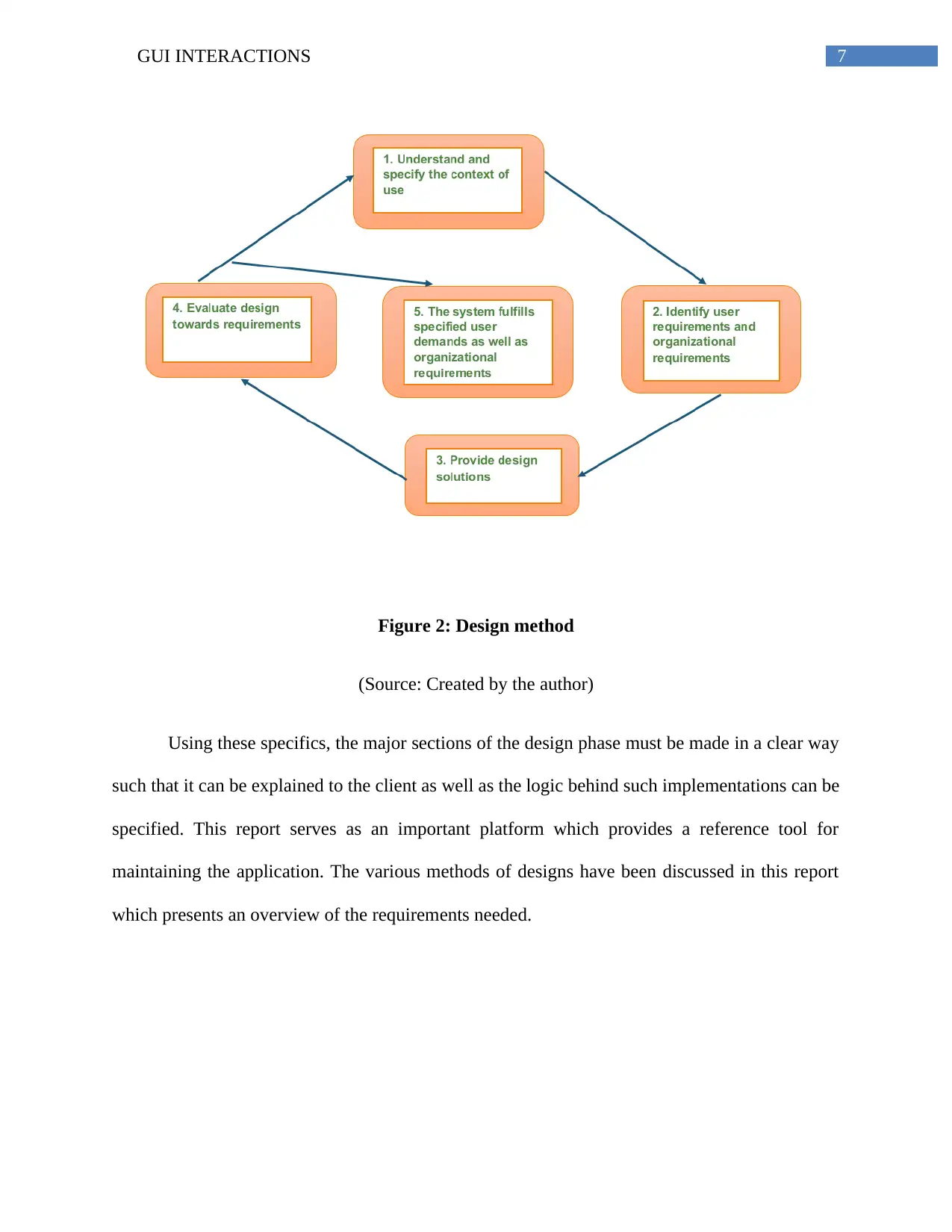
According to the design phase of the website, there are five different components that are
to be followed. The first component is the understanding the contents for use. This is the first
phase of the design process where the requirements are analyzed and then the physical
manifestation of the process is started. The next step is the identification of the user
requirements. In this phase, the various stakeholders related to the project will be analyzed and
7 Silva, Tiago C., Antonio Colaprico, Catharina Olsen, Gianluca Bontempi, Michele Ceccarelli, Benjamin P.
Berman, and Houtan Noushmehr. "TCGAbiolinksGUI: A graphical user interface to analyze GDC cancer molecular
and clinical data." bioRxiv (2017): 147496.
8 Doebelin, Nicola, and Reinhard Kleeberg. "Profex: a graphical user interface for the Rietveld refinement program
BGMN." Journal of applied crystallography 48, no. 5 (2015): 1573-1580.
Designing of the application
The major elements of the bootstarp.css are mainly used for creating a layout of the
interactive models in the website. This includes using the drop-down features of the website
along with changing the layout to meet the needs of the client7. These features are mainly
followed to adopt the interactive features of the application. For addressing such requirements,
the overall accountability of the elements in this website must be carefully monitored. This
process will help in accounting for any changes required in the development process which in
turn will give a general idea of the modifications needed. The GUI elements are to include all the
aspects which successfully capture the parameters accountable for the design of the website. The
metrics for capturing the design specifications are to be successfully integrated in the website
that allows in easy documentation of the data involved8. Along with this data, the entire
information pertaining to the process must be successfully documented.
According to the design phase of the website, there are five different components that are
to be followed. The first component is the understanding the contents for use. This is the first
phase of the design process where the requirements are analyzed and then the physical
manifestation of the process is started. The next step is the identification of the user
requirements. In this phase, the various stakeholders related to the project will be analyzed and
7 Silva, Tiago C., Antonio Colaprico, Catharina Olsen, Gianluca Bontempi, Michele Ceccarelli, Benjamin P.
Berman, and Houtan Noushmehr. "TCGAbiolinksGUI: A graphical user interface to analyze GDC cancer molecular
and clinical data." bioRxiv (2017): 147496.
8 Doebelin, Nicola, and Reinhard Kleeberg. "Profex: a graphical user interface for the Rietveld refinement program
BGMN." Journal of applied crystallography 48, no. 5 (2015): 1573-1580.
⊘ This is a preview!⊘
Do you want full access?
Subscribe today to unlock all pages.
Trusted by 1+ million students worldwide
6GUI INTERACTIONS
the requirements related to it have to be analyzed9. As a result, the effectiveness of the system
will be increased. The third phase involves the analysis of the design solutions. The design
solutions will be utilized in denoting the overall content of the website. This includes denoting a
front end design and a back end design. The additional features like the informative tab or the
header design must also be analyzed and executed. The fourth phase involves utilizing the
designs made and evaluating them to get a solution. If a fully functional website is established,
then the evaluation is considered to be successful10. The last phase involves analysis of the
project by the clients who will verify the quality of the product. If the system is able to meet the
demands of the client, then it is considered as success for the developer of the system. If the
system is not able to meet the standards of the client, the whole process is started until an
acceptable system is developed.
9 Singer, Adam B. "The Graphical User Interface." In Practical C++ Design, pp. 115-144. Apress, Berkeley, CA,
2017.
10 Priyam, Anurag, Ben J. Woodcroft, Vivek Rai, Alekhya Munagala, Ismail Moghul, Filip Ter, Mark Anthony
Gibbins et al. "Sequenceserver: a modern graphical user interface for custom BLAST databases." Biorxiv (2015):
033142.
the requirements related to it have to be analyzed9. As a result, the effectiveness of the system
will be increased. The third phase involves the analysis of the design solutions. The design
solutions will be utilized in denoting the overall content of the website. This includes denoting a
front end design and a back end design. The additional features like the informative tab or the
header design must also be analyzed and executed. The fourth phase involves utilizing the
designs made and evaluating them to get a solution. If a fully functional website is established,
then the evaluation is considered to be successful10. The last phase involves analysis of the
project by the clients who will verify the quality of the product. If the system is able to meet the
demands of the client, then it is considered as success for the developer of the system. If the
system is not able to meet the standards of the client, the whole process is started until an
acceptable system is developed.
9 Singer, Adam B. "The Graphical User Interface." In Practical C++ Design, pp. 115-144. Apress, Berkeley, CA,
2017.
10 Priyam, Anurag, Ben J. Woodcroft, Vivek Rai, Alekhya Munagala, Ismail Moghul, Filip Ter, Mark Anthony
Gibbins et al. "Sequenceserver: a modern graphical user interface for custom BLAST databases." Biorxiv (2015):
033142.
Paraphrase This Document
Need a fresh take? Get an instant paraphrase of this document with our AI Paraphraser
7GUI INTERACTIONS
Figure 2: Design method
(Source: Created by the author)
Using these specifics, the major sections of the design phase must be made in a clear way
such that it can be explained to the client as well as the logic behind such implementations can be
specified. This report serves as an important platform which provides a reference tool for
maintaining the application. The various methods of designs have been discussed in this report
which presents an overview of the requirements needed.
Figure 2: Design method
(Source: Created by the author)
Using these specifics, the major sections of the design phase must be made in a clear way
such that it can be explained to the client as well as the logic behind such implementations can be
specified. This report serves as an important platform which provides a reference tool for
maintaining the application. The various methods of designs have been discussed in this report
which presents an overview of the requirements needed.
8GUI INTERACTIONS
References
Avdiienko, Vitalii, Konstantin Kuznetsov, Isabelle Rommelfanger, Andreas Rau, Alessandra
Gorla, and Andreas Zeller. "Detecting behavior anomalies in graphical user interfaces."
In Software Engineering Companion (ICSE-C), 2017 IEEE/ACM 39th International Conference
on, pp. 201-203. IEEE, 2017.
Dang, Shuping, Rinat Kakimzhanov, Min Zhang, and Amin Gholamzadeh. "Smart grid-oriented
graphical user interface design and data processing algorithm proposal based on labview."
In Environment and Electrical Engineering (EEEIC), 2014 14th International Conference on,
pp. 323-327. IEEE, 2014.
Doebelin, Nicola, and Reinhard Kleeberg. "Profex: a graphical user interface for the Rietveld
refinement program BGMN." Journal of applied crystallography 48, no. 5 (2015): 1573-1580.
Drucker, Johanna. Graphesis: Visual forms of knowledge production. Harvard University Press,
2014.
Fotouhi, Abbas, Neda Shateri, Daniel J. Auger, Stefano Longo, Karsten Propp, Rajlakshmi
Purkayastha, and Mark Wild. "A MATLAB graphical user interface for battery design and
simulation; from cell test data to real-world automotive simulation." In Synthesis, Modeling,
Analysis and Simulation Methods and Applications to Circuit Design (SMACD), 2016 13th
International Conference on, pp. 1-6. IEEE, 2016.
Ma, Joyce, Lisa Sindorf, Isaac Liao, and Jennifer Frazier. "Using a tangible versus a multi-touch
graphical user interface to support data exploration at a museum exhibit." In Proceedings of the
References
Avdiienko, Vitalii, Konstantin Kuznetsov, Isabelle Rommelfanger, Andreas Rau, Alessandra
Gorla, and Andreas Zeller. "Detecting behavior anomalies in graphical user interfaces."
In Software Engineering Companion (ICSE-C), 2017 IEEE/ACM 39th International Conference
on, pp. 201-203. IEEE, 2017.
Dang, Shuping, Rinat Kakimzhanov, Min Zhang, and Amin Gholamzadeh. "Smart grid-oriented
graphical user interface design and data processing algorithm proposal based on labview."
In Environment and Electrical Engineering (EEEIC), 2014 14th International Conference on,
pp. 323-327. IEEE, 2014.
Doebelin, Nicola, and Reinhard Kleeberg. "Profex: a graphical user interface for the Rietveld
refinement program BGMN." Journal of applied crystallography 48, no. 5 (2015): 1573-1580.
Drucker, Johanna. Graphesis: Visual forms of knowledge production. Harvard University Press,
2014.
Fotouhi, Abbas, Neda Shateri, Daniel J. Auger, Stefano Longo, Karsten Propp, Rajlakshmi
Purkayastha, and Mark Wild. "A MATLAB graphical user interface for battery design and
simulation; from cell test data to real-world automotive simulation." In Synthesis, Modeling,
Analysis and Simulation Methods and Applications to Circuit Design (SMACD), 2016 13th
International Conference on, pp. 1-6. IEEE, 2016.
Ma, Joyce, Lisa Sindorf, Isaac Liao, and Jennifer Frazier. "Using a tangible versus a multi-touch
graphical user interface to support data exploration at a museum exhibit." In Proceedings of the
⊘ This is a preview!⊘
Do you want full access?
Subscribe today to unlock all pages.
Trusted by 1+ million students worldwide
9GUI INTERACTIONS
Ninth International Conference on Tangible, Embedded, and Embodied Interaction, pp. 33-40.
ACM, 2015.
Nilsson, Michael. "Konfigurationsverktyg för SIA." (2016).
Priyam, Anurag, Ben J. Woodcroft, Vivek Rai, Alekhya Munagala, Ismail Moghul, Filip Ter,
Mark Anthony Gibbins et al. "Sequenceserver: a modern graphical user interface for custom
BLAST databases." Biorxiv (2015): 033142.
Silva, Tiago C., Antonio Colaprico, Catharina Olsen, Gianluca Bontempi, Michele Ceccarelli,
Benjamin P. Berman, and Houtan Noushmehr. "TCGAbiolinksGUI: A graphical user interface to
analyze GDC cancer molecular and clinical data." bioRxiv (2017): 147496.
Singer, Adam B. "The Graphical User Interface." In Practical C++ Design, pp. 115-144. Apress,
Berkeley, CA, 2017.
Ninth International Conference on Tangible, Embedded, and Embodied Interaction, pp. 33-40.
ACM, 2015.
Nilsson, Michael. "Konfigurationsverktyg för SIA." (2016).
Priyam, Anurag, Ben J. Woodcroft, Vivek Rai, Alekhya Munagala, Ismail Moghul, Filip Ter,
Mark Anthony Gibbins et al. "Sequenceserver: a modern graphical user interface for custom
BLAST databases." Biorxiv (2015): 033142.
Silva, Tiago C., Antonio Colaprico, Catharina Olsen, Gianluca Bontempi, Michele Ceccarelli,
Benjamin P. Berman, and Houtan Noushmehr. "TCGAbiolinksGUI: A graphical user interface to
analyze GDC cancer molecular and clinical data." bioRxiv (2017): 147496.
Singer, Adam B. "The Graphical User Interface." In Practical C++ Design, pp. 115-144. Apress,
Berkeley, CA, 2017.

1 out of 10


Related Documents


Your All-in-One AI-Powered Toolkit for Academic Success.
+13062052269
info@desklib.com
Available 24*7 on WhatsApp / Email
![[object Object]](/_next/static/media/star-bottom.7253800d.svg)
Unlock your academic potential
Copyright © 2020–2025 A2Z Services. All Rights Reserved. Developed and managed by ZUCOL.