HW 1: Intro to VBA

Verified

Added on  2019/09/19

|3
|819
|226
Homework Assignment
AI Summary
This homework assignment focuses on understanding the Visual Basic for Applications (VBA) object model within Microsoft Office applications like Excel, Word, and PowerPoint. The assignment consists of several parts. The first two sections involve identifying collections and writing expressions to refer to specific objects within the Excel and Word object models, respectively. This tests the student's understanding of object hierarchy and addressing. The third section assesses the student's ability to write correct VBA code to access properties of objects, such as the number of slides in a PowerPoint presentation. The final section requires students to research and list three useful websites for learning and troubleshooting VBA programming, emphasizing resources specifically focused on VBA, not just Visual Basic. The assignment aims to build a foundational understanding of VBA and its application within the Microsoft Office suite.
Document Page
HW 1: Intro. to VBA and the Object Model (25 pts. Total)
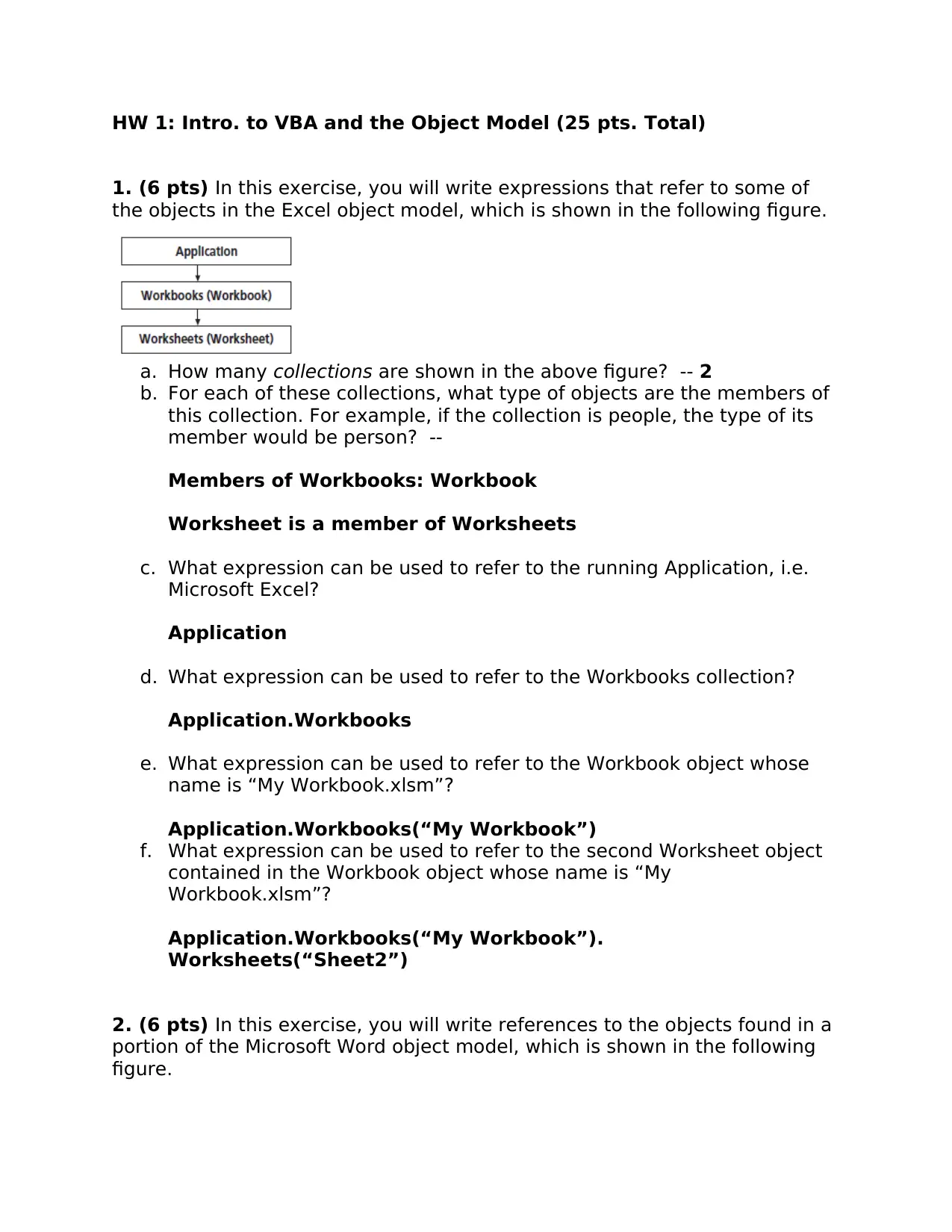
1. (6 pts) In this exercise, you will write expressions that refer to some of
the objects in the Excel object model, which is shown in the following figure.
a. How many collections are shown in the above figure? -- 2
b. For each of these collections, what type of objects are the members of
this collection. For example, if the collection is people, the type of its
member would be person? --
Members of Workbooks: Workbook
Worksheet is a member of Worksheets
c. What expression can be used to refer to the running Application, i.e.
Microsoft Excel?
Application
d. What expression can be used to refer to the Workbooks collection?
Application.Workbooks
e. What expression can be used to refer to the Workbook object whose
name is “My Workbook.xlsm”?
Application.Workbooks(“My Workbook”)
f. What expression can be used to refer to the second Worksheet object
contained in the Workbook object whose name is “My
Workbook.xlsm”?
Application.Workbooks(“My Workbook”).
Worksheets(“Sheet2”)
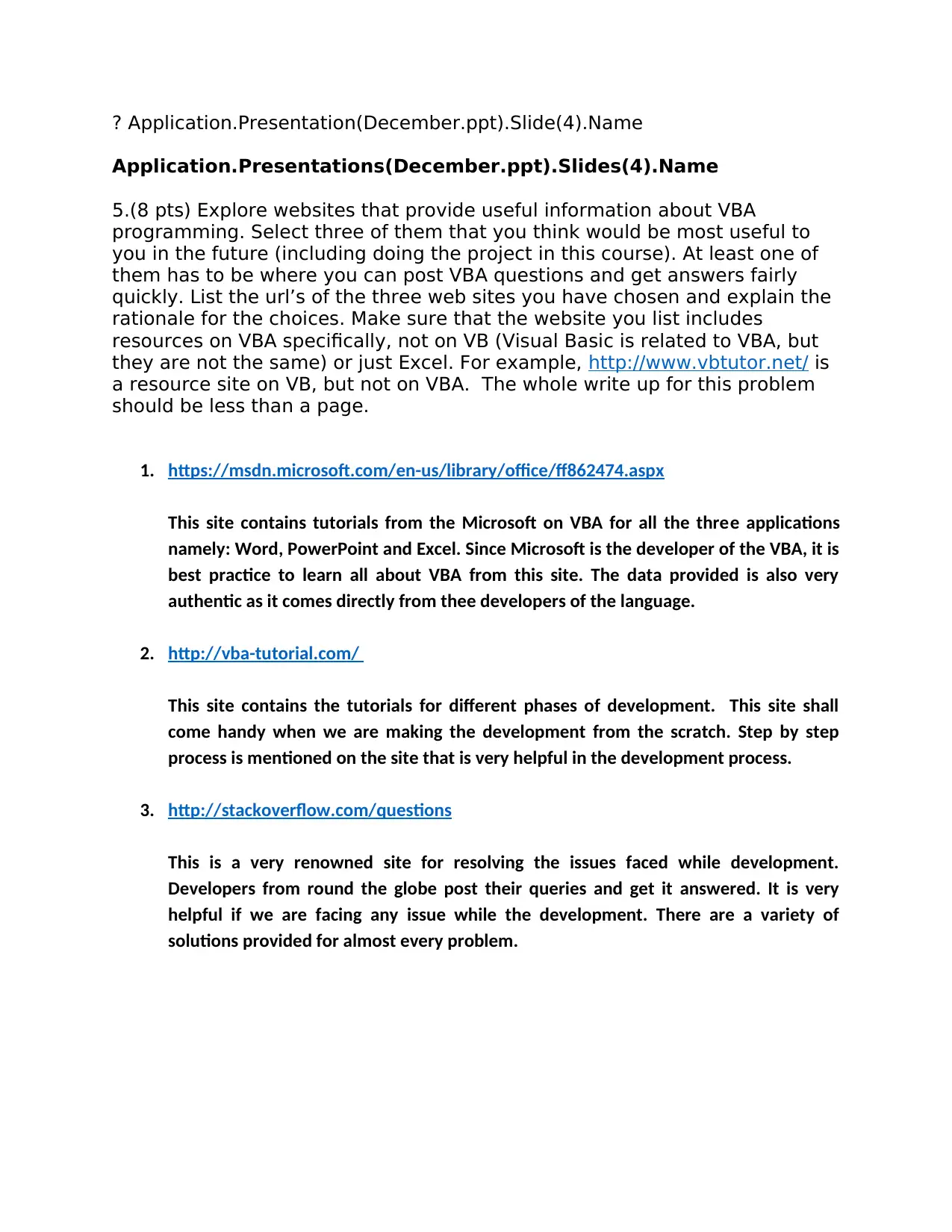
2. (6 pts) In this exercise, you will write references to the objects found in a
portion of the Microsoft Word object model, which is shown in the following
figure.
tabler-icon-diamond-filled.svg

Paraphrase This Document

Need a fresh take? Get an instant paraphrase of this document with our AI Paraphraser
Document Page
a. How many collections are shown in the above figure?
3
b. What expression can be used to refer to the running Application, i.e.
Microsoft Word?
Application
c. What expression can be used to refer to the Documents collection?
Documents
d. What expression can be used to refer to the Document whose name is
“My Document.docx” in the Documents collection?
Documents("My Document.docx")
e. What expression can be used to refer to the first sentence contained in
the Document whose name is “My Document.docx”?
Documents("My Document.docx").Sentences(1)
f. What expression can be used to refer to the second word contained in
the Document whose name is “My Document.docx”?
Documents("My Document.docx").Words(2)
3. (2 pts) Which of the following instructions will display the number of slides
contained in the third Presentation object, which is named “March.ppt”?
a. print Application.Presentations("March.ppt").Slides.Count
b. print Application.Presentations.Slides(3).Count
c. print Application.Slides.Presentations("March.ppt").Count
d. print Application.Slides.Presentations(3).Count
a
4. (3 pts) The following instruction is supposed to display the name of the
fourth slide contained in the December.ppt presentation, but it is not working
correctly. Correct the instruction.
Document Page
? Application.Presentation(December.ppt).Slide(4).Name
Application.Presentations(December.ppt).Slides(4).Name
5.(8 pts) Explore websites that provide useful information about VBA
programming. Select three of them that you think would be most useful to
you in the future (including doing the project in this course). At least one of
them has to be where you can post VBA questions and get answers fairly
quickly. List the url’s of the three web sites you have chosen and explain the
rationale for the choices. Make sure that the website you list includes
resources on VBA specifically, not on VB (Visual Basic is related to VBA, but
they are not the same) or just Excel. For example, http://www.vbtutor.net/ is
a resource site on VB, but not on VBA. The whole write up for this problem
should be less than a page.
1. https://msdn.microsoft.com/en-us/library/office/ff862474.aspx
This site contains tutorials from the Microsoft on VBA for all the three applications
namely: Word, PowerPoint and Excel. Since Microsoft is the developer of the VBA, it is
best practice to learn all about VBA from this site. The data provided is also very
authentic as it comes directly from thee developers of the language.
2. http://vba-tutorial.com/
This site contains the tutorials for different phases of development. This site shall
come handy when we are making the development from the scratch. Step by step
process is mentioned on the site that is very helpful in the development process.
3. http://stackoverflow.com/questions
This is a very renowned site for resolving the issues faced while development.
Developers from round the globe post their queries and get it answered. It is very
helpful if we are facing any issue while the development. There are a variety of
solutions provided for almost every problem.
chevron_up_icon
1 out of 3
circle_padding
hide_on_mobile
zoom_out_icon
[object Object]