Usability Case Study: Designing a Mobile App for Local Book Shop
VerifiedAdded on 2023/06/12
|15
|2258
|443
Case Study
AI Summary
This case study analyzes the interface usability of a mobile application designed for a local book shop aiming to automate its operations. The application intends to allow customers to browse book categories and make purchase selections, initially piloting on Android devices within the physical store. The design considers business requirements, such as displaying available books and prices, and user requirements, including search and filter options, user registration and login, product reviews, and cart functionality. The case study details the homepage, search feature, product page, purchase page, menu, login, registration, and account pages of the application. It also addresses non-functional requirements like security, user interaction, navigation, and efficiency, along with key assumptions made during the design process, such as social media integration and categorized search results. The design prioritizes a user-friendly interface that enhances customer satisfaction and streamlines the book shop's operations.
Running head: INTERFACE USABILITY
Interface Usability
Case Study: Book Shop
Name of the Student:
Name of the University:
Author Note
Interface Usability
Case Study: Book Shop
Name of the Student:
Name of the University:
Author Note
Paraphrase This Document
Need a fresh take? Get an instant paraphrase of this document with our AI Paraphraser

1
INTERFACE USABILITY
Table of Contents
Business and user requirements.......................................................................................................2
Assumptions....................................................................................................................................3
Interface design................................................................................................................................5
Design and Justification.................................................................................................................13
Bibliography..................................................................................................................................14
INTERFACE USABILITY
Table of Contents
Business and user requirements.......................................................................................................2
Assumptions....................................................................................................................................3
Interface design................................................................................................................................5
Design and Justification.................................................................................................................13
Bibliography..................................................................................................................................14

2
INTERFACE USABILITY
Business and user requirements
A local shop dealer sells books to the local community and the dealer wants to automate
the procedures that take place within the organization. The shop keeper is looking to design a
mobile application that would help the customers reach out to the shop keeper very easily. This
would also enhance the business of the shop keeper to a great extent. Currently for the payment
the shop keeper makes use of a teller operator. The system would be run on the mobile devices
present at the entrance of the shop. The prototype that is to be designed for the shop keeper
should be run on all the devices and should be able to provide different type of business and user
options for the shop keeper and as well as the customer of the shop.
The business requirement that the application should be able to fulfill are:
The system should be able to display different books available in the shop.
The prices of the books available in the shop should be displayed efficiently in the
application.
The system should be able to the assist the shop in performing different type of business
procedures such as payment.
The system should be able to provide an efficient interface in between the user and the
shop.
The main user requirements of the system are:
The system should be able to provide the users of the system with an efficient search and
filters option.
The system should be able to provide the search result in different categories and the user
should be able to filter the results according to the requirement of the user.
The system should also be able to provide the user with the option to register themselves
in the system and also log in to the system using the credentials that they used during the
registration.
The system should also be able to provide the customer with the option of adding a
review for the product.
The system should display the price of the items in the system. Additionally the system
should also allow the customers of the shop with the option to book the items they require
INTERFACE USABILITY
Business and user requirements
A local shop dealer sells books to the local community and the dealer wants to automate
the procedures that take place within the organization. The shop keeper is looking to design a
mobile application that would help the customers reach out to the shop keeper very easily. This
would also enhance the business of the shop keeper to a great extent. Currently for the payment
the shop keeper makes use of a teller operator. The system would be run on the mobile devices
present at the entrance of the shop. The prototype that is to be designed for the shop keeper
should be run on all the devices and should be able to provide different type of business and user
options for the shop keeper and as well as the customer of the shop.
The business requirement that the application should be able to fulfill are:
The system should be able to display different books available in the shop.
The prices of the books available in the shop should be displayed efficiently in the
application.
The system should be able to the assist the shop in performing different type of business
procedures such as payment.
The system should be able to provide an efficient interface in between the user and the
shop.
The main user requirements of the system are:
The system should be able to provide the users of the system with an efficient search and
filters option.
The system should be able to provide the search result in different categories and the user
should be able to filter the results according to the requirement of the user.
The system should also be able to provide the user with the option to register themselves
in the system and also log in to the system using the credentials that they used during the
registration.
The system should also be able to provide the customer with the option of adding a
review for the product.
The system should display the price of the items in the system. Additionally the system
should also allow the customers of the shop with the option to book the items they require
⊘ This is a preview!⊘
Do you want full access?
Subscribe today to unlock all pages.

Trusted by 1+ million students worldwide

3
INTERFACE USABILITY
to the cart. This would help the customers in gathering their requirements in a single
place.
The system should also allow the users in purchasing the product from the application.
The actual purchase of the product is to be done manually form the shop itself.
The requirements provided above are the functional requirements of the application,
however in addition to the functional requirements of the application there are some additional
non-functional requirements of the application that it has to follow. The following requirements
provided below are the non-functional requirements of the application:
Security: The design should be having an essence of security that would check the other
users from accessing information about another user and also the information about the
organization should be restricted that would prevent the organization from possibly
losing out on important information.
User Interaction: The system should have easy usability for the user. The user should be
able to interact efficiently with the systems. Additionally the system should also be able
to provide important responses for the users so that the user is able to obtain the actual
information he is looking for.
Navigation: The navigation of the system should also be designed efficiently so that
there are no problems in navigation for the users in the system. The operability of the
system depends on the design of navigation for the system.
Efficiency: The designing of the system should also be done efficiently, as the efficiency
of the actual system would depend on the design of the interfaces.
Assumptions
During the designing various constrains were provided, however design is not exactly
same with that of the provided constrains. This is because some assumptions have been made for
the design of the system as to make it look like an actual system that can be published online.
The various type of assumptions that have been made for the system include the
designing of the system according to a fully functional interface. This also involves the inclusion
of the Login and registration features in the system.
In addition to the information provided above it should also be noted that the designing of
the application is done assuming that the social media links would be enabled in the system. It is
INTERFACE USABILITY
to the cart. This would help the customers in gathering their requirements in a single
place.
The system should also allow the users in purchasing the product from the application.
The actual purchase of the product is to be done manually form the shop itself.
The requirements provided above are the functional requirements of the application,
however in addition to the functional requirements of the application there are some additional
non-functional requirements of the application that it has to follow. The following requirements
provided below are the non-functional requirements of the application:
Security: The design should be having an essence of security that would check the other
users from accessing information about another user and also the information about the
organization should be restricted that would prevent the organization from possibly
losing out on important information.
User Interaction: The system should have easy usability for the user. The user should be
able to interact efficiently with the systems. Additionally the system should also be able
to provide important responses for the users so that the user is able to obtain the actual
information he is looking for.
Navigation: The navigation of the system should also be designed efficiently so that
there are no problems in navigation for the users in the system. The operability of the
system depends on the design of navigation for the system.
Efficiency: The designing of the system should also be done efficiently, as the efficiency
of the actual system would depend on the design of the interfaces.
Assumptions
During the designing various constrains were provided, however design is not exactly
same with that of the provided constrains. This is because some assumptions have been made for
the design of the system as to make it look like an actual system that can be published online.
The various type of assumptions that have been made for the system include the
designing of the system according to a fully functional interface. This also involves the inclusion
of the Login and registration features in the system.
In addition to the information provided above it should also be noted that the designing of
the application is done assuming that the social media links would be enabled in the system. It is
Paraphrase This Document
Need a fresh take? Get an instant paraphrase of this document with our AI Paraphraser

4
INTERFACE USABILITY
also assumed that the user would be already registered with a social media website and hence,
the information can be fetch easily from the database of the website.
Some additional assumptions about the search options in the system is also made. It is
assumed that the system would be consisting of a number of categories. The search results would
be filtered according to the categories in the system. The search results should be further
filterable by the users. The system should display the price of the product when they are
produced as search results.
We keeping the above mentioned assumptions the designing of the system has been done.
INTERFACE USABILITY
also assumed that the user would be already registered with a social media website and hence,
the information can be fetch easily from the database of the website.
Some additional assumptions about the search options in the system is also made. It is
assumed that the system would be consisting of a number of categories. The search results would
be filtered according to the categories in the system. The search results should be further
filterable by the users. The system should display the price of the product when they are
produced as search results.
We keeping the above mentioned assumptions the designing of the system has been done.

5
INTERFACE USABILITY
Interface design
Homepage
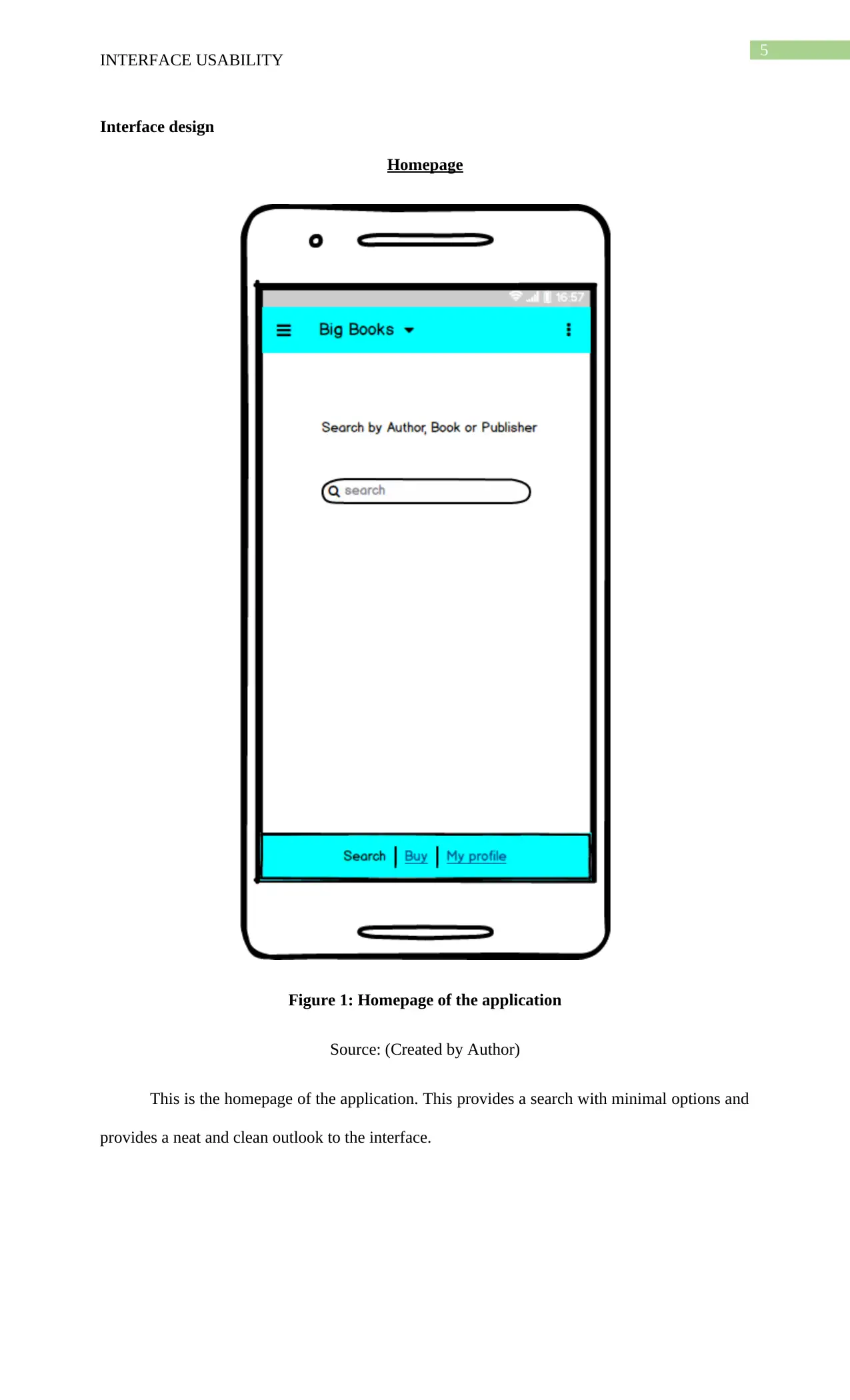
Figure 1: Homepage of the application
Source: (Created by Author)
This is the homepage of the application. This provides a search with minimal options and
provides a neat and clean outlook to the interface.
INTERFACE USABILITY
Interface design
Homepage
Figure 1: Homepage of the application
Source: (Created by Author)
This is the homepage of the application. This provides a search with minimal options and
provides a neat and clean outlook to the interface.
⊘ This is a preview!⊘
Do you want full access?
Subscribe today to unlock all pages.

Trusted by 1+ million students worldwide

6
INTERFACE USABILITY
Search
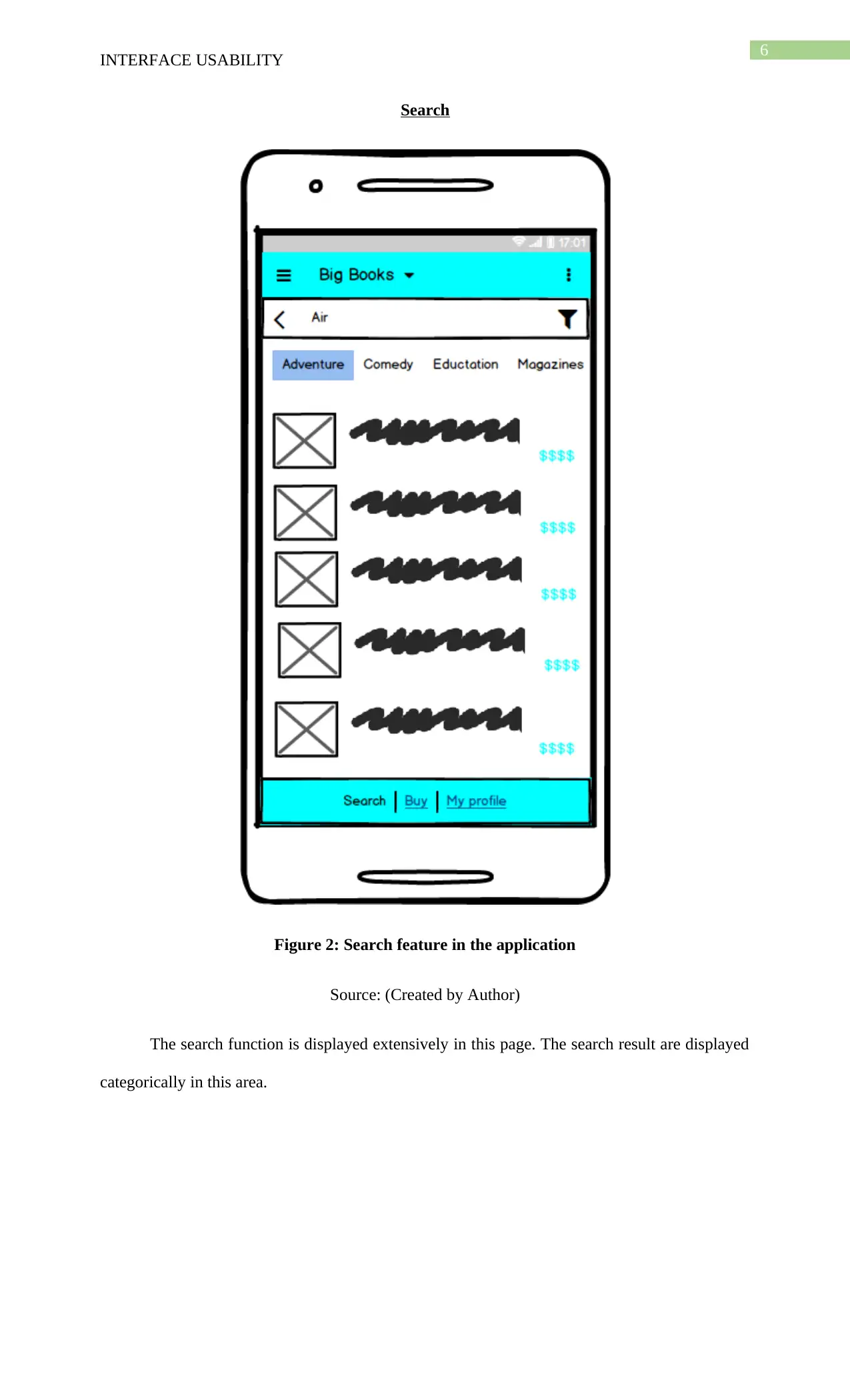
Figure 2: Search feature in the application
Source: (Created by Author)
The search function is displayed extensively in this page. The search result are displayed
categorically in this area.
INTERFACE USABILITY
Search
Figure 2: Search feature in the application
Source: (Created by Author)
The search function is displayed extensively in this page. The search result are displayed
categorically in this area.
Paraphrase This Document
Need a fresh take? Get an instant paraphrase of this document with our AI Paraphraser

7
INTERFACE USABILITY
Product
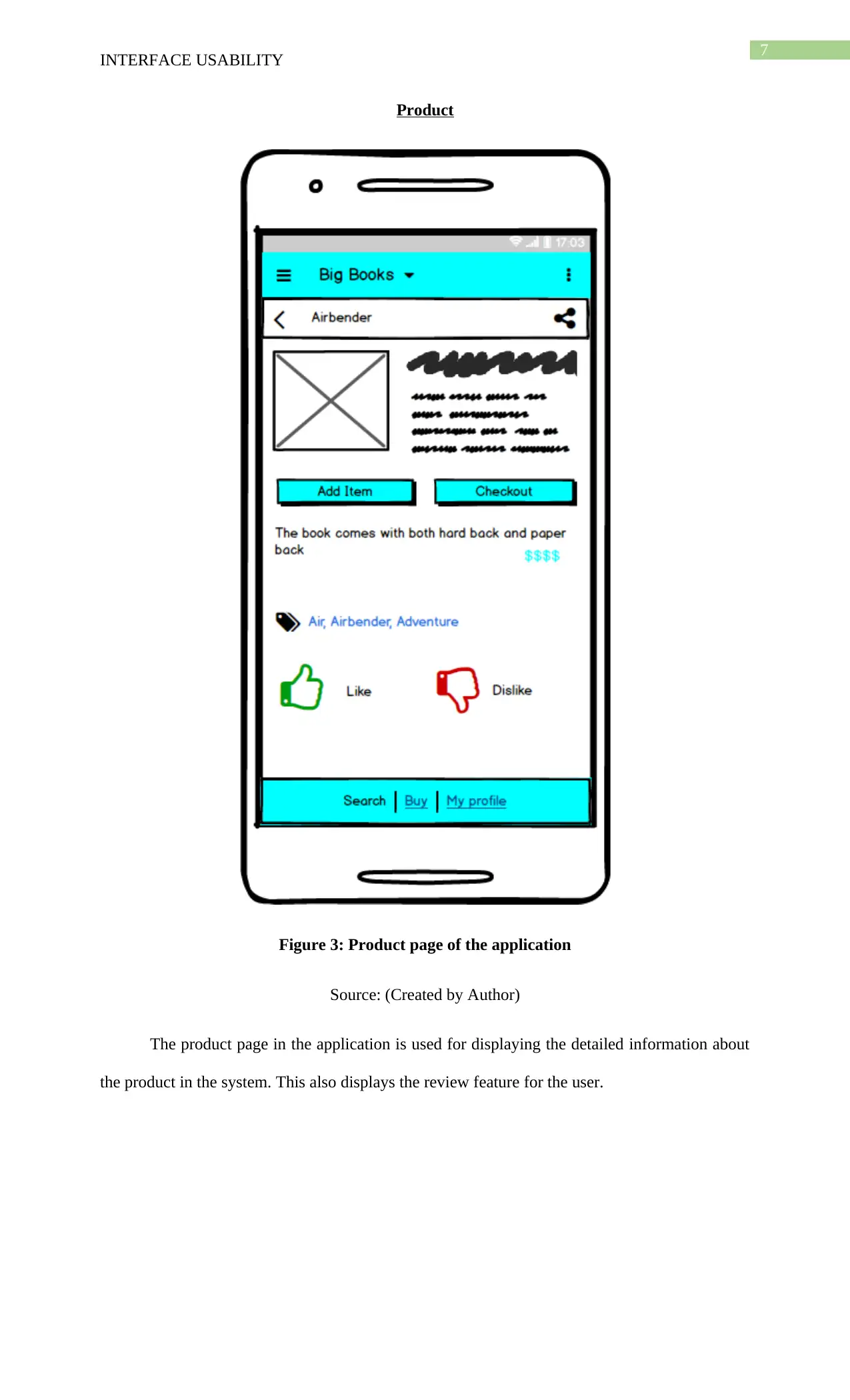
Figure 3: Product page of the application
Source: (Created by Author)
The product page in the application is used for displaying the detailed information about
the product in the system. This also displays the review feature for the user.
INTERFACE USABILITY
Product
Figure 3: Product page of the application
Source: (Created by Author)
The product page in the application is used for displaying the detailed information about
the product in the system. This also displays the review feature for the user.

8
INTERFACE USABILITY
Purchase
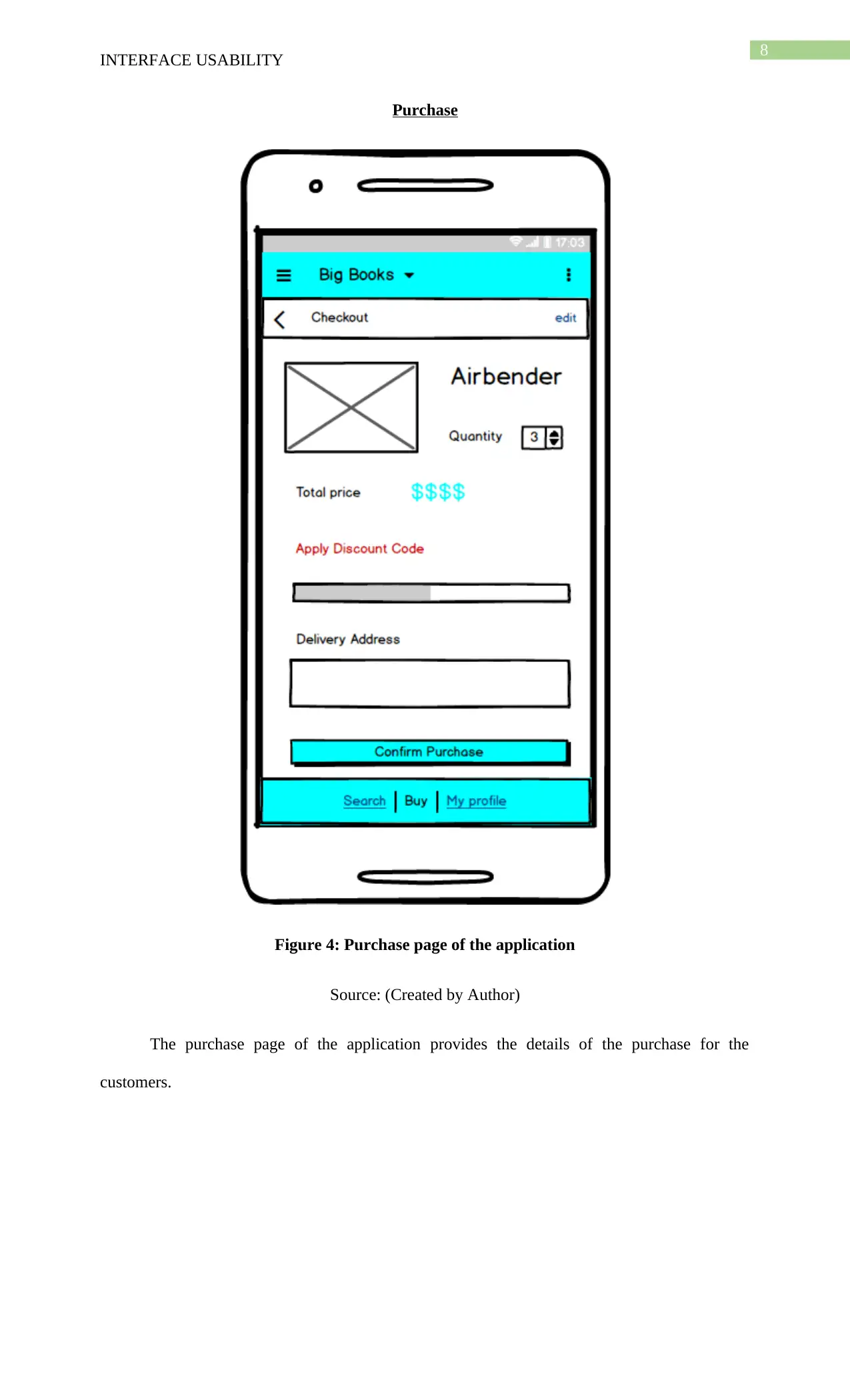
Figure 4: Purchase page of the application
Source: (Created by Author)
The purchase page of the application provides the details of the purchase for the
customers.
INTERFACE USABILITY
Purchase
Figure 4: Purchase page of the application
Source: (Created by Author)
The purchase page of the application provides the details of the purchase for the
customers.
⊘ This is a preview!⊘
Do you want full access?
Subscribe today to unlock all pages.

Trusted by 1+ million students worldwide

9
INTERFACE USABILITY
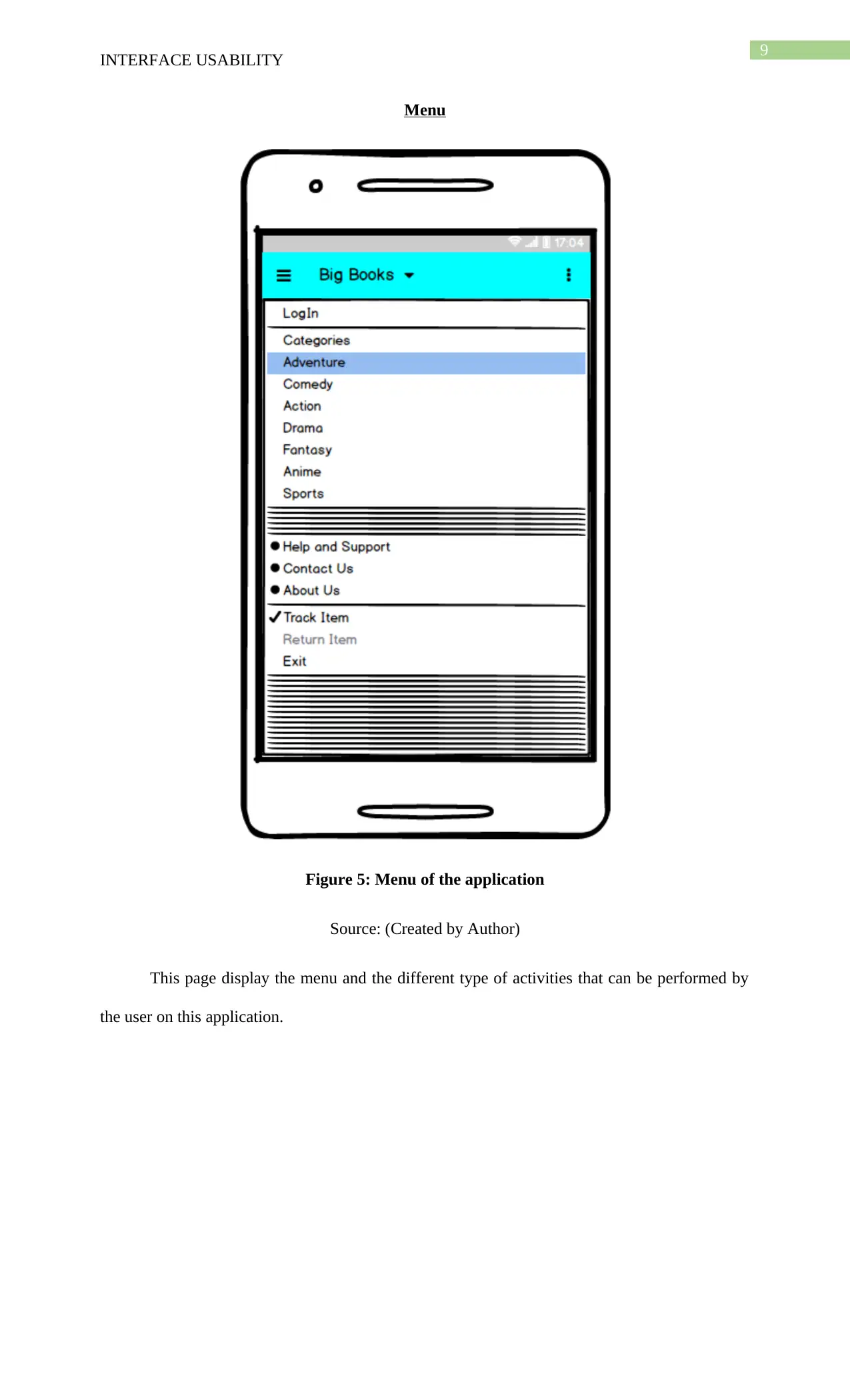
Menu
Figure 5: Menu of the application
Source: (Created by Author)
This page display the menu and the different type of activities that can be performed by
the user on this application.
INTERFACE USABILITY
Menu
Figure 5: Menu of the application
Source: (Created by Author)
This page display the menu and the different type of activities that can be performed by
the user on this application.
Paraphrase This Document
Need a fresh take? Get an instant paraphrase of this document with our AI Paraphraser

10
INTERFACE USABILITY
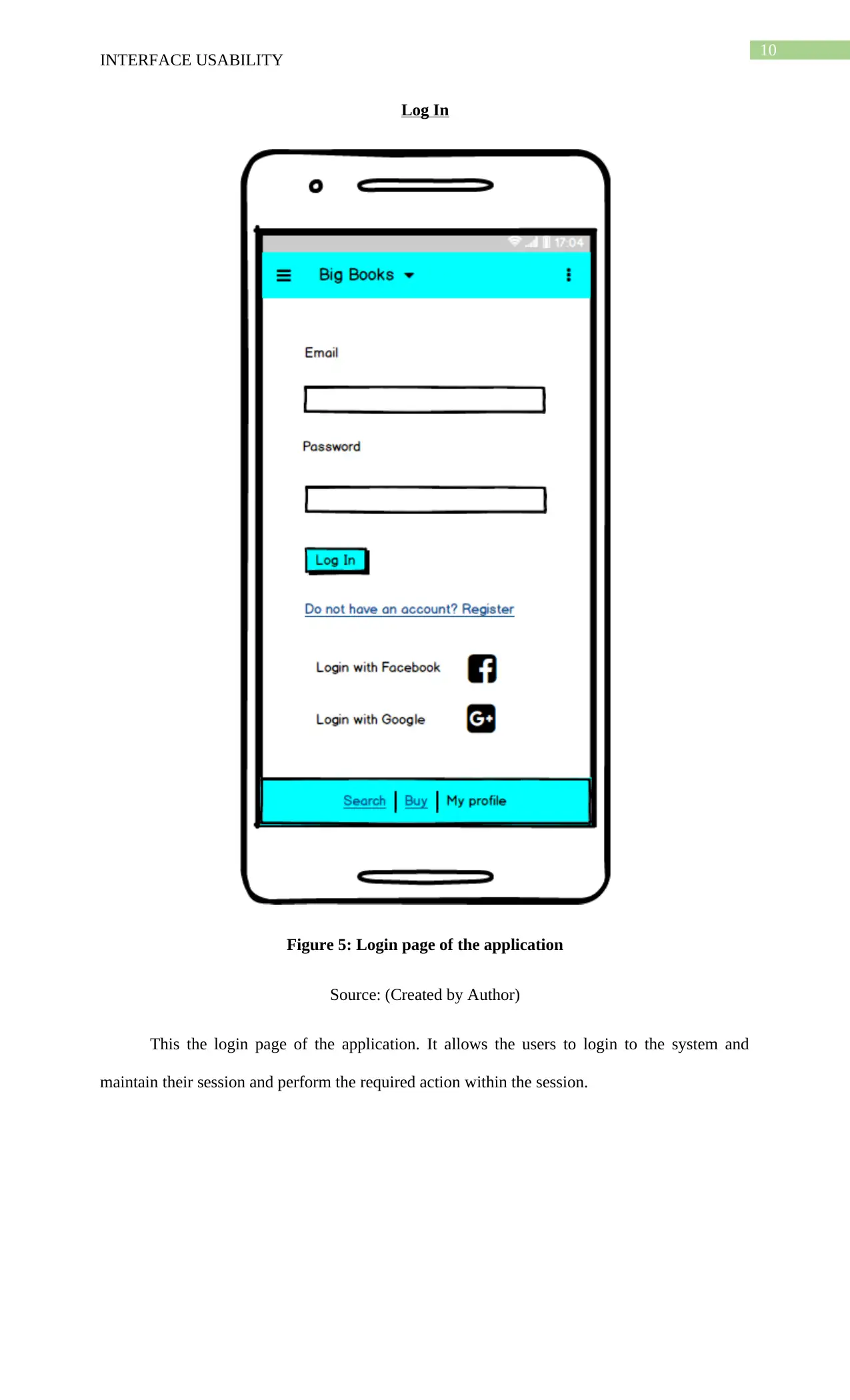
Log In
Figure 5: Login page of the application
Source: (Created by Author)
This the login page of the application. It allows the users to login to the system and
maintain their session and perform the required action within the session.
INTERFACE USABILITY
Log In
Figure 5: Login page of the application
Source: (Created by Author)
This the login page of the application. It allows the users to login to the system and
maintain their session and perform the required action within the session.

11
INTERFACE USABILITY
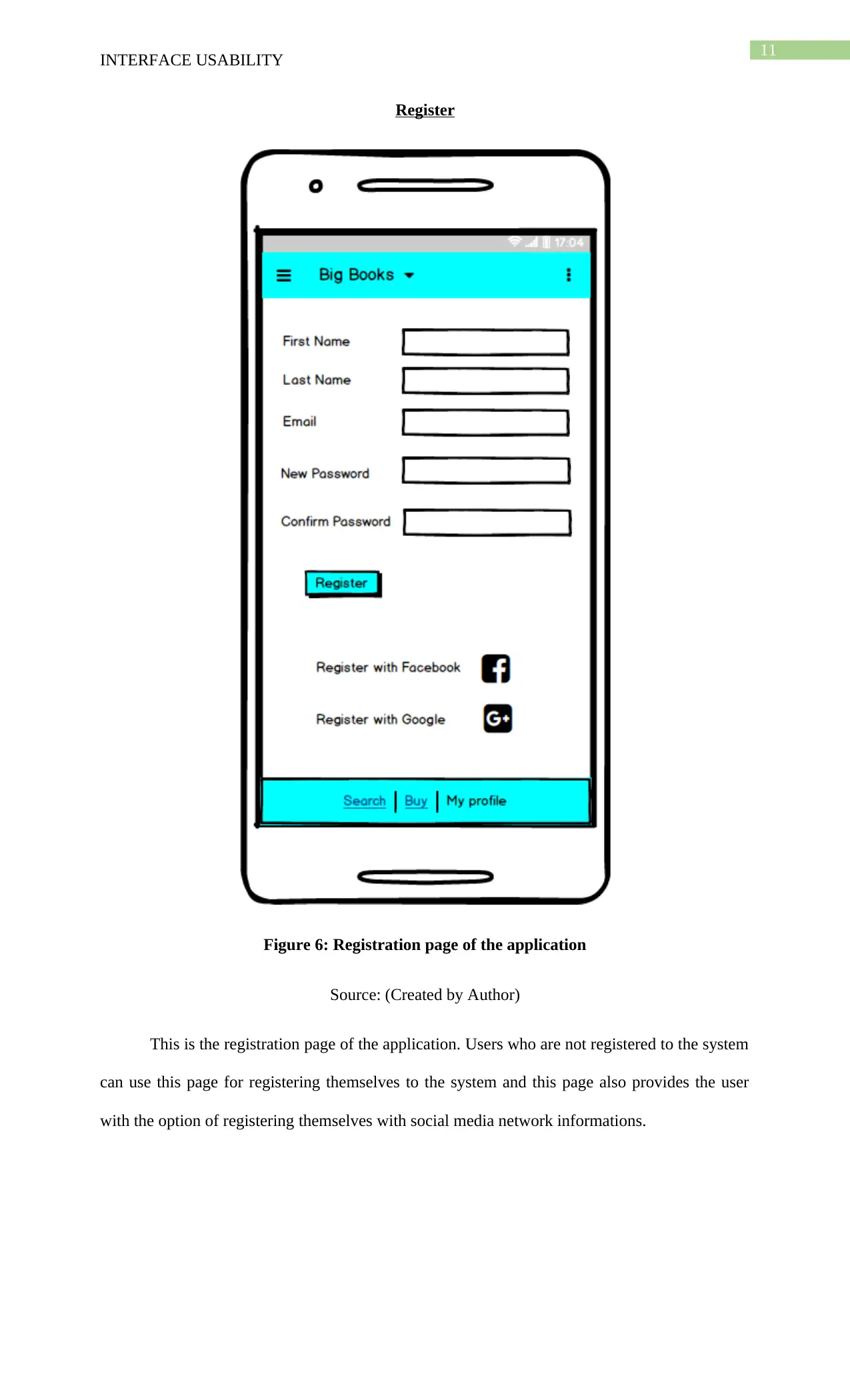
Register
Figure 6: Registration page of the application
Source: (Created by Author)
This is the registration page of the application. Users who are not registered to the system
can use this page for registering themselves to the system and this page also provides the user
with the option of registering themselves with social media network informations.
INTERFACE USABILITY
Register
Figure 6: Registration page of the application
Source: (Created by Author)
This is the registration page of the application. Users who are not registered to the system
can use this page for registering themselves to the system and this page also provides the user
with the option of registering themselves with social media network informations.
⊘ This is a preview!⊘
Do you want full access?
Subscribe today to unlock all pages.

Trusted by 1+ million students worldwide
1 out of 15
Related Documents
Your All-in-One AI-Powered Toolkit for Academic Success.
+13062052269
info@desklib.com
Available 24*7 on WhatsApp / Email
Unlock your academic potential
Copyright © 2020–2026 A2Z Services. All Rights Reserved. Developed and managed by ZUCOL.