Java Program: Implementing a Christmas Parcel Delivery System
VerifiedAdded on 2024/04/11
|18
|1815
|327
Practical Assignment
AI Summary
This document presents a Java assignment solution for a Christmas Parcel Delivery System. The system functions as a delivery calculator, determining travel surcharges based on parcel details, distance, and transportation costs per kilometer. The solution includes comprehensive design documentation, detailing algorithm development with a clear step-by-step process for calculating delivery costs, accompanied by a flow diagram for visual representation. The program development phase covers base, standard, and advanced functionalities, including welcome messages, menu displays, cost input and storage, parcel detail management, cost calculation, and system exit. Standard functionalities involve coding conventions and modularization for code reusability and clarity. Advanced features incorporate date calculations for delivery estimates. The testing phase validates both base and advanced functionalities against expected results, ensuring the system's accuracy and reliability. The assignment also includes references to external resources used in the development process. Desklib offers this and many other solved assignments.
JAVA ASSIGNMENT
Paraphrase This Document
Need a fresh take? Get an instant paraphrase of this document with our AI Paraphraser

Contents
Stage 1: Design Documentation..................................................................................................................2
Algorithm development describing the function of the program.............................................................2
Flow Diagram:.....................................................................................................................................4
Documented test cases to validate program:............................................................................................4
Stage 2: Program Development...................................................................................................................6
Base Functionality:..................................................................................................................................6
Standard Functionality...........................................................................................................................11
Advanced Functionalities......................................................................................................................14
Stage 3: Testing.........................................................................................................................................15
References.................................................................................................................................................17
List of figures:
Figure 1 Flow Diagram of the system..........................................................................................................4
Figure 2 Welcome message code.................................................................................................................6
Figure 3 Welcome message output..............................................................................................................6
Figure 4 Menu Display code........................................................................................................................7
Figure 5 Menu Display output.....................................................................................................................7
Figure 6 Transport costs code......................................................................................................................8
Figure 7 Transport costs output...................................................................................................................8
Figure 8 Parcel details code.........................................................................................................................9
Figure 9 Parcel details output......................................................................................................................9
Figure 10 Parcel Delivery costs code.........................................................................................................10
Figure 11 Parcel Delivery costs output......................................................................................................10
Figure 12 Exit message display output......................................................................................................11
Figure 13 Coding conventions...................................................................................................................11
Figure 14 Module: Main............................................................................................................................12
Figure 15 Module: Setup_Cost_Per_KM..................................................................................................12
Figure 16 Module: EnterParcel..................................................................................................................13
Figure 17 Module: Display_Parcel_delivery_Costs..................................................................................13
Figure 18 Advanced functionality output..................................................................................................14
Figure 19 Advanced Functionality code....................................................................................................14
1
Stage 1: Design Documentation..................................................................................................................2
Algorithm development describing the function of the program.............................................................2
Flow Diagram:.....................................................................................................................................4
Documented test cases to validate program:............................................................................................4
Stage 2: Program Development...................................................................................................................6
Base Functionality:..................................................................................................................................6
Standard Functionality...........................................................................................................................11
Advanced Functionalities......................................................................................................................14
Stage 3: Testing.........................................................................................................................................15
References.................................................................................................................................................17
List of figures:
Figure 1 Flow Diagram of the system..........................................................................................................4
Figure 2 Welcome message code.................................................................................................................6
Figure 3 Welcome message output..............................................................................................................6
Figure 4 Menu Display code........................................................................................................................7
Figure 5 Menu Display output.....................................................................................................................7
Figure 6 Transport costs code......................................................................................................................8
Figure 7 Transport costs output...................................................................................................................8
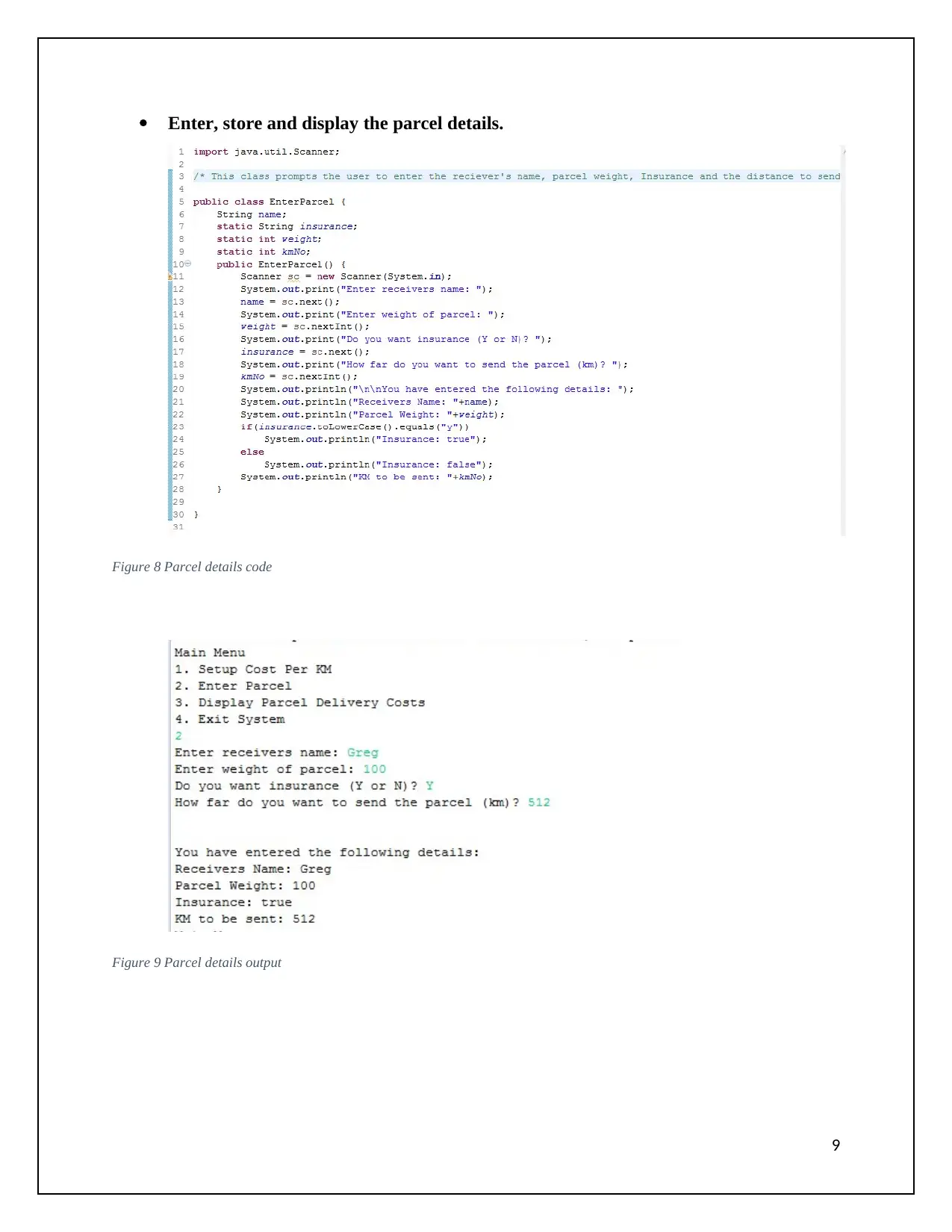
Figure 8 Parcel details code.........................................................................................................................9
Figure 9 Parcel details output......................................................................................................................9
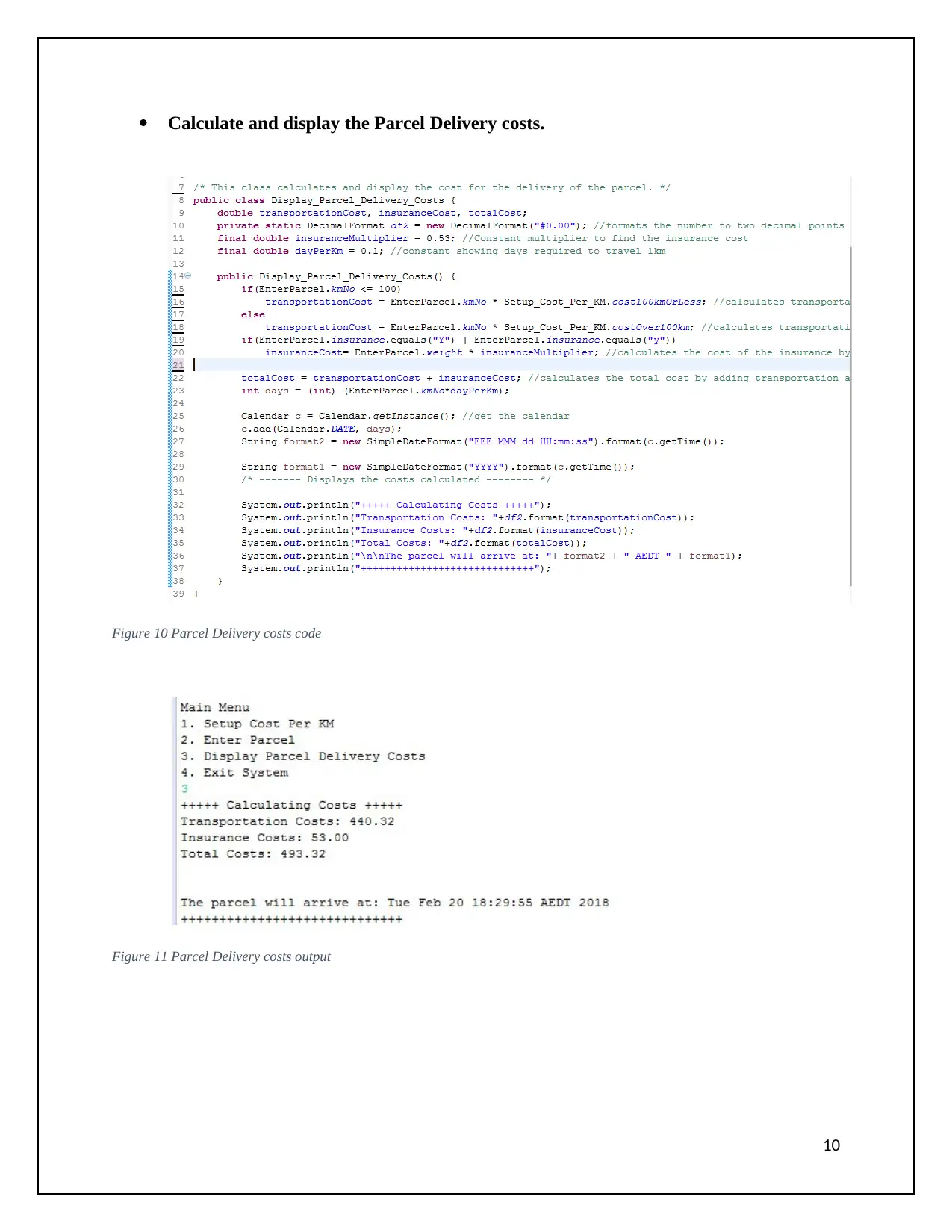
Figure 10 Parcel Delivery costs code.........................................................................................................10
Figure 11 Parcel Delivery costs output......................................................................................................10
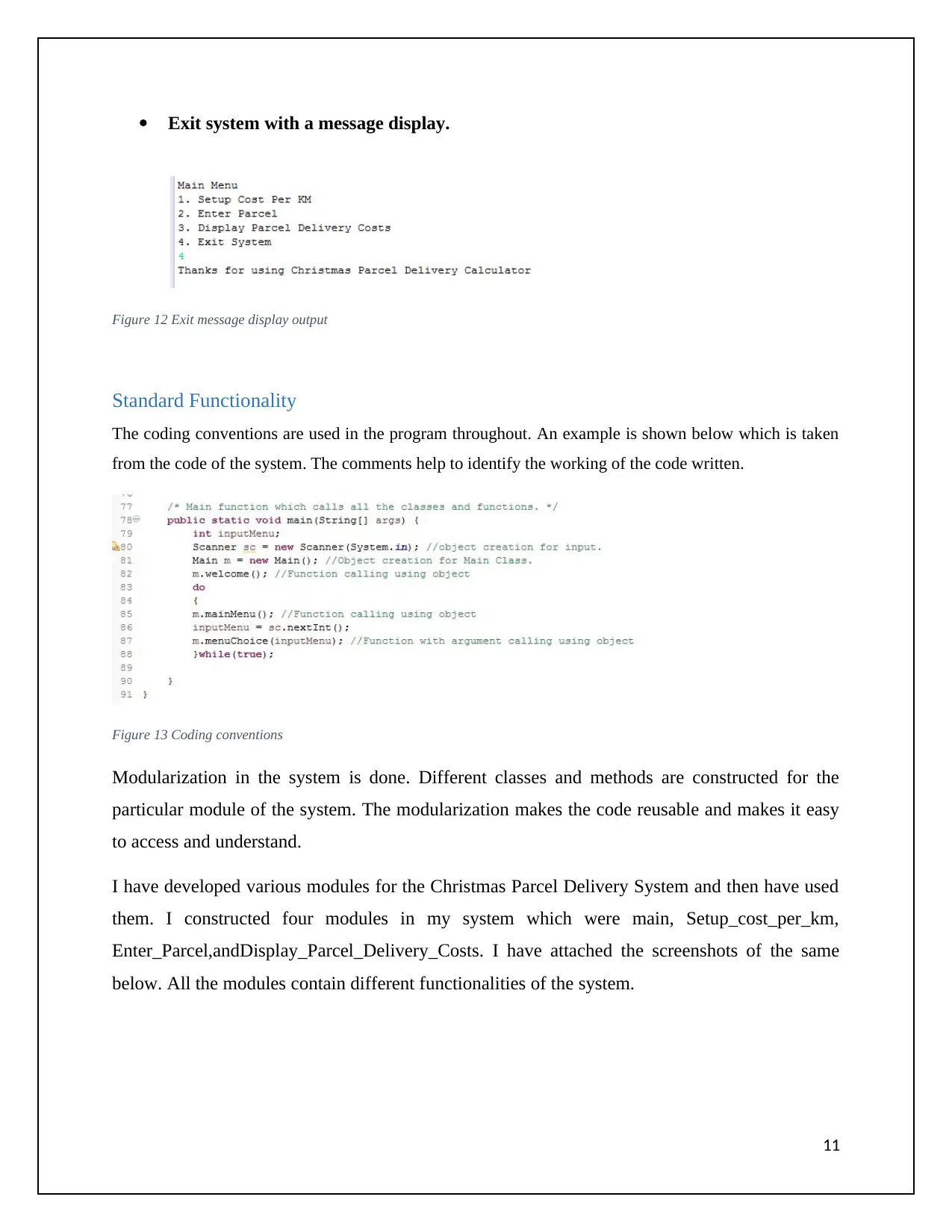
Figure 12 Exit message display output......................................................................................................11
Figure 13 Coding conventions...................................................................................................................11
Figure 14 Module: Main............................................................................................................................12
Figure 15 Module: Setup_Cost_Per_KM..................................................................................................12
Figure 16 Module: EnterParcel..................................................................................................................13
Figure 17 Module: Display_Parcel_delivery_Costs..................................................................................13
Figure 18 Advanced functionality output..................................................................................................14
Figure 19 Advanced Functionality code....................................................................................................14
1

Stage 1: Design Documentation
Algorithm development describing the function of the program
The Christmas Parcel Delivery system is basically a Christmas parcel Delivery Calculator which
calculates the travel surcharge. The details of the parcel, the distance of the parcel to send and the
transportation cost per km is taken as an input from the user. Various operations and calculations are then
done on the input and the final delivery cost is displayed to the user.
An algorithm is defined as the set of steps describing the solution for a specific problem of the system.
Before starting with the coding part, I first designed the algorithm for the system to be designed keeping
in mind all the requirements of the system. The designed algorithm helped me a lot while the
development of the system. It helped me to be clear in the coding and helped in developing the code for
the system faster (Vogella, 2016).
Algorithm:
1) Display the welcome message for the Christmas Parcel Delivery System.
2) Loop: while (true) //to repeat the menu each time the user select and choice and choice gets
completed
3) Display the main menu having 4 choices.
4) Read the user input for the choice from themain menu.
5) If(user choice == 1) then
6) Reads the user input for cost per km for a package to be sent 100km or less.
7) Read the user input for cost per km for a package to be sent over 100km.
8) Display and store the user input.
9) End if
10) Else If(user choice == 2) then
11) Read the user input for receiver’s name.
12) Read user input for theweight of theparcel.
13) Read user choice for insurance(y/n)
14) Read user input for distance of the parcel to be send
15) Display and store the user input.
16) End else if
17) Else if (user choice == 3) then
18) If(distance of the parcel <= 100) then
19) Calculate transportation cost = (distance of the parcel to be sent)*(cost per km for 100km or less)
2
Algorithm development describing the function of the program
The Christmas Parcel Delivery system is basically a Christmas parcel Delivery Calculator which
calculates the travel surcharge. The details of the parcel, the distance of the parcel to send and the
transportation cost per km is taken as an input from the user. Various operations and calculations are then
done on the input and the final delivery cost is displayed to the user.
An algorithm is defined as the set of steps describing the solution for a specific problem of the system.
Before starting with the coding part, I first designed the algorithm for the system to be designed keeping
in mind all the requirements of the system. The designed algorithm helped me a lot while the
development of the system. It helped me to be clear in the coding and helped in developing the code for
the system faster (Vogella, 2016).
Algorithm:
1) Display the welcome message for the Christmas Parcel Delivery System.
2) Loop: while (true) //to repeat the menu each time the user select and choice and choice gets
completed
3) Display the main menu having 4 choices.
4) Read the user input for the choice from themain menu.
5) If(user choice == 1) then
6) Reads the user input for cost per km for a package to be sent 100km or less.
7) Read the user input for cost per km for a package to be sent over 100km.
8) Display and store the user input.
9) End if
10) Else If(user choice == 2) then
11) Read the user input for receiver’s name.
12) Read user input for theweight of theparcel.
13) Read user choice for insurance(y/n)
14) Read user input for distance of the parcel to be send
15) Display and store the user input.
16) End else if
17) Else if (user choice == 3) then
18) If(distance of the parcel <= 100) then
19) Calculate transportation cost = (distance of the parcel to be sent)*(cost per km for 100km or less)
2
⊘ This is a preview!⊘
Do you want full access?
Subscribe today to unlock all pages.

Trusted by 1+ million students worldwide

20) Else
21) Calculate transportation cost = (distance of the parcel to be send)*(cost per km for distance over
100km)
22) End if
23) If(Insurance choice == (‘Y’ | ‘y’)) then
24) Calculate Insurance cost = weight of parcel * 0.53
25) End if
26) Calculate total cost = transportation cost + Insurance cost
27) Display the calculated transportation cost, insurance cost and total cost to the user.
28) End else if
29) Else if(choice == 4) then
30) Display the thank you message
31) Exit from the system
32) End else if
33) End while
3
21) Calculate transportation cost = (distance of the parcel to be send)*(cost per km for distance over
100km)
22) End if
23) If(Insurance choice == (‘Y’ | ‘y’)) then
24) Calculate Insurance cost = weight of parcel * 0.53
25) End if
26) Calculate total cost = transportation cost + Insurance cost
27) Display the calculated transportation cost, insurance cost and total cost to the user.
28) End else if
29) Else if(choice == 4) then
30) Display the thank you message
31) Exit from the system
32) End else if
33) End while
3
Paraphrase This Document
Need a fresh take? Get an instant paraphrase of this document with our AI Paraphraser

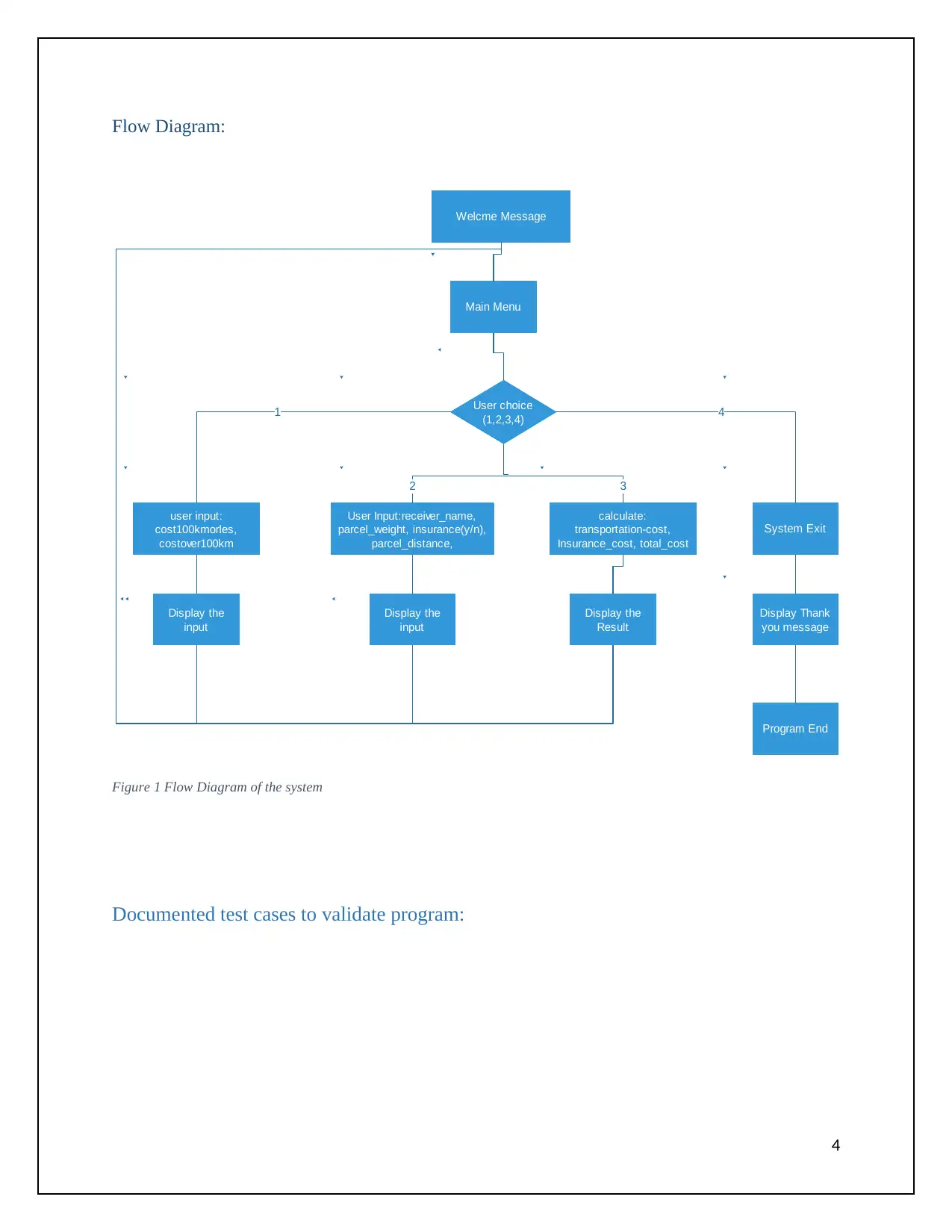
Flow Diagram:
Welcme Message
Main Menu
User choice
(1,2,3,4)
user input:
cost100kmorles,
costover100km
User Input:receiver_name,
parcel_weight, insurance(y/n),
parcel_distance,
calculate:
transportation-cost,
Insurance_cost, total_cost
System Exit
Display the
input
Display the
input
Display the
Result
Display Thank
you message
1
32
4
Program End
Figure 1 Flow Diagram of the system
Documented test cases to validate program:
4
Welcme Message
Main Menu
User choice
(1,2,3,4)
user input:
cost100kmorles,
costover100km
User Input:receiver_name,
parcel_weight, insurance(y/n),
parcel_distance,
calculate:
transportation-cost,
Insurance_cost, total_cost
System Exit
Display the
input
Display the
input
Display the
Result
Display Thank
you message
1
32
4
Program End
Figure 1 Flow Diagram of the system
Documented test cases to validate program:
4

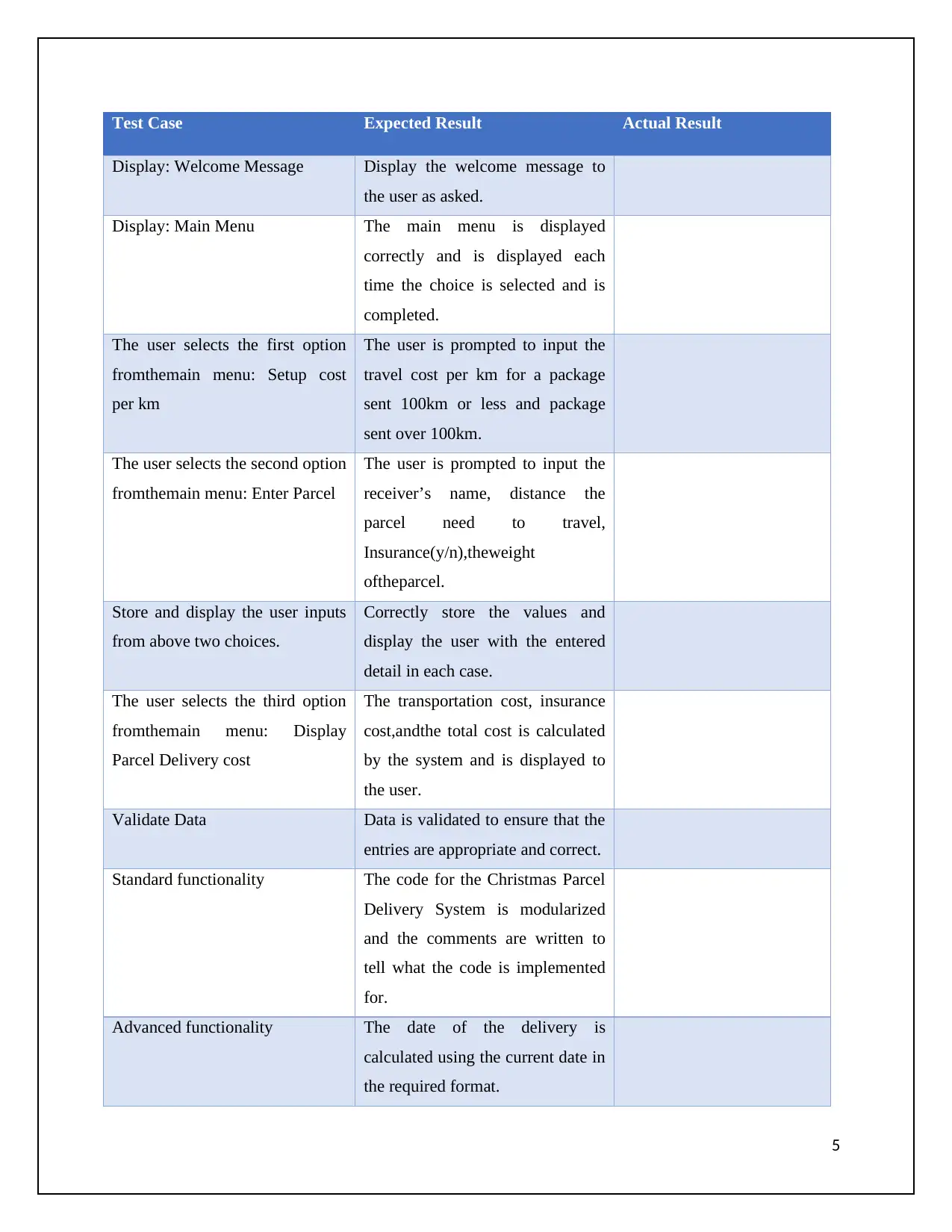
Test Case Expected Result Actual Result
Display: Welcome Message Display the welcome message to
the user as asked.
Display: Main Menu The main menu is displayed
correctly and is displayed each
time the choice is selected and is
completed.
The user selects the first option
fromthemain menu: Setup cost
per km
The user is prompted to input the
travel cost per km for a package
sent 100km or less and package
sent over 100km.
The user selects the second option
fromthemain menu: Enter Parcel
The user is prompted to input the
receiver’s name, distance the
parcel need to travel,
Insurance(y/n),theweight
oftheparcel.
Store and display the user inputs
from above two choices.
Correctly store the values and
display the user with the entered
detail in each case.
The user selects the third option
fromthemain menu: Display
Parcel Delivery cost
The transportation cost, insurance
cost,andthe total cost is calculated
by the system and is displayed to
the user.
Validate Data Data is validated to ensure that the
entries are appropriate and correct.
Standard functionality The code for the Christmas Parcel
Delivery System is modularized
and the comments are written to
tell what the code is implemented
for.
Advanced functionality The date of the delivery is
calculated using the current date in
the required format.
5
Display: Welcome Message Display the welcome message to
the user as asked.
Display: Main Menu The main menu is displayed
correctly and is displayed each
time the choice is selected and is
completed.
The user selects the first option
fromthemain menu: Setup cost
per km
The user is prompted to input the
travel cost per km for a package
sent 100km or less and package
sent over 100km.
The user selects the second option
fromthemain menu: Enter Parcel
The user is prompted to input the
receiver’s name, distance the
parcel need to travel,
Insurance(y/n),theweight
oftheparcel.
Store and display the user inputs
from above two choices.
Correctly store the values and
display the user with the entered
detail in each case.
The user selects the third option
fromthemain menu: Display
Parcel Delivery cost
The transportation cost, insurance
cost,andthe total cost is calculated
by the system and is displayed to
the user.
Validate Data Data is validated to ensure that the
entries are appropriate and correct.
Standard functionality The code for the Christmas Parcel
Delivery System is modularized
and the comments are written to
tell what the code is implemented
for.
Advanced functionality The date of the delivery is
calculated using the current date in
the required format.
5
⊘ This is a preview!⊘
Do you want full access?
Subscribe today to unlock all pages.

Trusted by 1+ million students worldwide

Stage 2: Program Development
Base Functionality:
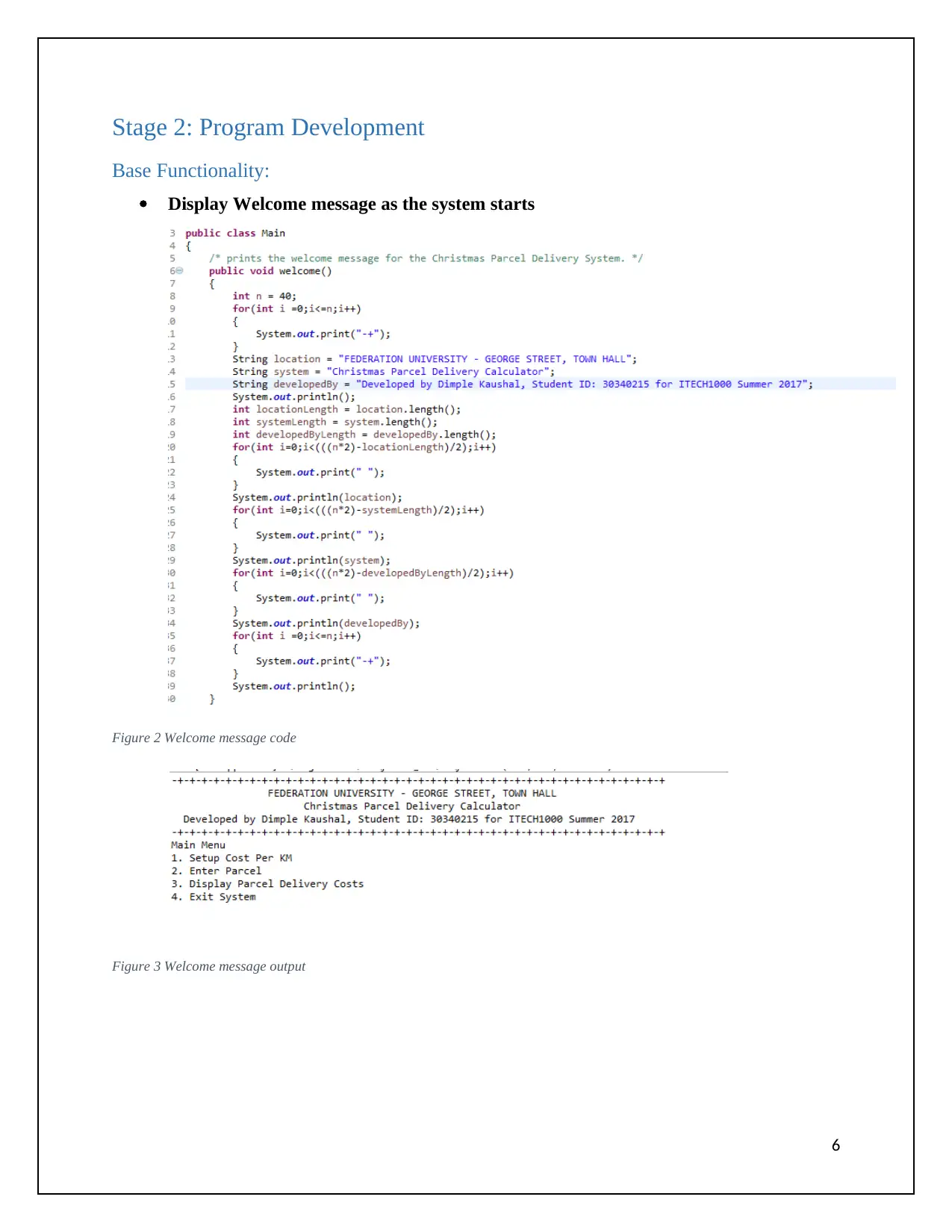
Display Welcome message as the system starts
Figure 2 Welcome message code
Figure 3 Welcome message output
6
Base Functionality:
Display Welcome message as the system starts
Figure 2 Welcome message code
Figure 3 Welcome message output
6
Paraphrase This Document
Need a fresh take? Get an instant paraphrase of this document with our AI Paraphraser

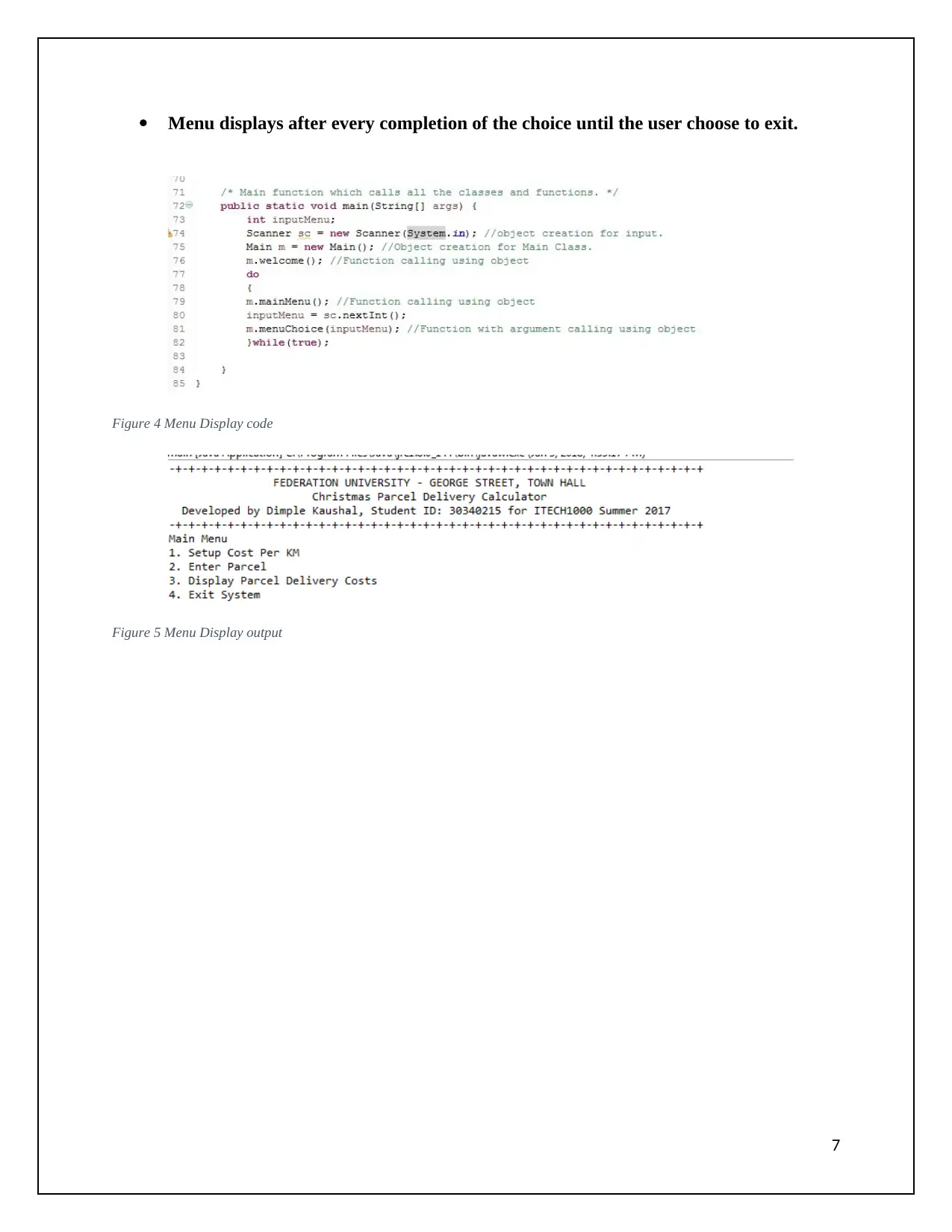
Menu displays after every completion of the choice until the user choose to exit.
Figure 4 Menu Display code
Figure 5 Menu Display output
7
Figure 4 Menu Display code
Figure 5 Menu Display output
7

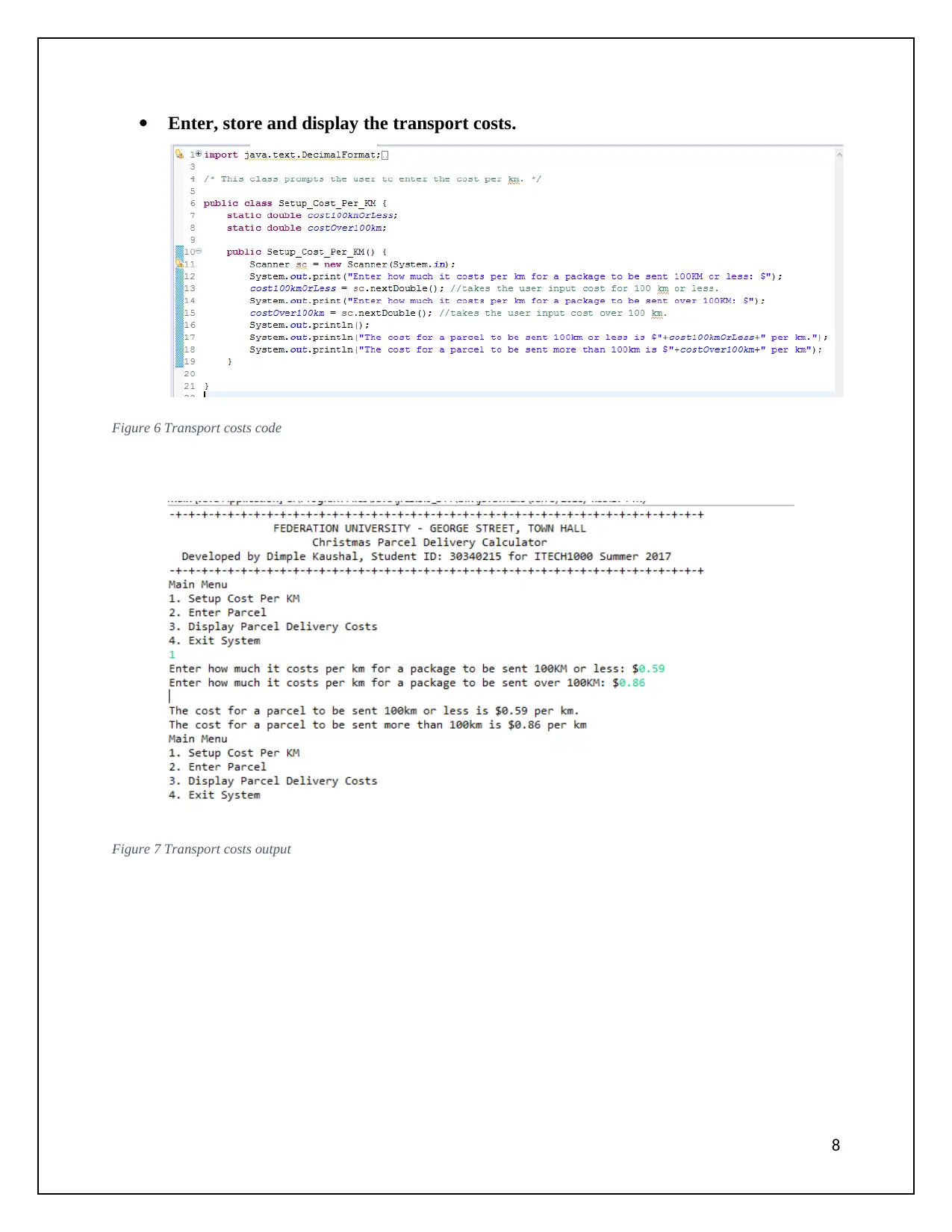
Enter, store and display the transport costs.
Figure 6 Transport costs code
Figure 7 Transport costs output
8
Figure 6 Transport costs code
Figure 7 Transport costs output
8
⊘ This is a preview!⊘
Do you want full access?
Subscribe today to unlock all pages.

Trusted by 1+ million students worldwide

Enter, store and display the parcel details.
Figure 8 Parcel details code
Figure 9 Parcel details output
9
Figure 8 Parcel details code
Figure 9 Parcel details output
9
Paraphrase This Document
Need a fresh take? Get an instant paraphrase of this document with our AI Paraphraser

Calculate and display the Parcel Delivery costs.
Figure 10 Parcel Delivery costs code
Figure 11 Parcel Delivery costs output
10
Figure 10 Parcel Delivery costs code
Figure 11 Parcel Delivery costs output
10

Exit system with a message display.
Figure 12 Exit message display output
Standard Functionality
The coding conventions are used in the program throughout. An example is shown below which is taken
from the code of the system. The comments help to identify the working of the code written.
Figure 13 Coding conventions
Modularization in the system is done. Different classes and methods are constructed for the
particular module of the system. The modularization makes the code reusable and makes it easy
to access and understand.
I have developed various modules for the Christmas Parcel Delivery System and then have used
them. I constructed four modules in my system which were main, Setup_cost_per_km,
Enter_Parcel,andDisplay_Parcel_Delivery_Costs. I have attached the screenshots of the same
below. All the modules contain different functionalities of the system.
11
Figure 12 Exit message display output
Standard Functionality
The coding conventions are used in the program throughout. An example is shown below which is taken
from the code of the system. The comments help to identify the working of the code written.
Figure 13 Coding conventions
Modularization in the system is done. Different classes and methods are constructed for the
particular module of the system. The modularization makes the code reusable and makes it easy
to access and understand.
I have developed various modules for the Christmas Parcel Delivery System and then have used
them. I constructed four modules in my system which were main, Setup_cost_per_km,
Enter_Parcel,andDisplay_Parcel_Delivery_Costs. I have attached the screenshots of the same
below. All the modules contain different functionalities of the system.
11
⊘ This is a preview!⊘
Do you want full access?
Subscribe today to unlock all pages.

Trusted by 1+ million students worldwide
1 out of 18
Related Documents
Your All-in-One AI-Powered Toolkit for Academic Success.
+13062052269
info@desklib.com
Available 24*7 on WhatsApp / Email
Unlock your academic potential
Copyright © 2020–2026 A2Z Services. All Rights Reserved. Developed and managed by ZUCOL.