Web Development Assignment: JavaScript REST API and Weather App

Verified

Added on  2022/08/26

|8
|831
|29
Homework Assignment
AI Summary
This assignment solution showcases the development of web applications using JavaScript and REST APIs. The first part focuses on building a weather application that fetches data from a weather service API (Darksky API) to display the current weather conditions of Calgary. The second part involves creating a user registration form for a fictional BVC Sport Club, utilizing a REST API approach for data transmission. This includes front-end JavaScript code to collect form data and back-end PHP and MySQL code to handle the data storage and retrieval. The solution demonstrates the use of vanilla JavaScript, PHP, and MySQL for a complete web application with API integration. The third part fetches and displays registered user details in a table format using a read method added to the model. The assignment covers various aspects of web development, including API integration, data fetching, form handling, and database interactions using PHP and MySQL. The provided code snippets illustrate the implementation of these features, including error handling, data validation, and response formatting in JSON.
Document Page
Running head: JAVASCRIPT REST API
JavaScript REST API
Name of the Student
Name of the University
Author’s note:
tabler-icon-diamond-filled.svg

Paraphrase This Document

Need a fresh take? Get an instant paraphrase of this document with our AI Paraphraser
Document Page
1JAVASCRIPT REST API
Question1:
In this section a weather app has been developed using fetch api. Darksky API service
has been used for collecting data. In order to access the data through API, registration needs to
be completed. The URL will have access key, distinct for individual user, along with latitude and
longitude of the place. In this project weather data of Calgary has been fetched. Google search
has been used to get the latitude and longitude of Calgary. The API accepts latitude and
longitude in order, otherwise the API will not work. Plain JavaScript has been used for
developing the project.
Output:
Document Page
2JAVASCRIPT REST API
Darksky Website:
Document Page
3JAVASCRIPT REST API
Question2:
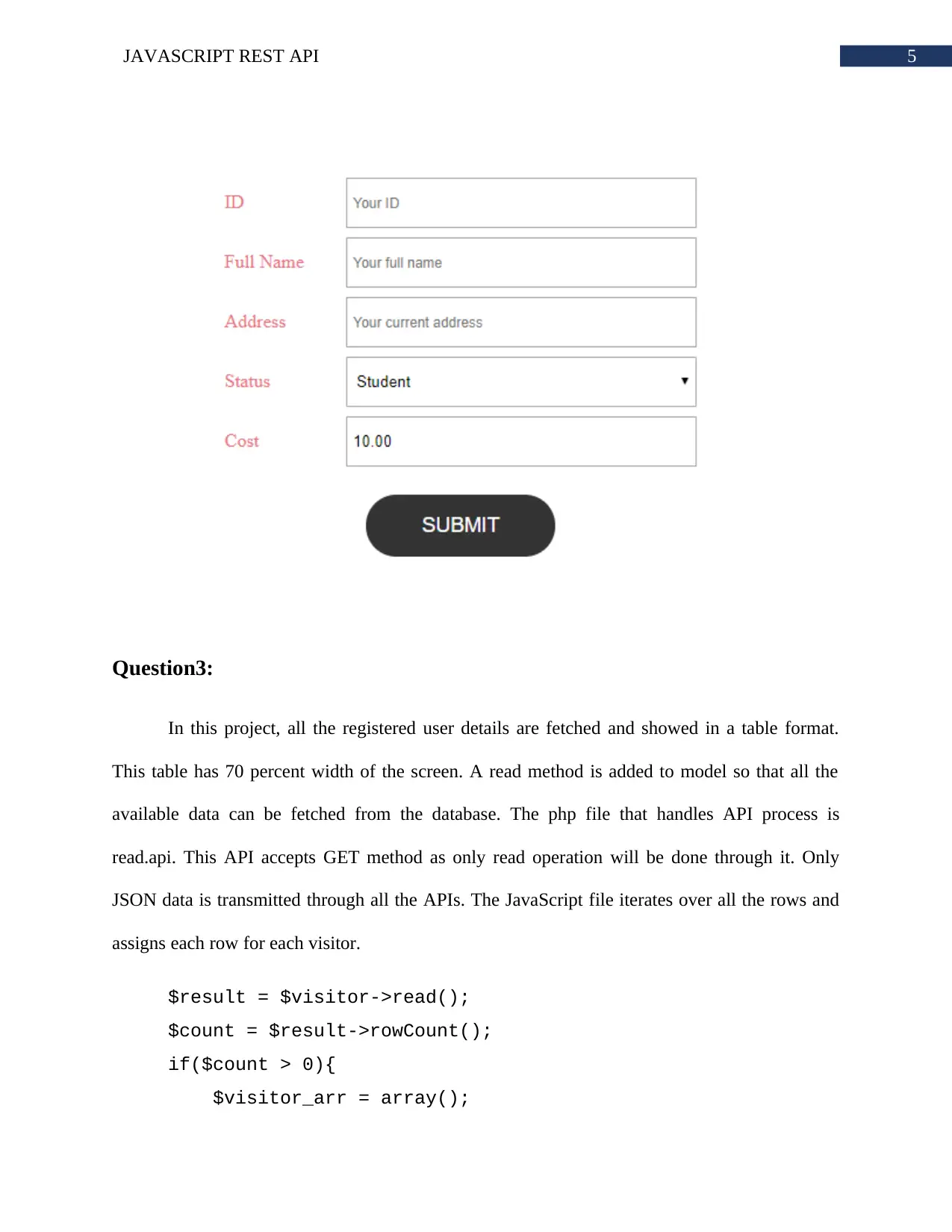
In this project, registration form for a fictional BVC Sport Club has been created.
Through this registration form, users can register for BVC Sport Club Event. REST API
approach has been used for data transmission. Vanilla JavaScript has been used to collect data
from form and send it to server. The server is created using PHP and MySQL. Server has three
files, one file for connecting database, one for creating model and one is for API response. As
this API will receive word, the method type has been set to POST.
header('Access-Control-Allow-Methods: POST');
Now the database class is initialized into model. The model has basic properties and
operations to be done on the database. The API extends passes collected data to the models and
call appropriate methods.
$visitor->id = $data->id;
$visitor->full_name = $data->full_name;
$visitor->address = $data->address;
$visitor->status = $data->status;
$visitor->price = $data->price;
If the method is executed successfully, then API will send success message or else it will
send error message.
tabler-icon-diamond-filled.svg

Paraphrase This Document

Need a fresh take? Get an instant paraphrase of this document with our AI Paraphraser
Document Page
4JAVASCRIPT REST API
$sql = 'insert into '. $this->table .' set id = :id,
full_name = :full_name, address = :address, status = :status,
price = :price';
$statement = $this->conn->prepare($sql);
The JavaScript code on the other end, selects the form. An iteration has been done on all
the input fields. In this iteration, properties are inserted into inputData object.
inputs.forEach(input =>
input.value !== ""
? (inputData[input.name] = input.value)
: (input.placeholder = "Data required")
);
This object is sent after JSON.stringify. The response is converted into object. This object
data is shown in the alert message. After the submission is successful, the form input values are
reset.
alert(data.message);
inputs.forEach(input => input.value = '');
Document Page
5JAVASCRIPT REST API
Question3:
In this project, all the registered user details are fetched and showed in a table format.
This table has 70 percent width of the screen. A read method is added to model so that all the
available data can be fetched from the database. The php file that handles API process is
read.api. This API accepts GET method as only read operation will be done through it. Only
JSON data is transmitted through all the APIs. The JavaScript file iterates over all the rows and
assigns each row for each visitor.
$result = $visitor->read();
$count = $result->rowCount();
if($count > 0){
$visitor_arr = array();
Document Page
6JAVASCRIPT REST API
foreach($result->fetchAll(PDO::FETCH_ASSOC) as $row){
extract($row);
$visitor_item = [
'id' => $id,
'full_name' => $full_name,
'address' => $address,
'status' => $status,
'price' => $price
];
array_push($visitor_arr, $visitor_item);
}
echo json_encode($visitor_arr);
} else {
echo json_encode(
array('message'=>'no visitors found')
);
}
tabler-icon-diamond-filled.svg

Paraphrase This Document

Need a fresh take? Get an instant paraphrase of this document with our AI Paraphraser
Document Page
7JAVASCRIPT REST API
Bibliography:
Khoury, M.J., 2018. Progressive web applications: fetching and caching.
Podborski, D., Son, J., Bhullar, G.S., Skupin, R., Sanchez, Y., Hellge, C. and Schierl, T., 2019.
HTML5 MSE Playback of MPEG 360 VR Tiled Streaming. arXiv preprint arXiv:1903.02971.
chevron_up_icon
1 out of 8
circle_padding
hide_on_mobile
zoom_out_icon
[object Object]