Logo Design Analysis Report - Course Name, Semester Details

Verified

Added on  2023/05/30

|4
|573
|277
Report
AI Summary
This report provides an analysis of logo design, focusing on the design process and techniques used in creating logos such as the Batman and Captain America logos. It details the use of Adobe Illustrator, including the Golden Ratio technique, pen tool, and shape builder tool. The report discusses the importance of shapes, contrasting colors, and borders in creating effective logos. It explores different color variations for the Captain America logo, demonstrating the versatility of design elements. The conclusion highlights the knowledge gained in logo design through the use of Adobe Illustrator and the significance of shape manipulation and color choices in conveying a strong design concept.
Document Page
Running head: LOGO DESIGN ANALYSIS
Logo Design Analysis
Name of the Student:
Name of the University:
Author note:
tabler-icon-diamond-filled.svg

Paraphrase This Document

Need a fresh take? Get an instant paraphrase of this document with our AI Paraphraser
Document Page
1
LOGO DESIGN ANALYSIS
Introduction
Designing an intuitive logo has always been a very crucial part of a branding process.
A logo’s design, the colours used and the typography depicts a lot about the inner details of
the brand or entity being highlighted. Here, the design process and the depth of 5 varieties of
logo have been illustrated.
Explanation
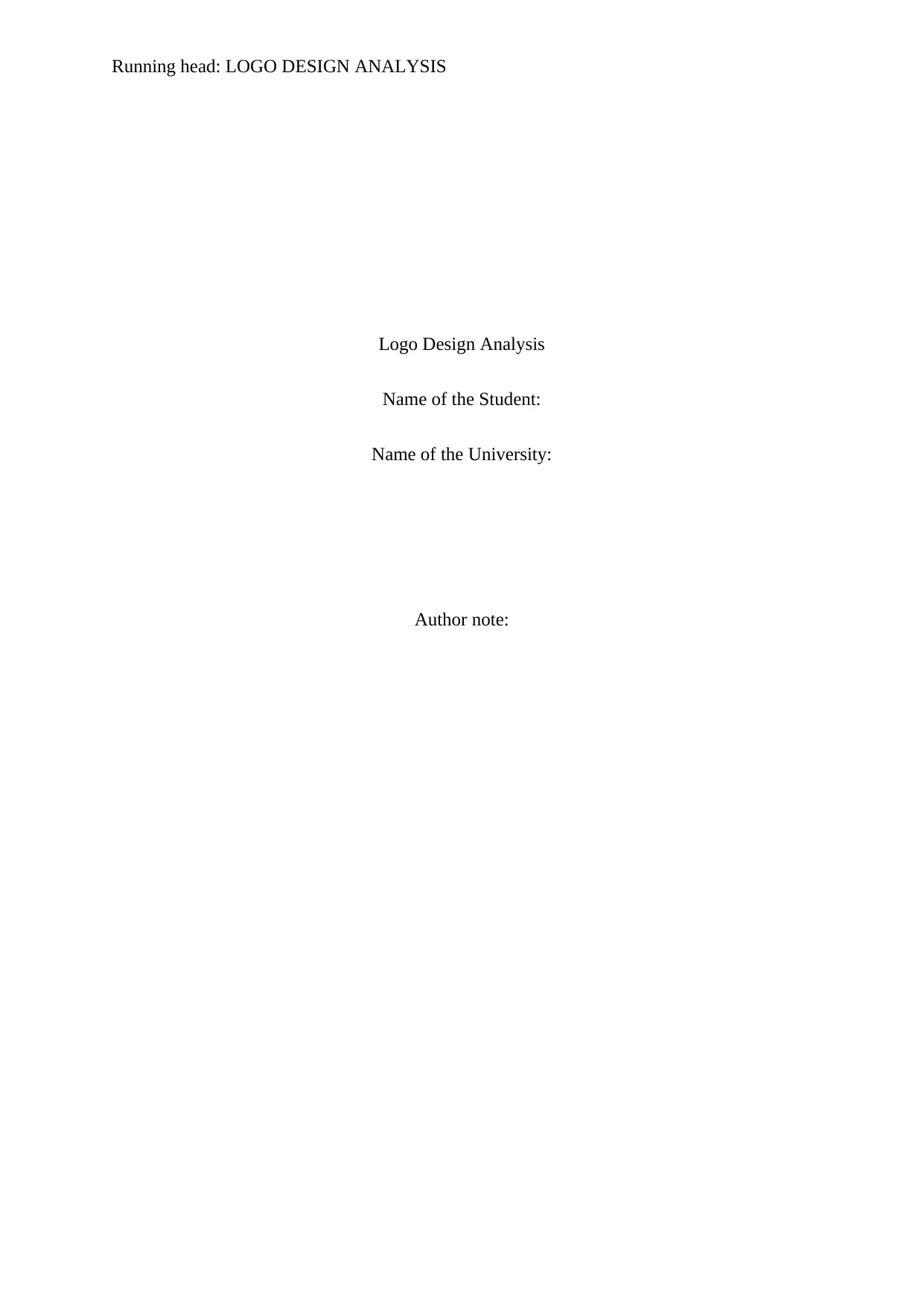
The first logo is a logo of Batman. The batman logo is one of the most praised and
acclaimed superhero logos of the modern generation. I have used the Adobe Illustrator
software in order to design this logo. The development process was preceded by a set of pen
on paper sketching. The sketching helped in gathering more details about the curves and
other details of the logo. In order to draw the logo in Adobe Illustrator, I took assistance of
the Golden Ratio technique. It is a cool way to make use of simple shapes like ellipses and
rectangles in order to create something fruitful. Here the void spaces were used from the
layout of a couple of such shapes to create the batman logo. Furthermore, I also accustomed
myself to the use of the pen tool to produce or adjust the shapes.
As for the Captain America logos, it was fairly simple. Multiple looped in circles
were created and a custom star shape was inserted in the centre to produce the final version of
the logo. However, in the 4 different versions, a variety of colours were used. These colours
brought out a variation in the logos. The Copperplate Gothic font has been used to present the
typography used in the logo. This font style goes well with the native Captain America style
set. Each of the circles within the logo had a mild black border to create a strong and distinct
base for the next circle.
The first Captain America Logo has been designed to represent the original logo with
the native red, blue and white colours. However, in case of the next three depictions of the
Document Page
2
LOGO DESIGN ANALYSIS
logo, the same outline image was used with a different set of colour combinations. The
colours used in these images were meant to test the versatility of the logo.
Conclusion
The various logo design concepts discussed above helped to gather quite a handsome
quality of knowledge about the logo designing technique using a photo creation and
manipulation Adobe Illustrator. The use of the illustrator tools like shapes, pen tool, shape
builder tool, colour palate was thoroughly researched and implemented in the process. It can
be said that the use of shapes and the shape builder tools helped a great zeal to create void
spaces and new shapes. This was indeed an interesting thing to learn and implement. To
curve out a good looking logo from a forest of different shapes was a great outcome. I also
learnt the importance of the use of contrasting colours and borders efficiently in order to
depict a strong design concept through the logo.
Document Page
3
LOGO DESIGN ANALYSIS
The Five Logos
chevron_up_icon
1 out of 4
circle_padding
hide_on_mobile
zoom_out_icon
[object Object]