Data Management in Databases: Wooly Traders Case Study with Queries

Verified

Added on  2024/07/29

|23
|3021
|394
Report
AI Summary
This report provides a detailed exploration of managing data in databases, using the Wooly Traders database as a case study. It covers the design and implementation of the database, including tables for Suppliers, Products, Orders, Customers, Order Details, and Shippers, along with their respective datasheets, design views, and report views. The report also includes SQL queries to extract and manipulate data according to specific requirements. Furthermore, the document delves into database normalization, specifically 1NF, 2NF, and 3NF, applied to a hotel recruitment table. Finally, it discusses big data concepts, the role of Hadoop, and components like HDFS and MapReduce, highlighting their importance in modern data management. Desklib offers a platform to access this document along with many other solved assignments and past papers.

Document Page
Managing Data in Databases
tabler-icon-diamond-filled.svg

Paraphrase This Document

Need a fresh take? Get an instant paraphrase of this document with our AI Paraphraser
Document Page
Contents
Question 1
...................................................................................................................................................3
Part 1:
...................................................................................................................................................... 3
Part 2
....................................................................................................................................................... 9
Question 2
.................................................................................................................................................16
Part 1:
.................................................................................................................................................... 16
Part 2:
.................................................................................................................................................... 16
Question 3
.................................................................................................................................................19
Part 1
.....................................................................................................................................................19
Part 2
.....................................................................................................................................................19
Part 3
.....................................................................................................................................................20
Reference
.................................................................................................................................................. 21
List of the figure:

Figure 1: Datasheet View of Suppliers Table
...............................................................................................4
Figure 2: Design view of Suppliers Table
.....................................................................................................4
Figure 3: Report view of Suppliers Table
..................................................................................................... 5
Figure 4: Datasheet View of Products Table
................................................................................................ 5
Figure 5: Design view of Products Table
......................................................................................................5
Figure 6: Report view of Products Table
...................................................................................................... 6
Figure 7: Datasheet View of Orders Table
................................................................................................... 6
Figure 8: Design view of the Orders Table
...................................................................................................6
Figure 9: Report view of the Orders Table
................................................................................................... 7
Figure 10: Datasheet View of Customers Table
...........................................................................................7
Figure 11: Design view of Customers Table
.................................................................................................7
Figure 12: Report view of Customers Table 1
..............................................................................................8
Figure 13: Report view of Customers Table 2
..............................................................................................8
Figure 14: Datasheet View of Order details Table
....................................................................................... 8
Figure 15: Design view of Order details Table
............................................................................................. 8
1
Document Page
Figure 16: Report view of Order details Table.............................................................................................9
Figure 17: Datasheet View of Shippers Table
.............................................................................................. 9
Figure 18: Design view of Shippers Table
.................................................................................................... 9
Figure 19: Report view of Shippers Table
.................................................................................................. 10
Figure 20: SQL view of query 1
.................................................................................................................. 10
Figure 21: Design view of query 1
..............................................................................................................11
Figure 22: Datasheet view as Output of query 1
.......................................................................................11
Figure 23: SQL view of query 2
.................................................................................................................. 11
Figure 24: Design view of query 2
..............................................................................................................12
Figure 25: Datasheet view as Output of query 2
.......................................................................................12
Figure 26: SQL view of query 3
.................................................................................................................. 12
Figure 27: Design view of query 3
..............................................................................................................13
Figure 28: Datasheet view as Output of query 3
.......................................................................................13
Figure 29: SQL view of query 4
.................................................................................................................. 13
Figure 30: Design view of query 4
..............................................................................................................14
Figure 31: Datasheet view as Output of query 4
.......................................................................................14
Figure 32: SQL view of query 5
.................................................................................................................. 14
Figure 33: Design view of query 5
..............................................................................................................15
Figure 34: : Datasheet view as Output of query 5
..................................................................................... 15
Figure 35: SQL view of query 6
.................................................................................................................. 15
Figure 36: Design view of query 6
..............................................................................................................16
Figure 37: Datasheet view as Output of query 6
.......................................................................................16
Figure 38: Employee table Functional dependency
...................................................................................17
Figure 39: Hotel Table Functional dependency
.........................................................................................17
Figure 40: Contract Process Table Functional dependency
.......................................................................17
Figure 41: final Functional dependency
..................................................................................................... 17
List of the Table:

Table 1: Hotel_recruitment Table 1 NF
..................................................................................................... 18
Table 2: Hotel_recruitment Table 2NF
......................................................................................................18
Table 3: Hotel recruitment Table 3NF
.......................................................................................................19
2
Document Page
3
tabler-icon-diamond-filled.svg

Paraphrase This Document

Need a fresh take? Get an instant paraphrase of this document with our AI Paraphraser
Document Page
Question 1
Here, I have designed a database for Wooly_TradersDB which contained the information about the

Suppliers, Products, Orders, Customers, Order_details, and Shippers. The report contained a datasheet,

design view, and report view of the table [1].

Part 1:

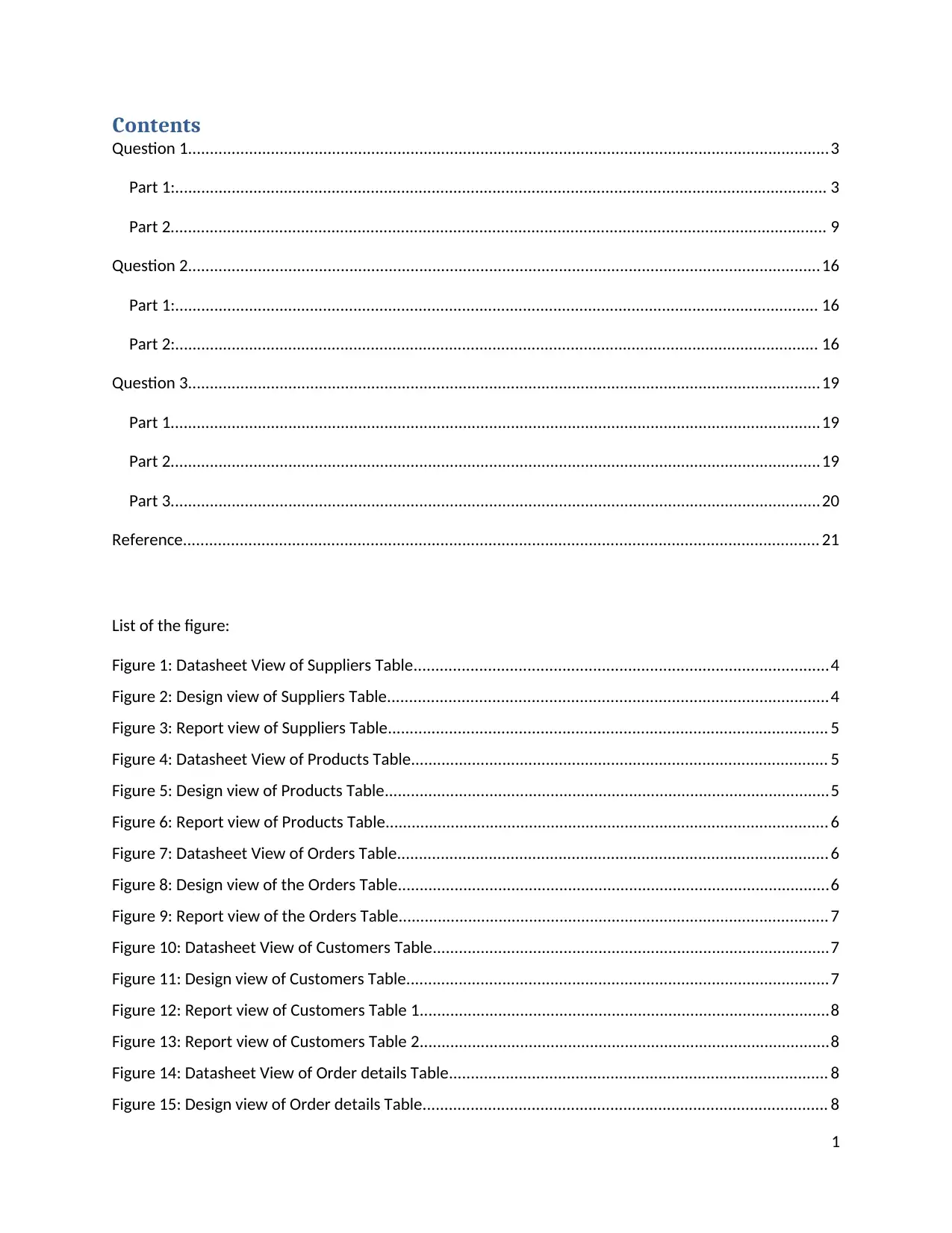
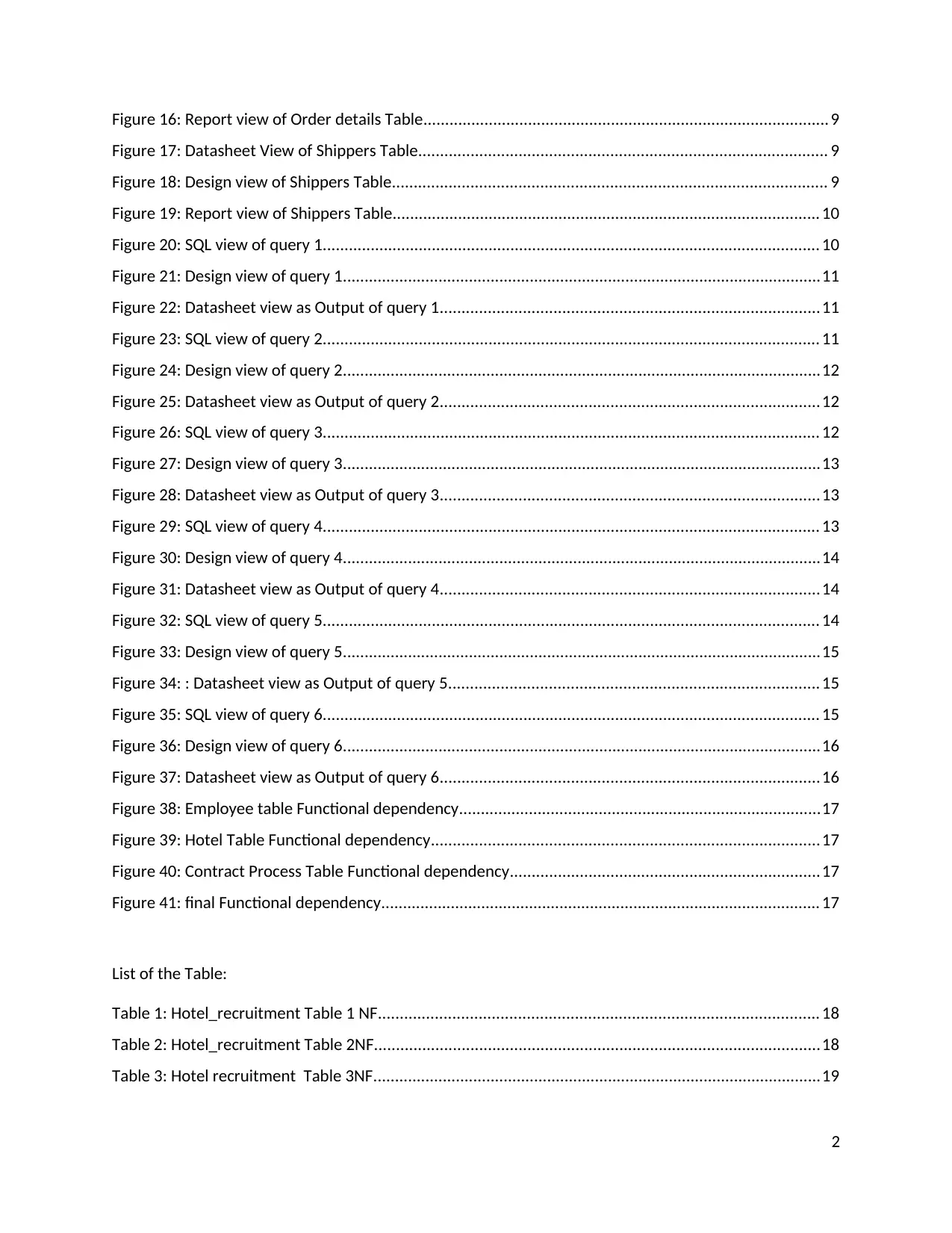
Suppliers Table:
it contained supplierID, companyName, ContantName, ContactTitle,Address, City,
region, Address, PostalCode, and PhoneNmeber information. SupplierID is the primary key of the table.

Datasheet

Figure
1: Datasheet View of Suppliers Table
Design view

Figure
2: Design view of Suppliers Table
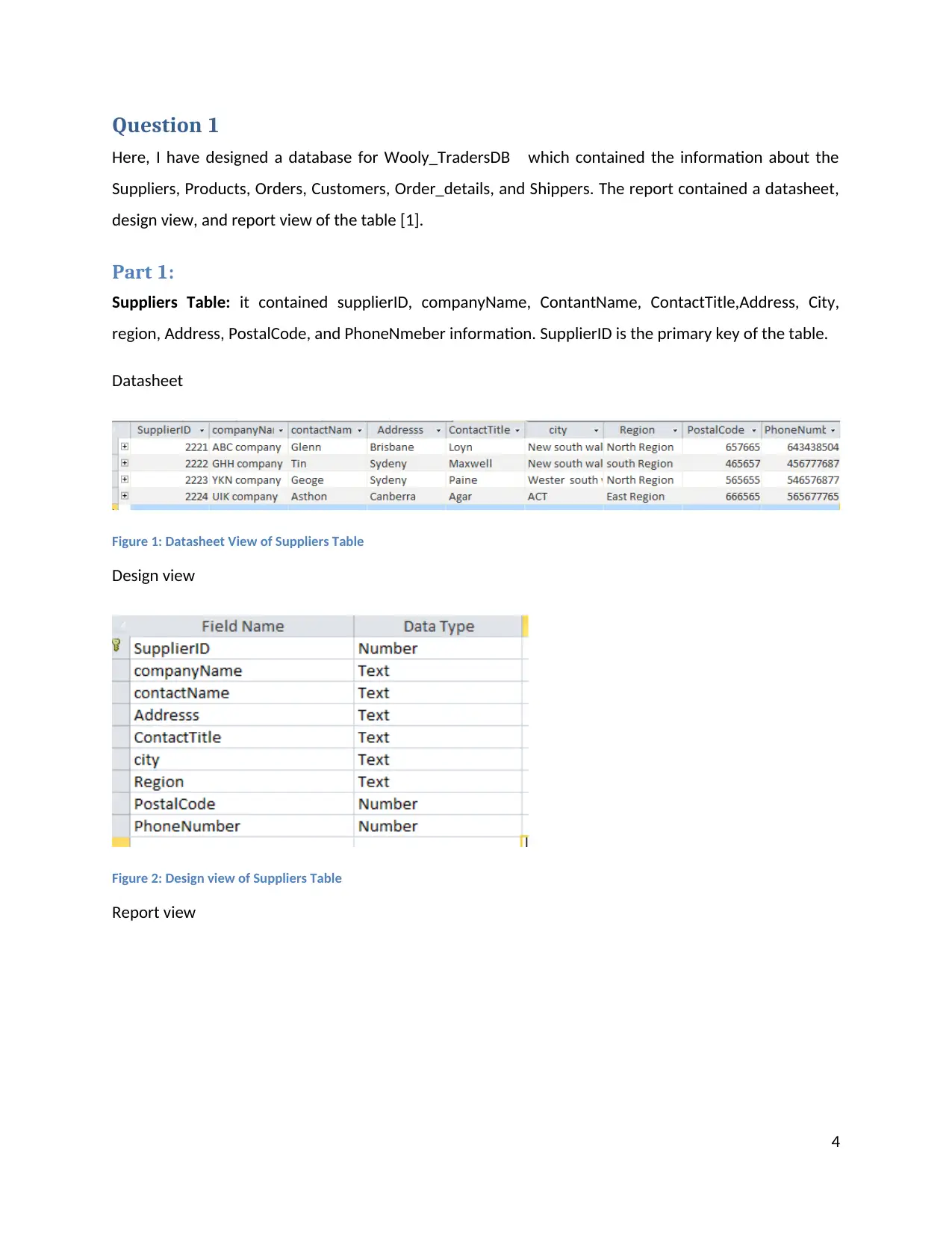
Report view

4
Document Page
Figure 3: Report view of Suppliers Table
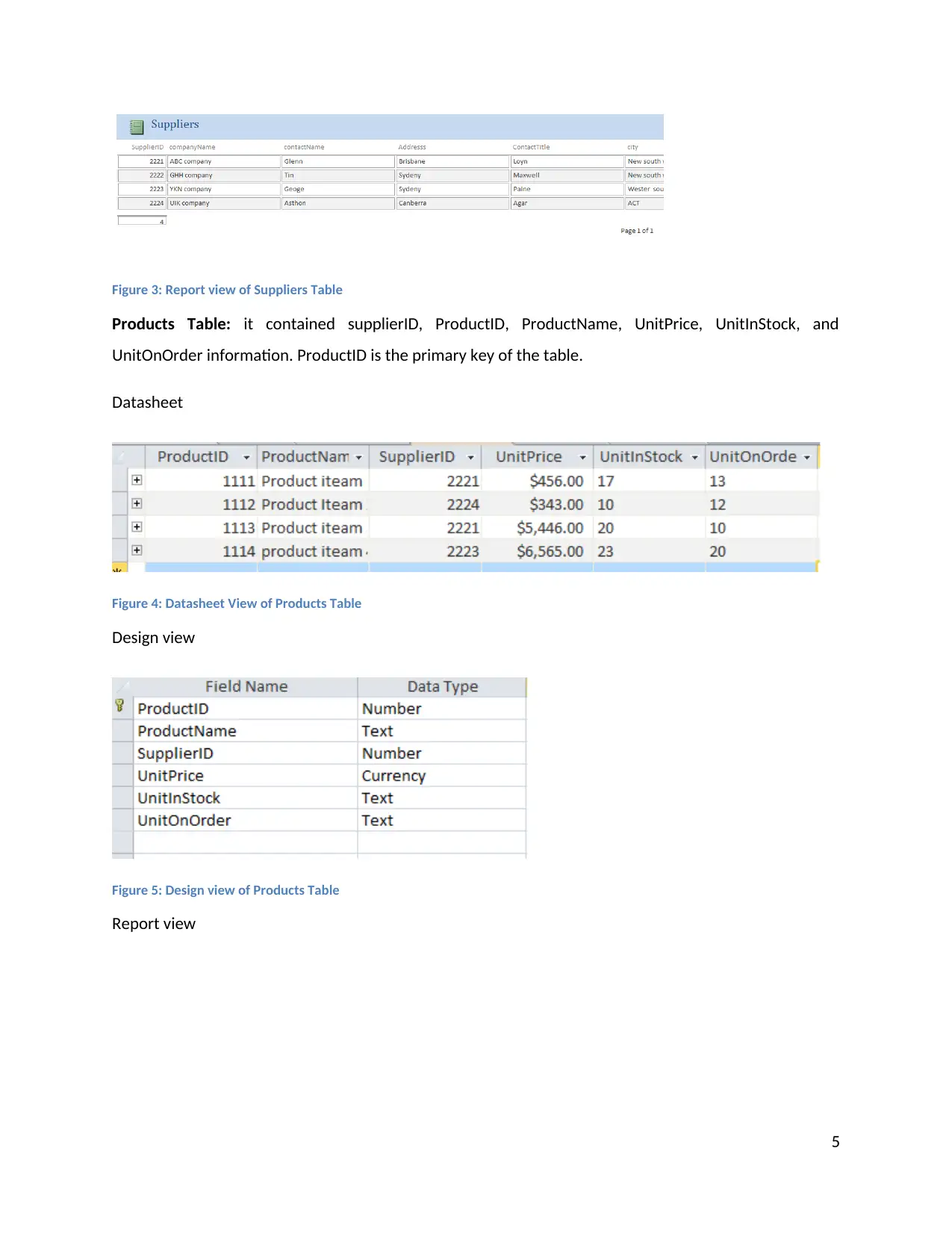
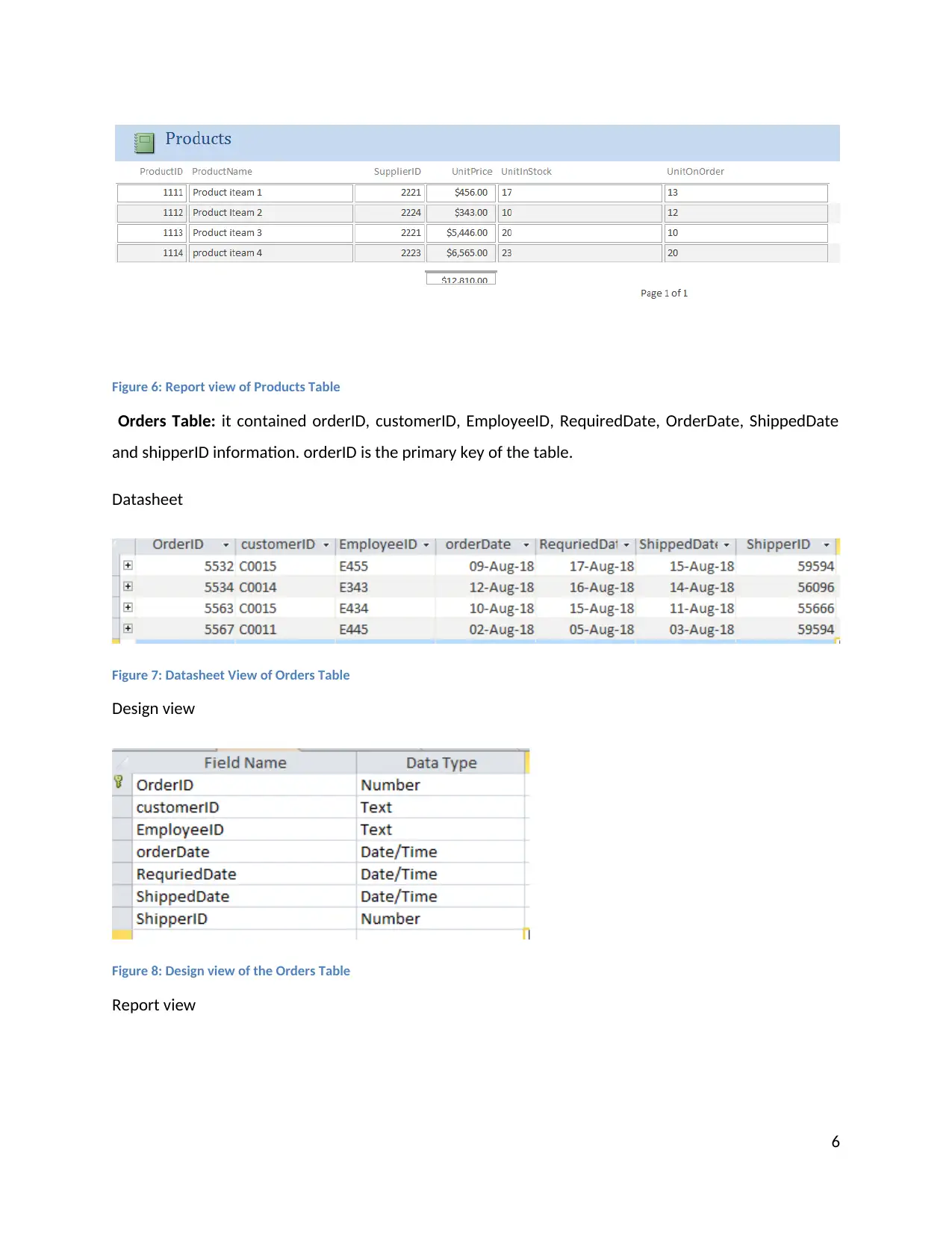
Products Table:
it contained supplierID, ProductID, ProductName, UnitPrice, UnitInStock, and
UnitOnOrder information. ProductID is the primary key of the table.

Datasheet

Figure
4: Datasheet View of Products Table
Design view

Figure
5: Design view of Products Table
Report view

5
Document Page
Figure 6: Report view of Products Table
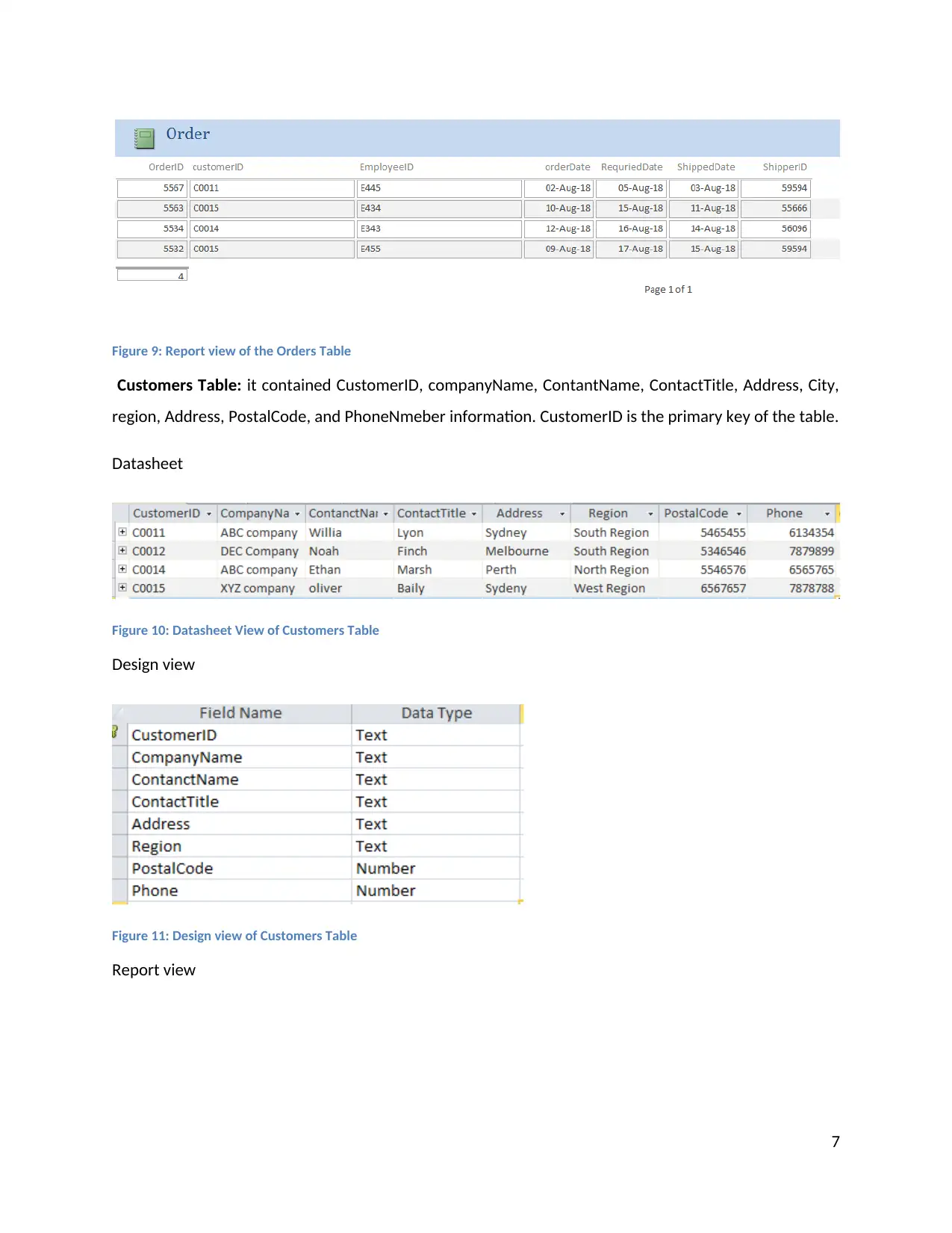
Orders Table:
it contained orderID, customerID, EmployeeID, RequiredDate, OrderDate, ShippedDate
and shipperID information. orderID is the primary key of the table.

Datasheet

Figure
7: Datasheet View of Orders Table
Design view

Figure
8: Design view of the Orders Table
Report view

6
tabler-icon-diamond-filled.svg

Paraphrase This Document

Need a fresh take? Get an instant paraphrase of this document with our AI Paraphraser
Document Page
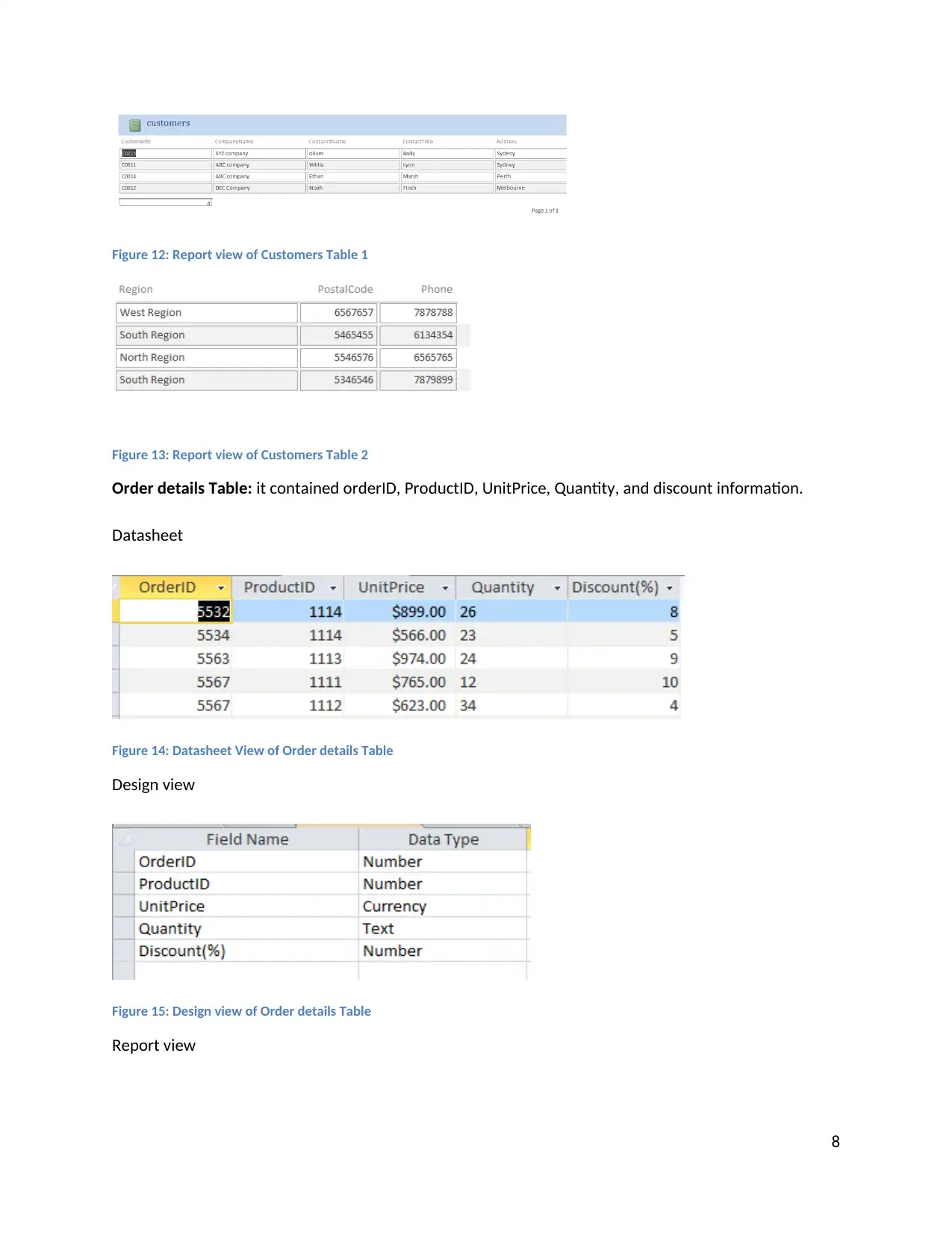
Figure 9: Report view of the Orders Table
Customers Table:
it contained CustomerID, companyName, ContantName, ContactTitle, Address, City,
region, Address, PostalCode, and PhoneNmeber information. CustomerID is the primary key of the table.

Datasheet

Figure
10: Datasheet View of Customers Table
Design view

Figure
11: Design view of Customers Table
Report view

7
Document Page
Figure 12: Report view of Customers Table 1
Figure
13: Report view of Customers Table 2
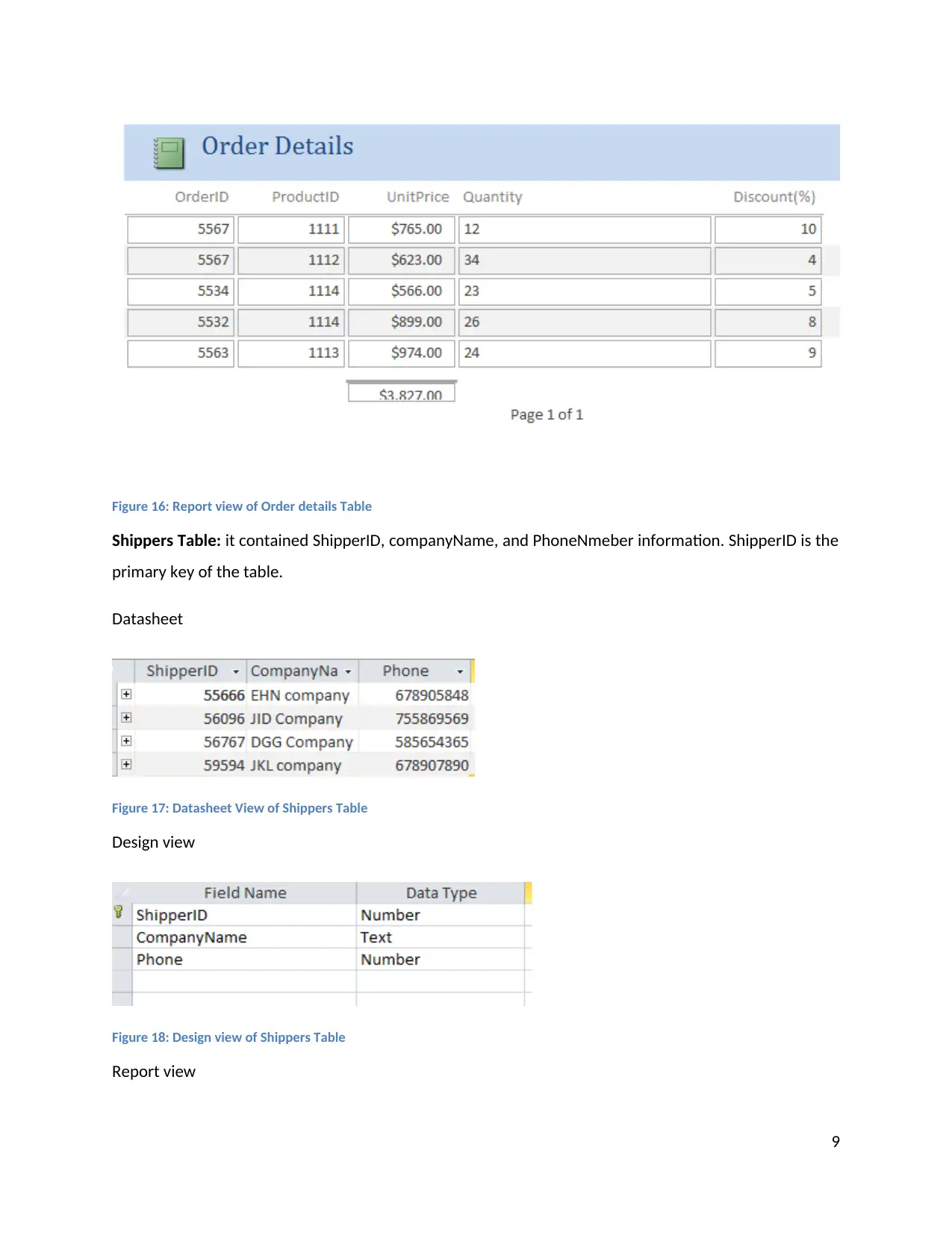
Order details Table:
it contained orderID, ProductID, UnitPrice, Quantity, and discount information.
Datasheet

Figure
14: Datasheet View of Order details Table
Design view

Figure
15: Design view of Order details Table
Report view

8
Document Page
Figure 16: Report view of Order details Table
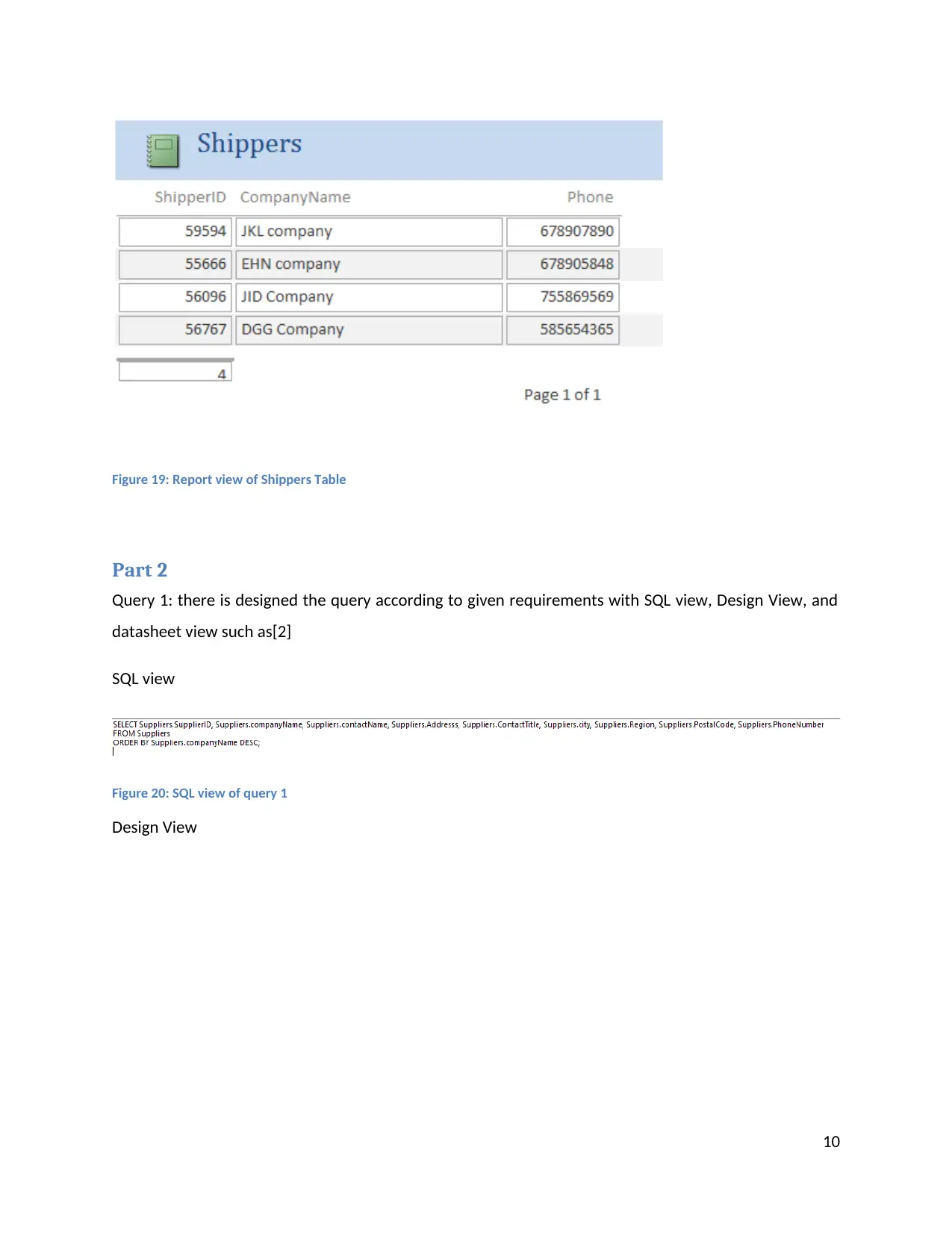
Shippers Table:
it contained ShipperID, companyName, and PhoneNmeber information. ShipperID is the
primary key of the table.

Datasheet

Figure
17: Datasheet View of Shippers Table
Design view

Figure
18: Design view of Shippers Table
Report view

9
tabler-icon-diamond-filled.svg

Paraphrase This Document

Need a fresh take? Get an instant paraphrase of this document with our AI Paraphraser
Document Page
Figure 19: Report view of Shippers Table
Part 2

Query 1: there is designed the query according to given requirements with SQL view, Design View, and

datasheet view such as[2]

SQL view

Figure
20: SQL view of query 1
Design View

10
Document Page
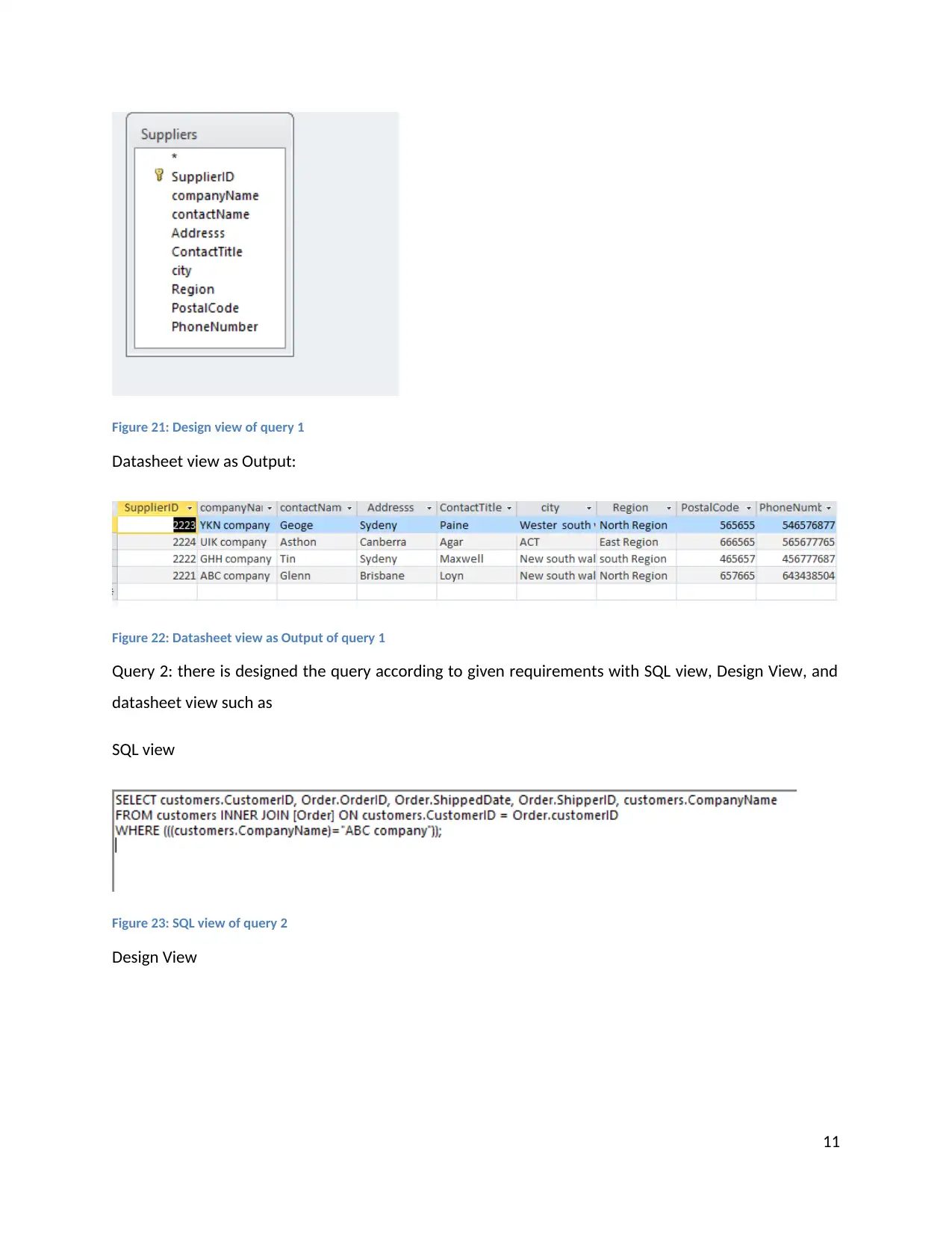
Figure 21: Design view of query 1
Datasheet view as Output:

Figure
22: Datasheet view as Output of query 1
Query 2: there is designed the query according to given requirements with SQL view, Design View, and

datasheet view such as

SQL view

Figure
23: SQL view of query 2
Design View

11
chevron_up_icon
1 out of 23
circle_padding
hide_on_mobile
zoom_out_icon
[object Object]