ITECH1101 Hackathon: Design and Implementation of Mindstorm Robot
VerifiedAdded on 2022/08/31
|19
|3308
|16
Project
AI Summary
This assignment details a student's project involving a Mindstorm robot designed to sort objects based on their colors. The project is part of an ITECH1101 IT Problem Solving Hackathon at Federation University. The solution addresses the challenge of sorting colored objects, particularly Lego bricks, using a Mindstorm robot programmed with Micropython. The assignment includes design documentation, a hackathon report, and a journal detailing the development process. The report covers software and hardware challenges, problem-solving strategies, and the integration of different robot components such as motors, sensors, and the EV3 brick. The project utilizes UML diagrams for architectural design and involves test-driven development and brainstorming for problem-solving. The student describes the programming code for the robot's functionality, including color detection, object handling, and sorting mechanisms. The journal entries document the assembly of the hardware and the integration of the software, highlighting the challenges faced and the solutions implemented to overcome them. The project demonstrates practical application of robotics, programming, and problem-solving skills.
Running head: MINDSTORM SORTING OBJECTS ROBOT 1
Mindstorm Sorting Objects Robot
Student’s Name (First Middle(initials),. Last)
Federation University Australia
Mindstorm Sorting Objects Robot
Student’s Name (First Middle(initials),. Last)
Federation University Australia

Paraphrase This Document
Need a fresh take? Get an instant paraphrase of this document with our AI Paraphraser
MINDSTORM SORTING OBJECTS ROBOT 2
Mindstorm Sorting Objects Robot
This study identifies a Mindstorm robot for sorting objects of different colours in
different locations. A robot is a physical device that receives commands from a computer in the
form of code, robots execute tasks autonomously (Simon, 2017). This is a robot that sorts objects
and groups those with the same colours together. The robot in this hackathon will groups objects
in different locations based on colours. The solution designed will be submitted for peer review.
The peer-review will evaluate the solution against a set of defined principles and suggest
improvements.
Part 1: Design Documentation and Peer Review
There exists a challenge in sorting objects of different colours, this is due to the tasks
being very tiring and very repetitive, it is even more challenging and tiring to sort those objects
in different locations. This robot aims to solve that problem, for purposes of this study the
objects in different locations will be lego toys. Legos are toys manufactured by the Lego
company, they are composed of attachable and detachable plastic materials. In the past, Lego
bricks were white, black and bright red, yellow, green and blue colour, nowadays they offer a
wider variety. The plastic blocks can be assembled to make several things from human dolls,
vehicles, robots, toy firearms and buildings, after building it’s easy for the legos to be scattered
all over the place, the greatest challenge for most users is grouping them together and sorting
them in colours before reuse.
Our solution will attempt to solve this challenge, a Mindstorm robot will be used to
implement our solution. My work will then be presented to peers for feedback, feedback based
on a certain rubric, this is to evaluate the products documentation. This project will require us to
use different strategies and to be creative to ensure the robot is effective.
Mindstorm Sorting Objects Robot
This study identifies a Mindstorm robot for sorting objects of different colours in
different locations. A robot is a physical device that receives commands from a computer in the
form of code, robots execute tasks autonomously (Simon, 2017). This is a robot that sorts objects
and groups those with the same colours together. The robot in this hackathon will groups objects
in different locations based on colours. The solution designed will be submitted for peer review.
The peer-review will evaluate the solution against a set of defined principles and suggest
improvements.
Part 1: Design Documentation and Peer Review
There exists a challenge in sorting objects of different colours, this is due to the tasks
being very tiring and very repetitive, it is even more challenging and tiring to sort those objects
in different locations. This robot aims to solve that problem, for purposes of this study the
objects in different locations will be lego toys. Legos are toys manufactured by the Lego
company, they are composed of attachable and detachable plastic materials. In the past, Lego
bricks were white, black and bright red, yellow, green and blue colour, nowadays they offer a
wider variety. The plastic blocks can be assembled to make several things from human dolls,
vehicles, robots, toy firearms and buildings, after building it’s easy for the legos to be scattered
all over the place, the greatest challenge for most users is grouping them together and sorting
them in colours before reuse.
Our solution will attempt to solve this challenge, a Mindstorm robot will be used to
implement our solution. My work will then be presented to peers for feedback, feedback based
on a certain rubric, this is to evaluate the products documentation. This project will require us to
use different strategies and to be creative to ensure the robot is effective.
MINDSTORM SORTING OBJECTS ROBOT 3
Our problem-solving approach uses two major strategies, the first strategy involves test-
driven development, the other approach to problem-solving involves brainstorming
(Podlovchenko & Khachatryan, 2004).
Design Documentation
Design documentation involves written documents that explain the choices made in the
design of the robot ("The Design Documentation | Packt Hub", 2014). Our design documentation
will highlight the architectural design, the procedures followed, a guideline on how to operate the
robot and test plans. The design documentation will explain the functionality of the robot and its
user interface (J Fox, 2019). Mindstorm robots are used by both children and adults to perform
fairly simple tasks, for fun and by students of engineering in their studies (Lawhead et al, 2003).
Mindstorm provides entry-level technology, electrical and programming students with an avenue
to understand the working of software in a physical model. A program for the robot will be
created using the EV3 programming tool. The program will also be transferred from the desktops
programming software to the robots EV3, which is the robots operating system. The robot will
also be programmed to move and to drive itself while being powered by EV3 motors. It is said
that children benefit the most from the knowledge they get from building Mindstorm Lego
robots, the informal specific skills gained are very important for their growth.
The robot should be able to move around a room and cross over small obstacles. Tasks
were broken down in the hierarchy of complexity to prevent mistakes and to improve the
efficiency of the robot. Ambiguities were discussed in the design of the robot, this included
things such as floor area to be covered by the robot (Turner & Hill, 2008). We use the Unified
Modelling Language(UML) a robotics-based architecture. UML is widely used in software
Our problem-solving approach uses two major strategies, the first strategy involves test-
driven development, the other approach to problem-solving involves brainstorming
(Podlovchenko & Khachatryan, 2004).
Design Documentation
Design documentation involves written documents that explain the choices made in the
design of the robot ("The Design Documentation | Packt Hub", 2014). Our design documentation
will highlight the architectural design, the procedures followed, a guideline on how to operate the
robot and test plans. The design documentation will explain the functionality of the robot and its
user interface (J Fox, 2019). Mindstorm robots are used by both children and adults to perform
fairly simple tasks, for fun and by students of engineering in their studies (Lawhead et al, 2003).
Mindstorm provides entry-level technology, electrical and programming students with an avenue
to understand the working of software in a physical model. A program for the robot will be
created using the EV3 programming tool. The program will also be transferred from the desktops
programming software to the robots EV3, which is the robots operating system. The robot will
also be programmed to move and to drive itself while being powered by EV3 motors. It is said
that children benefit the most from the knowledge they get from building Mindstorm Lego
robots, the informal specific skills gained are very important for their growth.
The robot should be able to move around a room and cross over small obstacles. Tasks
were broken down in the hierarchy of complexity to prevent mistakes and to improve the
efficiency of the robot. Ambiguities were discussed in the design of the robot, this included
things such as floor area to be covered by the robot (Turner & Hill, 2008). We use the Unified
Modelling Language(UML) a robotics-based architecture. UML is widely used in software
⊘ This is a preview!⊘
Do you want full access?
Subscribe today to unlock all pages.

Trusted by 1+ million students worldwide
MINDSTORM SORTING OBJECTS ROBOT 4
design, it is a design language in graphical-based designs. UML is composed of object, data,
business and component modelling. We have two UML diagram types, the first is structure
diagrams and behavioural diagrams.
Algorithms will be used in programming the robot’s functionality (Roy, 2006). An
algorithm specifies rules followed in solving tasks. Computer programs guide the computer, a
good example is the Microsoft word program that allows you to type, edit and delete text, it is
the instructions that the computer follows. Microsoft word and any other computer programs are
algorithms. Micropython will be used in the development of this robot, to run Micropython in the
EV3 brick it will be installed on a microSD card that will be attached to the EV3 brick. Our code
is organized in a project folder, our project folder will have the main.py and other files we need
to run the project. I will connect the EV3 to Visual studio code via a mini-USB cable. Every time
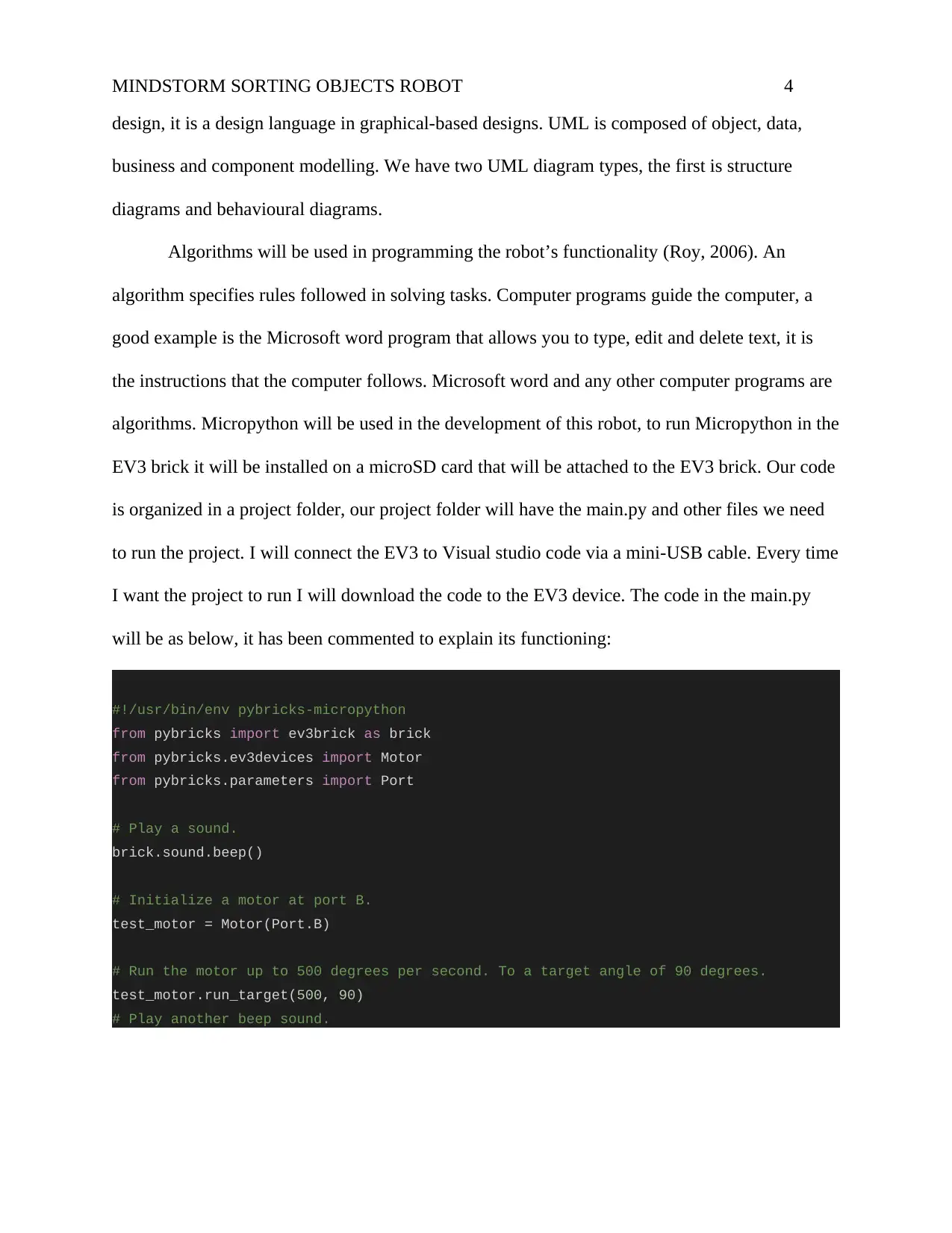
I want the project to run I will download the code to the EV3 device. The code in the main.py
will be as below, it has been commented to explain its functioning:
#!/usr/bin/env pybricks-micropython
from pybricks import ev3brick as brick
from pybricks.ev3devices import Motor
from pybricks.parameters import Port
# Play a sound.
brick.sound.beep()
# Initialize a motor at port B.
test_motor = Motor(Port.B)
# Run the motor up to 500 degrees per second. To a target angle of 90 degrees.
test_motor.run_target(500, 90)
# Play another beep sound.
design, it is a design language in graphical-based designs. UML is composed of object, data,
business and component modelling. We have two UML diagram types, the first is structure
diagrams and behavioural diagrams.
Algorithms will be used in programming the robot’s functionality (Roy, 2006). An
algorithm specifies rules followed in solving tasks. Computer programs guide the computer, a
good example is the Microsoft word program that allows you to type, edit and delete text, it is
the instructions that the computer follows. Microsoft word and any other computer programs are
algorithms. Micropython will be used in the development of this robot, to run Micropython in the
EV3 brick it will be installed on a microSD card that will be attached to the EV3 brick. Our code
is organized in a project folder, our project folder will have the main.py and other files we need
to run the project. I will connect the EV3 to Visual studio code via a mini-USB cable. Every time
I want the project to run I will download the code to the EV3 device. The code in the main.py
will be as below, it has been commented to explain its functioning:
#!/usr/bin/env pybricks-micropython
from pybricks import ev3brick as brick
from pybricks.ev3devices import Motor
from pybricks.parameters import Port
# Play a sound.
brick.sound.beep()
# Initialize a motor at port B.
test_motor = Motor(Port.B)
# Run the motor up to 500 degrees per second. To a target angle of 90 degrees.
test_motor.run_target(500, 90)
# Play another beep sound.
Paraphrase This Document
Need a fresh take? Get an instant paraphrase of this document with our AI Paraphraser
MINDSTORM SORTING OBJECTS ROBOT 5
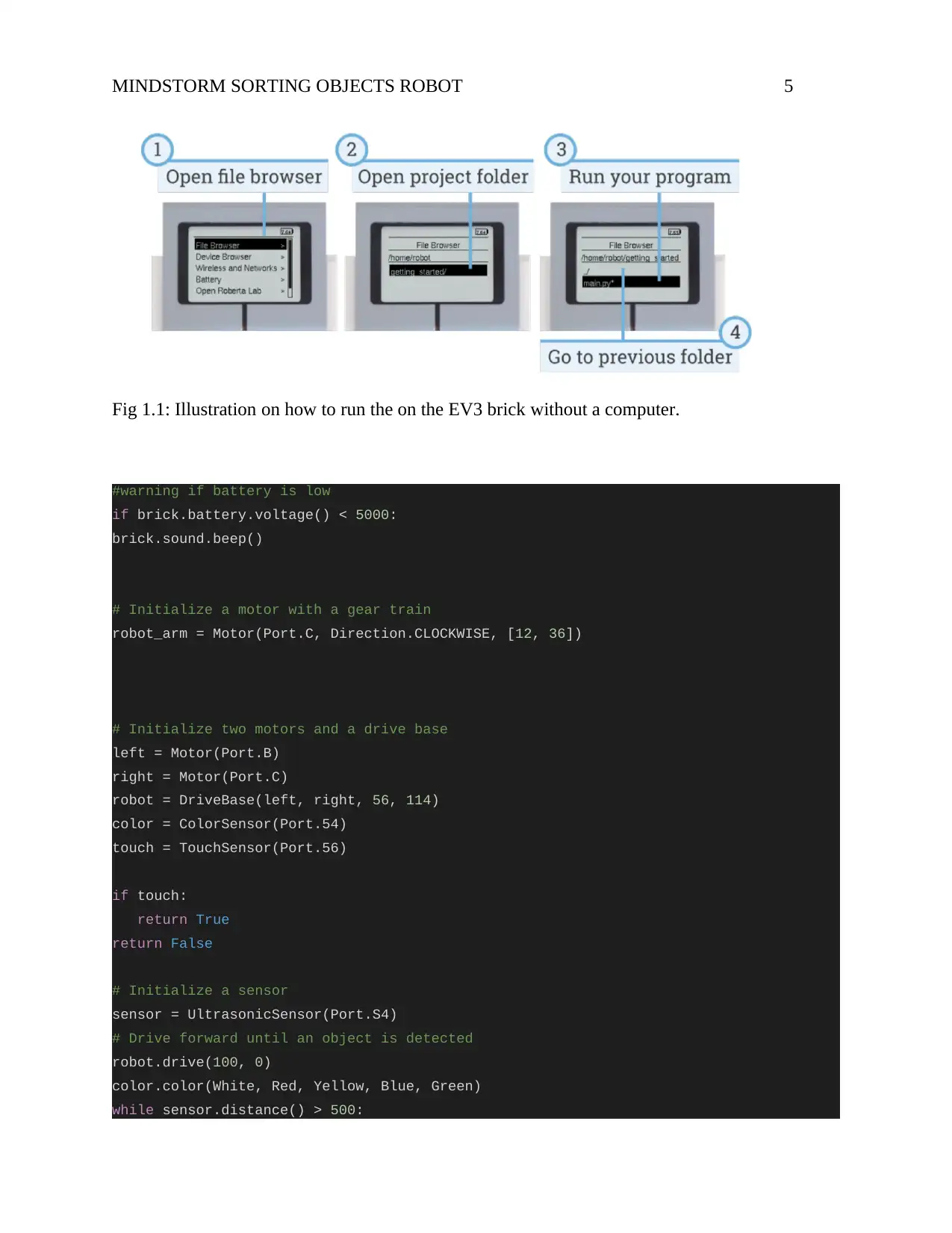
Fig 1.1: Illustration on how to run the on the EV3 brick without a computer.
#warning if battery is low
if brick.battery.voltage() < 5000:
brick.sound.beep()
# Initialize a motor with a gear train
robot_arm = Motor(Port.C, Direction.CLOCKWISE, [12, 36])
# Initialize two motors and a drive base
left = Motor(Port.B)
right = Motor(Port.C)
robot = DriveBase(left, right, 56, 114)
color = ColorSensor(Port.54)
touch = TouchSensor(Port.56)
if touch:
return True
return False
# Initialize a sensor
sensor = UltrasonicSensor(Port.S4)
# Drive forward until an object is detected
robot.drive(100, 0)
color.color(White, Red, Yellow, Blue, Green)
while sensor.distance() > 500:
Fig 1.1: Illustration on how to run the on the EV3 brick without a computer.
#warning if battery is low
if brick.battery.voltage() < 5000:
brick.sound.beep()
# Initialize a motor with a gear train
robot_arm = Motor(Port.C, Direction.CLOCKWISE, [12, 36])
# Initialize two motors and a drive base
left = Motor(Port.B)
right = Motor(Port.C)
robot = DriveBase(left, right, 56, 114)
color = ColorSensor(Port.54)
touch = TouchSensor(Port.56)
if touch:
return True
return False
# Initialize a sensor
sensor = UltrasonicSensor(Port.S4)
# Drive forward until an object is detected
robot.drive(100, 0)
color.color(White, Red, Yellow, Blue, Green)
while sensor.distance() > 500:
MINDSTORM SORTING OBJECTS ROBOT 6
wait(10)
robot.stop()
Above is an illustration of micropython as it’s used in the Mindstorm robot.
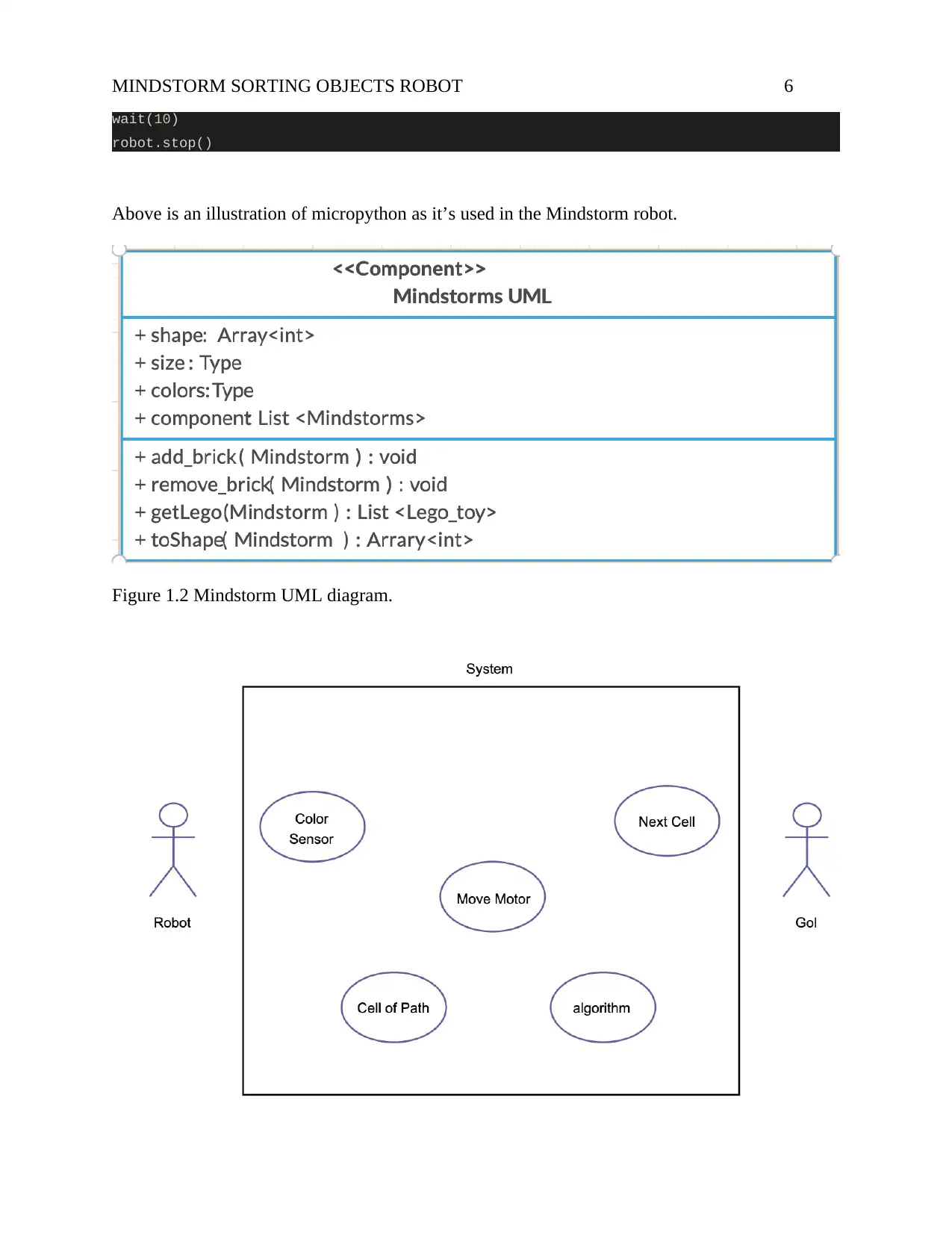
Figure 1.2 Mindstorm UML diagram.
wait(10)
robot.stop()
Above is an illustration of micropython as it’s used in the Mindstorm robot.
Figure 1.2 Mindstorm UML diagram.
⊘ This is a preview!⊘
Do you want full access?
Subscribe today to unlock all pages.
Trusted by 1+ million students worldwide
MINDSTORM SORTING OBJECTS ROBOT 7
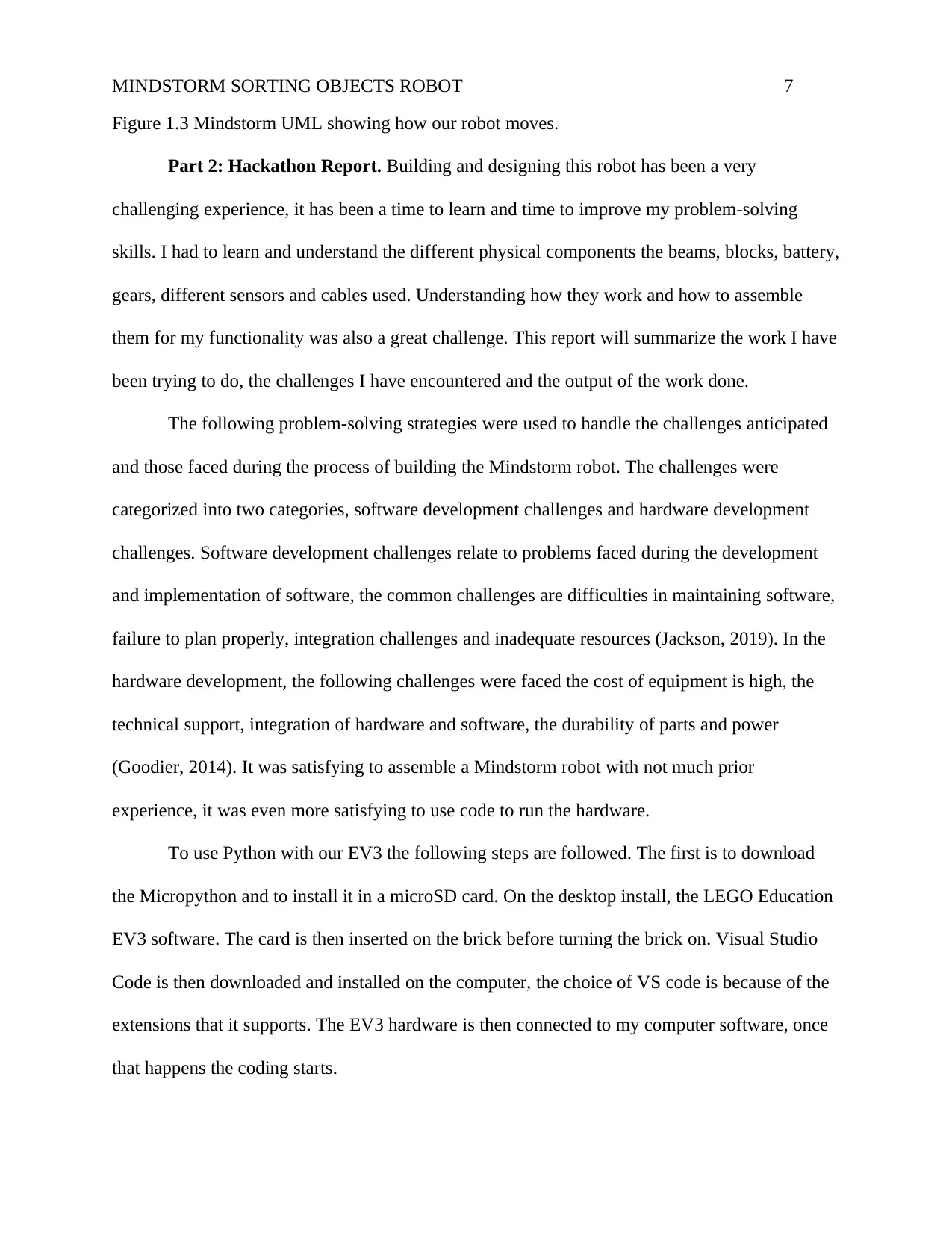
Figure 1.3 Mindstorm UML showing how our robot moves.
Part 2: Hackathon Report. Building and designing this robot has been a very
challenging experience, it has been a time to learn and time to improve my problem-solving
skills. I had to learn and understand the different physical components the beams, blocks, battery,
gears, different sensors and cables used. Understanding how they work and how to assemble
them for my functionality was also a great challenge. This report will summarize the work I have
been trying to do, the challenges I have encountered and the output of the work done.
The following problem-solving strategies were used to handle the challenges anticipated
and those faced during the process of building the Mindstorm robot. The challenges were
categorized into two categories, software development challenges and hardware development
challenges. Software development challenges relate to problems faced during the development
and implementation of software, the common challenges are difficulties in maintaining software,
failure to plan properly, integration challenges and inadequate resources (Jackson, 2019). In the
hardware development, the following challenges were faced the cost of equipment is high, the
technical support, integration of hardware and software, the durability of parts and power
(Goodier, 2014). It was satisfying to assemble a Mindstorm robot with not much prior
experience, it was even more satisfying to use code to run the hardware.
To use Python with our EV3 the following steps are followed. The first is to download
the Micropython and to install it in a microSD card. On the desktop install, the LEGO Education
EV3 software. The card is then inserted on the brick before turning the brick on. Visual Studio
Code is then downloaded and installed on the computer, the choice of VS code is because of the
extensions that it supports. The EV3 hardware is then connected to my computer software, once
that happens the coding starts.
Figure 1.3 Mindstorm UML showing how our robot moves.
Part 2: Hackathon Report. Building and designing this robot has been a very
challenging experience, it has been a time to learn and time to improve my problem-solving
skills. I had to learn and understand the different physical components the beams, blocks, battery,
gears, different sensors and cables used. Understanding how they work and how to assemble
them for my functionality was also a great challenge. This report will summarize the work I have
been trying to do, the challenges I have encountered and the output of the work done.
The following problem-solving strategies were used to handle the challenges anticipated
and those faced during the process of building the Mindstorm robot. The challenges were
categorized into two categories, software development challenges and hardware development
challenges. Software development challenges relate to problems faced during the development
and implementation of software, the common challenges are difficulties in maintaining software,
failure to plan properly, integration challenges and inadequate resources (Jackson, 2019). In the
hardware development, the following challenges were faced the cost of equipment is high, the
technical support, integration of hardware and software, the durability of parts and power
(Goodier, 2014). It was satisfying to assemble a Mindstorm robot with not much prior
experience, it was even more satisfying to use code to run the hardware.
To use Python with our EV3 the following steps are followed. The first is to download
the Micropython and to install it in a microSD card. On the desktop install, the LEGO Education
EV3 software. The card is then inserted on the brick before turning the brick on. Visual Studio
Code is then downloaded and installed on the computer, the choice of VS code is because of the
extensions that it supports. The EV3 hardware is then connected to my computer software, once
that happens the coding starts.
Paraphrase This Document
Need a fresh take? Get an instant paraphrase of this document with our AI Paraphraser
MINDSTORM SORTING OBJECTS ROBOT 8
Journal Entry: Days 1 & 2
Tasks Attempted: Writing the code for the application.
To write code that will control the robot. I worked on the logic of the code. This robot will run
on the micropython framework. The hardware will be run by code written in micropython, the
robot should be able to sense distance, scan colours, move, carry luggage, have an ultrasonic
sensor and a conveyor. Our code aims to control all these operations and ensure that they run
smoothly.
The challenges faced in implementing the code in this stage included lacking in skills, to help
this aggressive research from the internet help to cater for this shortfall. To deal with problems
in the code I had to identify the problems, gather data on the problems, discuss possible
solutions, attempt to implement the solutions then testing my solution.
My MicroPython code will run my colour sorting robot. To initialize it we import our ev3brick
from pybricks, import the Motor, TouchSensor, ColorSensor from ev3devices a pybricks
module. We also import Color, SoundFile, Port, Button and ImageFile from parameters in
pybricks, the wait has been imported from tools in pybricks. The modules imported give
functionality to the robot. For purposes of this robot, the colours are red, blue, yellow and
green which are the most common Lego colours. Using the imported Color module, we
identify the coloured objects as shown below:
COLORS_IDENTIFIED = (Color.RED, Color.GREEN, Color.BLUE, Color.YELLOW)
To feed the objects to the conveyor belt the code fetch_object = Motor(Port.A), The touch
sensor tells whether the fetched object has moved to the end of the belt before collecting
another one, to initialize it we use the code initialize_touch_sensor = TouchSensor(Port.S1).
Journal Entry: Days 1 & 2
Tasks Attempted: Writing the code for the application.
To write code that will control the robot. I worked on the logic of the code. This robot will run
on the micropython framework. The hardware will be run by code written in micropython, the
robot should be able to sense distance, scan colours, move, carry luggage, have an ultrasonic
sensor and a conveyor. Our code aims to control all these operations and ensure that they run
smoothly.
The challenges faced in implementing the code in this stage included lacking in skills, to help
this aggressive research from the internet help to cater for this shortfall. To deal with problems
in the code I had to identify the problems, gather data on the problems, discuss possible
solutions, attempt to implement the solutions then testing my solution.
My MicroPython code will run my colour sorting robot. To initialize it we import our ev3brick
from pybricks, import the Motor, TouchSensor, ColorSensor from ev3devices a pybricks
module. We also import Color, SoundFile, Port, Button and ImageFile from parameters in
pybricks, the wait has been imported from tools in pybricks. The modules imported give
functionality to the robot. For purposes of this robot, the colours are red, blue, yellow and
green which are the most common Lego colours. Using the imported Color module, we
identify the coloured objects as shown below:
COLORS_IDENTIFIED = (Color.RED, Color.GREEN, Color.BLUE, Color.YELLOW)
To feed the objects to the conveyor belt the code fetch_object = Motor(Port.A), The touch
sensor tells whether the fetched object has moved to the end of the belt before collecting
another one, to initialize it we use the code initialize_touch_sensor = TouchSensor(Port.S1).
MINDSTORM SORTING OBJECTS ROBOT 9
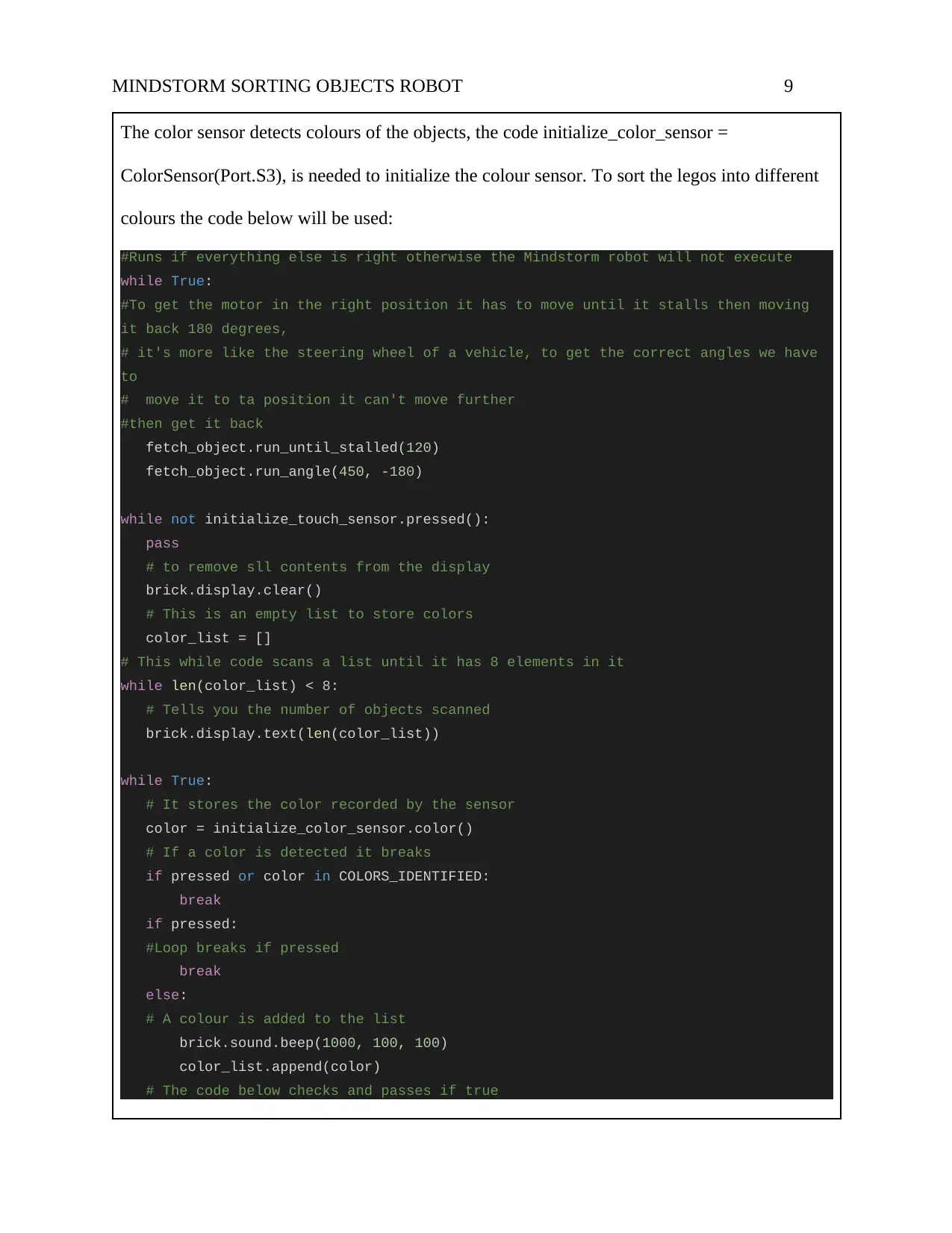
The color sensor detects colours of the objects, the code initialize_color_sensor =
ColorSensor(Port.S3), is needed to initialize the colour sensor. To sort the legos into different
colours the code below will be used:
#Runs if everything else is right otherwise the Mindstorm robot will not execute
while True:
#To get the motor in the right position it has to move until it stalls then moving
it back 180 degrees,
# it's more like the steering wheel of a vehicle, to get the correct angles we have
to
# move it to ta position it can't move further
#then get it back
fetch_object.run_until_stalled(120)
fetch_object.run_angle(450, -180)
while not initialize_touch_sensor.pressed():
pass
# to remove sll contents from the display
brick.display.clear()
# This is an empty list to store colors
color_list = []
# This while code scans a list until it has 8 elements in it
while len(color_list) < 8:
# Tells you the number of objects scanned
brick.display.text(len(color_list))
while True:
# It stores the color recorded by the sensor
color = initialize_color_sensor.color()
# If a color is detected it breaks
if pressed or color in COLORS_IDENTIFIED:
break
if pressed:
#Loop breaks if pressed
break
else:
# A colour is added to the list
brick.sound.beep(1000, 100, 100)
color_list.append(color)
# The code below checks and passes if true
The color sensor detects colours of the objects, the code initialize_color_sensor =
ColorSensor(Port.S3), is needed to initialize the colour sensor. To sort the legos into different
colours the code below will be used:
#Runs if everything else is right otherwise the Mindstorm robot will not execute
while True:
#To get the motor in the right position it has to move until it stalls then moving
it back 180 degrees,
# it's more like the steering wheel of a vehicle, to get the correct angles we have
to
# move it to ta position it can't move further
#then get it back
fetch_object.run_until_stalled(120)
fetch_object.run_angle(450, -180)
while not initialize_touch_sensor.pressed():
pass
# to remove sll contents from the display
brick.display.clear()
# This is an empty list to store colors
color_list = []
# This while code scans a list until it has 8 elements in it
while len(color_list) < 8:
# Tells you the number of objects scanned
brick.display.text(len(color_list))
while True:
# It stores the color recorded by the sensor
color = initialize_color_sensor.color()
# If a color is detected it breaks
if pressed or color in COLORS_IDENTIFIED:
break
if pressed:
#Loop breaks if pressed
break
else:
# A colour is added to the list
brick.sound.beep(1000, 100, 100)
color_list.append(color)
# The code below checks and passes if true
⊘ This is a preview!⊘
Do you want full access?
Subscribe today to unlock all pages.
Trusted by 1+ million students worldwide
MINDSTORM SORTING OBJECTS ROBOT 10
while color_sensor.color() in COLORS_IDENTIFIED:
pass
brick.sound.beep(2000, 100, 100)
# arrow points to center if we are done
brick.display.image(ImageFile.BACKWARD)
wait(2000)
for color in color_list:
wait(1000)
# Run belt to right based on color
if color == Color.BLUE:
brick.sound.file(SoundFile.BLUE)
belt_motor.run_target(500, 10)
elif color == Color.GREEN:
brick.sound.file(SoundFile.GREEN)
belt_motor.run_target(500, 132)
elif color == Color.YELLOW:
brick.sound.file(SoundFile.YELLOW)
belt_motor.run_target(500, 360)
elif color == Color.RED:
brick.sound.file(SoundFile.RED)
belt_motor.run_target(500, 530)
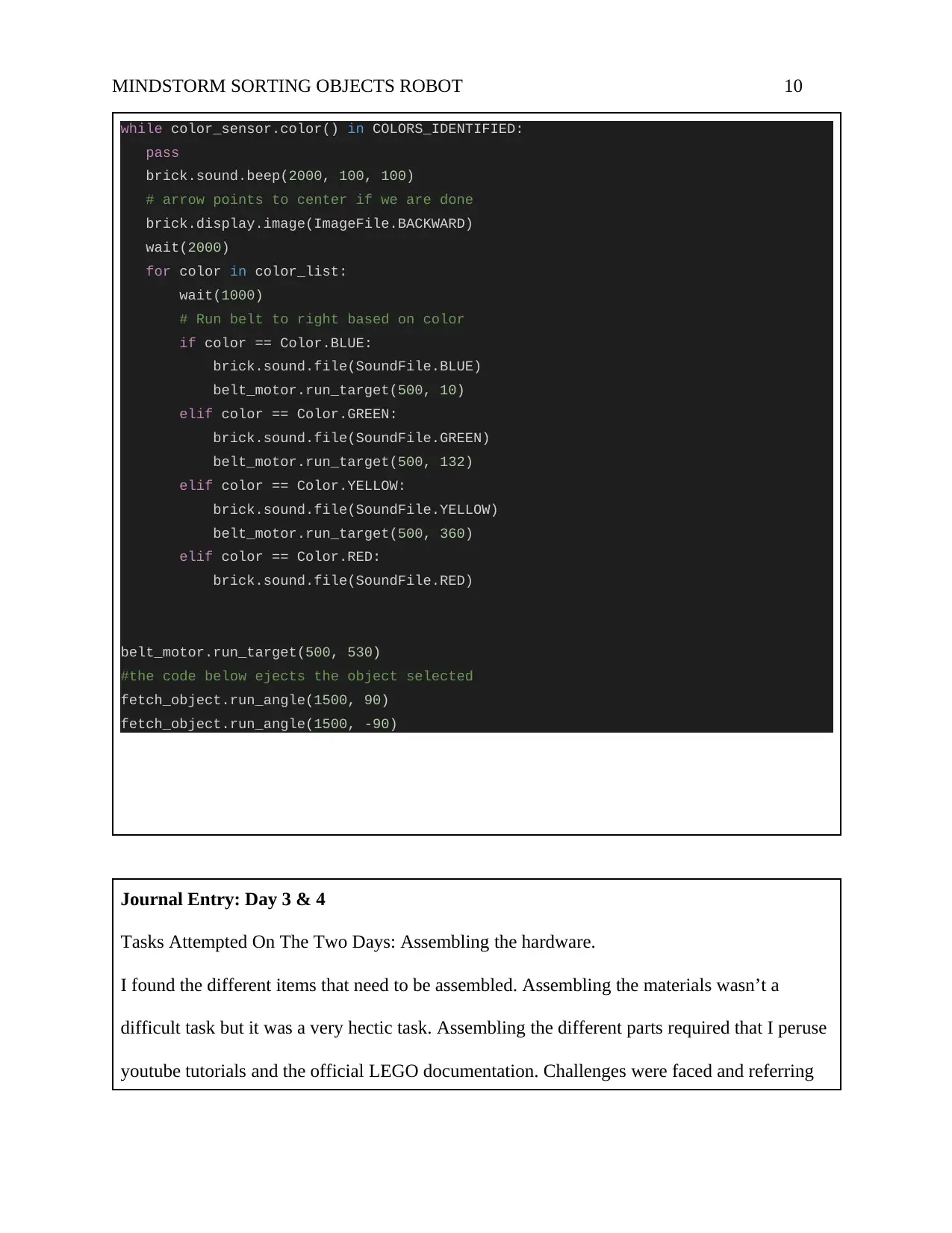
#the code below ejects the object selected
fetch_object.run_angle(1500, 90)
fetch_object.run_angle(1500, -90)
Journal Entry: Day 3 & 4
Tasks Attempted On The Two Days: Assembling the hardware.
I found the different items that need to be assembled. Assembling the materials wasn’t a
difficult task but it was a very hectic task. Assembling the different parts required that I peruse
youtube tutorials and the official LEGO documentation. Challenges were faced and referring
while color_sensor.color() in COLORS_IDENTIFIED:
pass
brick.sound.beep(2000, 100, 100)
# arrow points to center if we are done
brick.display.image(ImageFile.BACKWARD)
wait(2000)
for color in color_list:
wait(1000)
# Run belt to right based on color
if color == Color.BLUE:
brick.sound.file(SoundFile.BLUE)
belt_motor.run_target(500, 10)
elif color == Color.GREEN:
brick.sound.file(SoundFile.GREEN)
belt_motor.run_target(500, 132)
elif color == Color.YELLOW:
brick.sound.file(SoundFile.YELLOW)
belt_motor.run_target(500, 360)
elif color == Color.RED:
brick.sound.file(SoundFile.RED)
belt_motor.run_target(500, 530)
#the code below ejects the object selected
fetch_object.run_angle(1500, 90)
fetch_object.run_angle(1500, -90)
Journal Entry: Day 3 & 4
Tasks Attempted On The Two Days: Assembling the hardware.
I found the different items that need to be assembled. Assembling the materials wasn’t a
difficult task but it was a very hectic task. Assembling the different parts required that I peruse
youtube tutorials and the official LEGO documentation. Challenges were faced and referring
Paraphrase This Document
Need a fresh take? Get an instant paraphrase of this document with our AI Paraphraser
MINDSTORM SORTING OBJECTS ROBOT 11
to the documentation helped me to resolve those challenges.
Journal Entry: Day 5
Tasks Attempted On Day 5: Hardware and Software Integration.
Hardware and software integration proved to be the most complex task. The greatest challenge
was the level of skill, to understand how the different components of a Mindstorm robot work
(Mauch, 2001). To solve this problem, the robot was broken up into individual pieces, the EV3
robot, the pieces to be assembled and the desktop application. The functionalities of the
individual parts were then studied before being studied as a robot, breaking the robot into
pieces made it possible to understand what functionality every piece is bringing. Solving this
challenge made it easy to complete the channel. Looking at images of existing Mindstorm
robots and watching tutorials of how they are assembled made it possible to understand this.
This problem-solving skills gained can be applied in solving any challenges. Breaking down a
problem to its simplest form is the best way to tackle a challenge.
I managed to connect the EV3 brick to MicroPython which will be used to programme it
through the SD card, the MicroPython is installed in the microSD card. Our Mindstorm robot
has a colour sensor to identify the different colours, a touch sensor, an ultrasonic sensor to tell
the distance in the room it tells the distance to objects, a USB cable to connect to the desktop, a
rechargeable battery to power it, the wheelset to move the robot. The wheelset has tires, a
sprocket, gears, ball bearing and a curved panel. Beams of different sizes the beams have
to the documentation helped me to resolve those challenges.
Journal Entry: Day 5
Tasks Attempted On Day 5: Hardware and Software Integration.
Hardware and software integration proved to be the most complex task. The greatest challenge
was the level of skill, to understand how the different components of a Mindstorm robot work
(Mauch, 2001). To solve this problem, the robot was broken up into individual pieces, the EV3
robot, the pieces to be assembled and the desktop application. The functionalities of the
individual parts were then studied before being studied as a robot, breaking the robot into
pieces made it possible to understand what functionality every piece is bringing. Solving this
challenge made it easy to complete the channel. Looking at images of existing Mindstorm
robots and watching tutorials of how they are assembled made it possible to understand this.
This problem-solving skills gained can be applied in solving any challenges. Breaking down a
problem to its simplest form is the best way to tackle a challenge.
I managed to connect the EV3 brick to MicroPython which will be used to programme it
through the SD card, the MicroPython is installed in the microSD card. Our Mindstorm robot
has a colour sensor to identify the different colours, a touch sensor, an ultrasonic sensor to tell
the distance in the room it tells the distance to objects, a USB cable to connect to the desktop, a
rechargeable battery to power it, the wheelset to move the robot. The wheelset has tires, a
sprocket, gears, ball bearing and a curved panel. Beams of different sizes the beams have
MINDSTORM SORTING OBJECTS ROBOT 12
different holes to connect to it and connector pegs.
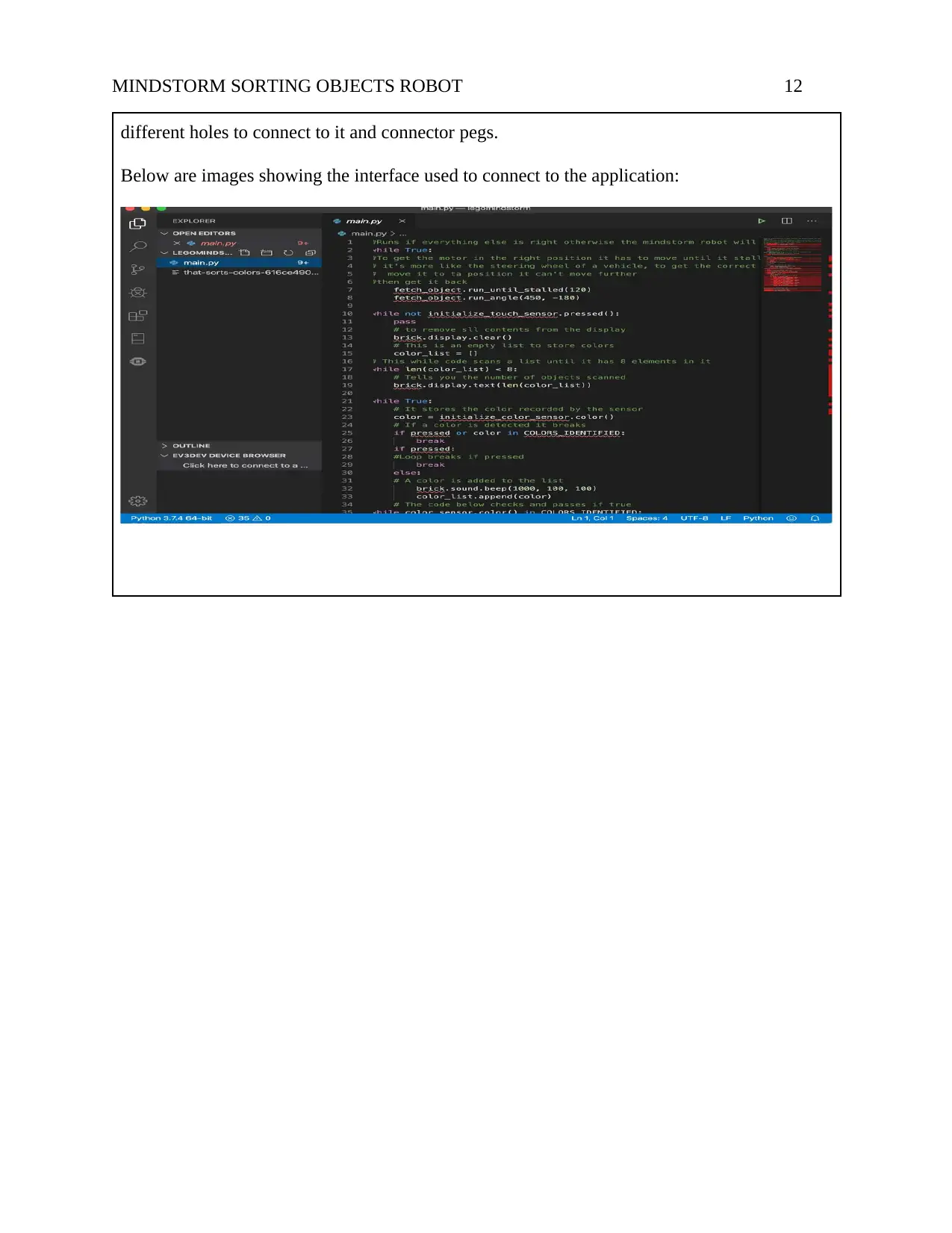
Below are images showing the interface used to connect to the application:
different holes to connect to it and connector pegs.
Below are images showing the interface used to connect to the application:
⊘ This is a preview!⊘
Do you want full access?
Subscribe today to unlock all pages.
Trusted by 1+ million students worldwide

1 out of 19


Related Documents


Your All-in-One AI-Powered Toolkit for Academic Success.
+13062052269
info@desklib.com
Available 24*7 on WhatsApp / Email
![[object Object]](/_next/static/media/star-bottom.7253800d.svg)
Unlock your academic potential
Copyright © 2020–2026 A2Z Services. All Rights Reserved. Developed and managed by ZUCOL.