ITNE1001 Project: Designing a Network for Silver Industries

Verified

Added on  2023/06/04

|14
|645
|212
Project
AI Summary
This project details the network design for Silver Industries, a mechanical company. The design encompasses the allocation of network devices, including routers and switches, along with their corresponding IP addresses and subnet masks. A comprehensive host list, detailing the number of devices per department (Reception, IT, Marketing, Manufacturing, Accounting, Customer Service, Quality Check, Store Room, Staff Room, and CEO's Office), is provided. The project utilizes Variable Length Subnet Masking (VLSM) to optimize IP address allocation. The document includes detailed network tables for routers and switches, specifying IP addresses and subnet masks. End device configurations, including IP addresses and subnet masks, are also outlined. The project also covers router and switch configurations, ensuring seamless communication within the network. The project focuses on creating an efficient and scalable network infrastructure for Silver Industries.
Document Page
Network design
tabler-icon-diamond-filled.svg

Paraphrase This Document

Need a fresh take? Get an instant paraphrase of this document with our AI Paraphraser
Document Page
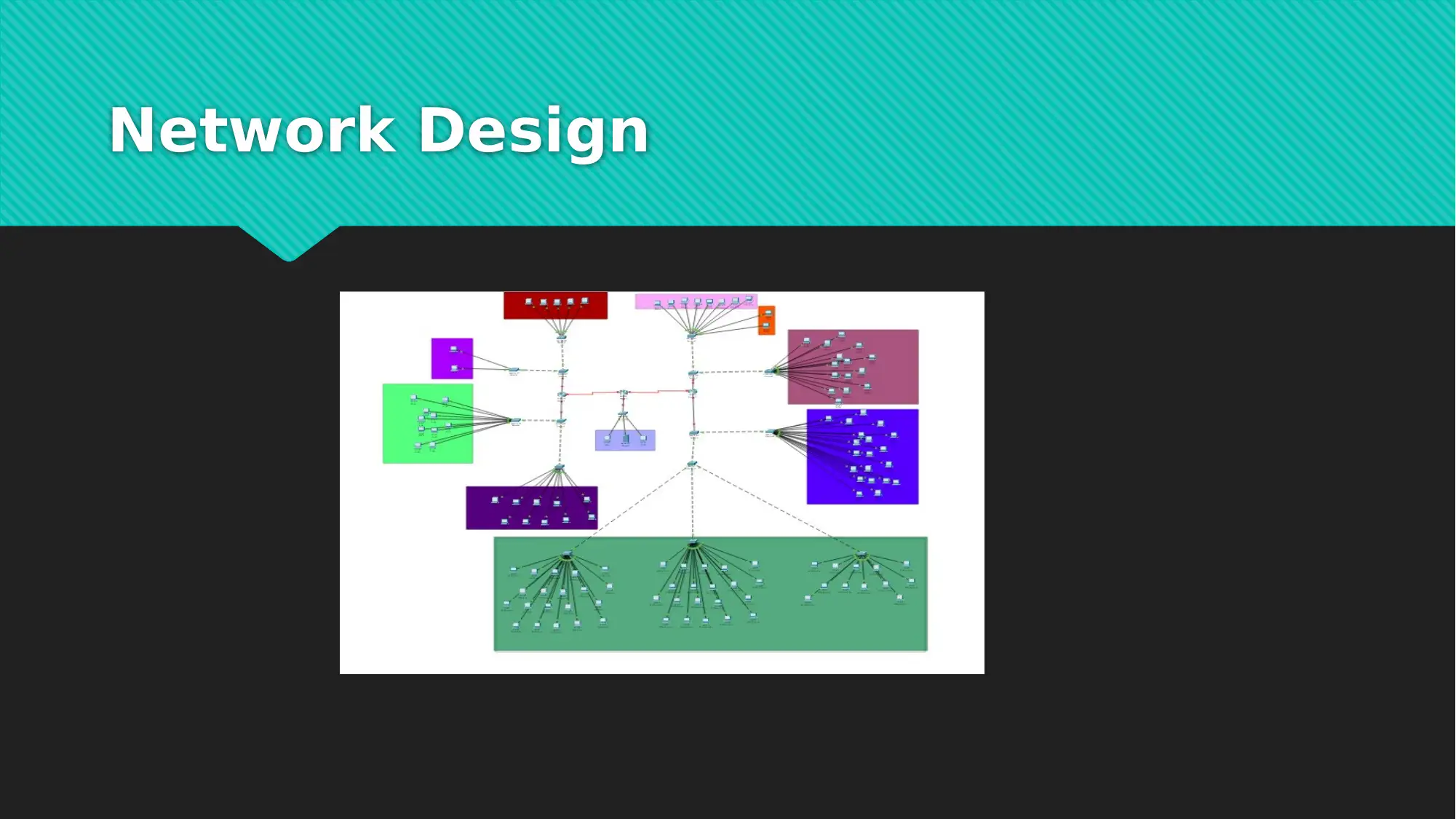
The below diagram showcase the network devices and the connection which was
proposed for the silver industry.
Document Page
Background
Sliver Industries is a Mechanical company for which we are going to design the
network. For this whole design of network we are going to plan how many devices
does the company is in need of, the IP addresses of every device and the subnets for
the network. At last we need to decide the type of cable to be used for the network
connection by looking at the cost of designing the whole network structure.
Document Page
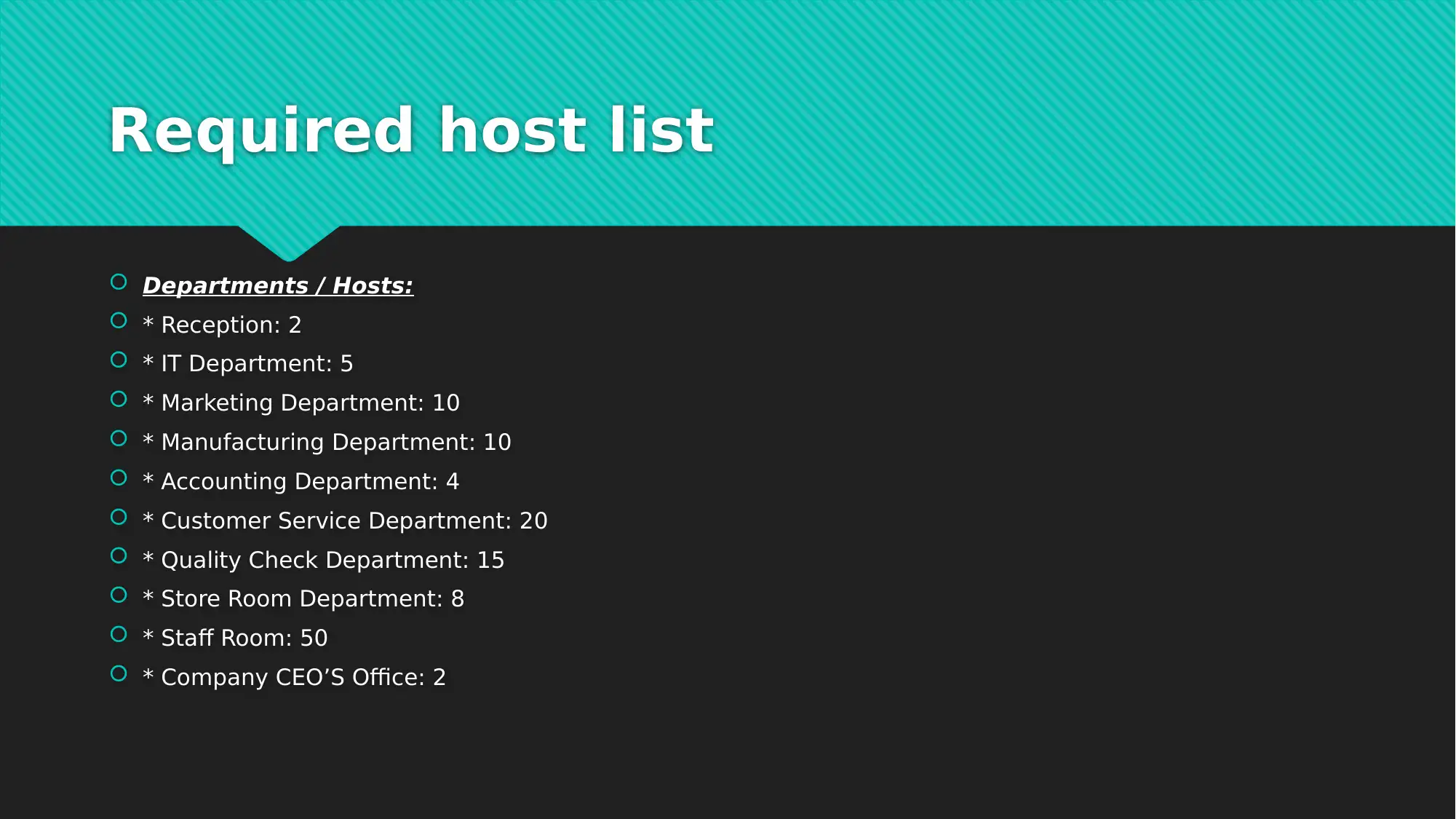
Required host list
Departments / Hosts:
* Reception: 2
* IT Department: 5
* Marketing Department: 10
* Manufacturing Department: 10
* Accounting Department: 4
* Customer Service Department: 20
* Quality Check Department: 15
* Store Room Department: 8
* Staff Room: 50
* Company CEO’S Office: 2
tabler-icon-diamond-filled.svg

Paraphrase This Document

Need a fresh take? Get an instant paraphrase of this document with our AI Paraphraser
Document Page
Network Design
Document Page
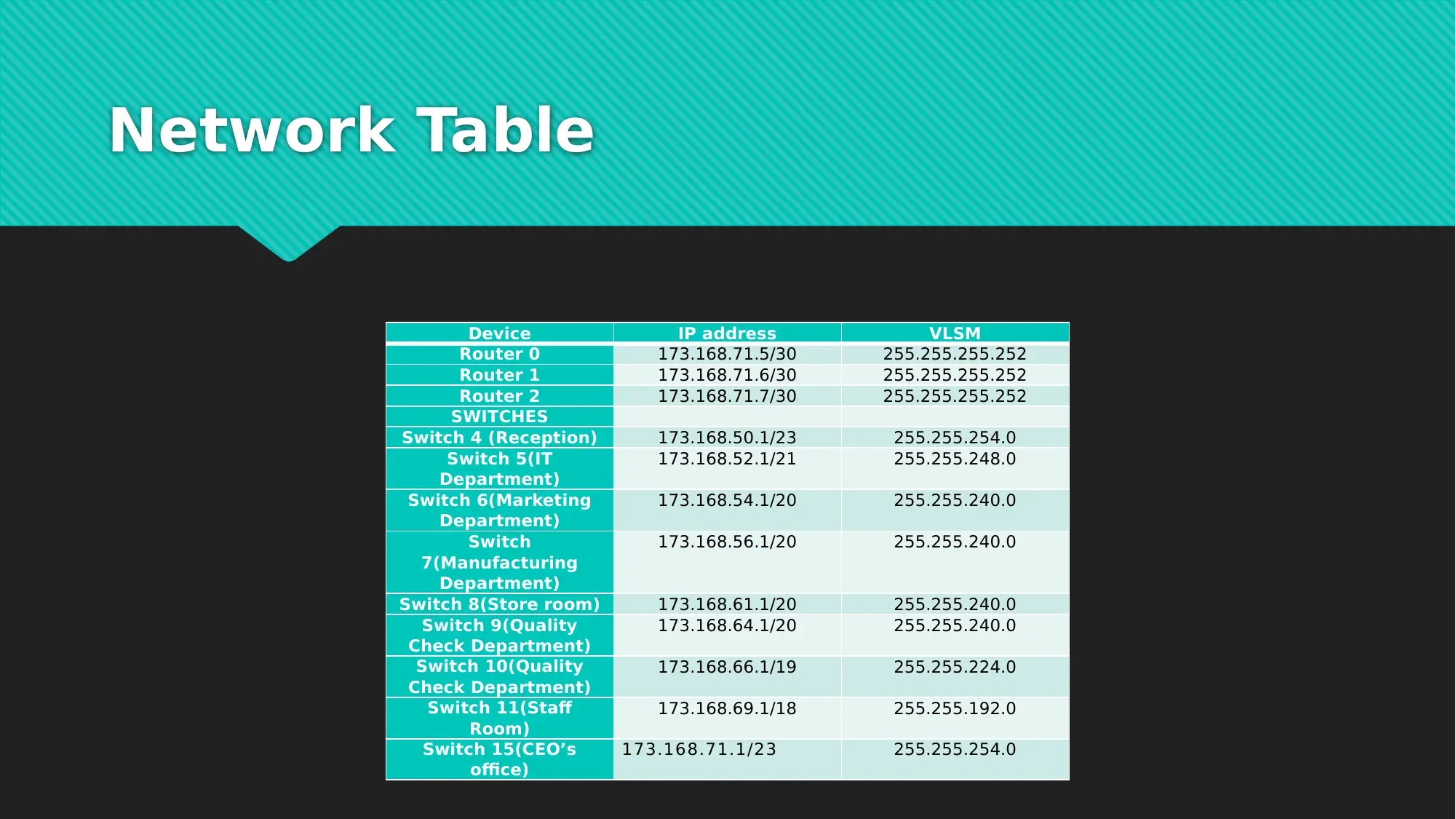
Network Table
Device IP address VLSM
Router 0 173.168.71.5/30 255.255.255.252
Router 1 173.168.71.6/30 255.255.255.252
Router 2 173.168.71.7/30 255.255.255.252
SWITCHES
Switch 4 (Reception) 173.168.50.1/23 255.255.254.0
Switch 5(IT
Department)
173.168.52.1/21 255.255.248.0
Switch 6(Marketing
Department)
173.168.54.1/20 255.255.240.0
Switch
7(Manufacturing
Department)
173.168.56.1/20 255.255.240.0
Switch 8(Store room) 173.168.61.1/20 255.255.240.0
Switch 9(Quality
Check Department)
173.168.64.1/20 255.255.240.0
Switch 10(Quality
Check Department)
173.168.66.1/19 255.255.224.0
Switch 11(Staff
Room)
173.168.69.1/18 255.255.192.0
Switch 15(CEO’s
office)
173.168.71.1/23 255.255.254.0
Document Page
End devices
Every end devices is comprised with an IP address and default gateway. The default
gateway is the IP address of the respective router.
tabler-icon-diamond-filled.svg

Paraphrase This Document

Need a fresh take? Get an instant paraphrase of this document with our AI Paraphraser
Document Page
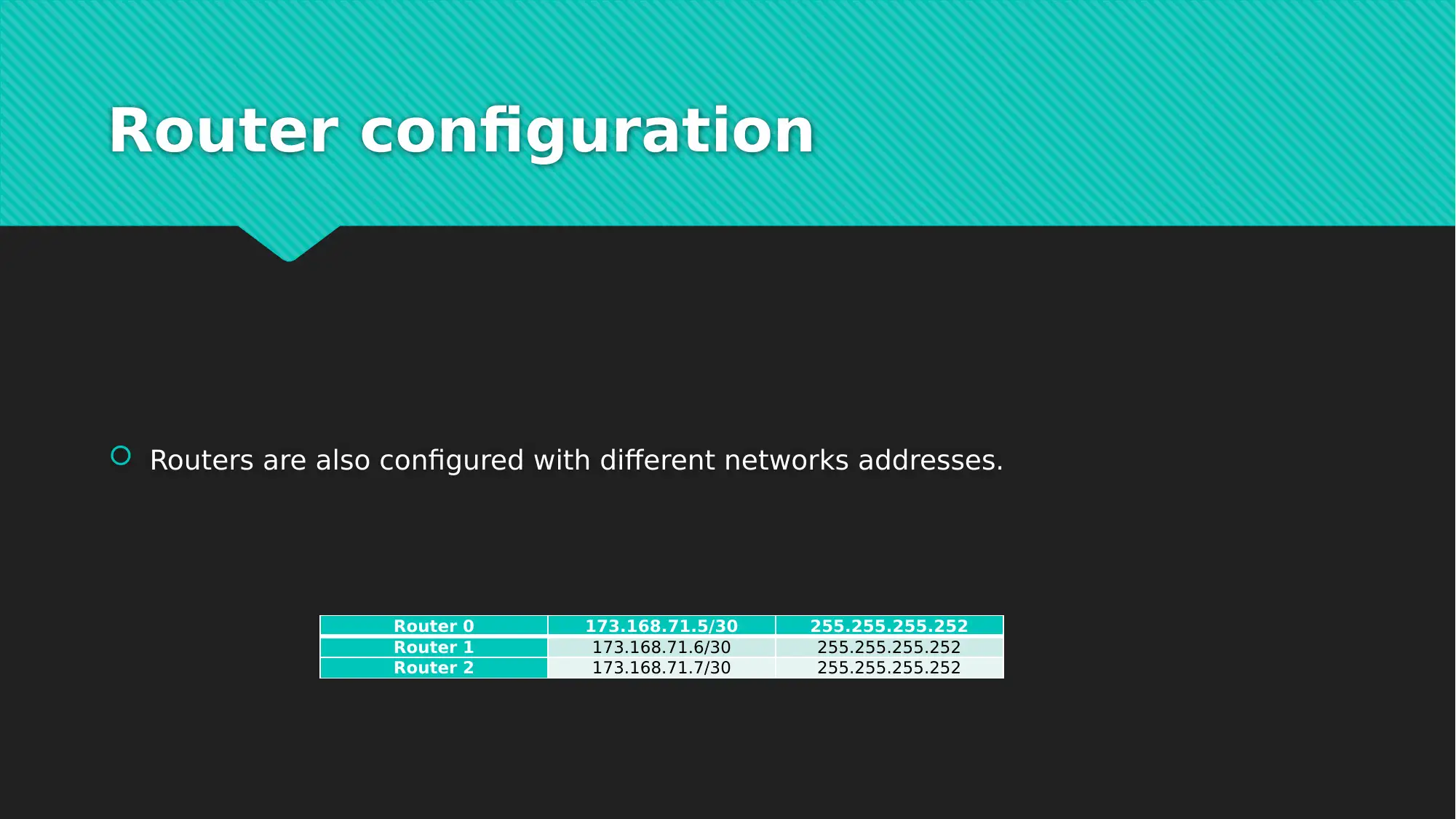
Router configuration
Routers are also configured with different networks addresses.
Router 0 173.168.71.5/30 255.255.255.252
Router 1 173.168.71.6/30 255.255.255.252
Router 2 173.168.71.7/30 255.255.255.252
Document Page
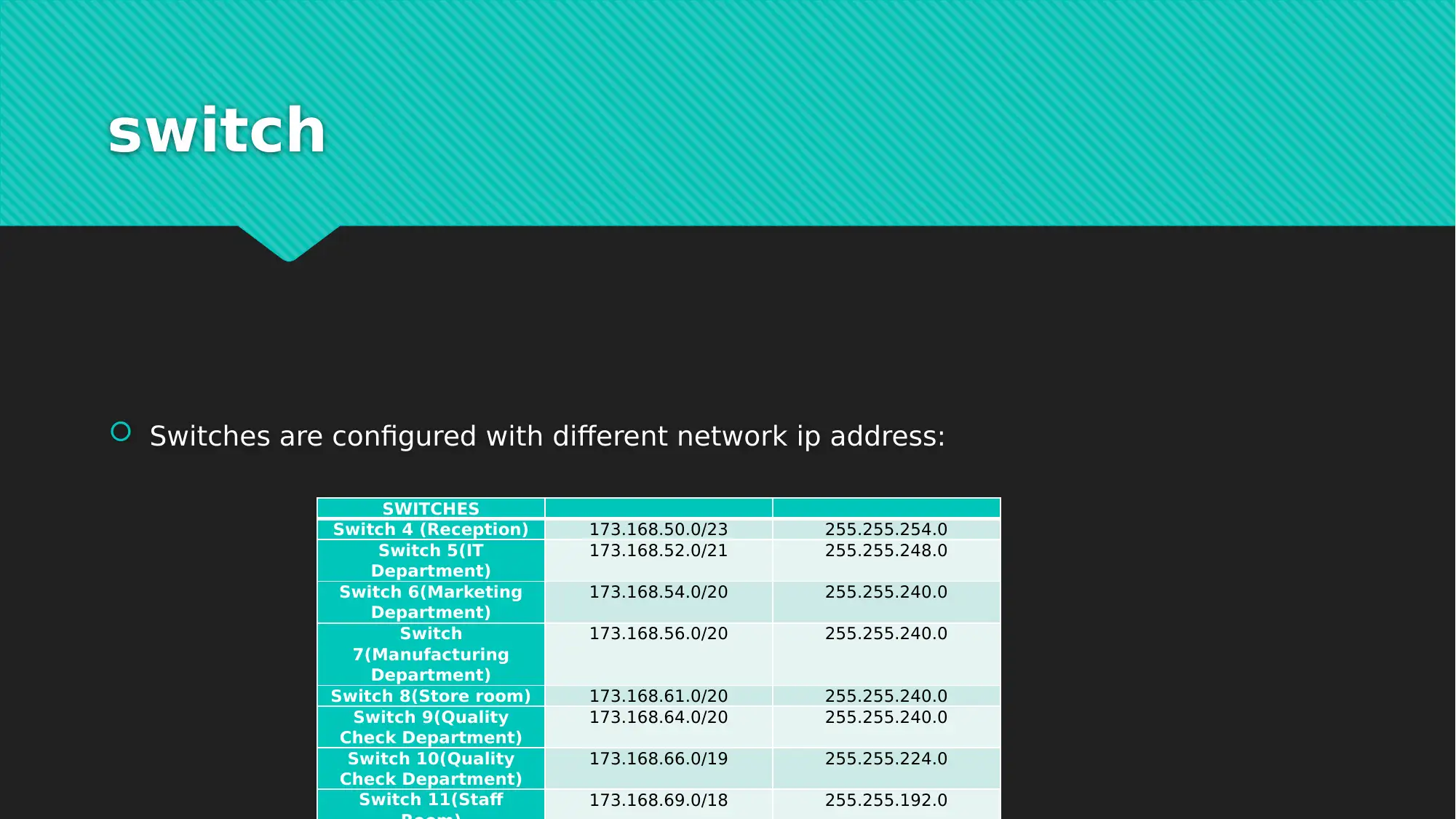
switch
Switches are configured with different network ip address:
SWITCHES
Switch 4 (Reception) 173.168.50.0/23 255.255.254.0
Switch 5(IT
Department)
173.168.52.0/21 255.255.248.0
Switch 6(Marketing
Department)
173.168.54.0/20 255.255.240.0
Switch
7(Manufacturing
Department)
173.168.56.0/20 255.255.240.0
Switch 8(Store room) 173.168.61.0/20 255.255.240.0
Switch 9(Quality
Check Department)
173.168.64.0/20 255.255.240.0
Switch 10(Quality
Check Department)
173.168.66.0/19 255.255.224.0
Switch 11(Staff 173.168.69.0/18 255.255.192.0
Document Page
VLSM
Variable Length Subnet Mask, abbreviated as VLSM, is a means to specify a different
subnet mask for the same network number on different subnets. With VLSM, a
network administrator can use a long mask on networks with few hosts and a short
mask on subnets with many hosts.
tabler-icon-diamond-filled.svg

Paraphrase This Document

Need a fresh take? Get an instant paraphrase of this document with our AI Paraphraser
Document Page
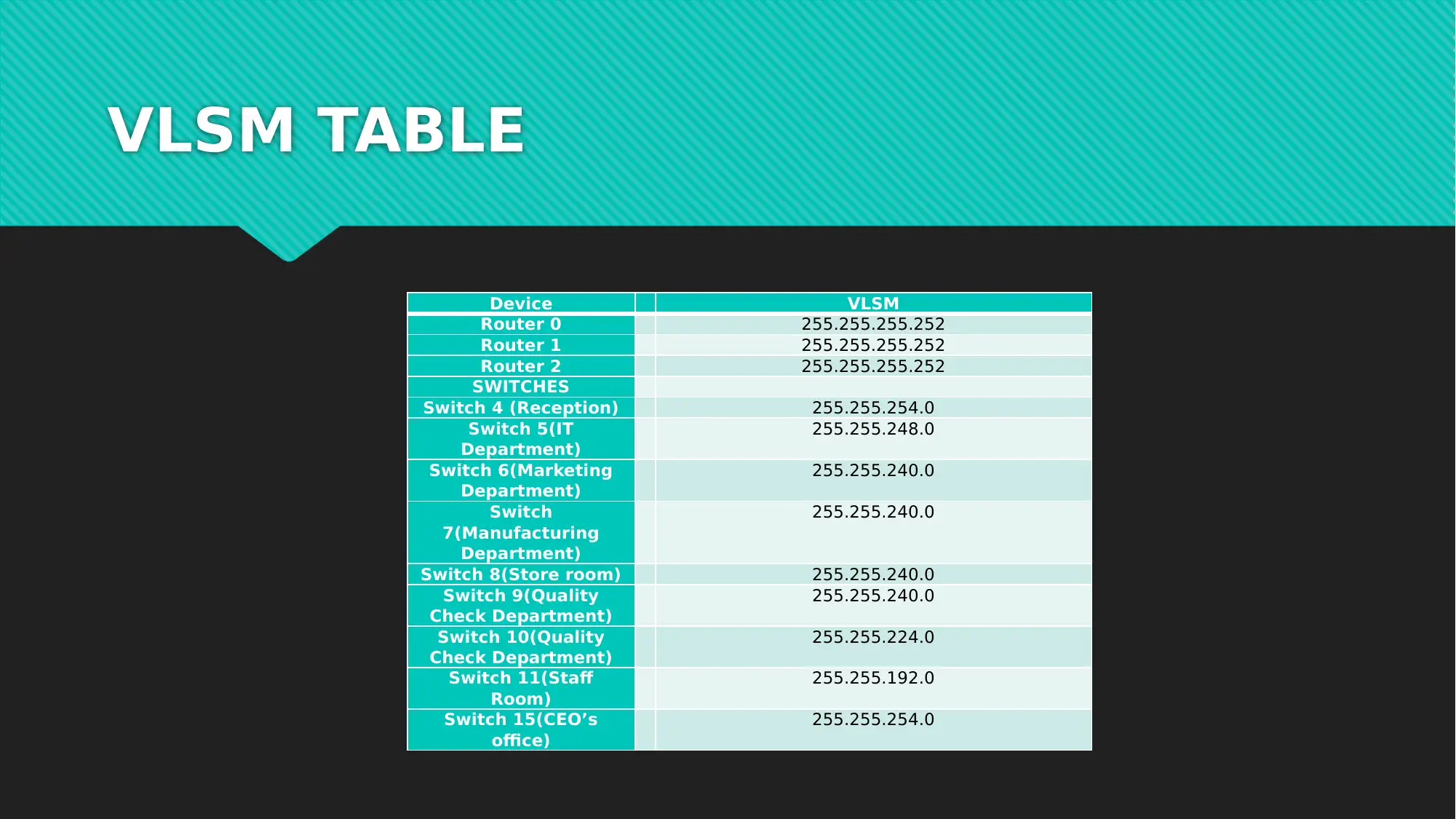
VLSM TABLE
Device VLSM
Router 0 255.255.255.252
Router 1 255.255.255.252
Router 2 255.255.255.252
SWITCHES
Switch 4 (Reception) 255.255.254.0
Switch 5(IT
Department)
255.255.248.0
Switch 6(Marketing
Department)
255.255.240.0
Switch
7(Manufacturing
Department)
255.255.240.0
Switch 8(Store room) 255.255.240.0
Switch 9(Quality
Check Department)
255.255.240.0
Switch 10(Quality
Check Department)
255.255.224.0
Switch 11(Staff
Room)
255.255.192.0
Switch 15(CEO’s
office)
255.255.254.0
Document Page
hosts
Host with different ip address can send or receive the packets via associate networks.
chevron_up_icon
1 out of 14
circle_padding
hide_on_mobile
zoom_out_icon
[object Object]