Object Oriented System Analysis and Design for Student System
VerifiedAdded on 2023/06/15
|17
|3650
|416
Report
AI Summary
This report provides an overview of object-oriented system analysis and design (OOAD), focusing on its application to an online student registration system. It begins by defining OOAD and object-oriented system analysis (OSA), highlighting the use of visual modeling and stakeholder interaction. The report includes a package diagram illustrating the system's architecture, detailing elements such as transcript login, course schedules, and prerequisites. It then discusses factors crucial for selecting a design strategy, including interface elements, consistency, business requirements, internal experience, project skills, project management, time frame, and cost. The report also explores client-server architectures (CSA), including 1-tier, N-tier, 2-tier, and 3-tier models, along with their advantages. Furthermore, it outlines key principles for user interface (UI) design, such as visibility, consistency, and minimizing user effort, and details the steps in the UI design process, from briefing and analysis to wireframing, prototyping, UI development, and interface evaluation. The report concludes by emphasizing the importance of usability and understandability in interface design.
OBJECT ORIENTED
SYSTEM ANALYSIS &
DESIGN
SYSTEM ANALYSIS &
DESIGN

Paraphrase This Document
Need a fresh take? Get an instant paraphrase of this document with our AI Paraphraser

INTRODUCTION
Object-oriented define as the system in which all data is presented as a discrete objects,
through which the users and other aspects can interact. This system will enable the user to
mainly concentrate on the tasks instead of the tools. OOAD object oriented analysis and design
can be understood as a technical process for designing the system with the use of the object
oriented programming language (Flores, Torres and Fonseca-Delgado, 2019). Object oriented
system analysis (OSA) is the systematic approach for the system that are developed on the basis
of existing methodologies' strength, also accounts the weaknesses. As the base for the OSA
models are the object class. OSA is the approach for designing the software, which used to plan
the system that are able to interact the object to solve any issues related to the software. In this
system it also uses the visual modelling thoroughly during the software development process in
order to guide the stakeholder interaction.
This report lay out the areas which involve the package diagram for the online student
registration, also describe about the factors which are required to include for design strategy. It
further describes about the computing client server, key principle of the UI design, UI process
steps, navigation control in the UI and output design principles.
MAIN BODY
1. Package diagram
Package diagrams are the structural based diagram which is used by the organization in
order to show their systematic arrangements of the different elements in the package form. This
diagram form is generally represented the layered architectures of the visual organization while
using the UML classifier. These diagrams are mainly aims to organize the element of the
massive system in a structural form, it involves the key deliverables, other diagrams. Its main
purpose is to simplify the complexity of the class diagrams (Mekruksavanich, 2017).
Concept of the package diagram:
This diagram follows the hierarchical approach which involves the nested packages. For
the nested package their modules are class based diagram. Certain rules are involves in this
diagram which are that name for two packages should not be identical, but for the classes it is
allowed to have same name in different packages.
Object-oriented define as the system in which all data is presented as a discrete objects,
through which the users and other aspects can interact. This system will enable the user to
mainly concentrate on the tasks instead of the tools. OOAD object oriented analysis and design
can be understood as a technical process for designing the system with the use of the object
oriented programming language (Flores, Torres and Fonseca-Delgado, 2019). Object oriented
system analysis (OSA) is the systematic approach for the system that are developed on the basis
of existing methodologies' strength, also accounts the weaknesses. As the base for the OSA
models are the object class. OSA is the approach for designing the software, which used to plan
the system that are able to interact the object to solve any issues related to the software. In this
system it also uses the visual modelling thoroughly during the software development process in
order to guide the stakeholder interaction.
This report lay out the areas which involve the package diagram for the online student
registration, also describe about the factors which are required to include for design strategy. It
further describes about the computing client server, key principle of the UI design, UI process
steps, navigation control in the UI and output design principles.
MAIN BODY
1. Package diagram
Package diagrams are the structural based diagram which is used by the organization in
order to show their systematic arrangements of the different elements in the package form. This
diagram form is generally represented the layered architectures of the visual organization while
using the UML classifier. These diagrams are mainly aims to organize the element of the
massive system in a structural form, it involves the key deliverables, other diagrams. Its main
purpose is to simplify the complexity of the class diagrams (Mekruksavanich, 2017).
Concept of the package diagram:
This diagram follows the hierarchical approach which involves the nested packages. For
the nested package their modules are class based diagram. Certain rules are involves in this
diagram which are that name for two packages should not be identical, but for the classes it is
allowed to have same name in different packages.
⊘ This is a preview!⊘
Do you want full access?
Subscribe today to unlock all pages.

Trusted by 1+ million students worldwide
2. Factors that are considered in order to select the designing strategy
Following are the factors which are consider in order to selecting the designing strategy-
Select the interface elements:
As users are very familiar with the interfaces elements, therefore it is important to keep the
layout consistent, it will help in task completion. Interface elements involves the input controls
which are buttons, radio buttons, toggles. Also involves the navigational and containers
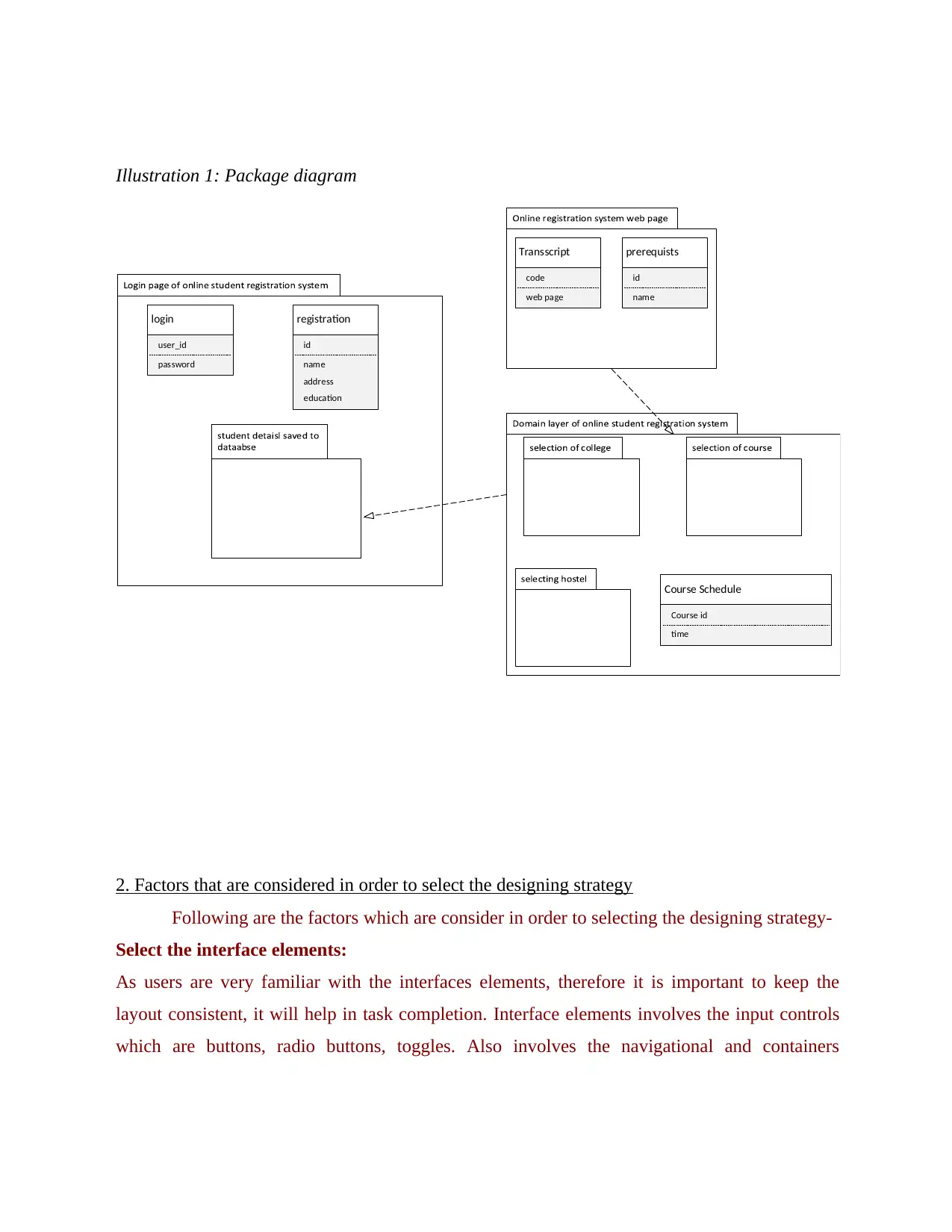
Illustration 1: Package diagram
Course Schedule
Transscript prerequists
login registration
Course id
time
code
web page
id
name
user_id
password
id
name
address
education
Following are the factors which are consider in order to selecting the designing strategy-
Select the interface elements:
As users are very familiar with the interfaces elements, therefore it is important to keep the
layout consistent, it will help in task completion. Interface elements involves the input controls
which are buttons, radio buttons, toggles. Also involves the navigational and containers
Illustration 1: Package diagram
Course Schedule
Transscript prerequists
login registration
Course id
time
code
web page
id
name
user_id
password
id
name
address
education
Paraphrase This Document
Need a fresh take? Get an instant paraphrase of this document with our AI Paraphraser
elements. For designing purposes it is important to design the interface simple, as user ignores
all the unnecessary elements.
Develop the consistency and use the same UI objects:
As to select the common elements will help the user to easily understood, also it enables
them to feel more comfortable and connected with the interface. Therefore it is important to
select the common designing elements so it appears familiar to the user.
Business requirement: It is beneficial in order to outline the project’s need; therefore for
selecting the designing themes for the project it is mandatory to identify the needs so that
project’s aim and objectives can be determined.
Internal experience: It involves the thought and emotion or sense of skills and knowledge
which boosts the designer to effectively use their experience for complete the project.
Project skills: These are competencies and the trait which a user need for effectively
approaching the project from start to end. It is mandatory in order to reach to project goals.
Project management: Process of heading the team work to accomplish the project goals.
Therefore it is important for the project leader to have good skills so that they can lead their
team.
Time frame and cost: It is important to design the budget first which helps to manage the cost
which is invested for designing the UI. Also to deliver the project on time it is important to work
in a module so important work can complete first.
3. Computing client server architectures
Client service architecture (CSA) define as the systematic approach in which the client
request to the centralized server, and receive the services provided by the server which is host
computer. Normally client server gives the proper interface which enables the user to make
request and to receive the solution (Leimane and Nikiforova, 2018). Advantage of CSA are it
has the centralize approach in which all data are gather at single location. Therefore, it is cost-
efficient in order to maintain a single server.
There are mainly four types of different CSA:
Single/1 tier architectures
N tier architectures
2 tier architectures
all the unnecessary elements.
Develop the consistency and use the same UI objects:
As to select the common elements will help the user to easily understood, also it enables
them to feel more comfortable and connected with the interface. Therefore it is important to
select the common designing elements so it appears familiar to the user.
Business requirement: It is beneficial in order to outline the project’s need; therefore for
selecting the designing themes for the project it is mandatory to identify the needs so that
project’s aim and objectives can be determined.
Internal experience: It involves the thought and emotion or sense of skills and knowledge
which boosts the designer to effectively use their experience for complete the project.
Project skills: These are competencies and the trait which a user need for effectively
approaching the project from start to end. It is mandatory in order to reach to project goals.
Project management: Process of heading the team work to accomplish the project goals.
Therefore it is important for the project leader to have good skills so that they can lead their
team.
Time frame and cost: It is important to design the budget first which helps to manage the cost
which is invested for designing the UI. Also to deliver the project on time it is important to work
in a module so important work can complete first.
3. Computing client server architectures
Client service architecture (CSA) define as the systematic approach in which the client
request to the centralized server, and receive the services provided by the server which is host
computer. Normally client server gives the proper interface which enables the user to make
request and to receive the solution (Leimane and Nikiforova, 2018). Advantage of CSA are it
has the centralize approach in which all data are gather at single location. Therefore, it is cost-
efficient in order to maintain a single server.
There are mainly four types of different CSA:
Single/1 tier architectures
N tier architectures
2 tier architectures
3 tier architectures
1 tier architecture: It mainly includes the important element, that are for the software
application on the isolated platform. This architecture is generally associated with the multi
tiered approach, which are used for the web applications in which the different business
processes are accommodated individually. Example is to practice the SQL when operating the
DBMS.
N tier architecture: In this engineering approach presentation and implementation functions are
maintained separately in both logical and physical term. It can also consider as the multi tier
approach. This architecture gives the benefit of security and flexibility. Some examples are
CORBA, DCOM server objects.
2 tier architectures: A software structure which involves the presentation layer and the data
layer, that are keep on the server. While storing these two process on different location known as
the 2 tier process, it is considered as opposite to the one tier architecture. Examples are database
and the client tier (Adams and et.al 2020). It helps to develop the easier understanding and also
in this maintenance do not involve complexities.
3 tier architectures: This structure is generally considered as the well-developed software
structure, which usually arranges the processes into the three logical and the practical aspects. Its
main components are the logic and the data tier. Its examples are typical business application in
which the every module have different aspects which are presentation tier has the browser, logic
tier has ASP.NET and the data tier has RDBMS database.
4. Principles for User interface design
User interface involves the devices which are hardware inputs as keyboards, monitor, mouse etc.
which are used to provide the interface between user and system. For the UI design certain
principles are visibility, feedback, liability, liability, regularity. These principles help the user to
manage the interface which is beneficial in order to efficiently interact with the services
(Bakaev, 2018). Main advantage of the principles is to check the proper functionality of the
1 tier architecture: It mainly includes the important element, that are for the software
application on the isolated platform. This architecture is generally associated with the multi
tiered approach, which are used for the web applications in which the different business
processes are accommodated individually. Example is to practice the SQL when operating the
DBMS.
N tier architecture: In this engineering approach presentation and implementation functions are
maintained separately in both logical and physical term. It can also consider as the multi tier
approach. This architecture gives the benefit of security and flexibility. Some examples are
CORBA, DCOM server objects.
2 tier architectures: A software structure which involves the presentation layer and the data
layer, that are keep on the server. While storing these two process on different location known as
the 2 tier process, it is considered as opposite to the one tier architecture. Examples are database
and the client tier (Adams and et.al 2020). It helps to develop the easier understanding and also
in this maintenance do not involve complexities.
3 tier architectures: This structure is generally considered as the well-developed software
structure, which usually arranges the processes into the three logical and the practical aspects. Its
main components are the logic and the data tier. Its examples are typical business application in
which the every module have different aspects which are presentation tier has the browser, logic
tier has ASP.NET and the data tier has RDBMS database.
4. Principles for User interface design
User interface involves the devices which are hardware inputs as keyboards, monitor, mouse etc.
which are used to provide the interface between user and system. For the UI design certain
principles are visibility, feedback, liability, liability, regularity. These principles help the user to
manage the interface which is beneficial in order to efficiently interact with the services
(Bakaev, 2018). Main advantage of the principles is to check the proper functionality of the
⊘ This is a preview!⊘
Do you want full access?
Subscribe today to unlock all pages.
Trusted by 1+ million students worldwide
product, it also supportive for the organization in order to understand the requirements of the
audience.
Visibility principle:
All principles are important respect to user interface but visibility factor is most considerable
factor. Visibility is the basic principle which must required for the user to include for better
visibility of the user interface design. It is beneficial in order to give visual representation to the
user so that they can develop the understandability (Dooley, 2017). To implementing the
visibility principle needed an element optimization for the design so that it helps the user to
achieve the goals. It is not necessary that all component appear visible, because the interface is
also cluttered. Therefore, it is important for the user who are designing the user face to involve
the important elements so that it do not distract the other clients with the redundant information.
Visibility principle allow to include all the necessary or important materials, it is essential in
order to make the task visible without any distractions.
Consistency principle:
It define as to keep all the repeated design elements in a same location or same
typography function. As it helps to enhance the user experience. This principle mainly refer as
how design makes the complete sense for the user, as what they view in the interface. Therefore
when the consistency is completely applied user will immediately gets the idea about the design
elements in interface.
Screen layout: A screen layout button which will help to arrange the elements in a order so that
it can be easily find.
Content awareness: Its aim is to provide the interface to user to make aware of the content by
using components as titles, field labels.
Aesthetics: It is the core principle which is used to describe the pleasing quality of the design.
User experience: It is the experience which the user have with product and services.
Minimise the user effort: To keep the interface simple, and using the common interface
element will reduce the user effort.
audience.
Visibility principle:
All principles are important respect to user interface but visibility factor is most considerable
factor. Visibility is the basic principle which must required for the user to include for better
visibility of the user interface design. It is beneficial in order to give visual representation to the
user so that they can develop the understandability (Dooley, 2017). To implementing the
visibility principle needed an element optimization for the design so that it helps the user to
achieve the goals. It is not necessary that all component appear visible, because the interface is
also cluttered. Therefore, it is important for the user who are designing the user face to involve
the important elements so that it do not distract the other clients with the redundant information.
Visibility principle allow to include all the necessary or important materials, it is essential in
order to make the task visible without any distractions.
Consistency principle:
It define as to keep all the repeated design elements in a same location or same
typography function. As it helps to enhance the user experience. This principle mainly refer as
how design makes the complete sense for the user, as what they view in the interface. Therefore
when the consistency is completely applied user will immediately gets the idea about the design
elements in interface.
Screen layout: A screen layout button which will help to arrange the elements in a order so that
it can be easily find.
Content awareness: Its aim is to provide the interface to user to make aware of the content by
using components as titles, field labels.
Aesthetics: It is the core principle which is used to describe the pleasing quality of the design.
User experience: It is the experience which the user have with product and services.
Minimise the user effort: To keep the interface simple, and using the common interface
element will reduce the user effort.
Paraphrase This Document
Need a fresh take? Get an instant paraphrase of this document with our AI Paraphraser
5. Steps for the user interface design process
User interface design process define as the configuration of the visual factors and the
interface animation. It is commonly described the graphical representation of the application. It
generally designs on the basis of the client requirements. The following steps which are included
in its designing processes are-
Briefing:
First to collect the all information, as what client wants to add in their UI project, as
designing of the user interface differs for every client. Therefore, it is important to communicate
with the client as what they usually need to involve in the UI process. So to collect the
information regarding their products, their ideas and goals which helps the user to meet the
needs of the client (Tagg, 2019). It is also important to identify the need of the customer for the
product, competition analysis, budget information and technical requirement which are required
in order to design the base of the UI design.
Analysis:
Before initiating with the process of developing the interface it is important for the
analyst to organize a meeting with the decision maker and proceed to complete the proper
market research. As the application is mainly based on the certain people so it is important to
know their behavioural patterns so it will add the reliability in the data. Well researching also
beneficial to consider all the important factor and it gives the information to outline key factors
and avoid the unnecessary features. After collecting all information now analyst can proceed to
design the UI.
Wire framing:
Wire framing is used to give the layout and functionality, based on the information
which is lay out by investigating the market, UI designer begin to make the packages of the
application screen with the interfacing components and arrange it in a structural form. It is
important to arrange in order as it gives the information as which screen is forward to the user
and what buttons are required to perform the certain actions.
UX prototype:
User interface design process define as the configuration of the visual factors and the
interface animation. It is commonly described the graphical representation of the application. It
generally designs on the basis of the client requirements. The following steps which are included
in its designing processes are-
Briefing:
First to collect the all information, as what client wants to add in their UI project, as
designing of the user interface differs for every client. Therefore, it is important to communicate
with the client as what they usually need to involve in the UI process. So to collect the
information regarding their products, their ideas and goals which helps the user to meet the
needs of the client (Tagg, 2019). It is also important to identify the need of the customer for the
product, competition analysis, budget information and technical requirement which are required
in order to design the base of the UI design.
Analysis:
Before initiating with the process of developing the interface it is important for the
analyst to organize a meeting with the decision maker and proceed to complete the proper
market research. As the application is mainly based on the certain people so it is important to
know their behavioural patterns so it will add the reliability in the data. Well researching also
beneficial to consider all the important factor and it gives the information to outline key factors
and avoid the unnecessary features. After collecting all information now analyst can proceed to
design the UI.
Wire framing:
Wire framing is used to give the layout and functionality, based on the information
which is lay out by investigating the market, UI designer begin to make the packages of the
application screen with the interfacing components and arrange it in a structural form. It is
important to arrange in order as it gives the information as which screen is forward to the user
and what buttons are required to perform the certain actions.
UX prototype:
It is the complete structural presentation, which shows the final aspect of the application.
Its main aim is to simulate the interconnection between the application and person. This is used
to find the final redundancy in the layout so that improvement can made (Allen, 2019).
UI developing:
Final stage which mainly concerned with the client approval for the last interpretation of
the UX prototype. In this UI designer begin to develop the User interface design by
implementing the typography approach and different colours in order to give interactive
appealing to the interface components. Moreover, designer use the Figma to carry out their work
as it gives the high flexibility to create the user interface.
Use scenario development: It helps to create structure into the analytic aspects, also enable to
design the alternative scenario which can be used further.
Interface structure design: Consider as the basic aspect of interface which is required to
present the relatedness of screen and reports.
Interface design prototyping: It is the iterative process which enables the user to take part in
mocking up for the UI which is for system.
Interface evaluation: Interface evaluation helps to make the services more usable and
understandable so that user can easily understand the design.
6. Navigation control for user interface
Navigation controls are basically required to navigate the person from the webpage. It
gives the flexibility to the user in order to make the unified frame so that interface pages can
appear to the user. Different type of the navigation control are as follows:
Navigation Bar: This is mainly used to show the primary navigation, it can be also used to
show the secondary navigation bar. Its all done on basis of the application.
Tab navigation: It is the tab which are present at the foot of the screen, it allows the user to
switch various navigation paths.
Tab bar: tab bar enables the user to navigate within the bunch of the content which are mainly
based on the same hierarchy (Zhou, Shi and Chen, 2018).
Breadcrumb: It helps to enhance the usability of the website, it provides the good
understanding to the user regarding the page.
Its main aim is to simulate the interconnection between the application and person. This is used
to find the final redundancy in the layout so that improvement can made (Allen, 2019).
UI developing:
Final stage which mainly concerned with the client approval for the last interpretation of
the UX prototype. In this UI designer begin to develop the User interface design by
implementing the typography approach and different colours in order to give interactive
appealing to the interface components. Moreover, designer use the Figma to carry out their work
as it gives the high flexibility to create the user interface.
Use scenario development: It helps to create structure into the analytic aspects, also enable to
design the alternative scenario which can be used further.
Interface structure design: Consider as the basic aspect of interface which is required to
present the relatedness of screen and reports.
Interface design prototyping: It is the iterative process which enables the user to take part in
mocking up for the UI which is for system.
Interface evaluation: Interface evaluation helps to make the services more usable and
understandable so that user can easily understand the design.
6. Navigation control for user interface
Navigation controls are basically required to navigate the person from the webpage. It
gives the flexibility to the user in order to make the unified frame so that interface pages can
appear to the user. Different type of the navigation control are as follows:
Navigation Bar: This is mainly used to show the primary navigation, it can be also used to
show the secondary navigation bar. Its all done on basis of the application.
Tab navigation: It is the tab which are present at the foot of the screen, it allows the user to
switch various navigation paths.
Tab bar: tab bar enables the user to navigate within the bunch of the content which are mainly
based on the same hierarchy (Zhou, Shi and Chen, 2018).
Breadcrumb: It helps to enhance the usability of the website, it provides the good
understanding to the user regarding the page.
⊘ This is a preview!⊘
Do you want full access?
Subscribe today to unlock all pages.
Trusted by 1+ million students worldwide
Languages: It enables the visitor to review the same page in various different languages.
Menus: Menu navigation allows to point out the important phase of website.
Direct manipulation: This will allow the users to acts on the displayed elements by using
reversible actions.
7. Principle of output design
Output design are the drawing which entails all elements which is used in the project. It
usually defines the assemblies of the services.
To provide the intended purpose: Output differs for every client, as what they expect as a
result, therefore analyst already communicate with the client as what are their purpose in order
to get the final result which meets their demands.
Output designing to suitable the person: It is generally to develop the user specific result, as
based on the observations it is beneficial in order to design the output that address the elements
which the client prefer.
Provide the better qualitative product: Most important to identify as what quantity is accurate
for the person. Therefore heuristic system need to give as what are the needed aspect in order to
carry out the work.
Deliver output on time: It can be majorly seen that user always complaint about not delivering
the project on time. As correct deliverables of the output is the critical for the business
functionality (Belikova, Rogozo and Borisova, 2017).
Understanding the report usage: It will help the project designer to know about the user’s
behaviour for certain duration.
Manage information load: For managing the information it is important to keep the things,
relevant, clear and simple. And design the framework simple which allow the user to take
certain actions.
Minimize bias: Develop the flexible result which will enable the user to modify the limits, also
work with the users so that they are aware of the output biases.
8. Specification of the UI and test plan for the System integration
User interface specification describe as the documentation which involves all the
software components details which are written in the document. It includes all the possible
Menus: Menu navigation allows to point out the important phase of website.
Direct manipulation: This will allow the users to acts on the displayed elements by using
reversible actions.
7. Principle of output design
Output design are the drawing which entails all elements which is used in the project. It
usually defines the assemblies of the services.
To provide the intended purpose: Output differs for every client, as what they expect as a
result, therefore analyst already communicate with the client as what are their purpose in order
to get the final result which meets their demands.
Output designing to suitable the person: It is generally to develop the user specific result, as
based on the observations it is beneficial in order to design the output that address the elements
which the client prefer.
Provide the better qualitative product: Most important to identify as what quantity is accurate
for the person. Therefore heuristic system need to give as what are the needed aspect in order to
carry out the work.
Deliver output on time: It can be majorly seen that user always complaint about not delivering
the project on time. As correct deliverables of the output is the critical for the business
functionality (Belikova, Rogozo and Borisova, 2017).
Understanding the report usage: It will help the project designer to know about the user’s
behaviour for certain duration.
Manage information load: For managing the information it is important to keep the things,
relevant, clear and simple. And design the framework simple which allow the user to take
certain actions.
Minimize bias: Develop the flexible result which will enable the user to modify the limits, also
work with the users so that they are aware of the output biases.
8. Specification of the UI and test plan for the System integration
User interface specification describe as the documentation which involves all the
software components details which are written in the document. It includes all the possible
Paraphrase This Document
Need a fresh take? Get an instant paraphrase of this document with our AI Paraphraser
aspects which are needed for the user in order to carry out the visual elements. Test plan for the
system integration involves the stages which are to develop the testing environment, find the
data and to develop the repository. Testing help to reduce all the inaccuracies factors from the
project so that it will give the desired final output.
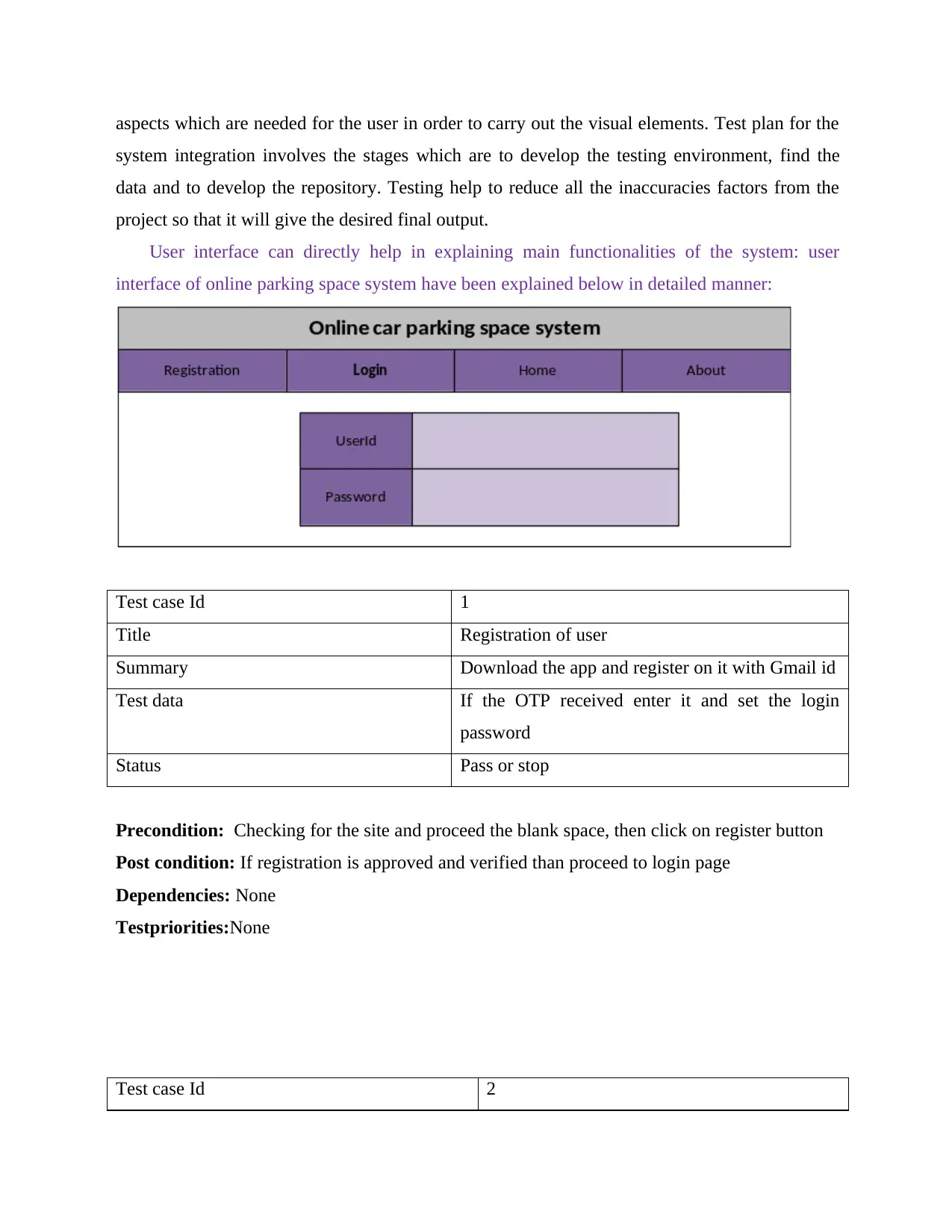
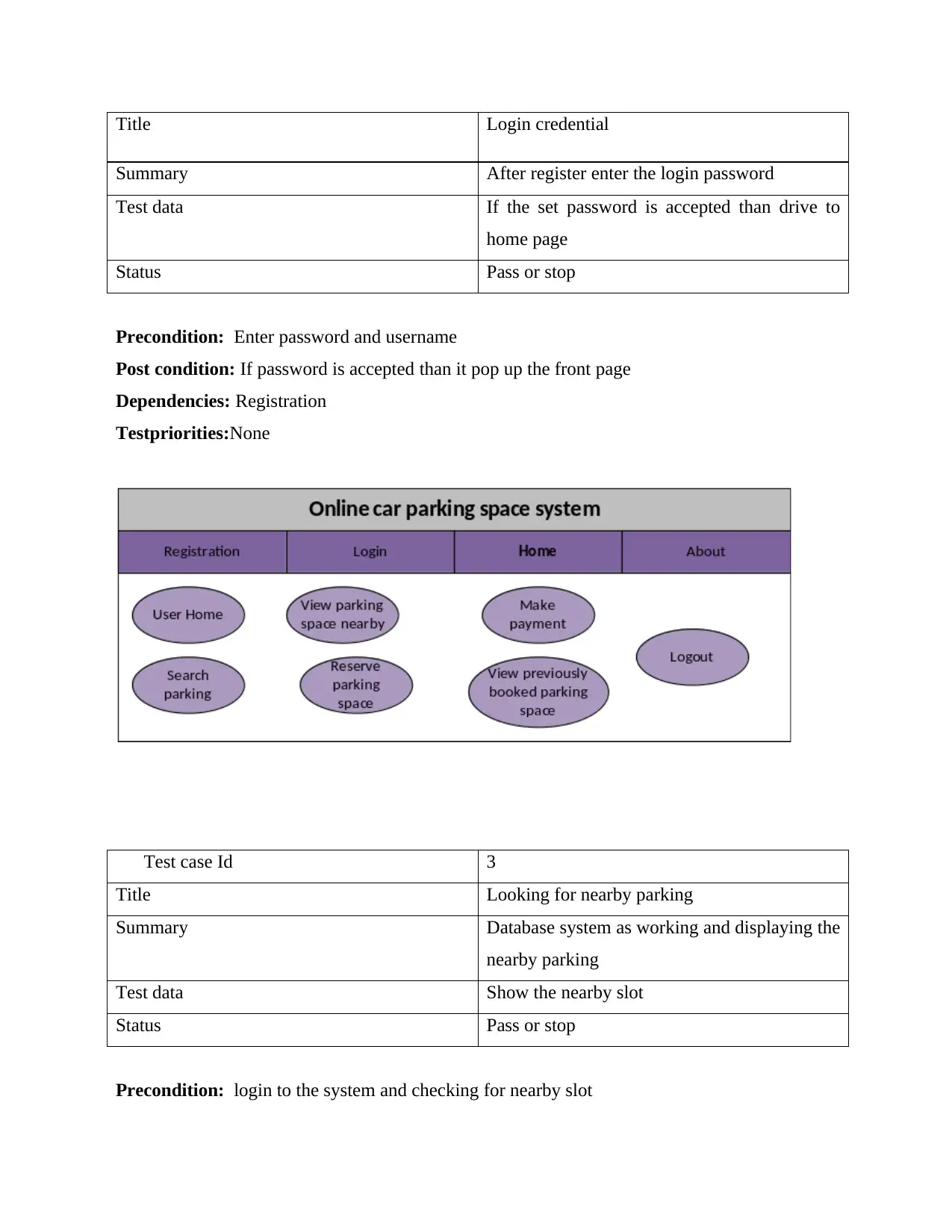
User interface can directly help in explaining main functionalities of the system: user
interface of online parking space system have been explained below in detailed manner:
Test case Id 1
Title Registration of user
Summary Download the app and register on it with Gmail id
Test data If the OTP received enter it and set the login
password
Status Pass or stop
Precondition: Checking for the site and proceed the blank space, then click on register button
Post condition: If registration is approved and verified than proceed to login page
Dependencies: None
Testpriorities:None
Test case Id 2
system integration involves the stages which are to develop the testing environment, find the
data and to develop the repository. Testing help to reduce all the inaccuracies factors from the
project so that it will give the desired final output.
User interface can directly help in explaining main functionalities of the system: user
interface of online parking space system have been explained below in detailed manner:
Test case Id 1
Title Registration of user
Summary Download the app and register on it with Gmail id
Test data If the OTP received enter it and set the login
password
Status Pass or stop
Precondition: Checking for the site and proceed the blank space, then click on register button
Post condition: If registration is approved and verified than proceed to login page
Dependencies: None
Testpriorities:None
Test case Id 2
Title Login credential
Summary After register enter the login password
Test data If the set password is accepted than drive to
home page
Status Pass or stop
Precondition: Enter password and username
Post condition: If password is accepted than it pop up the front page
Dependencies: Registration
Testpriorities:None
Test case Id 3
Title Looking for nearby parking
Summary Database system as working and displaying the
nearby parking
Test data Show the nearby slot
Status Pass or stop
Precondition: login to the system and checking for nearby slot
Summary After register enter the login password
Test data If the set password is accepted than drive to
home page
Status Pass or stop
Precondition: Enter password and username
Post condition: If password is accepted than it pop up the front page
Dependencies: Registration
Testpriorities:None
Test case Id 3
Title Looking for nearby parking
Summary Database system as working and displaying the
nearby parking
Test data Show the nearby slot
Status Pass or stop
Precondition: login to the system and checking for nearby slot
⊘ This is a preview!⊘
Do you want full access?
Subscribe today to unlock all pages.
Trusted by 1+ million students worldwide

1 out of 17


Related Documents


Your All-in-One AI-Powered Toolkit for Academic Success.
+13062052269
info@desklib.com
Available 24*7 on WhatsApp / Email
![[object Object]](/_next/static/media/star-bottom.7253800d.svg)
Unlock your academic potential
Copyright © 2020–2026 A2Z Services. All Rights Reserved. Developed and managed by ZUCOL.