Park Lane College Leeds Database Assignment: SQL Queries and Functions
VerifiedAdded on 2022/09/26
|14
|893
|23
Homework Assignment
AI Summary
This document presents a database assignment solution for Leeds City College's Library system, addressing the requirements of a learner resource center. The solution includes SQL queries to manage campus resources, such as creating tables for campus, resources, and fines. It covers various queries to display records, filter by category, and retrieve data based on specific criteria like book status and return dates. The assignment also includes a function for checking book availability and inserting rental records. References to relevant online resources are provided. The solution demonstrates the design and implementation of a database system to meet the college's needs, including reports on resources, fines, and other useful information for library management. The queries and functions showcase the ability to manage and retrieve data from the library system.

Park Lane College Leeds
[2019]
PARK LANE COLLEGE
[]
[2019]
PARK LANE COLLEGE
[]
Paraphrase This Document
Need a fresh take? Get an instant paraphrase of this document with our AI Paraphraser

Table of Contents
Question A).........................................................................................................................................................5
Question b).........................................................................................................................................................6
Question c).........................................................................................................................................................7
Quest d)..............................................................................................................................................................9
Question e).......................................................................................................................................................10
Question f)........................................................................................................................................................11
Question g)(Total fine).....................................................................................................................................12
Question h).......................................................................................................................................................14
References........................................................................................................................................................15
2 | P a g e
Question A).........................................................................................................................................................5
Question b).........................................................................................................................................................6
Question c).........................................................................................................................................................7
Quest d)..............................................................................................................................................................9
Question e).......................................................................................................................................................10
Question f)........................................................................................................................................................11
Question g)(Total fine).....................................................................................................................................12
Question h).......................................................................................................................................................14
References........................................................................................................................................................15
2 | P a g e

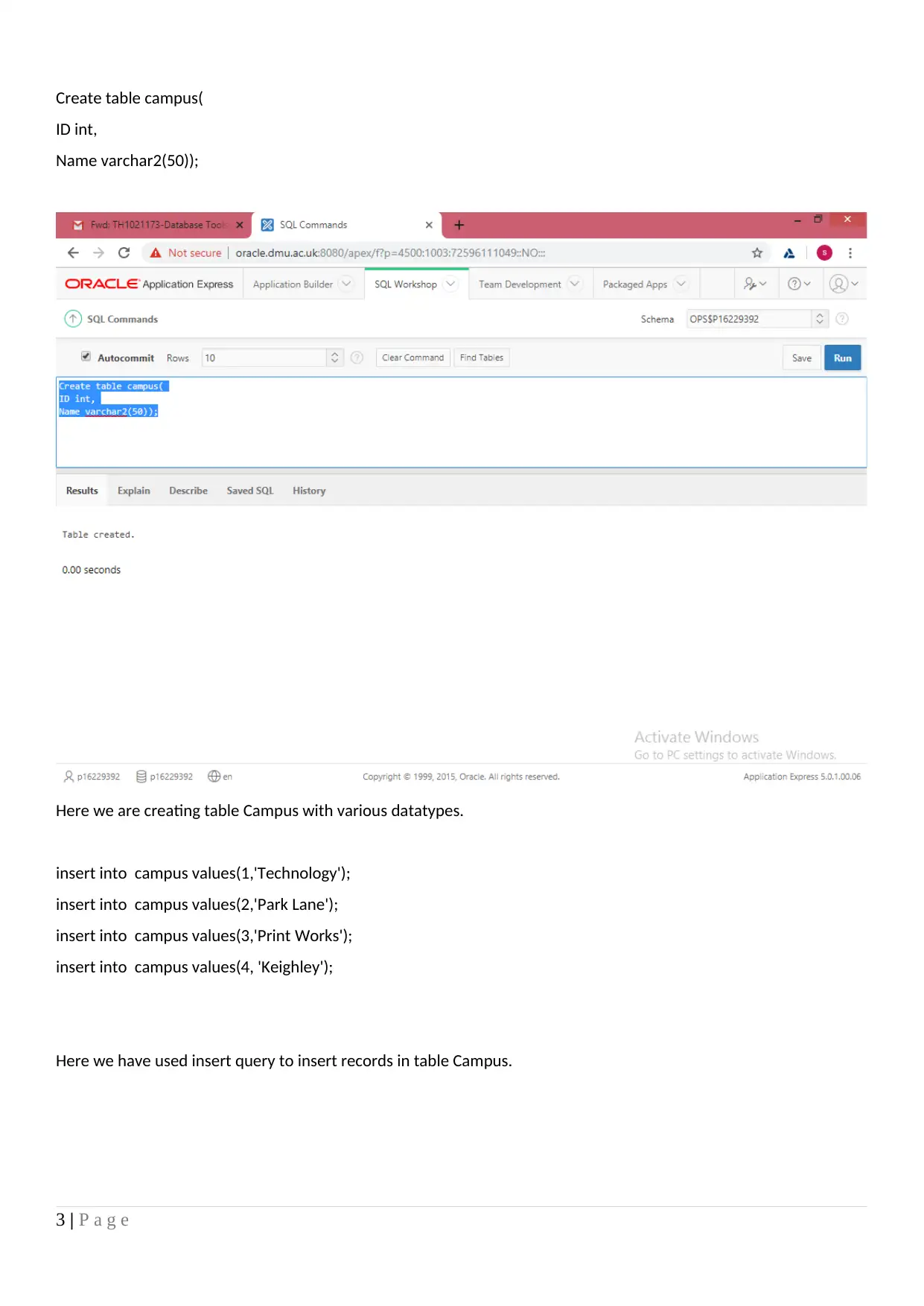
Create table campus(
ID int,
Name varchar2(50));
Here we are creating table Campus with various datatypes.
insert into campus values(1,'Technology');
insert into campus values(2,'Park Lane');
insert into campus values(3,'Print Works');
insert into campus values(4, 'Keighley');
Here we have used insert query to insert records in table Campus.
3 | P a g e
ID int,
Name varchar2(50));
Here we are creating table Campus with various datatypes.
insert into campus values(1,'Technology');
insert into campus values(2,'Park Lane');
insert into campus values(3,'Print Works');
insert into campus values(4, 'Keighley');
Here we have used insert query to insert records in table Campus.
3 | P a g e
⊘ This is a preview!⊘
Do you want full access?
Subscribe today to unlock all pages.

Trusted by 1+ million students worldwide

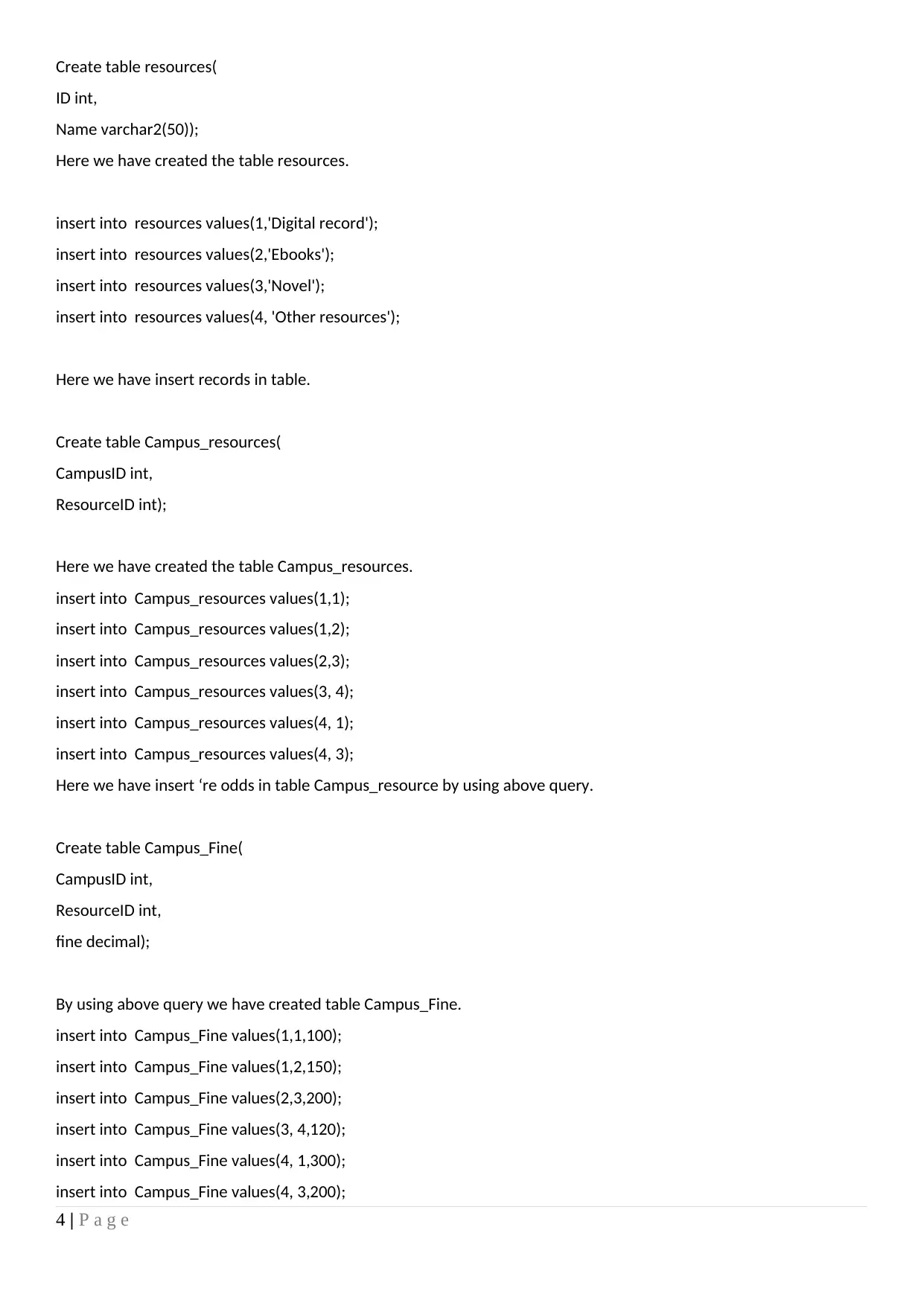
Create table resources(
ID int,
Name varchar2(50));
Here we have created the table resources.
insert into resources values(1,'Digital record');
insert into resources values(2,'Ebooks');
insert into resources values(3,'Novel');
insert into resources values(4, 'Other resources');
Here we have insert records in table.
Create table Campus_resources(
CampusID int,
ResourceID int);
Here we have created the table Campus_resources.
insert into Campus_resources values(1,1);
insert into Campus_resources values(1,2);
insert into Campus_resources values(2,3);
insert into Campus_resources values(3, 4);
insert into Campus_resources values(4, 1);
insert into Campus_resources values(4, 3);
Here we have insert ‘re odds in table Campus_resource by using above query.
Create table Campus_Fine(
CampusID int,
ResourceID int,
fine decimal);
By using above query we have created table Campus_Fine.
insert into Campus_Fine values(1,1,100);
insert into Campus_Fine values(1,2,150);
insert into Campus_Fine values(2,3,200);
insert into Campus_Fine values(3, 4,120);
insert into Campus_Fine values(4, 1,300);
insert into Campus_Fine values(4, 3,200);
4 | P a g e
ID int,
Name varchar2(50));
Here we have created the table resources.
insert into resources values(1,'Digital record');
insert into resources values(2,'Ebooks');
insert into resources values(3,'Novel');
insert into resources values(4, 'Other resources');
Here we have insert records in table.
Create table Campus_resources(
CampusID int,
ResourceID int);
Here we have created the table Campus_resources.
insert into Campus_resources values(1,1);
insert into Campus_resources values(1,2);
insert into Campus_resources values(2,3);
insert into Campus_resources values(3, 4);
insert into Campus_resources values(4, 1);
insert into Campus_resources values(4, 3);
Here we have insert ‘re odds in table Campus_resource by using above query.
Create table Campus_Fine(
CampusID int,
ResourceID int,
fine decimal);
By using above query we have created table Campus_Fine.
insert into Campus_Fine values(1,1,100);
insert into Campus_Fine values(1,2,150);
insert into Campus_Fine values(2,3,200);
insert into Campus_Fine values(3, 4,120);
insert into Campus_Fine values(4, 1,300);
insert into Campus_Fine values(4, 3,200);
4 | P a g e
Paraphrase This Document
Need a fresh take? Get an instant paraphrase of this document with our AI Paraphraser

Here we have inserted records in table Campus_Fine.
Question A)
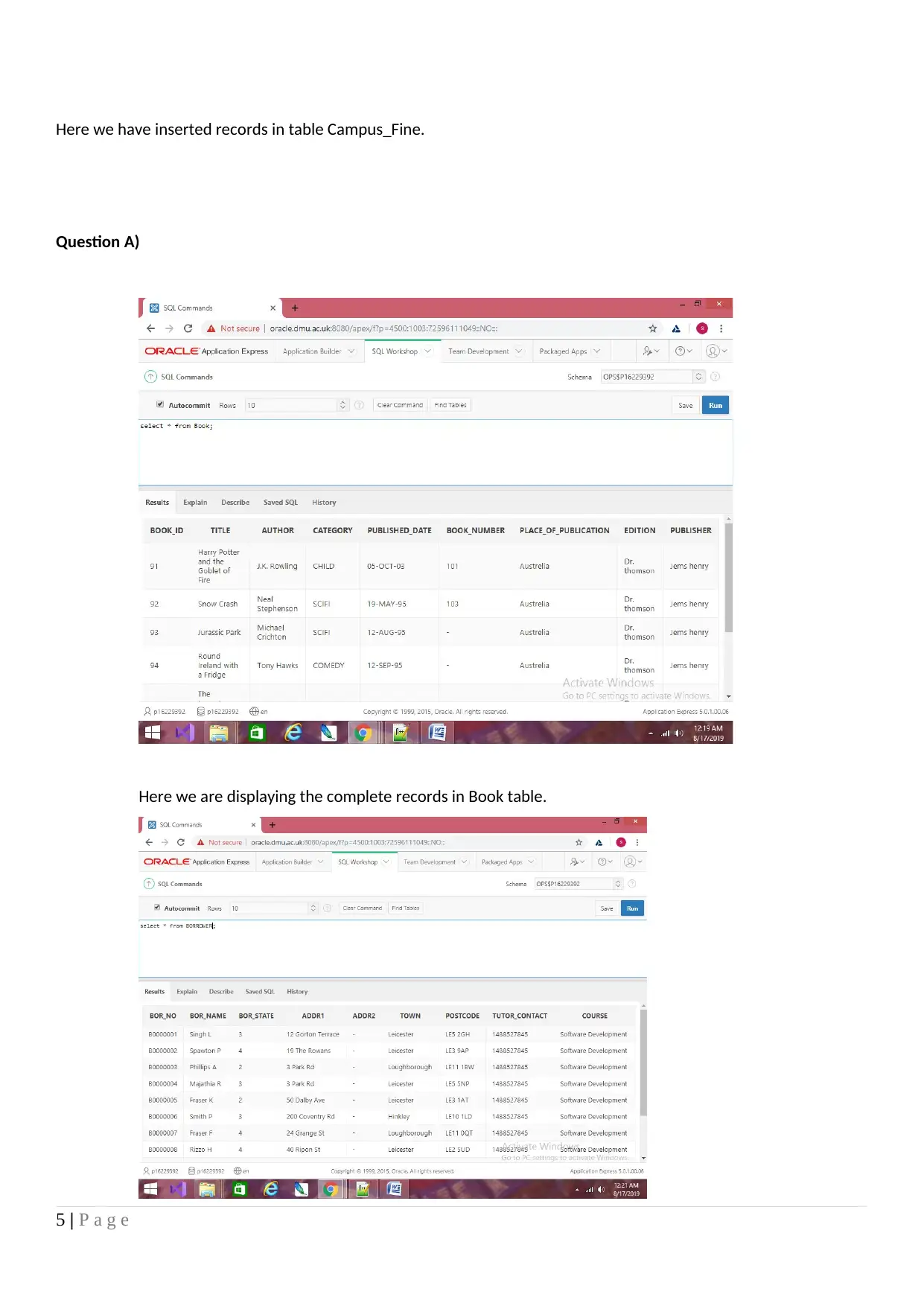
Here we are displaying the complete records in Book table.
5 | P a g e
Question A)
Here we are displaying the complete records in Book table.
5 | P a g e

Here we are displaying all the records from the table BORROWER.
Question b)
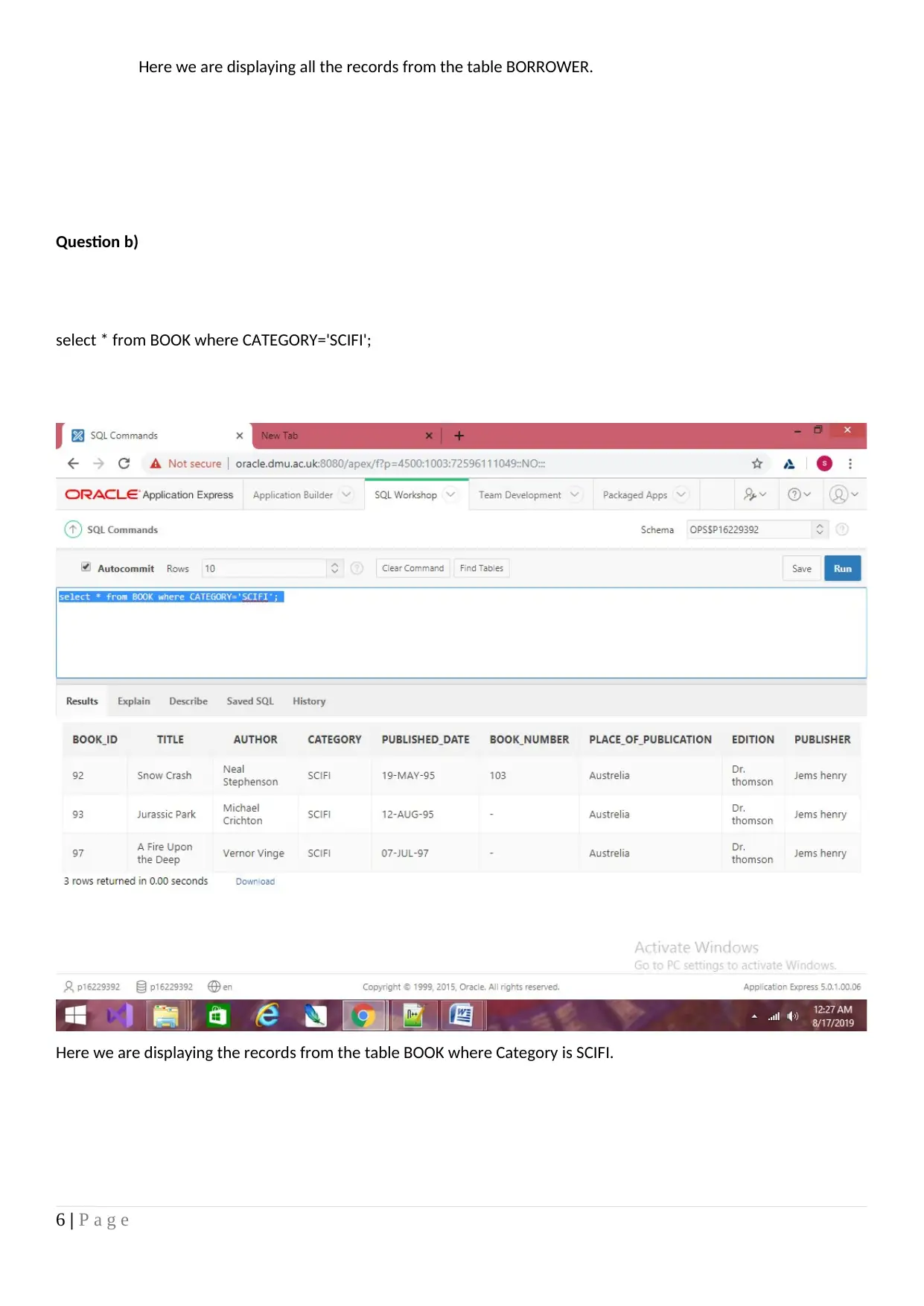
select * from BOOK where CATEGORY='SCIFI';
Here we are displaying the records from the table BOOK where Category is SCIFI.
6 | P a g e
Question b)
select * from BOOK where CATEGORY='SCIFI';
Here we are displaying the records from the table BOOK where Category is SCIFI.
6 | P a g e
⊘ This is a preview!⊘
Do you want full access?
Subscribe today to unlock all pages.

Trusted by 1+ million students worldwide

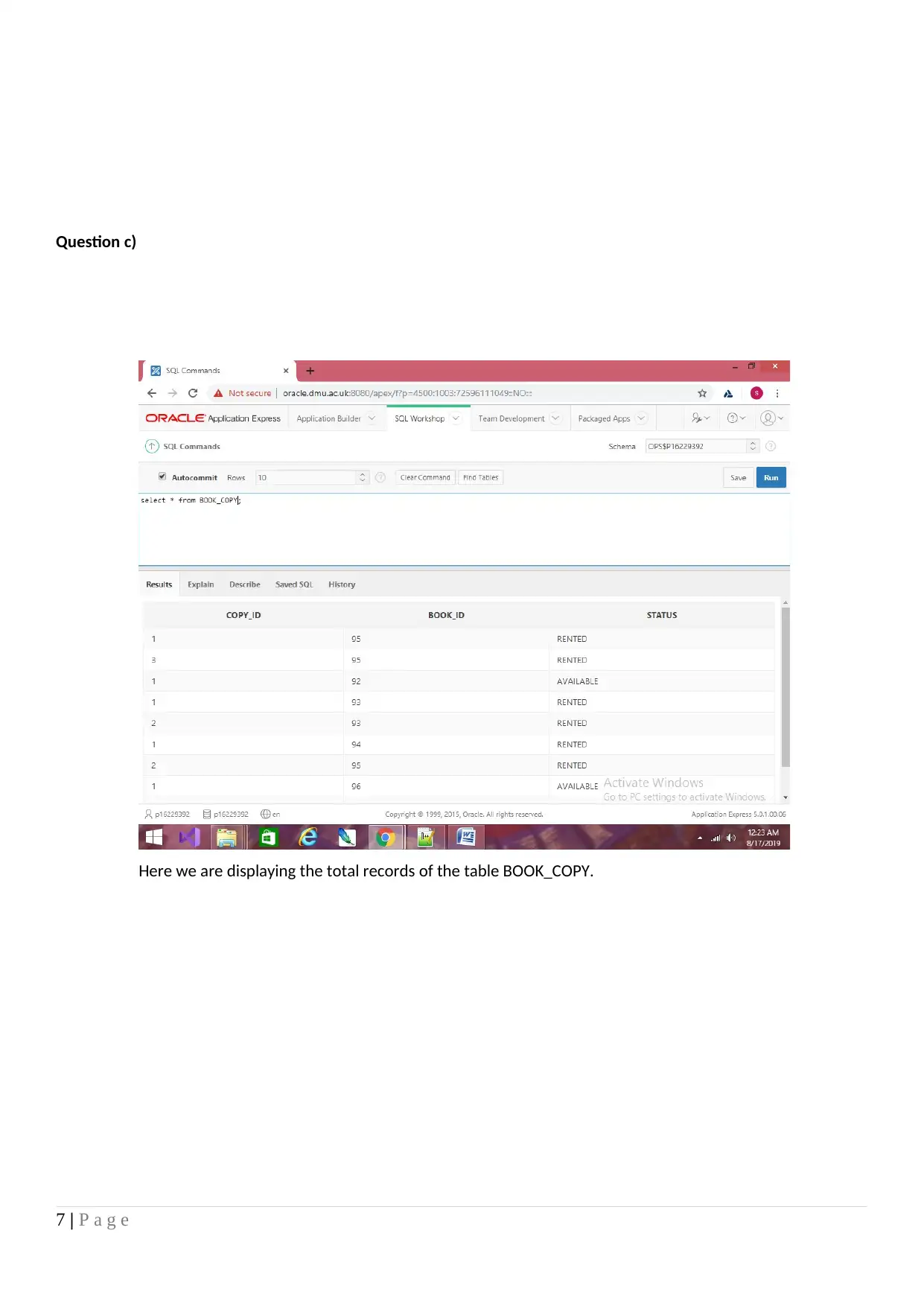
Question c)
Here we are displaying the total records of the table BOOK_COPY.
7 | P a g e
Here we are displaying the total records of the table BOOK_COPY.
7 | P a g e
Paraphrase This Document
Need a fresh take? Get an instant paraphrase of this document with our AI Paraphraser

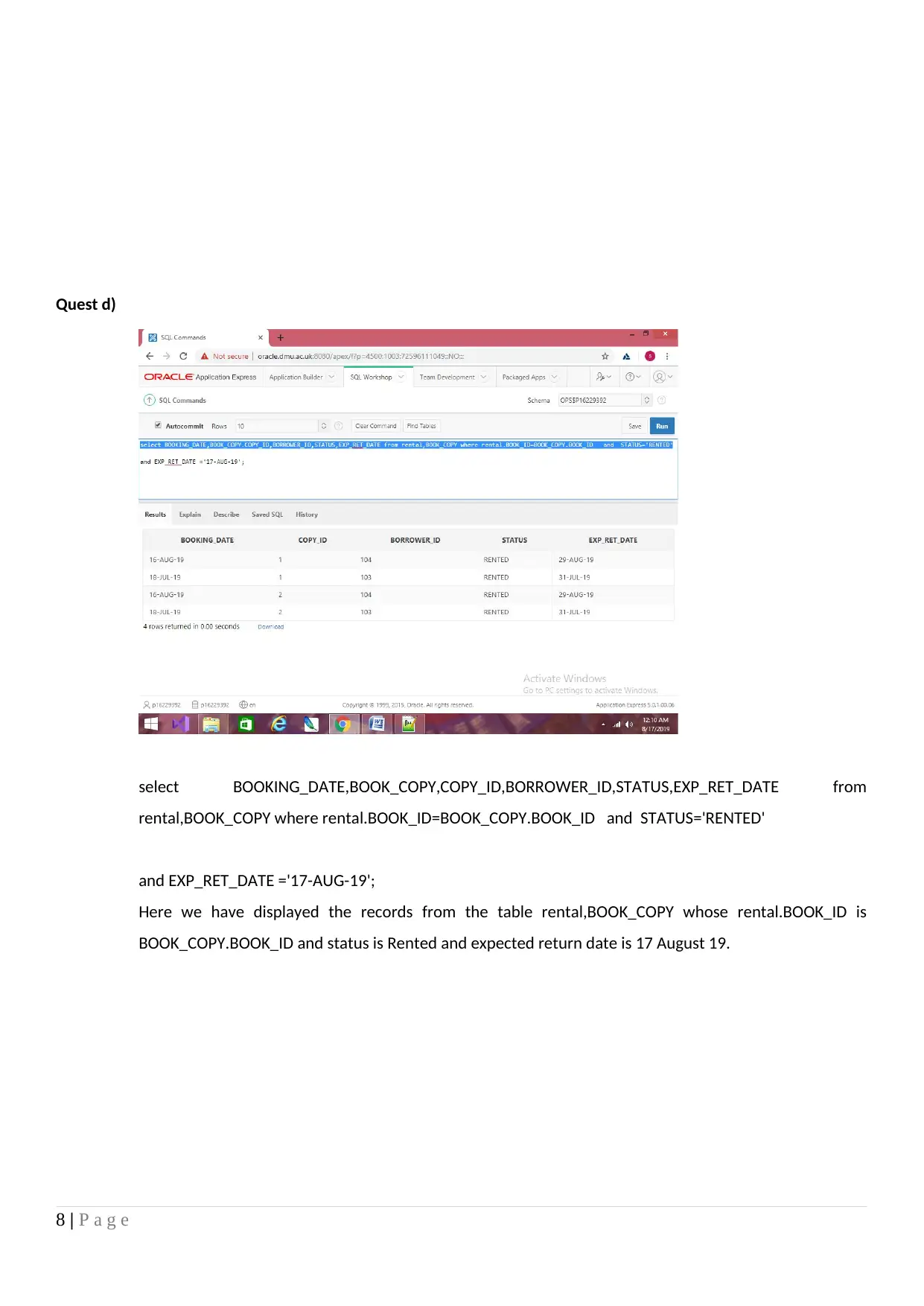
Quest d)
select BOOKING_DATE,BOOK_COPY,COPY_ID,BORROWER_ID,STATUS,EXP_RET_DATE from
rental,BOOK_COPY where rental.BOOK_ID=BOOK_COPY.BOOK_ID and STATUS='RENTED'
and EXP_RET_DATE ='17-AUG-19';
Here we have displayed the records from the table rental,BOOK_COPY whose rental.BOOK_ID is
BOOK_COPY.BOOK_ID and status is Rented and expected return date is 17 August 19.
8 | P a g e
select BOOKING_DATE,BOOK_COPY,COPY_ID,BORROWER_ID,STATUS,EXP_RET_DATE from
rental,BOOK_COPY where rental.BOOK_ID=BOOK_COPY.BOOK_ID and STATUS='RENTED'
and EXP_RET_DATE ='17-AUG-19';
Here we have displayed the records from the table rental,BOOK_COPY whose rental.BOOK_ID is
BOOK_COPY.BOOK_ID and status is Rented and expected return date is 17 August 19.
8 | P a g e

9 | P a g e
⊘ This is a preview!⊘
Do you want full access?
Subscribe today to unlock all pages.

Trusted by 1+ million students worldwide

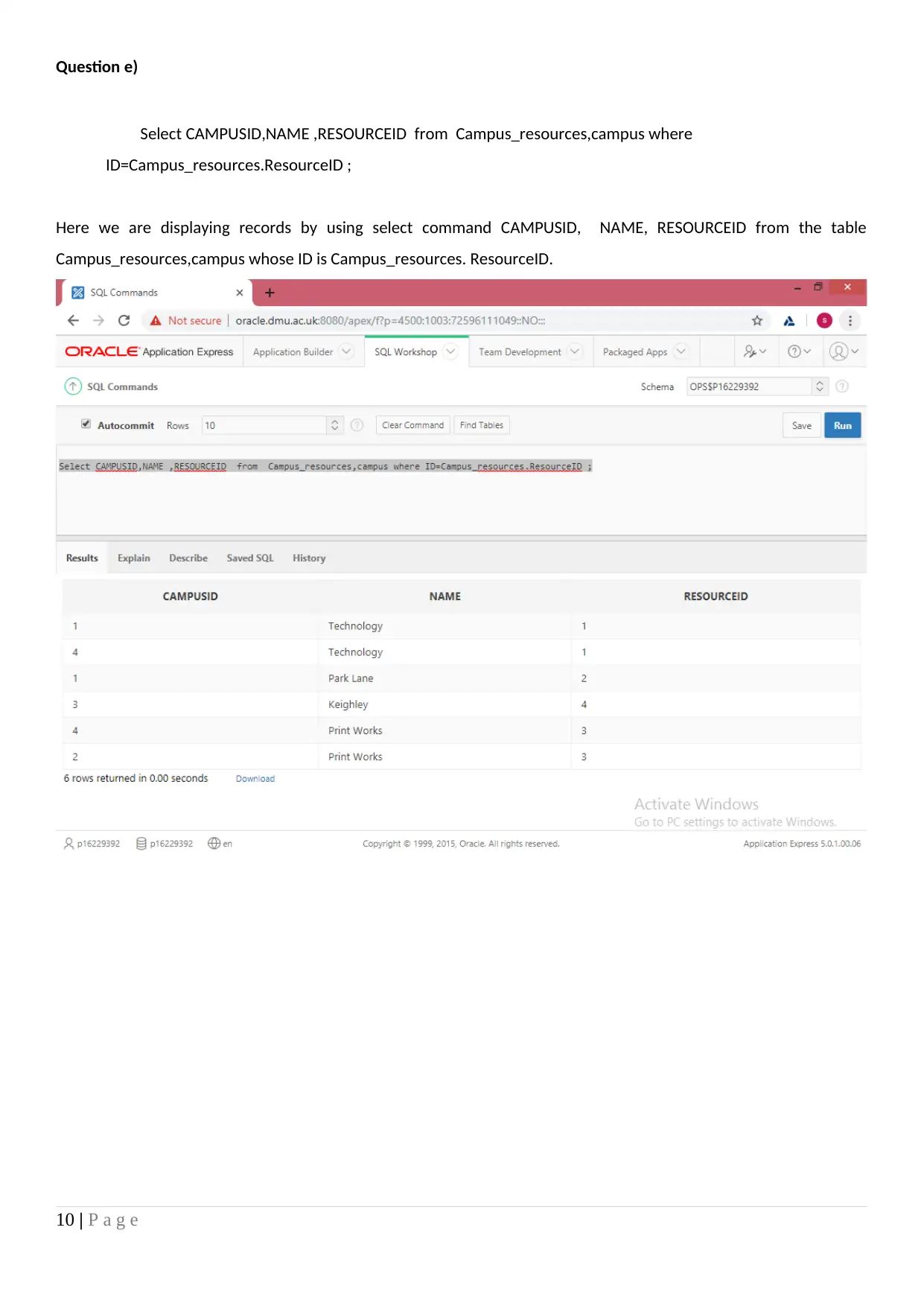
Question e)
Select CAMPUSID,NAME ,RESOURCEID from Campus_resources,campus where
ID=Campus_resources.ResourceID ;
Here we are displaying records by using select command CAMPUSID, NAME, RESOURCEID from the table
Campus_resources,campus whose ID is Campus_resources. ResourceID.
10 | P a g e
Select CAMPUSID,NAME ,RESOURCEID from Campus_resources,campus where
ID=Campus_resources.ResourceID ;
Here we are displaying records by using select command CAMPUSID, NAME, RESOURCEID from the table
Campus_resources,campus whose ID is Campus_resources. ResourceID.
10 | P a g e
Paraphrase This Document
Need a fresh take? Get an instant paraphrase of this document with our AI Paraphraser

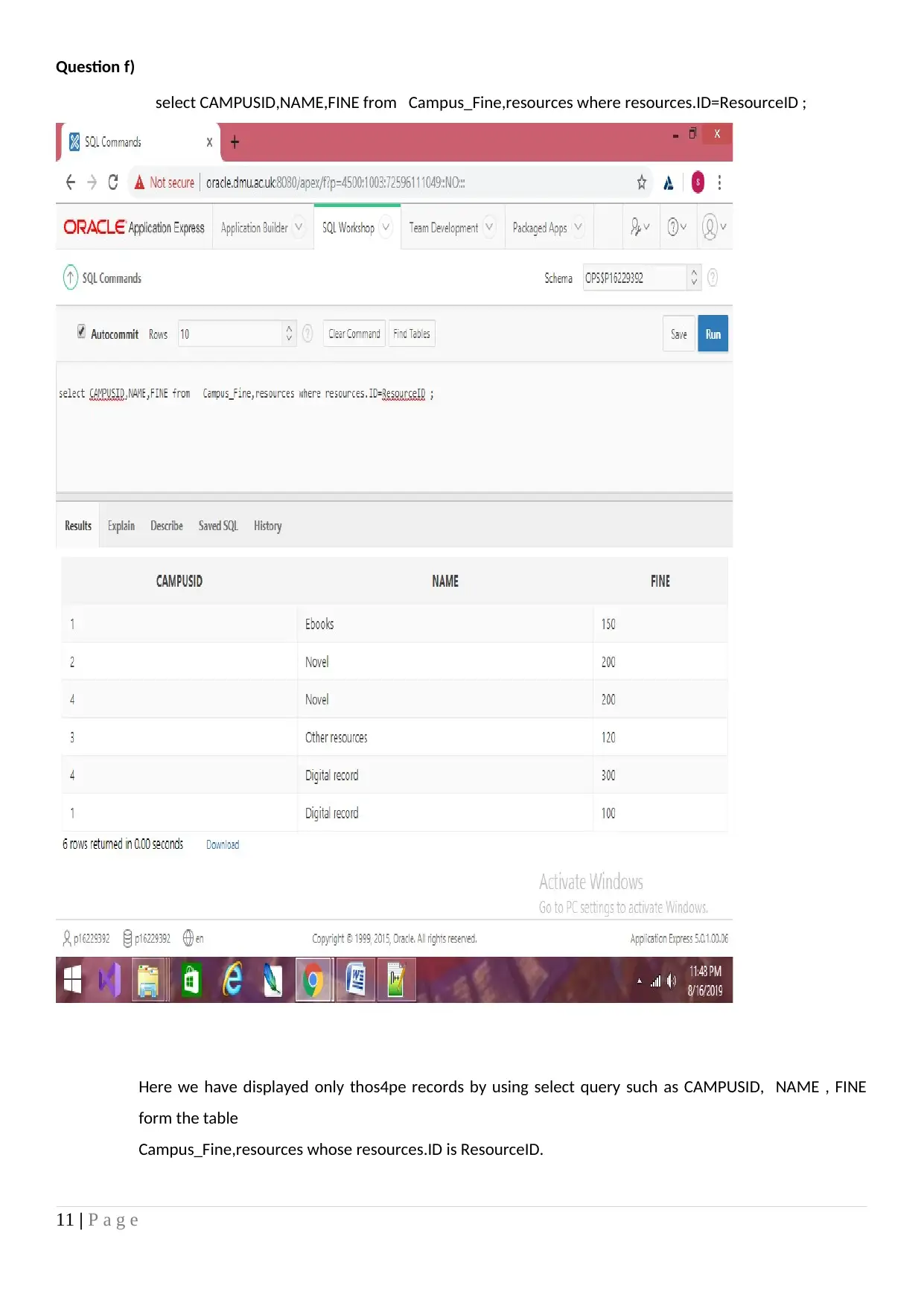
Question f)
select CAMPUSID,NAME,FINE from Campus_Fine,resources where resources.ID=ResourceID ;
Here we have displayed only thos4pe records by using select query such as CAMPUSID, NAME , FINE
form the table
Campus_Fine,resources whose resources.ID is ResourceID.
11 | P a g e
select CAMPUSID,NAME,FINE from Campus_Fine,resources where resources.ID=ResourceID ;
Here we have displayed only thos4pe records by using select query such as CAMPUSID, NAME , FINE
form the table
Campus_Fine,resources whose resources.ID is ResourceID.
11 | P a g e

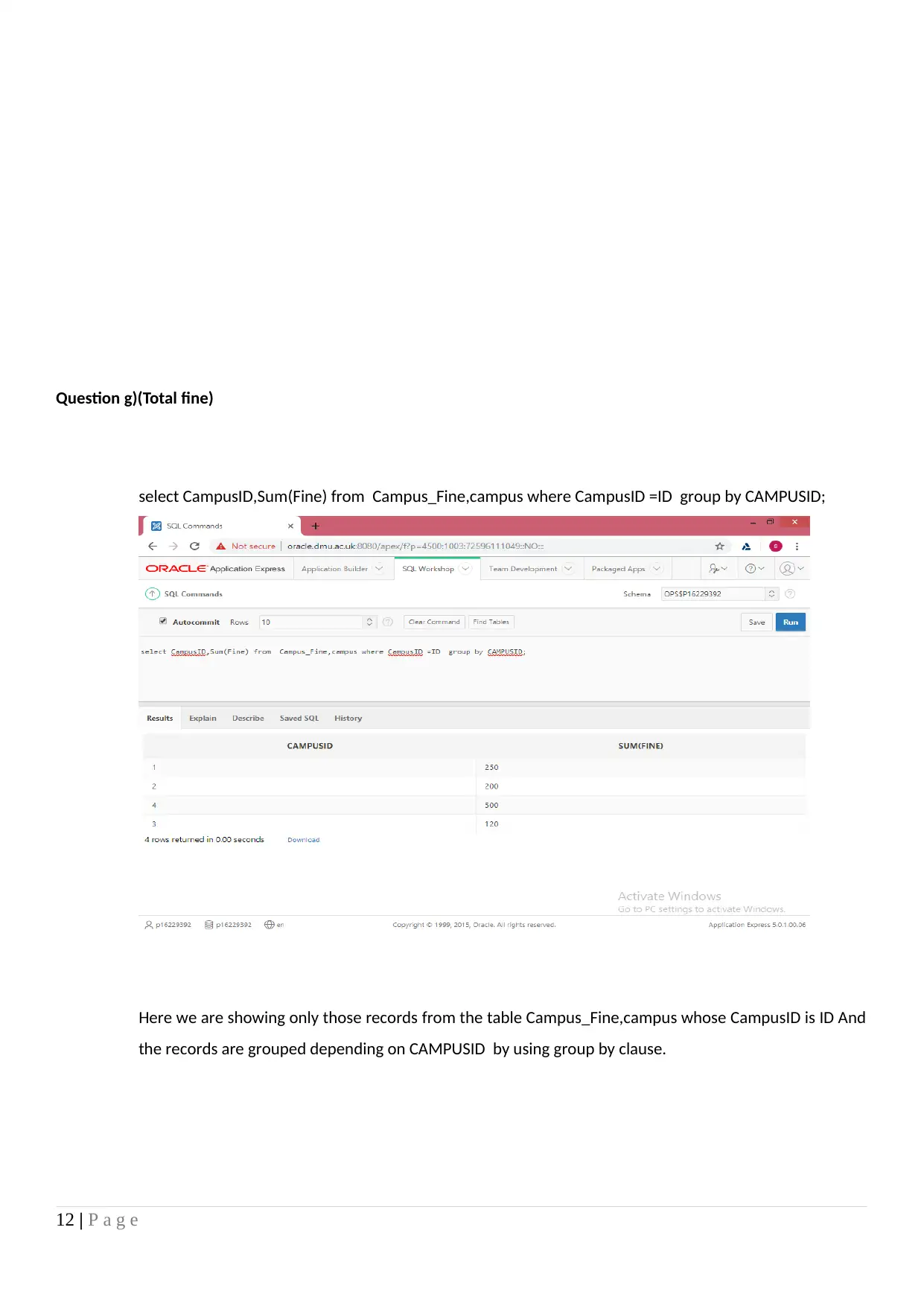
Question g)(Total fine)
select CampusID,Sum(Fine) from Campus_Fine,campus where CampusID =ID group by CAMPUSID;
Here we are showing only those records from the table Campus_Fine,campus whose CampusID is ID And
the records are grouped depending on CAMPUSID by using group by clause.
12 | P a g e
select CampusID,Sum(Fine) from Campus_Fine,campus where CampusID =ID group by CAMPUSID;
Here we are showing only those records from the table Campus_Fine,campus whose CampusID is ID And
the records are grouped depending on CAMPUSID by using group by clause.
12 | P a g e
⊘ This is a preview!⊘
Do you want full access?
Subscribe today to unlock all pages.

Trusted by 1+ million students worldwide
1 out of 14
Related Documents
Your All-in-One AI-Powered Toolkit for Academic Success.
+13062052269
info@desklib.com
Available 24*7 on WhatsApp / Email
Unlock your academic potential
Copyright © 2020–2026 A2Z Services. All Rights Reserved. Developed and managed by ZUCOL.