CS3423 Project 1: Bash Customer Management

Verified

Added on  2019/09/16

|3
|554
|253
Project
AI Summary
This project requires the development of a bash program to manage customer files. The program should interactively manage customer accounts, allowing for the creation of new customer files, accepting customer payments, and finding customers by apartment number. The program should consist of four bash files: proj1.bash, and separate files for create, payment, and find actions. The program should handle errors appropriately and provide specific error messages. The customer data files should be stored in a subordinate 'Data' directory. The project also requires the submission of a zip file containing the bash files and a terminal log of the session.
Document Page
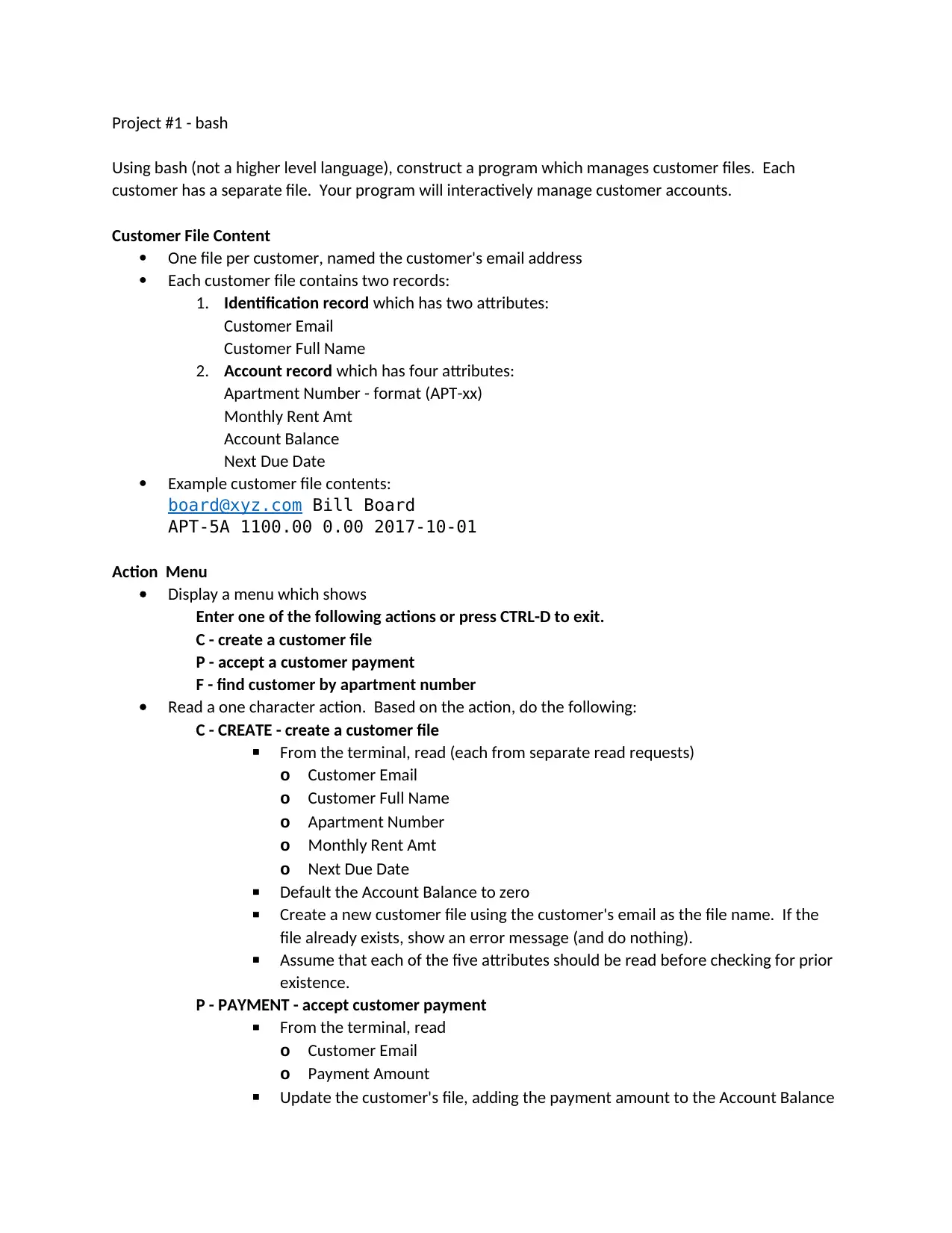
Project #1 - bash
Using bash (not a higher level language), construct a program which manages customer files. Each
customer has a separate file. Your program will interactively manage customer accounts.
Customer File Content
One file per customer, named the customer's email address
Each customer file contains two records:
1. Identification record which has two attributes:
Customer Email
Customer Full Name
2. Account record which has four attributes:
Apartment Number - format (APT-xx)
Monthly Rent Amt
Account Balance
Next Due Date
Example customer file contents:
board@xyz.com Bill Board
APT-5A 1100.00 0.00 2017-10-01
Action Menu
Display a menu which shows
Enter one of the following actions or press CTRL-D to exit.
C - create a customer file
P - accept a customer payment
F - find customer by apartment number
Read a one character action. Based on the action, do the following:
C - CREATE - create a customer file
From the terminal, read (each from separate read requests)
o Customer Email
o Customer Full Name
o Apartment Number
o Monthly Rent Amt
o Next Due Date
Default the Account Balance to zero
Create a new customer file using the customer's email as the file name. If the
file already exists, show an error message (and do nothing).
Assume that each of the five attributes should be read before checking for prior
existence.
P - PAYMENT - accept customer payment
From the terminal, read
o Customer Email
o Payment Amount
Update the customer's file, adding the payment amount to the Account Balance
tabler-icon-diamond-filled.svg

Paraphrase This Document

Need a fresh take? Get an instant paraphrase of this document with our AI Paraphraser
Document Page
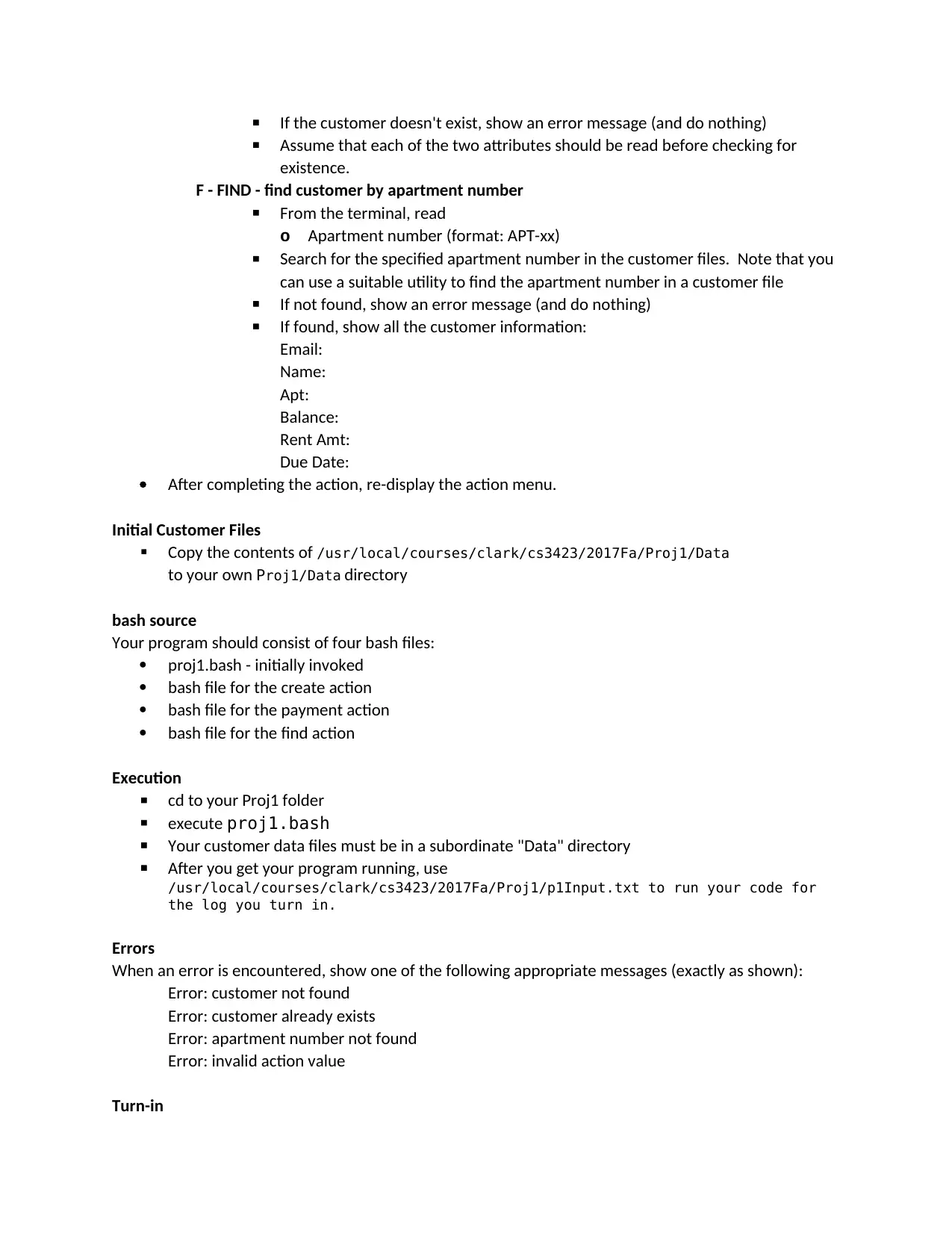
If the customer doesn't exist, show an error message (and do nothing)
Assume that each of the two attributes should be read before checking for
existence.
F - FIND - find customer by apartment number
From the terminal, read
o Apartment number (format: APT-xx)
Search for the specified apartment number in the customer files. Note that you
can use a suitable utility to find the apartment number in a customer file
If not found, show an error message (and do nothing)
If found, show all the customer information:
Email:
Name:
Apt:
Balance:
Rent Amt:
Due Date:
After completing the action, re-display the action menu.
Initial Customer Files
Copy the contents of /usr/local/courses/clark/cs3423/2017Fa/Proj1/Data
to your own Proj1/Data directory
bash source
Your program should consist of four bash files:
proj1.bash - initially invoked
bash file for the create action
bash file for the payment action
bash file for the find action
Execution
cd to your Proj1 folder
execute proj1.bash
Your customer data files must be in a subordinate "Data" directory
After you get your program running, use
/usr/local/courses/clark/cs3423/2017Fa/Proj1/p1Input.txt to run your code for
the log you turn in.
Errors
When an error is encountered, show one of the following appropriate messages (exactly as shown):
Error: customer not found
Error: customer already exists
Error: apartment number not found
Error: invalid action value
Turn-in
Document Page
Via blackboard, submit a zip file (named LastnameFirstname.zip) containing
o proj1.bash
o additional .bash files you used
o terminal log of your session
chevron_up_icon
1 out of 3
circle_padding
hide_on_mobile
zoom_out_icon
[object Object]