Comparative Analysis: 3D Modelling Tools (Cinema 4D, Blender, 3Ds Max)
VerifiedAdded on 2020/03/16
|13
|3930
|177
Report
AI Summary
This research paper provides a comprehensive overview of 3D modelling, its evolution, and its significance in the modern world, with applications spanning architecture, process modelling, and the automobile industry. The paper focuses on a detailed comparison of three prominent 3D modelling tools: 3Ds Max, Blender, and Cinema 4D. It explores the technical specifications, animation capabilities, extensibility, import/export formats, and community support of each tool. The introduction covers the fundamental concepts of 3D animation, including modeling, digitization, and rendering. The paper also discusses advanced computer-generated 3D modelling techniques, including the creation of models using primitives, procedural models, and model operations. The conclusion summarizes the key findings and provides insights into the strengths and weaknesses of each software, offering valuable information for professionals and students in the field of 3D design and animation. The paper also includes a comparison of the pricing and features of each software, along with their suitability for different types of users and projects.
3D - Research paper
Abstract
3D Modelling has travelled a long way since its inception. In today’s world, a mainstream
media is hard to imagine without the wonders of 3D Modelling. Simultaneously, various
industries such as Architecture, Process modelling, Automobile among others would are
highly dependent on 3D Modelling. This paper explores the 3D Modelling in the context of
Modern world usage and provides a comprehensive comparison of the three most popular 3D
modelling tools available in the market today that are 3Ds Max, Blender and Cinema 4D.
1
Abstract
3D Modelling has travelled a long way since its inception. In today’s world, a mainstream
media is hard to imagine without the wonders of 3D Modelling. Simultaneously, various
industries such as Architecture, Process modelling, Automobile among others would are
highly dependent on 3D Modelling. This paper explores the 3D Modelling in the context of
Modern world usage and provides a comprehensive comparison of the three most popular 3D
modelling tools available in the market today that are 3Ds Max, Blender and Cinema 4D.
1

Paraphrase This Document
Need a fresh take? Get an instant paraphrase of this document with our AI Paraphraser
3D - Research paper
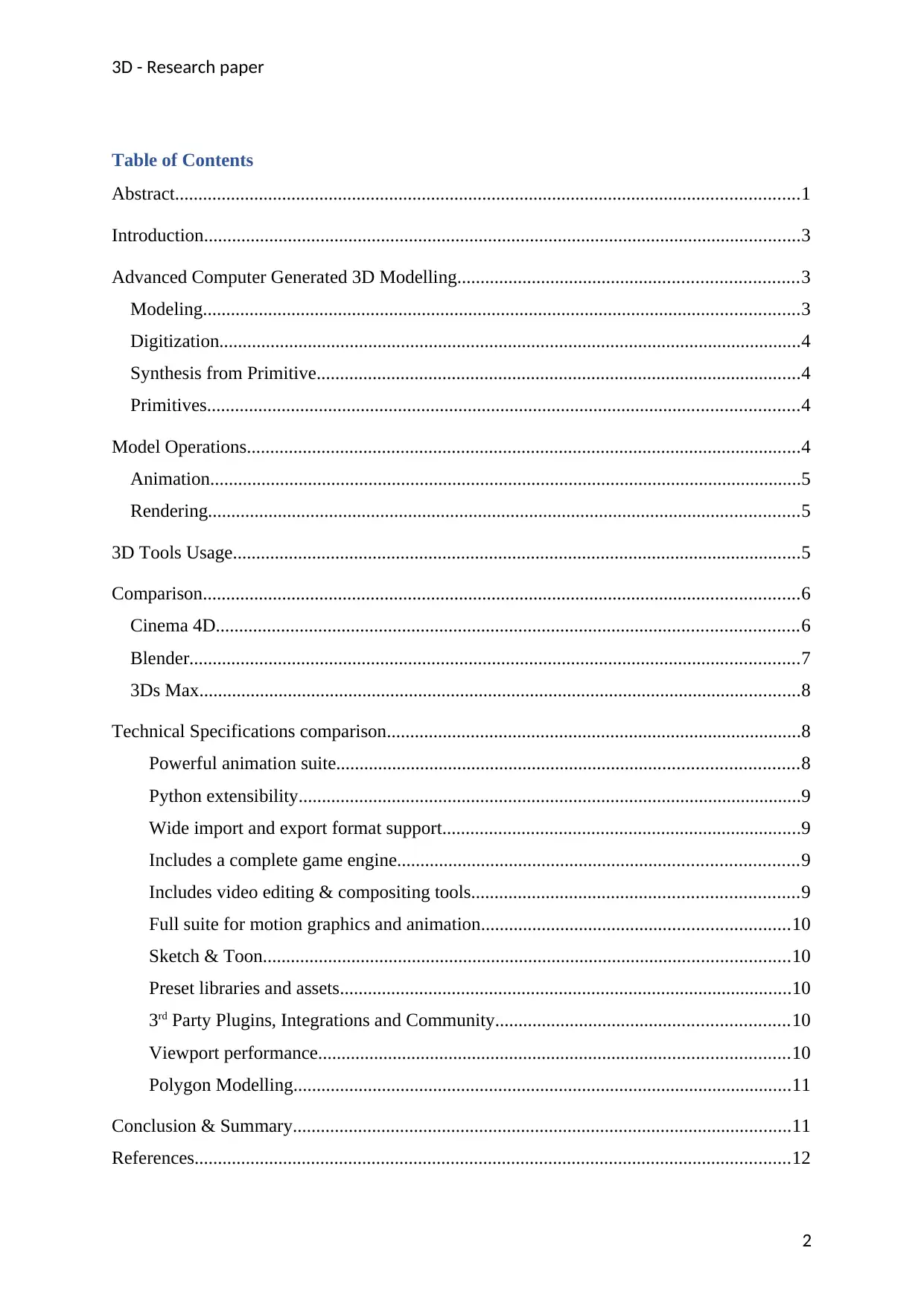
Table of Contents
Abstract......................................................................................................................................1
Introduction................................................................................................................................3
Advanced Computer Generated 3D Modelling.........................................................................3
Modeling................................................................................................................................3
Digitization.............................................................................................................................4
Synthesis from Primitive........................................................................................................4
Primitives...............................................................................................................................4
Model Operations.......................................................................................................................4
Animation...............................................................................................................................5
Rendering...............................................................................................................................5
3D Tools Usage..........................................................................................................................5
Comparison................................................................................................................................6
Cinema 4D.............................................................................................................................6
Blender...................................................................................................................................7
3Ds Max.................................................................................................................................8
Technical Specifications comparison.........................................................................................8
Powerful animation suite...................................................................................................8
Python extensibility............................................................................................................9
Wide import and export format support.............................................................................9
Includes a complete game engine......................................................................................9
Includes video editing & compositing tools......................................................................9
Full suite for motion graphics and animation..................................................................10
Sketch & Toon.................................................................................................................10
Preset libraries and assets.................................................................................................10
3rd Party Plugins, Integrations and Community...............................................................10
Viewport performance.....................................................................................................10
Polygon Modelling...........................................................................................................11
Conclusion & Summary...........................................................................................................11
References................................................................................................................................12
2
Table of Contents
Abstract......................................................................................................................................1
Introduction................................................................................................................................3
Advanced Computer Generated 3D Modelling.........................................................................3
Modeling................................................................................................................................3
Digitization.............................................................................................................................4
Synthesis from Primitive........................................................................................................4
Primitives...............................................................................................................................4
Model Operations.......................................................................................................................4
Animation...............................................................................................................................5
Rendering...............................................................................................................................5
3D Tools Usage..........................................................................................................................5
Comparison................................................................................................................................6
Cinema 4D.............................................................................................................................6
Blender...................................................................................................................................7
3Ds Max.................................................................................................................................8
Technical Specifications comparison.........................................................................................8
Powerful animation suite...................................................................................................8
Python extensibility............................................................................................................9
Wide import and export format support.............................................................................9
Includes a complete game engine......................................................................................9
Includes video editing & compositing tools......................................................................9
Full suite for motion graphics and animation..................................................................10
Sketch & Toon.................................................................................................................10
Preset libraries and assets.................................................................................................10
3rd Party Plugins, Integrations and Community...............................................................10
Viewport performance.....................................................................................................10
Polygon Modelling...........................................................................................................11
Conclusion & Summary...........................................................................................................11
References................................................................................................................................12
2
3D - Research paper
Introduction
Computers can be used for creating animation in several different ways. One is to use 3
dimensions. For this, computer programs are first used for creation of objects that are further
rendered. This can produce 3D images that look perfect. Another method of creating
animation is by creating different frames of pictures using pain tools and then making a
composite of them. These composite files can then be saved as a video movie. Another
method used for making animations is by using transitions with special effects like morphing
between the graphics to create a video effect. Graphics are the images that are created on
computers that are used with modifications for creating animations. A computer can create
many different types of images including simple lines or circles and complex pictures
involving fractals and rendered animations. 3D animation tools can be used for creating such
images.
. There are several 3D modelling tools available in the market today, however, the most over-
heard tools include Maxon Cinema 4D, Blender and Autodesk 3D Studio Max. There are
thousands of reviews available online on animation, 3D modelling and rigging. The review
gives an idea about how animation applications differ from each other (Breuß, Bruckstein,
and Maragos ,2013). Several professionals believe that the effectiveness of the tool in
creating animations depend on the convenience a professional has with the application but
others believe that the effectiveness of an animation tool is majorly affected by the
application itself. For understanding the capabilities and differences between different types
of animation applications this report would explore and compare three applications used for
creating animations with respect to each type of animation discussed.
Advanced Computer Generated 3D Modelling
3D animations that are created using computer graphics have two key components that
include models or objects and the rendering of these objects. 3D modelling involves creation
of the three-dimensional databases where the world that has to be presented through the
animation is saved as a sequence of graphics while rendering involves realization of the
database frame by frame. A single database can be rendered in unlimited ways. Modelling is
a fast and interactive process while rendering happens slowly and batch wise. This difference
in the speed disappear with faster computing hardware.
3
Introduction
Computers can be used for creating animation in several different ways. One is to use 3
dimensions. For this, computer programs are first used for creation of objects that are further
rendered. This can produce 3D images that look perfect. Another method of creating
animation is by creating different frames of pictures using pain tools and then making a
composite of them. These composite files can then be saved as a video movie. Another
method used for making animations is by using transitions with special effects like morphing
between the graphics to create a video effect. Graphics are the images that are created on
computers that are used with modifications for creating animations. A computer can create
many different types of images including simple lines or circles and complex pictures
involving fractals and rendered animations. 3D animation tools can be used for creating such
images.
. There are several 3D modelling tools available in the market today, however, the most over-
heard tools include Maxon Cinema 4D, Blender and Autodesk 3D Studio Max. There are
thousands of reviews available online on animation, 3D modelling and rigging. The review
gives an idea about how animation applications differ from each other (Breuß, Bruckstein,
and Maragos ,2013). Several professionals believe that the effectiveness of the tool in
creating animations depend on the convenience a professional has with the application but
others believe that the effectiveness of an animation tool is majorly affected by the
application itself. For understanding the capabilities and differences between different types
of animation applications this report would explore and compare three applications used for
creating animations with respect to each type of animation discussed.
Advanced Computer Generated 3D Modelling
3D animations that are created using computer graphics have two key components that
include models or objects and the rendering of these objects. 3D modelling involves creation
of the three-dimensional databases where the world that has to be presented through the
animation is saved as a sequence of graphics while rendering involves realization of the
database frame by frame. A single database can be rendered in unlimited ways. Modelling is
a fast and interactive process while rendering happens slowly and batch wise. This difference
in the speed disappear with faster computing hardware.
3
⊘ This is a preview!⊘
Do you want full access?
Subscribe today to unlock all pages.

Trusted by 1+ million students worldwide
3D - Research paper
Modeling
One of the challenging part of computer animation is getting animation objects in the
computer for the creation of an object database. This is called the modelling process which
can be accomplished either by scanning the input objects or by using interactive synthesis of
primitives.
Digitization
Digitization or input scanning can be done in different ways. One way of 3D digitization is
entering of 3D coordinates of the objects in the computer using specialized devices called “3-
D digitizers". In absence of these devices, the process of entering coordinates can be very
tedious.
Synthesis from Primitive
Interactive programs can be used for creating synthesized object models from multiple
primitive shapes very accurately. This type of modelling is called “solids modelling” in terms
of CAD/CAM systems. This involves tolerance, insistence, and dimensioning of objects that
can be realized such as a metal piece.
Primitives
Common primitive shapes that can be used for making animations include cones, cylinders,
spheres, ellipsoid, hyperboloid, paraboloid, and their superquadratic generalizations, torus or
honorary quadratic generalizations, biquadratic or bilinear patches, and bicubic or rational
versions of polygons. Other primitive shapes include points, lines, and surfaces such as
silhouttes or splines. Many of these shapes can be divided into other primitive shapes such as
polygons or manipulated in an intuitive form in the modelling stage.
Procedural Models
3D models have some basic building blocks that are called primitives such as fractals and
procedural models. Fractal model uses a controlled process of randomization which can then
be applied to a more detailed model. Fractals can be listed as a part of model operations. It is
difficult to describe these models as combinations of primitives or their fractals. An example
of procedural models or program defined models is the fire by Bill Reeves in the Star Trek II
- The Wrath of Khan, a movie that was produced by Lucas Film. Another example of fractal
technique is the animation by Loren Carpenter of Lucasfilm.
4
Modeling
One of the challenging part of computer animation is getting animation objects in the
computer for the creation of an object database. This is called the modelling process which
can be accomplished either by scanning the input objects or by using interactive synthesis of
primitives.
Digitization
Digitization or input scanning can be done in different ways. One way of 3D digitization is
entering of 3D coordinates of the objects in the computer using specialized devices called “3-
D digitizers". In absence of these devices, the process of entering coordinates can be very
tedious.
Synthesis from Primitive
Interactive programs can be used for creating synthesized object models from multiple
primitive shapes very accurately. This type of modelling is called “solids modelling” in terms
of CAD/CAM systems. This involves tolerance, insistence, and dimensioning of objects that
can be realized such as a metal piece.
Primitives
Common primitive shapes that can be used for making animations include cones, cylinders,
spheres, ellipsoid, hyperboloid, paraboloid, and their superquadratic generalizations, torus or
honorary quadratic generalizations, biquadratic or bilinear patches, and bicubic or rational
versions of polygons. Other primitive shapes include points, lines, and surfaces such as
silhouttes or splines. Many of these shapes can be divided into other primitive shapes such as
polygons or manipulated in an intuitive form in the modelling stage.
Procedural Models
3D models have some basic building blocks that are called primitives such as fractals and
procedural models. Fractal model uses a controlled process of randomization which can then
be applied to a more detailed model. Fractals can be listed as a part of model operations. It is
difficult to describe these models as combinations of primitives or their fractals. An example
of procedural models or program defined models is the fire by Bill Reeves in the Star Trek II
- The Wrath of Khan, a movie that was produced by Lucas Film. Another example of fractal
technique is the animation by Loren Carpenter of Lucasfilm.
4
Paraphrase This Document
Need a fresh take? Get an instant paraphrase of this document with our AI Paraphraser
3D - Research paper
Model Operations
In the synthesis technique used for the development of database, a designer uses primitives or
the procedural models for creating objects. Copies or instances of these primitive models
need to be fetched by the artist using an interactive keyboard driven language which can
position and combine the instances of primitive models.
Animation
Creation of graphical databases has been using still frames since generations. Time modelling
is used for creating animations out bined of the computer graphics. Animations can be
created from computer graphics using time modelling. The term ‘animation; means ‘giving
life to’ and at the same time the artists who does this is called animator. In context of CGI, it
typically means ‘giving motion to’ an object or thing.
Rendering
After different models has been synthesized or digitized and then altogether combined into a
single or multiple scenes and also animated, we would have ultimately had a group of frames.
These frames would be in a conventional database format, and they have to be processed
frame by frame into a final form which would have all the colours, lighting effects and all
hidden surfaces removed. Within rendering there is also a part which is involved with
wrapping of a 2D painted picture, scanned picture or even algorithmically generated picture
on a 3D surface giving it rich details and making it appear realistic (Triplet 3D, 2017).
3D Tools Usage
The world today witnesses 3D imagery in all shapes and forms. They are used for
architectural representations of buildings, used for industrial and process modelling, used for
Games, movies and other parts of the media industry. Anything that exist or can exist by
imagination can be built virtually. As the phrase goes, ‘only limit is your imagination’ can be
perfectly applied in the case of 3D Modelling (Leibe et al., 2016). A 3D modeller is able to
create anything from an industrial systemic process to product visualization to a complex
character in a movie. For instance, the Hulk character in the recent Hollywood movies was
created using 3D modelling. However, a 3D Modellers job in movie industry is different than
what it is in the gaming industry. Limitations set for a 3D modeller in gaming industry is far
less than what it is in the movie industry. 3D Modelling in movies are more about the
5
Model Operations
In the synthesis technique used for the development of database, a designer uses primitives or
the procedural models for creating objects. Copies or instances of these primitive models
need to be fetched by the artist using an interactive keyboard driven language which can
position and combine the instances of primitive models.
Animation
Creation of graphical databases has been using still frames since generations. Time modelling
is used for creating animations out bined of the computer graphics. Animations can be
created from computer graphics using time modelling. The term ‘animation; means ‘giving
life to’ and at the same time the artists who does this is called animator. In context of CGI, it
typically means ‘giving motion to’ an object or thing.
Rendering
After different models has been synthesized or digitized and then altogether combined into a
single or multiple scenes and also animated, we would have ultimately had a group of frames.
These frames would be in a conventional database format, and they have to be processed
frame by frame into a final form which would have all the colours, lighting effects and all
hidden surfaces removed. Within rendering there is also a part which is involved with
wrapping of a 2D painted picture, scanned picture or even algorithmically generated picture
on a 3D surface giving it rich details and making it appear realistic (Triplet 3D, 2017).
3D Tools Usage
The world today witnesses 3D imagery in all shapes and forms. They are used for
architectural representations of buildings, used for industrial and process modelling, used for
Games, movies and other parts of the media industry. Anything that exist or can exist by
imagination can be built virtually. As the phrase goes, ‘only limit is your imagination’ can be
perfectly applied in the case of 3D Modelling (Leibe et al., 2016). A 3D modeller is able to
create anything from an industrial systemic process to product visualization to a complex
character in a movie. For instance, the Hulk character in the recent Hollywood movies was
created using 3D modelling. However, a 3D Modellers job in movie industry is different than
what it is in the gaming industry. Limitations set for a 3D modeller in gaming industry is far
less than what it is in the movie industry. 3D Modelling in movies are more about the
5
3D - Research paper
ultimately quality of the character and the production speed. Whereas in the case of games,
the model would have potential to interact with the character with every possible angle. Also,
a 3D Modeller is limited by the gaming console as well as (Institute, 2017) the gaming engine
it would ultimately be based on. At the same time, creating 3D Models for product design is
an entirely different approach than that of the movies or games. Most of the time, a product
designer would be working with blueprints as well as creating the models to fit a very
specific description. These require a 3D Modeller who is capable of working with the
production pipeline. There are many different software packages for 3D modeling. Some of
the most utilized ones are Maya, 3ds Max, CINEMA 4D, and Blender.
Comparison
In the world of 3D Software packages, 3Ds Max from Autodesk is the most well-known. It is
the default go-to app in the gaming industry. Simultaneously, Cinema 4D was used for 3D
modelling for the Film industry. However, with frequent updates and new features being
added to other 3D applications it really begins to level the playing field. Now, since each of
the 3D programs work on the same level and offer intuitive controls, extensive feature set and
deep integration with other tools, it becomes difficult to narrow down to the best one
(CINEMA 4D RELEASE 11, 2008).
Cinema 4D
Cinema 4D is among the most popular 3D modelling, rendering and animation application. It
is owned, developed and managed by Maxon Computer GmbH. Cinema 4D is capable of
polygonal as well as procedural modeling, animation, lighting, texturing, rendering and other
common features that are found in the most popular 3D modelling applications. This becomes
an ideal choice for designers and animations who not only want to add 3D within their toolset
but also because it’s quite powerful owing to the various (Life Forms & Cinema 4D:
Animating Characters using Bones, 2014)Cinema 3D templates that are available on the
world-wide web. Along with this, Cinema 4D has a variety of versions to choose from. It can
become quite inexpensive for starters and practically free for professors and students. In
terms of 3D modelling, some of the features including clipping, filter effects, pressure
drawing, parametric, colour palette and importing of a wide variety of 3D models. In terms of
rendering, it could not only do the traditional rendering but also 3D stereo scoping rendering
and microplygonal rendering. It has various 2D animation features that goes on to support
both Apple and Windows operating system. However, Cinema 4D is not an open source
6
ultimately quality of the character and the production speed. Whereas in the case of games,
the model would have potential to interact with the character with every possible angle. Also,
a 3D Modeller is limited by the gaming console as well as (Institute, 2017) the gaming engine
it would ultimately be based on. At the same time, creating 3D Models for product design is
an entirely different approach than that of the movies or games. Most of the time, a product
designer would be working with blueprints as well as creating the models to fit a very
specific description. These require a 3D Modeller who is capable of working with the
production pipeline. There are many different software packages for 3D modeling. Some of
the most utilized ones are Maya, 3ds Max, CINEMA 4D, and Blender.
Comparison
In the world of 3D Software packages, 3Ds Max from Autodesk is the most well-known. It is
the default go-to app in the gaming industry. Simultaneously, Cinema 4D was used for 3D
modelling for the Film industry. However, with frequent updates and new features being
added to other 3D applications it really begins to level the playing field. Now, since each of
the 3D programs work on the same level and offer intuitive controls, extensive feature set and
deep integration with other tools, it becomes difficult to narrow down to the best one
(CINEMA 4D RELEASE 11, 2008).
Cinema 4D
Cinema 4D is among the most popular 3D modelling, rendering and animation application. It
is owned, developed and managed by Maxon Computer GmbH. Cinema 4D is capable of
polygonal as well as procedural modeling, animation, lighting, texturing, rendering and other
common features that are found in the most popular 3D modelling applications. This becomes
an ideal choice for designers and animations who not only want to add 3D within their toolset
but also because it’s quite powerful owing to the various (Life Forms & Cinema 4D:
Animating Characters using Bones, 2014)Cinema 3D templates that are available on the
world-wide web. Along with this, Cinema 4D has a variety of versions to choose from. It can
become quite inexpensive for starters and practically free for professors and students. In
terms of 3D modelling, some of the features including clipping, filter effects, pressure
drawing, parametric, colour palette and importing of a wide variety of 3D models. In terms of
rendering, it could not only do the traditional rendering but also 3D stereo scoping rendering
and microplygonal rendering. It has various 2D animation features that goes on to support
both Apple and Windows operating system. However, Cinema 4D is not an open source
6
⊘ This is a preview!⊘
Do you want full access?
Subscribe today to unlock all pages.
Trusted by 1+ million students worldwide
3D - Research paper
software. Cinema 4D is priced in a variety of formats. For instance, the previous version of
4D costs, 3-month for a short-term and Non-Floating license € 500.00, whereas the 3-month
short-term Floating license would typically amount to € 500.00. Also, the 6-month short-term
Non-Floating license is priced about € 950.00 and the 6-month short-term Floating license
totals up to € 950.00. Finally, the full version of non-floating license costs about € 1,600.00.
Essentially, Maxon cinema 4D is:
Highly capable and robust industrial solution
Suitable for and small-size teams and mid-size to even larger teams.
Free for learners
Includes a gigantic library of resources
Is easier to use compared with many other traditional offerings
Is not open source
Second most expensive option among the three
Blender
Blender on the other hand is produced and managed under the open source initiative. It is also
a highly capable and robust 3D animation tool and has a single version to choose from.
However, the most significant part of Blender is that it is suitable for a wide spectrum of
users including hobbyists, professionals, (Gupta & Nawani, 2016) small teams and large
studios. Blender has been used to power some of the most notable projects available on the
internet today and also in the mainstream media. For instance, a TND Drama Series called
the ‘Legends’ which is created by Locia is developed on Blender, the numerical artist
developed any Anthony Salvi is done on Blender as well and simultaneously the video
retouching in Plunder Pirates were also done in Blender (Gutierrez-Arenas, 2014). Blender
has a very limited supply of templates as compared to the other two options. Blender’s
animation features include wide variety of capabilities that includes 3D camera tracking,
automatic in-between, rotoscoping, onion skinning and particle engine. At the same time,
modelling features includes subdivision surfaces, UV editing as well as weight paining that
are touch based tablets compatible. Blender is supported by the max number of operating
systems including Windows, Linux and Apple and this is by far the most versatile solution of
the three (www.nyfa.edu, 2015).
Essentially, Blender is:
Intermediate level of difficulty and suitable for semi-experienced users.
For learning, anyone including hobbyists, individuals and freelancers can use this.
7
software. Cinema 4D is priced in a variety of formats. For instance, the previous version of
4D costs, 3-month for a short-term and Non-Floating license € 500.00, whereas the 3-month
short-term Floating license would typically amount to € 500.00. Also, the 6-month short-term
Non-Floating license is priced about € 950.00 and the 6-month short-term Floating license
totals up to € 950.00. Finally, the full version of non-floating license costs about € 1,600.00.
Essentially, Maxon cinema 4D is:
Highly capable and robust industrial solution
Suitable for and small-size teams and mid-size to even larger teams.
Free for learners
Includes a gigantic library of resources
Is easier to use compared with many other traditional offerings
Is not open source
Second most expensive option among the three
Blender
Blender on the other hand is produced and managed under the open source initiative. It is also
a highly capable and robust 3D animation tool and has a single version to choose from.
However, the most significant part of Blender is that it is suitable for a wide spectrum of
users including hobbyists, professionals, (Gupta & Nawani, 2016) small teams and large
studios. Blender has been used to power some of the most notable projects available on the
internet today and also in the mainstream media. For instance, a TND Drama Series called
the ‘Legends’ which is created by Locia is developed on Blender, the numerical artist
developed any Anthony Salvi is done on Blender as well and simultaneously the video
retouching in Plunder Pirates were also done in Blender (Gutierrez-Arenas, 2014). Blender
has a very limited supply of templates as compared to the other two options. Blender’s
animation features include wide variety of capabilities that includes 3D camera tracking,
automatic in-between, rotoscoping, onion skinning and particle engine. At the same time,
modelling features includes subdivision surfaces, UV editing as well as weight paining that
are touch based tablets compatible. Blender is supported by the max number of operating
systems including Windows, Linux and Apple and this is by far the most versatile solution of
the three (www.nyfa.edu, 2015).
Essentially, Blender is:
Intermediate level of difficulty and suitable for semi-experienced users.
For learning, anyone including hobbyists, individuals and freelancers can use this.
7
Paraphrase This Document
Need a fresh take? Get an instant paraphrase of this document with our AI Paraphraser
3D - Research paper
Blender is free for everyone
Contains resources, but not as much as Cinema 4D
Similar features when compared Cinema 4D
Open source and free, so essentially the cheapest as well as modifiable by the
community.
3Ds Max
3Ds Max is modelling, rendering and animating tool in 3D world which is mainly used for
creating animation, video game, modelling, visual 3D effect, etc. IT is often used for
engineers and architects as it has capability to interact with AutoCAD and other design tool
(Autodesk). 3Ds Max was used along with Maya while creating final Harry Potter movies to
generate 3D effects. Also, they were used in movies like Avatar, The Green Mile, alice in
Wonderland, etc. Being a leader in gaming world, this tool has been (What’s new in
Autodesk® 3ds Max® 2016, 2015)used in creating games like Assassin’s Creed, Gears of
wars, etc. 3Ds Max has relatively a very small learning curve as it requires small amount of
time in learning basics to advanced level. Users have admitted it to me more user-friendly.
This software has a huge community which provides extensive collection of tutorials,
advices, etc. There are various other advantages of 3Ds Max - Nitrous accelerated graphics
core (3ds Max 2017 Fundamentals, 2017). This handles bigger chunks of data, improve
performance and visual quality. Graphite - The toolset of 3D modeling combines freeform
sculpting, which is a proficient texturing toolset, with advanced polygonal modeling.
Creating a character is easy. Also rig characters can be built faster with CAT muscle and skin
modifiers for real-type bodies. The pricing plan of the software goes like this - monthly
subscription of $185, quarterly of $160 and annually of $1470. One can also buy software
outright $3675.
3Ds Max is -
It is semi-complex for new users though it is intuitive.
Good for large teams
Has resource but lesser than that of Cinema 4D.
Small learning curve.
Huge collection of add-ons.
Most expensive
Extensive community
8
Blender is free for everyone
Contains resources, but not as much as Cinema 4D
Similar features when compared Cinema 4D
Open source and free, so essentially the cheapest as well as modifiable by the
community.
3Ds Max
3Ds Max is modelling, rendering and animating tool in 3D world which is mainly used for
creating animation, video game, modelling, visual 3D effect, etc. IT is often used for
engineers and architects as it has capability to interact with AutoCAD and other design tool
(Autodesk). 3Ds Max was used along with Maya while creating final Harry Potter movies to
generate 3D effects. Also, they were used in movies like Avatar, The Green Mile, alice in
Wonderland, etc. Being a leader in gaming world, this tool has been (What’s new in
Autodesk® 3ds Max® 2016, 2015)used in creating games like Assassin’s Creed, Gears of
wars, etc. 3Ds Max has relatively a very small learning curve as it requires small amount of
time in learning basics to advanced level. Users have admitted it to me more user-friendly.
This software has a huge community which provides extensive collection of tutorials,
advices, etc. There are various other advantages of 3Ds Max - Nitrous accelerated graphics
core (3ds Max 2017 Fundamentals, 2017). This handles bigger chunks of data, improve
performance and visual quality. Graphite - The toolset of 3D modeling combines freeform
sculpting, which is a proficient texturing toolset, with advanced polygonal modeling.
Creating a character is easy. Also rig characters can be built faster with CAT muscle and skin
modifiers for real-type bodies. The pricing plan of the software goes like this - monthly
subscription of $185, quarterly of $160 and annually of $1470. One can also buy software
outright $3675.
3Ds Max is -
It is semi-complex for new users though it is intuitive.
Good for large teams
Has resource but lesser than that of Cinema 4D.
Small learning curve.
Huge collection of add-ons.
Most expensive
Extensive community
8
3D - Research paper
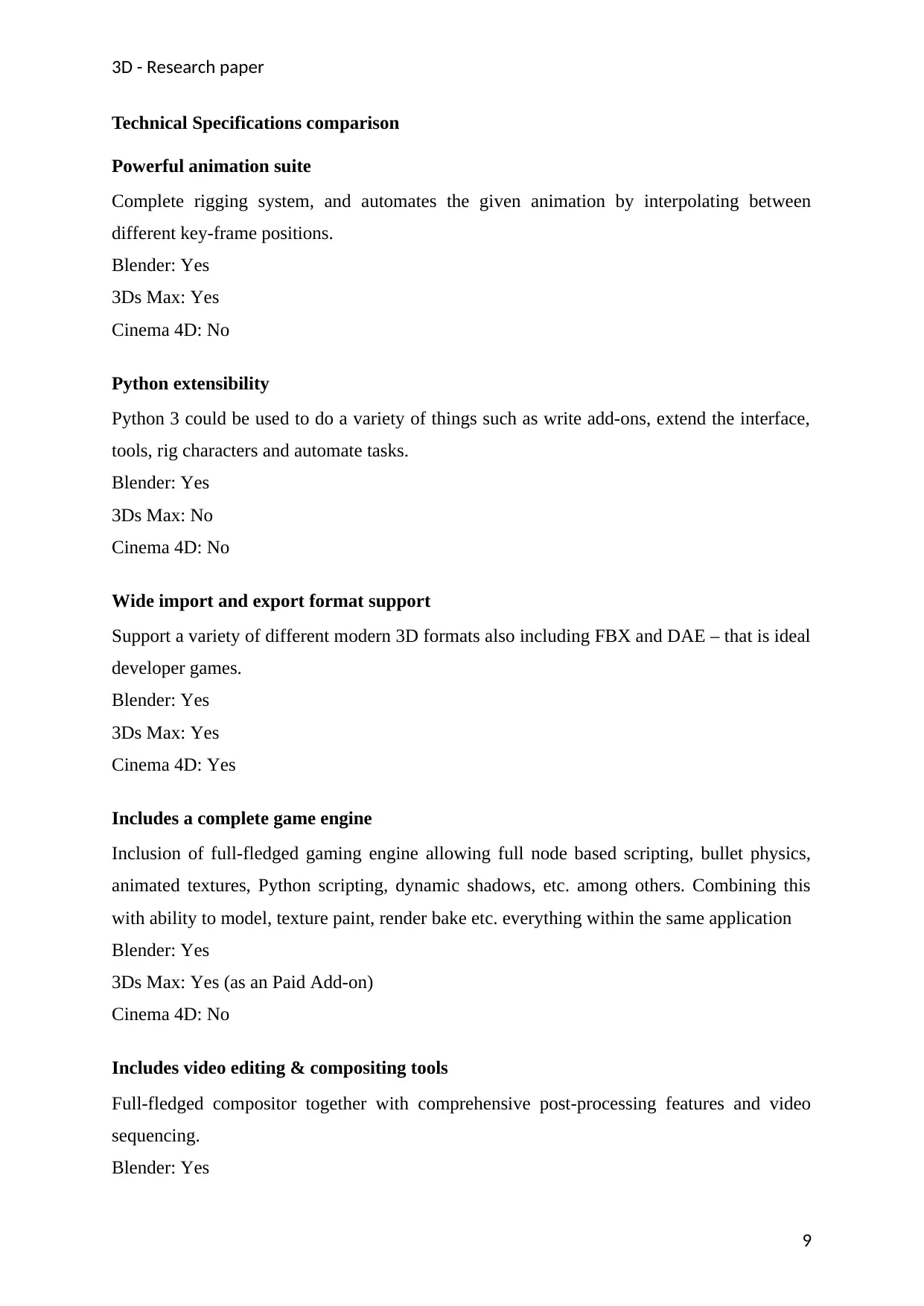
Technical Specifications comparison
Powerful animation suite
Complete rigging system, and automates the given animation by interpolating between
different key-frame positions.
Blender: Yes
3Ds Max: Yes
Cinema 4D: No
Python extensibility
Python 3 could be used to do a variety of things such as write add-ons, extend the interface,
tools, rig characters and automate tasks.
Blender: Yes
3Ds Max: No
Cinema 4D: No
Wide import and export format support
Support a variety of different modern 3D formats also including FBX and DAE – that is ideal
developer games.
Blender: Yes
3Ds Max: Yes
Cinema 4D: Yes
Includes a complete game engine
Inclusion of full-fledged gaming engine allowing full node based scripting, bullet physics,
animated textures, Python scripting, dynamic shadows, etc. among others. Combining this
with ability to model, texture paint, render bake etc. everything within the same application
Blender: Yes
3Ds Max: Yes (as an Paid Add-on)
Cinema 4D: No
Includes video editing & compositing tools
Full-fledged compositor together with comprehensive post-processing features and video
sequencing.
Blender: Yes
9
Technical Specifications comparison
Powerful animation suite
Complete rigging system, and automates the given animation by interpolating between
different key-frame positions.
Blender: Yes
3Ds Max: Yes
Cinema 4D: No
Python extensibility
Python 3 could be used to do a variety of things such as write add-ons, extend the interface,
tools, rig characters and automate tasks.
Blender: Yes
3Ds Max: No
Cinema 4D: No
Wide import and export format support
Support a variety of different modern 3D formats also including FBX and DAE – that is ideal
developer games.
Blender: Yes
3Ds Max: Yes
Cinema 4D: Yes
Includes a complete game engine
Inclusion of full-fledged gaming engine allowing full node based scripting, bullet physics,
animated textures, Python scripting, dynamic shadows, etc. among others. Combining this
with ability to model, texture paint, render bake etc. everything within the same application
Blender: Yes
3Ds Max: Yes (as an Paid Add-on)
Cinema 4D: No
Includes video editing & compositing tools
Full-fledged compositor together with comprehensive post-processing features and video
sequencing.
Blender: Yes
9
⊘ This is a preview!⊘
Do you want full access?
Subscribe today to unlock all pages.
Trusted by 1+ million students worldwide
3D - Research paper
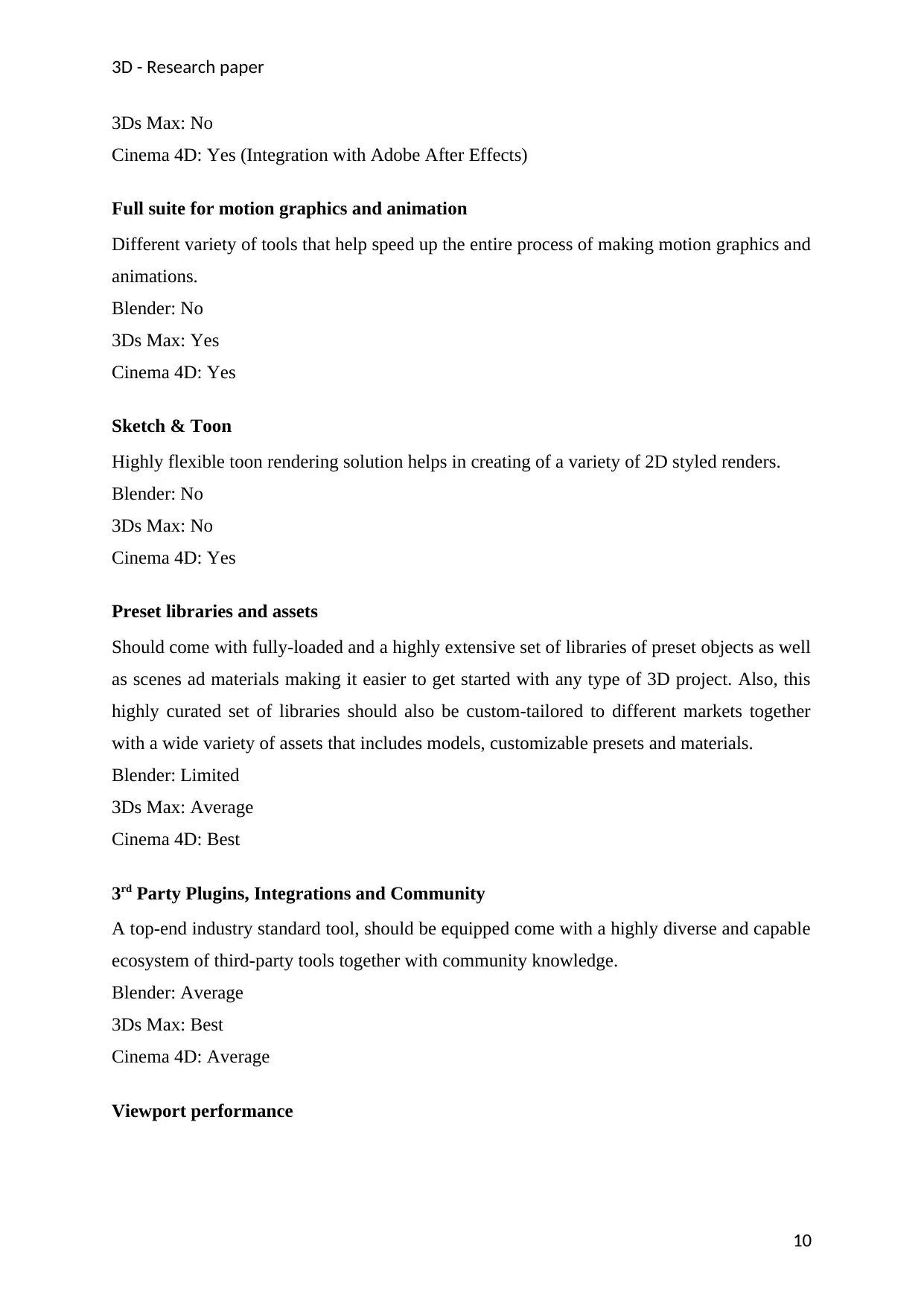
3Ds Max: No
Cinema 4D: Yes (Integration with Adobe After Effects)
Full suite for motion graphics and animation
Different variety of tools that help speed up the entire process of making motion graphics and
animations.
Blender: No
3Ds Max: Yes
Cinema 4D: Yes
Sketch & Toon
Highly flexible toon rendering solution helps in creating of a variety of 2D styled renders.
Blender: No
3Ds Max: No
Cinema 4D: Yes
Preset libraries and assets
Should come with fully-loaded and a highly extensive set of libraries of preset objects as well
as scenes ad materials making it easier to get started with any type of 3D project. Also, this
highly curated set of libraries should also be custom-tailored to different markets together
with a wide variety of assets that includes models, customizable presets and materials.
Blender: Limited
3Ds Max: Average
Cinema 4D: Best
3rd Party Plugins, Integrations and Community
A top-end industry standard tool, should be equipped come with a highly diverse and capable
ecosystem of third-party tools together with community knowledge.
Blender: Average
3Ds Max: Best
Cinema 4D: Average
Viewport performance
10
3Ds Max: No
Cinema 4D: Yes (Integration with Adobe After Effects)
Full suite for motion graphics and animation
Different variety of tools that help speed up the entire process of making motion graphics and
animations.
Blender: No
3Ds Max: Yes
Cinema 4D: Yes
Sketch & Toon
Highly flexible toon rendering solution helps in creating of a variety of 2D styled renders.
Blender: No
3Ds Max: No
Cinema 4D: Yes
Preset libraries and assets
Should come with fully-loaded and a highly extensive set of libraries of preset objects as well
as scenes ad materials making it easier to get started with any type of 3D project. Also, this
highly curated set of libraries should also be custom-tailored to different markets together
with a wide variety of assets that includes models, customizable presets and materials.
Blender: Limited
3Ds Max: Average
Cinema 4D: Best
3rd Party Plugins, Integrations and Community
A top-end industry standard tool, should be equipped come with a highly diverse and capable
ecosystem of third-party tools together with community knowledge.
Blender: Average
3Ds Max: Best
Cinema 4D: Average
Viewport performance
10
Paraphrase This Document
Need a fresh take? Get an instant paraphrase of this document with our AI Paraphraser
3D - Research paper
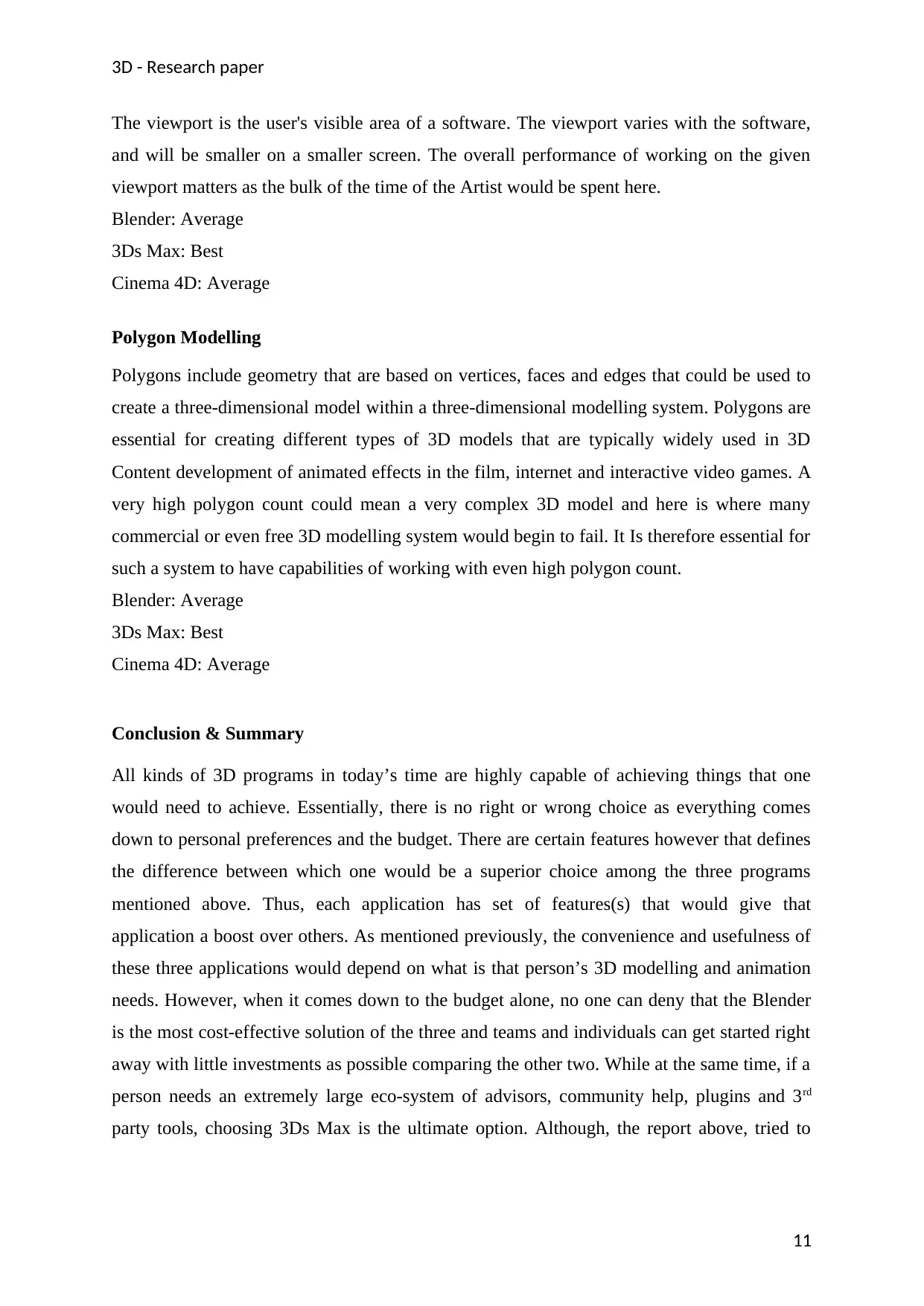
The viewport is the user's visible area of a software. The viewport varies with the software,
and will be smaller on a smaller screen. The overall performance of working on the given
viewport matters as the bulk of the time of the Artist would be spent here.
Blender: Average
3Ds Max: Best
Cinema 4D: Average
Polygon Modelling
Polygons include geometry that are based on vertices, faces and edges that could be used to
create a three-dimensional model within a three-dimensional modelling system. Polygons are
essential for creating different types of 3D models that are typically widely used in 3D
Content development of animated effects in the film, internet and interactive video games. A
very high polygon count could mean a very complex 3D model and here is where many
commercial or even free 3D modelling system would begin to fail. It Is therefore essential for
such a system to have capabilities of working with even high polygon count.
Blender: Average
3Ds Max: Best
Cinema 4D: Average
Conclusion & Summary
All kinds of 3D programs in today’s time are highly capable of achieving things that one
would need to achieve. Essentially, there is no right or wrong choice as everything comes
down to personal preferences and the budget. There are certain features however that defines
the difference between which one would be a superior choice among the three programs
mentioned above. Thus, each application has set of features(s) that would give that
application a boost over others. As mentioned previously, the convenience and usefulness of
these three applications would depend on what is that person’s 3D modelling and animation
needs. However, when it comes down to the budget alone, no one can deny that the Blender
is the most cost-effective solution of the three and teams and individuals can get started right
away with little investments as possible comparing the other two. While at the same time, if a
person needs an extremely large eco-system of advisors, community help, plugins and 3rd
party tools, choosing 3Ds Max is the ultimate option. Although, the report above, tried to
11
The viewport is the user's visible area of a software. The viewport varies with the software,
and will be smaller on a smaller screen. The overall performance of working on the given
viewport matters as the bulk of the time of the Artist would be spent here.
Blender: Average
3Ds Max: Best
Cinema 4D: Average
Polygon Modelling
Polygons include geometry that are based on vertices, faces and edges that could be used to
create a three-dimensional model within a three-dimensional modelling system. Polygons are
essential for creating different types of 3D models that are typically widely used in 3D
Content development of animated effects in the film, internet and interactive video games. A
very high polygon count could mean a very complex 3D model and here is where many
commercial or even free 3D modelling system would begin to fail. It Is therefore essential for
such a system to have capabilities of working with even high polygon count.
Blender: Average
3Ds Max: Best
Cinema 4D: Average
Conclusion & Summary
All kinds of 3D programs in today’s time are highly capable of achieving things that one
would need to achieve. Essentially, there is no right or wrong choice as everything comes
down to personal preferences and the budget. There are certain features however that defines
the difference between which one would be a superior choice among the three programs
mentioned above. Thus, each application has set of features(s) that would give that
application a boost over others. As mentioned previously, the convenience and usefulness of
these three applications would depend on what is that person’s 3D modelling and animation
needs. However, when it comes down to the budget alone, no one can deny that the Blender
is the most cost-effective solution of the three and teams and individuals can get started right
away with little investments as possible comparing the other two. While at the same time, if a
person needs an extremely large eco-system of advisors, community help, plugins and 3rd
party tools, choosing 3Ds Max is the ultimate option. Although, the report above, tried to
11

3D - Research paper
present some of the key distinctions among the three, all of them are equally great at their
tasks and are continuously evolving everyday ultimately leading to a level playing field.
12
present some of the key distinctions among the three, all of them are equally great at their
tasks and are continuously evolving everyday ultimately leading to a level playing field.
12
⊘ This is a preview!⊘
Do you want full access?
Subscribe today to unlock all pages.
Trusted by 1+ million students worldwide

1 out of 13


Your All-in-One AI-Powered Toolkit for Academic Success.
+13062052269
info@desklib.com
Available 24*7 on WhatsApp / Email
![[object Object]](/_next/static/media/star-bottom.7253800d.svg)
Unlock your academic potential
Copyright © 2020–2026 A2Z Services. All Rights Reserved. Developed and managed by ZUCOL.