COCS50592-A Semester 2 Heart Rate Monitor Project Analysis
VerifiedAdded on 2022/08/19
|9
|2031
|21
Project
AI Summary
This assignment presents two solutions for a simple heart rate monitor project. The first solution utilizes a 68hc11 microcontroller and a state diagram to illustrate the process, with pseudocode, flowcharts, and C source code for a LabVIEW DLL. The second solution implements a heart rate monitor using LabVIEW and DAQ units, detailing the user interface, output data, and data analysis. Both solutions aim to measure and record pulse rates, providing insights into data acquisition, system control, and analysis using the specified technologies and programming languages. The project includes an introduction, methodologies, results, and conclusions for each approach, with references to relevant literature. This project is designed to fulfill the requirements of the COCS50592-A Advanced Programming Languages for Computer Systems module, focusing on data acquisition, computer control, and C programming within a medical context.
Advanced Programming
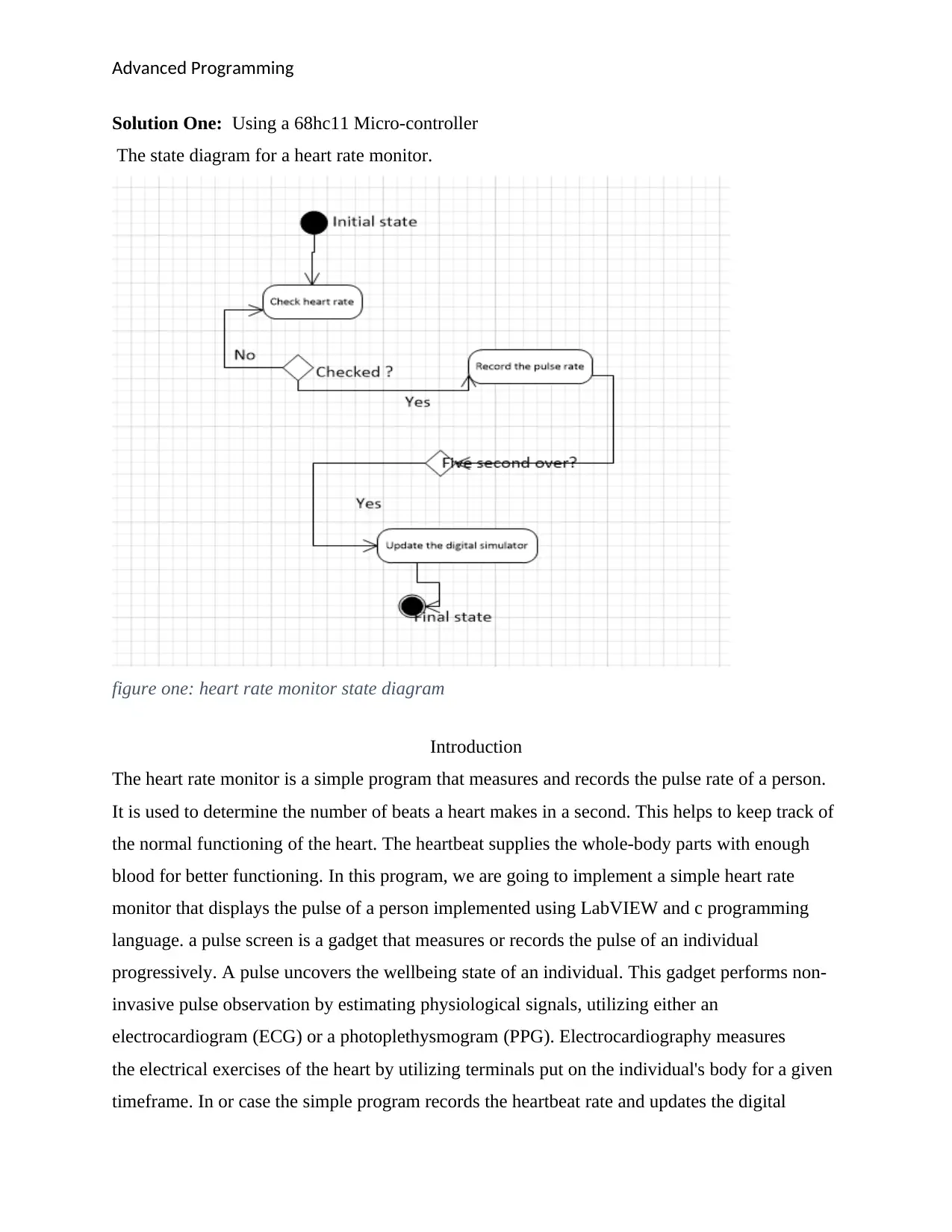
Solution One: Using a 68hc11 Micro-controller
The state diagram for a heart rate monitor.
figure one: heart rate monitor state diagram
Introduction
The heart rate monitor is a simple program that measures and records the pulse rate of a person.
It is used to determine the number of beats a heart makes in a second. This helps to keep track of
the normal functioning of the heart. The heartbeat supplies the whole-body parts with enough
blood for better functioning. In this program, we are going to implement a simple heart rate
monitor that displays the pulse of a person implemented using LabVIEW and c programming
language. a pulse screen is a gadget that measures or records the pulse of an individual
progressively. A pulse uncovers the wellbeing state of an individual. This gadget performs non-
invasive pulse observation by estimating physiological signals, utilizing either an
electrocardiogram (ECG) or a photoplethysmogram (PPG). Electrocardiography measures
the electrical exercises of the heart by utilizing terminals put on the individual's body for a given
timeframe. In or case the simple program records the heartbeat rate and updates the digital
Solution One: Using a 68hc11 Micro-controller
The state diagram for a heart rate monitor.
figure one: heart rate monitor state diagram
Introduction
The heart rate monitor is a simple program that measures and records the pulse rate of a person.
It is used to determine the number of beats a heart makes in a second. This helps to keep track of
the normal functioning of the heart. The heartbeat supplies the whole-body parts with enough
blood for better functioning. In this program, we are going to implement a simple heart rate
monitor that displays the pulse of a person implemented using LabVIEW and c programming
language. a pulse screen is a gadget that measures or records the pulse of an individual
progressively. A pulse uncovers the wellbeing state of an individual. This gadget performs non-
invasive pulse observation by estimating physiological signals, utilizing either an
electrocardiogram (ECG) or a photoplethysmogram (PPG). Electrocardiography measures
the electrical exercises of the heart by utilizing terminals put on the individual's body for a given
timeframe. In or case the simple program records the heartbeat rate and updates the digital

Paraphrase This Document
Need a fresh take? Get an instant paraphrase of this document with our AI Paraphraser
Advanced Programming
simulator. After every five seconds, the system checks the timer and refreshes the digital
simulator.
Pseudocode for the simple heart rate monitor
Start
Check the heartbeat
Record the heartbeat on a digital simulator
Refresh after 5 seconds and update the digital simulator
End of process
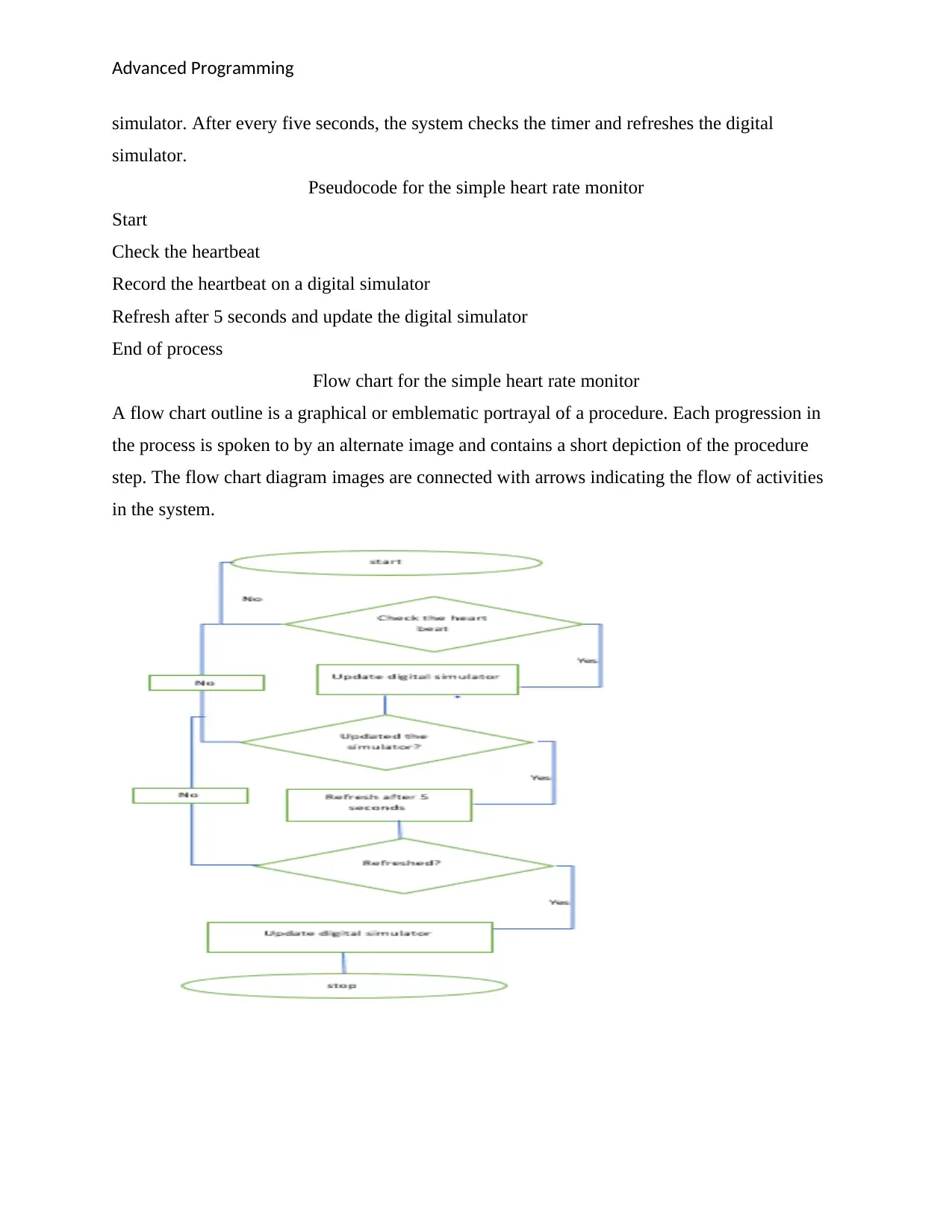
Flow chart for the simple heart rate monitor
A flow chart outline is a graphical or emblematic portrayal of a procedure. Each progression in
the process is spoken to by an alternate image and contains a short depiction of the procedure
step. The flow chart diagram images are connected with arrows indicating the flow of activities
in the system.
simulator. After every five seconds, the system checks the timer and refreshes the digital
simulator.
Pseudocode for the simple heart rate monitor
Start
Check the heartbeat
Record the heartbeat on a digital simulator
Refresh after 5 seconds and update the digital simulator
End of process
Flow chart for the simple heart rate monitor
A flow chart outline is a graphical or emblematic portrayal of a procedure. Each progression in
the process is spoken to by an alternate image and contains a short depiction of the procedure
step. The flow chart diagram images are connected with arrows indicating the flow of activities
in the system.
Advanced Programming
Source code for the simple heart rate monitor
/*
The purpose of this program is to call a DLL created by LabVIEW in C. This is designed
to show you that LabVIEW can be useful even if you are forced to use it from another
development environment. This program calls three functions from the LV_AAP.dll.
These functions are to Acquire, Analyze, and Present. These functions emphasize three
of LabVIEW's signature strengths, which include acquiring data, analyzing data, and
presenting the data on a state-of-the-art GUI.
*/
/*
The following three headers do not need to be included for this application, but may be
necessary when calling some LabVIEW DLL's depending upon the data types passed and the
features used. They can be found at the following directory:
C:\Program Files\National Instruments\LabVIEW 7.0\cintools
#include "platdefines.h"
#include "fundtypes.h"
#include "extcode.h” //extcode.h is included in LV_AAP.h
*/
#include <stdio.h>
#include "LV_AAP.h"
/*
The main VI walks the user through calling three LabVIEW functions from a LabVIEW DLL.
Each function was created as a separate LabVIEW VI and then the VI's were built together
as a DLL. To rebuild the DLL, simply choose "Tools->Build Shared Library" from
LabVIEW and then load the attached build script (.bld file).
*/
int main ()
{
double sineWave [1000], magnitude [20];
printf ("press any key to...\n\n");
Source code for the simple heart rate monitor
/*
The purpose of this program is to call a DLL created by LabVIEW in C. This is designed
to show you that LabVIEW can be useful even if you are forced to use it from another
development environment. This program calls three functions from the LV_AAP.dll.
These functions are to Acquire, Analyze, and Present. These functions emphasize three
of LabVIEW's signature strengths, which include acquiring data, analyzing data, and
presenting the data on a state-of-the-art GUI.
*/
/*
The following three headers do not need to be included for this application, but may be
necessary when calling some LabVIEW DLL's depending upon the data types passed and the
features used. They can be found at the following directory:
C:\Program Files\National Instruments\LabVIEW 7.0\cintools
#include "platdefines.h"
#include "fundtypes.h"
#include "extcode.h” //extcode.h is included in LV_AAP.h
*/
#include <stdio.h>
#include "LV_AAP.h"
/*
The main VI walks the user through calling three LabVIEW functions from a LabVIEW DLL.
Each function was created as a separate LabVIEW VI and then the VI's were built together
as a DLL. To rebuild the DLL, simply choose "Tools->Build Shared Library" from
LabVIEW and then load the attached build script (.bld file).
*/
int main ()
{
double sineWave [1000], magnitude [20];
printf ("press any key to...\n\n");
⊘ This is a preview!⊘
Do you want full access?
Subscribe today to unlock all pages.

Trusted by 1+ million students worldwide
Advanced Programming
printf ("1: Acquire");
getchar ();
fflush(stdin);
Acquire (sineWave, 1000);
/*
The Acquire function uses the built in Sine Waveform.vi in LabVIEW to generate a
sine wave. It then passes in a reference to the sineWave array along with its size
and stores the Y values of the sine wave to the sineWave array. The sine wave is
generated for the sake of the example. In a more practical application, one might
use LabVIEW to read data from a DAQ device.
*/
printf("Sine wave data acquired by LabVIEW!\n\n");
printf("2: Analyze");
getchar();
fflush(stdin);
Analyze (sineWave, magnitude, 1000, 20);
/*
The Analyze function uses the built in FFT Power Spectrum.vi in LabVIEW to compute
the power spectrum FFT of the sine wave generated in "Acquire." It passes in a
reference to the sinewave array and the magnitude array (along with their sizes)
and it stores the analyzed data in the magnitude array.
*/
Printf ("FFT analysis performed on sine wave data by LabVIEW! \n\n");
printf("3: Present");
getchar();
Present (magnitude, sineWave, 20, 1000);
Printf ("Data displayed beautifully by LabVIEW! \n");
/*
The Present function passes in a reference to both data arrays (and their sizes)
and displays this data on the LAbVIEW waveform graph.
*/
printf ("1: Acquire");
getchar ();
fflush(stdin);
Acquire (sineWave, 1000);
/*
The Acquire function uses the built in Sine Waveform.vi in LabVIEW to generate a
sine wave. It then passes in a reference to the sineWave array along with its size
and stores the Y values of the sine wave to the sineWave array. The sine wave is
generated for the sake of the example. In a more practical application, one might
use LabVIEW to read data from a DAQ device.
*/
printf("Sine wave data acquired by LabVIEW!\n\n");
printf("2: Analyze");
getchar();
fflush(stdin);
Analyze (sineWave, magnitude, 1000, 20);
/*
The Analyze function uses the built in FFT Power Spectrum.vi in LabVIEW to compute
the power spectrum FFT of the sine wave generated in "Acquire." It passes in a
reference to the sinewave array and the magnitude array (along with their sizes)
and it stores the analyzed data in the magnitude array.
*/
Printf ("FFT analysis performed on sine wave data by LabVIEW! \n\n");
printf("3: Present");
getchar();
Present (magnitude, sineWave, 20, 1000);
Printf ("Data displayed beautifully by LabVIEW! \n");
/*
The Present function passes in a reference to both data arrays (and their sizes)
and displays this data on the LAbVIEW waveform graph.
*/
Paraphrase This Document
Need a fresh take? Get an instant paraphrase of this document with our AI Paraphraser
Advanced Programming
return 0;
}
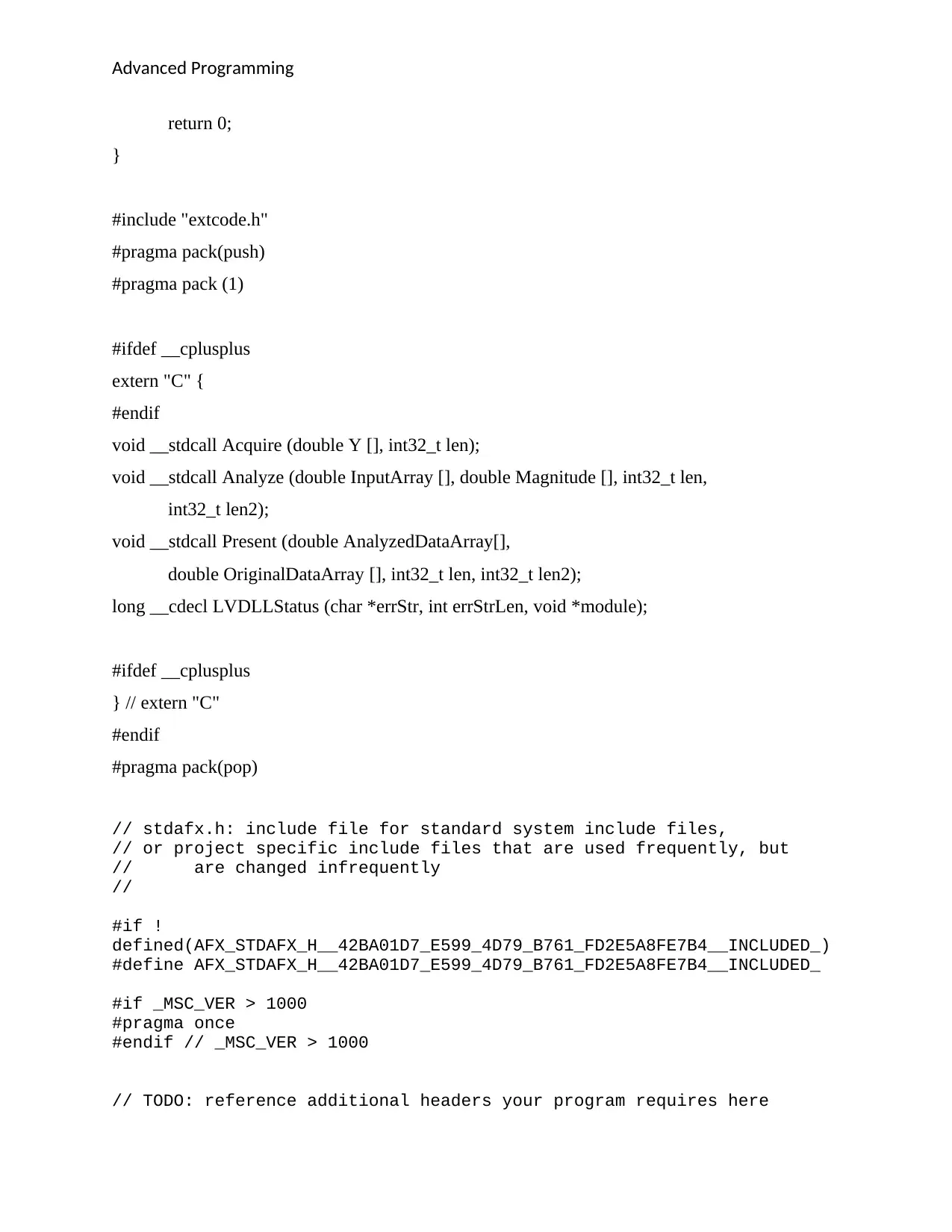
#include "extcode.h"
#pragma pack(push)
#pragma pack (1)
#ifdef __cplusplus
extern "C" {
#endif
void __stdcall Acquire (double Y [], int32_t len);
void __stdcall Analyze (double InputArray [], double Magnitude [], int32_t len,
int32_t len2);
void __stdcall Present (double AnalyzedDataArray[],
double OriginalDataArray [], int32_t len, int32_t len2);
long __cdecl LVDLLStatus (char *errStr, int errStrLen, void *module);
#ifdef __cplusplus
} // extern "C"
#endif
#pragma pack(pop)
// stdafx.h: include file for standard system include files,
// or project specific include files that are used frequently, but
// are changed infrequently
//
#if !
defined(AFX_STDAFX_H__42BA01D7_E599_4D79_B761_FD2E5A8FE7B4__INCLUDED_)
#define AFX_STDAFX_H__42BA01D7_E599_4D79_B761_FD2E5A8FE7B4__INCLUDED_
#if _MSC_VER > 1000
#pragma once
#endif // _MSC_VER > 1000
// TODO: reference additional headers your program requires here
return 0;
}
#include "extcode.h"
#pragma pack(push)
#pragma pack (1)
#ifdef __cplusplus
extern "C" {
#endif
void __stdcall Acquire (double Y [], int32_t len);
void __stdcall Analyze (double InputArray [], double Magnitude [], int32_t len,
int32_t len2);
void __stdcall Present (double AnalyzedDataArray[],
double OriginalDataArray [], int32_t len, int32_t len2);
long __cdecl LVDLLStatus (char *errStr, int errStrLen, void *module);
#ifdef __cplusplus
} // extern "C"
#endif
#pragma pack(pop)
// stdafx.h: include file for standard system include files,
// or project specific include files that are used frequently, but
// are changed infrequently
//
#if !
defined(AFX_STDAFX_H__42BA01D7_E599_4D79_B761_FD2E5A8FE7B4__INCLUDED_)
#define AFX_STDAFX_H__42BA01D7_E599_4D79_B761_FD2E5A8FE7B4__INCLUDED_
#if _MSC_VER > 1000
#pragma once
#endif // _MSC_VER > 1000
// TODO: reference additional headers your program requires here
Advanced Programming
//{{AFX_INSERT_LOCATION}}
// Microsoft Visual C++ will insert additional declarations
immediately before the previous line.
#endif //!
defined(AFX_STDAFX_H__42BA01D7_E599_4D79_B761_FD2E5A8FE7B4__INCLUDED_)
Conclusion
Right now, a chip framework stacked with a heartrate estimation calculation is actualized. The
chip framework is actualized utilizing LabVIEW equipment what's more, interfaces and its
associated heartbeat sensor. In a writing survey, a few existing chip frameworks utilizing a
heartbeat signal-based sensor are talked about. A test is conveyed out to dissect the usefulness of
the chip framework stacked with the calculation. The outcomes show that the pulse identified is
inside the scope of an ordinary human pulse. The signal progression of the microchip framework
is watched and analyzed. The heart rate monitor is of much importance in monitoring the health
position of an individual.
Solution two Using LabVIEW and DAQ Units
Introduction
The field of information obtaining includes an extremely wide range of exercises. At its least
difficult level, it includes perusing electrical signals into a PC from a sensor. These signs may
speak to the condition of a physical procedure, for example, position and direction of machine
apparatuses, heater temperature, size and state of a produced segment and so on. The obtained
information may be put away, printed or showed. Regularly the information must be breaking
down or handled here and there so as to create further signals for controlling outside hardware or
for interfacing to different PCs. DAQ (Data Acquisition) framework is a framework that secures
the information, for example, input/yield parameters from the field with the assistance of sensors
related to the framework, its investigations the information and produce control activity required
for working and furthermore screen the obtained information on GUI. The DAQ framework is a
fundamental requirement for controlling and observing of a Mega framework in present-day
enterprises. So, the fundamental target of this paper is to build up a low-cost DAQ framework for
controlling and observing a framework utilizing the GNU controller and LabVIEW GUI. In
//{{AFX_INSERT_LOCATION}}
// Microsoft Visual C++ will insert additional declarations
immediately before the previous line.
#endif //!
defined(AFX_STDAFX_H__42BA01D7_E599_4D79_B761_FD2E5A8FE7B4__INCLUDED_)
Conclusion
Right now, a chip framework stacked with a heartrate estimation calculation is actualized. The
chip framework is actualized utilizing LabVIEW equipment what's more, interfaces and its
associated heartbeat sensor. In a writing survey, a few existing chip frameworks utilizing a
heartbeat signal-based sensor are talked about. A test is conveyed out to dissect the usefulness of
the chip framework stacked with the calculation. The outcomes show that the pulse identified is
inside the scope of an ordinary human pulse. The signal progression of the microchip framework
is watched and analyzed. The heart rate monitor is of much importance in monitoring the health
position of an individual.
Solution two Using LabVIEW and DAQ Units
Introduction
The field of information obtaining includes an extremely wide range of exercises. At its least
difficult level, it includes perusing electrical signals into a PC from a sensor. These signs may
speak to the condition of a physical procedure, for example, position and direction of machine
apparatuses, heater temperature, size and state of a produced segment and so on. The obtained
information may be put away, printed or showed. Regularly the information must be breaking
down or handled here and there so as to create further signals for controlling outside hardware or
for interfacing to different PCs. DAQ (Data Acquisition) framework is a framework that secures
the information, for example, input/yield parameters from the field with the assistance of sensors
related to the framework, its investigations the information and produce control activity required
for working and furthermore screen the obtained information on GUI. The DAQ framework is a
fundamental requirement for controlling and observing of a Mega framework in present-day
enterprises. So, the fundamental target of this paper is to build up a low-cost DAQ framework for
controlling and observing a framework utilizing the GNU controller and LabVIEW GUI. In
⊘ This is a preview!⊘
Do you want full access?
Subscribe today to unlock all pages.
Trusted by 1+ million students worldwide
Advanced Programming
another manner on the off chance that we need, we can likewise screen the information on cell
phone with an Android application or personal computers.
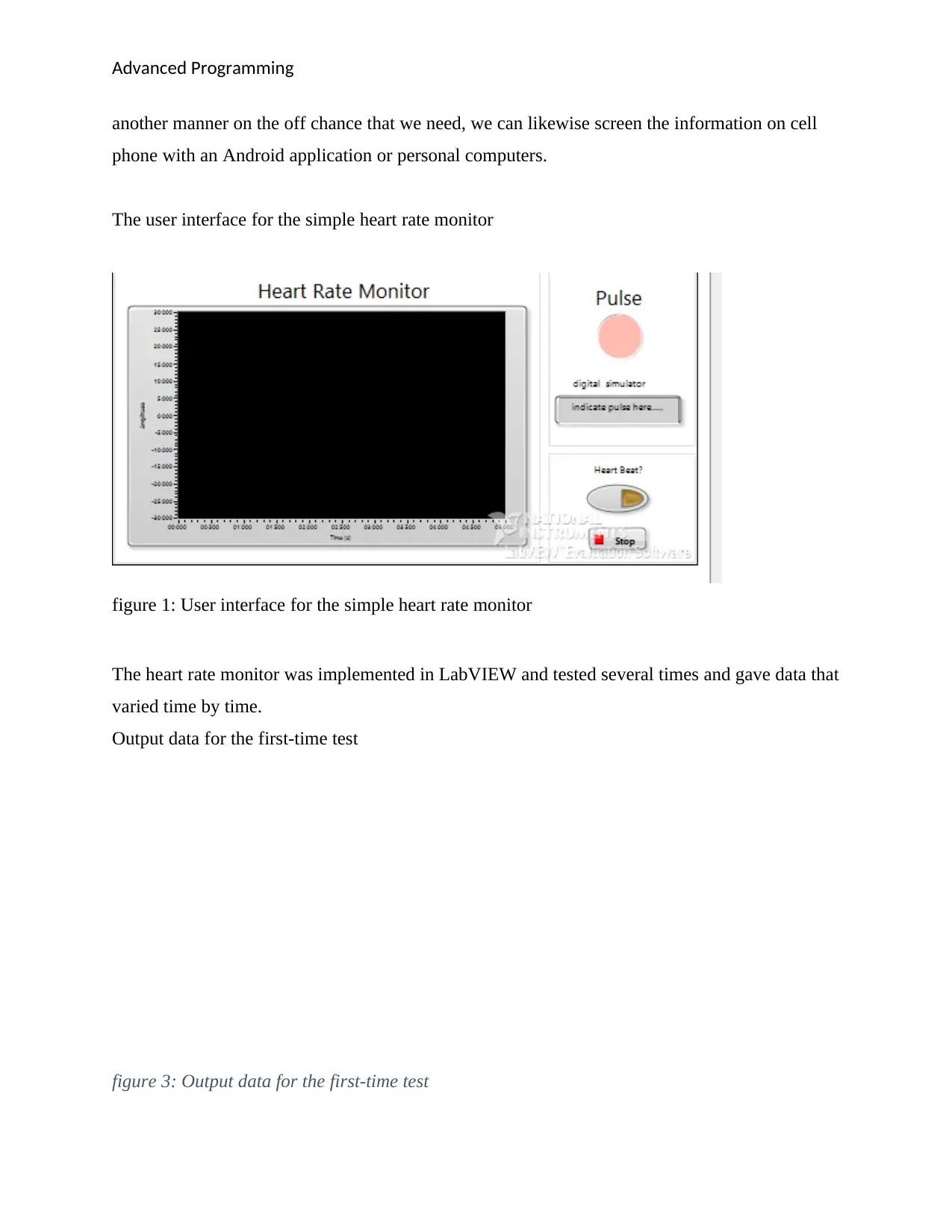
The user interface for the simple heart rate monitor
figure 1: User interface for the simple heart rate monitor
The heart rate monitor was implemented in LabVIEW and tested several times and gave data that
varied time by time.
Output data for the first-time test
figure 3: Output data for the first-time test
another manner on the off chance that we need, we can likewise screen the information on cell
phone with an Android application or personal computers.
The user interface for the simple heart rate monitor
figure 1: User interface for the simple heart rate monitor
The heart rate monitor was implemented in LabVIEW and tested several times and gave data that
varied time by time.
Output data for the first-time test
figure 3: Output data for the first-time test
Paraphrase This Document
Need a fresh take? Get an instant paraphrase of this document with our AI Paraphraser
Advanced Programming
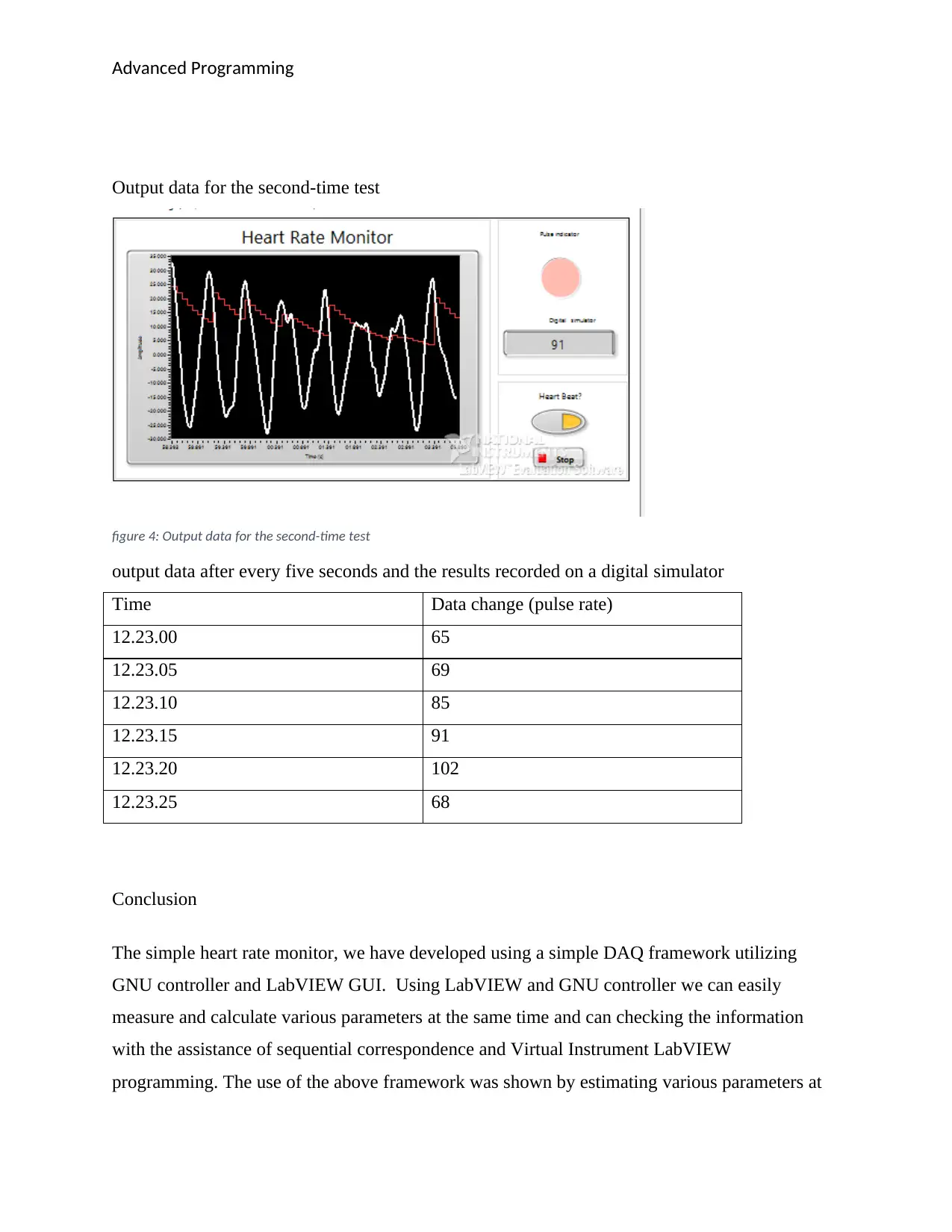
Output data for the second-time test
figure 4: Output data for the second-time test
output data after every five seconds and the results recorded on a digital simulator
Time Data change (pulse rate)
12.23.00 65
12.23.05 69
12.23.10 85
12.23.15 91
12.23.20 102
12.23.25 68
Conclusion
The simple heart rate monitor, we have developed using a simple DAQ framework utilizing
GNU controller and LabVIEW GUI. Using LabVIEW and GNU controller we can easily
measure and calculate various parameters at the same time and can checking the information
with the assistance of sequential correspondence and Virtual Instrument LabVIEW
programming. The use of the above framework was shown by estimating various parameters at
Output data for the second-time test
figure 4: Output data for the second-time test
output data after every five seconds and the results recorded on a digital simulator
Time Data change (pulse rate)
12.23.00 65
12.23.05 69
12.23.10 85
12.23.15 91
12.23.20 102
12.23.25 68
Conclusion
The simple heart rate monitor, we have developed using a simple DAQ framework utilizing
GNU controller and LabVIEW GUI. Using LabVIEW and GNU controller we can easily
measure and calculate various parameters at the same time and can checking the information
with the assistance of sequential correspondence and Virtual Instrument LabVIEW
programming. The use of the above framework was shown by estimating various parameters at
Advanced Programming
the same time. The Features like reportage, plotting, disturbing were joined in the programming
and the information was gotten through sequential correspondence in Personal PC. The proposed
approach can be valuable in the little procedure like level, temperature, Measurement at the Gas
station, Load Estimation with load cell at Way Bridge, and some little scale ventures where the
financially savvy arrangement is out of luck.
This has formed the basis of the development of the simply hear rate monitor by using the
LabVIEW GUI and the controller.
References
Barberis, D., Vilas, V. V., Millet, S., Sandow, M., Colle, J. Y., & de las Heras, L. A. (2017). A
LabVIEW®-based software for the control of the AUTORAD platform: a fully automated multi
sequential flow injection analysis Lab-on-Valve (MSFIA-LOV) system for radiochemical
analysis. Journal of radioanalytical and nuclear chemistry, 313(1), 217-227.
Hernando, D., Garatachea, N., Almeida, R., Casajús, J. A., & Bailón, R. (2018). Validation of
heart rate monitor Polar RS800 for heart rate variability analysis during exercise. The Journal of
Strength & Conditioning Research, 32(3), 716-725.
Natarajan, S., & Broman, D. (2018, April). Timed c: An extension to the c programming
language for real-time systems. In 2018 IEEE Real-Time and Embedded Technology and
Applications Symposium (RTAS) (pp. 227-239). IEEE.
Yang, R., Chen, H., & He, C. (2019, July). Study on the reform of integrating project teaching
methods into the teaching of C programming. In Proceedings of the 2019 7th International
Conference on Computer and Communications Management (pp. 53-57).
Melnikova, A. V. (2019, November). Using the LABVIEW software package to automate
production and research tasks. In Journal of Physics: Conference Series (Vol. 1384, No. 1, p.
012029). IOP Publishing.
the same time. The Features like reportage, plotting, disturbing were joined in the programming
and the information was gotten through sequential correspondence in Personal PC. The proposed
approach can be valuable in the little procedure like level, temperature, Measurement at the Gas
station, Load Estimation with load cell at Way Bridge, and some little scale ventures where the
financially savvy arrangement is out of luck.
This has formed the basis of the development of the simply hear rate monitor by using the
LabVIEW GUI and the controller.
References
Barberis, D., Vilas, V. V., Millet, S., Sandow, M., Colle, J. Y., & de las Heras, L. A. (2017). A
LabVIEW®-based software for the control of the AUTORAD platform: a fully automated multi
sequential flow injection analysis Lab-on-Valve (MSFIA-LOV) system for radiochemical
analysis. Journal of radioanalytical and nuclear chemistry, 313(1), 217-227.
Hernando, D., Garatachea, N., Almeida, R., Casajús, J. A., & Bailón, R. (2018). Validation of
heart rate monitor Polar RS800 for heart rate variability analysis during exercise. The Journal of
Strength & Conditioning Research, 32(3), 716-725.
Natarajan, S., & Broman, D. (2018, April). Timed c: An extension to the c programming
language for real-time systems. In 2018 IEEE Real-Time and Embedded Technology and
Applications Symposium (RTAS) (pp. 227-239). IEEE.
Yang, R., Chen, H., & He, C. (2019, July). Study on the reform of integrating project teaching
methods into the teaching of C programming. In Proceedings of the 2019 7th International
Conference on Computer and Communications Management (pp. 53-57).
Melnikova, A. V. (2019, November). Using the LABVIEW software package to automate
production and research tasks. In Journal of Physics: Conference Series (Vol. 1384, No. 1, p.
012029). IOP Publishing.
⊘ This is a preview!⊘
Do you want full access?
Subscribe today to unlock all pages.
Trusted by 1+ million students worldwide

1 out of 9


Your All-in-One AI-Powered Toolkit for Academic Success.
+13062052269
info@desklib.com
Available 24*7 on WhatsApp / Email
![[object Object]](/_next/static/media/star-bottom.7253800d.svg)
Unlock your academic potential
Copyright © 2020–2026 A2Z Services. All Rights Reserved. Developed and managed by ZUCOL.