Accounting System and Process Report

Verified

Added on  2020/03/16

|20
|1671
|383
Report
AI Summary
This report delves into various aspects of accounting systems and processes, including the use of spreadsheets for financial management, inventory control, and journal entries. It covers topics such as the IF function, periodic inventory systems, and the analysis of financial statements for Wesfarmers. The report also discusses methods for determining bad debts and the importance of receivable turnover ratios in assessing company performance. With references to relevant literature, this comprehensive document serves as a valuable resource for understanding accounting practices.
Document Page
Running head: ACCOUNTING SYSTEM AND PROCESS
Accounting system and process
Name of the University
Subject code and name ‘
Student Name and ID
Assignment Task Number
Author Note
tabler-icon-diamond-filled.svg

Paraphrase This Document

Need a fresh take? Get an instant paraphrase of this document with our AI Paraphraser
Document Page
1ACCOUNTING SYSTEM AND PROCESS
Table of Contents
Answer 1:................................................................................................................................................3
Answer 2:................................................................................................................................................3
Answer 3:................................................................................................................................................4
Answer 4:................................................................................................................................................4
Answer 5:................................................................................................................................................5
Answer 6:................................................................................................................................................5
Answer 7:................................................................................................................................................7
Answer 8:................................................................................................................................................9
Answer 9:..............................................................................................................................................10
Answer 10:............................................................................................................................................10
Answer 11:............................................................................................................................................10
Answer 12:............................................................................................................................................11
Answer 13:............................................................................................................................................11
References:............................................................................................................................................14
Document Page
2ACCOUNTING SYSTEM AND PROCESS
Answer 1:
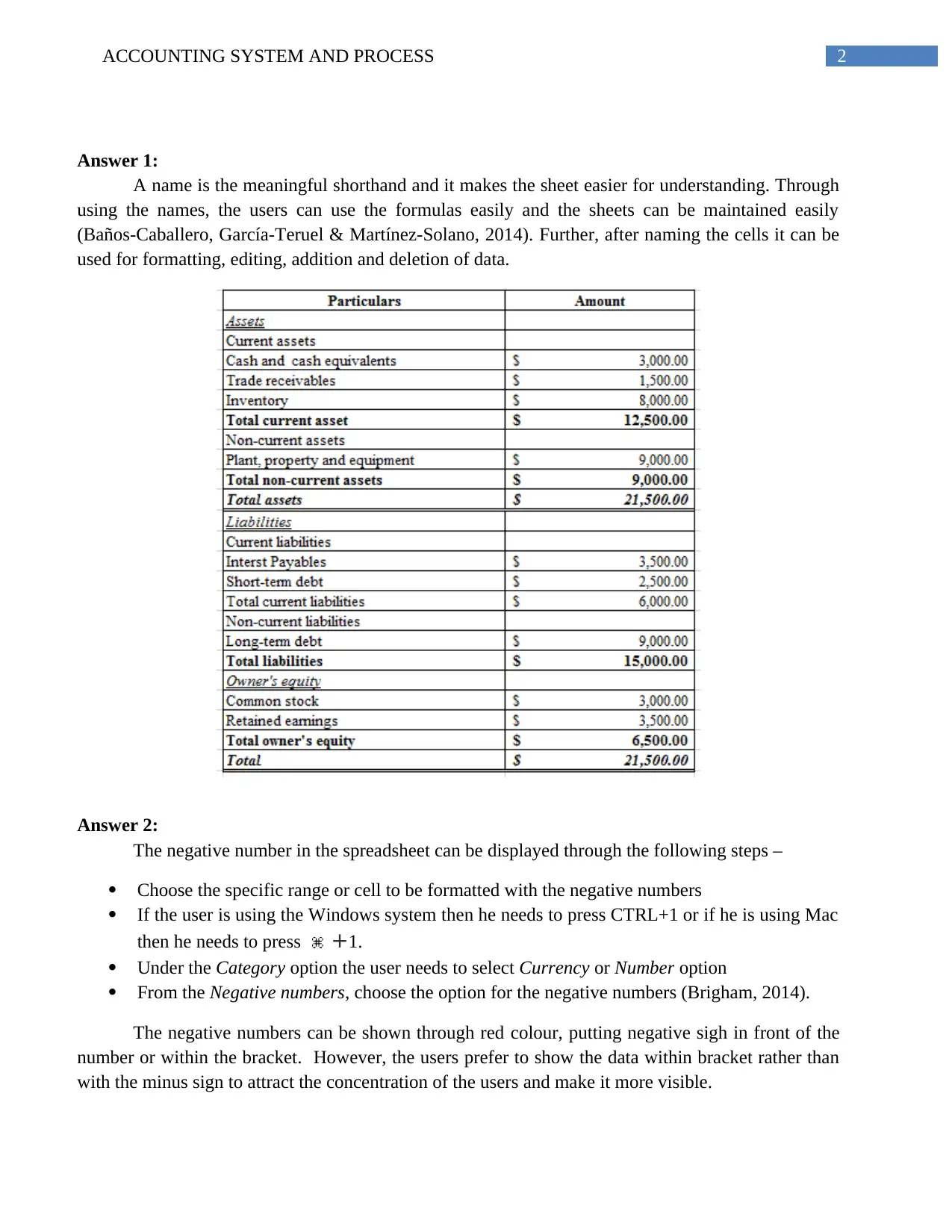
A name is the meaningful shorthand and it makes the sheet easier for understanding. Through
using the names, the users can use the formulas easily and the sheets can be maintained easily
(Baños-Caballero, García-Teruel & Martínez-Solano, 2014). Further, after naming the cells it can be
used for formatting, editing, addition and deletion of data.
Answer 2:
The negative number in the spreadsheet can be displayed through the following steps –
Choose the specific range or cell to be formatted with the negative numbers
If the user is using the Windows system then he needs to press CTRL+1 or if he is using Mac
then he needs to press +1.
Under the Category option the user needs to select Currency or Number option
From the Negative numbers, choose the option for the negative numbers (Brigham, 2014).
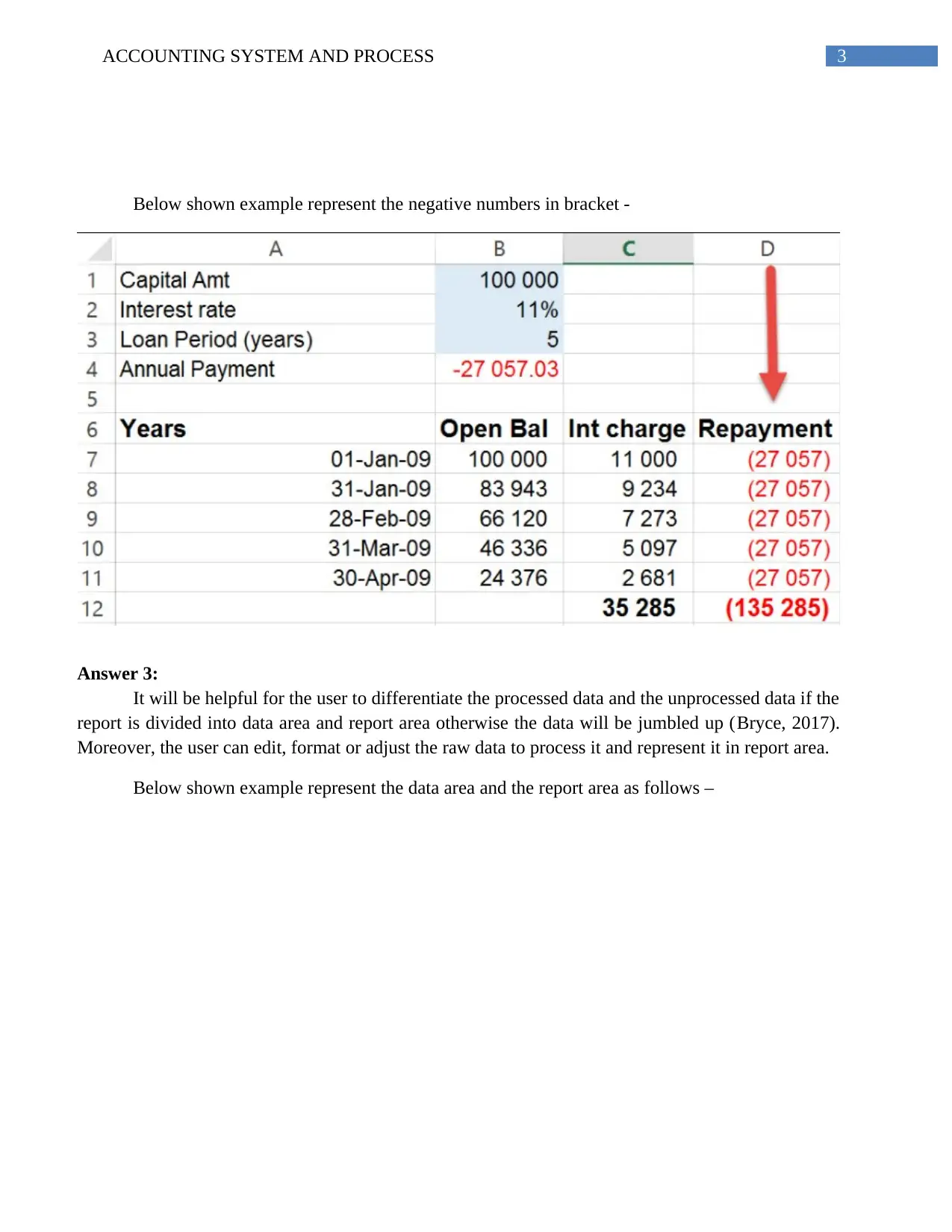
The negative numbers can be shown through red colour, putting negative sigh in front of the
number or within the bracket. However, the users prefer to show the data within bracket rather than
with the minus sign to attract the concentration of the users and make it more visible.
Document Page
3ACCOUNTING SYSTEM AND PROCESS
Below shown example represent the negative numbers in bracket -
Answer 3:
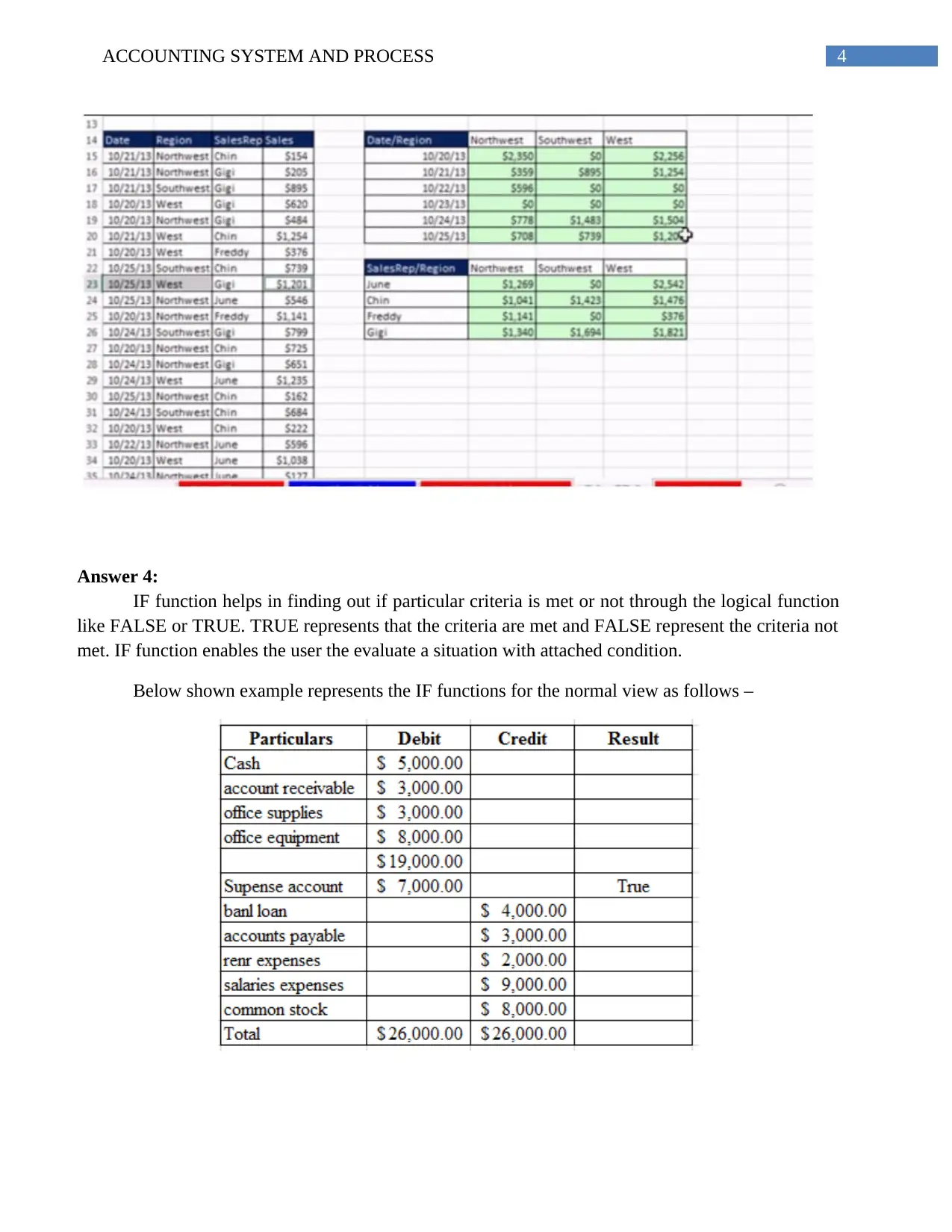
It will be helpful for the user to differentiate the processed data and the unprocessed data if the
report is divided into data area and report area otherwise the data will be jumbled up (Bryce, 2017).
Moreover, the user can edit, format or adjust the raw data to process it and represent it in report area.
Below shown example represent the data area and the report area as follows –
tabler-icon-diamond-filled.svg

Paraphrase This Document

Need a fresh take? Get an instant paraphrase of this document with our AI Paraphraser
Document Page
4ACCOUNTING SYSTEM AND PROCESS
Answer 4:
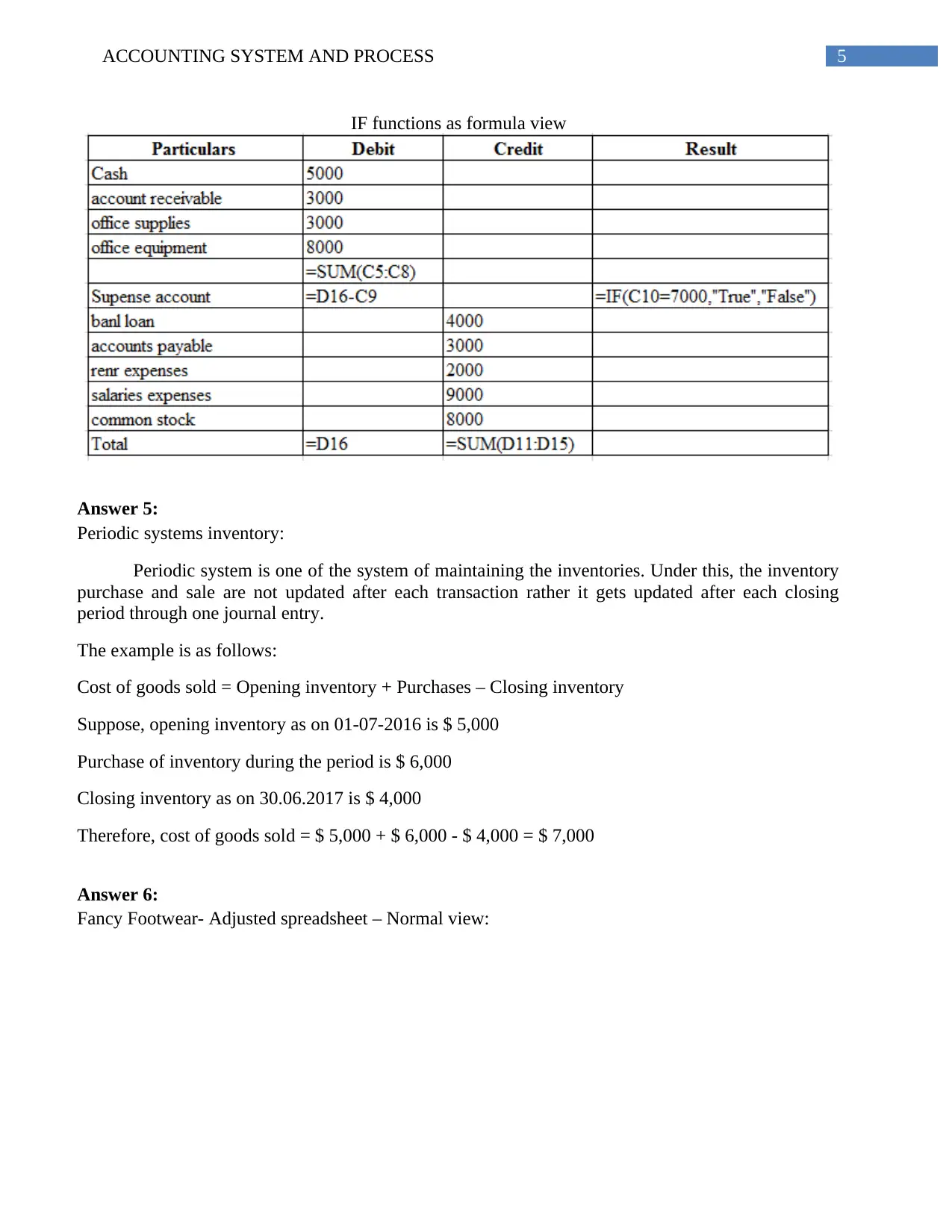
IF function helps in finding out if particular criteria is met or not through the logical function
like FALSE or TRUE. TRUE represents that the criteria are met and FALSE represent the criteria not
met. IF function enables the user the evaluate a situation with attached condition.
Below shown example represents the IF functions for the normal view as follows –
Document Page
5ACCOUNTING SYSTEM AND PROCESS
IF functions as formula view
Answer 5:
Periodic systems inventory:
Periodic system is one of the system of maintaining the inventories. Under this, the inventory
purchase and sale are not updated after each transaction rather it gets updated after each closing
period through one journal entry.
The example is as follows:
Cost of goods sold = Opening inventory + Purchases – Closing inventory
Suppose, opening inventory as on 01-07-2016 is $ 5,000
Purchase of inventory during the period is $ 6,000
Closing inventory as on 30.06.2017 is $ 4,000
Therefore, cost of goods sold = $ 5,000 + $ 6,000 - $ 4,000 = $ 7,000
Answer 6:
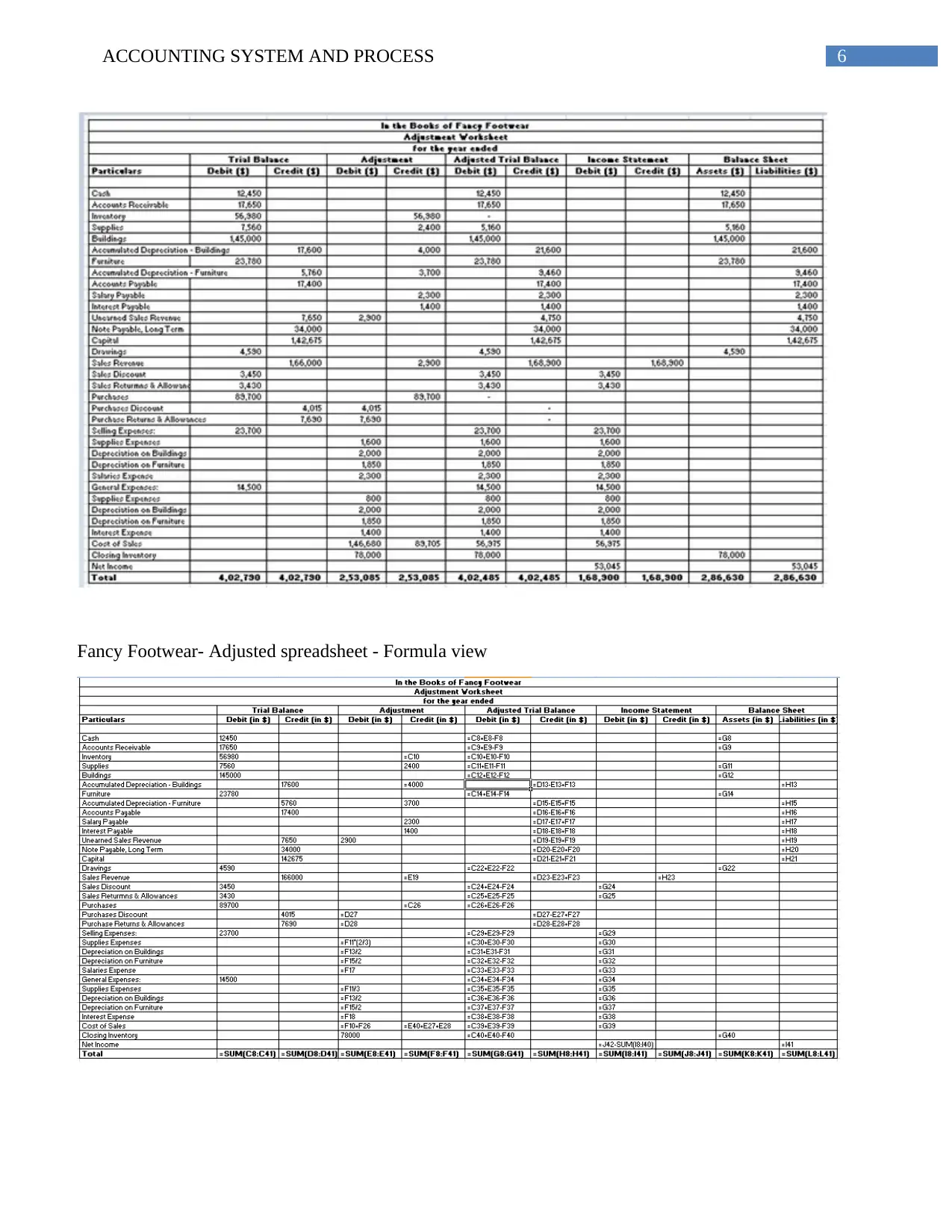
Fancy Footwear- Adjusted spreadsheet – Normal view:
Document Page
6ACCOUNTING SYSTEM AND PROCESS
Fancy Footwear- Adjusted spreadsheet - Formula view
tabler-icon-diamond-filled.svg

Paraphrase This Document

Need a fresh take? Get an instant paraphrase of this document with our AI Paraphraser
Document Page
7ACCOUNTING SYSTEM AND PROCESS
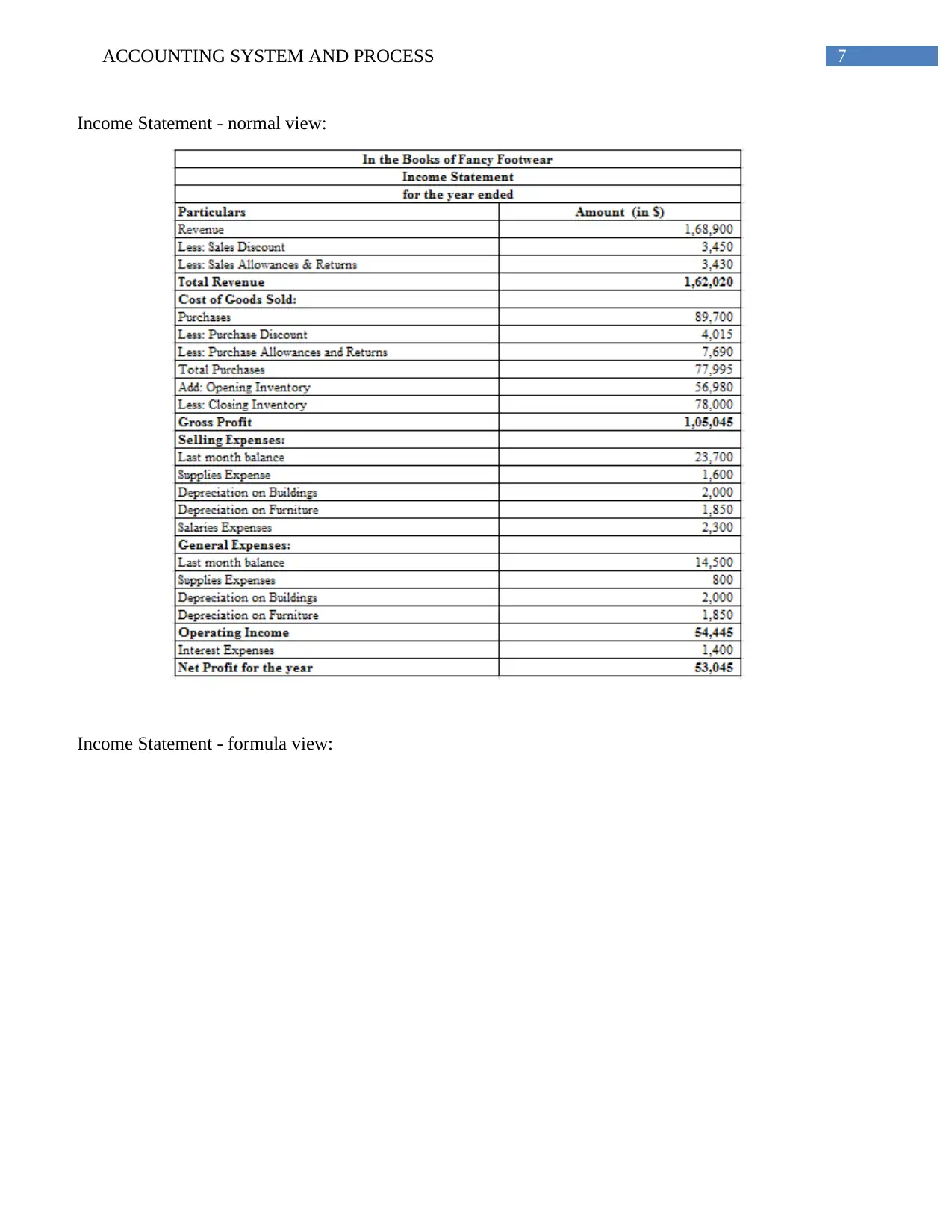
Income Statement - normal view:
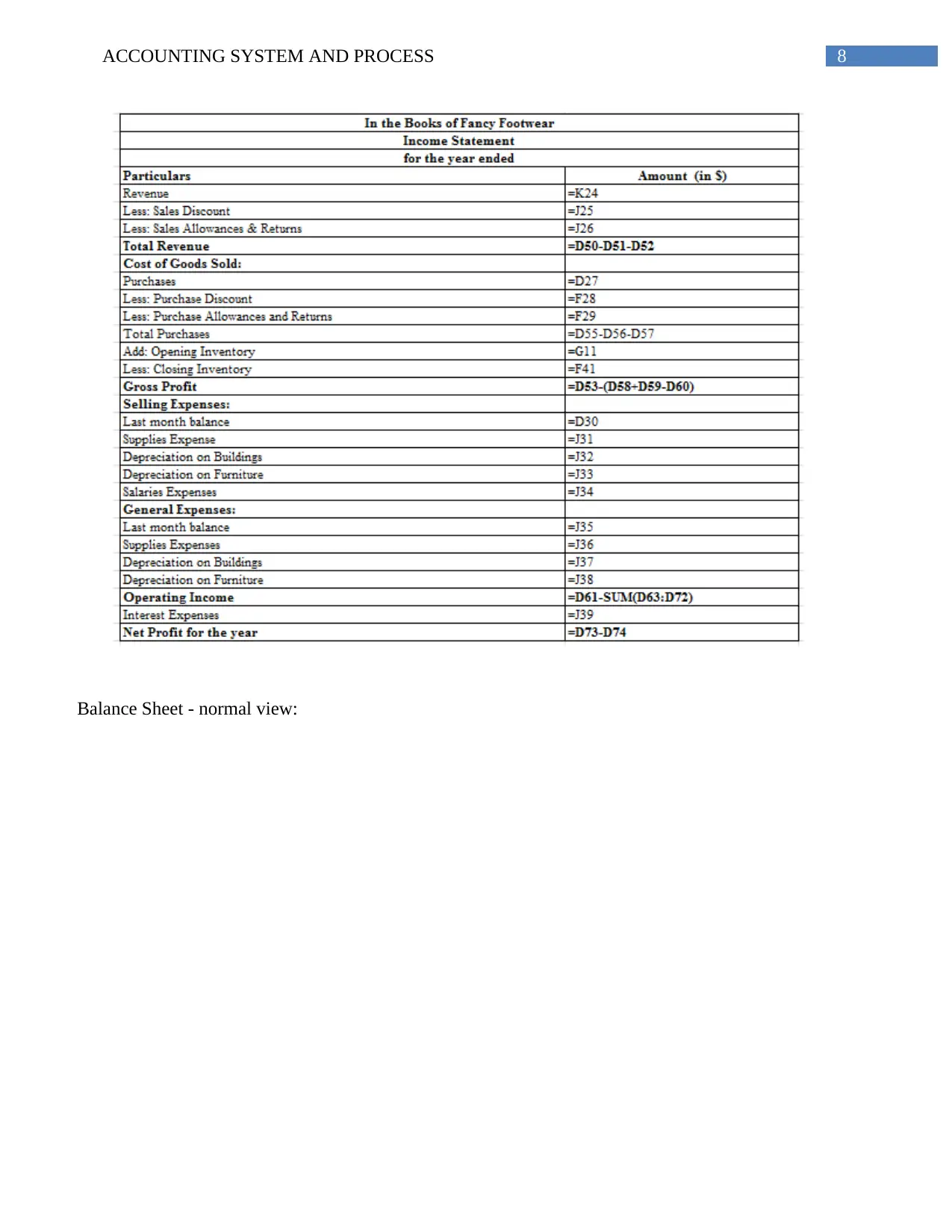
Income Statement - formula view:
Document Page
8ACCOUNTING SYSTEM AND PROCESS
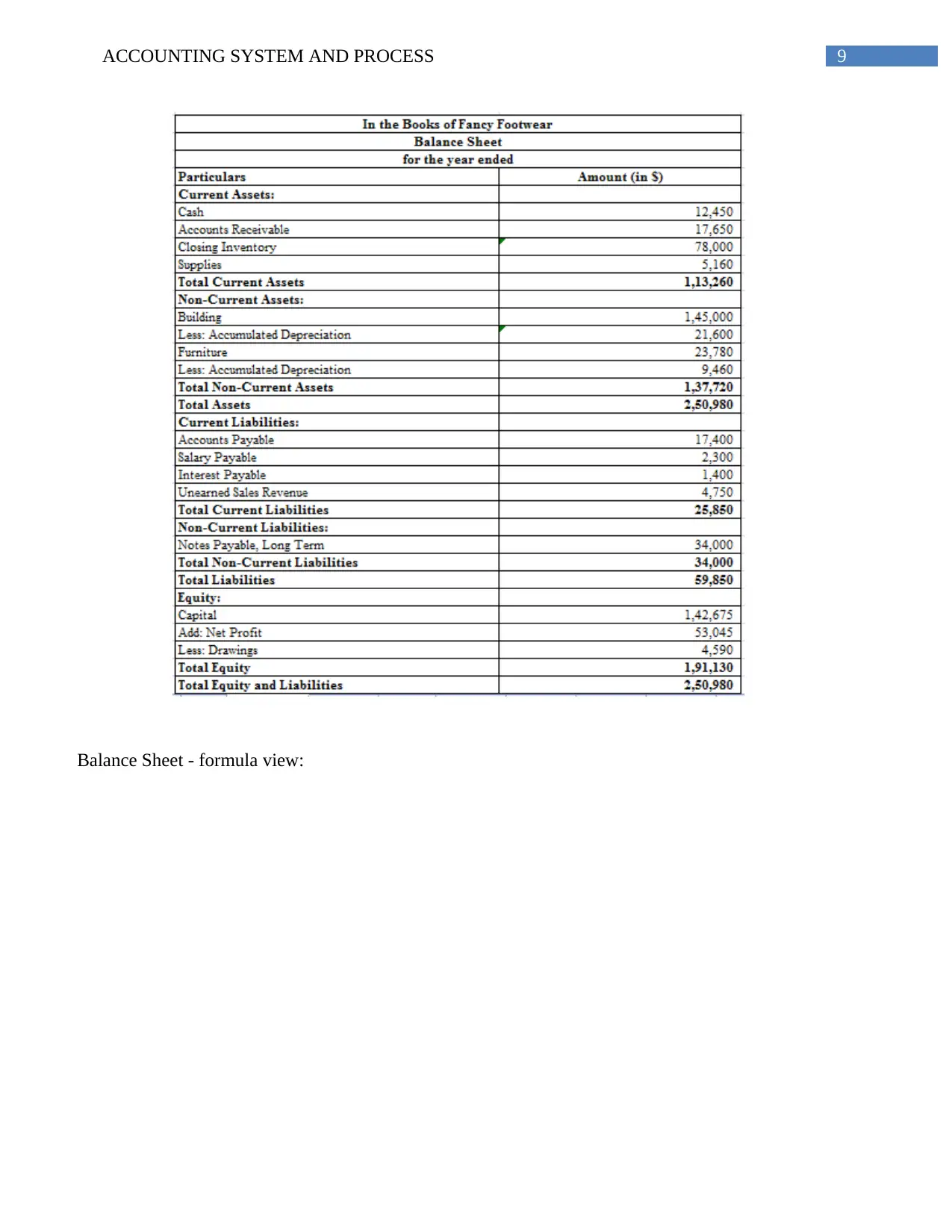
Balance Sheet - normal view:
Document Page
9ACCOUNTING SYSTEM AND PROCESS
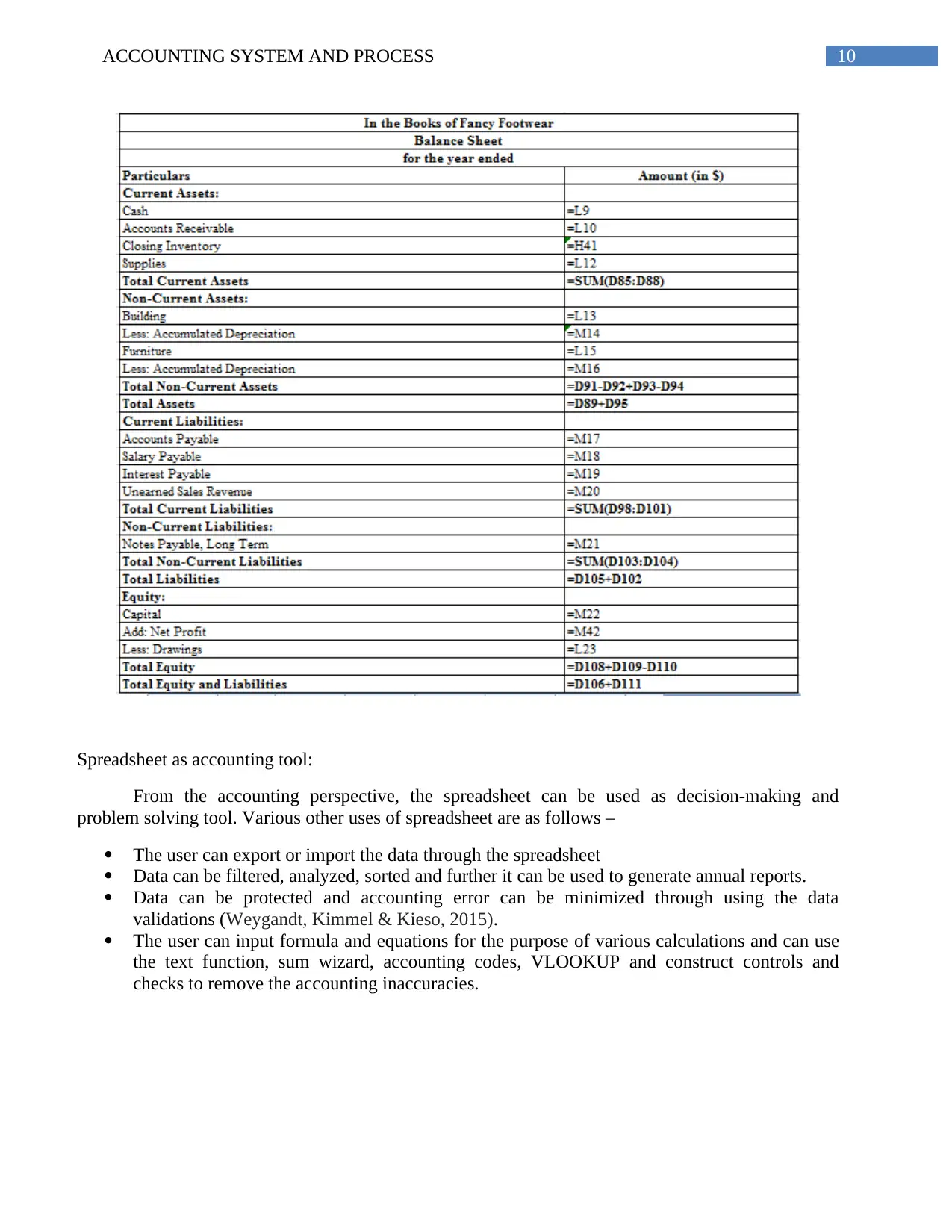
Balance Sheet - formula view:
tabler-icon-diamond-filled.svg

Paraphrase This Document

Need a fresh take? Get an instant paraphrase of this document with our AI Paraphraser
Document Page
10ACCOUNTING SYSTEM AND PROCESS
Spreadsheet as accounting tool:
From the accounting perspective, the spreadsheet can be used as decision-making and
problem solving tool. Various other uses of spreadsheet are as follows –
The user can export or import the data through the spreadsheet
Data can be filtered, analyzed, sorted and further it can be used to generate annual reports.
Data can be protected and accounting error can be minimized through using the data
validations (Weygandt, Kimmel & Kieso, 2015).
The user can input formula and equations for the purpose of various calculations and can use
the text function, sum wizard, accounting codes, VLOOKUP and construct controls and
checks to remove the accounting inaccuracies.
Document Page
11ACCOUNTING SYSTEM AND PROCESS
Answer 7:
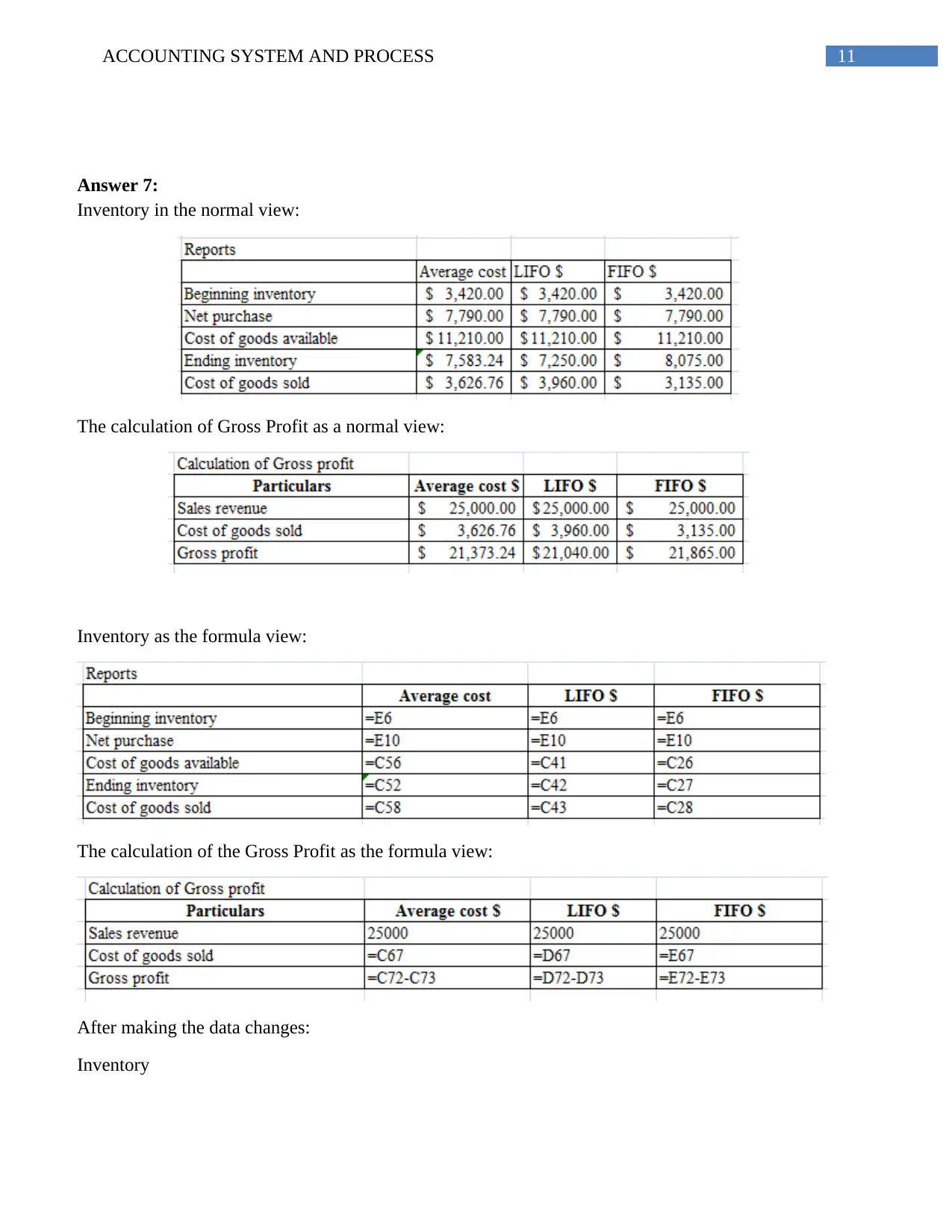
Inventory in the normal view:
The calculation of Gross Profit as a normal view:
Inventory as the formula view:
The calculation of the Gross Profit as the formula view:
After making the data changes:
Inventory
chevron_up_icon
1 out of 20
circle_padding
hide_on_mobile
zoom_out_icon
[object Object]