Computer Ergonomics, Energy Conservation, and Record Storage Report

Verified

Added on  2021/01/01

|9
|1454
|251
Report
AI Summary
This report delves into the critical aspects of computer ergonomics, energy conservation, and business record storage, providing valuable insights for creating a healthier and more efficient workplace. It begins by highlighting the importance of proper workstation setup and the implementation of exercises to mitigate the risks of injury associated with prolonged computer use, such as body movements, modifying body mechanics, and strategic breaks. The report then outlines practical steps for adjusting computer energy conservation settings to minimize power consumption, including setting monitor timeouts and configuring standby modes. Furthermore, it explores various strategies for conserving energy and resources within a workplace, emphasizing the use of energy-saving features and equipment, as well as the importance of proper system maintenance. Finally, the report discusses the methods of business record storage in Australia, including cloud computing and database solutions, and their implications for data management and accessibility. The report concludes by summarizing the key findings and emphasizing the importance of implementing the discussed strategies for improving workplace efficiency, employee well-being, and environmental sustainability.
Document Page
Use Complex spreadsheets: 1
tabler-icon-diamond-filled.svg

Paraphrase This Document

Need a fresh take? Get an instant paraphrase of this document with our AI Paraphraser
Document Page
Table of Contents
INTRODUCTION...........................................................................................................................1
2. Describe two exercises undertake to reduce the risk of injury when using a computer.
Explain how often exercises are done..........................................................................................1
3 Setup or adjust the energy conservation settings on your computer to perform the following
settings.........................................................................................................................................1
4.Describe two ways that your workplace could conserve energy or resources..........................1
5 Suggest where and how a business operation in Australia can store its business records........2
CONCLUSION ...............................................................................................................................2
REFERENCES ...............................................................................................................................3
Document Page
INTRODUCTION
Many people spend a lot of time sitting in front of computer. They do not think about
what impact it can have on physical or mental health. It is very important to set and adjust a
system or workstation in proper way in organizations. This is done to provide comfort to
employees and reduce health hazards (Gaines and Monk, 2015). computer ergonomics is a field
of study that attempts to reduce strain, stress, etc. at workplace. This report will describe
exercises that can be used to reduce risk of injury. Also, it will discuss about ways how energy
can be conserved at workplace. At last place is shown where and how business records are stored
in Australia.
2. Describe two exercises undertake to reduce the risk of injury when using a computer. Explain
how often exercises are done
While doing work continuously on computer a person health can be impacted very badly.
This may lead to long term impact (How to protect from strain and pain. 2018). Therefore, it is
essential that person should work in such a way so that it feels comfortable and can relax for
some time. It can be done by doing some exercises at workplace. They are as follows :
Body movements – in this a person can move its different body parts like neck, arms, legs, etc.
in different ways. It will help in movement of parts and proper blood circulation throughout
body. Also, some yoga can be practised while sitting on chair (Sirajudeen and Siddik, 2017). It
will help in easy breathing.
Modify body mechanics- here, a person can weak glasses that protects from harmful rays. Also,
by sitting straight, keeping muscles in relaxed position and switching hands while using mouse.
These exercises will help in keeping body posture in proper way.
Strategy – A person can apply a strategy in which he or she can go and talk with other
colleagues or friends for some time. He or she can roam around in office area to have movement
of body. It can be done every 2-3 hours so that body can get relaxed.
Thus, by regularly doing this exercise a person can reduce risk of injury (Bisht and
Bakhshi, 2018). He or she can work in properly and stress free.
3 Setup or adjust the energy conservation settings on your computer to perform the following
settings
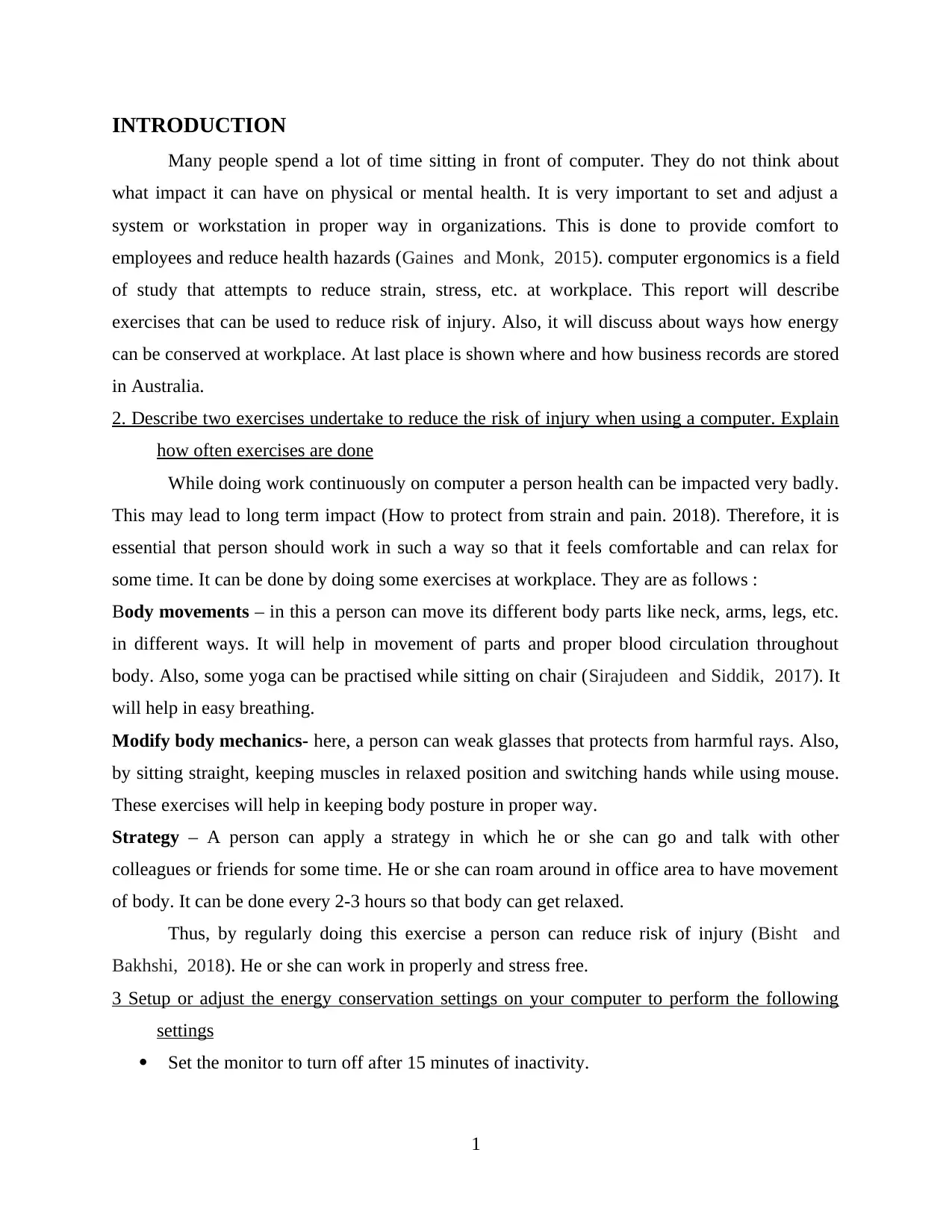
Set the monitor to turn off after 15 minutes of inactivity.
1
Document Page
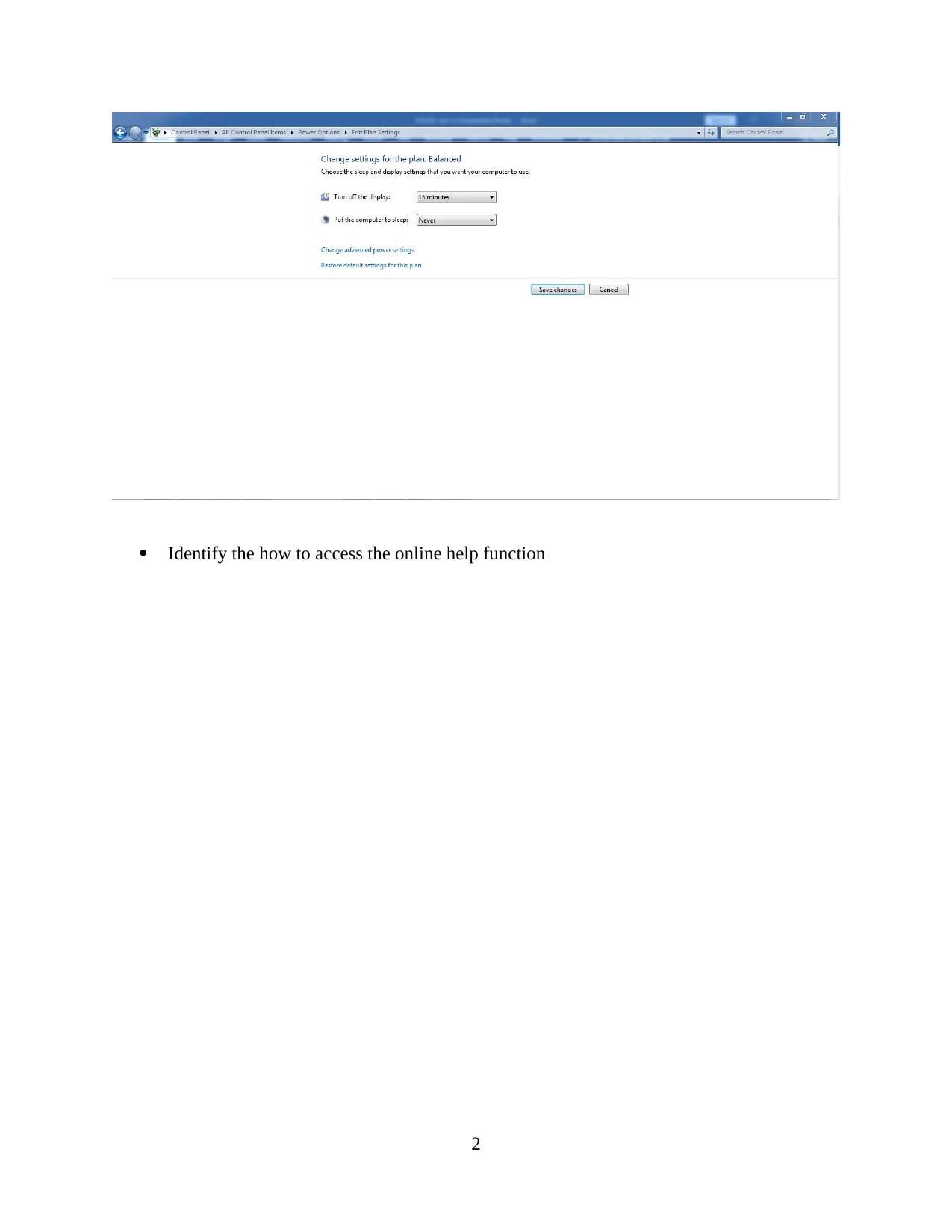
Identify the how to access the online help function
2
tabler-icon-diamond-filled.svg

Paraphrase This Document

Need a fresh take? Get an instant paraphrase of this document with our AI Paraphraser
Document Page
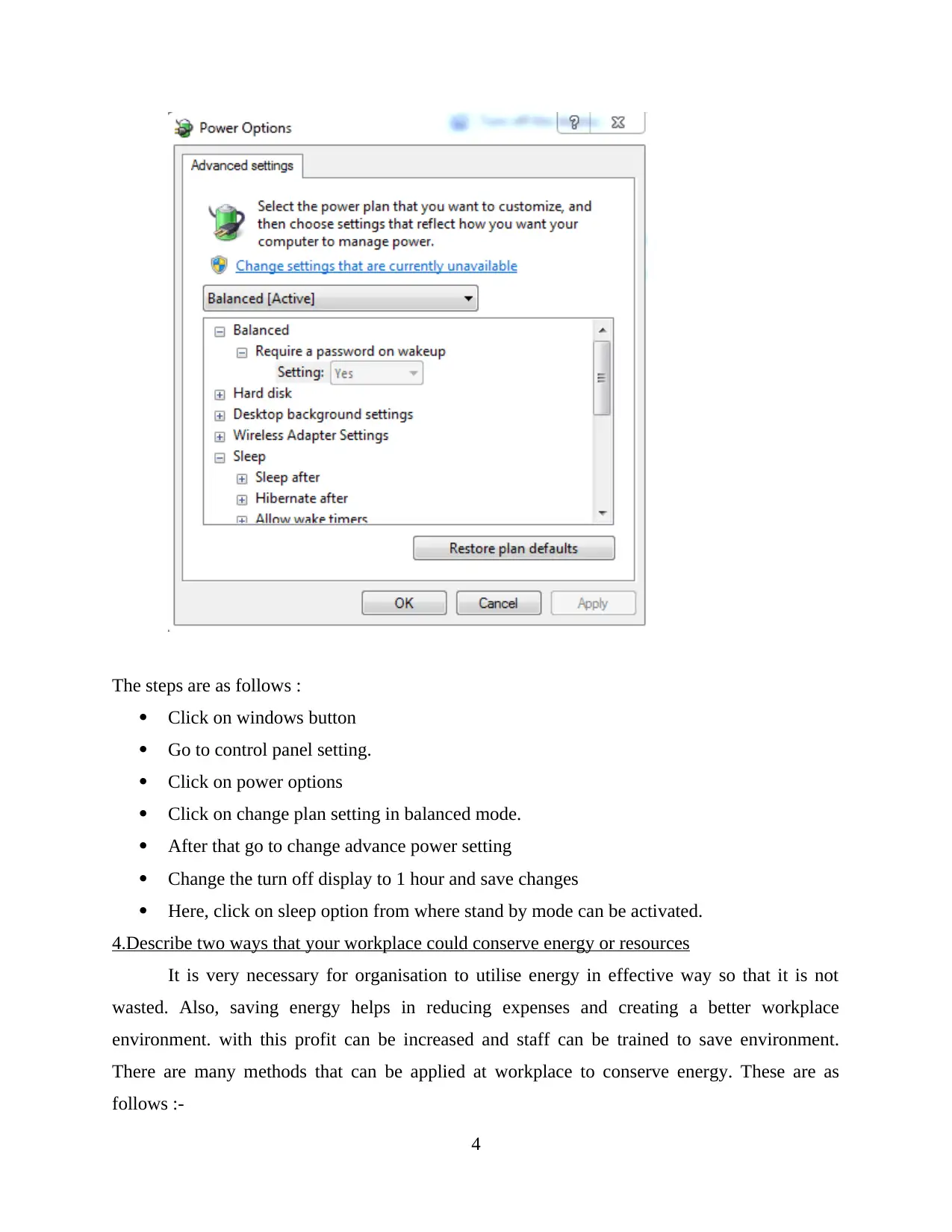
Use the online function to identify how to set the computer to go into standby mode after
1 hour of inactivity. Write the steps below.
3
Document Page
The steps are as follows :
Click on windows button
Go to control panel setting.
Click on power options
Click on change plan setting in balanced mode.
After that go to change advance power setting
Change the turn off display to 1 hour and save changes
Here, click on sleep option from where stand by mode can be activated.
4.Describe two ways that your workplace could conserve energy or resources
It is very necessary for organisation to utilise energy in effective way so that it is not
wasted. Also, saving energy helps in reducing expenses and creating a better workplace
environment. with this profit can be increased and staff can be trained to save environment.
There are many methods that can be applied at workplace to conserve energy. These are as
follows :-
4
Document Page
Using energy saving features- every system is having feature of energy saving. Thus,
employees should use it in power saving mode so that it consumes less energy (Bowman and
et.al., 2014). It will help in generating low amount of electricity bill.
Switch off equipment when not in use- this is most common way of conserving energy. In this,
appliances or devices when are not used can be switch off. This can be implemented in entire
workplace. It is a very easy and simple method. This can result in save of cost.
System are well maintained – it is also an effective method through which energy can be
conserved. The organisation could maintain different systems so that it works properly. Any
faults or errors must be repaired quickly (Patrizi, Pennestrì and Valentini, 2016). The servicing
of systems must be done in particular time period. This will be useful in using less resources.
Thus, by these ways’ energy can be conserved and organisation expenses will be reduced.
5 Suggest where and how a business operation in Australia can store its business records
Every business keeps and maintain their records. Through this, reports related to tax,
profit, etc. can be generated. Also, it provides detail regarding each transaction that is done with
customers, suppliers, businesses, etc. (Woo, White and Lai, 2016) there are many methods of
record keeping. They are as follows :-
Cloud computing – it is a platform where business can store large number of data set and
business records. This service is provided by various third party companies. it works
electronically where records are updated, accessed, entered, etc. for this business need to deal
with parties that provide these services.
Database – the business can use database to store data and information. It is a safe and protected
way of storing records. For this business needs to develop their own database with help of
computer systems. A complete IT infrastructure is required.
CONCLUSION
From this report it can be summarised that computer systems should be placed in proper
way at workplace so that a person can work comfortably. For this measurements should be taken.
A person can do exercise of body movements and to reduce risk of injury while using computer.
Also, energy can be conserved by maintaining systems, switching off when not in use and using
energy saving mode. It will help in reducing expenses.
5
tabler-icon-diamond-filled.svg

Paraphrase This Document

Need a fresh take? Get an instant paraphrase of this document with our AI Paraphraser
Document Page
REFERENCES
Books and journals
Bisht, D. and Bakhshi, R., 2018. Knowledge of computer ergonomics and incidence of
musculoskeletal disorders among students of Punjab Agricultural University, Ludhiana,
India. Journal of Applied and Natural Science, 10(1), pp.323-329.
Bowman, P.J. and et.al., 2014. Benefits of laptop computer ergonomics education to
graduate students. Open Journal of Therapy and Rehabilitation, 2(01), p.25.
Gaines, B.R. and Monk, A.F., 2015. Cognitive Ergonomics: Understanding, Learning, and
Designing Human-Computer Interaction. Academic Press.
Patrizi, A., Pennestrì, E. and Valentini, P.P., 2016. Comparison between low-cost marker-
less and high-end marker-based motion capture systems for the computer-aided assessment of
working ergonomics. Ergonomics, 59(1), pp.155-162.
Sirajudeen, M.S. and Siddik, S.S.M., 2017. Knowledge of Computer Ergonomics among
Computer Science Engineering and Information Technology Students in Karnataka, India. Asian
Journal of Pharmaceutical Research and Health Care, 9(2), pp.64-70.
Woo, E.H.C., White, P. and Lai, C.W.K., 2016. Ergonomics standards and guidelines for
computer workstation design and the impact on users’ health–a review. Ergonomics, 59(3),
pp.464-475.
Online
How to protect from strain and pain. 2018. [online] Available Through: <
https://www.uhs.umich.edu/computerergonomics >
6
Document Page
7
chevron_up_icon
1 out of 9
circle_padding
hide_on_mobile
zoom_out_icon
[object Object]