Website Usability Testing Report: Canberra Library, Analysis & Results
VerifiedAdded on 2023/01/13
|8
|1201
|54
Report
AI Summary
This report presents a comprehensive usability testing analysis of the Canberra Library website. The study employed a combination of self-observation and the Morae tools to evaluate the website's user interface, navigation, and download functionalities. The methodology involved initial website exploration followed by the use of Morae tools to record user interactions and gather data. Data analysis was performed using qualitative methods, including participant surveys and severity level assessments based on predefined criteria. The report details the testing process, data analysis, and results, including visual representations of the findings. Key areas of focus included navigation, design, error reduction, downloads, and interface. The findings revealed challenges in the website's navigation and download options, leading to recommendations for improvements in these areas to enhance the user experience. The report concludes with a bibliography of relevant sources.
Running head: WEBSITE USABILITY TESTING
Website Usability Testing
Name of the Student:
Name of the University:
Author Note
Website Usability Testing
Name of the Student:
Name of the University:
Author Note
Paraphrase This Document
Need a fresh take? Get an instant paraphrase of this document with our AI Paraphraser

1
WEBSITE USABILITY TESTING
Table of Contents
Background Summary................................................................................................................2
Methodology..............................................................................................................................2
Data Analysis.............................................................................................................................2
Reporting the severity level of the problems.............................................................................2
Self-Observations...................................................................................................................4
Test Results................................................................................................................................4
Visuals for illustrations..........................................................................................................4
Finding and Recommendations..................................................................................................6
Bibliography...............................................................................................................................7
WEBSITE USABILITY TESTING
Table of Contents
Background Summary................................................................................................................2
Methodology..............................................................................................................................2
Data Analysis.............................................................................................................................2
Reporting the severity level of the problems.............................................................................2
Self-Observations...................................................................................................................4
Test Results................................................................................................................................4
Visuals for illustrations..........................................................................................................4
Finding and Recommendations..................................................................................................6
Bibliography...............................................................................................................................7

2
WEBSITE USABILITY TESTING
Background Summary
The website of the Canberra Library has been used here for this task. The usability
testing process has been performed on the website. The testing has been done in two steps. At
first an self observation process has been used and a tool has been used in the later part. The
details of the testing methods have been described in this report.
Methodology
For the testing of the website at first a visit was made to the website to gain some
knowledge about the website. Some observations were made which were noted down in this
report. After performing the self observation, The Morae Tools were downloaded which
includes the Recorder, Observer and the manager tools were installed in the system. The
website usability analysis was further carried out to capture some data for the illustrations.
Data Analysis
The analysis of the data is depending on the several type of data collected for the
system. The qualitative data analysis was done for the website. The primary method of data
collection was used for this testing process. The participant was sent the surveys in which the
participant did the review and the data was recorded in the system. The overall rating of the
website was based on the reviews of the participants.
Reporting the severity level of the problems
The problems in the system were marked according to the four criteria. The four
criteria are unable to perform, difficult to perform, easy to perform and function not
available. The observations in the web site were made according to these criteria which were
set. In addition to this, the for the tool that was use the following score allocations were done
for the severity of the system:
WEBSITE USABILITY TESTING
Background Summary
The website of the Canberra Library has been used here for this task. The usability
testing process has been performed on the website. The testing has been done in two steps. At
first an self observation process has been used and a tool has been used in the later part. The
details of the testing methods have been described in this report.
Methodology
For the testing of the website at first a visit was made to the website to gain some
knowledge about the website. Some observations were made which were noted down in this
report. After performing the self observation, The Morae Tools were downloaded which
includes the Recorder, Observer and the manager tools were installed in the system. The
website usability analysis was further carried out to capture some data for the illustrations.
Data Analysis
The analysis of the data is depending on the several type of data collected for the
system. The qualitative data analysis was done for the website. The primary method of data
collection was used for this testing process. The participant was sent the surveys in which the
participant did the review and the data was recorded in the system. The overall rating of the
website was based on the reviews of the participants.
Reporting the severity level of the problems
The problems in the system were marked according to the four criteria. The four
criteria are unable to perform, difficult to perform, easy to perform and function not
available. The observations in the web site were made according to these criteria which were
set. In addition to this, the for the tool that was use the following score allocations were done
for the severity of the system:
⊘ This is a preview!⊘
Do you want full access?
Subscribe today to unlock all pages.

Trusted by 1+ million students worldwide

3
WEBSITE USABILITY TESTING
Easy to perform 0
Difficult to perform 1
Unable to perform 2
Function not available 3
With the increase in the score the severity of the website increases. In addition to this
the marking were done according to the list of task provided below:
Navigation: The task involves navigation of the users through the website. The
navigation in the website should be very easy for the users and the users should be
able to surf through the website very easily.
Minimalistic designs: The designs of the websites are to be made minimalistic, the
users should have all their requirements at a single place, and hence they should be
able access all the information required by them at a single place.
Error reduction: The user should not be facing much errors in the system and hence,
they would be able to perform various tasks without having to wait for the system
because of the errors.
Downloads: The uploading and downloading facility of the system should be very
efficient so that the users can download their contents very easily. They response time
for downloading a content should be low for a highly efficient website.
Interface: The interface should be highly attractive for a highly efficient website. The
more number of colours used in the website would increase the attractiveness of the
website and attract more user towards it.
The listing of the tasks that were to be done on the website are done according to the
heuristics for the website usability testing.
WEBSITE USABILITY TESTING
Easy to perform 0
Difficult to perform 1
Unable to perform 2
Function not available 3
With the increase in the score the severity of the website increases. In addition to this
the marking were done according to the list of task provided below:
Navigation: The task involves navigation of the users through the website. The
navigation in the website should be very easy for the users and the users should be
able to surf through the website very easily.
Minimalistic designs: The designs of the websites are to be made minimalistic, the
users should have all their requirements at a single place, and hence they should be
able access all the information required by them at a single place.
Error reduction: The user should not be facing much errors in the system and hence,
they would be able to perform various tasks without having to wait for the system
because of the errors.
Downloads: The uploading and downloading facility of the system should be very
efficient so that the users can download their contents very easily. They response time
for downloading a content should be low for a highly efficient website.
Interface: The interface should be highly attractive for a highly efficient website. The
more number of colours used in the website would increase the attractiveness of the
website and attract more user towards it.
The listing of the tasks that were to be done on the website are done according to the
heuristics for the website usability testing.
Paraphrase This Document
Need a fresh take? Get an instant paraphrase of this document with our AI Paraphraser

4
WEBSITE USABILITY TESTING
Self-Observations
As per the self-observation criteria the visit to the website was made and it was found
that the website was created with very attractive colour sets. In addition to this, the
minimalistic designs were carried out in the website development as the all the required
options were found and only the minimal colours were found in the website. However the
navigation and download options in the website were not up to the mark.
Test Results
The tests were carried out in the morae recorder and the observations were made in
the morae observer. The test was carries out for around 11 minutes and it was found that the
as per observation the download option was very difficult and most time spent on navigation
was quite high.
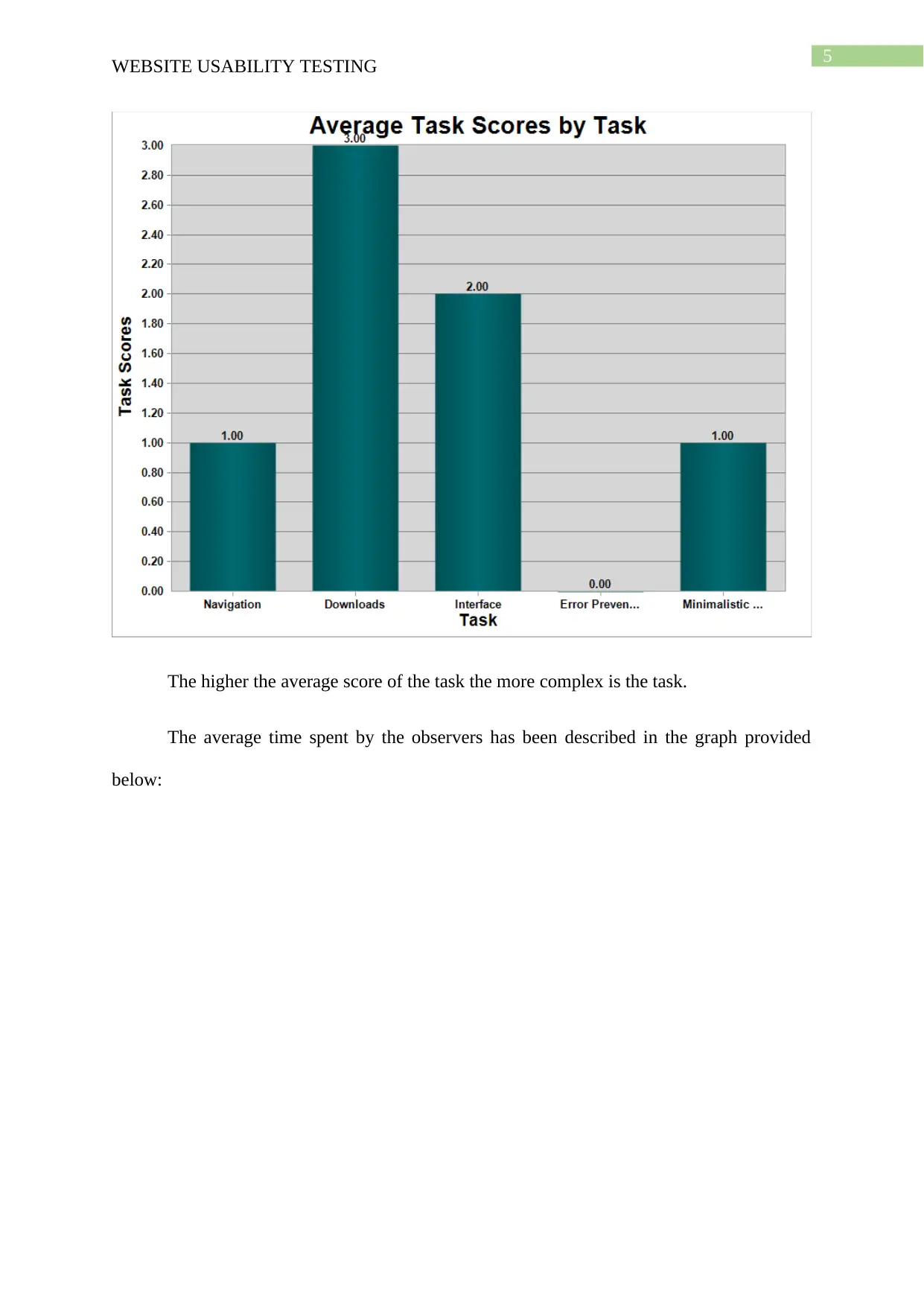
Visuals for illustrations
The average scores provided by the observers has been described in the graph
provided below:
WEBSITE USABILITY TESTING
Self-Observations
As per the self-observation criteria the visit to the website was made and it was found
that the website was created with very attractive colour sets. In addition to this, the
minimalistic designs were carried out in the website development as the all the required
options were found and only the minimal colours were found in the website. However the
navigation and download options in the website were not up to the mark.
Test Results
The tests were carried out in the morae recorder and the observations were made in
the morae observer. The test was carries out for around 11 minutes and it was found that the
as per observation the download option was very difficult and most time spent on navigation
was quite high.
Visuals for illustrations
The average scores provided by the observers has been described in the graph
provided below:

5
WEBSITE USABILITY TESTING
The higher the average score of the task the more complex is the task.
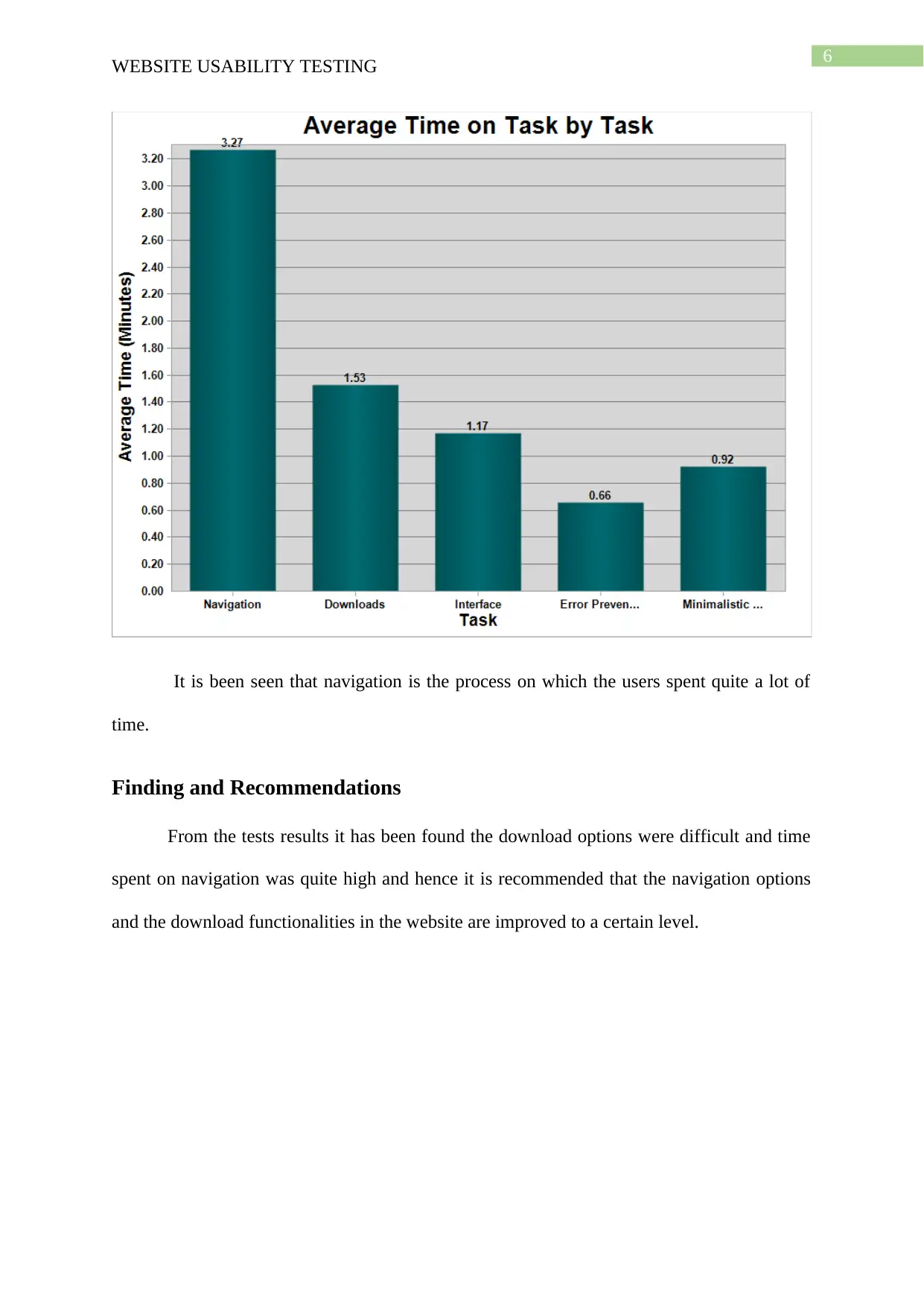
The average time spent by the observers has been described in the graph provided
below:
WEBSITE USABILITY TESTING
The higher the average score of the task the more complex is the task.
The average time spent by the observers has been described in the graph provided
below:
⊘ This is a preview!⊘
Do you want full access?
Subscribe today to unlock all pages.

Trusted by 1+ million students worldwide

6
WEBSITE USABILITY TESTING
It is been seen that navigation is the process on which the users spent quite a lot of
time.
Finding and Recommendations
From the tests results it has been found the download options were difficult and time
spent on navigation was quite high and hence it is recommended that the navigation options
and the download functionalities in the website are improved to a certain level.
WEBSITE USABILITY TESTING
It is been seen that navigation is the process on which the users spent quite a lot of
time.
Finding and Recommendations
From the tests results it has been found the download options were difficult and time
spent on navigation was quite high and hence it is recommended that the navigation options
and the download functionalities in the website are improved to a certain level.
Paraphrase This Document
Need a fresh take? Get an instant paraphrase of this document with our AI Paraphraser

7
WEBSITE USABILITY TESTING
Bibliography
Hasbullah, N. A., Osman, A., Abdullah, S., Salahuddin, S. N., Ramlee, N. F., & Soha, H. M.
(2016). The relationship of attitude, subjective norm and website usability on
consumer intention to purchase online: An evidence of Malaysian youth. Procedia
Economics and Finance, 35, 493-502.
Jano, Z., Noor, S. M., Ahmad, R., Saad, M. S. M., Saadan, R., Bokhari, M., & Abdullah, A.
N. (2015). Website usability and cultural dimensions in Malaysian and Australian
universities. Asian Social Science, 11(9), 1.
Kaur, S., Kaur, K., & Kaur, P. (2016, March). Analysis of website usability evaluation
methods. In 2016 3rd International Conference on Computing for Sustainable Global
Development (INDIACom) (pp. 1043-1046). IEEE.
Miraz, M. H., Ali, M., & Excell, P. (2017). Multilingual website usability analysis based on
an International user survey. arXiv preprint arXiv:1708.05085.
Pant, A. (2015). Usability evaluation of an academic library website: experience with the
Central Science Library, University of Delhi. The electronic library, 33(5), 896-915.
Pee, L. G., Jiang, J., & Klein, G. (2018). Signaling effect of website usability on repurchase
intention. International Journal of Information Management, 39, 228-241.
WEBSITE USABILITY TESTING
Bibliography
Hasbullah, N. A., Osman, A., Abdullah, S., Salahuddin, S. N., Ramlee, N. F., & Soha, H. M.
(2016). The relationship of attitude, subjective norm and website usability on
consumer intention to purchase online: An evidence of Malaysian youth. Procedia
Economics and Finance, 35, 493-502.
Jano, Z., Noor, S. M., Ahmad, R., Saad, M. S. M., Saadan, R., Bokhari, M., & Abdullah, A.
N. (2015). Website usability and cultural dimensions in Malaysian and Australian
universities. Asian Social Science, 11(9), 1.
Kaur, S., Kaur, K., & Kaur, P. (2016, March). Analysis of website usability evaluation
methods. In 2016 3rd International Conference on Computing for Sustainable Global
Development (INDIACom) (pp. 1043-1046). IEEE.
Miraz, M. H., Ali, M., & Excell, P. (2017). Multilingual website usability analysis based on
an International user survey. arXiv preprint arXiv:1708.05085.
Pant, A. (2015). Usability evaluation of an academic library website: experience with the
Central Science Library, University of Delhi. The electronic library, 33(5), 896-915.
Pee, L. G., Jiang, J., & Klein, G. (2018). Signaling effect of website usability on repurchase
intention. International Journal of Information Management, 39, 228-241.
1 out of 8
Related Documents
Your All-in-One AI-Powered Toolkit for Academic Success.
+13062052269
info@desklib.com
Available 24*7 on WhatsApp / Email
Unlock your academic potential
Copyright © 2020–2025 A2Z Services. All Rights Reserved. Developed and managed by ZUCOL.