Cloud Computing: IBM Bluemix Application Development for AB Pty Ltd

Verified

Added on  2023/06/11

|29
|3625
|408
Report
AI Summary
This report presents a cloud computing solution for AB Pty. Ltd., a product delivery company facing delays and customer dissatisfaction. The report analyzes the company's issues and proposes a solution using IBM Bluemix to develop a simulated connected vehicle application. The design and deployment plans are detailed, including the integration of IoT and Geospatial Analytics services. The application aims to improve delivery performance by dividing delivery zones, tracking truck locations, and providing real-time notifications. The report concludes with a development plan for the proposed solution, emphasizing the benefits of cloud applications in addressing the company's challenges. Desklib provides access to this and other solved assignments for students.
Document Page
Cloud Computing
tabler-icon-diamond-filled.svg

Paraphrase This Document

Need a fresh take? Get an instant paraphrase of this document with our AI Paraphraser
Document Page
Table of Contents
1. Introduction............................................................................................................................................................ 1
1.1 IBM Bluemix...................................................................................................................................................... 2
1.2 Business Case.................................................................................................................................................... 13
2. Proposed Solution.................................................................................................................................................. 13
3. Design Plan........................................................................................................................................................... 14
4. Develop and Deployment Plan...............................................................................................................................22
5. Conclusion............................................................................................................................................................. 24
References-20hrvrd........................................................................................................................................................ 25
Document Page
1. Introduction
This report sheds light on a case study of a company named, AB Pty. Ltd. This company
basically carries out product delivery services to a specific area, i.e., Austin downtown, Texas,
USA. The further provided details about the company are highlighted as follows- This Company
owns nearly three trucks to carry out the delivery service. This shows how small the company is
and the area covered by it also denotes the size of its business. Mainly, it handles the deliveries
of the third parties. The case takes a turn when its deliveries start getting delayed and the
customers start complaining out the lately delivered products. Thus, the company is facing
customer dissatisfaction at the moment. The company really wants to know what has caused this
problem to arise and what could be the possible solution for it. The company out of its interest
and concern hires a business analyst to rectify the issue and suggest possible and effective
solutions. The identified issues revolve around the busy and increasing demands of the trucks. It
is determined that, the present scenario of the company is it is having a long pending list of
product deliveries. Because, now the trucks are able to manage only three product deliveries in a
day. But earlier, it wasable to over five deliveries in a single day. Thus, this is expected to
increase the list of pending deliveries.Hence, the analyst has scrutinized some potential reasons
that the company is facing challenges to deal with. Keeping the size and need of the company,
few recommendations are suggested. The company really has to take immediate actions on the
issue, if not the dissatisfied customers will increase and it will affect the growth of the company.
The impact of cloud application for this business will be analyzed, designed and implemented.
The objective is to provide a befitting solution of the current issues which the company is
facing related to the late product delivery. The report will investigate on the effective solutions
which are already provided by the business analyst, from which one will be selected and
implemented. The selection of the solution will be carried out by the newly hired ICT professional,
of the company. The IBM blue mix will accessed, for providing a proposed solution. The
development plan will be shared. Finally, the solution will be to develop a simulated connected
vehicleapplication, using Bluemix.
1
Document Page
1.1 IBM Bluemix
Bluemix is used for developing the design of the solution, for the case study’s problem,
which refers to delayed product delivery service. The analysis determines that, the delay can be
monitored and resolved, with a web application. This will help to resolve the issue of delayed
deliveries. Mainly, the Bluemix helps to developweb applications and it is an effective option
considered.
It is also referred as IBM Bluemix and it is a cloud platform as a service, which IBM has
developed. IBM Bluemix supports various programming languages as well as services and
integrated DevOps for building, running, deploying and managing the applications on the
cloud.Bluemix helps to have easy access of cloud across various deployments. Moreover, IBM
Bluemix is free to build and anyone can do it just by logging in to the below provided link:
https://idaas.iam.ibm.com/idaas/mtfim/sps/authsvc?
PolicyId=urn:ibm:security:authentication:asf:basicldapuser
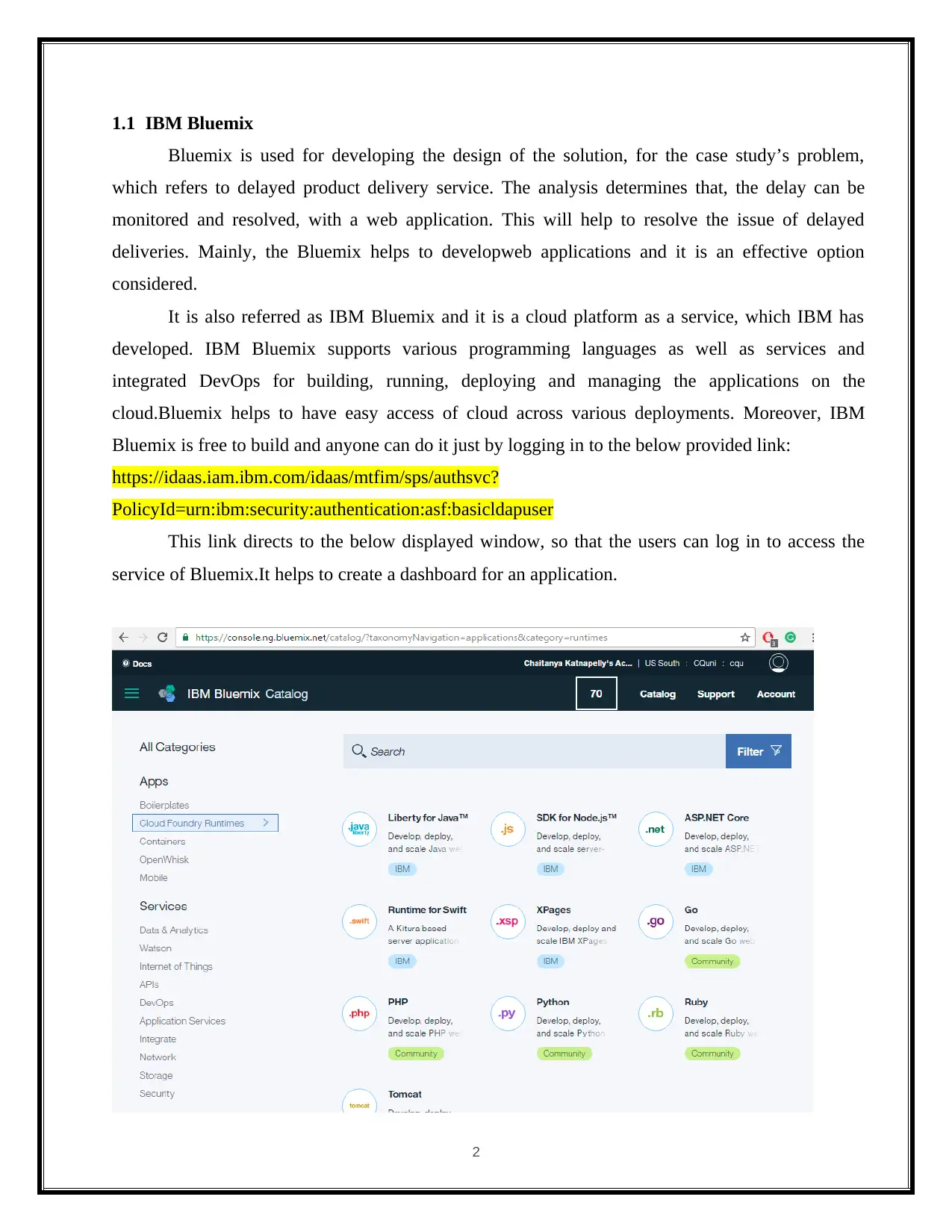
This link directs to the below displayed window, so that the users can log in to access the
service of Bluemix.It helps to create a dashboard for an application.
2
tabler-icon-diamond-filled.svg

Paraphrase This Document

Need a fresh take? Get an instant paraphrase of this document with our AI Paraphraser
Document Page
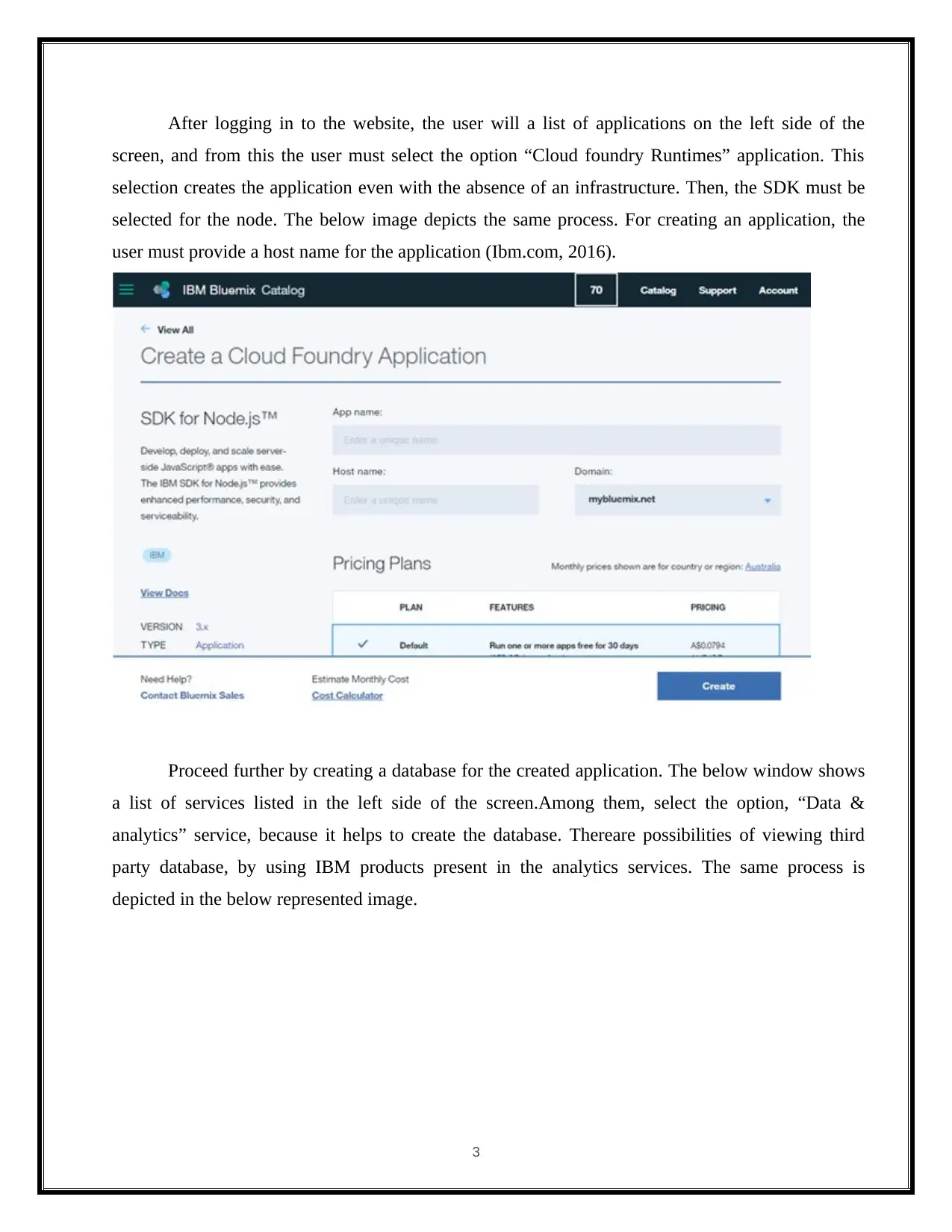
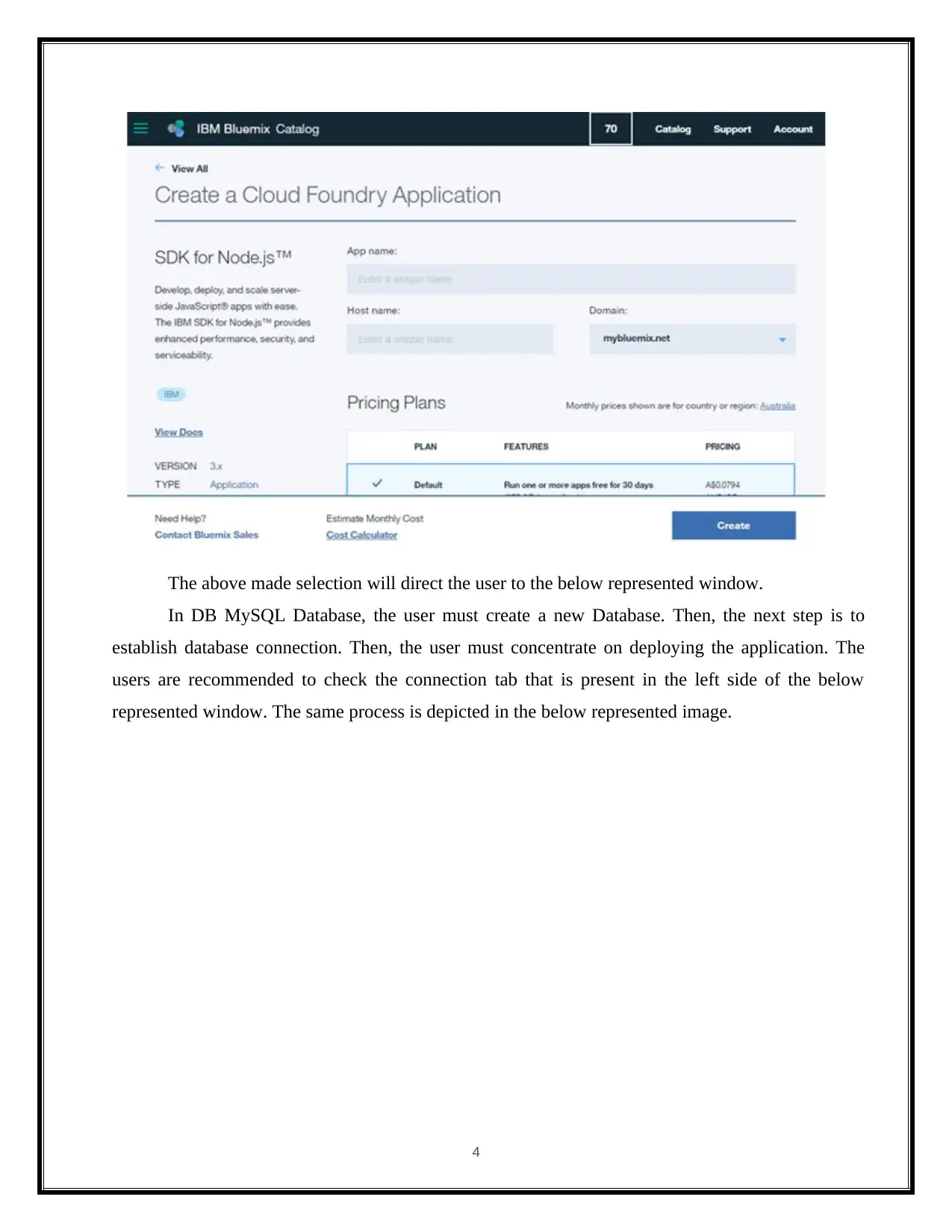
After logging in to the website, the user will a list of applications on the left side of the
screen, and from this the user must select the option “Cloud foundry Runtimes” application. This
selection creates the application even with the absence of an infrastructure. Then, the SDK must be
selected for the node. The below image depicts the same process. For creating an application, the
user must provide a host name for the application (Ibm.com, 2016).
Proceed further by creating a database for the created application. The below window shows
a list of services listed in the left side of the screen.Among them, select the option, “Data &
analytics” service, because it helps to create the database. Thereare possibilities of viewing third
party database, by using IBM products present in the analytics services. The same process is
depicted in the below represented image.
3
Document Page
The above made selection will direct the user to the below represented window.
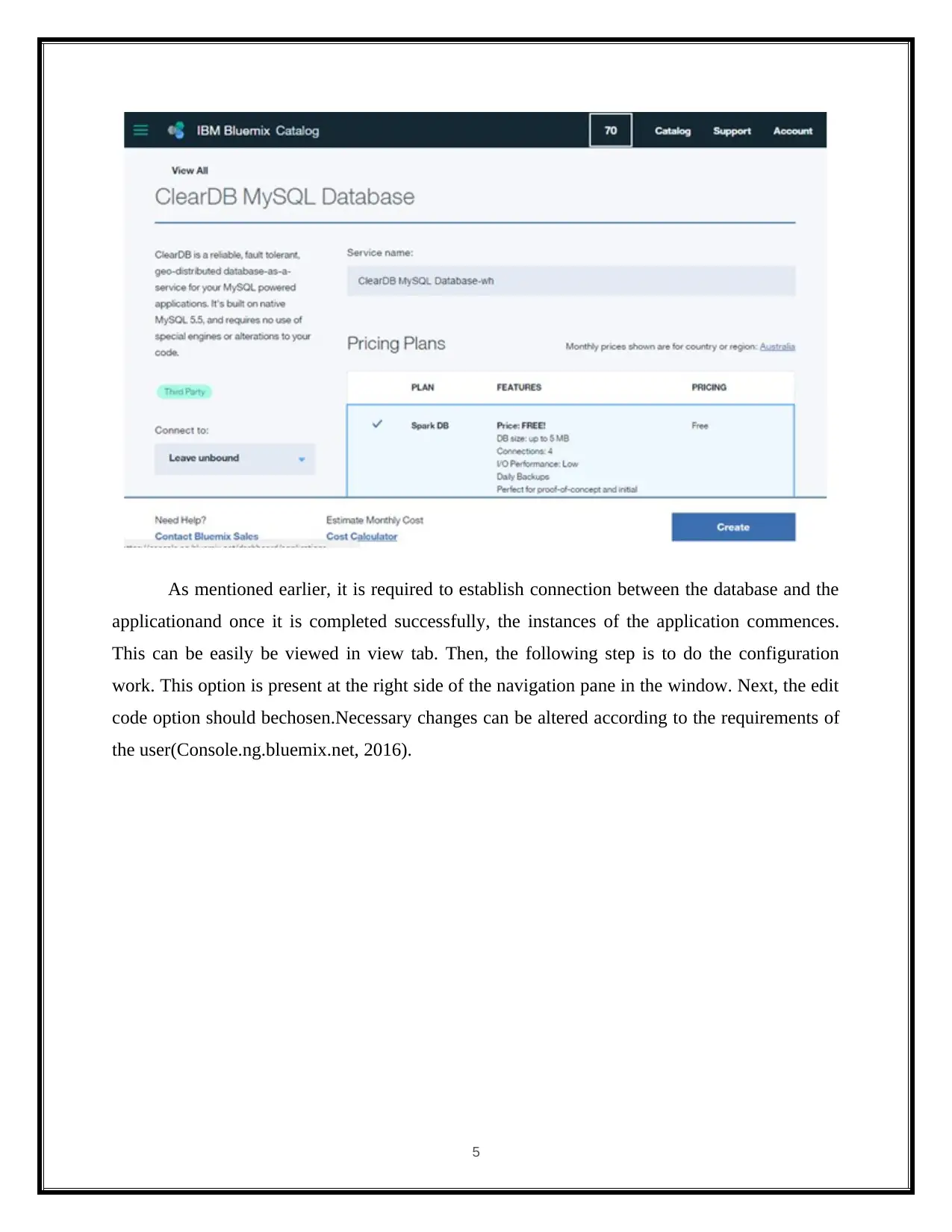
In DB MySQL Database, the user must create a new Database. Then, the next step is to
establish database connection. Then, the user must concentrate on deploying the application. The
users are recommended to check the connection tab that is present in the left side of the below
represented window. The same process is depicted in the below represented image.
4
Document Page
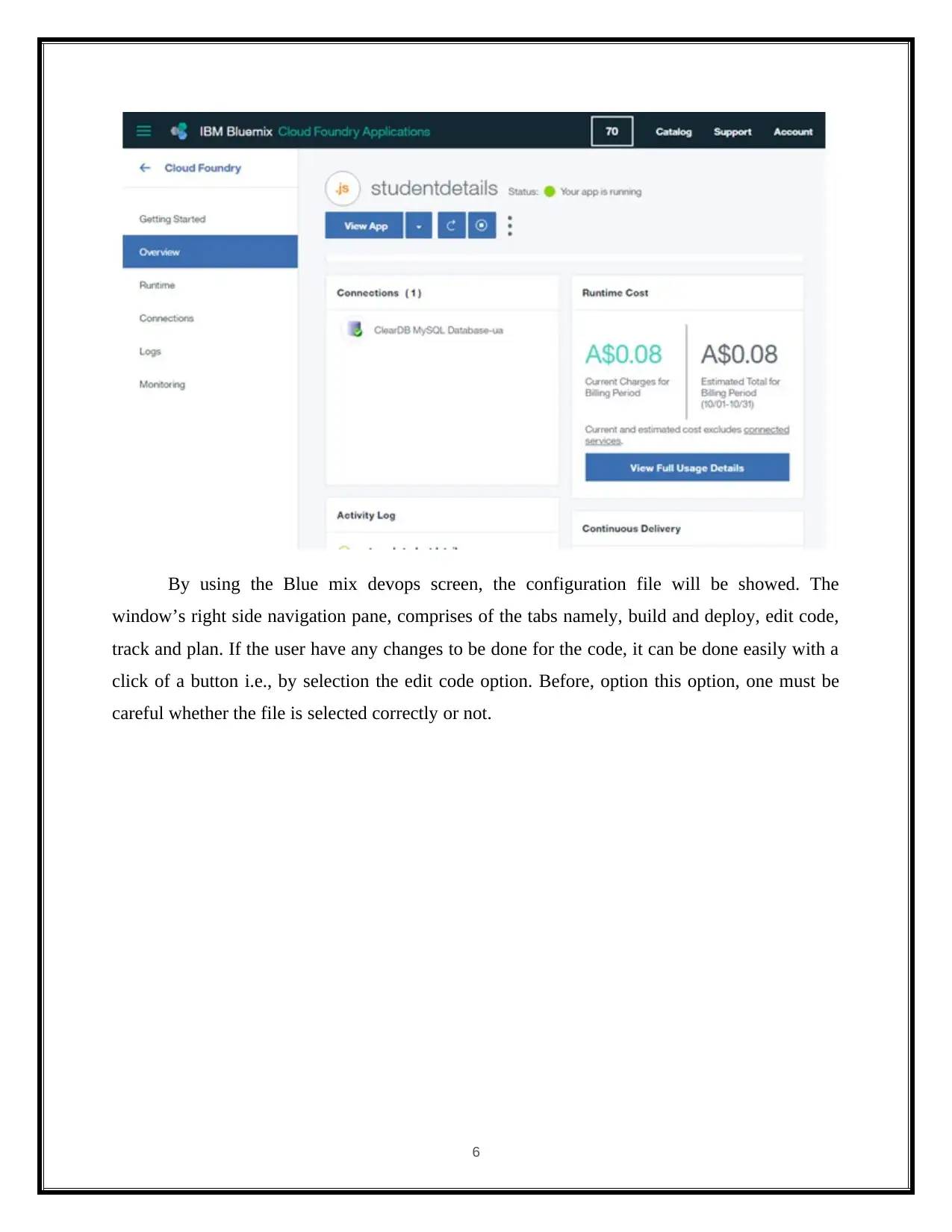
As mentioned earlier, it is required to establish connection between the database and the
applicationand once it is completed successfully, the instances of the application commences.
This can be easily be viewed in view tab. Then, the following step is to do the configuration
work. This option is present at the right side of the navigation pane in the window. Next, the edit
code option should bechosen.Necessary changes can be altered according to the requirements of
the user(Console.ng.bluemix.net, 2016).
5
tabler-icon-diamond-filled.svg

Paraphrase This Document

Need a fresh take? Get an instant paraphrase of this document with our AI Paraphraser
Document Page
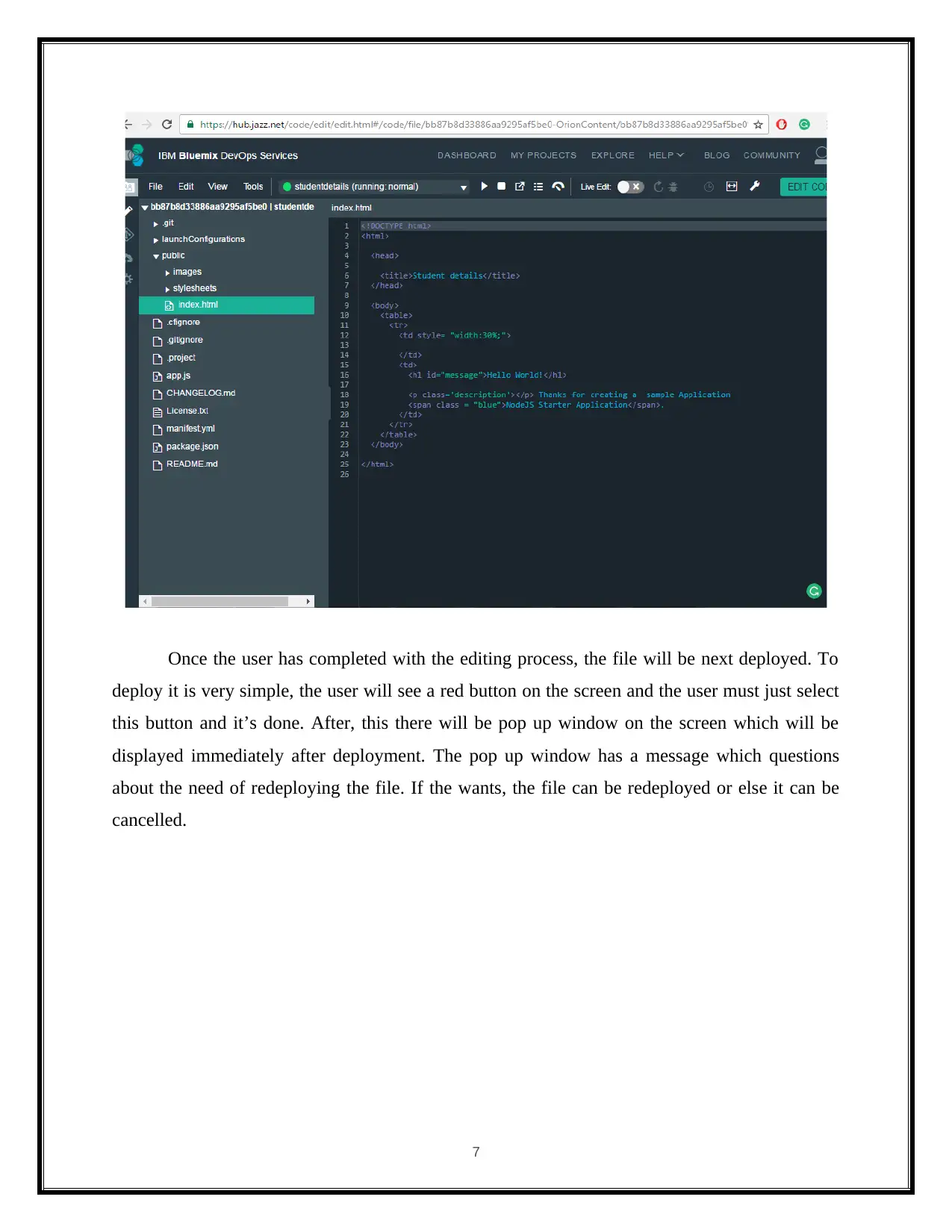
By using the Blue mix devops screen, the configuration file will be showed. The
window’s right side navigation pane, comprises of the tabs namely, build and deploy, edit code,
track and plan. If the user have any changes to be done for the code, it can be done easily with a
click of a button i.e., by selection the edit code option. Before, option this option, one must be
careful whether the file is selected correctly or not.
6
Document Page
Once the user has completed with the editing process, the file will be next deployed. To
deploy it is very simple, the user will see a red button on the screen and the user must just select
this button and it’s done. After, this there will be pop up window on the screen which will be
displayed immediately after deployment. The pop up window has a message which questions
about the need of redeploying the file. If the wants, the file can be redeployed or else it can be
cancelled.
7
Document Page
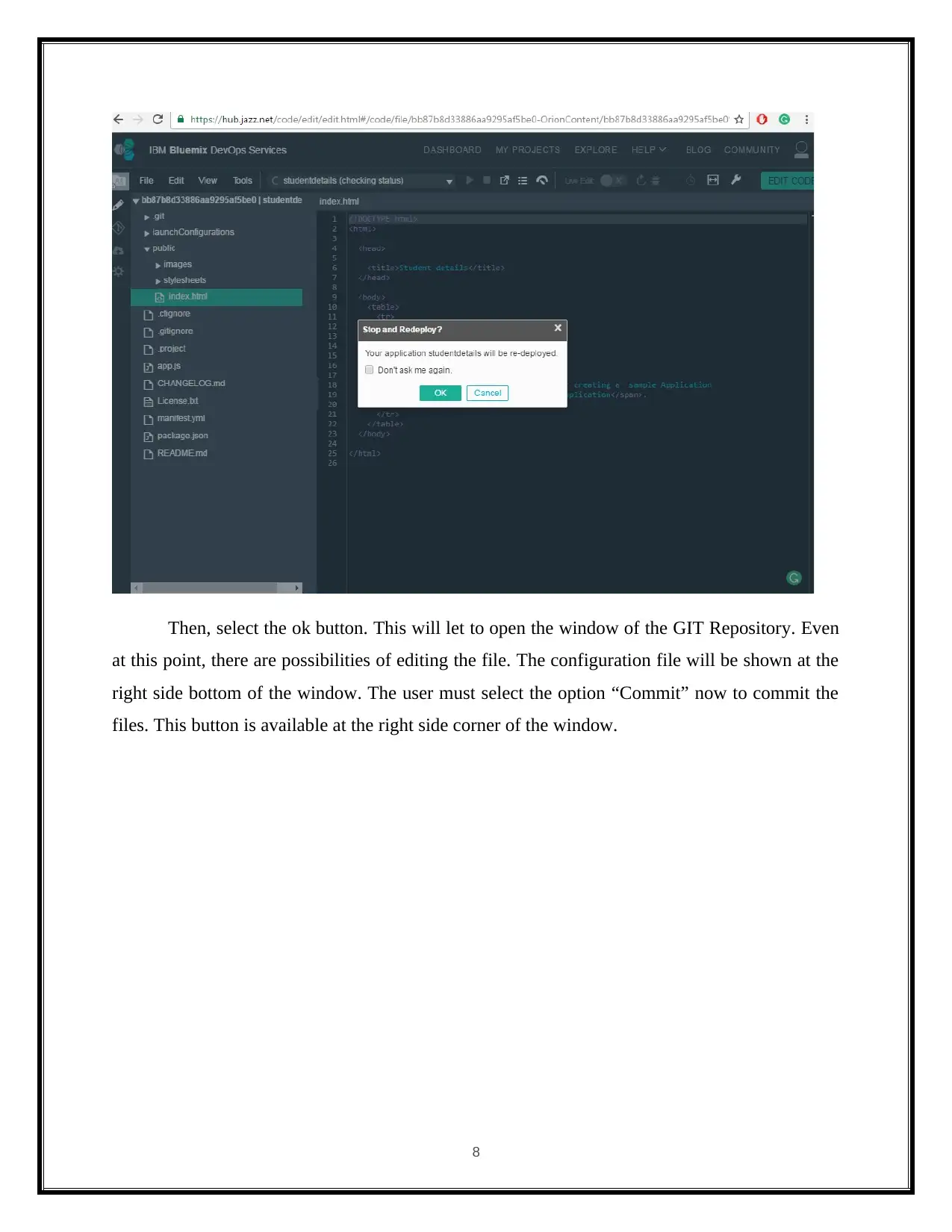
Then, select the ok button. This will let to open the window of the GIT Repository. Even
at this point, there are possibilities of editing the file. The configuration file will be shown at the
right side bottom of the window. The user must select the option “Commit” now to commit the
files. This button is available at the right side corner of the window.
8
tabler-icon-diamond-filled.svg

Paraphrase This Document

Need a fresh take? Get an instant paraphrase of this document with our AI Paraphraser
Document Page
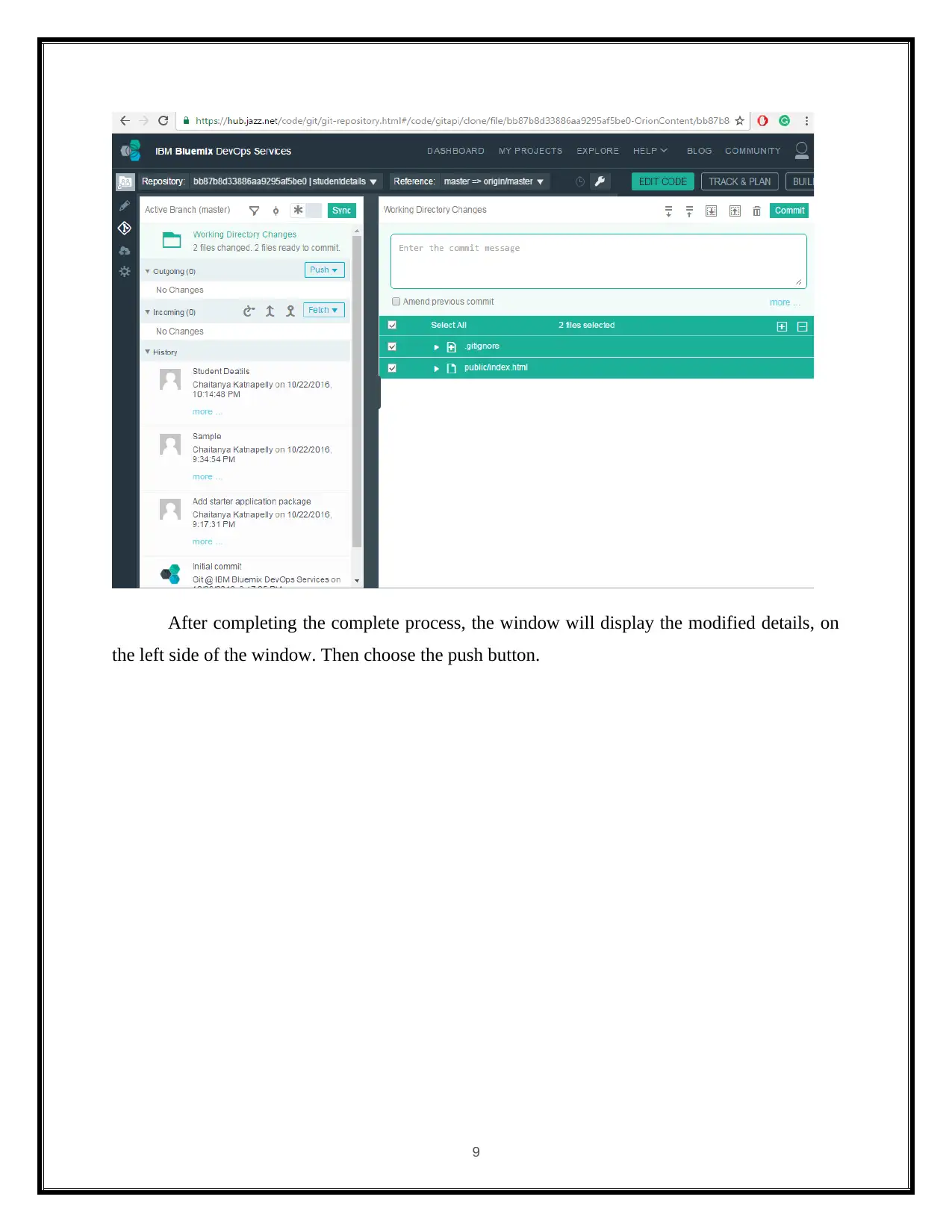
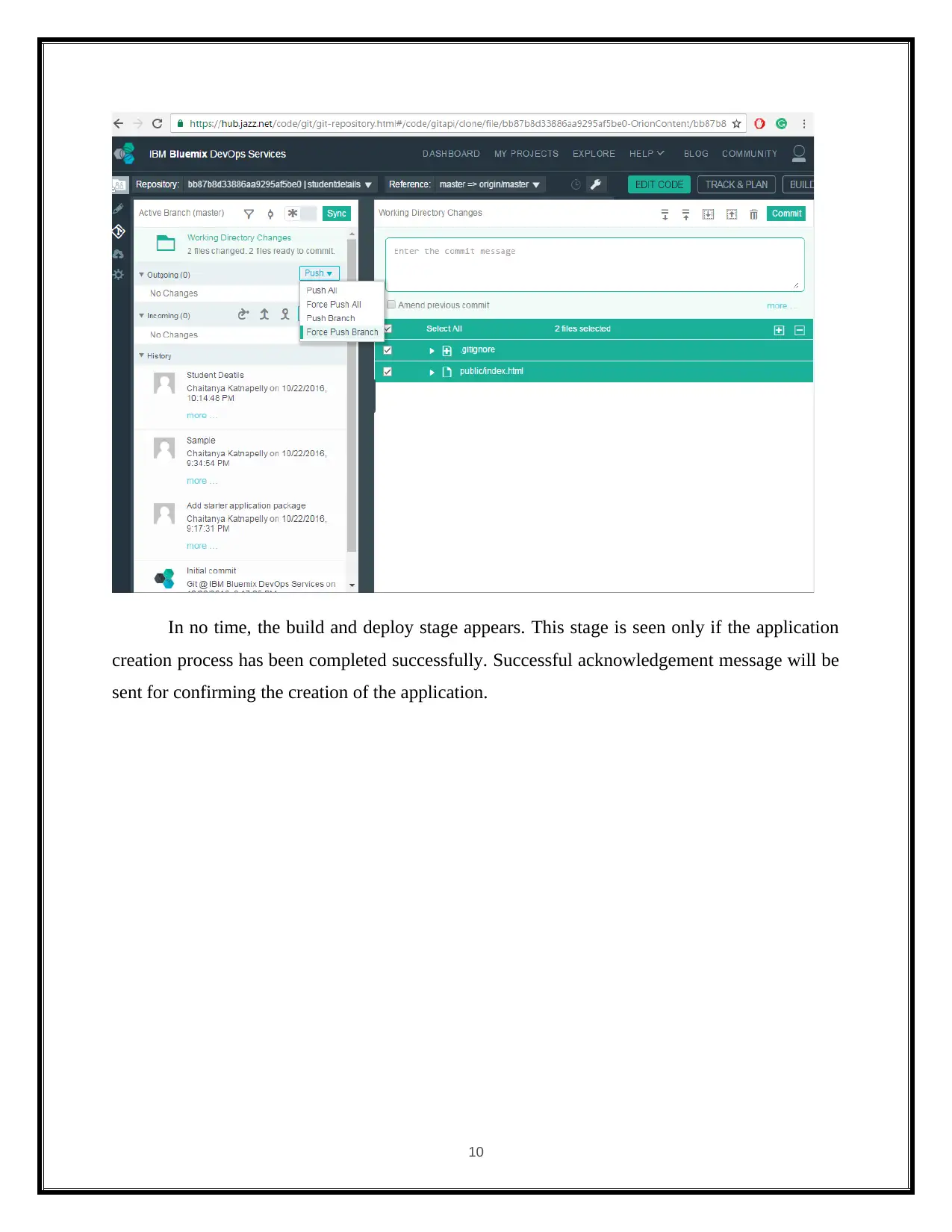
After completing the complete process, the window will display the modified details, on
the left side of the window. Then choose the push button.
9
Document Page
In no time, the build and deploy stage appears. This stage is seen only if the application
creation process has been completed successfully. Successful acknowledgement message will be
sent for confirming the creation of the application.
10
chevron_up_icon
1 out of 29
circle_padding
hide_on_mobile
zoom_out_icon
[object Object]