Comparison of Information System Development Methods: IMAT3423 Report
VerifiedAdded on 2022/08/27
|14
|3472
|29
Report
AI Summary
This report provides a comprehensive comparison of information system development methods. It begins with an introduction to the inevitability of changes in information systems, particularly in databases, and discusses system maintenance types like corrective, adaptive, preventive, and perfective maintenance. The report then explores a scenario involving database transactions, emphasizing ACID properties and the importance of database backup and disaster recovery. A comparative analysis of the Systems Development Life Cycle (SDLC) is presented, contrasting it with alternative approaches, and highlighting the significance of choosing the right methodology. The report also includes a discussion on the phases of SDLC, such as planning, analysis, design, and implementation. It examines the common pitfalls in systems development and the benefits of a structured approach. Finally, the report concludes with recommendations for selecting an appropriate framework for evaluating ISDM and justifying the choice of methodology for a given ISD project, all within the context of Borchester Leisure Centre's information system.

1
Title: Comparison of Information System Development Methods
Student Name
Student Institution:
Title: Comparison of Information System Development Methods
Student Name
Student Institution:

Paraphrase This Document
Need a fresh take? Get an instant paraphrase of this document with our AI Paraphraser
2
Contents
Introduction.................................................................................................................................................3
Scenario Description....................................................................................................................................3
Comparative Analysis..................................................................................................................................6
Recommendations and Conclusion...........................................................................................................13
References.................................................................................................................................................15
Contents
Introduction.................................................................................................................................................3
Scenario Description....................................................................................................................................3
Comparative Analysis..................................................................................................................................6
Recommendations and Conclusion...........................................................................................................13
References.................................................................................................................................................15
3
Introduction
Such as the nature of technology itself, changes within a specific information system such as
databases are inevitable. Corrective, adaptive and perfective update requests are part of the
system maintenance phase which can be found throughout the SDLC. System maintenance refers
to changing an existing information system to fix errors or enhance functionality; there are four
types of systems maintenance: corrective, adaptive, perfective, and preventive. Corrective
maintenance refers to repairing design and programming errors and is the most frequent,
examples of corrective updates include fixing errors found by end users such as a field meant for
integers accepting character entries. Adaptive maintenance refers to modifying a system in
response to environmental changes; examples of adaptive maintenance could include an end user
request to produce a new type of form based on a policy change. Preventive maintenance refers
to introducing changes that would protect the system from future problems; examples of
preventive maintenance would include database admins scanning data tables to eliminate null
values that could potentially affect the system adversely. Perfective maintenance refers to
changing the system so that it can solve new problems or take advantage of new technologies
(Coronel & Morris, 2017), an example of this would be creating a new update that would make
the end user GUI better by including a data and time section.
Scenario Description
Basic operations of a transaction include read and write, with other actions including commit and
abort. Each individual transaction much display four properties, sometimes referred to as the
ACID test, these four properties are atomicity, consistency, isolation, and durability. Each of
these properties briefly explained are:
Introduction
Such as the nature of technology itself, changes within a specific information system such as
databases are inevitable. Corrective, adaptive and perfective update requests are part of the
system maintenance phase which can be found throughout the SDLC. System maintenance refers
to changing an existing information system to fix errors or enhance functionality; there are four
types of systems maintenance: corrective, adaptive, perfective, and preventive. Corrective
maintenance refers to repairing design and programming errors and is the most frequent,
examples of corrective updates include fixing errors found by end users such as a field meant for
integers accepting character entries. Adaptive maintenance refers to modifying a system in
response to environmental changes; examples of adaptive maintenance could include an end user
request to produce a new type of form based on a policy change. Preventive maintenance refers
to introducing changes that would protect the system from future problems; examples of
preventive maintenance would include database admins scanning data tables to eliminate null
values that could potentially affect the system adversely. Perfective maintenance refers to
changing the system so that it can solve new problems or take advantage of new technologies
(Coronel & Morris, 2017), an example of this would be creating a new update that would make
the end user GUI better by including a data and time section.
Scenario Description
Basic operations of a transaction include read and write, with other actions including commit and
abort. Each individual transaction much display four properties, sometimes referred to as the
ACID test, these four properties are atomicity, consistency, isolation, and durability. Each of
these properties briefly explained are:
⊘ This is a preview!⊘
Do you want full access?
Subscribe today to unlock all pages.

Trusted by 1+ million students worldwide
4
Atomicity: Transaction is either performed in its entirety or not performed at all.
Consistency: It is user's responsibility to insure consistency of the transaction.
Isolation: It should not be affected by other transactions.
Durability: Even if the system fails all changes applied after commit should persists.
Given the increased use and importance of data over the last few years, the need for database
backup and disaster recovery have increased significantly. Databases play critical roles in
organizations and businesses such as retail, banking, and airline operations in which data and
information is an absolute necessity for day to day operations to continue. Computer systems that
run databases often break down sometimes due to several reasons, which may include human
error, system failure and cyber-attack (Qian et al., 2009). The failure or break down of these
database systems can lead to a great loss to an organization or even stop a business from running.
Database backup refers to the duplication of data in a database, so that the duplicated data can be
used to recover or restore the database when a data loss or damage occurs (Kadry et al., 2010).
The duplicated copies of data are known as backups and are usually implemented to ensure the
recovery of data in case of a disaster or catastrophic event. Backup is also implemented so as to
restore data and information in case of data corruption or human error (Kadry, et al., 2010).
Database consists of files, which are logical components in the database used to group data. The
data in this database are used and retrieved from time to time to perform several operations,
which are critical to organizations and businesses. Database backup is important to be in place in
an organization, so as to protect data from media failures and human errors (Bhalla &Madnick,
2004). Backup of databases is usually done in different ways depending on the size, availability
and criticality of information and data stored. The best way to back up a database to ensure the
Atomicity: Transaction is either performed in its entirety or not performed at all.
Consistency: It is user's responsibility to insure consistency of the transaction.
Isolation: It should not be affected by other transactions.
Durability: Even if the system fails all changes applied after commit should persists.
Given the increased use and importance of data over the last few years, the need for database
backup and disaster recovery have increased significantly. Databases play critical roles in
organizations and businesses such as retail, banking, and airline operations in which data and
information is an absolute necessity for day to day operations to continue. Computer systems that
run databases often break down sometimes due to several reasons, which may include human
error, system failure and cyber-attack (Qian et al., 2009). The failure or break down of these
database systems can lead to a great loss to an organization or even stop a business from running.
Database backup refers to the duplication of data in a database, so that the duplicated data can be
used to recover or restore the database when a data loss or damage occurs (Kadry et al., 2010).
The duplicated copies of data are known as backups and are usually implemented to ensure the
recovery of data in case of a disaster or catastrophic event. Backup is also implemented so as to
restore data and information in case of data corruption or human error (Kadry, et al., 2010).
Database consists of files, which are logical components in the database used to group data. The
data in this database are used and retrieved from time to time to perform several operations,
which are critical to organizations and businesses. Database backup is important to be in place in
an organization, so as to protect data from media failures and human errors (Bhalla &Madnick,
2004). Backup of databases is usually done in different ways depending on the size, availability
and criticality of information and data stored. The best way to back up a database to ensure the
Paraphrase This Document
Need a fresh take? Get an instant paraphrase of this document with our AI Paraphraser
5
security and reliability of data is to perform a total back up, which is done by shutting down a
database to copy all the data, log and control files to other places (Qian, et al., 2009). Total back
up is usually done in an off-line mode when the database is not in use, which often takes long
hours to complete. Other examples of backups include export backup, and differential backup.
Disaster recovery involves the recovery of a system from catastrophic event, which may include
natural disasters, power outage, human error and security breach (Snedaker, 2007). Proper
implementation of a disaster recovery plan helps to reduce or stop the impacts of a disaster on an
organization as fast as possible, by addressing the impact of the catastrophic event. The ability to
recover and restore data and information of a database and all other computer systems from
previous backups is an essential process of ensuring business continuity and continuous running
of an organization (Akhtar et al., 2012). Organization and businesses need to prepare for the
possibility of system failure and data loss by implementing a disaster recovery plan, so if a
disaster should occur business can continue running with the help of appropriate backups and
recovery strategies (Akhtar et al., 2012). Database backup ensures the availability of a database
to users throughout an acceptable period and even after an outage or disaster by ensuring that
data is not lost. Data backups and recovery are critical parts of a disaster recovery plan. To
ensure a proper recovery of critical data, organizations must implement a disaster recovery plan.
Disaster recovery plan involves several steps and considerations that must be taken.
Comparative Analysis
The most common approach used by modern organizations is what has been coined as the
“systems development lifecycle.” The challenge with this method is that is the systems
development lifecycle has taken on many pseudonyms. That is it has been given many other
names and has spawned many variants off of a common theme. It isn’t unusual of a group of
security and reliability of data is to perform a total back up, which is done by shutting down a
database to copy all the data, log and control files to other places (Qian, et al., 2009). Total back
up is usually done in an off-line mode when the database is not in use, which often takes long
hours to complete. Other examples of backups include export backup, and differential backup.
Disaster recovery involves the recovery of a system from catastrophic event, which may include
natural disasters, power outage, human error and security breach (Snedaker, 2007). Proper
implementation of a disaster recovery plan helps to reduce or stop the impacts of a disaster on an
organization as fast as possible, by addressing the impact of the catastrophic event. The ability to
recover and restore data and information of a database and all other computer systems from
previous backups is an essential process of ensuring business continuity and continuous running
of an organization (Akhtar et al., 2012). Organization and businesses need to prepare for the
possibility of system failure and data loss by implementing a disaster recovery plan, so if a
disaster should occur business can continue running with the help of appropriate backups and
recovery strategies (Akhtar et al., 2012). Database backup ensures the availability of a database
to users throughout an acceptable period and even after an outage or disaster by ensuring that
data is not lost. Data backups and recovery are critical parts of a disaster recovery plan. To
ensure a proper recovery of critical data, organizations must implement a disaster recovery plan.
Disaster recovery plan involves several steps and considerations that must be taken.
Comparative Analysis
The most common approach used by modern organizations is what has been coined as the
“systems development lifecycle.” The challenge with this method is that is the systems
development lifecycle has taken on many pseudonyms. That is it has been given many other
names and has spawned many variants off of a common theme. It isn’t unusual of a group of
6
analysts from different organizations or even from the same organization believing that their
systems development lifecycle is different from that of their peers only to discover that there is
essentially one model that has morphed by name only. We’ll discuss this more later.
Let’s suppose you wanted to build your dream house. You and your significant other are driving
along a scenic country road and you happen along a beautiful parcel of land. You are pleased to
discover that this beautiful spot is for sale. You proceed to purchase the land and you are so
excited and maybe a bit in a hurry as well, after all time is money. The very next day you borrow
a friend’s pickup truck, drive to Home Depot, buy some lumber and tools, drive your friend’s
pickup laden with building materials to your new plot of land and start constructing your new
home. What’s wrong with this picture? So why do some attempt to build information systems the
same way?
While this is sure there are some success stories; there are a disproportionate number of failures.
That is, systems were delivered late, over-budget, high in defects or without the agreed upon
functionality. The Standish Group, a research firm that analyzes systems implementations, found
that of 280,000 systems projects only 28% were completed successfully. (Johnson, 2001) The
results of this study summarized below should be reason enough to revisit our systems
development methods.
The systems development lifecycle was born in the late 1960’s as the result of the work of an
IBM researcher, Dr. Winston W. Royce. Royce published his findings for a systems
methodology in a seminal work in August of 1970, “Managing the Development of Large
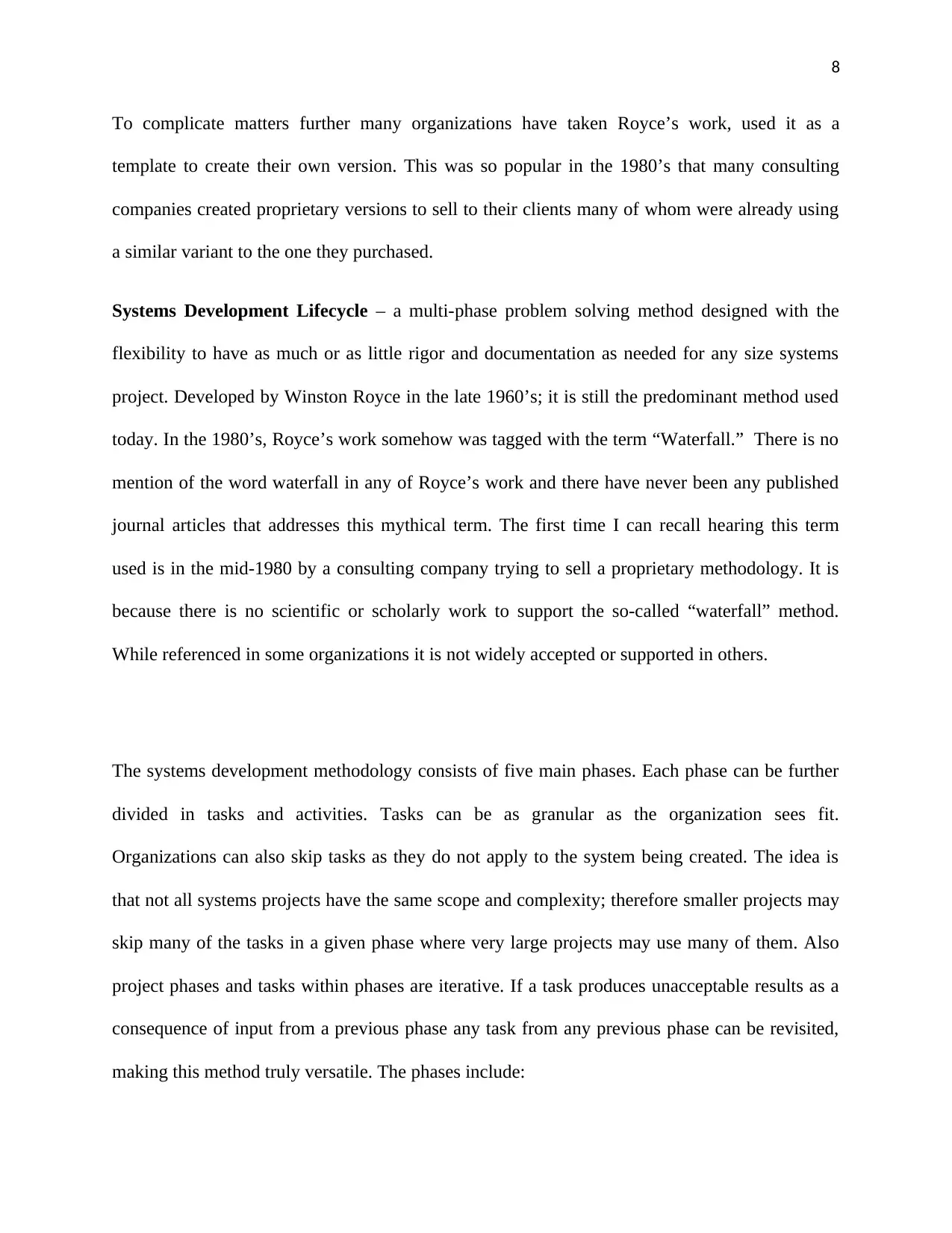
Software Systems.” To better explain Royce’s findings and observations I have assembled a
model that reflects systems development activities summarized into phases representing the
analysts from different organizations or even from the same organization believing that their
systems development lifecycle is different from that of their peers only to discover that there is
essentially one model that has morphed by name only. We’ll discuss this more later.
Let’s suppose you wanted to build your dream house. You and your significant other are driving
along a scenic country road and you happen along a beautiful parcel of land. You are pleased to
discover that this beautiful spot is for sale. You proceed to purchase the land and you are so
excited and maybe a bit in a hurry as well, after all time is money. The very next day you borrow
a friend’s pickup truck, drive to Home Depot, buy some lumber and tools, drive your friend’s
pickup laden with building materials to your new plot of land and start constructing your new
home. What’s wrong with this picture? So why do some attempt to build information systems the
same way?
While this is sure there are some success stories; there are a disproportionate number of failures.
That is, systems were delivered late, over-budget, high in defects or without the agreed upon
functionality. The Standish Group, a research firm that analyzes systems implementations, found
that of 280,000 systems projects only 28% were completed successfully. (Johnson, 2001) The
results of this study summarized below should be reason enough to revisit our systems
development methods.
The systems development lifecycle was born in the late 1960’s as the result of the work of an
IBM researcher, Dr. Winston W. Royce. Royce published his findings for a systems
methodology in a seminal work in August of 1970, “Managing the Development of Large
Software Systems.” To better explain Royce’s findings and observations I have assembled a
model that reflects systems development activities summarized into phases representing the
⊘ This is a preview!⊘
Do you want full access?
Subscribe today to unlock all pages.
Trusted by 1+ million students worldwide
7
phases as resources consumed (by phase) over time. This model in no way prevents or restricts
activities in each phase from being performed in any desired sequence. That is, there are no “lock
step” or serial paths implied. In Royce’s work he makes it clear that any activities can be
revisited at any time giving the users of this methodology the ability to iterate within and among
phases when needed.
Another way to look at the systems development lifecycle is to view it hierarchically (see chart
below) in relationship to many of the so-called later methods that have been developed since the
inception of Royce’s model. These methods are variations of Royce’s original work and contain
many of the same phases and activities of Royce’s methodology; but represent them in different
increments of time or suggest that activities be performed in different sequences. While these
variants make for interesting reading and are subject to numerous debates; they are all essentially
the same in that they allow the analyst to perform the same functions in the appropriate
sequence. The key phrase here being “appropriate sequence.”
phases as resources consumed (by phase) over time. This model in no way prevents or restricts
activities in each phase from being performed in any desired sequence. That is, there are no “lock
step” or serial paths implied. In Royce’s work he makes it clear that any activities can be
revisited at any time giving the users of this methodology the ability to iterate within and among
phases when needed.
Another way to look at the systems development lifecycle is to view it hierarchically (see chart
below) in relationship to many of the so-called later methods that have been developed since the
inception of Royce’s model. These methods are variations of Royce’s original work and contain
many of the same phases and activities of Royce’s methodology; but represent them in different
increments of time or suggest that activities be performed in different sequences. While these
variants make for interesting reading and are subject to numerous debates; they are all essentially
the same in that they allow the analyst to perform the same functions in the appropriate
sequence. The key phrase here being “appropriate sequence.”
Paraphrase This Document
Need a fresh take? Get an instant paraphrase of this document with our AI Paraphraser
8
To complicate matters further many organizations have taken Royce’s work, used it as a
template to create their own version. This was so popular in the 1980’s that many consulting
companies created proprietary versions to sell to their clients many of whom were already using
a similar variant to the one they purchased.
Systems Development Lifecycle – a multi-phase problem solving method designed with the
flexibility to have as much or as little rigor and documentation as needed for any size systems
project. Developed by Winston Royce in the late 1960’s; it is still the predominant method used
today. In the 1980’s, Royce’s work somehow was tagged with the term “Waterfall.” There is no
mention of the word waterfall in any of Royce’s work and there have never been any published
journal articles that addresses this mythical term. The first time I can recall hearing this term
used is in the mid-1980 by a consulting company trying to sell a proprietary methodology. It is
because there is no scientific or scholarly work to support the so-called “waterfall” method.
While referenced in some organizations it is not widely accepted or supported in others.
The systems development methodology consists of five main phases. Each phase can be further
divided in tasks and activities. Tasks can be as granular as the organization sees fit.
Organizations can also skip tasks as they do not apply to the system being created. The idea is
that not all systems projects have the same scope and complexity; therefore smaller projects may
skip many of the tasks in a given phase where very large projects may use many of them. Also
project phases and tasks within phases are iterative. If a task produces unacceptable results as a
consequence of input from a previous phase any task from any previous phase can be revisited,
making this method truly versatile. The phases include:
To complicate matters further many organizations have taken Royce’s work, used it as a
template to create their own version. This was so popular in the 1980’s that many consulting
companies created proprietary versions to sell to their clients many of whom were already using
a similar variant to the one they purchased.
Systems Development Lifecycle – a multi-phase problem solving method designed with the
flexibility to have as much or as little rigor and documentation as needed for any size systems
project. Developed by Winston Royce in the late 1960’s; it is still the predominant method used
today. In the 1980’s, Royce’s work somehow was tagged with the term “Waterfall.” There is no
mention of the word waterfall in any of Royce’s work and there have never been any published
journal articles that addresses this mythical term. The first time I can recall hearing this term
used is in the mid-1980 by a consulting company trying to sell a proprietary methodology. It is
because there is no scientific or scholarly work to support the so-called “waterfall” method.
While referenced in some organizations it is not widely accepted or supported in others.
The systems development methodology consists of five main phases. Each phase can be further
divided in tasks and activities. Tasks can be as granular as the organization sees fit.
Organizations can also skip tasks as they do not apply to the system being created. The idea is
that not all systems projects have the same scope and complexity; therefore smaller projects may
skip many of the tasks in a given phase where very large projects may use many of them. Also
project phases and tasks within phases are iterative. If a task produces unacceptable results as a
consequence of input from a previous phase any task from any previous phase can be revisited,
making this method truly versatile. The phases include:
9
1. Planning – This is the initial phase where the systems analyst solicits.
Financial – does the organization have the financial resources to manage a system of
this magnitude
Operational – does the organization have the ability to absorb the disruption of a
system of this magnitude
Technical – does the organization have the technical resources to create, implement and
maintain a system of this magnitude
2. Analysis – This is the phase where the analyst determines the system requirements. This
generally includes the data requirements and the business rules which include:
structural, derived and action rules.
3. Design – This is the phase that actually solves the problem, well at least on paper. There
are two parts to design, logical design and physical.
4. Implementation – This is the phase that approximates the construction of a physical
building. Here is where the build or buy decisions are made. If the decision is to buy a
solution you then move to testing. If the decision is to build than the software
construction i.e. programming is performed here. Once the procurement of or the
construction of the software has been completed the system is ready to test. Depending
on the size of the system and the procedures of the organization a system may go
through a few or many levels of testing. These include but are not limited to:
unit – each object is tested independently
systems- all related objects are tested together
1. Planning – This is the initial phase where the systems analyst solicits.
Financial – does the organization have the financial resources to manage a system of
this magnitude
Operational – does the organization have the ability to absorb the disruption of a
system of this magnitude
Technical – does the organization have the technical resources to create, implement and
maintain a system of this magnitude
2. Analysis – This is the phase where the analyst determines the system requirements. This
generally includes the data requirements and the business rules which include:
structural, derived and action rules.
3. Design – This is the phase that actually solves the problem, well at least on paper. There
are two parts to design, logical design and physical.
4. Implementation – This is the phase that approximates the construction of a physical
building. Here is where the build or buy decisions are made. If the decision is to buy a
solution you then move to testing. If the decision is to build than the software
construction i.e. programming is performed here. Once the procurement of or the
construction of the software has been completed the system is ready to test. Depending
on the size of the system and the procedures of the organization a system may go
through a few or many levels of testing. These include but are not limited to:
unit – each object is tested independently
systems- all related objects are tested together
⊘ This is a preview!⊘
Do you want full access?
Subscribe today to unlock all pages.
Trusted by 1+ million students worldwide
10
QA- tested independently and as a system by independent testing facility
Model office – tested in a pseudo-production business unit facility
5. Maintenance and Support – This is phase where end user support and post-delivery
system changes are made. These are generally small to medium size changes usually
changes smaller than a complete re-write of the existing system. Most organizations
devote 70-80% of their systems development budget to this phase. (Schach, 2005) There
are three general maintenance categories performed here:
Popular Variations
Below are a number of other variations on the same systems development lifecycle theme. Most
of them have all of the same phases as Royce’s method and generally the same sequence.
However some of them have deemphasized some of the earlier phases in order to spend more
resources on software development or have re-sequenced phases or tasks or identified explicitly
how tasks should be performed to give their variant unique-nests. Listed below are a few of
them:
Evolution-tree – the systems development lifecycle that uses a tree-like structure as a visual
model used to represent all of the iterations to any of the systems artifacts. Otherwise it is exactly
like the systems development lifecycle.
Iteration and Incrimination – again this is the systems development lifecycle where each
artifact is built incrementally. Think of a system with 1,000 requirements. Each component may
be built satisfying 10 requirements at a time; then revisited to handle the next 10, followed by the
next 10 etc. until all 1,000 requirements have been accommodated.
QA- tested independently and as a system by independent testing facility
Model office – tested in a pseudo-production business unit facility
5. Maintenance and Support – This is phase where end user support and post-delivery
system changes are made. These are generally small to medium size changes usually
changes smaller than a complete re-write of the existing system. Most organizations
devote 70-80% of their systems development budget to this phase. (Schach, 2005) There
are three general maintenance categories performed here:
Popular Variations
Below are a number of other variations on the same systems development lifecycle theme. Most
of them have all of the same phases as Royce’s method and generally the same sequence.
However some of them have deemphasized some of the earlier phases in order to spend more
resources on software development or have re-sequenced phases or tasks or identified explicitly
how tasks should be performed to give their variant unique-nests. Listed below are a few of
them:
Evolution-tree – the systems development lifecycle that uses a tree-like structure as a visual
model used to represent all of the iterations to any of the systems artifacts. Otherwise it is exactly
like the systems development lifecycle.
Iteration and Incrimination – again this is the systems development lifecycle where each
artifact is built incrementally. Think of a system with 1,000 requirements. Each component may
be built satisfying 10 requirements at a time; then revisited to handle the next 10, followed by the
next 10 etc. until all 1,000 requirements have been accommodated.
Paraphrase This Document
Need a fresh take? Get an instant paraphrase of this document with our AI Paraphraser
11
Code and Fix – Generally speaking this method implies that a system is built without any
analysis or design. Practically speaking if that were true; how would the application developers
know application to build and when it was complete i.e. what requirements were satisfied? This
method may work for und-user developed systems where the requirements are already known by
the user who happens to be the builder as well.
Rapid Prototyping – this is systems development lifecycle in very small increments. Each of
the planning, analysis, design phases produce the specifications for a small sub-set of the system;
usually a part of the system that has a user interface: form, report or a screen. Since the product
is a prototype there is a user interface that partially works but generally there are no associated
business logic or data structure objects.
Extreme Programming – this is the systems development lifecycle. The phases are the same
but this method describes the way programming resources are deployed. Generally speaking this
isn’t a lifecycle model at all; but a resource deployment strategy. Royce never dictated how the
resources should be deployed across the lifecycle’s phases and tasks. He left the responsibility to
the manager to make work assignments.
Agile – this is the systems development lifecycle only there is less emphasis place on earlier
phases of planning, analysis and design and more emphasis place on implementation. Systems
documentation is also deemphasized.
Synchronize and Stabilize – a version of the Iteration and Incrimination but still a repacked
systems development lifecycle that uses the packaging of its requirements as a distinguishing
characteristic.
Code and Fix – Generally speaking this method implies that a system is built without any
analysis or design. Practically speaking if that were true; how would the application developers
know application to build and when it was complete i.e. what requirements were satisfied? This
method may work for und-user developed systems where the requirements are already known by
the user who happens to be the builder as well.
Rapid Prototyping – this is systems development lifecycle in very small increments. Each of
the planning, analysis, design phases produce the specifications for a small sub-set of the system;
usually a part of the system that has a user interface: form, report or a screen. Since the product
is a prototype there is a user interface that partially works but generally there are no associated
business logic or data structure objects.
Extreme Programming – this is the systems development lifecycle. The phases are the same
but this method describes the way programming resources are deployed. Generally speaking this
isn’t a lifecycle model at all; but a resource deployment strategy. Royce never dictated how the
resources should be deployed across the lifecycle’s phases and tasks. He left the responsibility to
the manager to make work assignments.
Agile – this is the systems development lifecycle only there is less emphasis place on earlier
phases of planning, analysis and design and more emphasis place on implementation. Systems
documentation is also deemphasized.
Synchronize and Stabilize – a version of the Iteration and Incrimination but still a repacked
systems development lifecycle that uses the packaging of its requirements as a distinguishing
characteristic.
12
Spiral – a version of the systems development lifecycle predicated on the use of prototypes to
minimize risk. There is a risk analysis step at the beginning of each phase.
Recommendations and Conclusion
Concurrency control, as defined by Coronel & Morris (2017), is the coordination of the
simultaneous execution of transactions in a multiuser database system. The objective of this
control is to ensure the stability of database transactions within a multiuser database platform.
Concurrency control is vital in a multi-user database due to the data integrity as well as
consistency problems that may arise as a result of the simultaneous execution of transactions,
other issues that may arise at the result of a lack of concurrency control are lost updates,
uncommitted data, as well as inconsistent retrievals (Coronel & Morris, 2017). In an effort to
control these issues, a series of concurrency controls with locking methods should be
implemented within this database. Locking methods are one of the more common techniques
used in concurrency control because of their ability to facilitate the isolation of data items used in
concurrently executing transactions (Coronel & Morris, 2017). Locking, therefore, is an
operation which secures both the permission to read, as well as permission to write a data item
for a transaction unless the unlock atomic operator is called. Several examples of locking
techniques can be found, some examples include: database-level lock, table-level lock, page-
level lock, row-level lock, field-level lock, binary lock, exclusive lock, as well as shared lock.
One locking technique which should be implemented within this database is the two-phase
locking technique. This technique includes two lock modes; shared as well as exclusive. Some
essential components of the two-phase lock technique include the lock manager which is
responsible for managing locks on data items, as well as the lock table which the lock manager
uses in order to store the identity of transaction locking data item, the data item, lock mode as
Spiral – a version of the systems development lifecycle predicated on the use of prototypes to
minimize risk. There is a risk analysis step at the beginning of each phase.
Recommendations and Conclusion
Concurrency control, as defined by Coronel & Morris (2017), is the coordination of the
simultaneous execution of transactions in a multiuser database system. The objective of this
control is to ensure the stability of database transactions within a multiuser database platform.
Concurrency control is vital in a multi-user database due to the data integrity as well as
consistency problems that may arise as a result of the simultaneous execution of transactions,
other issues that may arise at the result of a lack of concurrency control are lost updates,
uncommitted data, as well as inconsistent retrievals (Coronel & Morris, 2017). In an effort to
control these issues, a series of concurrency controls with locking methods should be
implemented within this database. Locking methods are one of the more common techniques
used in concurrency control because of their ability to facilitate the isolation of data items used in
concurrently executing transactions (Coronel & Morris, 2017). Locking, therefore, is an
operation which secures both the permission to read, as well as permission to write a data item
for a transaction unless the unlock atomic operator is called. Several examples of locking
techniques can be found, some examples include: database-level lock, table-level lock, page-
level lock, row-level lock, field-level lock, binary lock, exclusive lock, as well as shared lock.
One locking technique which should be implemented within this database is the two-phase
locking technique. This technique includes two lock modes; shared as well as exclusive. Some
essential components of the two-phase lock technique include the lock manager which is
responsible for managing locks on data items, as well as the lock table which the lock manager
uses in order to store the identity of transaction locking data item, the data item, lock mode as
⊘ This is a preview!⊘
Do you want full access?
Subscribe today to unlock all pages.
Trusted by 1+ million students worldwide

1 out of 14


Related Documents


Your All-in-One AI-Powered Toolkit for Academic Success.
+13062052269
info@desklib.com
Available 24*7 on WhatsApp / Email
![[object Object]](/_next/static/media/star-bottom.7253800d.svg)
Unlock your academic potential
Copyright © 2020–2026 A2Z Services. All Rights Reserved. Developed and managed by ZUCOL.