Case Study Analysis: Computer Network Security and Digital Forensics
VerifiedAdded on 2020/03/04
|21
|2953
|207
Case Study
AI Summary
This document presents three case studies focusing on computer network security and digital forensics. The first case study examines an email spoofing cyberattack, detailing the attacker's techniques of impersonation and spear phishing to obtain financial information. It explores how DMARC authentication and anti-fraud training can protect against such attacks. The second case study investigates the creation and deletion of files on a USB drive, utilizing ProDiscover Basic software to recover deleted files and analyze the forensic evidence. The third case study delves into data acquisition methods, including image file creation and disk-to-disk copies, and discusses the use of forensic imaging tools. It also covers the process of penetration testing, outlining the PTES phases and various data gathering techniques, emphasizing the importance of identifying vulnerabilities and protecting against cyber threats.

COMPUTER NETWORK SECURity
Paraphrase This Document
Need a fresh take? Get an instant paraphrase of this document with our AI Paraphraser

Case Study I: Leaving Clues to a Crime
Crime scenario
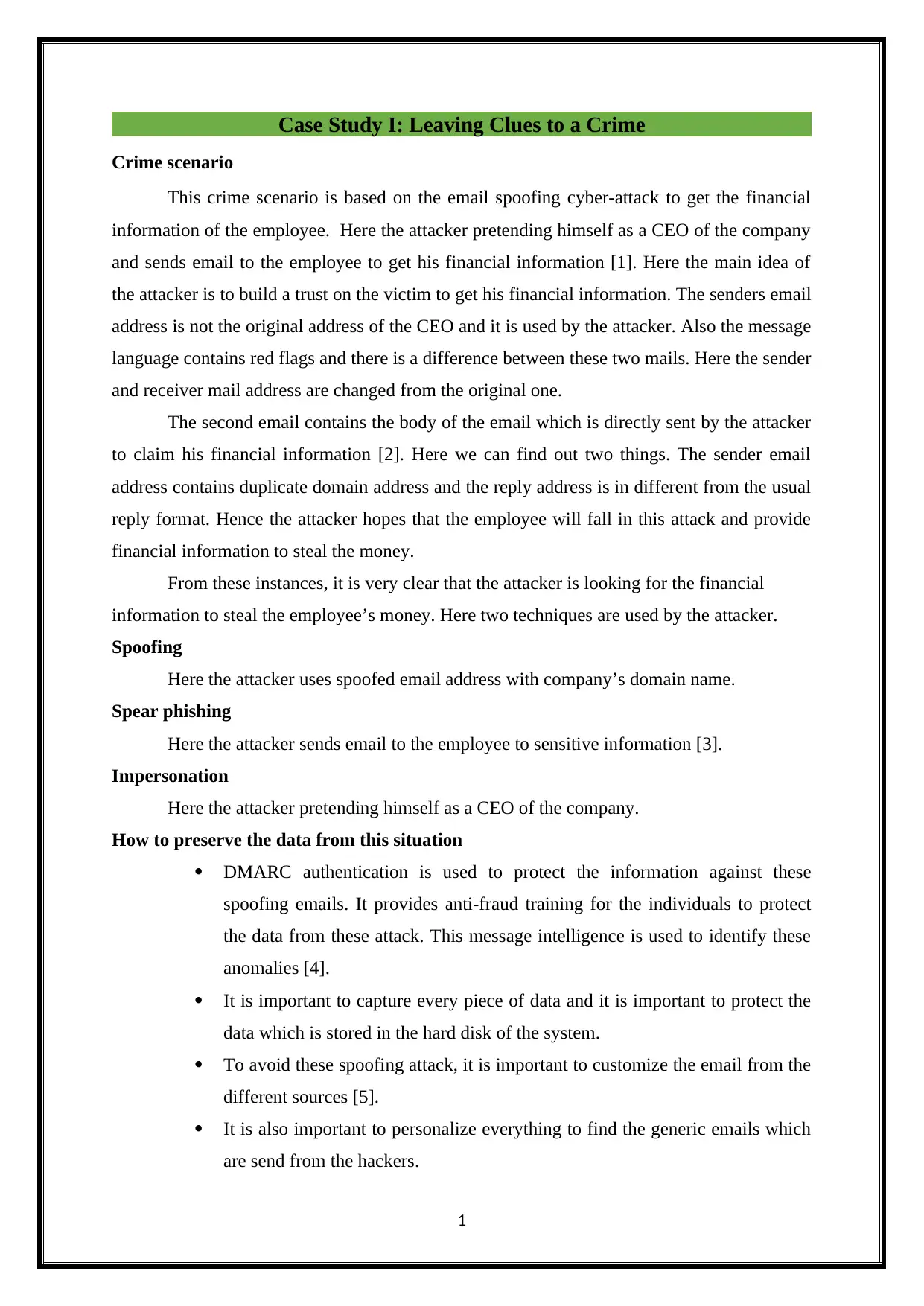
This crime scenario is based on the email spoofing cyber-attack to get the financial
information of the employee. Here the attacker pretending himself as a CEO of the company
and sends email to the employee to get his financial information [1]. Here the main idea of
the attacker is to build a trust on the victim to get his financial information. The senders email
address is not the original address of the CEO and it is used by the attacker. Also the message
language contains red flags and there is a difference between these two mails. Here the sender
and receiver mail address are changed from the original one.
The second email contains the body of the email which is directly sent by the attacker
to claim his financial information [2]. Here we can find out two things. The sender email
address contains duplicate domain address and the reply address is in different from the usual
reply format. Hence the attacker hopes that the employee will fall in this attack and provide
financial information to steal the money.
From these instances, it is very clear that the attacker is looking for the financial
information to steal the employee’s money. Here two techniques are used by the attacker.
Spoofing
Here the attacker uses spoofed email address with company’s domain name.
Spear phishing
Here the attacker sends email to the employee to sensitive information [3].
Impersonation
Here the attacker pretending himself as a CEO of the company.
How to preserve the data from this situation
DMARC authentication is used to protect the information against these
spoofing emails. It provides anti-fraud training for the individuals to protect
the data from these attack. This message intelligence is used to identify these
anomalies [4].
It is important to capture every piece of data and it is important to protect the
data which is stored in the hard disk of the system.
To avoid these spoofing attack, it is important to customize the email from the
different sources [5].
It is also important to personalize everything to find the generic emails which
are send from the hackers.
1
Crime scenario
This crime scenario is based on the email spoofing cyber-attack to get the financial
information of the employee. Here the attacker pretending himself as a CEO of the company
and sends email to the employee to get his financial information [1]. Here the main idea of
the attacker is to build a trust on the victim to get his financial information. The senders email
address is not the original address of the CEO and it is used by the attacker. Also the message
language contains red flags and there is a difference between these two mails. Here the sender
and receiver mail address are changed from the original one.
The second email contains the body of the email which is directly sent by the attacker
to claim his financial information [2]. Here we can find out two things. The sender email
address contains duplicate domain address and the reply address is in different from the usual
reply format. Hence the attacker hopes that the employee will fall in this attack and provide
financial information to steal the money.
From these instances, it is very clear that the attacker is looking for the financial
information to steal the employee’s money. Here two techniques are used by the attacker.
Spoofing
Here the attacker uses spoofed email address with company’s domain name.
Spear phishing
Here the attacker sends email to the employee to sensitive information [3].
Impersonation
Here the attacker pretending himself as a CEO of the company.
How to preserve the data from this situation
DMARC authentication is used to protect the information against these
spoofing emails. It provides anti-fraud training for the individuals to protect
the data from these attack. This message intelligence is used to identify these
anomalies [4].
It is important to capture every piece of data and it is important to protect the
data which is stored in the hard disk of the system.
To avoid these spoofing attack, it is important to customize the email from the
different sources [5].
It is also important to personalize everything to find the generic emails which
are send from the hackers.
1

The Digital clues are created by using the ProDiscover software and it is shown below.
Case Study II: Create and Delete Files on USB Drive
A Pen drive is selected. Few files are created inside the pen drive and the files are
deleted. This is the case and clue for the investigation. Further details for getting the files
back are explained below [6].
ProDiscover Basic has a worked in announcing apparatus to exhibit discoveries as
confirmation for lawful procedures. One accumulate time zone information, drive data,
Internet action, and the sky is the limit from there, piece by piece, or in a full report as
required. One have powerful scan capacities for catching one of a kind information,
filenames and file types, information designs, date ranges, and so forth. ProDiscover Basic
gives customers the independence they want in dealing with their own information security
[7].
Downloaded ProDiscoverRelease8205Basic and installed.
2
Case Study II: Create and Delete Files on USB Drive
A Pen drive is selected. Few files are created inside the pen drive and the files are
deleted. This is the case and clue for the investigation. Further details for getting the files
back are explained below [6].
ProDiscover Basic has a worked in announcing apparatus to exhibit discoveries as
confirmation for lawful procedures. One accumulate time zone information, drive data,
Internet action, and the sky is the limit from there, piece by piece, or in a full report as
required. One have powerful scan capacities for catching one of a kind information,
filenames and file types, information designs, date ranges, and so forth. ProDiscover Basic
gives customers the independence they want in dealing with their own information security
[7].
Downloaded ProDiscoverRelease8205Basic and installed.
2
⊘ This is a preview!⊘
Do you want full access?
Subscribe today to unlock all pages.

Trusted by 1+ million students worldwide

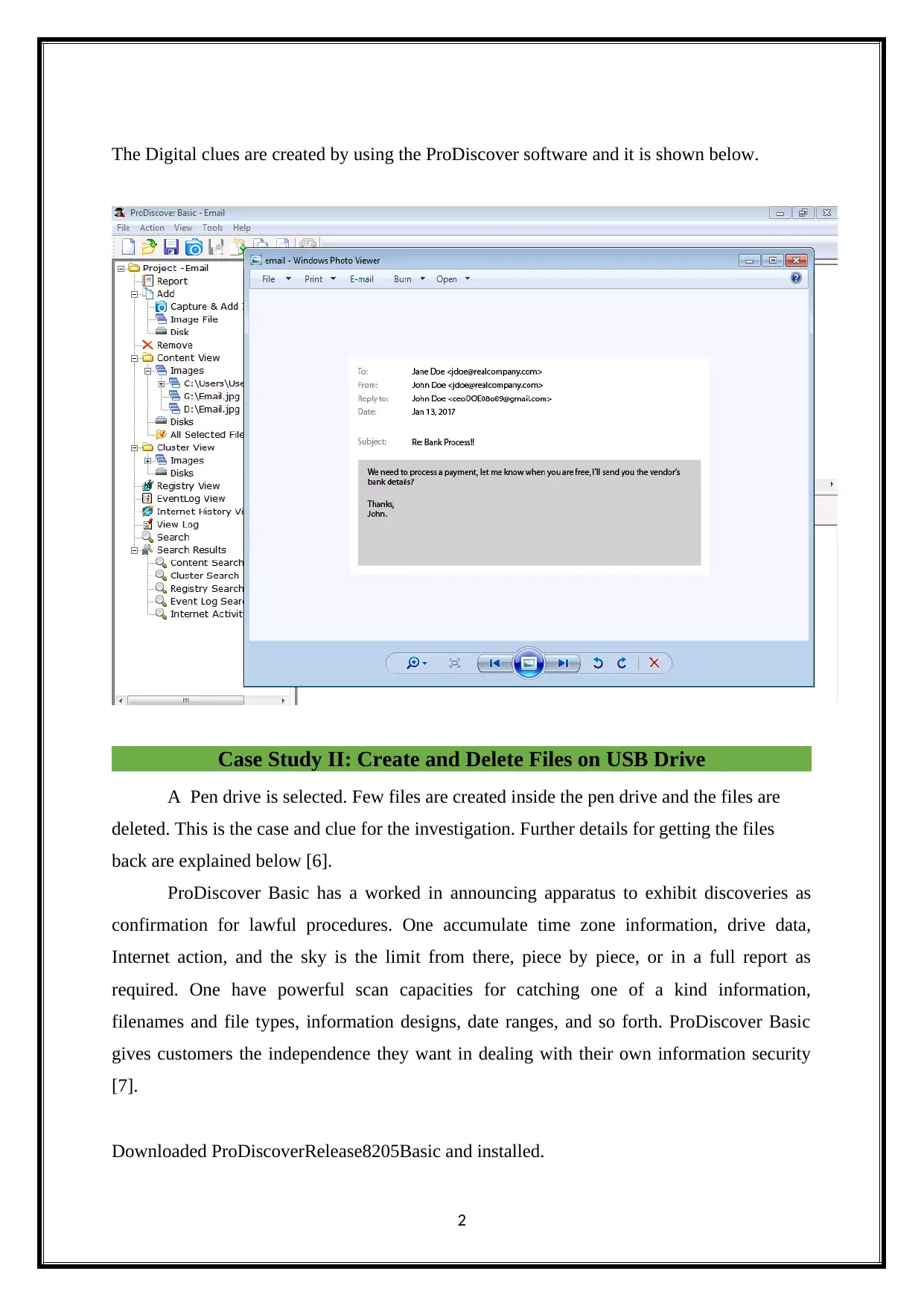
New project opened as shown above and gave the DEMO Project name.
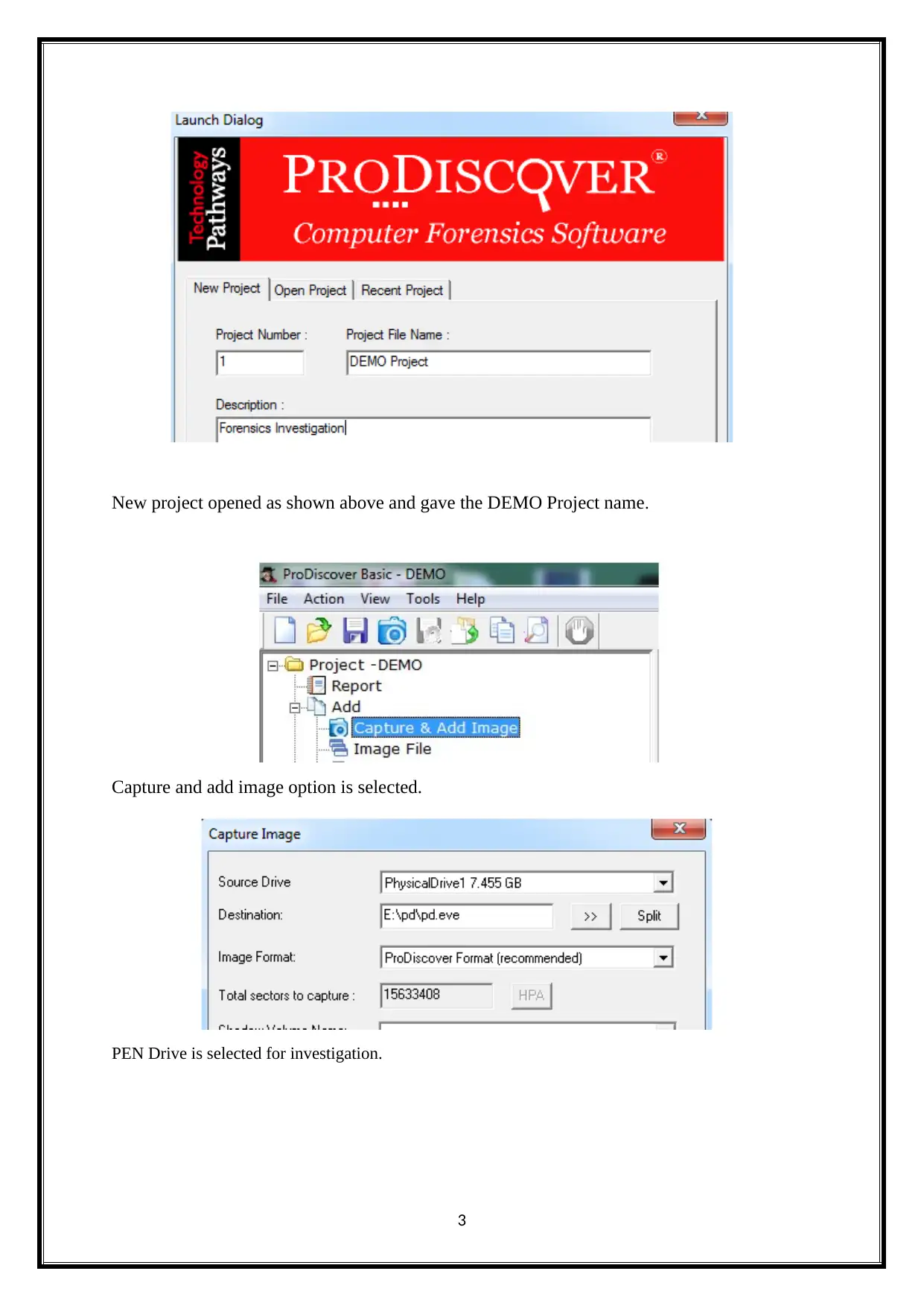
Capture and add image option is selected.
PEN Drive is selected for investigation.
3
Capture and add image option is selected.
PEN Drive is selected for investigation.
3
Paraphrase This Document
Need a fresh take? Get an instant paraphrase of this document with our AI Paraphraser

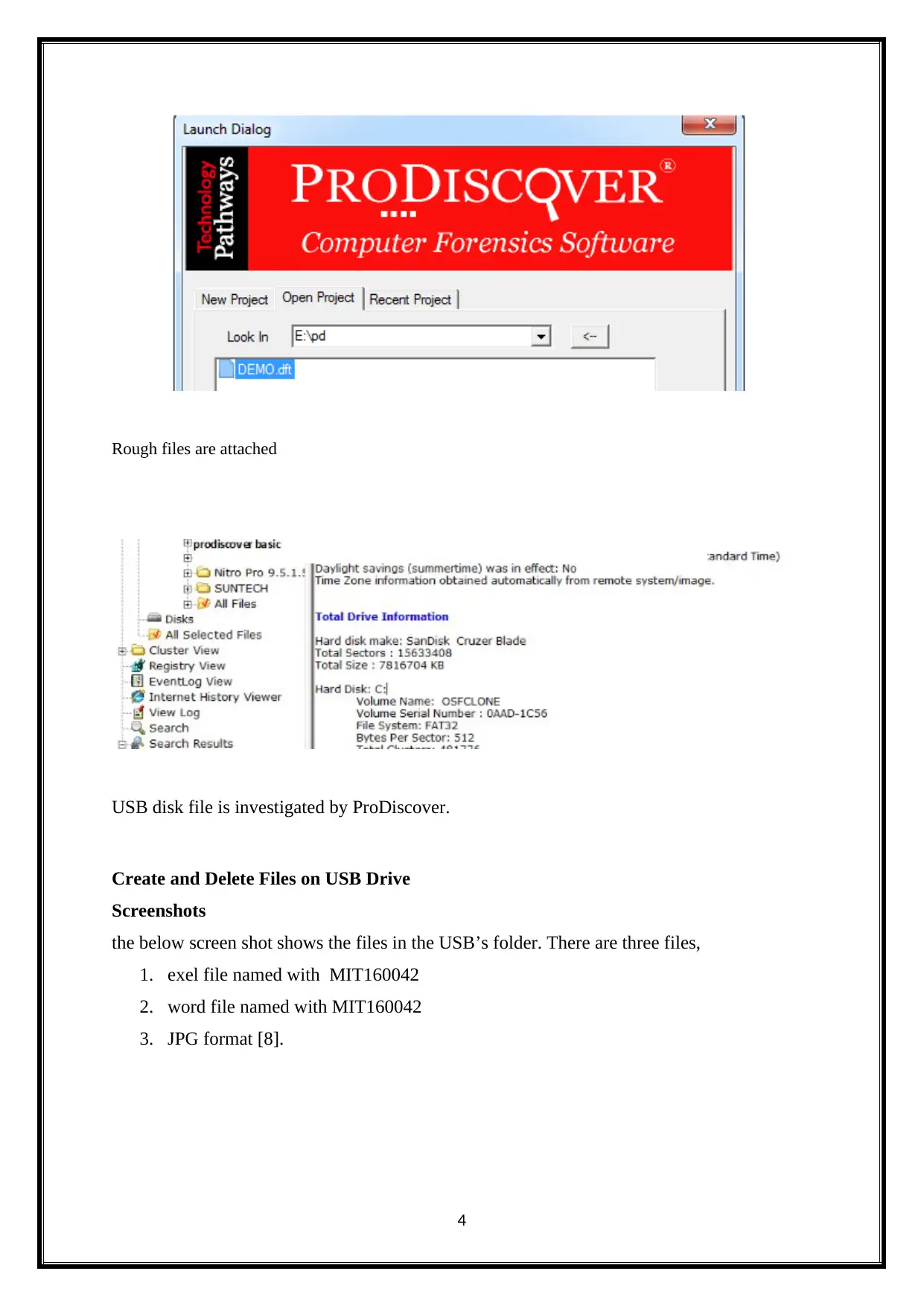
Rough files are attached
USB disk file is investigated by ProDiscover.
Create and Delete Files on USB Drive
Screenshots
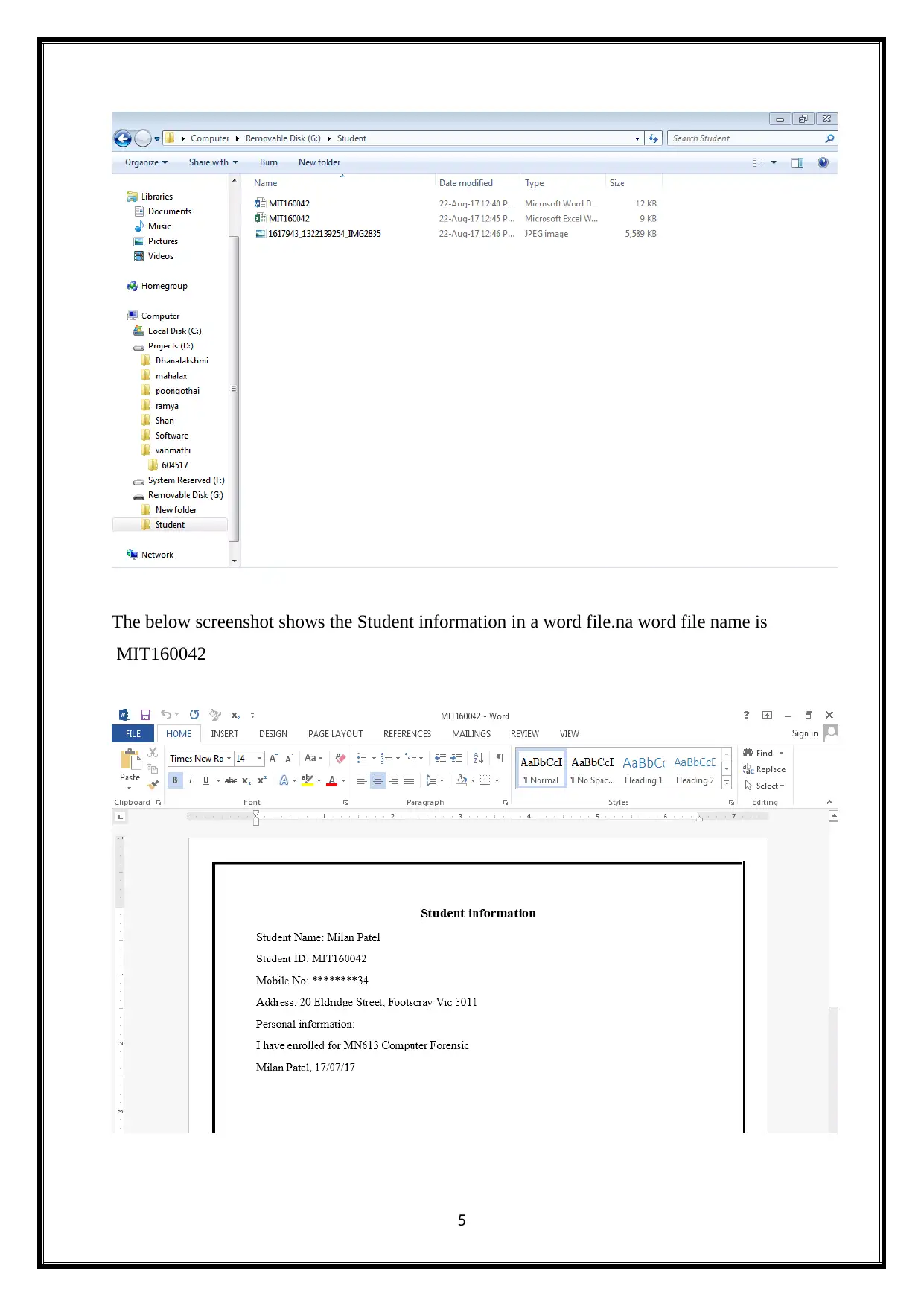
the below screen shot shows the files in the USB’s folder. There are three files,
1. exel file named with MIT160042
2. word file named with MIT160042
3. JPG format [8].
4
USB disk file is investigated by ProDiscover.
Create and Delete Files on USB Drive
Screenshots
the below screen shot shows the files in the USB’s folder. There are three files,
1. exel file named with MIT160042
2. word file named with MIT160042
3. JPG format [8].
4

The below screenshot shows the Student information in a word file.na word file name is
MIT160042
5
MIT160042
5
⊘ This is a preview!⊘
Do you want full access?
Subscribe today to unlock all pages.

Trusted by 1+ million students worldwide

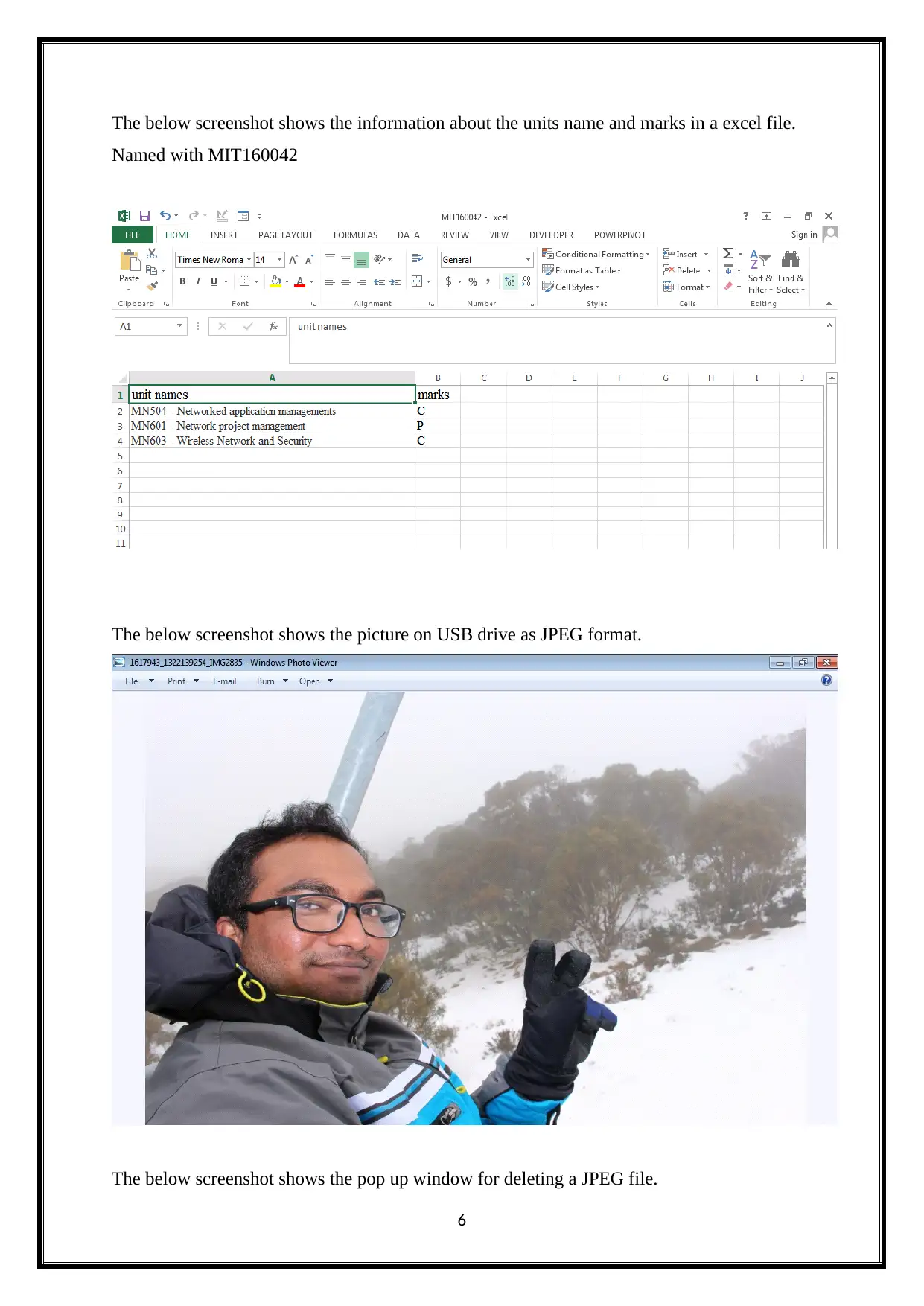
The below screenshot shows the information about the units name and marks in a excel file.
Named with MIT160042
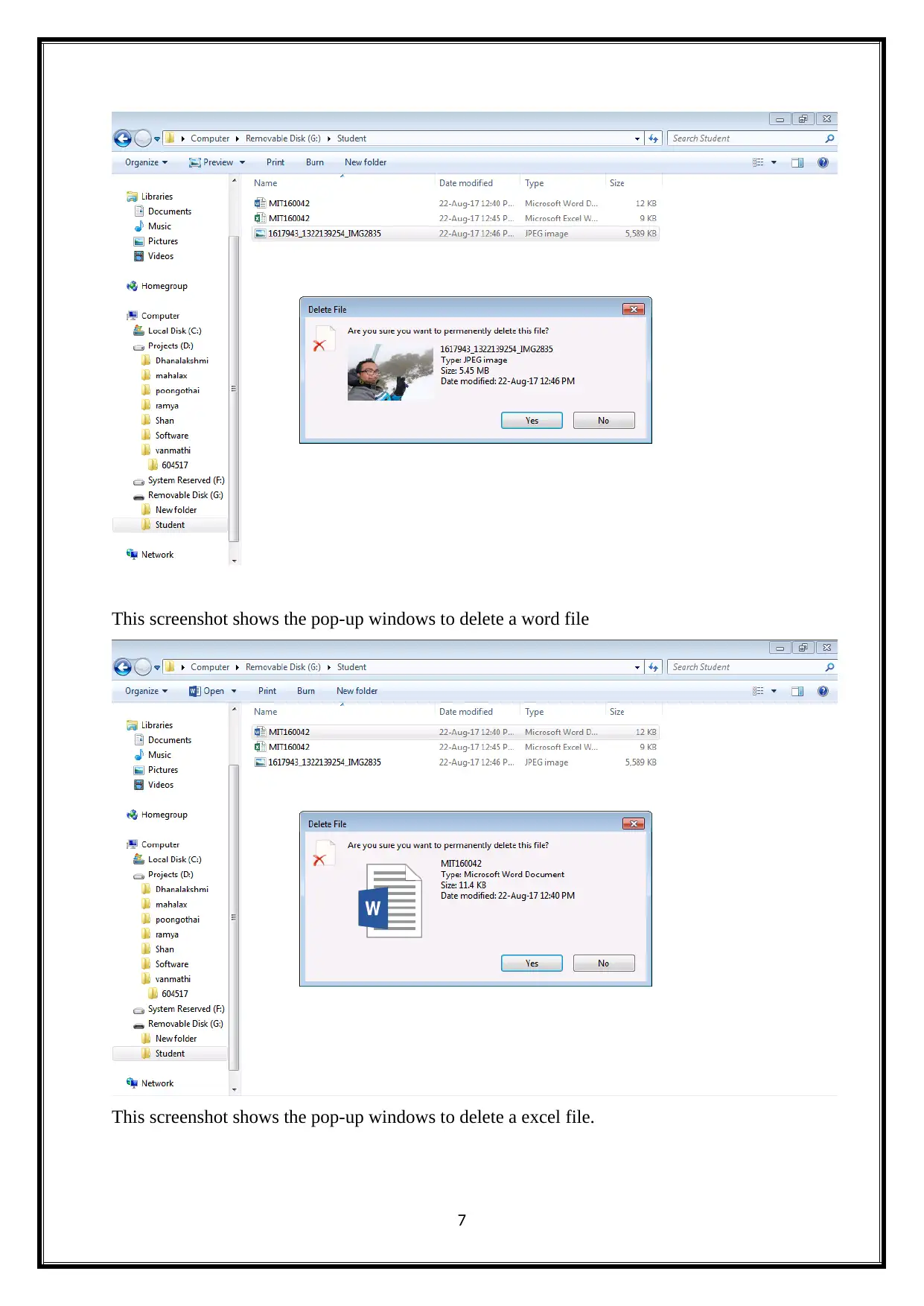
The below screenshot shows the picture on USB drive as JPEG format.
The below screenshot shows the pop up window for deleting a JPEG file.
6
Named with MIT160042
The below screenshot shows the picture on USB drive as JPEG format.
The below screenshot shows the pop up window for deleting a JPEG file.
6
Paraphrase This Document
Need a fresh take? Get an instant paraphrase of this document with our AI Paraphraser

This screenshot shows the pop-up windows to delete a word file
This screenshot shows the pop-up windows to delete a excel file.
7
This screenshot shows the pop-up windows to delete a excel file.
7

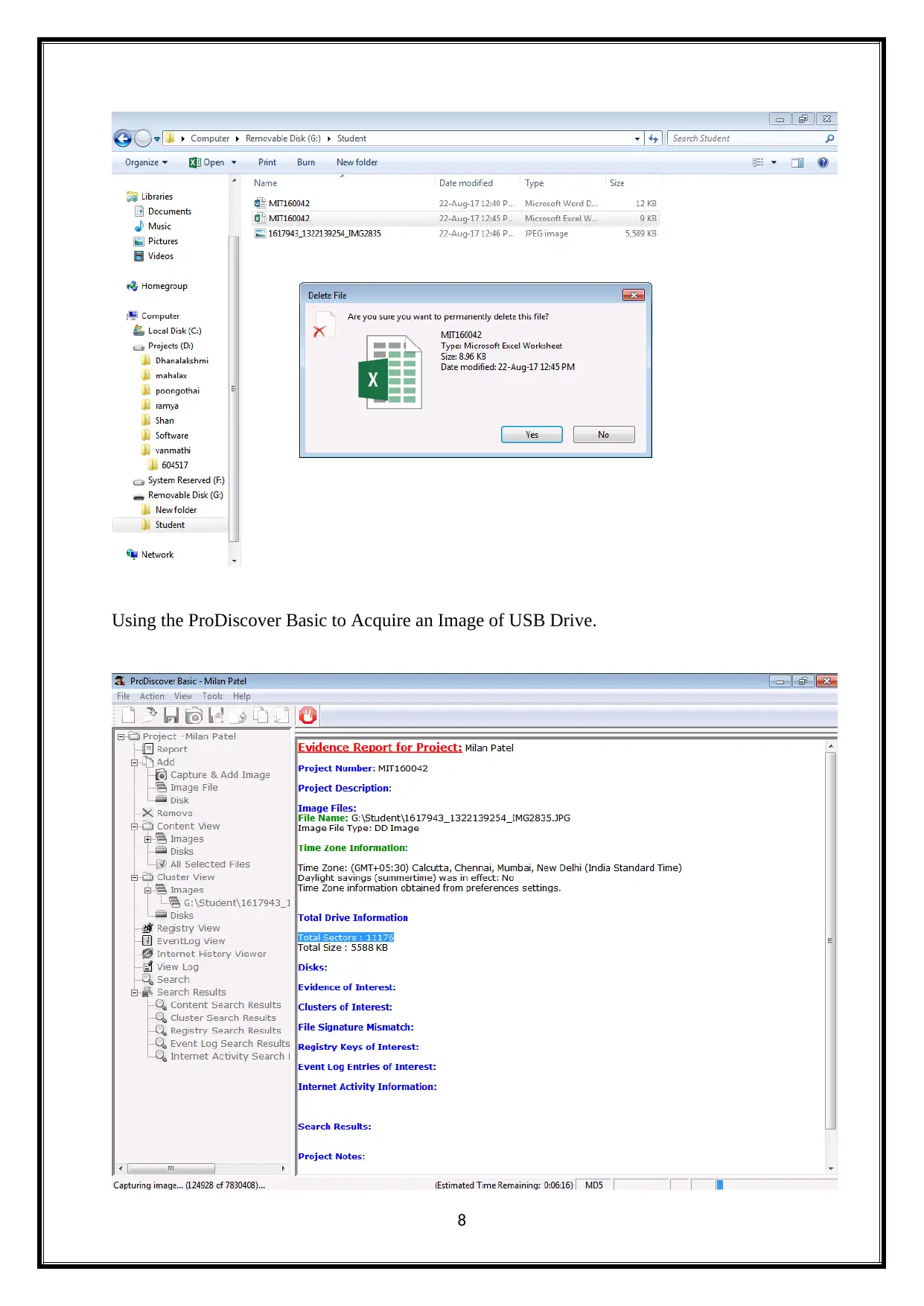
Using the ProDiscover Basic to Acquire an Image of USB Drive.
8
8
⊘ This is a preview!⊘
Do you want full access?
Subscribe today to unlock all pages.

Trusted by 1+ million students worldwide

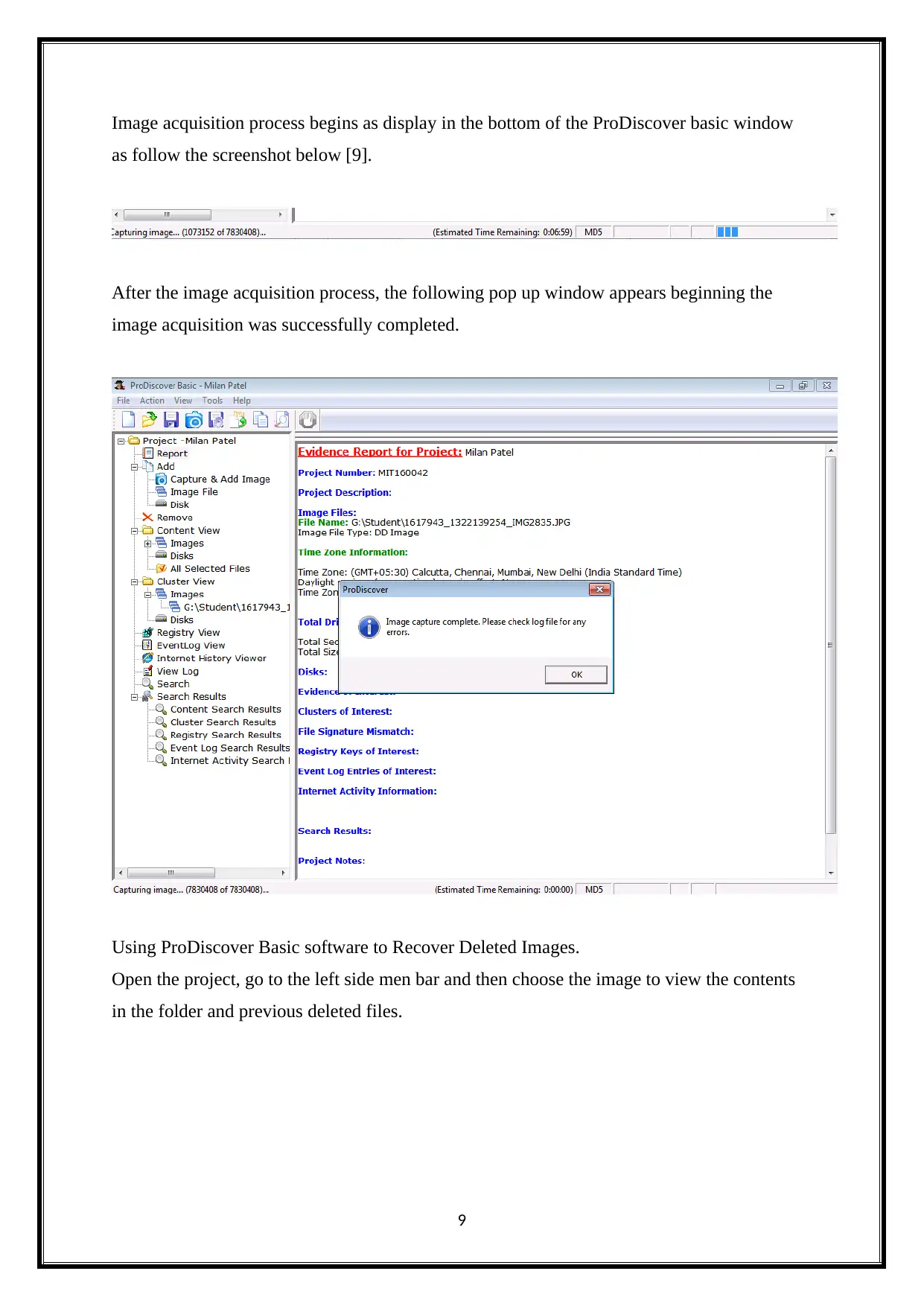
Image acquisition process begins as display in the bottom of the ProDiscover basic window
as follow the screenshot below [9].
After the image acquisition process, the following pop up window appears beginning the
image acquisition was successfully completed.
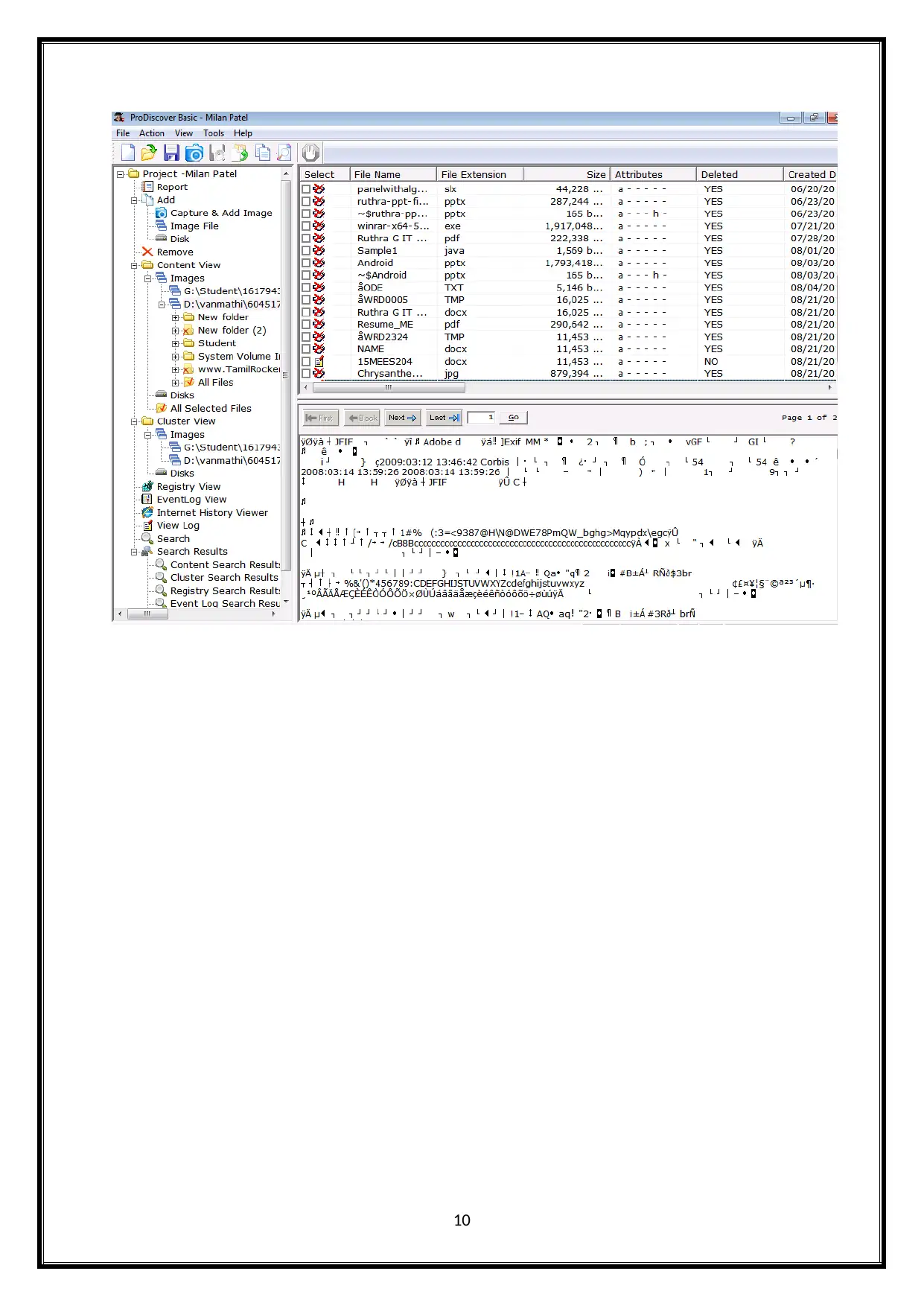
Using ProDiscover Basic software to Recover Deleted Images.
Open the project, go to the left side men bar and then choose the image to view the contents
in the folder and previous deleted files.
9
as follow the screenshot below [9].
After the image acquisition process, the following pop up window appears beginning the
image acquisition was successfully completed.
Using ProDiscover Basic software to Recover Deleted Images.
Open the project, go to the left side men bar and then choose the image to view the contents
in the folder and previous deleted files.
9
Paraphrase This Document
Need a fresh take? Get an instant paraphrase of this document with our AI Paraphraser

10

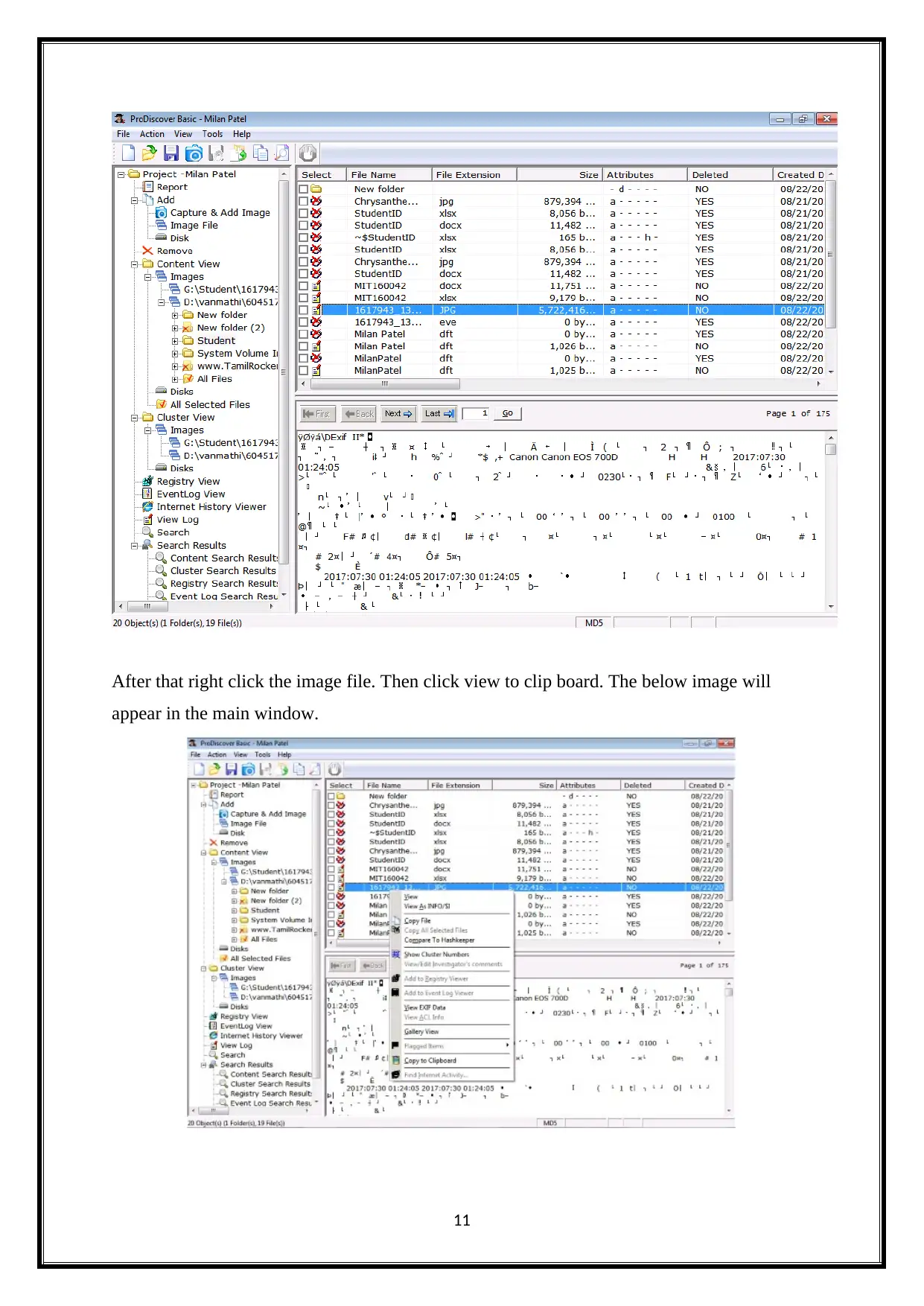
After that right click the image file. Then click view to clip board. The below image will
appear in the main window.
11
appear in the main window.
11
⊘ This is a preview!⊘
Do you want full access?
Subscribe today to unlock all pages.

Trusted by 1+ million students worldwide
1 out of 21
Related Documents
Your All-in-One AI-Powered Toolkit for Academic Success.
+13062052269
info@desklib.com
Available 24*7 on WhatsApp / Email
Unlock your academic potential
Copyright © 2020–2025 A2Z Services. All Rights Reserved. Developed and managed by ZUCOL.