Computer Networks Assignment: IP Addressing, Subnetting, and DNS

Verified

Added on  2023/01/11

|2
|795
|92
Homework Assignment
AI Summary
This homework assignment delves into fundamental networking concepts. The first part contrasts static IP addresses with DHCP, highlighting their respective configurations and advantages. The second section explains DNS zones and their role in hosting DNS records, with examples of different zone types. The assignment then addresses the limitations of classful addressing and introduces Classless Inter-Domain Routing (CIDR) as a more efficient method for IP address allocation, including a practical example. Following this, a subnetting exercise is presented, calculating network and host addresses based on a given IP address and subnet mask. Finally, the assignment concludes with a reflection on the modules covered, summarizing key learning points and areas requiring further exploration, specifically mentioning the need for a clearer explanation of wireless LANs and WiFi protocols.
Document Page
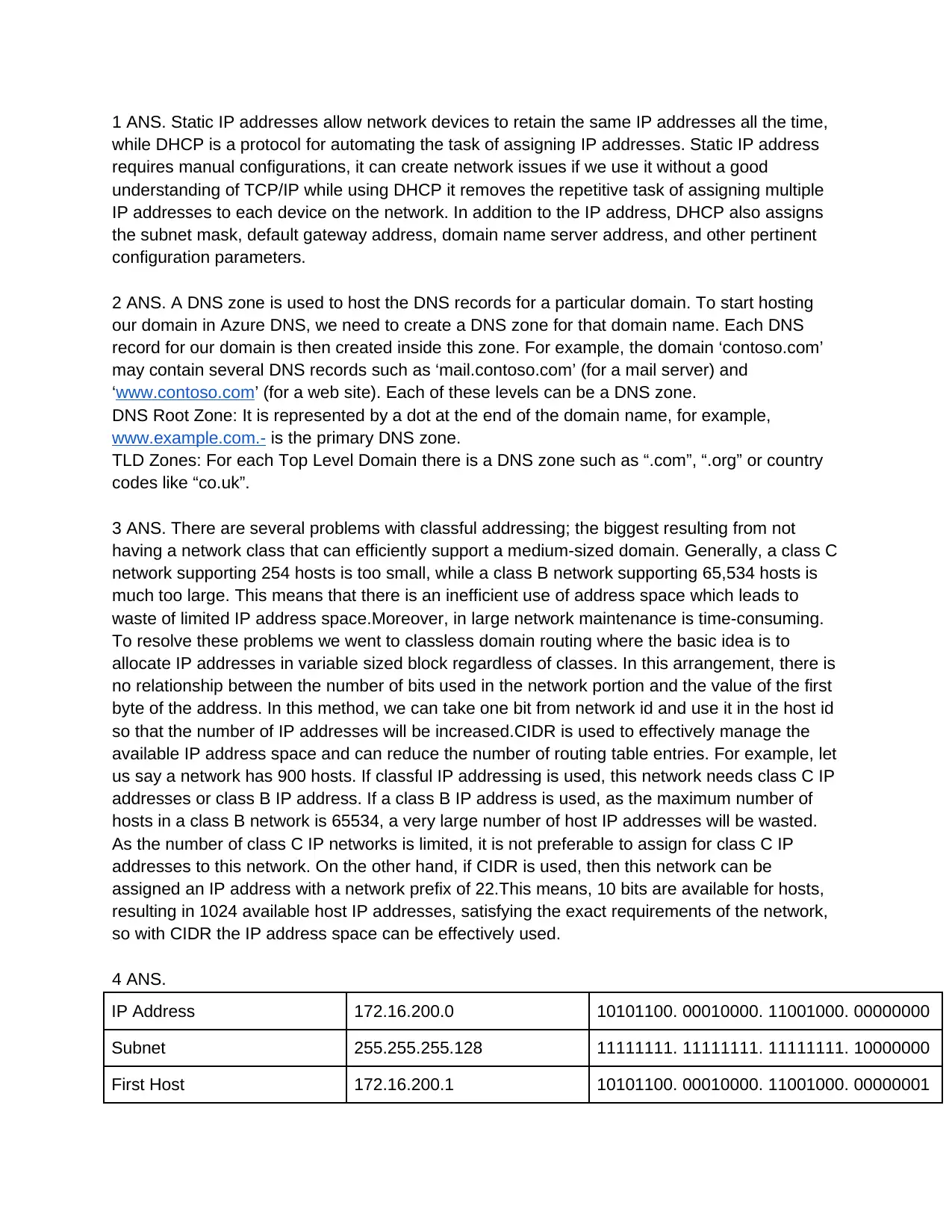
1 ANS. Static IP addresses allow network devices to retain the same IP addresses all the time,
while DHCP is a protocol for automating the task of assigning IP addresses. Static IP address
requires manual configurations, it can create network issues if we use it without a good
understanding of TCP/IP while using DHCP it removes the repetitive task of assigning multiple
IP addresses to each device on the network. In addition to the IP address, DHCP also assigns
the subnet mask, default gateway address, domain name server address, and other pertinent
configuration parameters.
2 ANS. A DNS zone is used to host the DNS records for a particular domain. To start hosting
our domain in Azure DNS, we need to create a DNS zone for that domain name. Each DNS
record for our domain is then created inside this zone. For example, the domain ‘contoso.com’
may contain several DNS records such as ‘mail.contoso.com’ (for a mail server) and
www.contoso.com’ (for a web site). Each of these levels can be a DNS zone.
DNS Root Zone: It is represented by a dot at the end of the domain name, for example,
www.example.com.- is the primary DNS zone.
TLD Zones: For each Top Level Domain there is a DNS zone such as “.com”, “.org” or country
codes like “co.uk”.
3 ANS. There are several problems with classful addressing; the biggest resulting from not
having a network class that can efficiently support a medium-sized domain. Generally, a class C
network supporting 254 hosts is too small, while a class B network supporting 65,534 hosts is
much too large. This means that there is an inefficient use of address space which leads to
waste of limited IP address space.Moreover, in large network maintenance is time-consuming.
To resolve these problems we went to classless domain routing where the basic idea is to
allocate IP addresses in variable sized block regardless of classes. In this arrangement, there is
no relationship between the number of bits used in the network portion and the value of the first
byte of the address. In this method, we can take one bit from network id and use it in the host id
so that the number of IP addresses will be increased.CIDR is used to effectively manage the
available IP address space and can reduce the number of routing table entries. For example, let
us say a network has 900 hosts. If classful IP addressing is used, this network needs class C IP
addresses or class B IP address. If a class B IP address is used, as the maximum number of
hosts in a class B network is 65534, a very large number of host IP addresses will be wasted.
As the number of class C IP networks is limited, it is not preferable to assign for class C IP
addresses to this network. On the other hand, if CIDR is used, then this network can be
assigned an IP address with a network prefix of 22.This means, 10 bits are available for hosts,
resulting in 1024 available host IP addresses, satisfying the exact requirements of the network,
so with CIDR the IP address space can be effectively used.
4 ANS.
IP Address 172.16.200.0 10101100. 00010000. 11001000. 00000000
Subnet 255.255.255.128 11111111. 11111111. 11111111. 10000000
First Host 172.16.200.1 10101100. 00010000. 11001000. 00000001
tabler-icon-diamond-filled.svg

Paraphrase This Document

Need a fresh take? Get an instant paraphrase of this document with our AI Paraphraser
Document Page
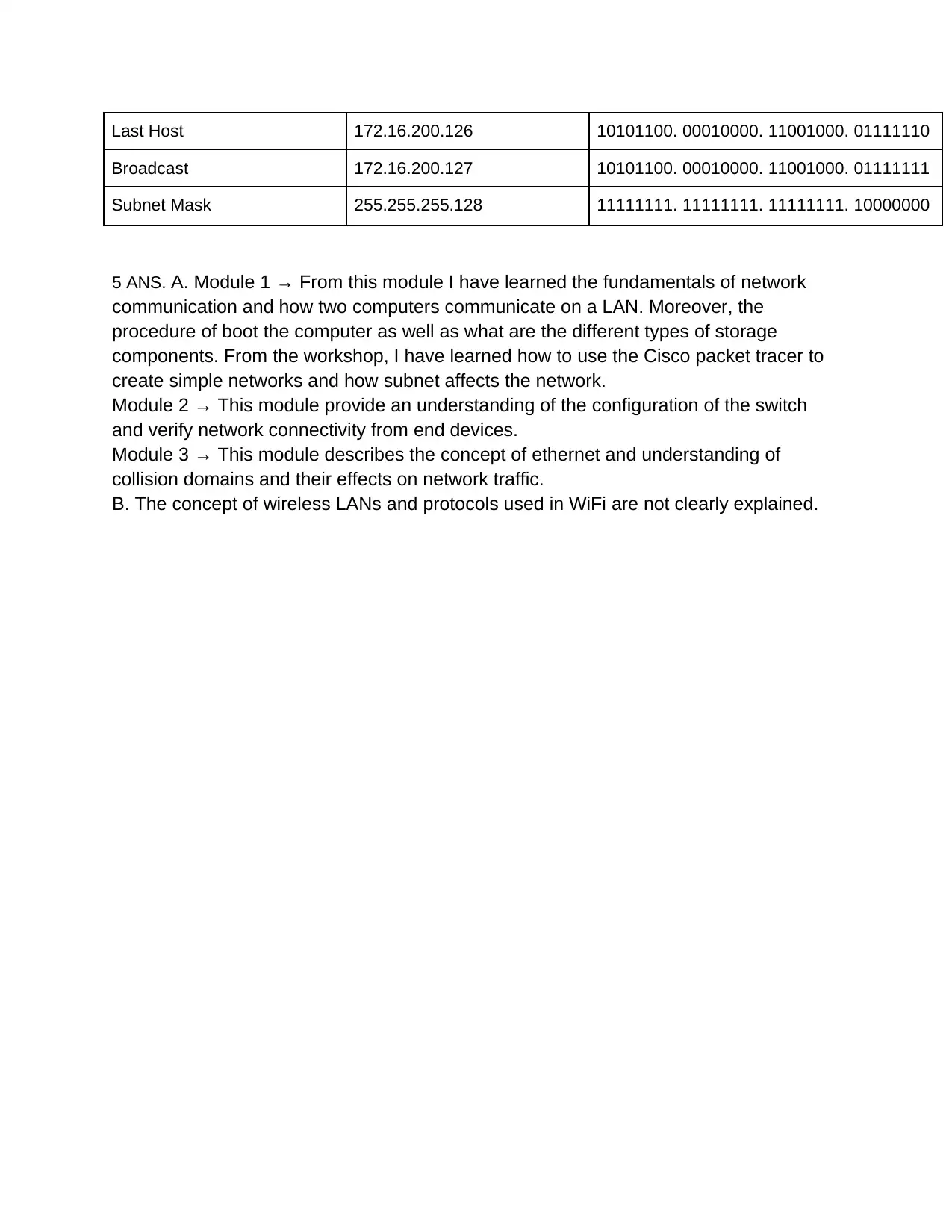
Last Host 172.16.200.126 10101100. 00010000. 11001000. 01111110
Broadcast 172.16.200.127 10101100. 00010000. 11001000. 01111111
Subnet Mask 255.255.255.128 11111111. 11111111. 11111111. 10000000
5 ANS. A. Module 1 → From this module I have learned the fundamentals of network
communication and how two computers communicate on a LAN. Moreover, the
procedure of boot the computer as well as what are the different types of storage
components. From the workshop, I have learned how to use the Cisco packet tracer to
create simple networks and how subnet affects the network.
Module 2 → This module provide an understanding of the configuration of the switch
and verify network connectivity from end devices.
Module 3 → This module describes the concept of ethernet and understanding of
collision domains and their effects on network traffic.
B. The concept of wireless LANs and protocols used in WiFi are not clearly explained.
chevron_up_icon
1 out of 2
circle_padding
hide_on_mobile
zoom_out_icon
[object Object]