Computer Security and Linux Systems: Firewall, Reiser, and MS-DOS

Verified

Added on  2020/01/28

|5
|1247
|61
Homework Assignment
AI Summary
This assignment explores several key aspects of computer security and system administration. It begins with an explanation of Windows Firewall, its purpose, and the advantages of a default-deny configuration. The assignment then delves into the Reiser File System (ReiserFS) in the context of Linux, explaining its 'journaled' nature and its significance for system administrators, highlighting the difference between Reiser3 and Reiser4. The content also examines the /etc/securetty file and its role in controlling secure terminal access. Furthermore, the assignment addresses the MS-DOS command 'net user administrator /active:yes' and explains its function, potential issues, and how to resolve them. Finally, it discusses the risks associated with using online tools to automatically fix device drivers, cautioning against potential security threats such as Trojans and viruses. The solutions provided offer a comprehensive understanding of these fundamental concepts in computer security and system administration.
Document Page
1. What is the Windows Firewall and what is its purpose. Which
is better in a firewall, default permit or default deny? Why?
A firewall is a network security system, either hardware- or software-
based, that controls incoming and outgoing network traffic based on a set
of rules. Acting as a barrier between a trusted network and other
untrusted networks
-- Such as the Internet
-- Or less-trusted networks
-- Such as a retail merchant's network outside of a cardholder data
environment
A firewall controls access to the resources of a network through a positive
control model. This means that the only traffic allowed onto the network
defined in the firewall policy is; all other traffic is denied.
The primary purpose of a firewall is packet filtering. When a computer
sends a request across the Internet, it takes the form of small packets of
data, which travel through the network to their destination. The target
server responds with its own packets of data, which return along the same
route. A firewall monitors every packet that passes through it, considering
its source, destination and what type of data it contains, and it compares
that information to its internal rule set. If the firewall detects that the
packet is unauthorized, it discards the data. Typically, firewalls allow
traffic from common programs such email or Web browsers, while
discarding most incoming requests. You can also configure a firewall to
disallow access to certain websites or services to prevent employees from
accessing non-work resources while on the clock.
1
tabler-icon-diamond-filled.svg

Paraphrase This Document

Need a fresh take? Get an instant paraphrase of this document with our AI Paraphraser
Document Page
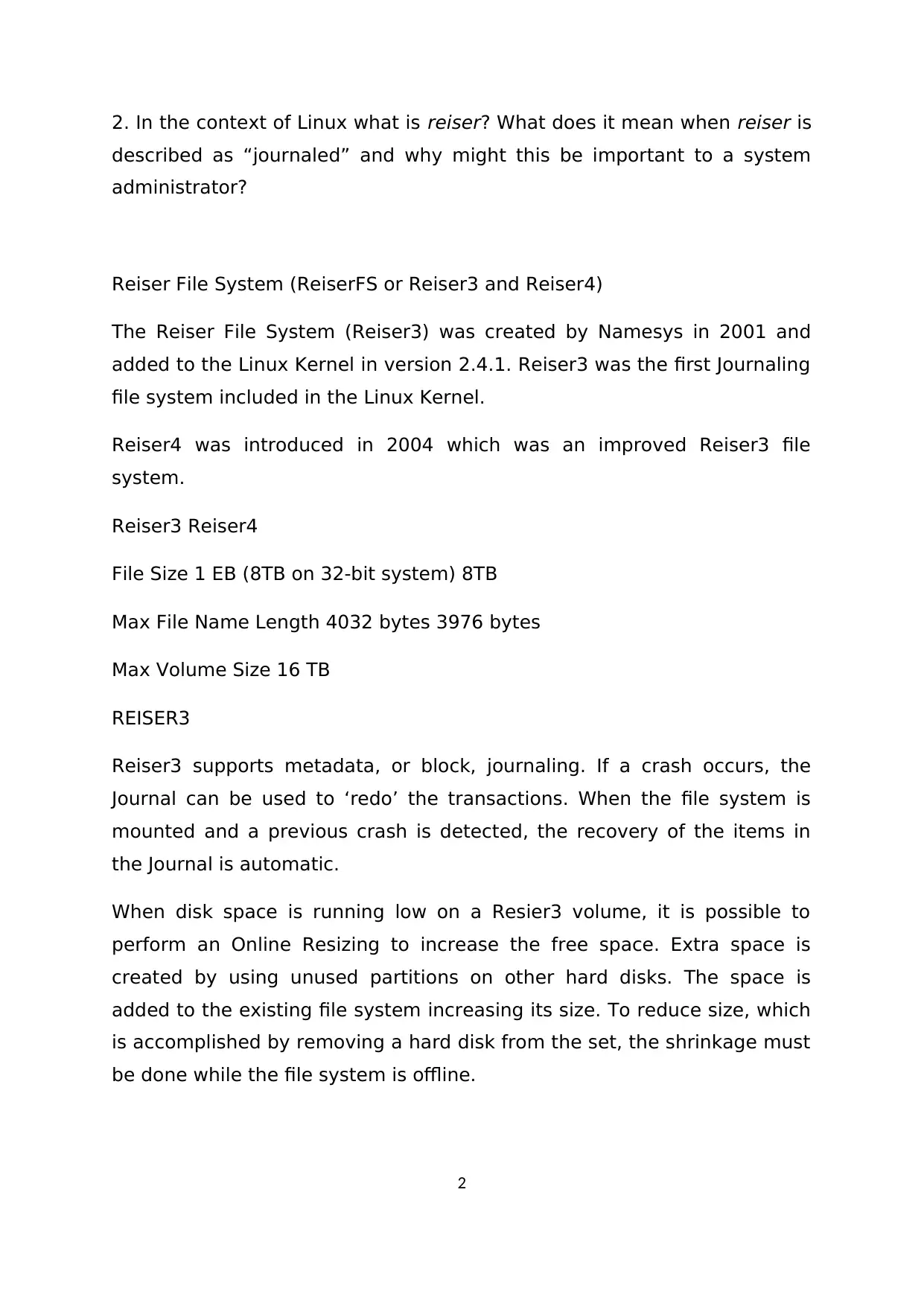
2. In the context of Linux what is reiser? What does it mean when reiser is
described as “journaled” and why might this be important to a system
administrator?
Reiser File System (ReiserFS or Reiser3 and Reiser4)
The Reiser File System (Reiser3) was created by Namesys in 2001 and
added to the Linux Kernel in version 2.4.1. Reiser3 was the first Journaling
file system included in the Linux Kernel.
Reiser4 was introduced in 2004 which was an improved Reiser3 file
system.
Reiser3 Reiser4
File Size 1 EB (8TB on 32-bit system) 8TB
Max File Name Length 4032 bytes 3976 bytes
Max Volume Size 16 TB
REISER3
Reiser3 supports metadata, or block, journaling. If a crash occurs, the
Journal can be used to ‘redo’ the transactions. When the file system is
mounted and a previous crash is detected, the recovery of the items in
the Journal is automatic.
When disk space is running low on a Resier3 volume, it is possible to
perform an Online Resizing to increase the free space. Extra space is
created by using unused partitions on other hard disks. The space is
added to the existing file system increasing its size. To reduce size, which
is accomplished by removing a hard disk from the set, the shrinkage must
be done while the file system is offline.
2
Document Page
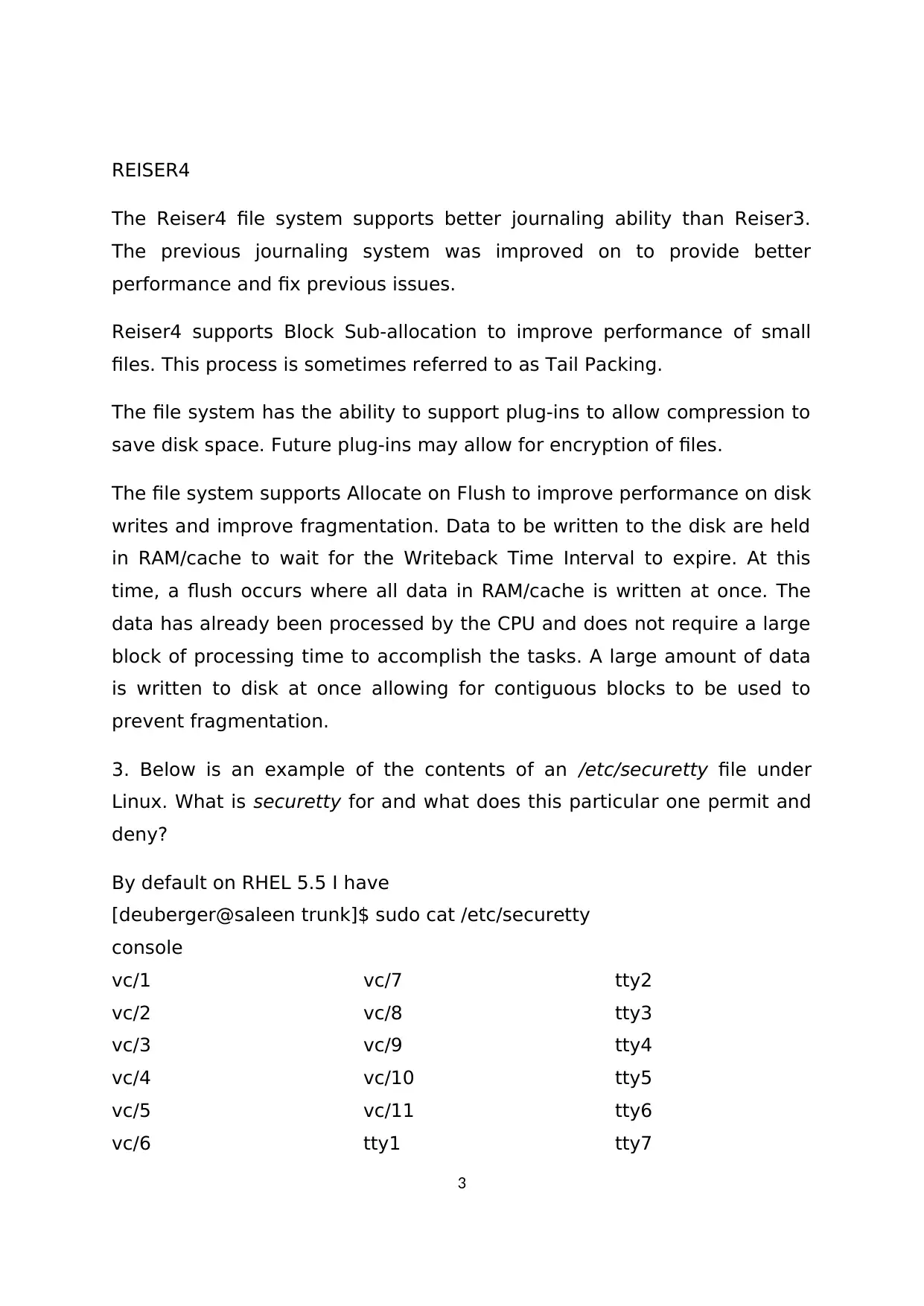
REISER4
The Reiser4 file system supports better journaling ability than Reiser3.
The previous journaling system was improved on to provide better
performance and fix previous issues.
Reiser4 supports Block Sub-allocation to improve performance of small
files. This process is sometimes referred to as Tail Packing.
The file system has the ability to support plug-ins to allow compression to
save disk space. Future plug-ins may allow for encryption of files.
The file system supports Allocate on Flush to improve performance on disk
writes and improve fragmentation. Data to be written to the disk are held
in RAM/cache to wait for the Writeback Time Interval to expire. At this
time, a flush occurs where all data in RAM/cache is written at once. The
data has already been processed by the CPU and does not require a large
block of processing time to accomplish the tasks. A large amount of data
is written to disk at once allowing for contiguous blocks to be used to
prevent fragmentation.
3. Below is an example of the contents of an /etc/securetty file under
Linux. What is securetty for and what does this particular one permit and
deny?
By default on RHEL 5.5 I have
[deuberger@saleen trunk]$ sudo cat /etc/securetty
console
vc/1
vc/2
vc/3
vc/4
vc/5
vc/6
vc/7
vc/8
vc/9
vc/10
vc/11
tty1
tty2
tty3
tty4
tty5
tty6
tty7
3
Document Page
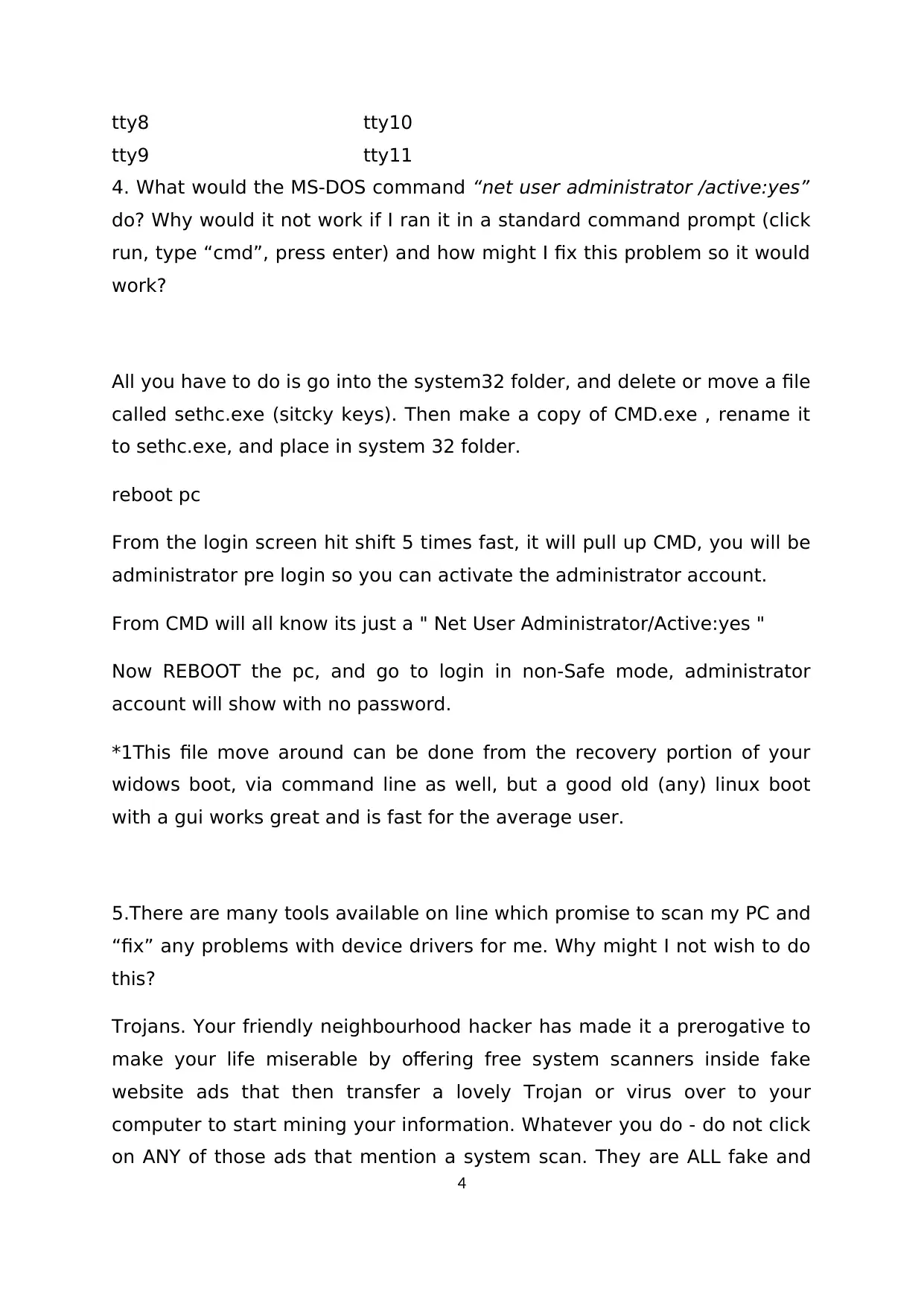
tty8
tty9
tty10
tty11
4. What would the MS-DOS command “net user administrator /active:yes”
do? Why would it not work if I ran it in a standard command prompt (click
run, type “cmd”, press enter) and how might I fix this problem so it would
work?
All you have to do is go into the system32 folder, and delete or move a file
called sethc.exe (sitcky keys). Then make a copy of CMD.exe , rename it
to sethc.exe, and place in system 32 folder.
reboot pc
From the login screen hit shift 5 times fast, it will pull up CMD, you will be
administrator pre login so you can activate the administrator account.
From CMD will all know its just a " Net User Administrator/Active:yes "
Now REBOOT the pc, and go to login in non-Safe mode, administrator
account will show with no password.
*1This file move around can be done from the recovery portion of your
widows boot, via command line as well, but a good old (any) linux boot
with a gui works great and is fast for the average user.
5.There are many tools available on line which promise to scan my PC and
“fix” any problems with device drivers for me. Why might I not wish to do
this?
Trojans. Your friendly neighbourhood hacker has made it a prerogative to
make your life miserable by offering free system scanners inside fake
website ads that then transfer a lovely Trojan or virus over to your
computer to start mining your information. Whatever you do - do not click
on ANY of those ads that mention a system scan. They are ALL fake and
4
tabler-icon-diamond-filled.svg

Paraphrase This Document

Need a fresh take? Get an instant paraphrase of this document with our AI Paraphraser
Document Page
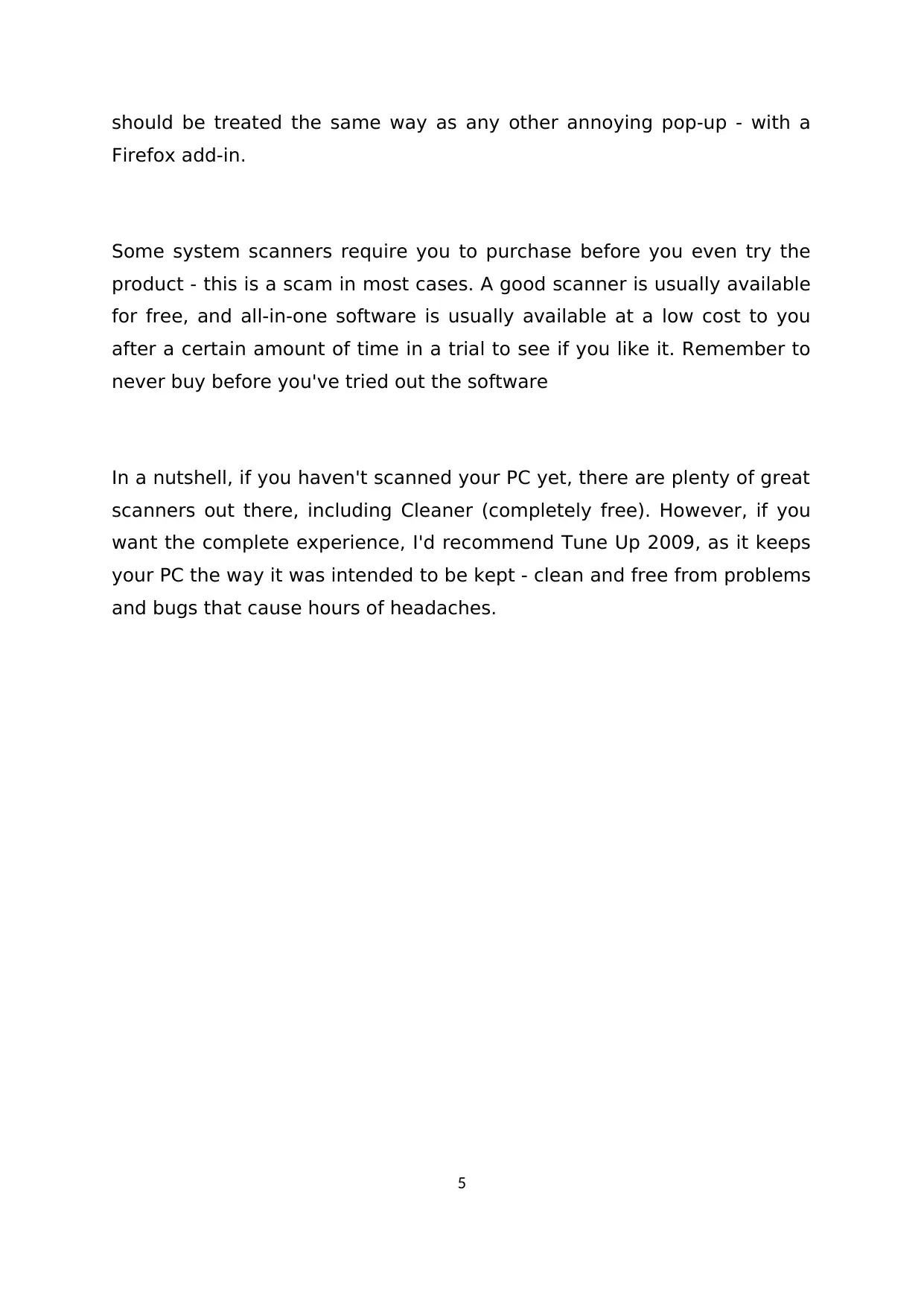
should be treated the same way as any other annoying pop-up - with a
Firefox add-in.
Some system scanners require you to purchase before you even try the
product - this is a scam in most cases. A good scanner is usually available
for free, and all-in-one software is usually available at a low cost to you
after a certain amount of time in a trial to see if you like it. Remember to
never buy before you've tried out the software
In a nutshell, if you haven't scanned your PC yet, there are plenty of great
scanners out there, including Cleaner (completely free). However, if you
want the complete experience, I'd recommend Tune Up 2009, as it keeps
your PC the way it was intended to be kept - clean and free from problems
and bugs that cause hours of headaches.
5
chevron_up_icon
1 out of 5
circle_padding
hide_on_mobile
zoom_out_icon
[object Object]