COSC 578 HW#6 Database Queries
VerifiedAdded on 2019/09/18
|3
|843
|347
Homework Assignment
AI Summary
This is a homework assignment for the COSC 578 Database Management Systems course. It requires students to create tables in MySQL, insert data, and then write SQL queries to answer a series of questions. The assignment includes tasks such as retrieving data based on specific criteria, using subqueries, updating and deleting data, creating views, and discussing the results of these operations. The provided solution includes table creation scripts, data insertion scripts, SQL statements, and result tables for each question.
COSC 578 Database Management Systems
Professor: Sungchul Hong
HW#6
Please create following tables by using MySQL and answer the following questions.
Submit a table creation script and data insert script. Then prepare the report as follows:
question number, question, SQL statement and the result table for each question.
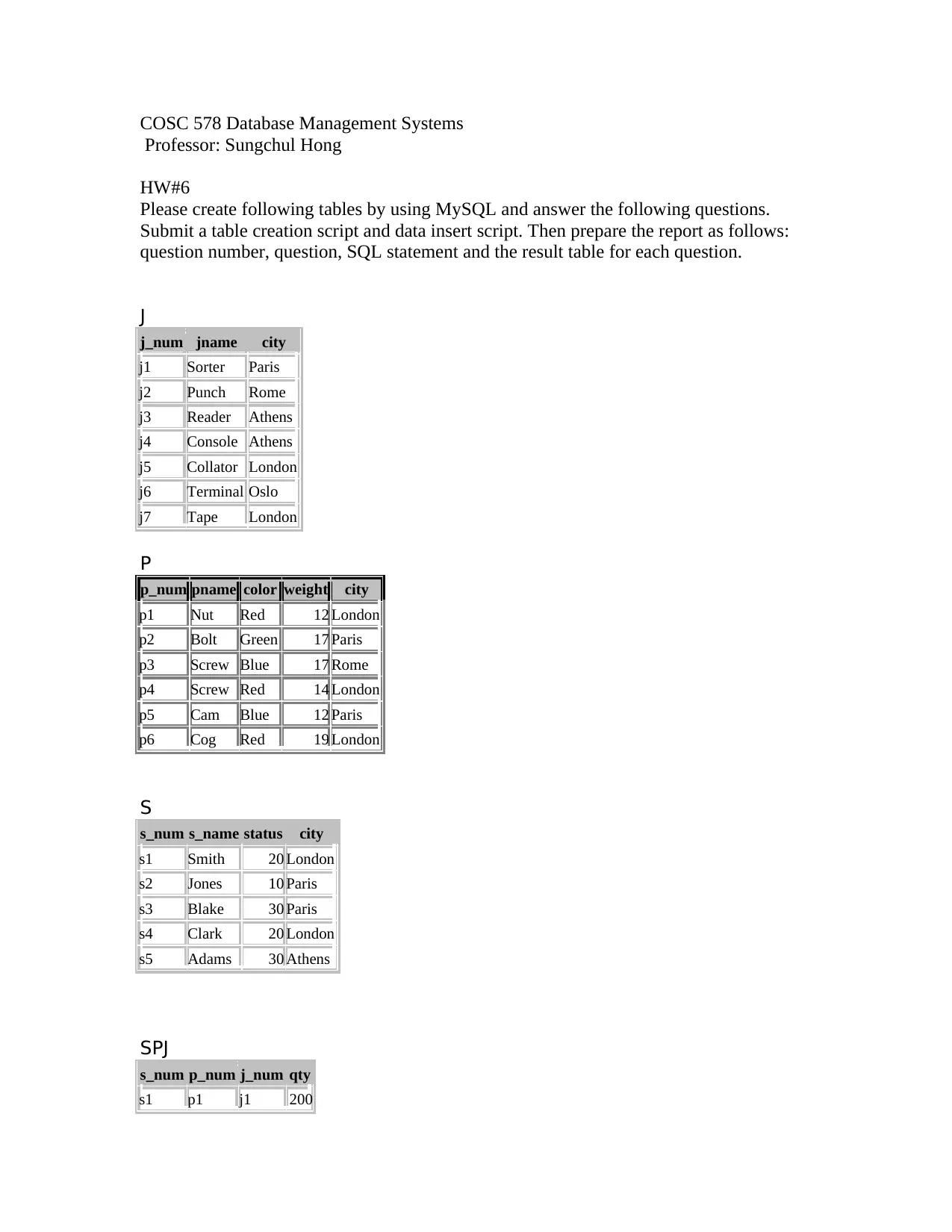
J
j_num jname city
j1 Sorter Paris
j2 Punch Rome
j3 Reader Athens
j4 Console Athens
j5 Collator London
j6 Terminal Oslo
j7 Tape London
P
p_num pname color weight city
p1 Nut Red 12 London
p2 Bolt Green 17 Paris
p3 Screw Blue 17 Rome
p4 Screw Red 14 London
p5 Cam Blue 12 Paris
p6 Cog Red 19 London
S
s_num s_name status city
s1 Smith 20 London
s2 Jones 10 Paris
s3 Blake 30 Paris
s4 Clark 20 London
s5 Adams 30 Athens
SPJ
s_num p_num j_num qty
s1 p1 j1 200
Professor: Sungchul Hong
HW#6
Please create following tables by using MySQL and answer the following questions.
Submit a table creation script and data insert script. Then prepare the report as follows:
question number, question, SQL statement and the result table for each question.
J
j_num jname city
j1 Sorter Paris
j2 Punch Rome
j3 Reader Athens
j4 Console Athens
j5 Collator London
j6 Terminal Oslo
j7 Tape London
P
p_num pname color weight city
p1 Nut Red 12 London
p2 Bolt Green 17 Paris
p3 Screw Blue 17 Rome
p4 Screw Red 14 London
p5 Cam Blue 12 Paris
p6 Cog Red 19 London
S
s_num s_name status city
s1 Smith 20 London
s2 Jones 10 Paris
s3 Blake 30 Paris
s4 Clark 20 London
s5 Adams 30 Athens
SPJ
s_num p_num j_num qty
s1 p1 j1 200
Paraphrase This Document
Need a fresh take? Get an instant paraphrase of this document with our AI Paraphraser

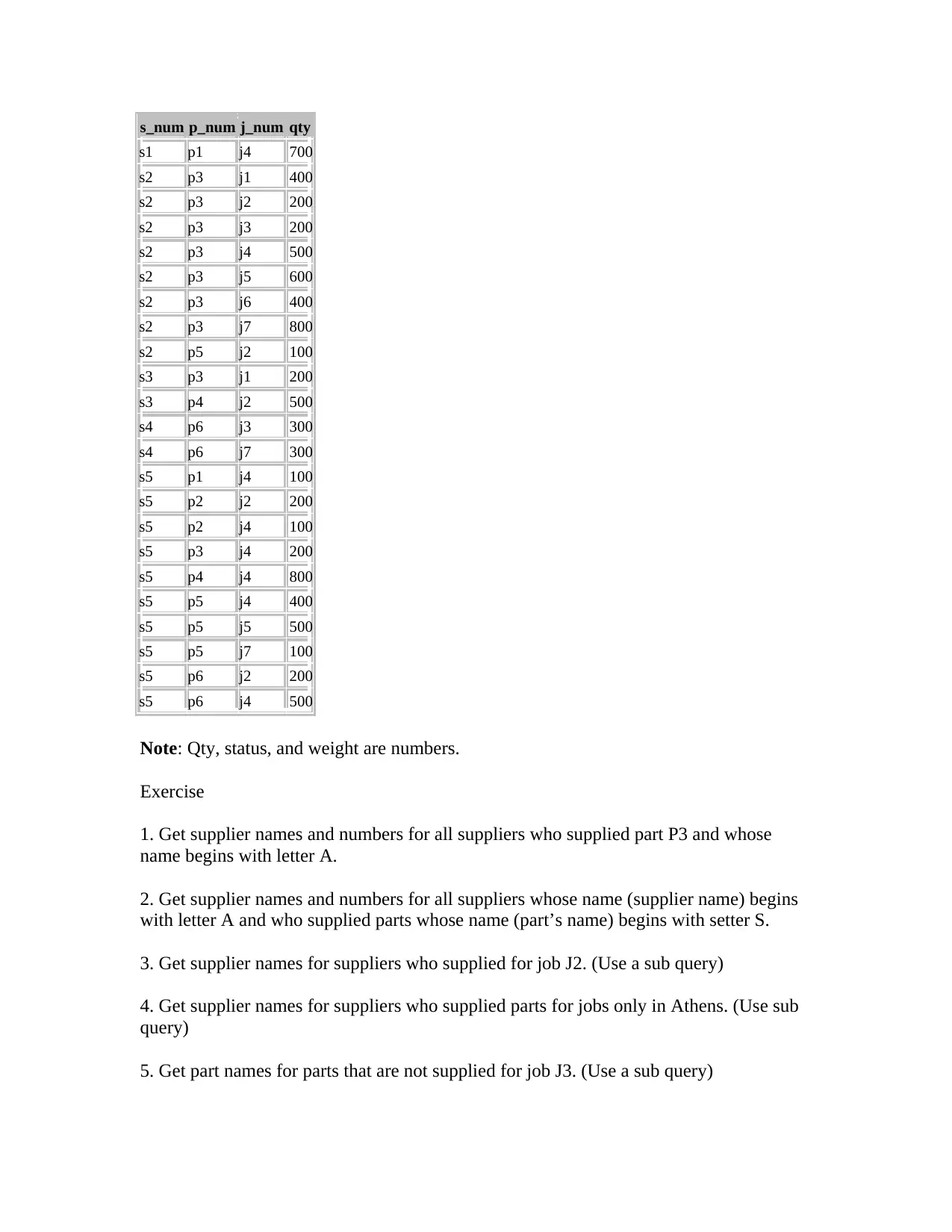
s_num p_num j_num qty
s1 p1 j4 700
s2 p3 j1 400
s2 p3 j2 200
s2 p3 j3 200
s2 p3 j4 500
s2 p3 j5 600
s2 p3 j6 400
s2 p3 j7 800
s2 p5 j2 100
s3 p3 j1 200
s3 p4 j2 500
s4 p6 j3 300
s4 p6 j7 300
s5 p1 j4 100
s5 p2 j2 200
s5 p2 j4 100
s5 p3 j4 200
s5 p4 j4 800
s5 p5 j4 400
s5 p5 j5 500
s5 p5 j7 100
s5 p6 j2 200
s5 p6 j4 500
Note: Qty, status, and weight are numbers.
Exercise
1. Get supplier names and numbers for all suppliers who supplied part P3 and whose
name begins with letter A.
2. Get supplier names and numbers for all suppliers whose name (supplier name) begins
with letter A and who supplied parts whose name (part’s name) begins with setter S.
3. Get supplier names for suppliers who supplied for job J2. (Use a sub query)
4. Get supplier names for suppliers who supplied parts for jobs only in Athens. (Use sub
query)
5. Get part names for parts that are not supplied for job J3. (Use a sub query)
s1 p1 j4 700
s2 p3 j1 400
s2 p3 j2 200
s2 p3 j3 200
s2 p3 j4 500
s2 p3 j5 600
s2 p3 j6 400
s2 p3 j7 800
s2 p5 j2 100
s3 p3 j1 200
s3 p4 j2 500
s4 p6 j3 300
s4 p6 j7 300
s5 p1 j4 100
s5 p2 j2 200
s5 p2 j4 100
s5 p3 j4 200
s5 p4 j4 800
s5 p5 j4 400
s5 p5 j5 500
s5 p5 j7 100
s5 p6 j2 200
s5 p6 j4 500
Note: Qty, status, and weight are numbers.
Exercise
1. Get supplier names and numbers for all suppliers who supplied part P3 and whose
name begins with letter A.
2. Get supplier names and numbers for all suppliers whose name (supplier name) begins
with letter A and who supplied parts whose name (part’s name) begins with setter S.
3. Get supplier names for suppliers who supplied for job J2. (Use a sub query)
4. Get supplier names for suppliers who supplied parts for jobs only in Athens. (Use sub
query)
5. Get part names for parts that are not supplied for job J3. (Use a sub query)

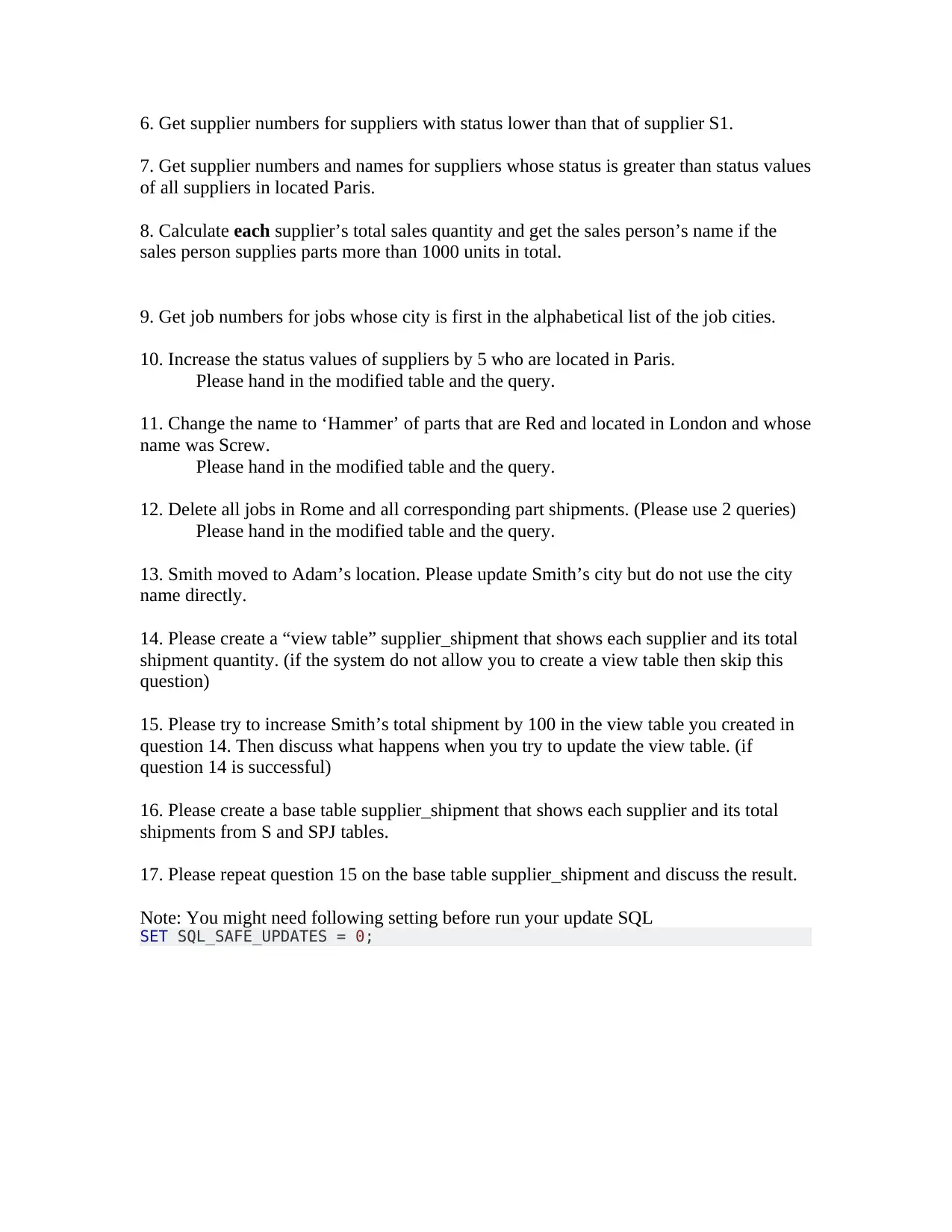
6. Get supplier numbers for suppliers with status lower than that of supplier S1.
7. Get supplier numbers and names for suppliers whose status is greater than status values
of all suppliers in located Paris.
8. Calculate each supplier’s total sales quantity and get the sales person’s name if the
sales person supplies parts more than 1000 units in total.
9. Get job numbers for jobs whose city is first in the alphabetical list of the job cities.
10. Increase the status values of suppliers by 5 who are located in Paris.
Please hand in the modified table and the query.
11. Change the name to ‘Hammer’ of parts that are Red and located in London and whose
name was Screw.
Please hand in the modified table and the query.
12. Delete all jobs in Rome and all corresponding part shipments. (Please use 2 queries)
Please hand in the modified table and the query.
13. Smith moved to Adam’s location. Please update Smith’s city but do not use the city
name directly.
14. Please create a “view table” supplier_shipment that shows each supplier and its total
shipment quantity. (if the system do not allow you to create a view table then skip this
question)
15. Please try to increase Smith’s total shipment by 100 in the view table you created in
question 14. Then discuss what happens when you try to update the view table. (if
question 14 is successful)
16. Please create a base table supplier_shipment that shows each supplier and its total
shipments from S and SPJ tables.
17. Please repeat question 15 on the base table supplier_shipment and discuss the result.
Note: You might need following setting before run your update SQL
SET SQL_SAFE_UPDATES = 0;
7. Get supplier numbers and names for suppliers whose status is greater than status values
of all suppliers in located Paris.
8. Calculate each supplier’s total sales quantity and get the sales person’s name if the
sales person supplies parts more than 1000 units in total.
9. Get job numbers for jobs whose city is first in the alphabetical list of the job cities.
10. Increase the status values of suppliers by 5 who are located in Paris.
Please hand in the modified table and the query.
11. Change the name to ‘Hammer’ of parts that are Red and located in London and whose
name was Screw.
Please hand in the modified table and the query.
12. Delete all jobs in Rome and all corresponding part shipments. (Please use 2 queries)
Please hand in the modified table and the query.
13. Smith moved to Adam’s location. Please update Smith’s city but do not use the city
name directly.
14. Please create a “view table” supplier_shipment that shows each supplier and its total
shipment quantity. (if the system do not allow you to create a view table then skip this
question)
15. Please try to increase Smith’s total shipment by 100 in the view table you created in
question 14. Then discuss what happens when you try to update the view table. (if
question 14 is successful)
16. Please create a base table supplier_shipment that shows each supplier and its total
shipments from S and SPJ tables.
17. Please repeat question 15 on the base table supplier_shipment and discuss the result.
Note: You might need following setting before run your update SQL
SET SQL_SAFE_UPDATES = 0;
⊘ This is a preview!⊘
Do you want full access?
Subscribe today to unlock all pages.

Trusted by 1+ million students worldwide
1 out of 3
Your All-in-One AI-Powered Toolkit for Academic Success.
+13062052269
info@desklib.com
Available 24*7 on WhatsApp / Email
Unlock your academic potential
Copyright © 2020–2026 A2Z Services. All Rights Reserved. Developed and managed by ZUCOL.