Cybersecurity Breach Incident Technical Report: Initech Analysis

Verified

Added on  2023/06/15

|24
|2693
|115
Report
AI Summary
This report details a cybersecurity breach incident, presenting a technical analysis based on a practical scenario involving the fictional Initech Company. The investigation utilizes a virtual machine to simulate a breach investigator's walkthrough, focusing on a multi-part series Virtual Machine with a constant IP address. The report covers the background of Initech, findings from the breach, and a thorough analysis using tools like Nmap, Tomcat, Ngrep, SSL, Keystore, Tcpdump, and Tshark. It also provides recommendations for preventing future breaches, including disabling employee accounts upon termination, changing default passwords, regular network scans, monitoring outbound network traffic, and implementing a comprehensive security plan. The report concludes with a summary of the incident and the steps taken to analyze and address the breach.

Document Page
CYBERSECURITY
tabler-icon-diamond-filled.svg

Paraphrase This Document

Need a fresh take? Get an instant paraphrase of this document with our AI Paraphraser
Document Page
Table of Contents
1. Introduction............................................................................................................................2
2. Background.............................................................................................................................2
3. Findings...................................................................................................................................2
4. Analysis..................................................................................................................................10
5. Recommendations................................................................................................................14
6. Conclusion.............................................................................................................................15
7. References.............................................................................................................................15
8. Appendix...............................................................................................................................17
1
Document Page
1. Introduction
A breach incident will be taken and response Technical Report will be created based on
practical work (scenario). Walkthrough will be used on virtual machine as a breach investigator.
Breach is a first and foremost Virtual Machine in multi-part series, it will be
arranged with constant IP address and configuration will be done for host-
only adaptor to this particular subnet.
The main objective of the project will be provided. The Background of the Initech Company
will then be investigated and the findings will be provided. Analysis will be provided. Suitable
recommendations will be made finally.
2. Background
INITECH Co., Ltd., is a financial IT and the security company, this helps in providing the
information safety solutions. This mainly develops in the systems like e-banking and this offers
e-banking services, there are services such as service preparation and consulting, development,
control and monitoring, and maintenance; and operates data centers that provide various
supplementary services for enterprises. The company also offers IT professional services, such as
security system. The system has the following scenario.
Scenario Initech got through and the board of directors chosen to bring in their internal
Initech Cyber Consulting, LLP division to assist. Given the high profile nature of the breach and,
nearly catastrophic losses, there have been many following attempts at a company. Initech has
tasked their foremost top consultants, this is led by the head, Bill Lumbergh, and Peter Gibbons
to contain and perform an analysis of the breach (The Balance, 2018).
Then the company realizes that the breach was not the work of skilled hackers but a parting
gift from a disgruntled former employee on his way out. The top consultants are hard at work for
containing the breach. However, their work ethics and the mess left behind may be a downfall of
the company (Digital-forensics.sans.org, 2018).
2
Document Page
3. Findings
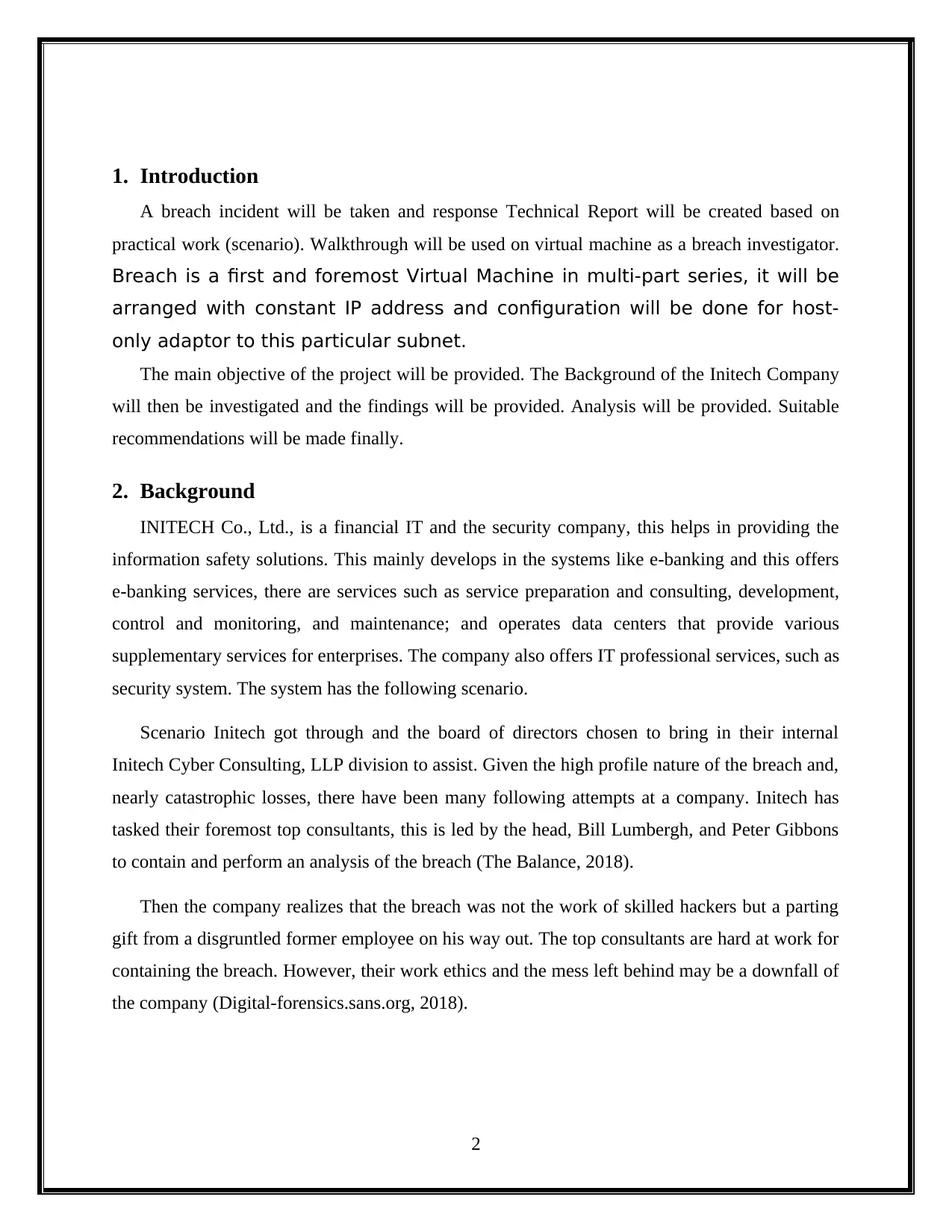
Installed an Oracle Virtual Box and opened the Virtual Box is given below. After install the
Ubuntu in Virtual box was running shown in figure (Baggili, 2011).
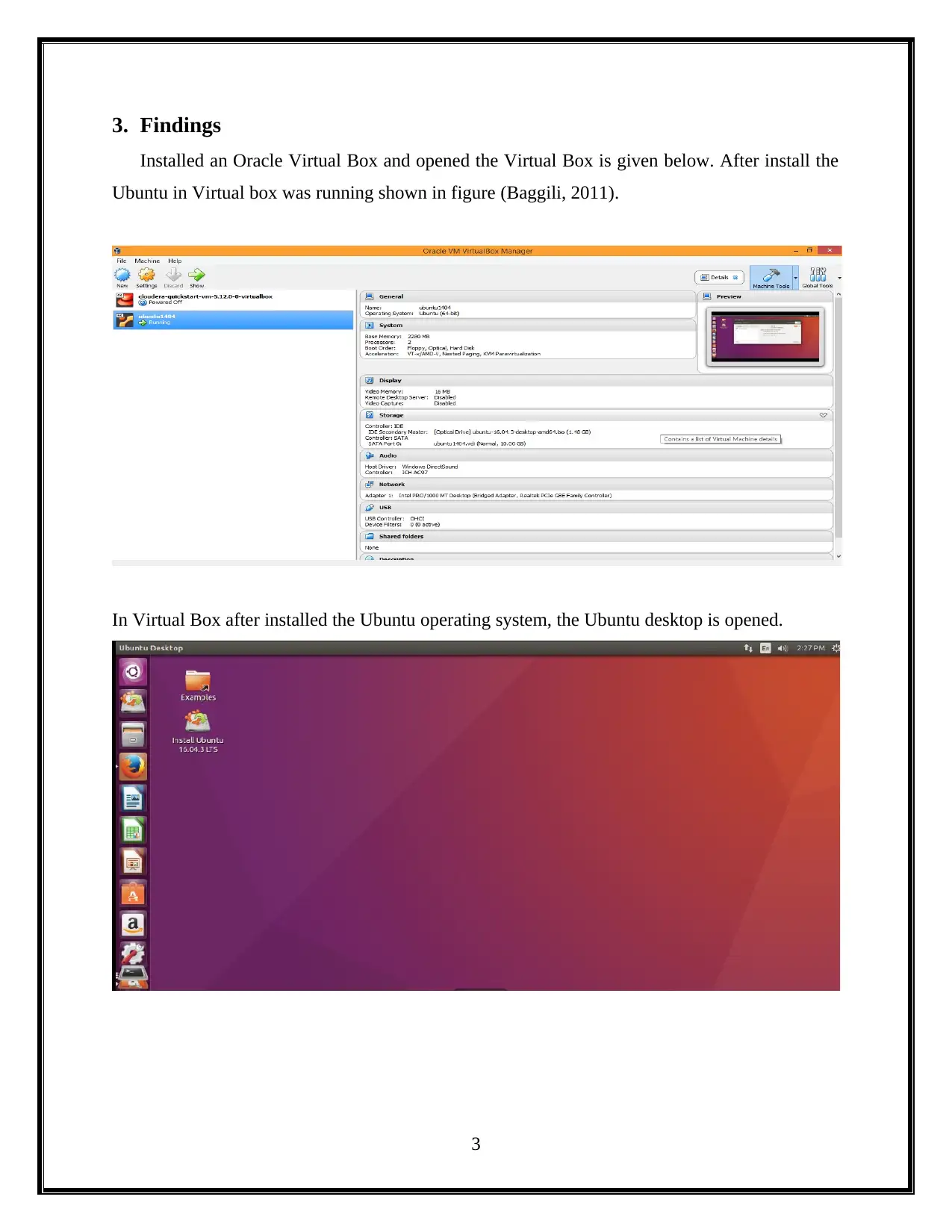
In Virtual Box after installed the Ubuntu operating system, the Ubuntu desktop is opened.
3
tabler-icon-diamond-filled.svg

Paraphrase This Document

Need a fresh take? Get an instant paraphrase of this document with our AI Paraphraser
Document Page
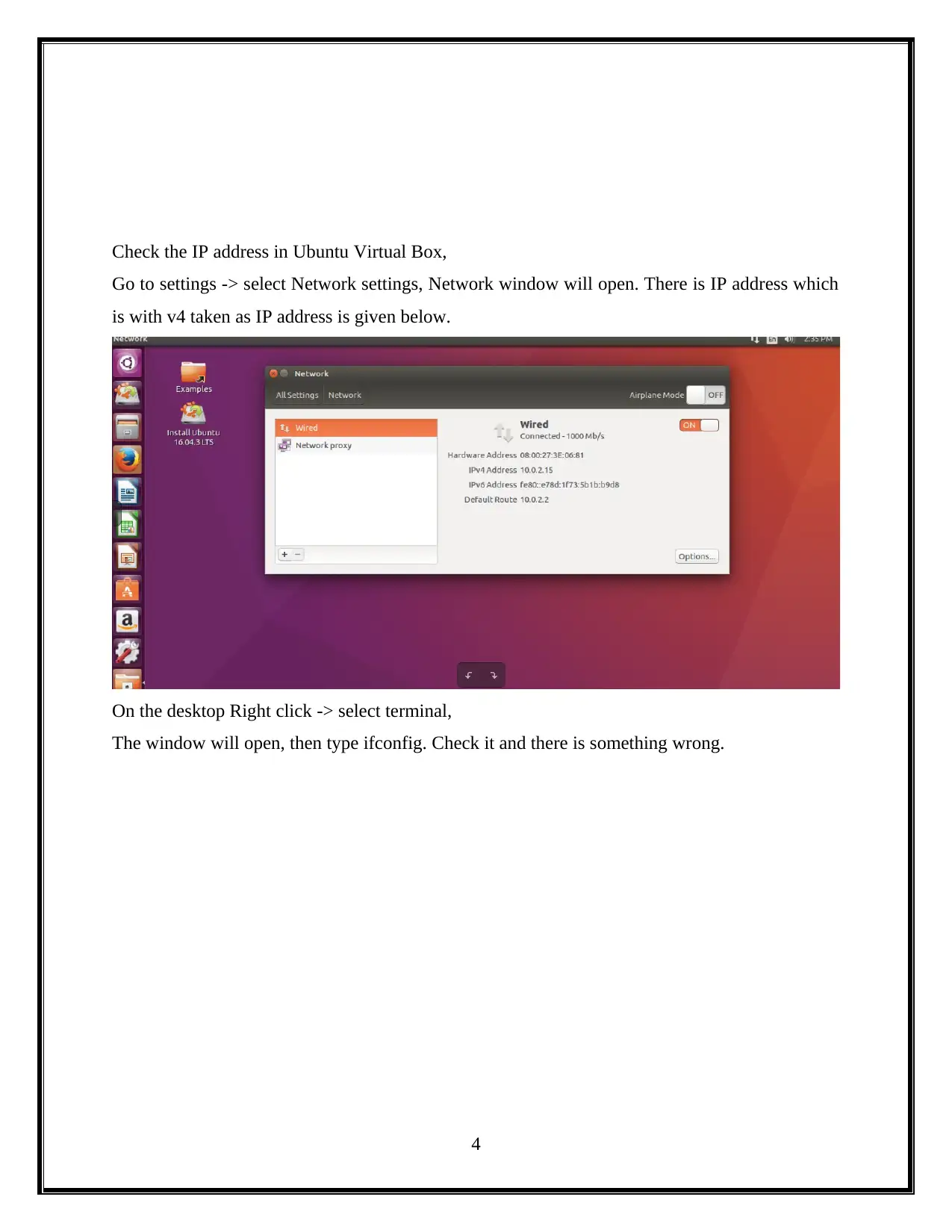
Check the IP address in Ubuntu Virtual Box,
Go to settings -> select Network settings, Network window will open. There is IP address which
is with v4 taken as IP address is given below.
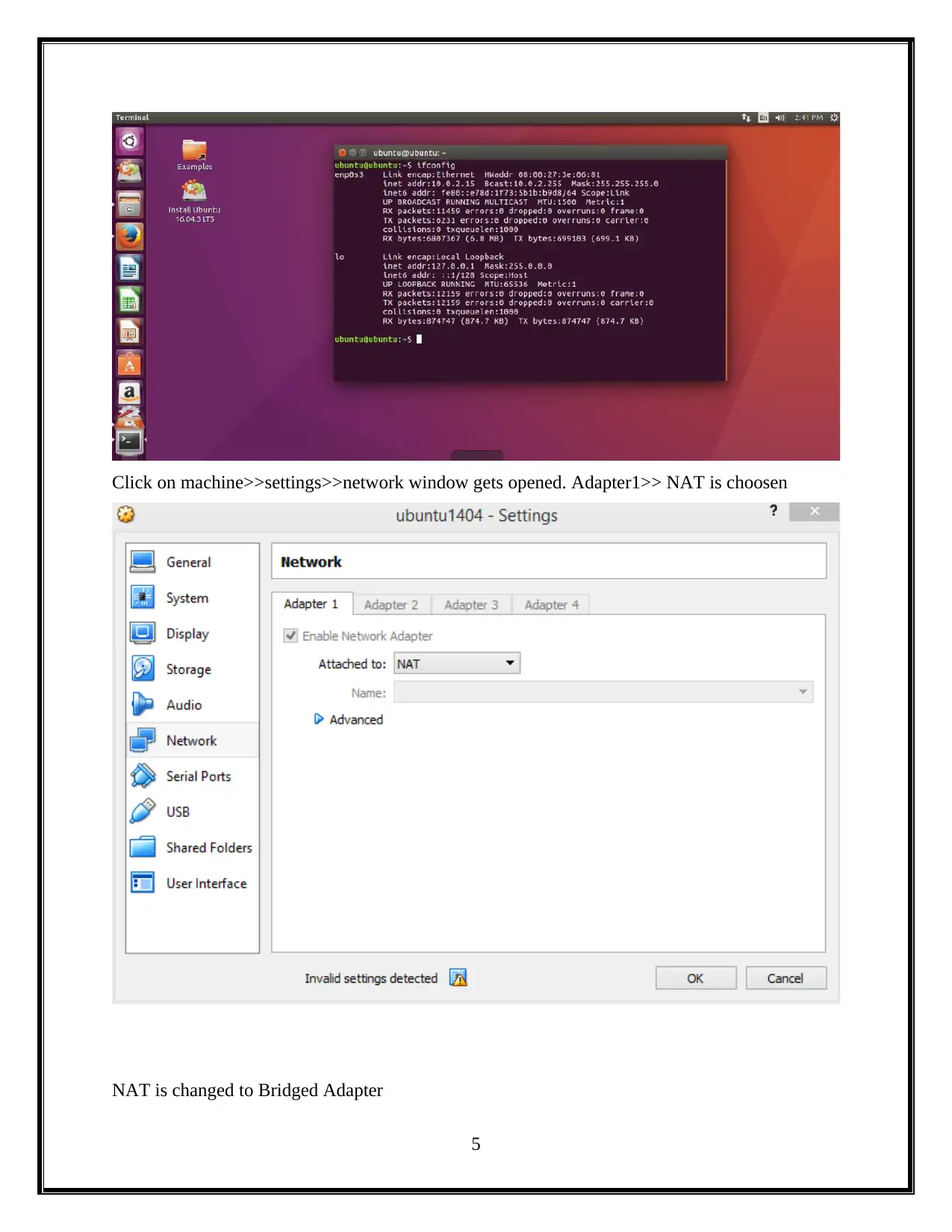
On the desktop Right click -> select terminal,
The window will open, then type ifconfig. Check it and there is something wrong.
4
Document Page
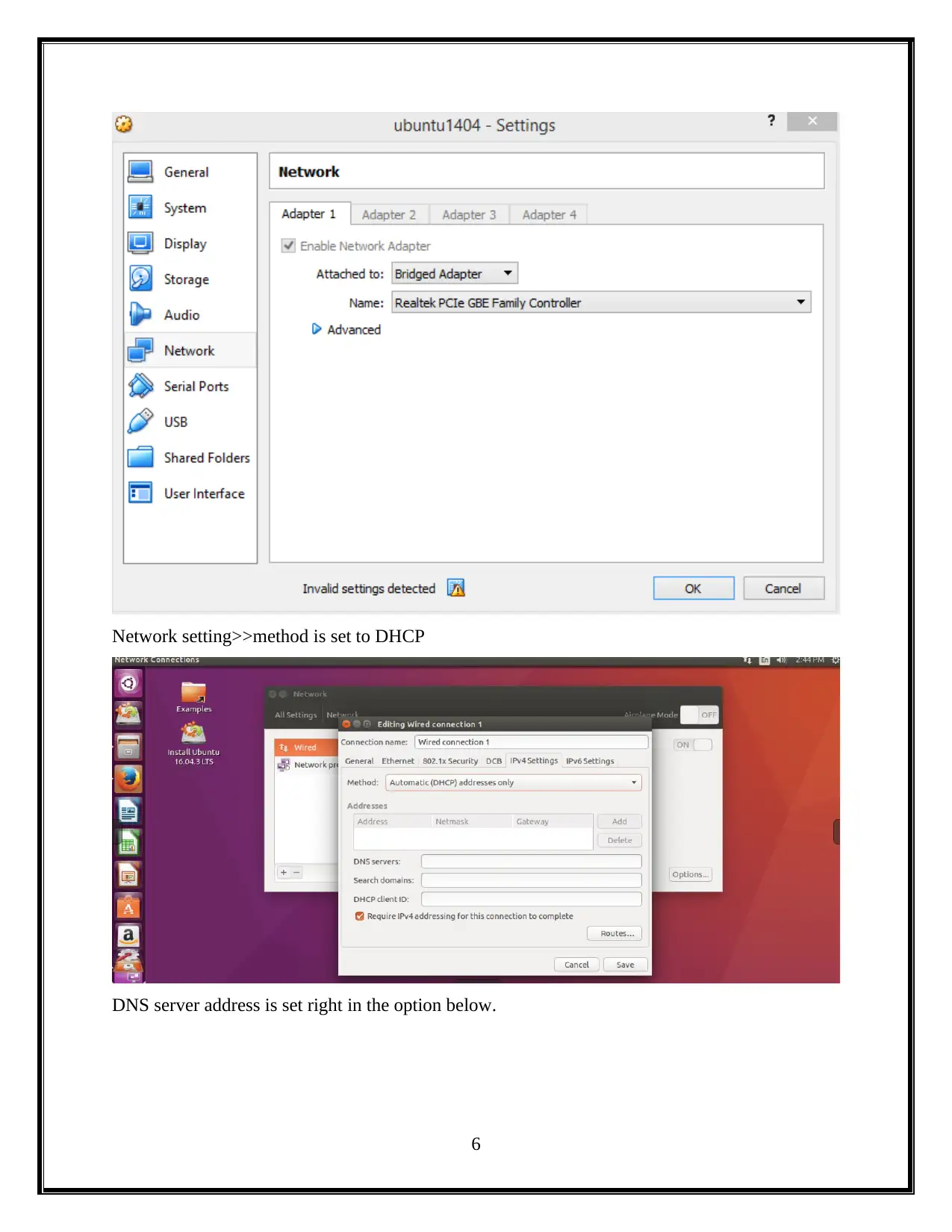
Click on machine>>settings>>network window gets opened. Adapter1>> NAT is choosen
NAT is changed to Bridged Adapter
5
Document Page
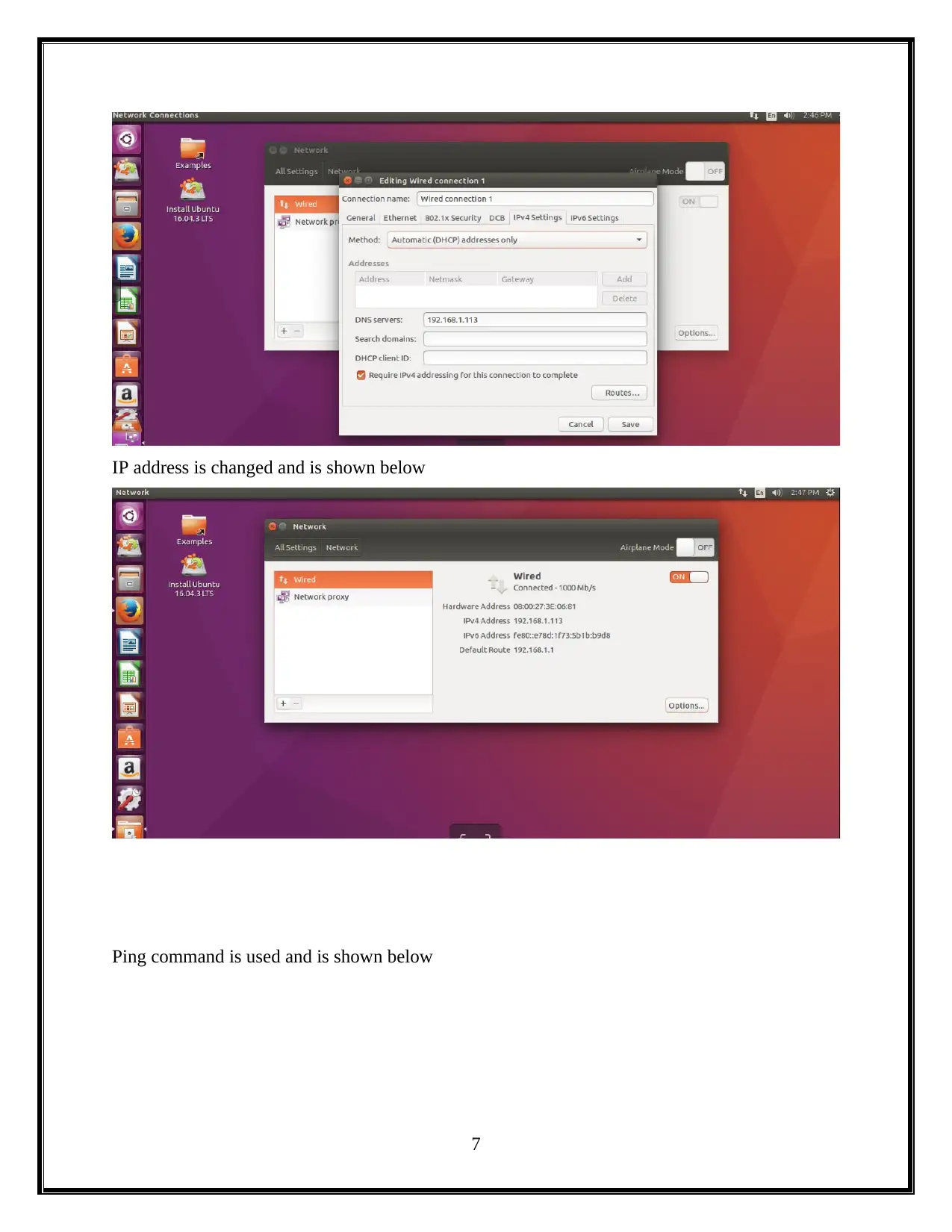
Network setting>>method is set to DHCP
DNS server address is set right in the option below.
6
tabler-icon-diamond-filled.svg

Paraphrase This Document

Need a fresh take? Get an instant paraphrase of this document with our AI Paraphraser
Document Page
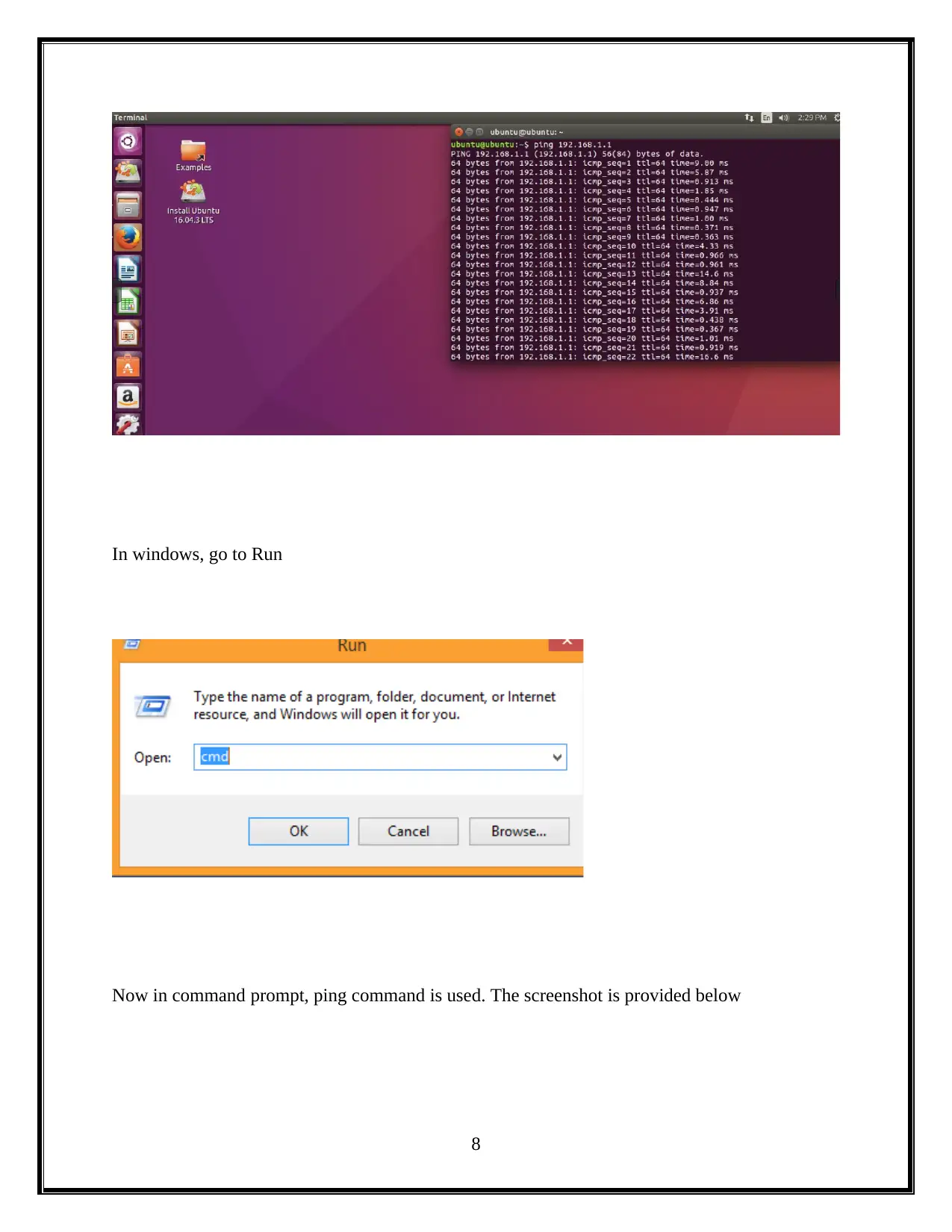
IP address is changed and is shown below
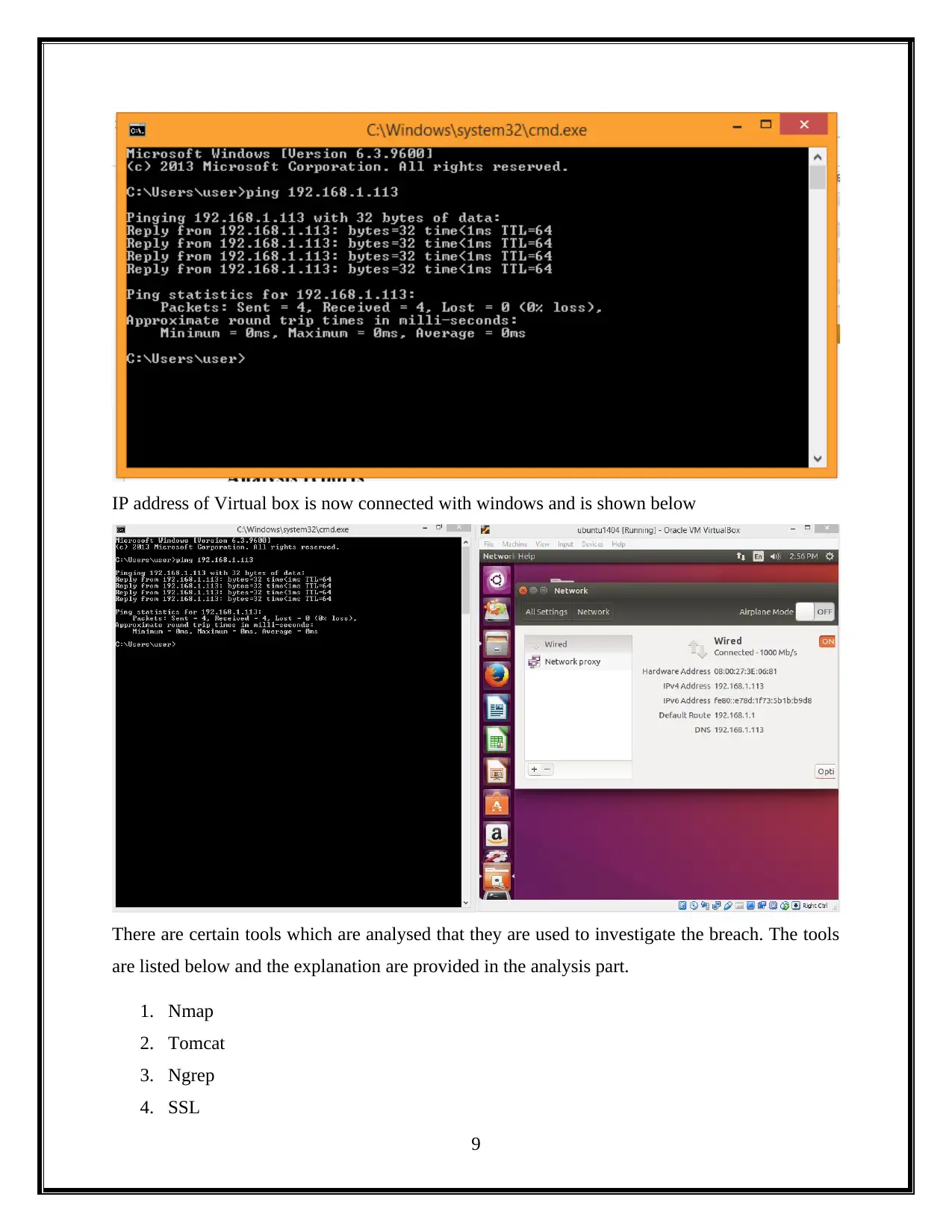
Ping command is used and is shown below
7
Document Page
In windows, go to Run
Now in command prompt, ping command is used. The screenshot is provided below
8
Document Page
IP address of Virtual box is now connected with windows and is shown below
There are certain tools which are analysed that they are used to investigate the breach. The tools
are listed below and the explanation are provided in the analysis part.
1. Nmap
2. Tomcat
3. Ngrep
4. SSL
9
tabler-icon-diamond-filled.svg

Paraphrase This Document

Need a fresh take? Get an instant paraphrase of this document with our AI Paraphraser
Document Page
5. Keystore
6. Tcpdump
7. Tshark
4. Analysis
Analysis is done for the project and the tools are analyzed. The tools are analyzed that they are
used in the field of breach in Digital forensics. They are listed below with brief description.
Nmap
With a basic functionalities of networking user can learn how to not only execute a port
scanner (Goel, 2010). Nmap is the port scanner and most populist in world-wide that is a hosted
security tools. Nmap is an online scanner for port can to scan your network servers and devices
from an external perspectives of external of user firewall.
This helps in utilizing the framework that works. Nmap will keep running on a Windows
framework, it works better and is quicker under Linux. Likewise having background with Linux
based frameworks is an awesome method to access a wide choice of security apparatuses.
Steps for using Nmap in Linux
Step-1: Operating system Installation
Step-2: Ubuntu Installation
Step-3: Nmap Installation from source
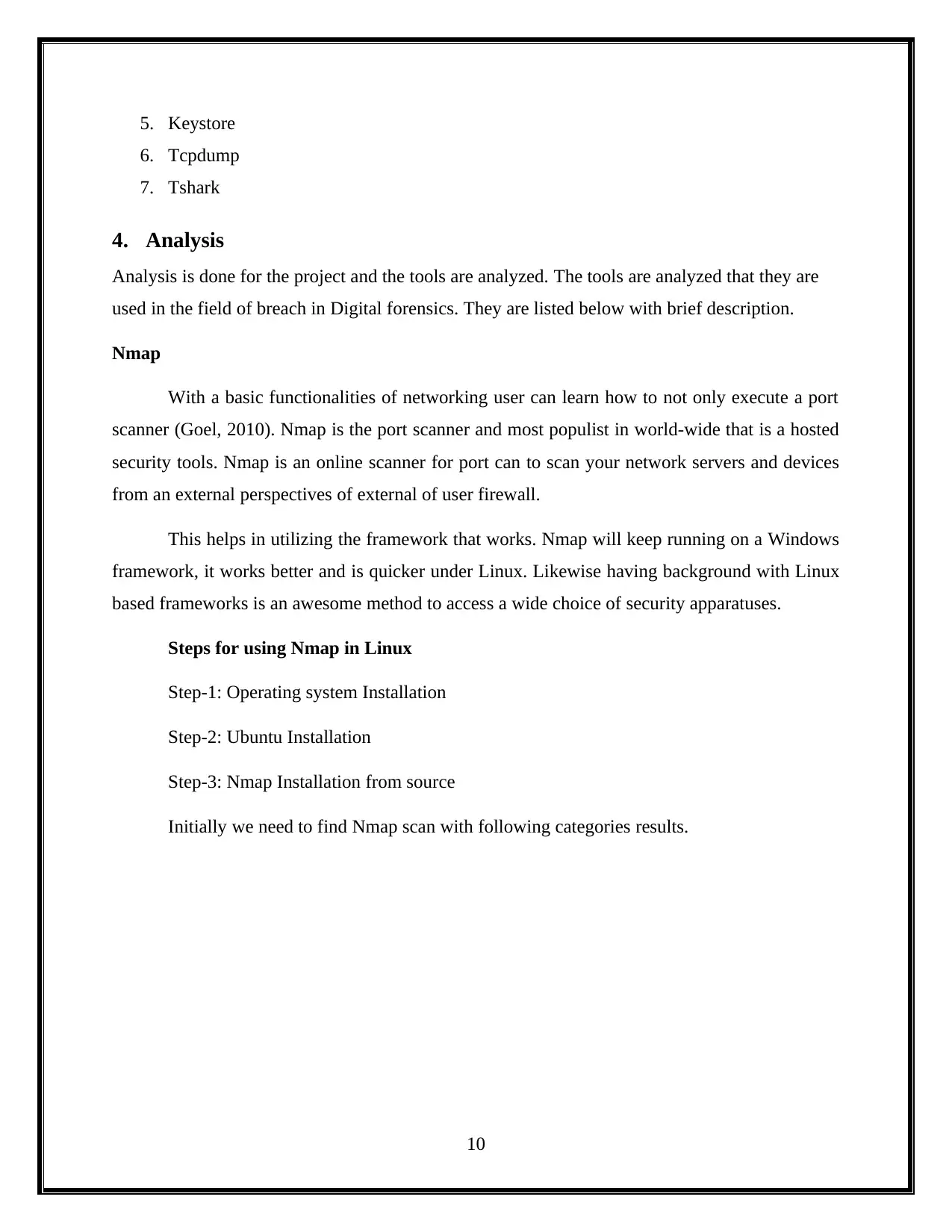
Initially we need to find Nmap scan with following categories results.
10
Document Page
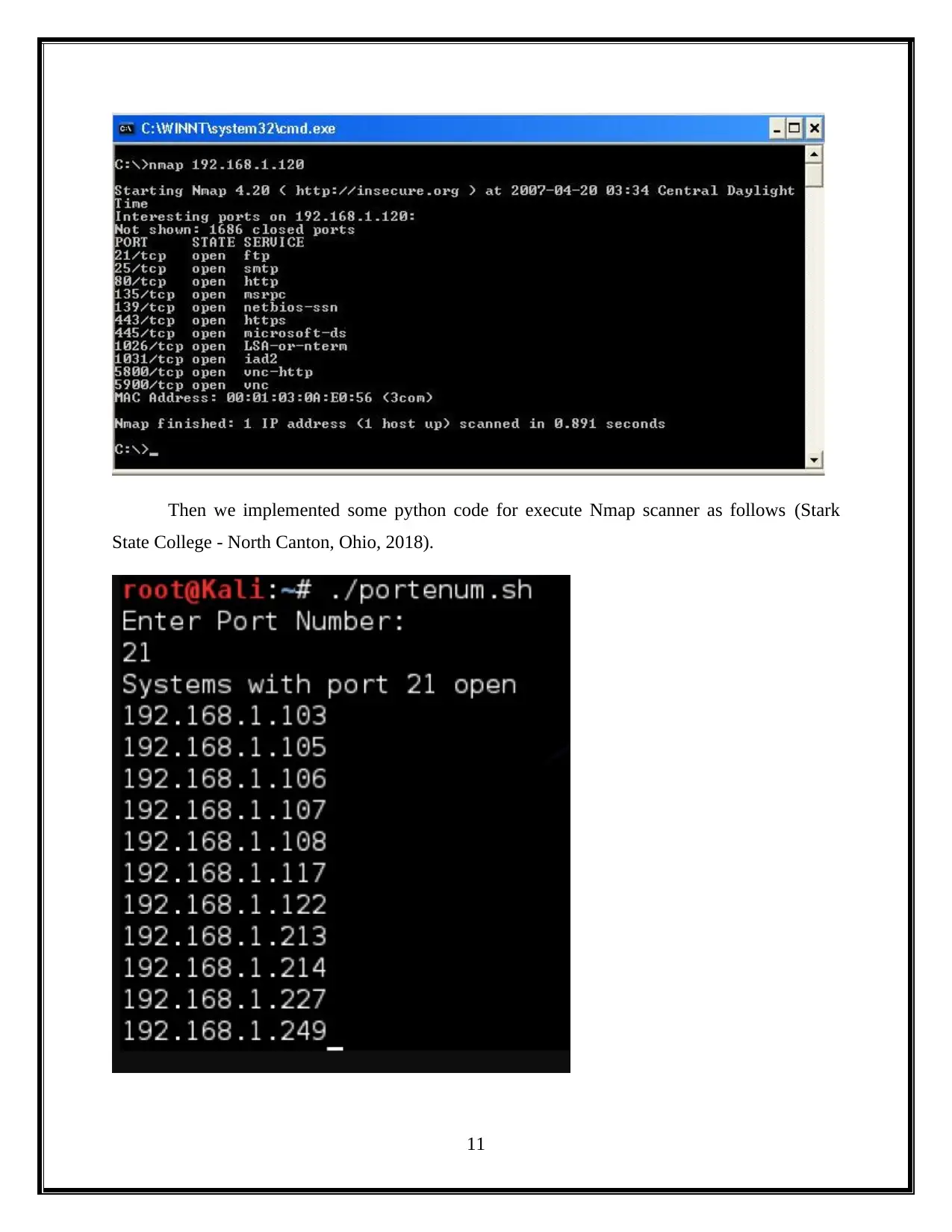
Then we implemented some python code for execute Nmap scanner as follows (Stark
State College - North Canton, Ohio, 2018).
11
chevron_up_icon
1 out of 24
circle_padding
hide_on_mobile
zoom_out_icon
[object Object]