Designing and Testing Relational Databases: A Data Analysis Report
VerifiedAdded on 2024/05/17
|96
|9203
|276
Report
AI Summary
This report provides a comprehensive analysis and design of a relational database system for Dominican College, focusing on data storage, retrieval, and management. It begins with a critical comparison of various data models and database technologies, including hierarchical, relational, and network models, highlighting their benefits and limitations. The report then details the design and implementation of the relational database system, covering conceptual and logical diagrams, table structures, and data validation techniques. It also explores the use of manipulation and querying tools, specifically SQL, to extract meaningful data. Finally, the report addresses the testing and documentation phases, including user documentation and explanations of verification, validation, and control mechanisms used in the developed system. The report includes screenshots and examples to illustrate the practical aspects of the database design and implementation.
Data Analysis and Design

Paraphrase This Document
Need a fresh take? Get an instant paraphrase of this document with our AI Paraphraser
Table of Contents
Introduction...............................................................................................................................7
LO1 –Understand data models and database technologies......................................................8
A.C. 1.1. Critically compare different data models and schemas...........................................8
A.C. 1.2.Critically discuss the benefit and limitations of the different database
technologies.........................................................................................................................13
A.C.1.3 Analyse different approaches to database design two approaches........................20
LO2. Be able to design and implement relational database systems......................................24
A.C.2.1 Design a relational database system to meet a given requirements......................24
A.C.2.2- Build a relational database system for the database design..................................29
A.C.2.3 Apply a range of database tools and techniques to enhance the user interface....39
LO3 - Be able to use manipulation and querying tools............................................................44
A.C. 3.1 Explain the benefits of using manipulation and query tools in a relational
database system...................................................................................................................44
A.C.3.2 Implement a query language into the relational database system.........................49
A.C.3.3 Critically evaluate how meaningful data has been extracted through the use of
query tools for the given case study....................................................................................55
LO4 - Be able to test and document relational database systems..........................................56
A.C.4.1Critically review and test the implemented relational database system.................56
A.C.4.2Create documentation to support the implementation and testing........................58
A.C.4.3Create user documentation for the developed relational database system...........77
A.C.4.4 Explain how verification and validation has been addressed in the developed
relational database system..................................................................................................88
A.C.4.5 Explain how control mechanisms have been used in the developed relational
database system...................................................................................................................90
Conclusion................................................................................................................................91
1
Introduction...............................................................................................................................7
LO1 –Understand data models and database technologies......................................................8
A.C. 1.1. Critically compare different data models and schemas...........................................8
A.C. 1.2.Critically discuss the benefit and limitations of the different database
technologies.........................................................................................................................13
A.C.1.3 Analyse different approaches to database design two approaches........................20
LO2. Be able to design and implement relational database systems......................................24
A.C.2.1 Design a relational database system to meet a given requirements......................24
A.C.2.2- Build a relational database system for the database design..................................29
A.C.2.3 Apply a range of database tools and techniques to enhance the user interface....39
LO3 - Be able to use manipulation and querying tools............................................................44
A.C. 3.1 Explain the benefits of using manipulation and query tools in a relational
database system...................................................................................................................44
A.C.3.2 Implement a query language into the relational database system.........................49
A.C.3.3 Critically evaluate how meaningful data has been extracted through the use of
query tools for the given case study....................................................................................55
LO4 - Be able to test and document relational database systems..........................................56
A.C.4.1Critically review and test the implemented relational database system.................56
A.C.4.2Create documentation to support the implementation and testing........................58
A.C.4.3Create user documentation for the developed relational database system...........77
A.C.4.4 Explain how verification and validation has been addressed in the developed
relational database system..................................................................................................88
A.C.4.5 Explain how control mechanisms have been used in the developed relational
database system...................................................................................................................90
Conclusion................................................................................................................................91
1
References................................................................................................................................92
List of figures
Figure 1: Hierarchical model......................................................................................................8
Figure 2: Example of Relational model......................................................................................9
Figure 3: Example of Network Model......................................................................................10
Figure 4: Architecture of database schema.............................................................................11
Figure 5: File Based System......................................................................................................13
Figure 6: Example of RDMS......................................................................................................14
Figure 7: Example of Multimedia database.............................................................................15
Figure 8: Example of Object-oriented database......................................................................16
Figure 9: Distributed database.................................................................................................17
Figure 10: Data warehouse......................................................................................................18
Figure 11: Cloud computing.....................................................................................................19
Figure 12: Notation- ER diagram..............................................................................................21
Figure 13: Normalisation Process............................................................................................22
Figure 14: Example of trainee and organisation......................................................................23
Figure 15: Conceptual diagram................................................................................................28
Figure 16: Logical Diagram.......................................................................................................28
Figure 17: Academic details table............................................................................................29
Figure 18: Admin table.............................................................................................................29
Figure 19: BSc Accounting table...............................................................................................29
Figure 20: Course Details table................................................................................................29
Figure 21: CIS Table..................................................................................................................30
Figure 22: Learner details table...............................................................................................30
Figure 23: Lecturer type details...............................................................................................30
Figure 24: Management table..................................................................................................31
Figure 25: Student information table......................................................................................31
Figure 26: Validation on range of digit in Academic Table......................................................31
Figure 27: Not Null Validation in Course ID.............................................................................32
2
List of figures
Figure 1: Hierarchical model......................................................................................................8
Figure 2: Example of Relational model......................................................................................9
Figure 3: Example of Network Model......................................................................................10
Figure 4: Architecture of database schema.............................................................................11
Figure 5: File Based System......................................................................................................13
Figure 6: Example of RDMS......................................................................................................14
Figure 7: Example of Multimedia database.............................................................................15
Figure 8: Example of Object-oriented database......................................................................16
Figure 9: Distributed database.................................................................................................17
Figure 10: Data warehouse......................................................................................................18
Figure 11: Cloud computing.....................................................................................................19
Figure 12: Notation- ER diagram..............................................................................................21
Figure 13: Normalisation Process............................................................................................22
Figure 14: Example of trainee and organisation......................................................................23
Figure 15: Conceptual diagram................................................................................................28
Figure 16: Logical Diagram.......................................................................................................28
Figure 17: Academic details table............................................................................................29
Figure 18: Admin table.............................................................................................................29
Figure 19: BSc Accounting table...............................................................................................29
Figure 20: Course Details table................................................................................................29
Figure 21: CIS Table..................................................................................................................30
Figure 22: Learner details table...............................................................................................30
Figure 23: Lecturer type details...............................................................................................30
Figure 24: Management table..................................................................................................31
Figure 25: Student information table......................................................................................31
Figure 26: Validation on range of digit in Academic Table......................................................31
Figure 27: Not Null Validation in Course ID.............................................................................32
2
⊘ This is a preview!⊘
Do you want full access?
Subscribe today to unlock all pages.

Trusted by 1+ million students worldwide
Figure 28: Text Validation on Name in academic details.........................................................32
Figure 29: Validation of not null on Student ID.......................................................................33
Figure 30: Validation of Not null on course ID.........................................................................33
Figure 31: Validation of data type on course ID......................................................................34
Figure 32: Validation of non-negative integer on year............................................................34
Figure 33: Validation of non-negative integer on Fees............................................................35
Figure 34: Validation on fees of non-negative integer............................................................35
Figure 35: Checkbox validation on Learner details Table........................................................36
Figure 36: Email format validation in Lecturer type table.......................................................36
Figure 37: Digit range validation on contact in Learner details table......................................37
Figure 38: Non-negative validation on Lecturer ID in Management table..............................37
Figure 39: Validation of E-Mail in Student info table...............................................................38
Figure 40: Contact Number validation on Student info table..................................................38
Figure 41: Academic details Table’s insertion form.................................................................39
Figure 42: Admin Table’s insertion form..................................................................................40
Figure 43: BSc. Accounting Table’s insertion form..................................................................40
Figure 44: CIS Table’s insertion form.......................................................................................40
Figure 45: Course details Table’s insertion form.....................................................................41
Figure 46: Learner details Table’s insertion form....................................................................41
Figure 47: Lecturer type Table’s insertion form......................................................................42
Figure 48: Management Table’s insertion form......................................................................42
Figure 49: Student Info Table’s insertion form........................................................................43
Figure 50: List of different commands used in SQL.................................................................44
Figure 51: Design view of Table Academic details...................................................................46
Figure 52: Tabular or datasheet view of Academic details table.............................................47
Figure 53: 1 Query result view of Query Course Details..........................................................47
Figure 54: SQL view of course detail query..............................................................................47
Figure 55: Report view of Course detail query........................................................................47
Figure 56: Insertion Form view of Student Info Table.............................................................48
Figure 57: SQL view of Query on Course details and academic manager...............................49
Figure 58: Datasheet view of result of query 1........................................................................49
Figure 59: Query 1 Relationship...............................................................................................49
3
Figure 29: Validation of not null on Student ID.......................................................................33
Figure 30: Validation of Not null on course ID.........................................................................33
Figure 31: Validation of data type on course ID......................................................................34
Figure 32: Validation of non-negative integer on year............................................................34
Figure 33: Validation of non-negative integer on Fees............................................................35
Figure 34: Validation on fees of non-negative integer............................................................35
Figure 35: Checkbox validation on Learner details Table........................................................36
Figure 36: Email format validation in Lecturer type table.......................................................36
Figure 37: Digit range validation on contact in Learner details table......................................37
Figure 38: Non-negative validation on Lecturer ID in Management table..............................37
Figure 39: Validation of E-Mail in Student info table...............................................................38
Figure 40: Contact Number validation on Student info table..................................................38
Figure 41: Academic details Table’s insertion form.................................................................39
Figure 42: Admin Table’s insertion form..................................................................................40
Figure 43: BSc. Accounting Table’s insertion form..................................................................40
Figure 44: CIS Table’s insertion form.......................................................................................40
Figure 45: Course details Table’s insertion form.....................................................................41
Figure 46: Learner details Table’s insertion form....................................................................41
Figure 47: Lecturer type Table’s insertion form......................................................................42
Figure 48: Management Table’s insertion form......................................................................42
Figure 49: Student Info Table’s insertion form........................................................................43
Figure 50: List of different commands used in SQL.................................................................44
Figure 51: Design view of Table Academic details...................................................................46
Figure 52: Tabular or datasheet view of Academic details table.............................................47
Figure 53: 1 Query result view of Query Course Details..........................................................47
Figure 54: SQL view of course detail query..............................................................................47
Figure 55: Report view of Course detail query........................................................................47
Figure 56: Insertion Form view of Student Info Table.............................................................48
Figure 57: SQL view of Query on Course details and academic manager...............................49
Figure 58: Datasheet view of result of query 1........................................................................49
Figure 59: Query 1 Relationship...............................................................................................49
3
Paraphrase This Document
Need a fresh take? Get an instant paraphrase of this document with our AI Paraphraser
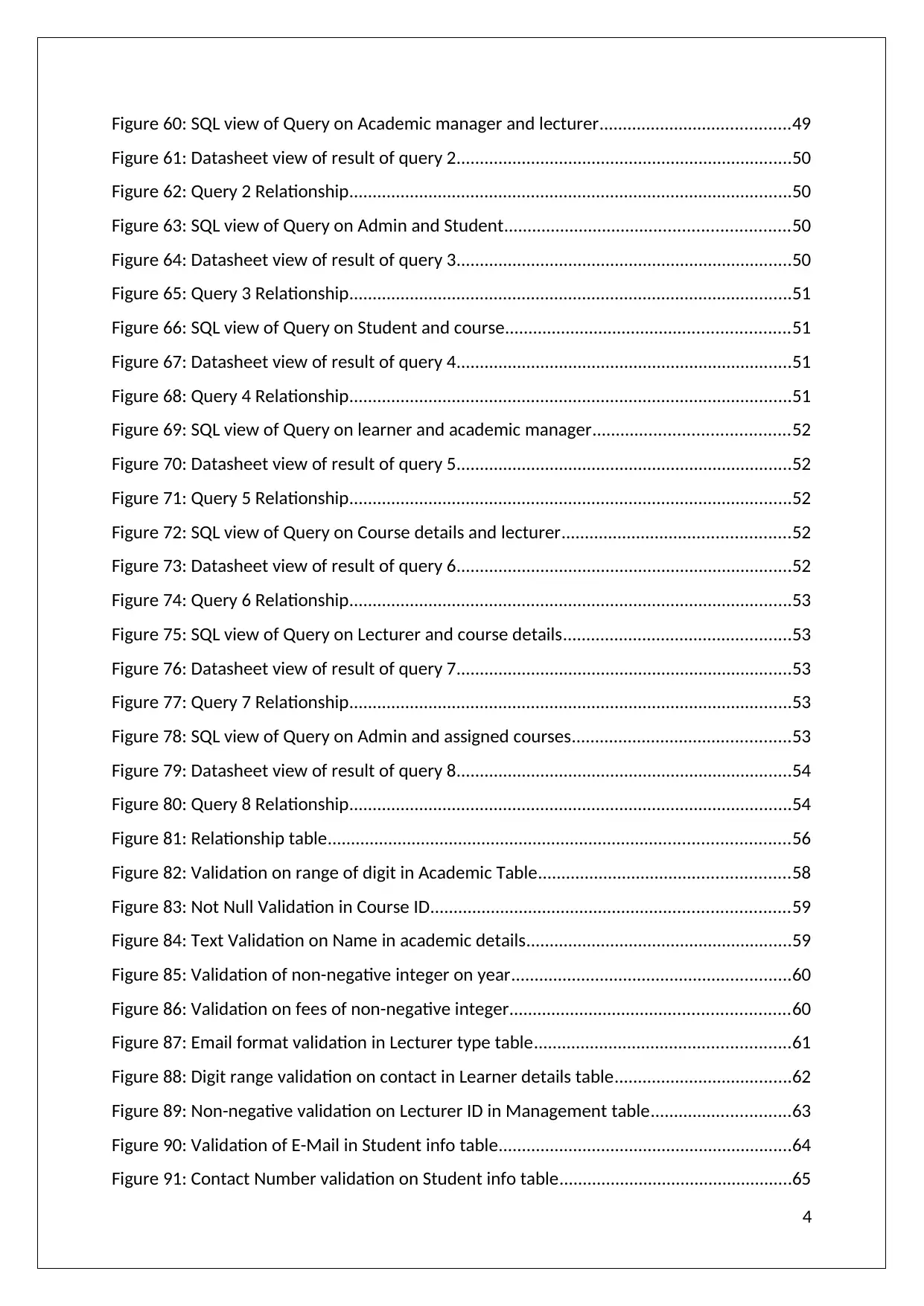
Figure 60: SQL view of Query on Academic manager and lecturer.........................................49
Figure 61: Datasheet view of result of query 2........................................................................50
Figure 62: Query 2 Relationship...............................................................................................50
Figure 63: SQL view of Query on Admin and Student.............................................................50
Figure 64: Datasheet view of result of query 3........................................................................50
Figure 65: Query 3 Relationship...............................................................................................51
Figure 66: SQL view of Query on Student and course.............................................................51
Figure 67: Datasheet view of result of query 4........................................................................51
Figure 68: Query 4 Relationship...............................................................................................51
Figure 69: SQL view of Query on learner and academic manager..........................................52
Figure 70: Datasheet view of result of query 5........................................................................52
Figure 71: Query 5 Relationship...............................................................................................52
Figure 72: SQL view of Query on Course details and lecturer.................................................52
Figure 73: Datasheet view of result of query 6........................................................................52
Figure 74: Query 6 Relationship...............................................................................................53
Figure 75: SQL view of Query on Lecturer and course details.................................................53
Figure 76: Datasheet view of result of query 7........................................................................53
Figure 77: Query 7 Relationship...............................................................................................53
Figure 78: SQL view of Query on Admin and assigned courses...............................................53
Figure 79: Datasheet view of result of query 8........................................................................54
Figure 80: Query 8 Relationship...............................................................................................54
Figure 81: Relationship table...................................................................................................56
Figure 82: Validation on range of digit in Academic Table......................................................58
Figure 83: Not Null Validation in Course ID.............................................................................59
Figure 84: Text Validation on Name in academic details.........................................................59
Figure 85: Validation of non-negative integer on year............................................................60
Figure 86: Validation on fees of non-negative integer............................................................60
Figure 87: Email format validation in Lecturer type table.......................................................61
Figure 88: Digit range validation on contact in Learner details table......................................62
Figure 89: Non-negative validation on Lecturer ID in Management table..............................63
Figure 90: Validation of E-Mail in Student info table...............................................................64
Figure 91: Contact Number validation on Student info table..................................................65
4
Figure 61: Datasheet view of result of query 2........................................................................50
Figure 62: Query 2 Relationship...............................................................................................50
Figure 63: SQL view of Query on Admin and Student.............................................................50
Figure 64: Datasheet view of result of query 3........................................................................50
Figure 65: Query 3 Relationship...............................................................................................51
Figure 66: SQL view of Query on Student and course.............................................................51
Figure 67: Datasheet view of result of query 4........................................................................51
Figure 68: Query 4 Relationship...............................................................................................51
Figure 69: SQL view of Query on learner and academic manager..........................................52
Figure 70: Datasheet view of result of query 5........................................................................52
Figure 71: Query 5 Relationship...............................................................................................52
Figure 72: SQL view of Query on Course details and lecturer.................................................52
Figure 73: Datasheet view of result of query 6........................................................................52
Figure 74: Query 6 Relationship...............................................................................................53
Figure 75: SQL view of Query on Lecturer and course details.................................................53
Figure 76: Datasheet view of result of query 7........................................................................53
Figure 77: Query 7 Relationship...............................................................................................53
Figure 78: SQL view of Query on Admin and assigned courses...............................................53
Figure 79: Datasheet view of result of query 8........................................................................54
Figure 80: Query 8 Relationship...............................................................................................54
Figure 81: Relationship table...................................................................................................56
Figure 82: Validation on range of digit in Academic Table......................................................58
Figure 83: Not Null Validation in Course ID.............................................................................59
Figure 84: Text Validation on Name in academic details.........................................................59
Figure 85: Validation of non-negative integer on year............................................................60
Figure 86: Validation on fees of non-negative integer............................................................60
Figure 87: Email format validation in Lecturer type table.......................................................61
Figure 88: Digit range validation on contact in Learner details table......................................62
Figure 89: Non-negative validation on Lecturer ID in Management table..............................63
Figure 90: Validation of E-Mail in Student info table...............................................................64
Figure 91: Contact Number validation on Student info table..................................................65
4
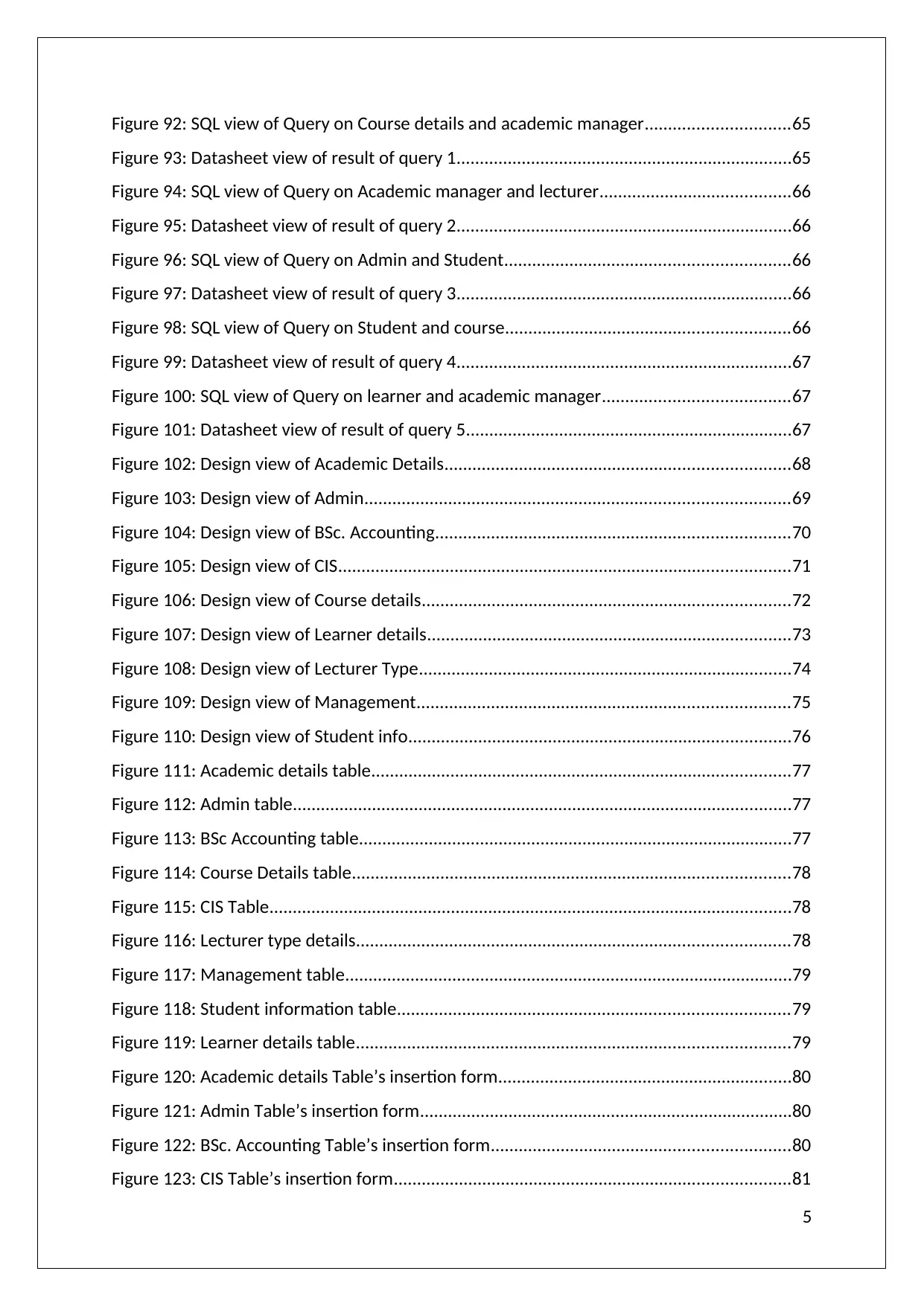
Figure 92: SQL view of Query on Course details and academic manager...............................65
Figure 93: Datasheet view of result of query 1........................................................................65
Figure 94: SQL view of Query on Academic manager and lecturer.........................................66
Figure 95: Datasheet view of result of query 2........................................................................66
Figure 96: SQL view of Query on Admin and Student.............................................................66
Figure 97: Datasheet view of result of query 3........................................................................66
Figure 98: SQL view of Query on Student and course.............................................................66
Figure 99: Datasheet view of result of query 4........................................................................67
Figure 100: SQL view of Query on learner and academic manager........................................67
Figure 101: Datasheet view of result of query 5......................................................................67
Figure 102: Design view of Academic Details..........................................................................68
Figure 103: Design view of Admin...........................................................................................69
Figure 104: Design view of BSc. Accounting............................................................................70
Figure 105: Design view of CIS.................................................................................................71
Figure 106: Design view of Course details...............................................................................72
Figure 107: Design view of Learner details..............................................................................73
Figure 108: Design view of Lecturer Type................................................................................74
Figure 109: Design view of Management................................................................................75
Figure 110: Design view of Student info..................................................................................76
Figure 111: Academic details table..........................................................................................77
Figure 112: Admin table...........................................................................................................77
Figure 113: BSc Accounting table.............................................................................................77
Figure 114: Course Details table..............................................................................................78
Figure 115: CIS Table................................................................................................................78
Figure 116: Lecturer type details.............................................................................................78
Figure 117: Management table................................................................................................79
Figure 118: Student information table....................................................................................79
Figure 119: Learner details table.............................................................................................79
Figure 120: Academic details Table’s insertion form...............................................................80
Figure 121: Admin Table’s insertion form................................................................................80
Figure 122: BSc. Accounting Table’s insertion form................................................................80
Figure 123: CIS Table’s insertion form.....................................................................................81
5
Figure 93: Datasheet view of result of query 1........................................................................65
Figure 94: SQL view of Query on Academic manager and lecturer.........................................66
Figure 95: Datasheet view of result of query 2........................................................................66
Figure 96: SQL view of Query on Admin and Student.............................................................66
Figure 97: Datasheet view of result of query 3........................................................................66
Figure 98: SQL view of Query on Student and course.............................................................66
Figure 99: Datasheet view of result of query 4........................................................................67
Figure 100: SQL view of Query on learner and academic manager........................................67
Figure 101: Datasheet view of result of query 5......................................................................67
Figure 102: Design view of Academic Details..........................................................................68
Figure 103: Design view of Admin...........................................................................................69
Figure 104: Design view of BSc. Accounting............................................................................70
Figure 105: Design view of CIS.................................................................................................71
Figure 106: Design view of Course details...............................................................................72
Figure 107: Design view of Learner details..............................................................................73
Figure 108: Design view of Lecturer Type................................................................................74
Figure 109: Design view of Management................................................................................75
Figure 110: Design view of Student info..................................................................................76
Figure 111: Academic details table..........................................................................................77
Figure 112: Admin table...........................................................................................................77
Figure 113: BSc Accounting table.............................................................................................77
Figure 114: Course Details table..............................................................................................78
Figure 115: CIS Table................................................................................................................78
Figure 116: Lecturer type details.............................................................................................78
Figure 117: Management table................................................................................................79
Figure 118: Student information table....................................................................................79
Figure 119: Learner details table.............................................................................................79
Figure 120: Academic details Table’s insertion form...............................................................80
Figure 121: Admin Table’s insertion form................................................................................80
Figure 122: BSc. Accounting Table’s insertion form................................................................80
Figure 123: CIS Table’s insertion form.....................................................................................81
5
⊘ This is a preview!⊘
Do you want full access?
Subscribe today to unlock all pages.
Trusted by 1+ million students worldwide
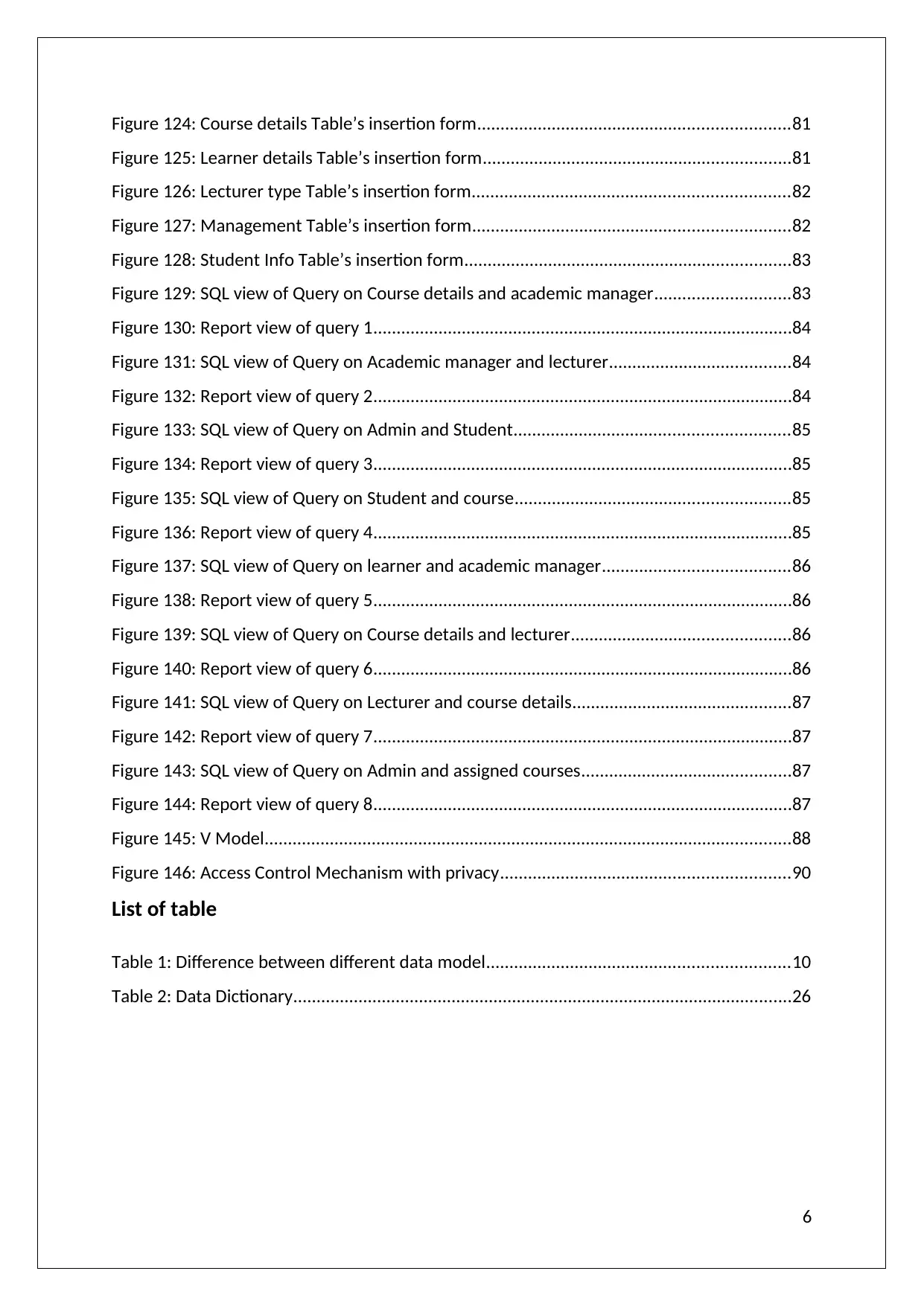
Figure 124: Course details Table’s insertion form...................................................................81
Figure 125: Learner details Table’s insertion form..................................................................81
Figure 126: Lecturer type Table’s insertion form....................................................................82
Figure 127: Management Table’s insertion form....................................................................82
Figure 128: Student Info Table’s insertion form......................................................................83
Figure 129: SQL view of Query on Course details and academic manager.............................83
Figure 130: Report view of query 1..........................................................................................84
Figure 131: SQL view of Query on Academic manager and lecturer.......................................84
Figure 132: Report view of query 2..........................................................................................84
Figure 133: SQL view of Query on Admin and Student...........................................................85
Figure 134: Report view of query 3..........................................................................................85
Figure 135: SQL view of Query on Student and course...........................................................85
Figure 136: Report view of query 4..........................................................................................85
Figure 137: SQL view of Query on learner and academic manager........................................86
Figure 138: Report view of query 5..........................................................................................86
Figure 139: SQL view of Query on Course details and lecturer...............................................86
Figure 140: Report view of query 6..........................................................................................86
Figure 141: SQL view of Query on Lecturer and course details...............................................87
Figure 142: Report view of query 7..........................................................................................87
Figure 143: SQL view of Query on Admin and assigned courses.............................................87
Figure 144: Report view of query 8..........................................................................................87
Figure 145: V Model.................................................................................................................88
Figure 146: Access Control Mechanism with privacy..............................................................90
List of table
Table 1: Difference between different data model.................................................................10
Table 2: Data Dictionary...........................................................................................................26
6
Figure 125: Learner details Table’s insertion form..................................................................81
Figure 126: Lecturer type Table’s insertion form....................................................................82
Figure 127: Management Table’s insertion form....................................................................82
Figure 128: Student Info Table’s insertion form......................................................................83
Figure 129: SQL view of Query on Course details and academic manager.............................83
Figure 130: Report view of query 1..........................................................................................84
Figure 131: SQL view of Query on Academic manager and lecturer.......................................84
Figure 132: Report view of query 2..........................................................................................84
Figure 133: SQL view of Query on Admin and Student...........................................................85
Figure 134: Report view of query 3..........................................................................................85
Figure 135: SQL view of Query on Student and course...........................................................85
Figure 136: Report view of query 4..........................................................................................85
Figure 137: SQL view of Query on learner and academic manager........................................86
Figure 138: Report view of query 5..........................................................................................86
Figure 139: SQL view of Query on Course details and lecturer...............................................86
Figure 140: Report view of query 6..........................................................................................86
Figure 141: SQL view of Query on Lecturer and course details...............................................87
Figure 142: Report view of query 7..........................................................................................87
Figure 143: SQL view of Query on Admin and assigned courses.............................................87
Figure 144: Report view of query 8..........................................................................................87
Figure 145: V Model.................................................................................................................88
Figure 146: Access Control Mechanism with privacy..............................................................90
List of table
Table 1: Difference between different data model.................................................................10
Table 2: Data Dictionary...........................................................................................................26
6
Paraphrase This Document
Need a fresh take? Get an instant paraphrase of this document with our AI Paraphraser
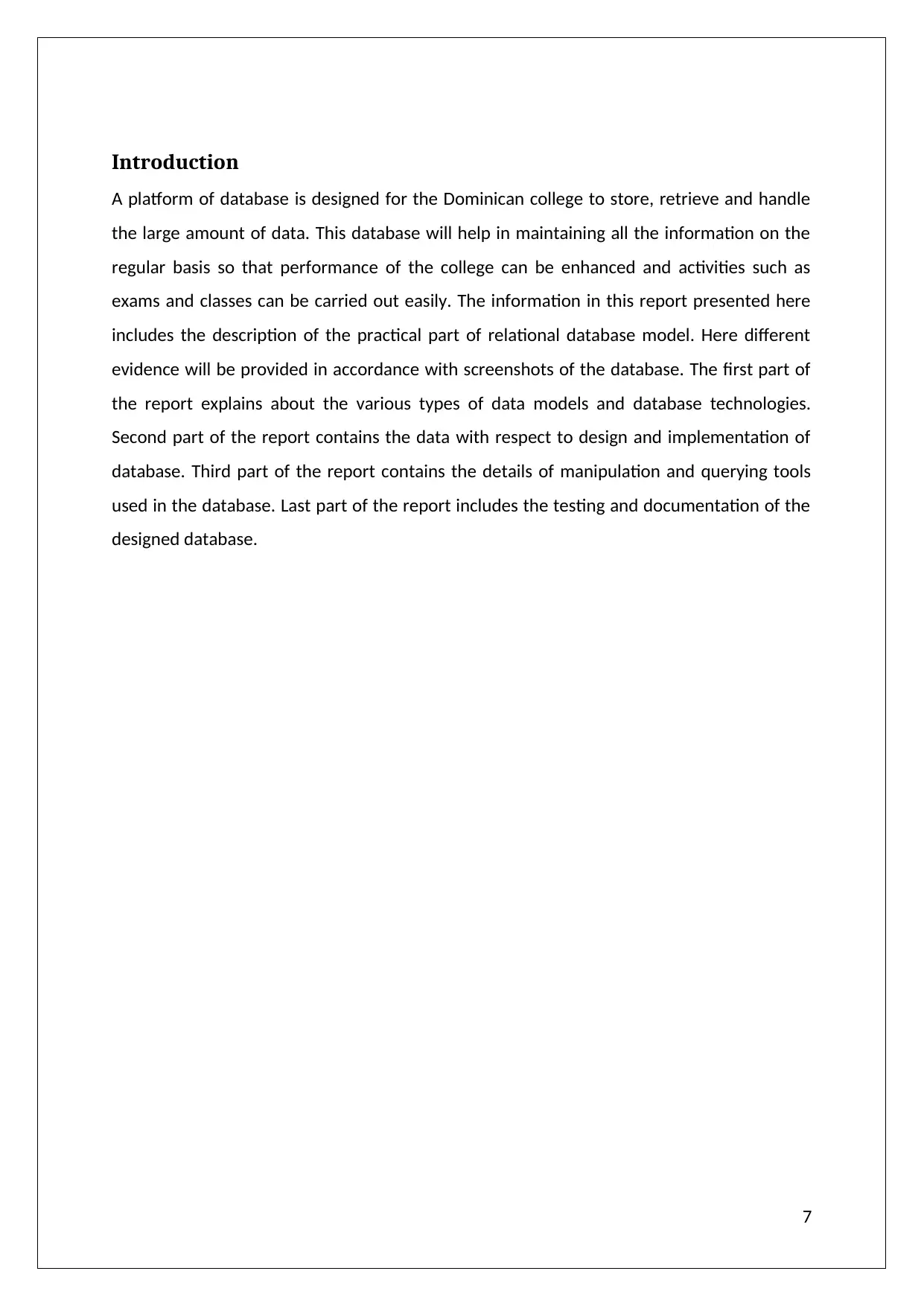
Introduction
A platform of database is designed for the Dominican college to store, retrieve and handle
the large amount of data. This database will help in maintaining all the information on the
regular basis so that performance of the college can be enhanced and activities such as
exams and classes can be carried out easily. The information in this report presented here
includes the description of the practical part of relational database model. Here different
evidence will be provided in accordance with screenshots of the database. The first part of
the report explains about the various types of data models and database technologies.
Second part of the report contains the data with respect to design and implementation of
database. Third part of the report contains the details of manipulation and querying tools
used in the database. Last part of the report includes the testing and documentation of the
designed database.
7
A platform of database is designed for the Dominican college to store, retrieve and handle
the large amount of data. This database will help in maintaining all the information on the
regular basis so that performance of the college can be enhanced and activities such as
exams and classes can be carried out easily. The information in this report presented here
includes the description of the practical part of relational database model. Here different
evidence will be provided in accordance with screenshots of the database. The first part of
the report explains about the various types of data models and database technologies.
Second part of the report contains the data with respect to design and implementation of
database. Third part of the report contains the details of manipulation and querying tools
used in the database. Last part of the report includes the testing and documentation of the
designed database.
7
LO1 –Understand data models and database technologies
A.C. 1.1. Critically compare different data models and schemas
Data models plays and key rule in finding solutions for different business sectors. There are
several models which can be used to get the appropriate solution. They are responsible for
the creation of logical structures which is basic structure of the database management
system.
Types of Data models
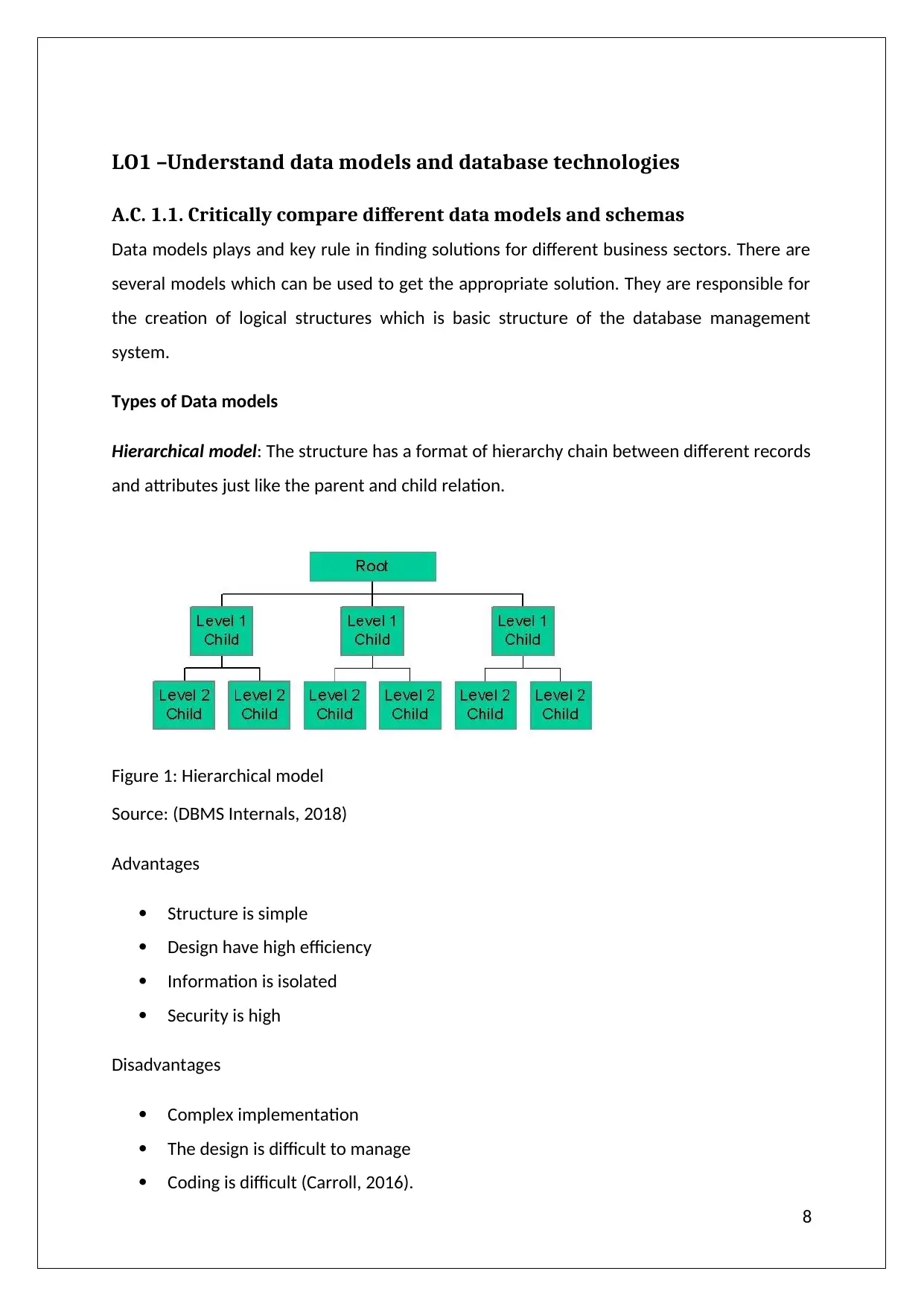
Hierarchical model: The structure has a format of hierarchy chain between different records
and attributes just like the parent and child relation.
Figure 1: Hierarchical model
Source: (DBMS Internals, 2018)
Advantages
Structure is simple
Design have high efficiency
Information is isolated
Security is high
Disadvantages
Complex implementation
The design is difficult to manage
Coding is difficult (Carroll, 2016).
8
A.C. 1.1. Critically compare different data models and schemas
Data models plays and key rule in finding solutions for different business sectors. There are
several models which can be used to get the appropriate solution. They are responsible for
the creation of logical structures which is basic structure of the database management
system.
Types of Data models
Hierarchical model: The structure has a format of hierarchy chain between different records
and attributes just like the parent and child relation.
Figure 1: Hierarchical model
Source: (DBMS Internals, 2018)
Advantages
Structure is simple
Design have high efficiency
Information is isolated
Security is high
Disadvantages
Complex implementation
The design is difficult to manage
Coding is difficult (Carroll, 2016).
8
⊘ This is a preview!⊘
Do you want full access?
Subscribe today to unlock all pages.
Trusted by 1+ million students worldwide
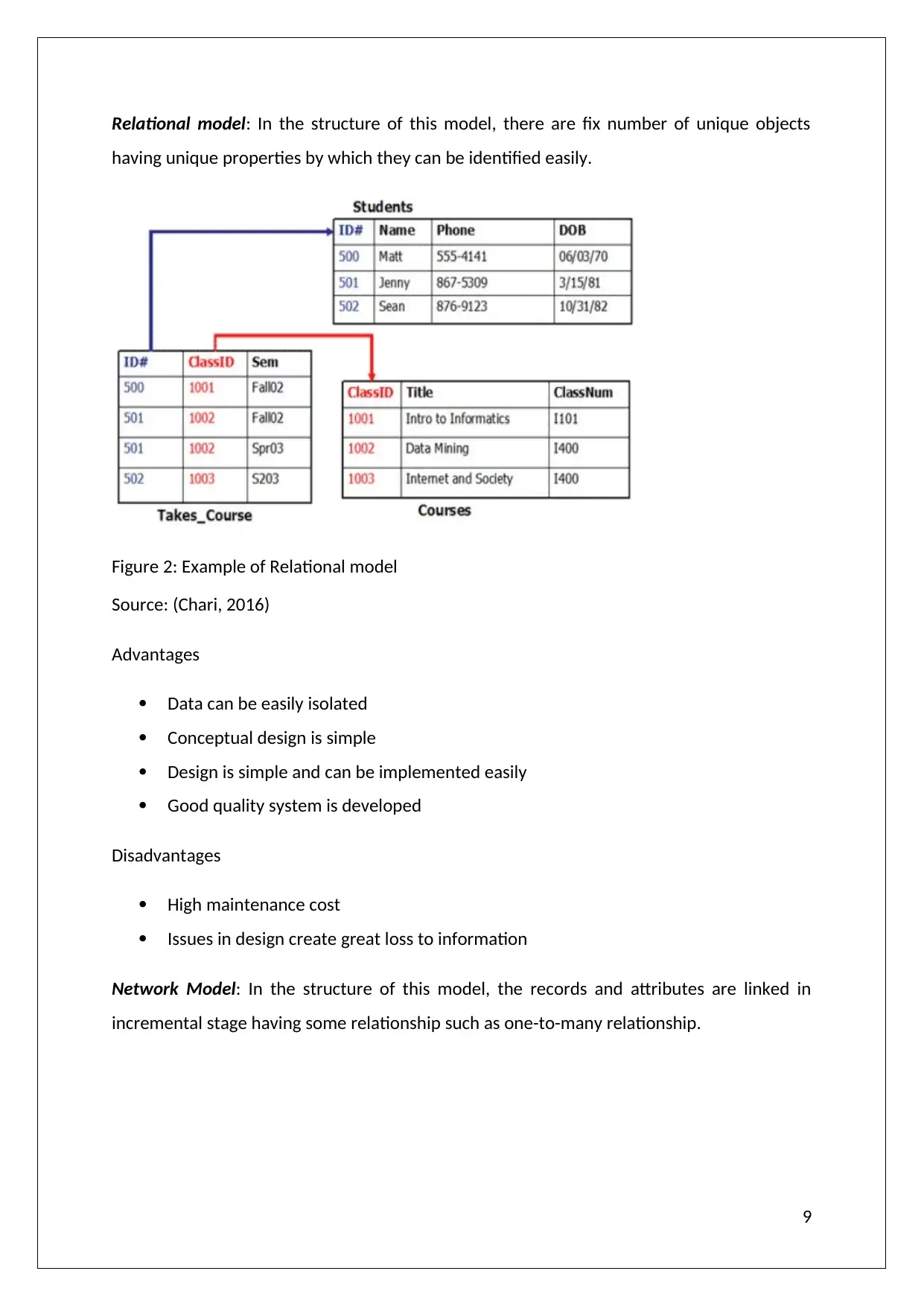
Relational model: In the structure of this model, there are fix number of unique objects
having unique properties by which they can be identified easily.
Figure 2: Example of Relational model
Source: (Chari, 2016)
Advantages
Data can be easily isolated
Conceptual design is simple
Design is simple and can be implemented easily
Good quality system is developed
Disadvantages
High maintenance cost
Issues in design create great loss to information
Network Model: In the structure of this model, the records and attributes are linked in
incremental stage having some relationship such as one-to-many relationship.
9
having unique properties by which they can be identified easily.
Figure 2: Example of Relational model
Source: (Chari, 2016)
Advantages
Data can be easily isolated
Conceptual design is simple
Design is simple and can be implemented easily
Good quality system is developed
Disadvantages
High maintenance cost
Issues in design create great loss to information
Network Model: In the structure of this model, the records and attributes are linked in
incremental stage having some relationship such as one-to-many relationship.
9
Paraphrase This Document
Need a fresh take? Get an instant paraphrase of this document with our AI Paraphraser
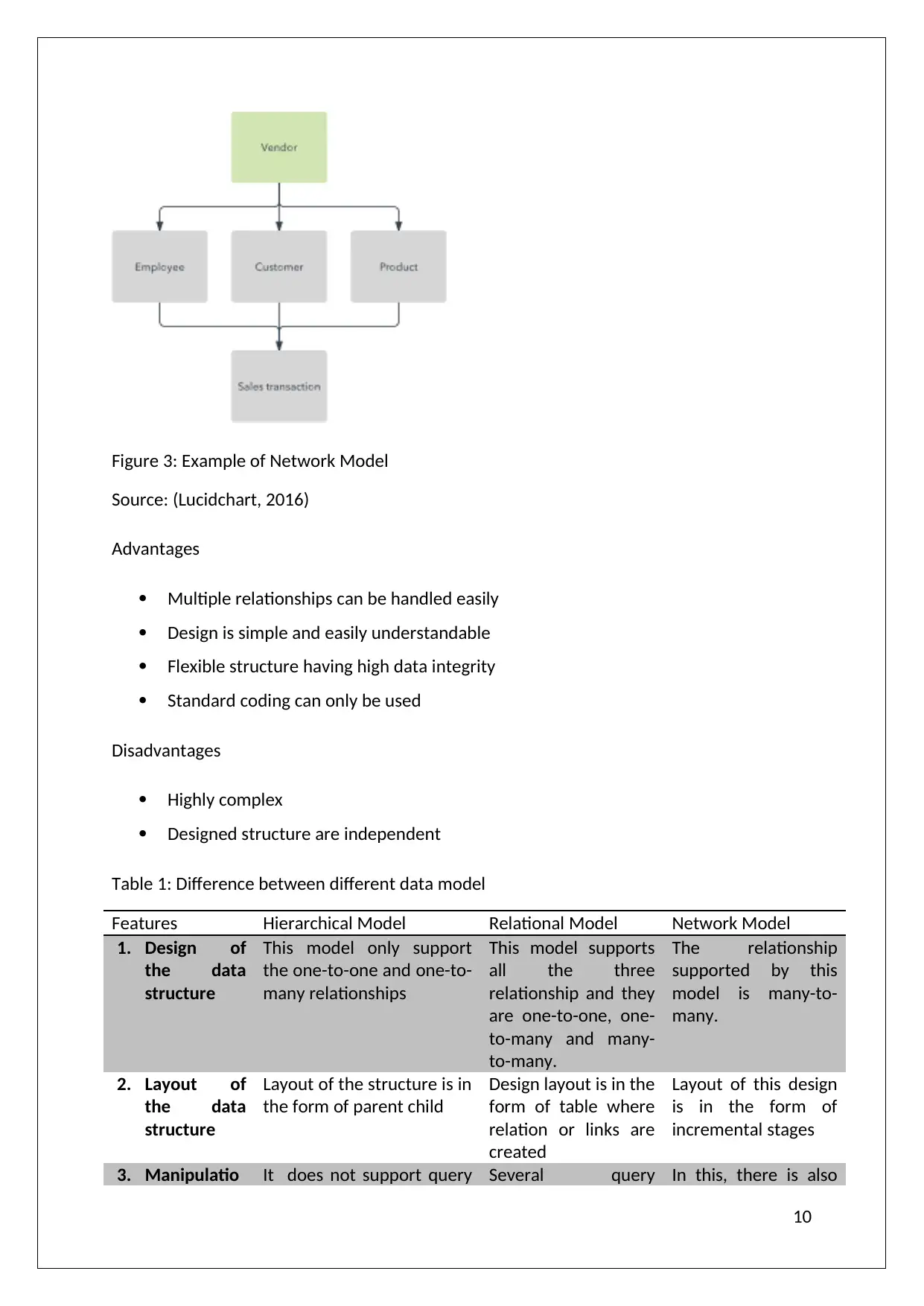
Figure 3: Example of Network Model
Source: (Lucidchart, 2016)
Advantages
Multiple relationships can be handled easily
Design is simple and easily understandable
Flexible structure having high data integrity
Standard coding can only be used
Disadvantages
Highly complex
Designed structure are independent
Table 1: Difference between different data model
Features Hierarchical Model Relational Model Network Model
1. Design of
the data
structure
This model only support
the one-to-one and one-to-
many relationships
This model supports
all the three
relationship and they
are one-to-one, one-
to-many and many-
to-many.
The relationship
supported by this
model is many-to-
many.
2. Layout of
the data
structure
Layout of the structure is in
the form of parent child
Design layout is in the
form of table where
relation or links are
created
Layout of this design
is in the form of
incremental stages
3. Manipulatio It does not support query Several query In this, there is also
10
Source: (Lucidchart, 2016)
Advantages
Multiple relationships can be handled easily
Design is simple and easily understandable
Flexible structure having high data integrity
Standard coding can only be used
Disadvantages
Highly complex
Designed structure are independent
Table 1: Difference between different data model
Features Hierarchical Model Relational Model Network Model
1. Design of
the data
structure
This model only support
the one-to-one and one-to-
many relationships
This model supports
all the three
relationship and they
are one-to-one, one-
to-many and many-
to-many.
The relationship
supported by this
model is many-to-
many.
2. Layout of
the data
structure
Layout of the structure is in
the form of parent child
Design layout is in the
form of table where
relation or links are
created
Layout of this design
is in the form of
incremental stages
3. Manipulatio It does not support query Several query In this, there is also
10
n of the data interface for the
manipulation of the data
interface is available
such as SQL which
provides
representation of
many features under
single query
the availability of the
querying language
such as CODASYL
(Conference on Data
System languages)
which supports the
manipulation
4. Retrieval of
the data
Command available for the
retrieval of the data is
complex in addition to
asymmetric
The statements used
for retrieving the
data from the system
is easy to understand
and implement
Statements used for
retrieval of data are
complex but easily
understandable
5. Integrity of
the
information
Integrity of data is not
maintained properly due to
inconsistency in design
The update of the
information does not
support anomalies
Anomalies are not
present in data
update
6. Removal of
the data
Delete anomalies can easily
be implemented
There is no effect of
the data deletion on
rest of the
information
The design of this
model has much
affect from delete
anomalies on rest of
the data (Sen, 2012).
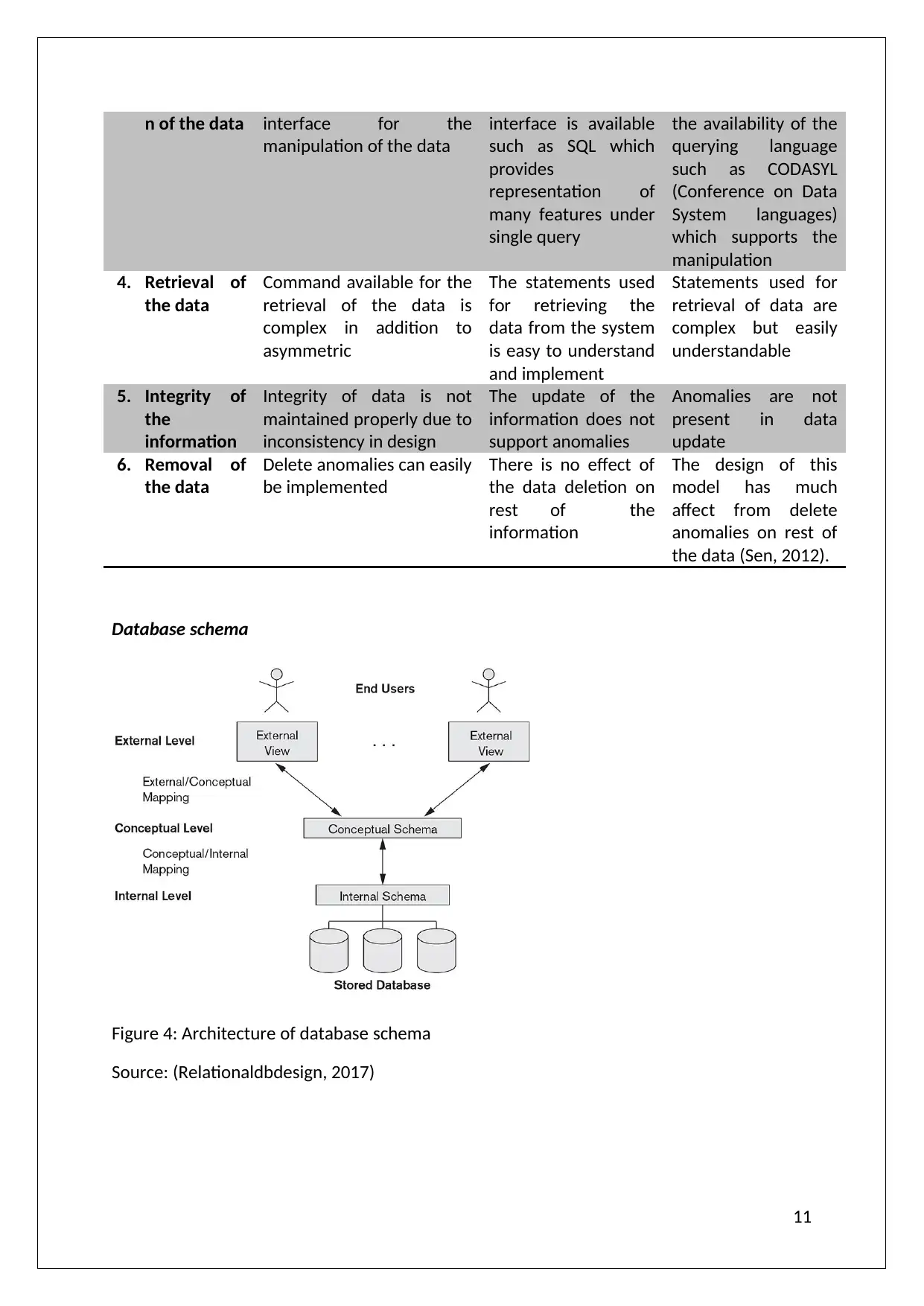
Database schema
Figure 4: Architecture of database schema
Source: (Relationaldbdesign, 2017)
11
manipulation of the data
interface is available
such as SQL which
provides
representation of
many features under
single query
the availability of the
querying language
such as CODASYL
(Conference on Data
System languages)
which supports the
manipulation
4. Retrieval of
the data
Command available for the
retrieval of the data is
complex in addition to
asymmetric
The statements used
for retrieving the
data from the system
is easy to understand
and implement
Statements used for
retrieval of data are
complex but easily
understandable
5. Integrity of
the
information
Integrity of data is not
maintained properly due to
inconsistency in design
The update of the
information does not
support anomalies
Anomalies are not
present in data
update
6. Removal of
the data
Delete anomalies can easily
be implemented
There is no effect of
the data deletion on
rest of the
information
The design of this
model has much
affect from delete
anomalies on rest of
the data (Sen, 2012).
Database schema
Figure 4: Architecture of database schema
Source: (Relationaldbdesign, 2017)
11
⊘ This is a preview!⊘
Do you want full access?
Subscribe today to unlock all pages.
Trusted by 1+ million students worldwide

1 out of 96


Related Documents


Your All-in-One AI-Powered Toolkit for Academic Success.
+13062052269
info@desklib.com
Available 24*7 on WhatsApp / Email
![[object Object]](/_next/static/media/star-bottom.7253800d.svg)
Unlock your academic potential
Copyright © 2020–2026 A2Z Services. All Rights Reserved. Developed and managed by ZUCOL.