Data Handling and Business Intelligence: Excel and SPSS Analysis
VerifiedAdded on 2022/12/30
|18
|3118
|75
Report
AI Summary
This report analyzes data handling and business intelligence, focusing on the application of Microsoft Excel and SPSS. It begins with an introduction to data handling and its significance for business growth, using Smile Clinic as a case study. The report then explores various Excel functions, including data storage, recovery, report generation, and research capabilities. It details the use of the IF function, data analysis techniques, and the creation of pivot tables for data visualization. The second part of the report delves into SPSS, showcasing its statistical analysis capabilities and the application of data mining techniques. The analysis covers customer demographics, cluster analysis, and the evaluation of different data mining methods with current market examples. The report also compares the advantages and disadvantages of SPSS over MS Excel, concluding with a discussion on the overall effectiveness of both tools in deriving business insights. The report provides an in-depth view of data handling and business intelligence tools and techniques.

Data handling and
business intelligence
Paraphrase This Document
Need a fresh take? Get an instant paraphrase of this document with our AI Paraphraser

Contents
Contents...........................................................................................................................................2
INTRODUCTION...........................................................................................................................1
PART 1............................................................................................................................................1
1. Determining and evaluating various aspects of using Excel for pre-processing, analysing,
and visualising the data................................................................................................................1
PART 2............................................................................................................................................7
2.1 Working on SPSS including explanation of the results.........................................................7
2.2 Analysis and evaluation of the different methods that are used in common data mining and
relating it with the current market examples that are prevailing in the present scenario..........12
2.3 Advantages and disadvantages of SPSS over MS Excel.....................................................14
CONCLUSION..............................................................................................................................14
REFERENCES..............................................................................................................................15
Contents...........................................................................................................................................2
INTRODUCTION...........................................................................................................................1
PART 1............................................................................................................................................1
1. Determining and evaluating various aspects of using Excel for pre-processing, analysing,
and visualising the data................................................................................................................1
PART 2............................................................................................................................................7
2.1 Working on SPSS including explanation of the results.........................................................7
2.2 Analysis and evaluation of the different methods that are used in common data mining and
relating it with the current market examples that are prevailing in the present scenario..........12
2.3 Advantages and disadvantages of SPSS over MS Excel.....................................................14
CONCLUSION..............................................................................................................................14
REFERENCES..............................................................................................................................15

INTRODUCTION
Handling of data in an appropriate, systematic, and sequential manner is one of the most
crucial as well as critical aspect in the current scenario as it can help a business firm to grow and
prosper in the market but at the same time it can damage and disrupt the operations of the
enterprise if not used in an effective and efficient way (Al-Qirim, Tarhini and Rouibah, 2017).
Smile clinic is a firm which is operating in the industry since a considerable amount of time and
thus has captured a good share in the market and enjoys a loyal customer base. In this report
there is a brief discussion of the above mentioned company and its related aspects that carrier a
lot of value in the present time. apart from this the report also covers different topics which are
related with the Microsoft Excel and its operations that it performs for the company’s well being
in the market so that it can sustain in the industry for a much longer time period as compared
with other competitors that are prevailing in the current market situation. Further this report also
covers Excel’s importance in the company so that it can perform its activities in an appropriate
manner.
PART 1
1. Determining and evaluating various aspects of using Excel for pre-processing, analysing, and
visualising the data
Excel performs a number of different functions that helps a company to carry out its daily
transactions in an impactful manner so that it can add to the market value of that organisation in
the long run. The main function of it is to store and evaluate the facts and figures of the business
so that it can prove handy in taking and implementing various decisions for the betterment of the
enterprise which can substantially increase its value in the industry in which it is operating.
Various functions of Microsoft Excel are elaborated below-
Analyzing and storing data- The most important function of Excel is that it analyses,
evaluate, and store relevant data in a precise format for the company so that it can be used
as per the requirements of the enterprise without facing much problems. There are a
number of tools and techniques that can be used in it so that all the figures can be store in
an accurate way which can help the firm in the near future (Antignac, Scandariato and
Schneider, 2016).
Handling of data in an appropriate, systematic, and sequential manner is one of the most
crucial as well as critical aspect in the current scenario as it can help a business firm to grow and
prosper in the market but at the same time it can damage and disrupt the operations of the
enterprise if not used in an effective and efficient way (Al-Qirim, Tarhini and Rouibah, 2017).
Smile clinic is a firm which is operating in the industry since a considerable amount of time and
thus has captured a good share in the market and enjoys a loyal customer base. In this report
there is a brief discussion of the above mentioned company and its related aspects that carrier a
lot of value in the present time. apart from this the report also covers different topics which are
related with the Microsoft Excel and its operations that it performs for the company’s well being
in the market so that it can sustain in the industry for a much longer time period as compared
with other competitors that are prevailing in the current market situation. Further this report also
covers Excel’s importance in the company so that it can perform its activities in an appropriate
manner.
PART 1
1. Determining and evaluating various aspects of using Excel for pre-processing, analysing, and
visualising the data
Excel performs a number of different functions that helps a company to carry out its daily
transactions in an impactful manner so that it can add to the market value of that organisation in
the long run. The main function of it is to store and evaluate the facts and figures of the business
so that it can prove handy in taking and implementing various decisions for the betterment of the
enterprise which can substantially increase its value in the industry in which it is operating.
Various functions of Microsoft Excel are elaborated below-
Analyzing and storing data- The most important function of Excel is that it analyses,
evaluate, and store relevant data in a precise format for the company so that it can be used
as per the requirements of the enterprise without facing much problems. There are a
number of tools and techniques that can be used in it so that all the figures can be store in
an accurate way which can help the firm in the near future (Antignac, Scandariato and
Schneider, 2016).
⊘ This is a preview!⊘
Do you want full access?
Subscribe today to unlock all pages.

Trusted by 1+ million students worldwide

Data recovery- Also stored data in Microsoft Excel can be restored many times as per
the needs or if it is erased or deleted by mistake it can also be recovered and thus giving
an upper hand to the firm in the market environment which is highly competitive as well
as dynamic in nature.
Making report- Reports can also be made in Microsoft Excel in an impactful way with
the help of different tools that are prevailing in the current market scenario and are
available in it. It also proves very beneficial as it helps in monitoring of the data so that
chances of any type of error can be minimized so that appropriate and necessary
rectifications can be as and when needed by the organization.
Research- It is an essential element as new and important aspects can be evaluated with
the help of it and Microsoft Excel does all the research in an effective and efficient way
so that it can add to the market value of that organization in the long run by increasing
and improving the performance and the productivity of the firm so that it can sustain in
the industry for a long time period (Berg and Carlsson, 2019).
Conditional formatting- Formatting of different things can be done easily in Microsoft
Excel according to the requirements and demands of the company owners so that
necessary adjustments can be implemented in the working of the business which can
prove beneficial from the firm’s point of view.
Security- Since all the facts and figures that are store in Microsoft Excel posses a lot of
important for each and every firm that is currently working in the industry and thus
security aspect becomes very much crucial in this and Excel provides all that in an
effective manner. Security cannot be breached easily in it and thus it provides all the
necessary measures that an enterprise wants so that all the information can be stored with
high confidentiality (Jain, 2017).
Evaluating and analysing the use of IF function in Microsoft Excel- It includes a comma
and then it is divided into three pieces which is know and IF feature or IF declaration and the
function that it performs are given below in detail-
It helps in analysing and evaluating the performance of the company while taking its
revenues and incomes as a base for it and it also indicates the level of sales that the firm
the needs or if it is erased or deleted by mistake it can also be recovered and thus giving
an upper hand to the firm in the market environment which is highly competitive as well
as dynamic in nature.
Making report- Reports can also be made in Microsoft Excel in an impactful way with
the help of different tools that are prevailing in the current market scenario and are
available in it. It also proves very beneficial as it helps in monitoring of the data so that
chances of any type of error can be minimized so that appropriate and necessary
rectifications can be as and when needed by the organization.
Research- It is an essential element as new and important aspects can be evaluated with
the help of it and Microsoft Excel does all the research in an effective and efficient way
so that it can add to the market value of that organization in the long run by increasing
and improving the performance and the productivity of the firm so that it can sustain in
the industry for a long time period (Berg and Carlsson, 2019).
Conditional formatting- Formatting of different things can be done easily in Microsoft
Excel according to the requirements and demands of the company owners so that
necessary adjustments can be implemented in the working of the business which can
prove beneficial from the firm’s point of view.
Security- Since all the facts and figures that are store in Microsoft Excel posses a lot of
important for each and every firm that is currently working in the industry and thus
security aspect becomes very much crucial in this and Excel provides all that in an
effective manner. Security cannot be breached easily in it and thus it provides all the
necessary measures that an enterprise wants so that all the information can be stored with
high confidentiality (Jain, 2017).
Evaluating and analysing the use of IF function in Microsoft Excel- It includes a comma
and then it is divided into three pieces which is know and IF feature or IF declaration and the
function that it performs are given below in detail-
It helps in analysing and evaluating the performance of the company while taking its
revenues and incomes as a base for it and it also indicates the level of sales that the firm
Paraphrase This Document
Need a fresh take? Get an instant paraphrase of this document with our AI Paraphraser

has achieved in a given period of time which makes decision making process very easy
and simple as all the things are done in an step by step format.
Apart from that all the old figures that are stored in it can be rearranged so that new data
can be generated which can drastically improve and increase the value of the company in
the market in which it is performing.
Uses of the IF Element form- There are different use of this and all of those are discussed
below in detail-
Form code can be shaped with the help of it.
Further the code of different cells can be checked and rechecked so as to remove any
duplication of work and to examine that it fulfils all the needs and requirements or not
(Kalakbandi and Kondareddy, 2017).
If any of the function reveals the significance of B3, then if the importance or value of B3 is
less than of B3's variable that indicates that the parameter of B1 will also mean that the IF
parameter is more important than B3 as soon as the function is seen. User which is operating it
should obtain the cell that is of B4 file after pressing the Enter key. To see the impact of it the
user has to transfer the handle from D4 to cell D8400.
If there is an application and the user needs to learn about H Lookup and V lookup factors in
a detailed manner so firstly they must not be confused that whether the buyer wants it as this is
an important skill or not. Thus the user will consider all the things in detail if operating is being
done with minimal numbers. Hence this would take longer to locate each and everything in the
data for the extension of the search.
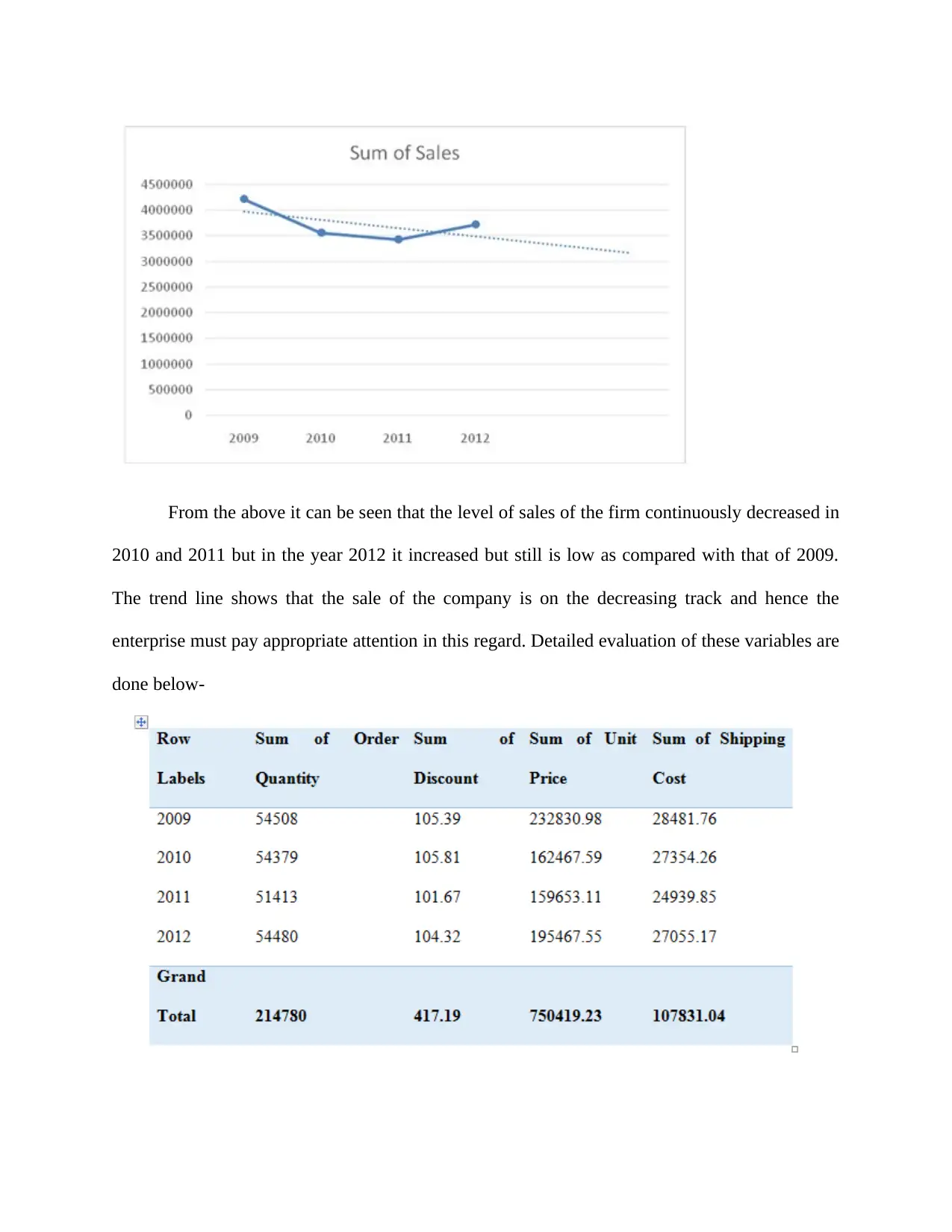
The analysis of Superstore data is aimed at determining the decline in sales. Using the
PIVOT table, the following graph was generated.
and simple as all the things are done in an step by step format.
Apart from that all the old figures that are stored in it can be rearranged so that new data
can be generated which can drastically improve and increase the value of the company in
the market in which it is performing.
Uses of the IF Element form- There are different use of this and all of those are discussed
below in detail-
Form code can be shaped with the help of it.
Further the code of different cells can be checked and rechecked so as to remove any
duplication of work and to examine that it fulfils all the needs and requirements or not
(Kalakbandi and Kondareddy, 2017).
If any of the function reveals the significance of B3, then if the importance or value of B3 is
less than of B3's variable that indicates that the parameter of B1 will also mean that the IF
parameter is more important than B3 as soon as the function is seen. User which is operating it
should obtain the cell that is of B4 file after pressing the Enter key. To see the impact of it the
user has to transfer the handle from D4 to cell D8400.
If there is an application and the user needs to learn about H Lookup and V lookup factors in
a detailed manner so firstly they must not be confused that whether the buyer wants it as this is
an important skill or not. Thus the user will consider all the things in detail if operating is being
done with minimal numbers. Hence this would take longer to locate each and everything in the
data for the extension of the search.
The analysis of Superstore data is aimed at determining the decline in sales. Using the
PIVOT table, the following graph was generated.

From the above it can be seen that the level of sales of the firm continuously decreased in
2010 and 2011 but in the year 2012 it increased but still is low as compared with that of 2009.
The trend line shows that the sale of the company is on the decreasing track and hence the
enterprise must pay appropriate attention in this regard. Detailed evaluation of these variables are
done below-
2010 and 2011 but in the year 2012 it increased but still is low as compared with that of 2009.
The trend line shows that the sale of the company is on the decreasing track and hence the
enterprise must pay appropriate attention in this regard. Detailed evaluation of these variables are
done below-
⊘ This is a preview!⊘
Do you want full access?
Subscribe today to unlock all pages.

Trusted by 1+ million students worldwide

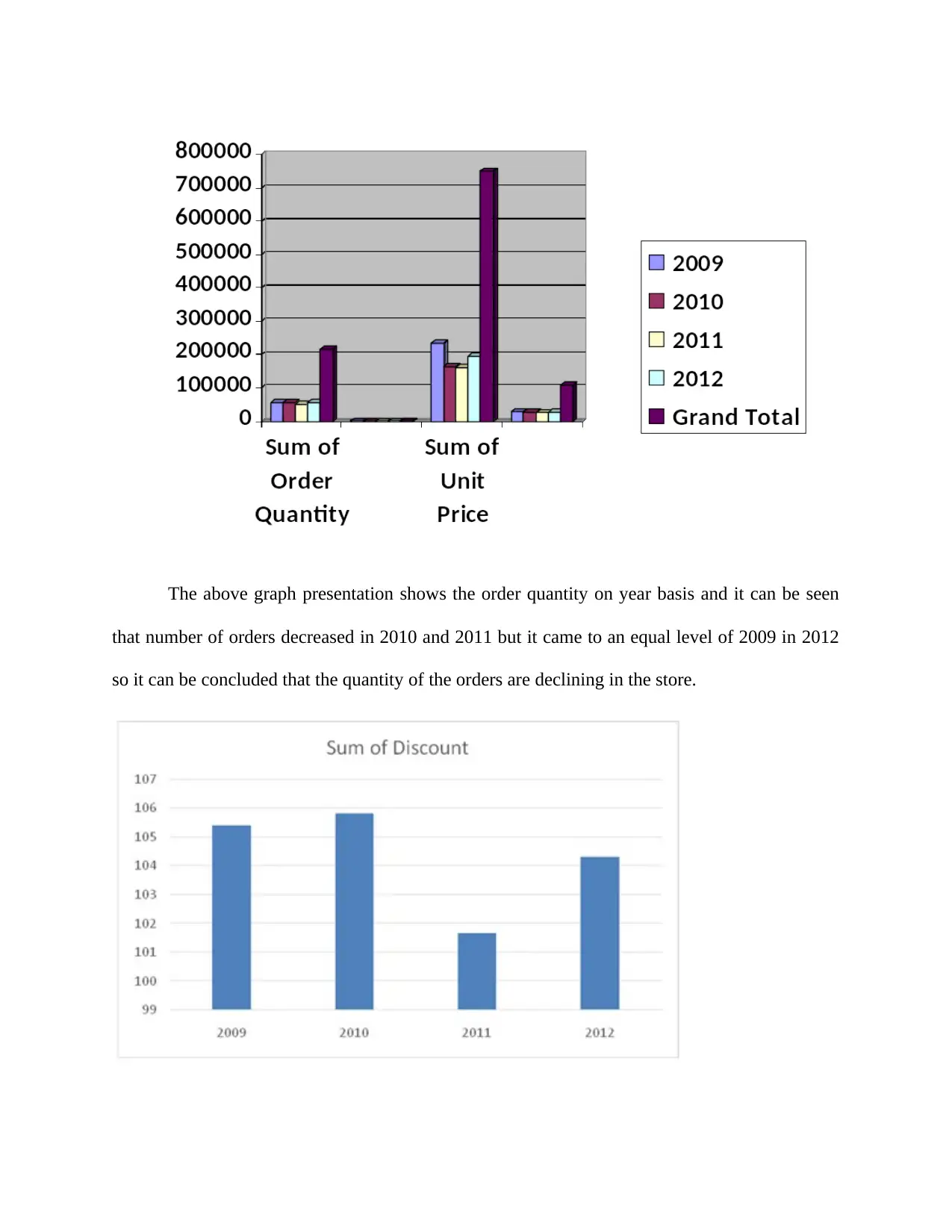
The above graph presentation shows the order quantity on year basis and it can be seen
that number of orders decreased in 2010 and 2011 but it came to an equal level of 2009 in 2012
so it can be concluded that the quantity of the orders are declining in the store.
that number of orders decreased in 2010 and 2011 but it came to an equal level of 2009 in 2012
so it can be concluded that the quantity of the orders are declining in the store.
Paraphrase This Document
Need a fresh take? Get an instant paraphrase of this document with our AI Paraphraser

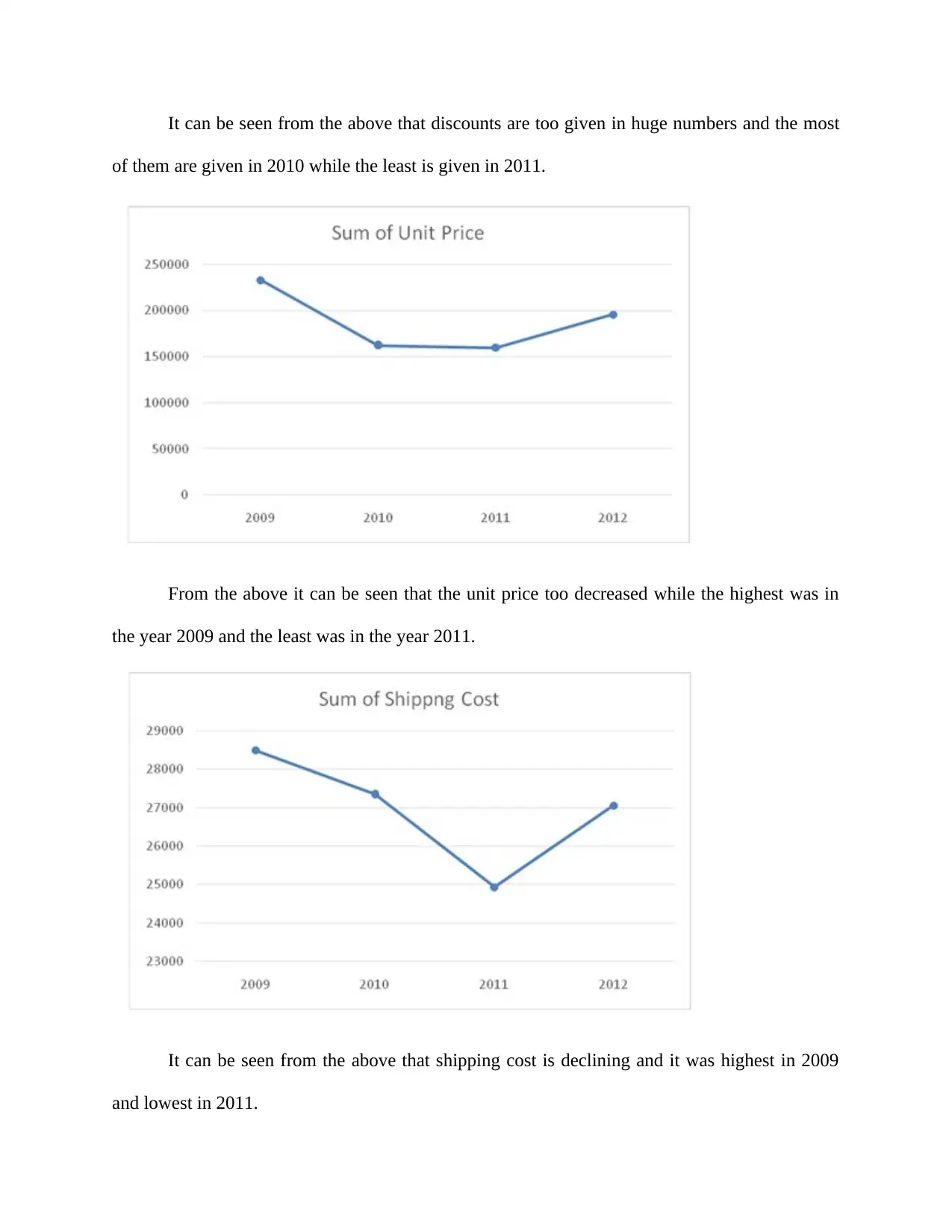
It can be seen from the above that discounts are too given in huge numbers and the most
of them are given in 2010 while the least is given in 2011.
From the above it can be seen that the unit price too decreased while the highest was in
the year 2009 and the least was in the year 2011.
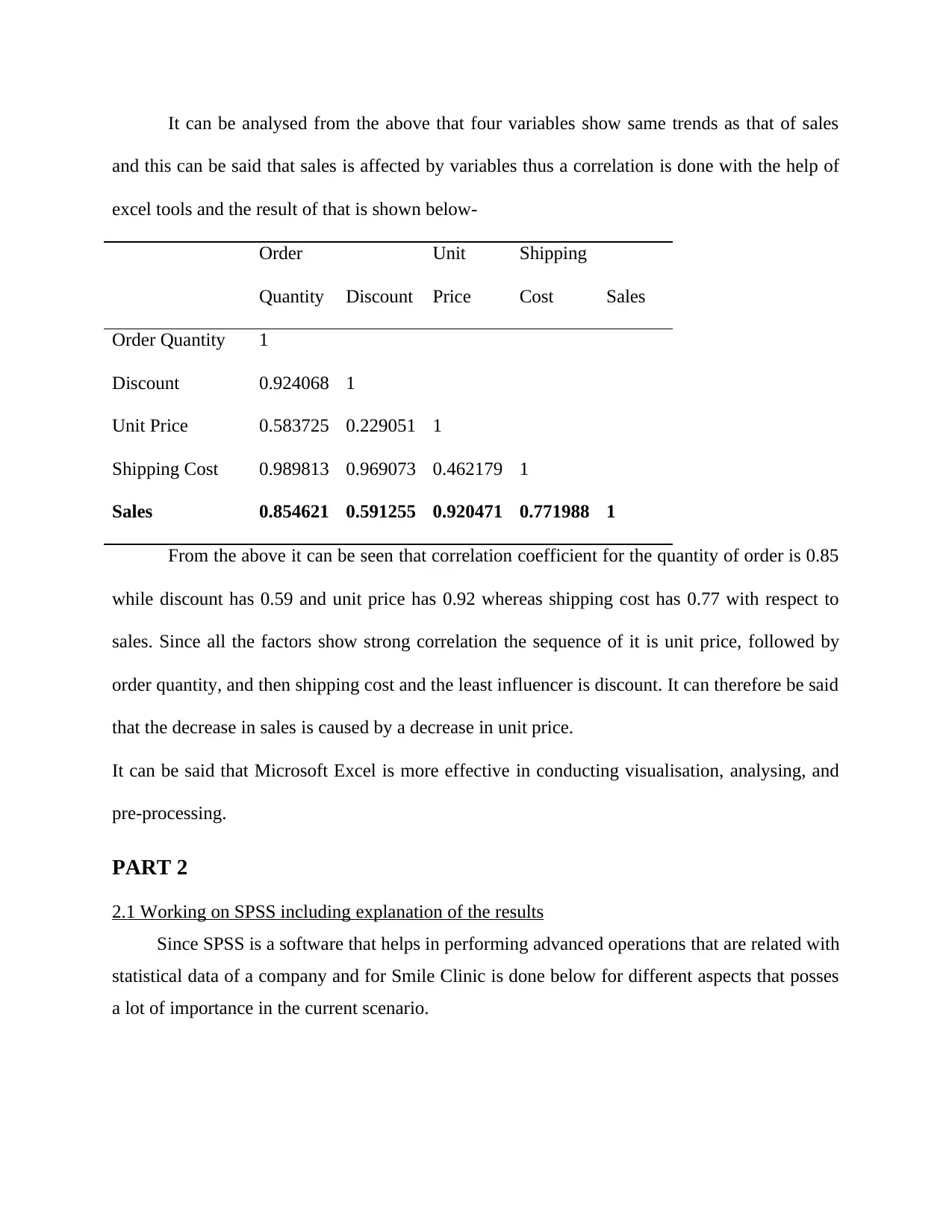
It can be seen from the above that shipping cost is declining and it was highest in 2009
and lowest in 2011.
of them are given in 2010 while the least is given in 2011.
From the above it can be seen that the unit price too decreased while the highest was in
the year 2009 and the least was in the year 2011.
It can be seen from the above that shipping cost is declining and it was highest in 2009
and lowest in 2011.

It can be analysed from the above that four variables show same trends as that of sales
and this can be said that sales is affected by variables thus a correlation is done with the help of
excel tools and the result of that is shown below-
Order
Quantity Discount
Unit
Price
Shipping
Cost Sales
Order Quantity 1
Discount 0.924068 1
Unit Price 0.583725 0.229051 1
Shipping Cost 0.989813 0.969073 0.462179 1
Sales 0.854621 0.591255 0.920471 0.771988 1
From the above it can be seen that correlation coefficient for the quantity of order is 0.85
while discount has 0.59 and unit price has 0.92 whereas shipping cost has 0.77 with respect to
sales. Since all the factors show strong correlation the sequence of it is unit price, followed by
order quantity, and then shipping cost and the least influencer is discount. It can therefore be said
that the decrease in sales is caused by a decrease in unit price.
It can be said that Microsoft Excel is more effective in conducting visualisation, analysing, and
pre-processing.
PART 2
2.1 Working on SPSS including explanation of the results
Since SPSS is a software that helps in performing advanced operations that are related with
statistical data of a company and for Smile Clinic is done below for different aspects that posses
a lot of importance in the current scenario.
and this can be said that sales is affected by variables thus a correlation is done with the help of
excel tools and the result of that is shown below-
Order
Quantity Discount
Unit
Price
Shipping
Cost Sales
Order Quantity 1
Discount 0.924068 1
Unit Price 0.583725 0.229051 1
Shipping Cost 0.989813 0.969073 0.462179 1
Sales 0.854621 0.591255 0.920471 0.771988 1
From the above it can be seen that correlation coefficient for the quantity of order is 0.85
while discount has 0.59 and unit price has 0.92 whereas shipping cost has 0.77 with respect to
sales. Since all the factors show strong correlation the sequence of it is unit price, followed by
order quantity, and then shipping cost and the least influencer is discount. It can therefore be said
that the decrease in sales is caused by a decrease in unit price.
It can be said that Microsoft Excel is more effective in conducting visualisation, analysing, and
pre-processing.
PART 2
2.1 Working on SPSS including explanation of the results
Since SPSS is a software that helps in performing advanced operations that are related with
statistical data of a company and for Smile Clinic is done below for different aspects that posses
a lot of importance in the current scenario.
⊘ This is a preview!⊘
Do you want full access?
Subscribe today to unlock all pages.

Trusted by 1+ million students worldwide

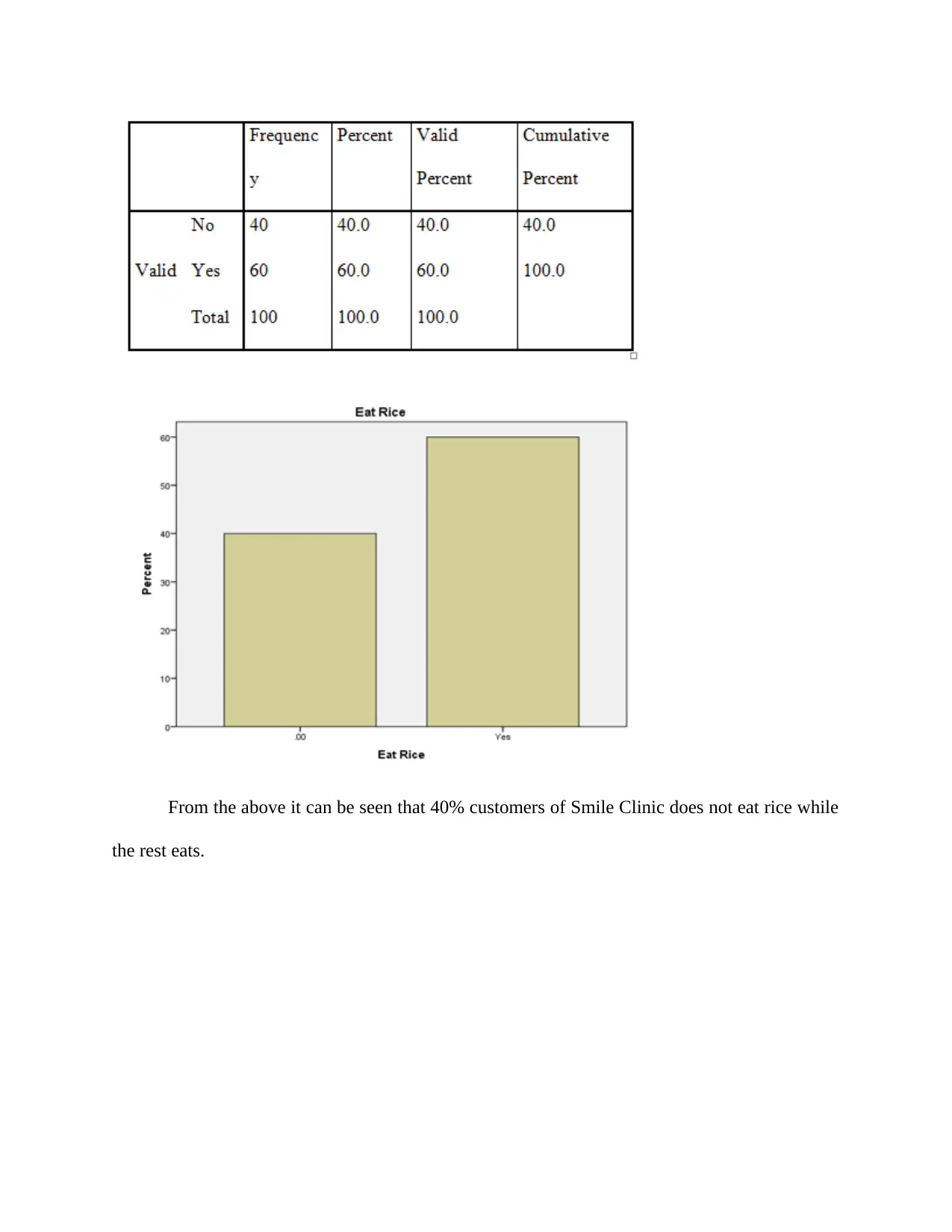
From the above it can be seen that 40% customers of Smile Clinic does not eat rice while
the rest eats.
the rest eats.
Paraphrase This Document
Need a fresh take? Get an instant paraphrase of this document with our AI Paraphraser

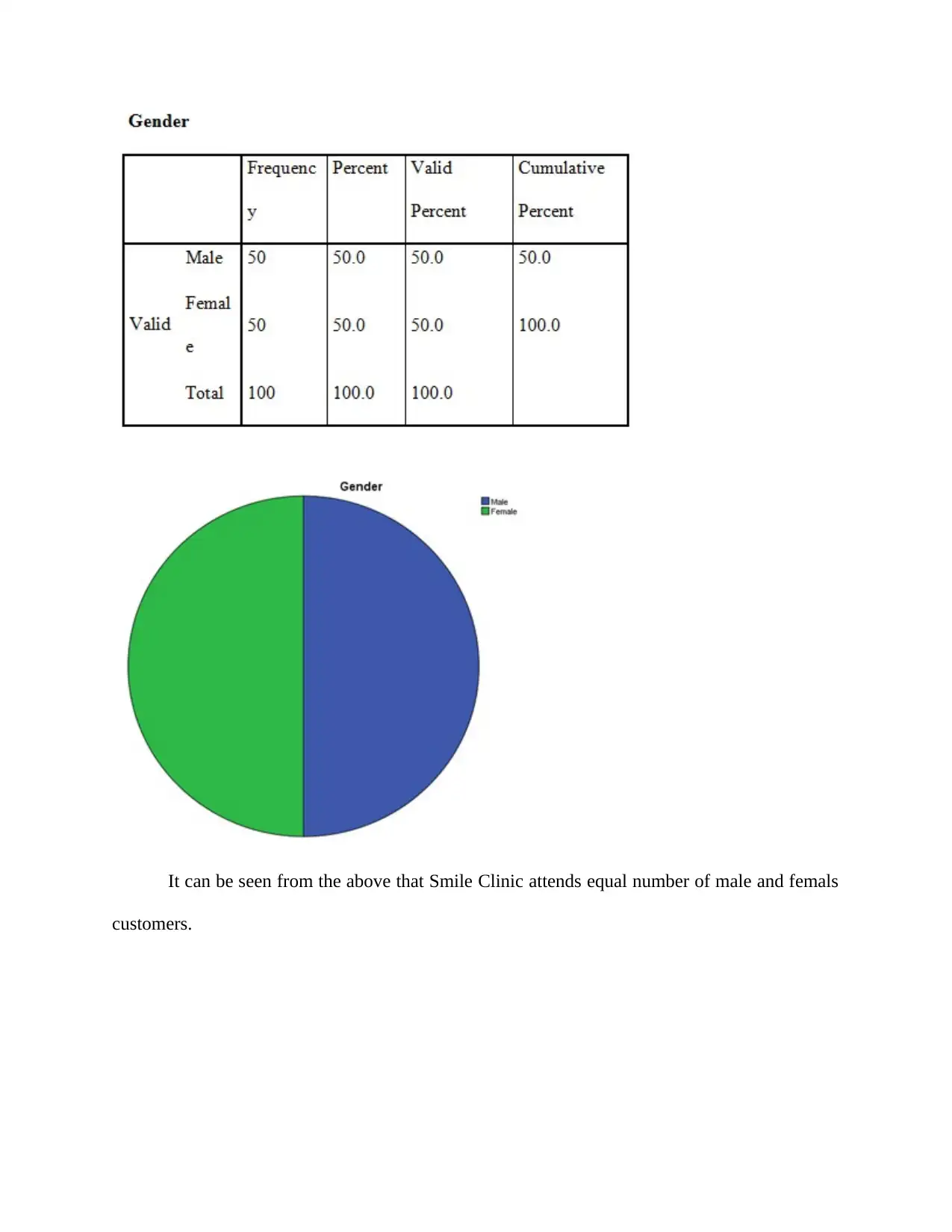
It can be seen from the above that Smile Clinic attends equal number of male and femals
customers.
customers.

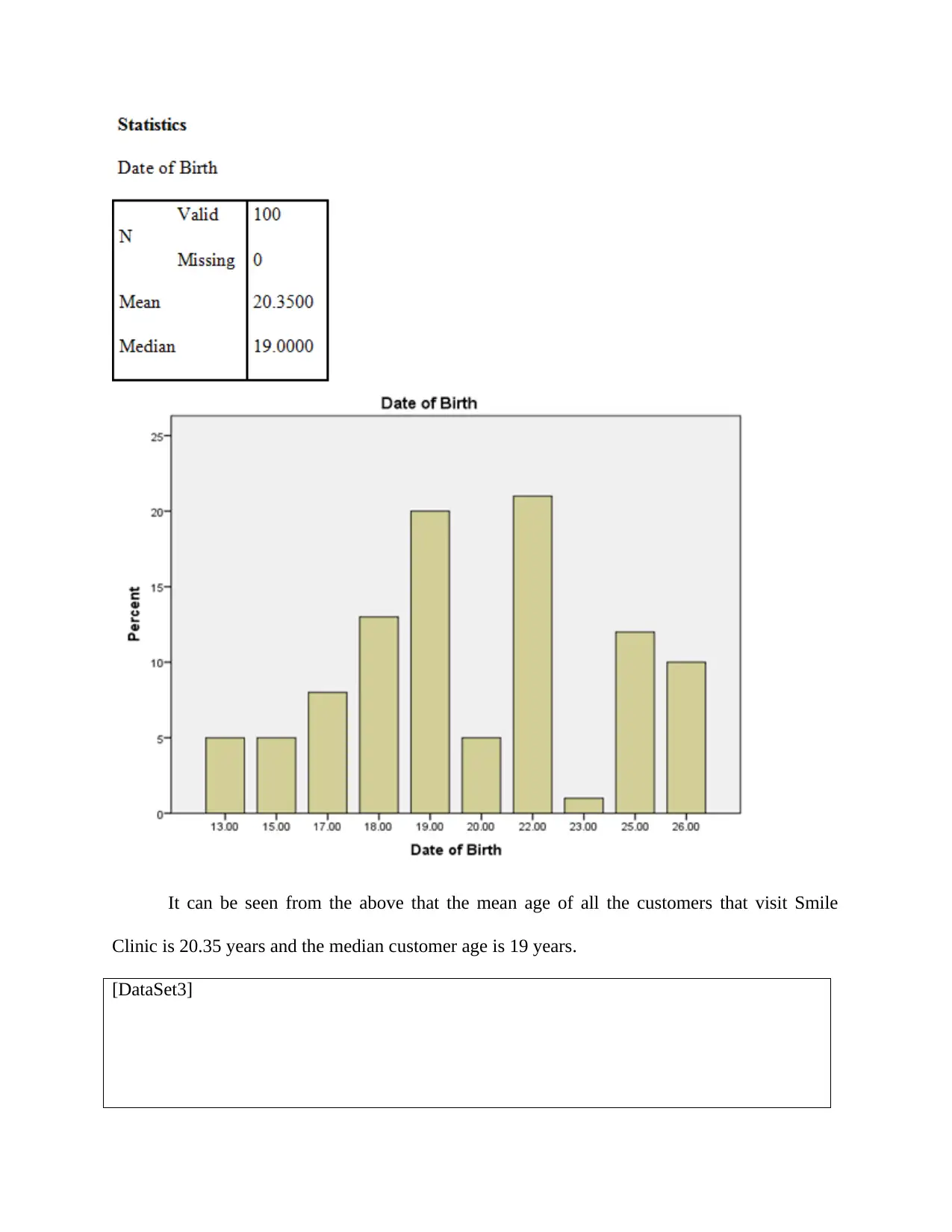
It can be seen from the above that the mean age of all the customers that visit Smile
Clinic is 20.35 years and the median customer age is 19 years.
[DataSet3]
Clinic is 20.35 years and the median customer age is 19 years.
[DataSet3]
⊘ This is a preview!⊘
Do you want full access?
Subscribe today to unlock all pages.

Trusted by 1+ million students worldwide
1 out of 18
Related Documents
Your All-in-One AI-Powered Toolkit for Academic Success.
+13062052269
info@desklib.com
Available 24*7 on WhatsApp / Email
Unlock your academic potential
Copyright © 2020–2025 A2Z Services. All Rights Reserved. Developed and managed by ZUCOL.