Certificate IV Business Administration: BSBITU402 Assignment
VerifiedAdded on 2019/09/27
|47
|8218
|95
Homework Assignment
AI Summary
This document presents a comprehensive BSBITU402 assignment from Zenith Business Academy's Certificate IV in Business Administration program. The assignment is designed to assess the student's ability to develop and use complex spreadsheets, covering topics such as spreadsheet design, formula creation, automation through macros, data import/export, and the representation of numerical data in graphic form. The assessment is divided into three parts: written questions testing theoretical knowledge, and two project activities requiring practical application of spreadsheet skills. The assignment adheres to the academy's guidelines, including submission instructions, assessment criteria, and foundation skills mapping, providing a detailed overview of the unit's learning outcomes and assessment requirements. The document includes sections on student information, assessment matrices, instructions, and student feedback. The assignment includes all the information needed to complete the assignment successfully, including the assessment criteria and the foundation skills needed to succeed.
Conte
nt
ASSESSMENT TOOL OUTLINE
Course
Name:
Certificate IV in Business
Administration
Course
Code:
BSB40515
Unit
Name:
Develop and Use
Complex Spreadsheets
Unit
Code:
BSBITU402
BSBITU402–Develop and Use Complex Spreadsheets Version 2:0 updated 17/06/2016 Page 1 of 47
nt
ASSESSMENT TOOL OUTLINE
Course
Name:
Certificate IV in Business
Administration
Course
Code:
BSB40515
Unit
Name:
Develop and Use
Complex Spreadsheets
Unit
Code:
BSBITU402
BSBITU402–Develop and Use Complex Spreadsheets Version 2:0 updated 17/06/2016 Page 1 of 47

Paraphrase This Document
Need a fresh take? Get an instant paraphrase of this document with our AI Paraphraser
BSBITU402–Develop and Use Complex Spreadsheets Version 2:0 updated 17/06/2016 Page 2 of 47
ContentsSection 1 - Student’s
Information………………………………………………………………………………………………………………2
Section 2 - Assessment Matrix…………………………………………………………………………………………………………………..7
Section 3 : Assessment Cover Sheet…………………………………………………………………………………………………………13
Assessment Instructions………………………………………………………………………………………………………………………….15
Section 4: Assessment Task……………………………………………………………………………………………………………………..16
Part A – Written Questions………………………………………………………………………………………………………………………16
Part B – Project Activity.………………………………………………………………………………………………………………….………25
Part C – Project Activity……….………………………………………………………………………………………………………………….34
Section 5: Student Feedback on unit………………………………………………………………………………………………………..44
ContentsSection 1 - Student’s
Information………………………………………………………………………………………………………………2
Section 2 - Assessment Matrix…………………………………………………………………………………………………………………..7
Section 3 : Assessment Cover Sheet…………………………………………………………………………………………………………13
Assessment Instructions………………………………………………………………………………………………………………………….15
Section 4: Assessment Task……………………………………………………………………………………………………………………..16
Part A – Written Questions………………………………………………………………………………………………………………………16
Part B – Project Activity.………………………………………………………………………………………………………………….………25
Part C – Project Activity……….………………………………………………………………………………………………………………….34
Section 5: Student Feedback on unit………………………………………………………………………………………………………..44
Zenith Business Academy
Level 7, 399 Lonsdale Street, Melbourne VIC 3000
Telephone: 03 9603 5300
www.zba.nsw.edu.au, email: studentservices@zba.edu.au
CRICOS Provider Code 02997M
Section 1 - Student’s Information
Introduction
This assessment tool relates to the following unit of competency of BSBITU402 Develop and Use
Complex Spreadsheets. The delivery and assessment of this unit will be conducted over a period of 40
hours face to face training.
Unit descriptors
BSBITU402: Develop and Use Complex Spreadsheets’
This unit describes the performance outcomes, skills and knowledge required to use spreadsheet software
to complete business tasks and to produce complex documents.
This unit applies to individuals employed in a range of work environments that require skills in the creation
of complex spreadsheets to store and retrieve data. They may work as individuals providing administrative
support within an enterprise, or may be independently responsible for designing and working with
spreadsheets relevant to their own work roles.
Licensing/Regulatory Information
Not applicable.
Pre-Requisites
Not applicable.
BSBITU402–Develop and Use Complex Spreadsheets Version 2:0 updated 17/06/2016 Page 3 of 47
Level 7, 399 Lonsdale Street, Melbourne VIC 3000
Telephone: 03 9603 5300
www.zba.nsw.edu.au, email: studentservices@zba.edu.au
CRICOS Provider Code 02997M
Section 1 - Student’s Information
Introduction
This assessment tool relates to the following unit of competency of BSBITU402 Develop and Use
Complex Spreadsheets. The delivery and assessment of this unit will be conducted over a period of 40
hours face to face training.
Unit descriptors
BSBITU402: Develop and Use Complex Spreadsheets’
This unit describes the performance outcomes, skills and knowledge required to use spreadsheet software
to complete business tasks and to produce complex documents.
This unit applies to individuals employed in a range of work environments that require skills in the creation
of complex spreadsheets to store and retrieve data. They may work as individuals providing administrative
support within an enterprise, or may be independently responsible for designing and working with
spreadsheets relevant to their own work roles.
Licensing/Regulatory Information
Not applicable.
Pre-Requisites
Not applicable.
BSBITU402–Develop and Use Complex Spreadsheets Version 2:0 updated 17/06/2016 Page 3 of 47
⊘ This is a preview!⊘
Do you want full access?
Subscribe today to unlock all pages.

Trusted by 1+ million students worldwide
Zenith Business Academy
Level 7, 399 Lonsdale Street, Melbourne VIC 3000
Telephone: 03 9603 5300
www.zba.nsw.edu.au, email: studentservices@zba.edu.au
CRICOS Provider Code 02997M
Instructions to students
The strategies used in gathering evidence for these units in the qualifications including a clustered
assessment for BSBITU402 – Develop and Use Complex Spreadsheets:
Demonstration
Project/Activities
Knowledge Test
Outcomes of the Assessment:
After completion of this assessment tool student will be able to:
1. Prepare to develop spreadsheet
2. Develop a linked spreadsheet solution
3. Automate and standardize spreadsheet operation
4. Use spreadsheets
5. Represent numerical data in graphic form
Instruction for Assessments Submission:
If you do not understand any part of the unit or the assessments you are required to undertake, please talk
with your trainer or with the course coordinator. It is important that you understand all of the critical aspects
of the learning and assessment process that you will be undertaking. This will make it easier for you to
learn and successfully progress in your studies.
To be able to be marked competent (pass) in any unit you must:
Submit all pieces of assessable work. If you do not submit any work, you will be unable to gain
competency (pass)
Submit all work on or before the due date. Any work submitted after the due date, without an
approved extension will be unable to gain competency
Any work submitted after term will not be marked and you will be assessed as not yet competent
(not passed).
All work is to be done to a high quality in terms of both presentation and content. This includes
correct referencing, grammar, punctuation and name/student number placed in either header or
footer.
If you hand in your work to your trainer and it is not yet competent (not passed) you have one further
opportunity to resubmit. Your trainer will advise you of new submission date and the areas of improvement
to be made.
If you are found cheating, you will automatically get a not yet competent on your assessment. If you are
found to have cheated, copied work from others either in class or during assessment, you will either to
BSBITU402–Develop and Use Complex Spreadsheets Version 2:0 updated 17/06/2016 Page 4 of 47
Level 7, 399 Lonsdale Street, Melbourne VIC 3000
Telephone: 03 9603 5300
www.zba.nsw.edu.au, email: studentservices@zba.edu.au
CRICOS Provider Code 02997M
Instructions to students
The strategies used in gathering evidence for these units in the qualifications including a clustered
assessment for BSBITU402 – Develop and Use Complex Spreadsheets:
Demonstration
Project/Activities
Knowledge Test
Outcomes of the Assessment:
After completion of this assessment tool student will be able to:
1. Prepare to develop spreadsheet
2. Develop a linked spreadsheet solution
3. Automate and standardize spreadsheet operation
4. Use spreadsheets
5. Represent numerical data in graphic form
Instruction for Assessments Submission:
If you do not understand any part of the unit or the assessments you are required to undertake, please talk
with your trainer or with the course coordinator. It is important that you understand all of the critical aspects
of the learning and assessment process that you will be undertaking. This will make it easier for you to
learn and successfully progress in your studies.
To be able to be marked competent (pass) in any unit you must:
Submit all pieces of assessable work. If you do not submit any work, you will be unable to gain
competency (pass)
Submit all work on or before the due date. Any work submitted after the due date, without an
approved extension will be unable to gain competency
Any work submitted after term will not be marked and you will be assessed as not yet competent
(not passed).
All work is to be done to a high quality in terms of both presentation and content. This includes
correct referencing, grammar, punctuation and name/student number placed in either header or
footer.
If you hand in your work to your trainer and it is not yet competent (not passed) you have one further
opportunity to resubmit. Your trainer will advise you of new submission date and the areas of improvement
to be made.
If you are found cheating, you will automatically get a not yet competent on your assessment. If you are
found to have cheated, copied work from others either in class or during assessment, you will either to
BSBITU402–Develop and Use Complex Spreadsheets Version 2:0 updated 17/06/2016 Page 4 of 47
Paraphrase This Document
Need a fresh take? Get an instant paraphrase of this document with our AI Paraphraser
Zenith Business Academy
Level 7, 399 Lonsdale Street, Melbourne VIC 3000
Telephone: 03 9603 5300
www.zba.nsw.edu.au, email: studentservices@zba.edu.au
CRICOS Provider Code 02997M
repeat the unit or be given a new reassessment task. You will be reported for this action and you may also
have to pay a financial penalty.
Cheating is where any students use:
· Notes in a test
· Copies another person’s work
· Use unauthorized material in test
You must write your work in your own words, you are being assessed on your own thoughts and
knowledge. All work is to be typed and handed directly to your trainer. You have to attach a completed
assignment sheet to your work that clearly shows your name and your student Id number as well as your
trainer’s name.
Please keep a copy of any work you submit. It is your responsibility to re – submit any work requested at
any time. The Zenith Business Academy takes no responsibility for work that cannot be located.
You do have the right to appeal any assessment decision made by the Zenith Business Academy trainer if
you:
· Believe that the assessment is invalid and /or
· Feel that the process was invalid, inappropriate or unfair.
You will find an overview of this unit in the assessment matrix below and this will help you to develop and
understand how this unit will run over the period of the weeks. The assessment matrix will give you an
opportunity to:
Check your progress
Apply the skills you have learnt during the training sessions
Gather evidence to achieve the competency in this unit
In order to demonstrate your employability skills that underpin all job roles, through the set of foundation
skills that are essential if learners are to participate successfully in work and be valuable and productive
employees.
These skills are identified as:
learning
reading
writing
oral communication
numeracy
BSBITU402–Develop and Use Complex Spreadsheets Version 2:0 updated 17/06/2016 Page 5 of 47
Level 7, 399 Lonsdale Street, Melbourne VIC 3000
Telephone: 03 9603 5300
www.zba.nsw.edu.au, email: studentservices@zba.edu.au
CRICOS Provider Code 02997M
repeat the unit or be given a new reassessment task. You will be reported for this action and you may also
have to pay a financial penalty.
Cheating is where any students use:
· Notes in a test
· Copies another person’s work
· Use unauthorized material in test
You must write your work in your own words, you are being assessed on your own thoughts and
knowledge. All work is to be typed and handed directly to your trainer. You have to attach a completed
assignment sheet to your work that clearly shows your name and your student Id number as well as your
trainer’s name.
Please keep a copy of any work you submit. It is your responsibility to re – submit any work requested at
any time. The Zenith Business Academy takes no responsibility for work that cannot be located.
You do have the right to appeal any assessment decision made by the Zenith Business Academy trainer if
you:
· Believe that the assessment is invalid and /or
· Feel that the process was invalid, inappropriate or unfair.
You will find an overview of this unit in the assessment matrix below and this will help you to develop and
understand how this unit will run over the period of the weeks. The assessment matrix will give you an
opportunity to:
Check your progress
Apply the skills you have learnt during the training sessions
Gather evidence to achieve the competency in this unit
In order to demonstrate your employability skills that underpin all job roles, through the set of foundation
skills that are essential if learners are to participate successfully in work and be valuable and productive
employees.
These skills are identified as:
learning
reading
writing
oral communication
numeracy
BSBITU402–Develop and Use Complex Spreadsheets Version 2:0 updated 17/06/2016 Page 5 of 47
Zenith Business Academy
Level 7, 399 Lonsdale Street, Melbourne VIC 3000
Telephone: 03 9603 5300
www.zba.nsw.edu.au, email: studentservices@zba.edu.au
CRICOS Provider Code 02997M
navigating the world of work
interacting with others
getting the work done.
These foundation skills are embedded in the unit of competency (and sometimes explicitly identified). You
will need to take time to analyse the unit of competency to identify where particular foundation skills are
evident.
You must demonstrate in your assessment task the Critical aspects for assessment and evidence required
to demonstrate competency in this unit.
BSBITU402–Develop and Use Complex Spreadsheets Version 2:0 updated 17/06/2016 Page 6 of 47
Level 7, 399 Lonsdale Street, Melbourne VIC 3000
Telephone: 03 9603 5300
www.zba.nsw.edu.au, email: studentservices@zba.edu.au
CRICOS Provider Code 02997M
navigating the world of work
interacting with others
getting the work done.
These foundation skills are embedded in the unit of competency (and sometimes explicitly identified). You
will need to take time to analyse the unit of competency to identify where particular foundation skills are
evident.
You must demonstrate in your assessment task the Critical aspects for assessment and evidence required
to demonstrate competency in this unit.
BSBITU402–Develop and Use Complex Spreadsheets Version 2:0 updated 17/06/2016 Page 6 of 47
⊘ This is a preview!⊘
Do you want full access?
Subscribe today to unlock all pages.
Trusted by 1+ million students worldwide
Zenith Business Academy
Level 7, 399 Lonsdale Street, Melbourne VIC 3000
Telephone: 03 9603 5300
www.zba.nsw.edu.au, email: studentservices@zba.edu.au
CRICOS Provider Code 02997M
Overview of assessment requirements
To achieve competency in this unit, a person must be able to demonstrate the required knowledge in these
areas:
Performance Evidence
Evidence of the ability to:
follow organisational and safe work practices including:
ergonomic requirements
energy and resource conservation techniques
adhere to organisational requirements for:
ensuring consistency of style, design and layout
saving and printing documents within designated timelines
naming and storing documents
adhere to identified or task requirements when producing documents including:
editing macros and automating some tasks
using appropriate templates
creating graphs to represent data
resolve issues by referring to user documentation and online help
use appropriate data storage options
evaluate tasks to improve efficiency
apply knowledge of functions and features of contemporary computer applications
communicate with relevant personnel.
Note: If a specific volume or frequency is not stated, then evidence must be provided at least once.
Required knowledge
To complete the unit requirements safely and effectively, the individual must:
explain advanced functions of spreadsheet software applications
describe impact of formatting and design on presentation and readability of data
explain organisational requirements for ergonomics, work periods and breaks, and conservation
techniques.
BSBITU402–Develop and Use Complex Spreadsheets Version 2:0 updated 17/06/2016 Page 7 of 47
Level 7, 399 Lonsdale Street, Melbourne VIC 3000
Telephone: 03 9603 5300
www.zba.nsw.edu.au, email: studentservices@zba.edu.au
CRICOS Provider Code 02997M
Overview of assessment requirements
To achieve competency in this unit, a person must be able to demonstrate the required knowledge in these
areas:
Performance Evidence
Evidence of the ability to:
follow organisational and safe work practices including:
ergonomic requirements
energy and resource conservation techniques
adhere to organisational requirements for:
ensuring consistency of style, design and layout
saving and printing documents within designated timelines
naming and storing documents
adhere to identified or task requirements when producing documents including:
editing macros and automating some tasks
using appropriate templates
creating graphs to represent data
resolve issues by referring to user documentation and online help
use appropriate data storage options
evaluate tasks to improve efficiency
apply knowledge of functions and features of contemporary computer applications
communicate with relevant personnel.
Note: If a specific volume or frequency is not stated, then evidence must be provided at least once.
Required knowledge
To complete the unit requirements safely and effectively, the individual must:
explain advanced functions of spreadsheet software applications
describe impact of formatting and design on presentation and readability of data
explain organisational requirements for ergonomics, work periods and breaks, and conservation
techniques.
BSBITU402–Develop and Use Complex Spreadsheets Version 2:0 updated 17/06/2016 Page 7 of 47
Paraphrase This Document
Need a fresh take? Get an instant paraphrase of this document with our AI Paraphraser
Zenith Business Academy
Level 7, 399 Lonsdale Street, Melbourne VIC 3000
Telephone: 03 9603 5300
www.zba.nsw.edu.au, email: studentservices@zba.edu.au
CRICOS Provider Code 02997M
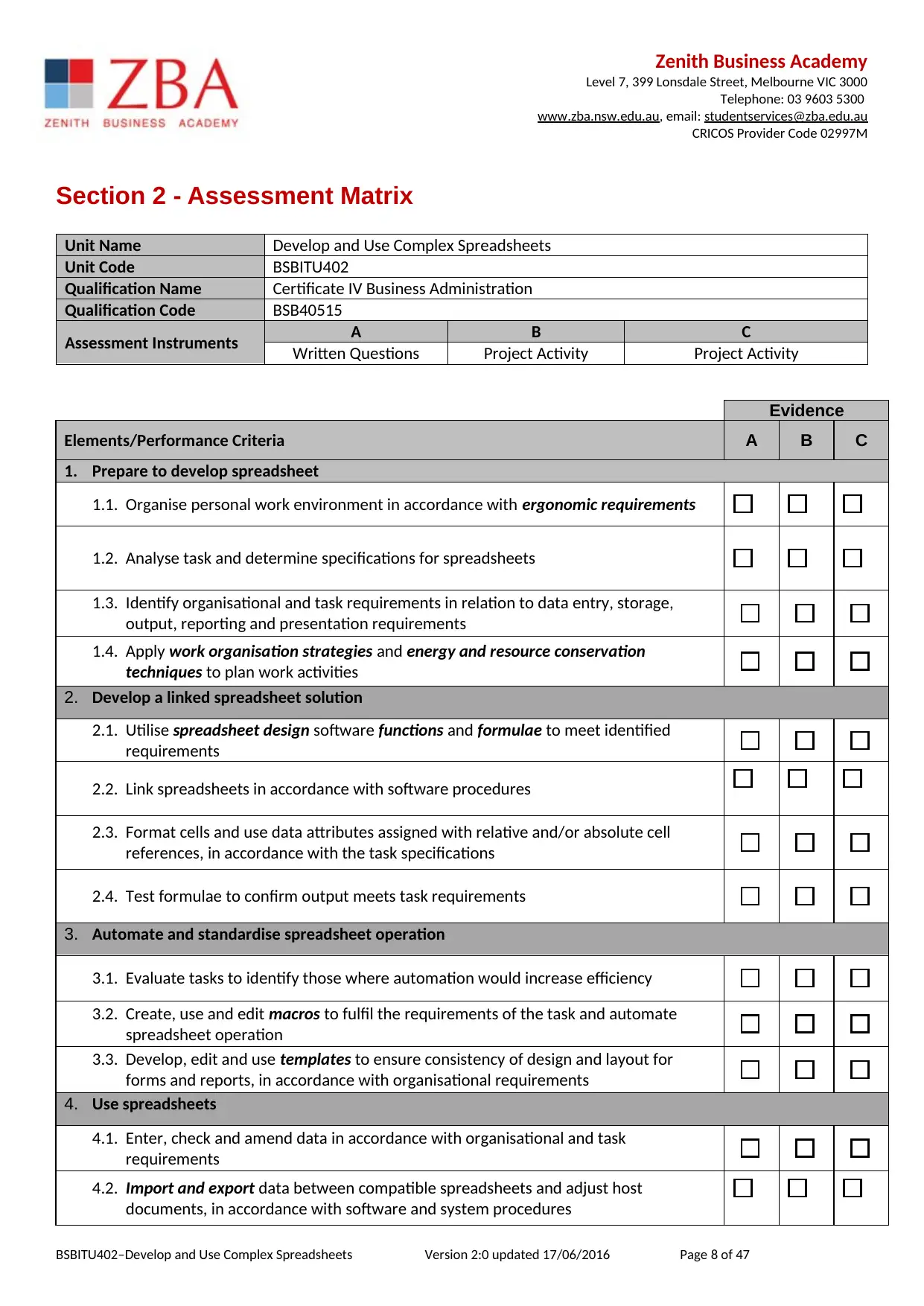
Section 2 - Assessment Matrix
Unit Name Develop and Use Complex Spreadsheets
Unit Code BSBITU402
Qualification Name Certificate IV Business Administration
Qualification Code BSB40515
Assessment Instruments A B C
Written Questions Project Activity Project Activity
Evidence
Elements/Performance Criteria A B C
1. Prepare to develop spreadsheet
1.1. Organise personal work environment in accordance with ergonomic requirements
1.2. Analyse task and determine specifications for spreadsheets
1.3. Identify organisational and task requirements in relation to data entry, storage,
output, reporting and presentation requirements
1.4. Apply work organisation strategies and energy and resource conservation
techniques to plan work activities
2. Develop a linked spreadsheet solution
2.1. Utilise spreadsheet design software functions and formulae to meet identified
requirements
2.2. Link spreadsheets in accordance with software procedures
2.3. Format cells and use data attributes assigned with relative and/or absolute cell
references, in accordance with the task specifications
2.4. Test formulae to confirm output meets task requirements
3. Automate and standardise spreadsheet operation
3.1. Evaluate tasks to identify those where automation would increase efficiency
3.2. Create, use and edit macros to fulfil the requirements of the task and automate
spreadsheet operation
3.3. Develop, edit and use templates to ensure consistency of design and layout for
forms and reports, in accordance with organisational requirements
4. Use spreadsheets
4.1. Enter, check and amend data in accordance with organisational and task
requirements
4.2. Import and export data between compatible spreadsheets and adjust host
documents, in accordance with software and system procedures
BSBITU402–Develop and Use Complex Spreadsheets Version 2:0 updated 17/06/2016 Page 8 of 47
Level 7, 399 Lonsdale Street, Melbourne VIC 3000
Telephone: 03 9603 5300
www.zba.nsw.edu.au, email: studentservices@zba.edu.au
CRICOS Provider Code 02997M
Section 2 - Assessment Matrix
Unit Name Develop and Use Complex Spreadsheets
Unit Code BSBITU402
Qualification Name Certificate IV Business Administration
Qualification Code BSB40515
Assessment Instruments A B C
Written Questions Project Activity Project Activity
Evidence
Elements/Performance Criteria A B C
1. Prepare to develop spreadsheet
1.1. Organise personal work environment in accordance with ergonomic requirements
1.2. Analyse task and determine specifications for spreadsheets
1.3. Identify organisational and task requirements in relation to data entry, storage,
output, reporting and presentation requirements
1.4. Apply work organisation strategies and energy and resource conservation
techniques to plan work activities
2. Develop a linked spreadsheet solution
2.1. Utilise spreadsheet design software functions and formulae to meet identified
requirements
2.2. Link spreadsheets in accordance with software procedures
2.3. Format cells and use data attributes assigned with relative and/or absolute cell
references, in accordance with the task specifications
2.4. Test formulae to confirm output meets task requirements
3. Automate and standardise spreadsheet operation
3.1. Evaluate tasks to identify those where automation would increase efficiency
3.2. Create, use and edit macros to fulfil the requirements of the task and automate
spreadsheet operation
3.3. Develop, edit and use templates to ensure consistency of design and layout for
forms and reports, in accordance with organisational requirements
4. Use spreadsheets
4.1. Enter, check and amend data in accordance with organisational and task
requirements
4.2. Import and export data between compatible spreadsheets and adjust host
documents, in accordance with software and system procedures
BSBITU402–Develop and Use Complex Spreadsheets Version 2:0 updated 17/06/2016 Page 8 of 47
Zenith Business Academy
Level 7, 399 Lonsdale Street, Melbourne VIC 3000
Telephone: 03 9603 5300
www.zba.nsw.edu.au, email: studentservices@zba.edu.au
CRICOS Provider Code 02997M
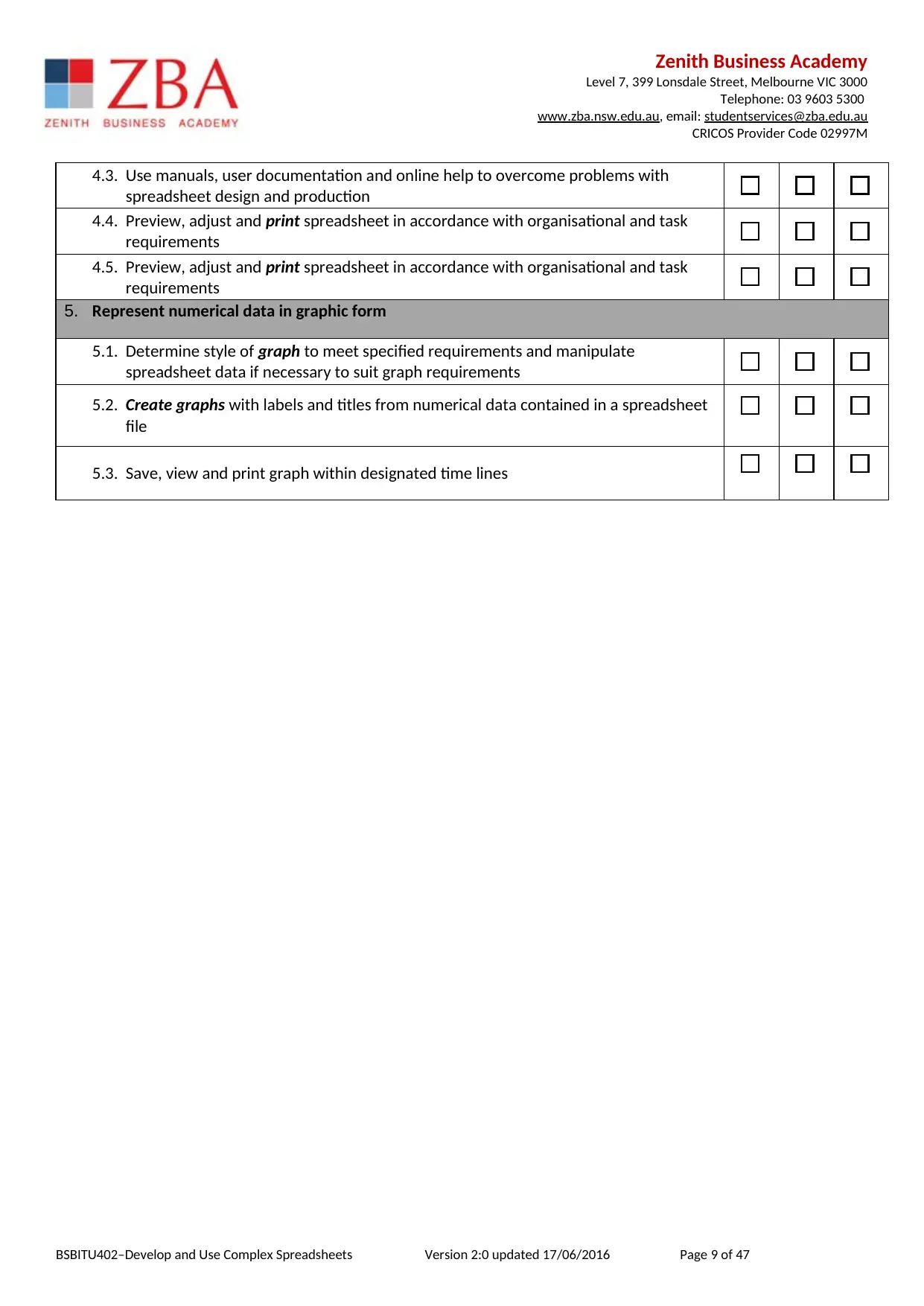
4.3. Use manuals, user documentation and online help to overcome problems with
spreadsheet design and production
4.4. Preview, adjust and print spreadsheet in accordance with organisational and task
requirements
4.5. Preview, adjust and print spreadsheet in accordance with organisational and task
requirements
5. Represent numerical data in graphic form
5.1. Determine style of graph to meet specified requirements and manipulate
spreadsheet data if necessary to suit graph requirements
5.2. Create graphs with labels and titles from numerical data contained in a spreadsheet
file
5.3. Save, view and print graph within designated time lines
BSBITU402–Develop and Use Complex Spreadsheets Version 2:0 updated 17/06/2016 Page 9 of 47
Level 7, 399 Lonsdale Street, Melbourne VIC 3000
Telephone: 03 9603 5300
www.zba.nsw.edu.au, email: studentservices@zba.edu.au
CRICOS Provider Code 02997M
4.3. Use manuals, user documentation and online help to overcome problems with
spreadsheet design and production
4.4. Preview, adjust and print spreadsheet in accordance with organisational and task
requirements
4.5. Preview, adjust and print spreadsheet in accordance with organisational and task
requirements
5. Represent numerical data in graphic form
5.1. Determine style of graph to meet specified requirements and manipulate
spreadsheet data if necessary to suit graph requirements
5.2. Create graphs with labels and titles from numerical data contained in a spreadsheet
file
5.3. Save, view and print graph within designated time lines
BSBITU402–Develop and Use Complex Spreadsheets Version 2:0 updated 17/06/2016 Page 9 of 47
⊘ This is a preview!⊘
Do you want full access?
Subscribe today to unlock all pages.
Trusted by 1+ million students worldwide
Zenith Business Academy
Level 7, 399 Lonsdale Street, Melbourne VIC 3000
Telephone: 03 9603 5300
www.zba.nsw.edu.au, email: studentservices@zba.edu.au
CRICOS Provider Code 02997M
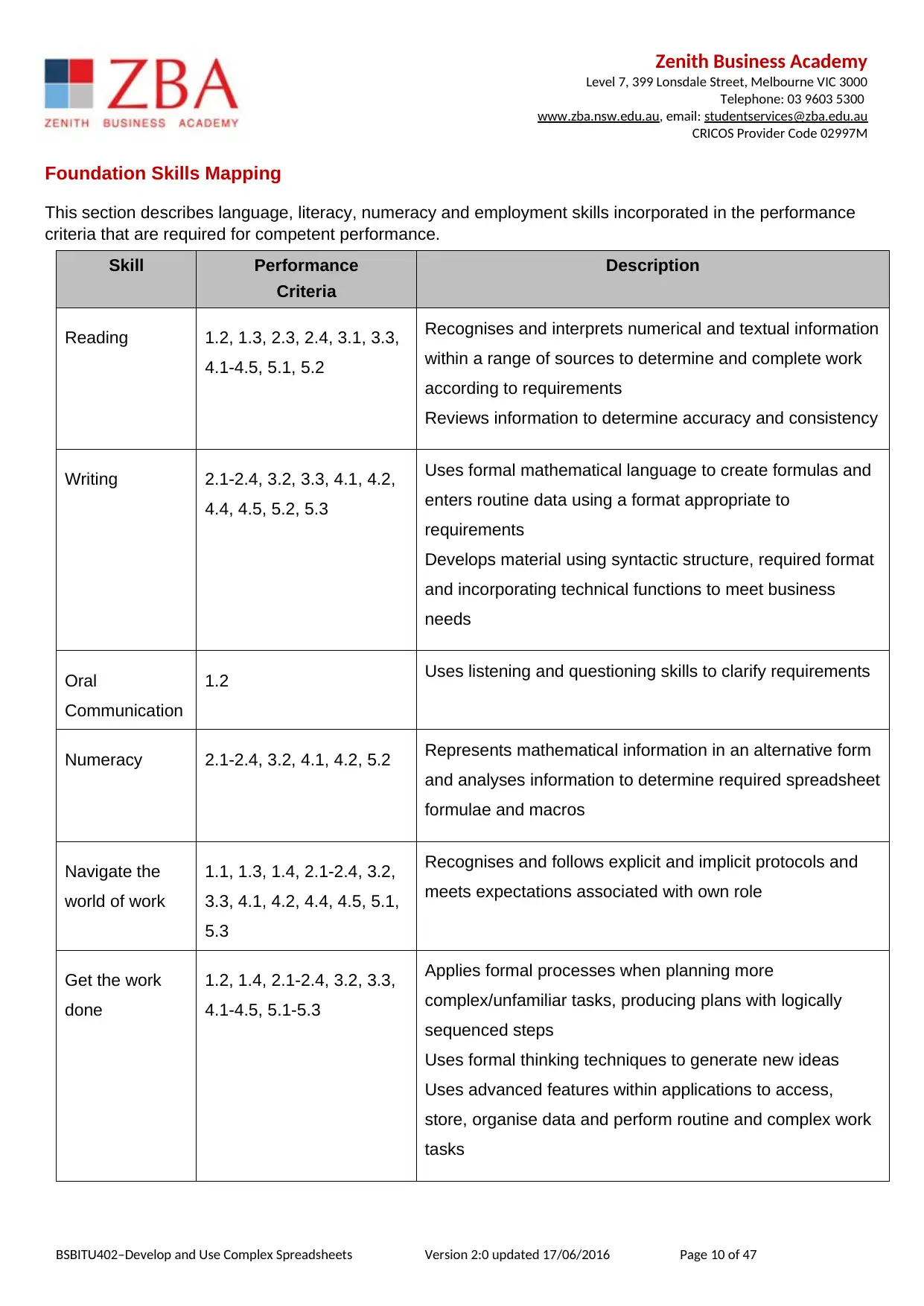
Foundation Skills Mapping
This section describes language, literacy, numeracy and employment skills incorporated in the performance
criteria that are required for competent performance.
Skill Performance
Criteria
Description
Reading 1.2, 1.3, 2.3, 2.4, 3.1, 3.3,
4.1-4.5, 5.1, 5.2
Recognises and interprets numerical and textual information
within a range of sources to determine and complete work
according to requirements
Reviews information to determine accuracy and consistency
Writing 2.1-2.4, 3.2, 3.3, 4.1, 4.2,
4.4, 4.5, 5.2, 5.3
Uses formal mathematical language to create formulas and
enters routine data using a format appropriate to
requirements
Develops material using syntactic structure, required format
and incorporating technical functions to meet business
needs
Oral
Communication
1.2 Uses listening and questioning skills to clarify requirements
Numeracy 2.1-2.4, 3.2, 4.1, 4.2, 5.2 Represents mathematical information in an alternative form
and analyses information to determine required spreadsheet
formulae and macros
Navigate the
world of work
1.1, 1.3, 1.4, 2.1-2.4, 3.2,
3.3, 4.1, 4.2, 4.4, 4.5, 5.1,
5.3
Recognises and follows explicit and implicit protocols and
meets expectations associated with own role
Get the work
done
1.2, 1.4, 2.1-2.4, 3.2, 3.3,
4.1-4.5, 5.1-5.3
Applies formal processes when planning more
complex/unfamiliar tasks, producing plans with logically
sequenced steps
Uses formal thinking techniques to generate new ideas
Uses advanced features within applications to access,
store, organise data and perform routine and complex work
tasks
BSBITU402–Develop and Use Complex Spreadsheets Version 2:0 updated 17/06/2016 Page 10 of 47
Level 7, 399 Lonsdale Street, Melbourne VIC 3000
Telephone: 03 9603 5300
www.zba.nsw.edu.au, email: studentservices@zba.edu.au
CRICOS Provider Code 02997M
Foundation Skills Mapping
This section describes language, literacy, numeracy and employment skills incorporated in the performance
criteria that are required for competent performance.
Skill Performance
Criteria
Description
Reading 1.2, 1.3, 2.3, 2.4, 3.1, 3.3,
4.1-4.5, 5.1, 5.2
Recognises and interprets numerical and textual information
within a range of sources to determine and complete work
according to requirements
Reviews information to determine accuracy and consistency
Writing 2.1-2.4, 3.2, 3.3, 4.1, 4.2,
4.4, 4.5, 5.2, 5.3
Uses formal mathematical language to create formulas and
enters routine data using a format appropriate to
requirements
Develops material using syntactic structure, required format
and incorporating technical functions to meet business
needs
Oral
Communication
1.2 Uses listening and questioning skills to clarify requirements
Numeracy 2.1-2.4, 3.2, 4.1, 4.2, 5.2 Represents mathematical information in an alternative form
and analyses information to determine required spreadsheet
formulae and macros
Navigate the
world of work
1.1, 1.3, 1.4, 2.1-2.4, 3.2,
3.3, 4.1, 4.2, 4.4, 4.5, 5.1,
5.3
Recognises and follows explicit and implicit protocols and
meets expectations associated with own role
Get the work
done
1.2, 1.4, 2.1-2.4, 3.2, 3.3,
4.1-4.5, 5.1-5.3
Applies formal processes when planning more
complex/unfamiliar tasks, producing plans with logically
sequenced steps
Uses formal thinking techniques to generate new ideas
Uses advanced features within applications to access,
store, organise data and perform routine and complex work
tasks
BSBITU402–Develop and Use Complex Spreadsheets Version 2:0 updated 17/06/2016 Page 10 of 47
Paraphrase This Document
Need a fresh take? Get an instant paraphrase of this document with our AI Paraphraser
Zenith Business Academy
Level 7, 399 Lonsdale Street, Melbourne VIC 3000
Telephone: 03 9603 5300
www.zba.nsw.edu.au, email: studentservices@zba.edu.au
CRICOS Provider Code 02997M
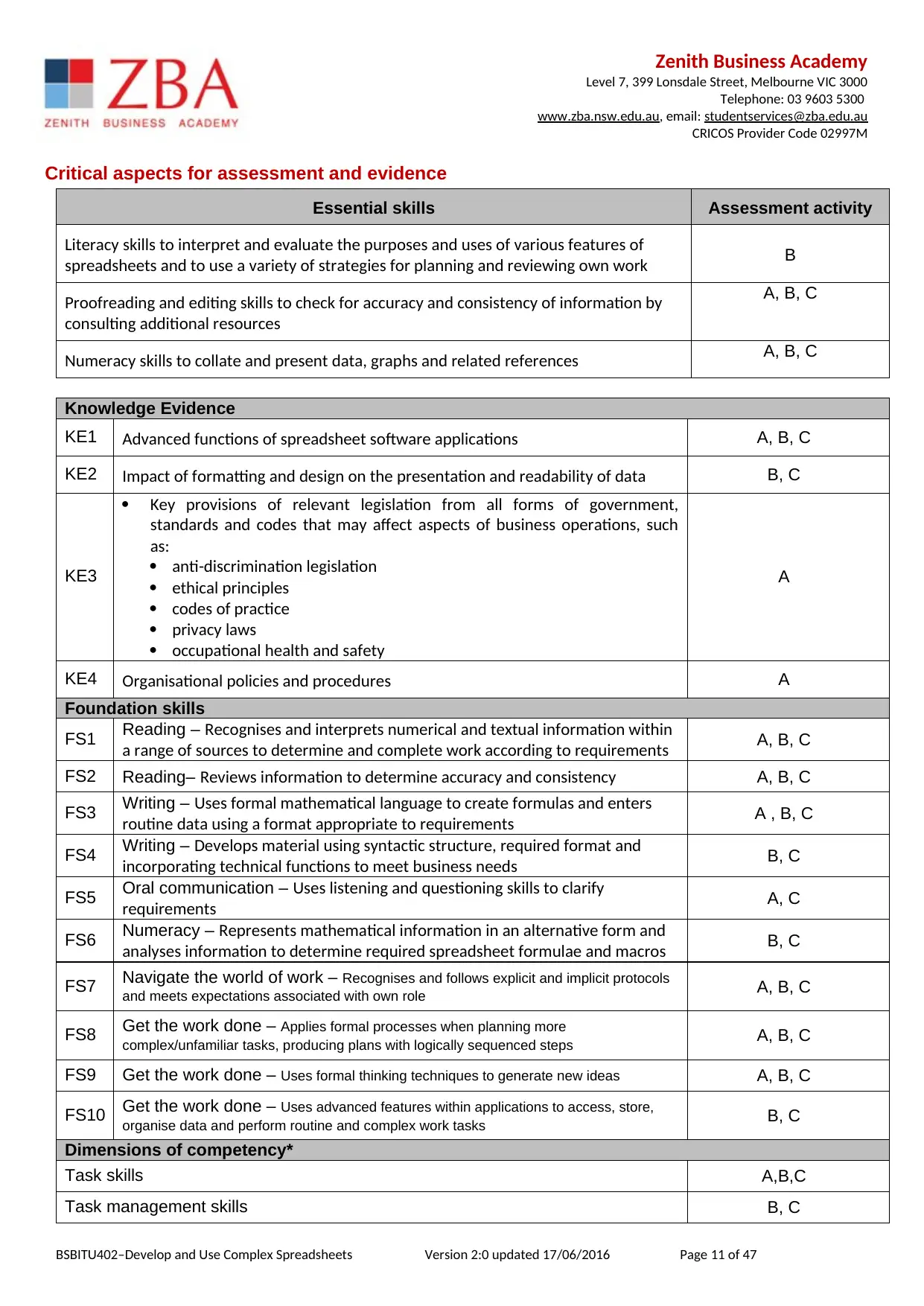
Critical aspects for assessment and evidence
Essential skills Assessment activity
Literacy skills to interpret and evaluate the purposes and uses of various features of
spreadsheets and to use a variety of strategies for planning and reviewing own work B
Proofreading and editing skills to check for accuracy and consistency of information by
consulting additional resources
A, B, C
Numeracy skills to collate and present data, graphs and related references A, B, C
Knowledge Evidence
KE1 Advanced functions of spreadsheet software applications A, B, C
KE2 Impact of formatting and design on the presentation and readability of data B, C
KE3
Key provisions of relevant legislation from all forms of government,
standards and codes that may affect aspects of business operations, such
as:
anti-discrimination legislation
ethical principles
codes of practice
privacy laws
occupational health and safety
A
KE4 Organisational policies and procedures A
Foundation skills
FS1 Reading – Recognises and interprets numerical and textual information within
a range of sources to determine and complete work according to requirements A, B, C
FS2 Reading– Reviews information to determine accuracy and consistency A, B, C
FS3 Writing – Uses formal mathematical language to create formulas and enters
routine data using a format appropriate to requirements A , B, C
FS4 Writing – Develops material using syntactic structure, required format and
incorporating technical functions to meet business needs B, C
FS5 Oral communication – Uses listening and questioning skills to clarify
requirements A, C
FS6 Numeracy – Represents mathematical information in an alternative form and
analyses information to determine required spreadsheet formulae and macros B, C
FS7 Navigate the world of work – Recognises and follows explicit and implicit protocols
and meets expectations associated with own role A, B, C
FS8 Get the work done – Applies formal processes when planning more
complex/unfamiliar tasks, producing plans with logically sequenced steps A, B, C
FS9 Get the work done – Uses formal thinking techniques to generate new ideas A, B, C
FS10 Get the work done – Uses advanced features within applications to access, store,
organise data and perform routine and complex work tasks B, C
Dimensions of competency*
Task skills A,B,C
Task management skills B, C
BSBITU402–Develop and Use Complex Spreadsheets Version 2:0 updated 17/06/2016 Page 11 of 47
Level 7, 399 Lonsdale Street, Melbourne VIC 3000
Telephone: 03 9603 5300
www.zba.nsw.edu.au, email: studentservices@zba.edu.au
CRICOS Provider Code 02997M
Critical aspects for assessment and evidence
Essential skills Assessment activity
Literacy skills to interpret and evaluate the purposes and uses of various features of
spreadsheets and to use a variety of strategies for planning and reviewing own work B
Proofreading and editing skills to check for accuracy and consistency of information by
consulting additional resources
A, B, C
Numeracy skills to collate and present data, graphs and related references A, B, C
Knowledge Evidence
KE1 Advanced functions of spreadsheet software applications A, B, C
KE2 Impact of formatting and design on the presentation and readability of data B, C
KE3
Key provisions of relevant legislation from all forms of government,
standards and codes that may affect aspects of business operations, such
as:
anti-discrimination legislation
ethical principles
codes of practice
privacy laws
occupational health and safety
A
KE4 Organisational policies and procedures A
Foundation skills
FS1 Reading – Recognises and interprets numerical and textual information within
a range of sources to determine and complete work according to requirements A, B, C
FS2 Reading– Reviews information to determine accuracy and consistency A, B, C
FS3 Writing – Uses formal mathematical language to create formulas and enters
routine data using a format appropriate to requirements A , B, C
FS4 Writing – Develops material using syntactic structure, required format and
incorporating technical functions to meet business needs B, C
FS5 Oral communication – Uses listening and questioning skills to clarify
requirements A, C
FS6 Numeracy – Represents mathematical information in an alternative form and
analyses information to determine required spreadsheet formulae and macros B, C
FS7 Navigate the world of work – Recognises and follows explicit and implicit protocols
and meets expectations associated with own role A, B, C
FS8 Get the work done – Applies formal processes when planning more
complex/unfamiliar tasks, producing plans with logically sequenced steps A, B, C
FS9 Get the work done – Uses formal thinking techniques to generate new ideas A, B, C
FS10 Get the work done – Uses advanced features within applications to access, store,
organise data and perform routine and complex work tasks B, C
Dimensions of competency*
Task skills A,B,C
Task management skills B, C
BSBITU402–Develop and Use Complex Spreadsheets Version 2:0 updated 17/06/2016 Page 11 of 47
Zenith Business Academy
Level 7, 399 Lonsdale Street, Melbourne VIC 3000
Telephone: 03 9603 5300
www.zba.nsw.edu.au, email: studentservices@zba.edu.au
CRICOS Provider Code 02997M
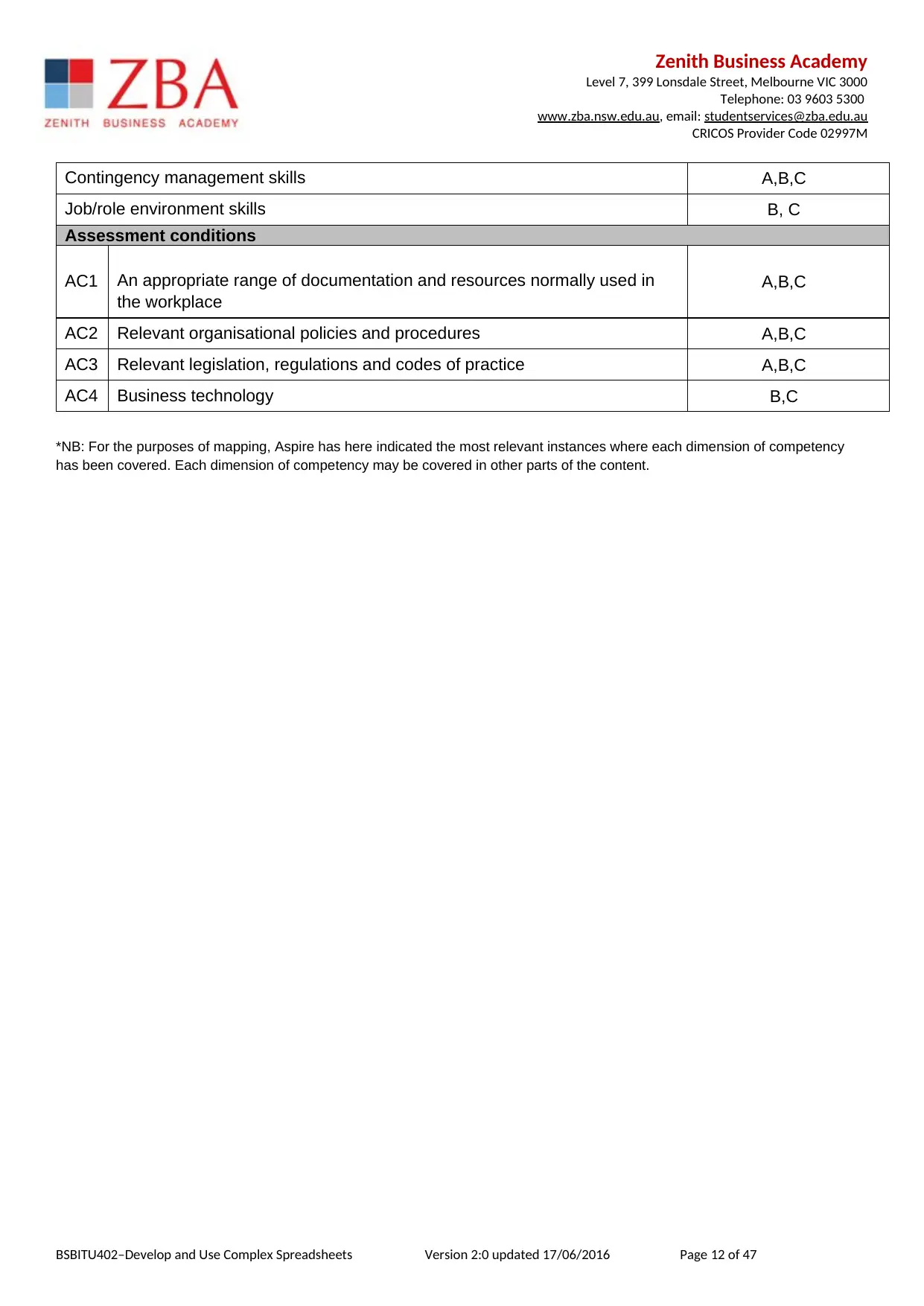
Contingency management skills A,B,C
Job/role environment skills B, C
Assessment conditions
AC1 An appropriate range of documentation and resources normally used in
the workplace
A,B,C
AC2 Relevant organisational policies and procedures A,B,C
AC3 Relevant legislation, regulations and codes of practice A,B,C
AC4 Business technology B,C
*NB: For the purposes of mapping, Aspire has here indicated the most relevant instances where each dimension of competency
has been covered. Each dimension of competency may be covered in other parts of the content.
BSBITU402–Develop and Use Complex Spreadsheets Version 2:0 updated 17/06/2016 Page 12 of 47
Level 7, 399 Lonsdale Street, Melbourne VIC 3000
Telephone: 03 9603 5300
www.zba.nsw.edu.au, email: studentservices@zba.edu.au
CRICOS Provider Code 02997M
Contingency management skills A,B,C
Job/role environment skills B, C
Assessment conditions
AC1 An appropriate range of documentation and resources normally used in
the workplace
A,B,C
AC2 Relevant organisational policies and procedures A,B,C
AC3 Relevant legislation, regulations and codes of practice A,B,C
AC4 Business technology B,C
*NB: For the purposes of mapping, Aspire has here indicated the most relevant instances where each dimension of competency
has been covered. Each dimension of competency may be covered in other parts of the content.
BSBITU402–Develop and Use Complex Spreadsheets Version 2:0 updated 17/06/2016 Page 12 of 47
⊘ This is a preview!⊘
Do you want full access?
Subscribe today to unlock all pages.
Trusted by 1+ million students worldwide

1 out of 47


Related Documents


Your All-in-One AI-Powered Toolkit for Academic Success.
+13062052269
info@desklib.com
Available 24*7 on WhatsApp / Email
![[object Object]](/_next/static/media/star-bottom.7253800d.svg)
Unlock your academic potential
Copyright © 2020–2025 A2Z Services. All Rights Reserved. Developed and managed by ZUCOL.