Enterprise Support and Infrastructure: Disaster Recovery & Automation

Verified

Added on  2023/04/07

|10
|1260
|399
Report
AI Summary
This report provides an overview of enterprise support and infrastructure, focusing on IT disaster recovery plans and business continuity planning (BCP). It details the types of information an IT disaster recovery plan should contain, including threat analysis, business impact analysis, communication plans, backup strategies, and infrastructure overviews. The report also addresses the challenges corporate IT teams face when executing a BCP, such as lack of management support, budget constraints, and employee turnover. It highlights the impact of IT disaster recovery plans on minimizing interruptions, limiting damage, and establishing alternative operational means. Furthermore, the report explores system automation, specifically the benefits of using PowerShell automation, such as rapid fire fighting, interaction with various technologies, object-based flexibility, and consolidation of learning experiences, providing examples of PowerShell scripts for text file conversion. Desklib provides access to this and many other solved assignments to help students.

Document Page
Running head: ENTERPRISE SUPPORT AND INFRASTRUCTURE
Enterprise support and Infrastructure
Name of the student:
Name of the university:
Author note:
tabler-icon-diamond-filled.svg

Paraphrase This Document

Need a fresh take? Get an instant paraphrase of this document with our AI Paraphraser
Document Page
1ENTERPRISE SUPPPORT AND INFRASTRUCTURE
1. Disaster recovery and Business Continuity Plan (BCP)
Type of information that the IT disaster recovery plan would contain:
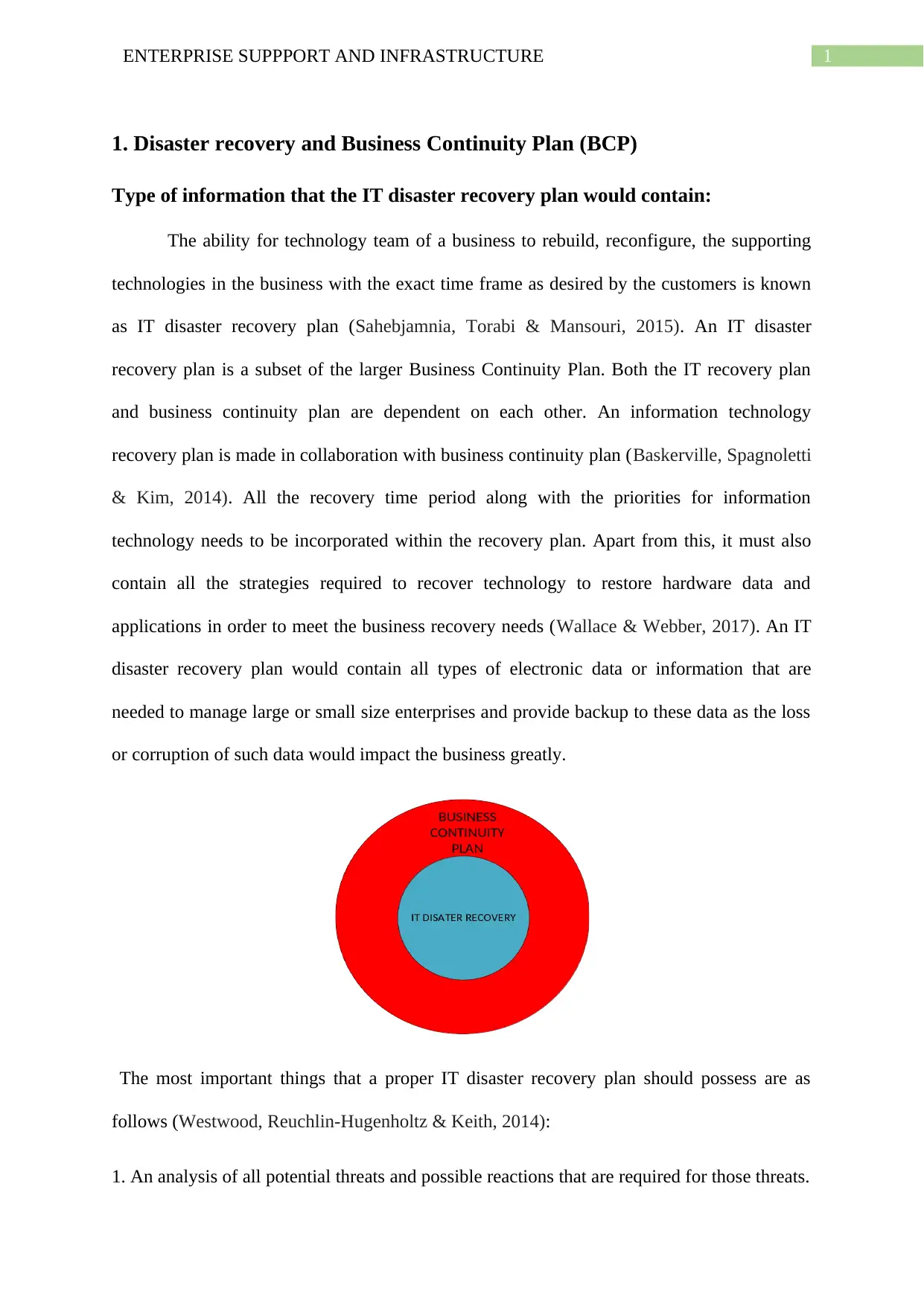
The ability for technology team of a business to rebuild, reconfigure, the supporting
technologies in the business with the exact time frame as desired by the customers is known
as IT disaster recovery plan (Sahebjamnia, Torabi & Mansouri, 2015). An IT disaster
recovery plan is a subset of the larger Business Continuity Plan. Both the IT recovery plan
and business continuity plan are dependent on each other. An information technology
recovery plan is made in collaboration with business continuity plan (Baskerville, Spagnoletti
& Kim, 2014). All the recovery time period along with the priorities for information
technology needs to be incorporated within the recovery plan. Apart from this, it must also
contain all the strategies required to recover technology to restore hardware data and
applications in order to meet the business recovery needs (Wallace & Webber, 2017). An IT
disaster recovery plan would contain all types of electronic data or information that are
needed to manage large or small size enterprises and provide backup to these data as the loss
or corruption of such data would impact the business greatly.
The most important things that a proper IT disaster recovery plan should possess are as
follows (Westwood, Reuchlin-Hugenholtz & Keith, 2014):
1. An analysis of all potential threats and possible reactions that are required for those threats.
Document Page
2ENTERPRISE SUPPPORT AND INFRASTRUCTURE
2. A business impact analysis
3. Plans for communication
4. Plan for backups
5. Planning for contingency phases
6. Overview of the infrastructure
7. Outline of the whole document.
Challenges the corporate IT teams encounter while executing Business
Continuity Plan:
Majority of business risks gets reduced as result of performing a business continuity
plan which safeguards the key interests of the business, its relationships and vital assets
(Chen et al., 2014). However due to some challenges, the corporate IT teams fail to execute
the business continuity plan. The major challenges that are faced by business organisations
are as follows:
1. Lack of support from the management:
2. Restraints of budget:
3. Maintaining a culture of preparedness:
4. Lack of training and business continuity awareness:
5. Turnover of the employees:
Document Page
3ENTERPRISE SUPPPORT AND INFRASTRUCTURE
6. Achieving a constant readiness state:
7. Coordination with the external suppliers:
8. Identifying critical process:
9. Identifying threats and vulnerabilities:
10. Securing suppliers for business continuity:
Impact of the IT disaster recovery plan for business organisations:
It is reported that a failure in the IT infrastructure can cost up to $100000 per hour. As
business channels are expanding digitally they provide a market share of high value which
can drive generation of revenue (Baba, 2014). Apart from this it can also cause loss in the
production and cause customer dissatisfaction as customers are unable to bear the downtime.
As a result, the customers will immediately abandon the particular business with the failure
and will use other competitive firms to meet their need. Using the IT disaster recovery plan
has many impact over a business which are as follows:
1. It minimizes the amount of interruption to the operations so that it can operate normally.
2. It limits the extent of damage and disruption.
3. It minimizes the impact of interruption economically.
4. Using it an alternative means of operation is thus established in advance.
5. It helps in training personals with emergency procedures.
6. It helps in restoring rapid and smooth services of a business.
tabler-icon-diamond-filled.svg

Paraphrase This Document

Need a fresh take? Get an instant paraphrase of this document with our AI Paraphraser
Document Page
4ENTERPRISE SUPPPORT AND INFRASTRUCTURE
2. System Automation:
Benefits of using Power shell automation:
Automation is defined to be a type of technology by which different processes are
done without any human effort. It is the use of various controlling systems which are used for
operating equipment’s such as different machines in factories, operating systems using power
shells, and various other application to reduce human strengths. The two most important [[art
of PowerShell is the scripting and automation (Washam, 2014). Certain factors are
considered apart from time in the context of scripting and automation which includes:
1. Consistency
2. Audit trail:
3. Modular code
4. Documentation
5 Education
6. Motivation
7. Delegation
8. Change of space
Behind the concept of learning PowerShell, scripting and automation plays avital role
(Piirainen, 2018). Power shell is defined as a command for a particular task with line shell
and scripting language which are built on the framework of .NET. As it is a combination of
both of scripting language and command line shell it serves various benefits such as-
Document Page
5ENTERPRISE SUPPPORT AND INFRASTRUCTURE
1. It can fight fires rapidly making use of the existing PowerShell commands with no features
of compiling code. As a result, one can develop code at the command line even before
creating any function around it. The scripts that are written in PowerShell can be used several
times as needed. It provides writing of script in a formal and readable manner so that it can be
used for future services.
2. Another benefit of using PowerShell is that it can interact with a number of technologies
making use of dot net frameworks, COM, ADSL, WMI, CISCO UCS, Citrix XenApp, Xin
desktop and many more. The window that is used in PowerShell automation is text free
which makes it easy to use tools that does not support text based languages.
3. PowerShell is object based which gives it the feature of high flexibility. This makes it
easier for filtering, measuring, sorting and comparing the objects present in it.
4. PowerShell is an essential requirement for the Microsoft Common Engineering Criteria
and for server products which widely supports the PowerShell interface for shipping purpose.
5. In many cases, Microsoft makes use of PowerShell scripting to build management console
on GUI for its products.
6. Using PowerShell automation also consolidates and multiplies the learning experience of
user.
7. PowerShell does not only work as a system administrator but it also allows working in the
Microsoft Ecosystem.
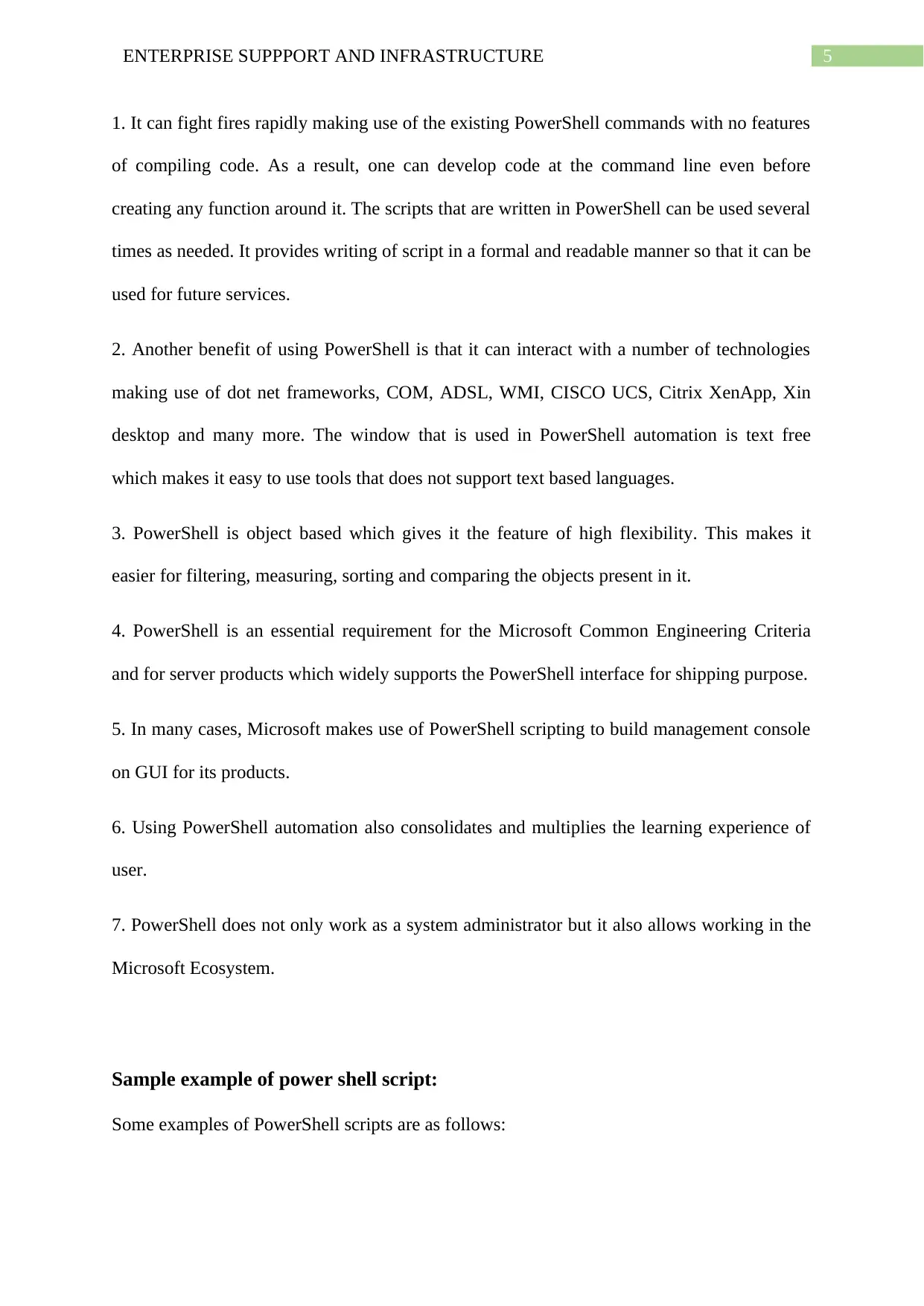
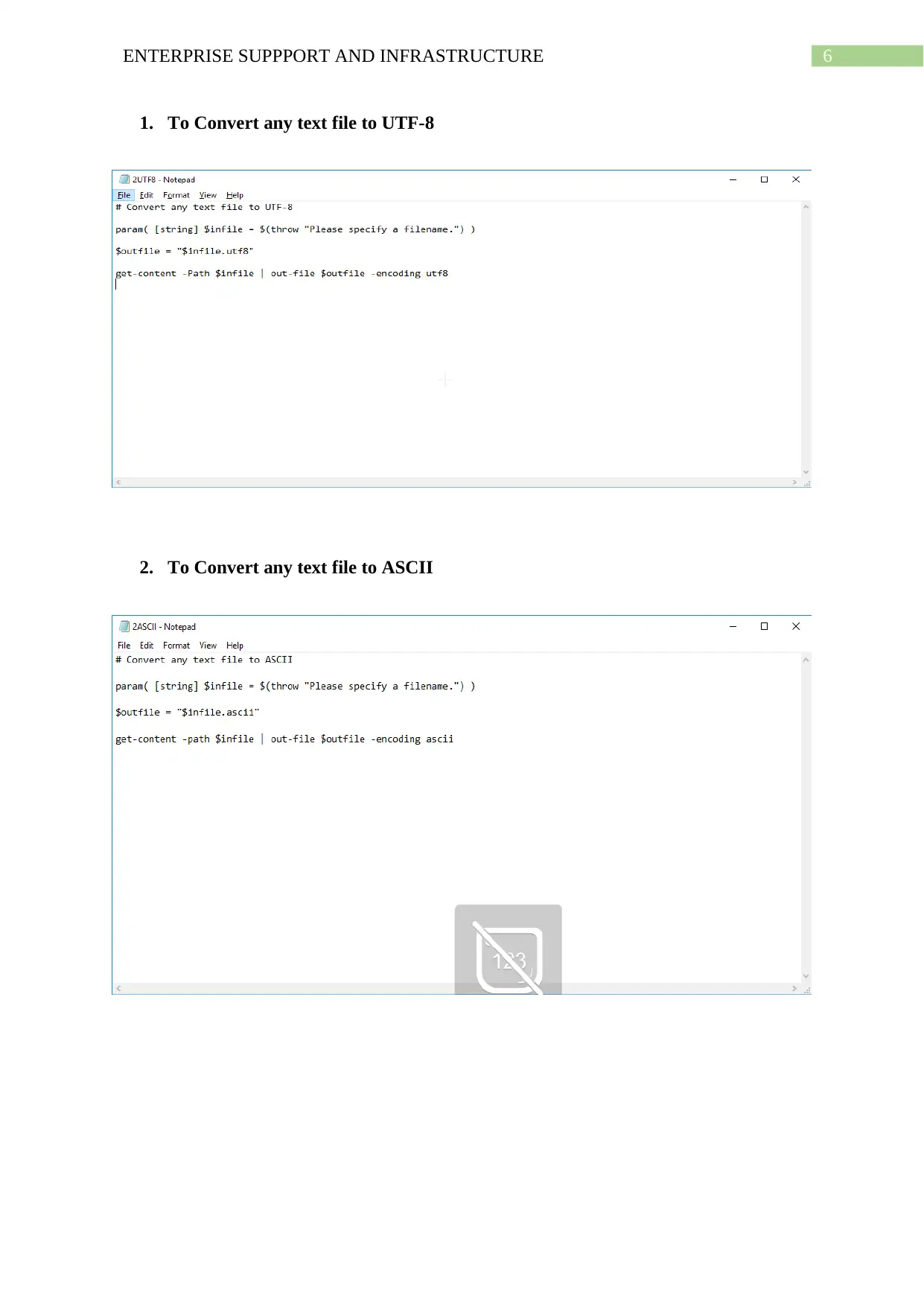
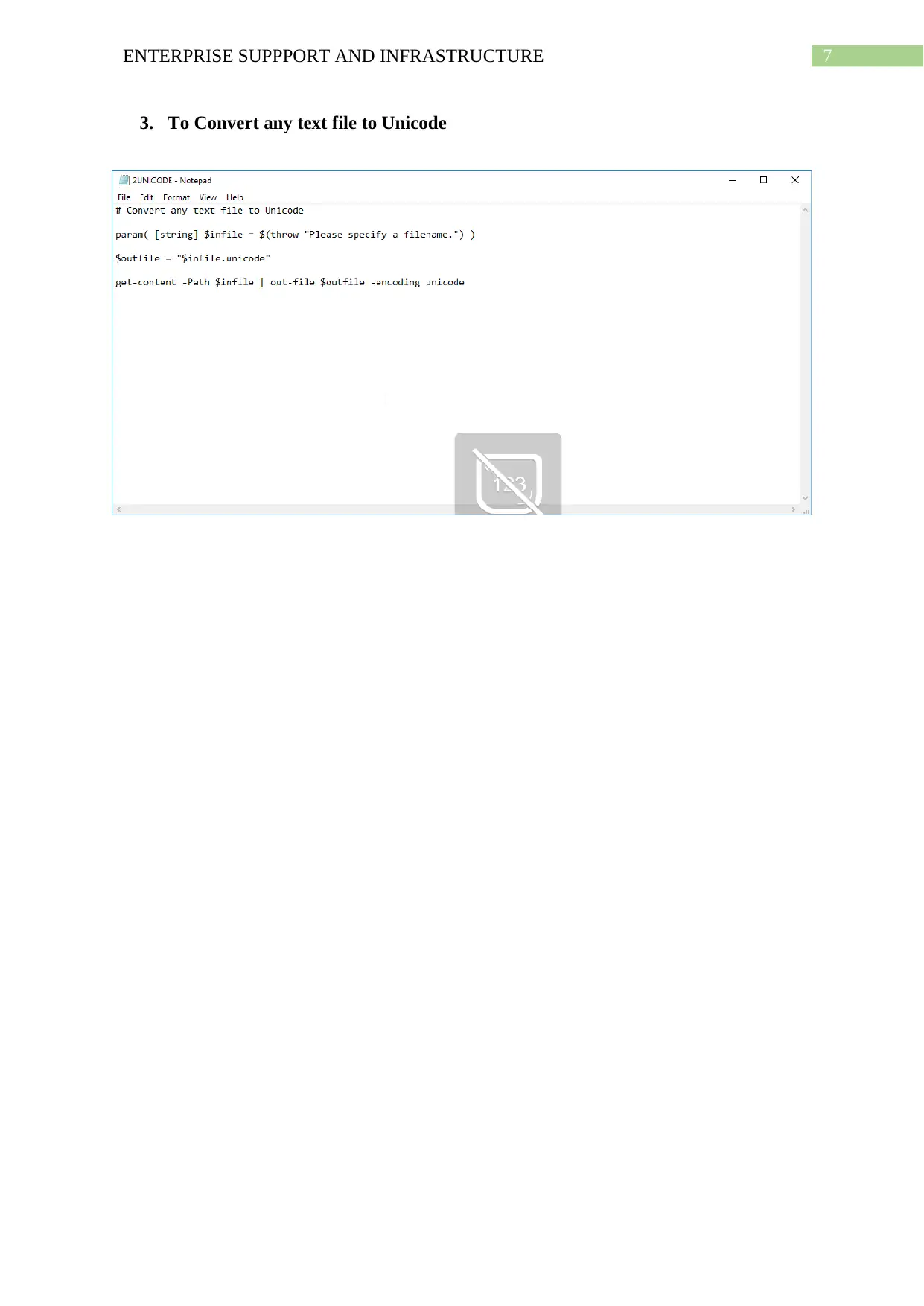
Sample example of power shell script:
Some examples of PowerShell scripts are as follows:
Document Page
6ENTERPRISE SUPPPORT AND INFRASTRUCTURE
1. To Convert any text file to UTF-8
2. To Convert any text file to ASCII
tabler-icon-diamond-filled.svg

Paraphrase This Document

Need a fresh take? Get an instant paraphrase of this document with our AI Paraphraser
Document Page
7ENTERPRISE SUPPPORT AND INFRASTRUCTURE
3. To Convert any text file to Unicode
Document Page
8ENTERPRISE SUPPPORT AND INFRASTRUCTURE
References:
Baba, H. (2014). Introductory study on Disaster Risk Assessment and Area Business
Continuity Planning in industry agglomerated areas in the ASEAN. IDRiM
Journal, 3(2), 184-195.
Baskerville, R., Spagnoletti, P., & Kim, J. (2014). Incident-centered information security:
Managing a strategic balance between prevention and response. Information &
management, 51(1), 138-151.
Chen, S., Xu, H., Liu, D., Hu, B., & Wang, H. (2014). A vision of IoT: Applications,
challenges, and opportunities with china perspective. IEEE Internet of Things
journal, 1(4), 349-359.
Piirainen, J. (2018). PowerShell Task Automation Features.
Sahebjamnia, N., Torabi, S. A., & Mansouri, S. A. (2015). Integrated business continuity and
disaster recovery planning: Towards organizational resilience. European Journal of
Operational Research, 242(1), 261-273.
Wallace, M., & Webber, L. (2017). The disaster recovery handbook: A step-by-step plan to
ensure business continuity and protect vital operations, facilities, and assets.
Amacom.
Washam, M. (2014). Automating Microsoft Azure Infrastructure Services: From the Data
Center to the Cloud with PowerShell. " O'Reilly Media, Inc.".
Westwood, A., Reuchlin-Hugenholtz, E., & Keith, D. M. (2014). Re-defining recovery: a
generalized framework for assessing species recovery. Biological Conservation, 172,
155-162.
Document Page
9ENTERPRISE SUPPPORT AND INFRASTRUCTURE
chevron_up_icon
1 out of 10
circle_padding
hide_on_mobile
zoom_out_icon
[object Object]