Game Development: Tutorial, User Evaluation, and Enhancement Design

Verified

Added on  2023/03/17

|5
|437
|27
Homework Assignment
AI Summary
This assignment presents a game tutorial, user evaluation, and enhancement design. The tutorial describes the game's functionality, including how users interact with the game through touch controls, navigate between pages, and the scoring system. The user evaluation section includes feedback from a participant, detailing their experience and suggestions for improvement. The enhancement design section proposes a flowchart and storyboard to improve the game. The flowchart outlines the game's navigation, from the start screen to the game over screen. The storyboard focuses on the game's start page, describing the visual elements, user interactions, and potential animations. The assignment concludes with user feedback and suggestions for additional features like in-game instructions and a save option for scores. This assignment is designed to enhance game development skills and user experience through practical application.
Document Page
Running head: PART B
Part B: Completed Tutorial, User Evaluation and
Enhancement Design
Name of the Student
Name of the University
tabler-icon-diamond-filled.svg

Paraphrase This Document

Need a fresh take? Get an instant paraphrase of this document with our AI Paraphraser
Document Page
1COMPLETED TUTORIAL, USER EVALUATION AND ENHANCEMENT DESIGN
Tutorial:
Viewing Player Instructions:
The game is opened by the user in browser i.e. chrome, firefox or internet explorer.
Touch control is present in for the home page and on a single click the page is navigated to the
game page. There is a button used for redirecting to the instruction page which contains the
instructions for playing the developed game.
Obstacles comes randomly to the character and the user needs to click for making the
character jump for avoiding the obstacles. The score for avoiding each of the obstacles are
displayed at the top left corner of the gameplay page.
User Evaluation:
Name: Emma L. Gordy
Address:
834 Lilac Lane
Omega, GA 31775
Contact Number:
912-501-6425
Email: EmmaLGordy@armyspy.com
Occupation: High school Student
i. How much do you like the game? [Very Much]
ii. Do you think charter can do more? [As for now it is good]
Document Page
2COMPLETED TUTORIAL, USER EVALUATION AND ENHANCEMENT DESIGN
iii. Do you like the theme? [Yes]
iv. What can be done to enhance the game? [Add another page in between home and
game play]
Enhancement Design:
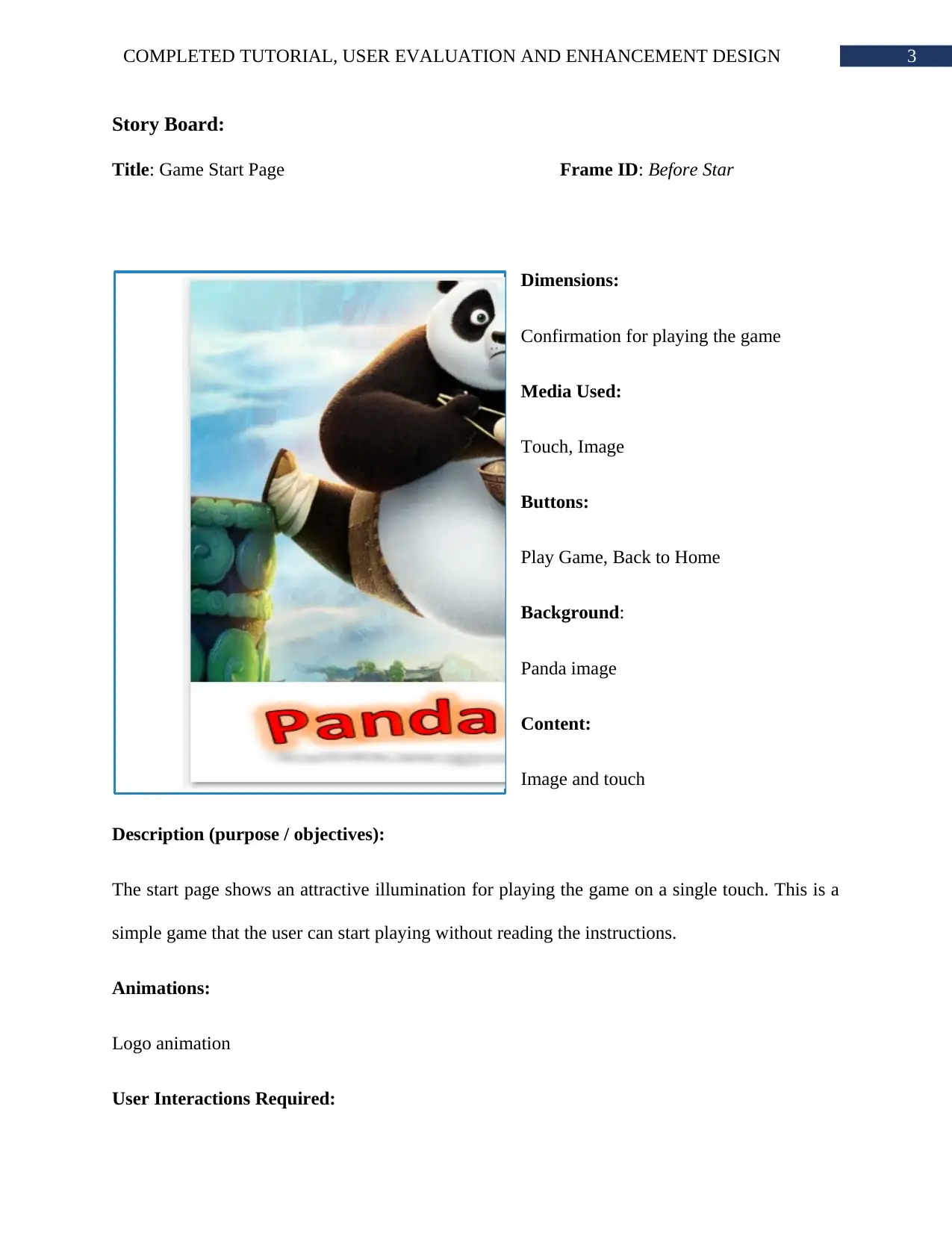
Flowchart:
Start
Access Application
Home Page
Click Link
Read Instruction
Instruction
Play Game
Start Button
Game Over
Play Again?
Yes
Exit Game
No
Click Play Game
Button
Start
Confirm Play Game
Document Page
3COMPLETED TUTORIAL, USER EVALUATION AND ENHANCEMENT DESIGN
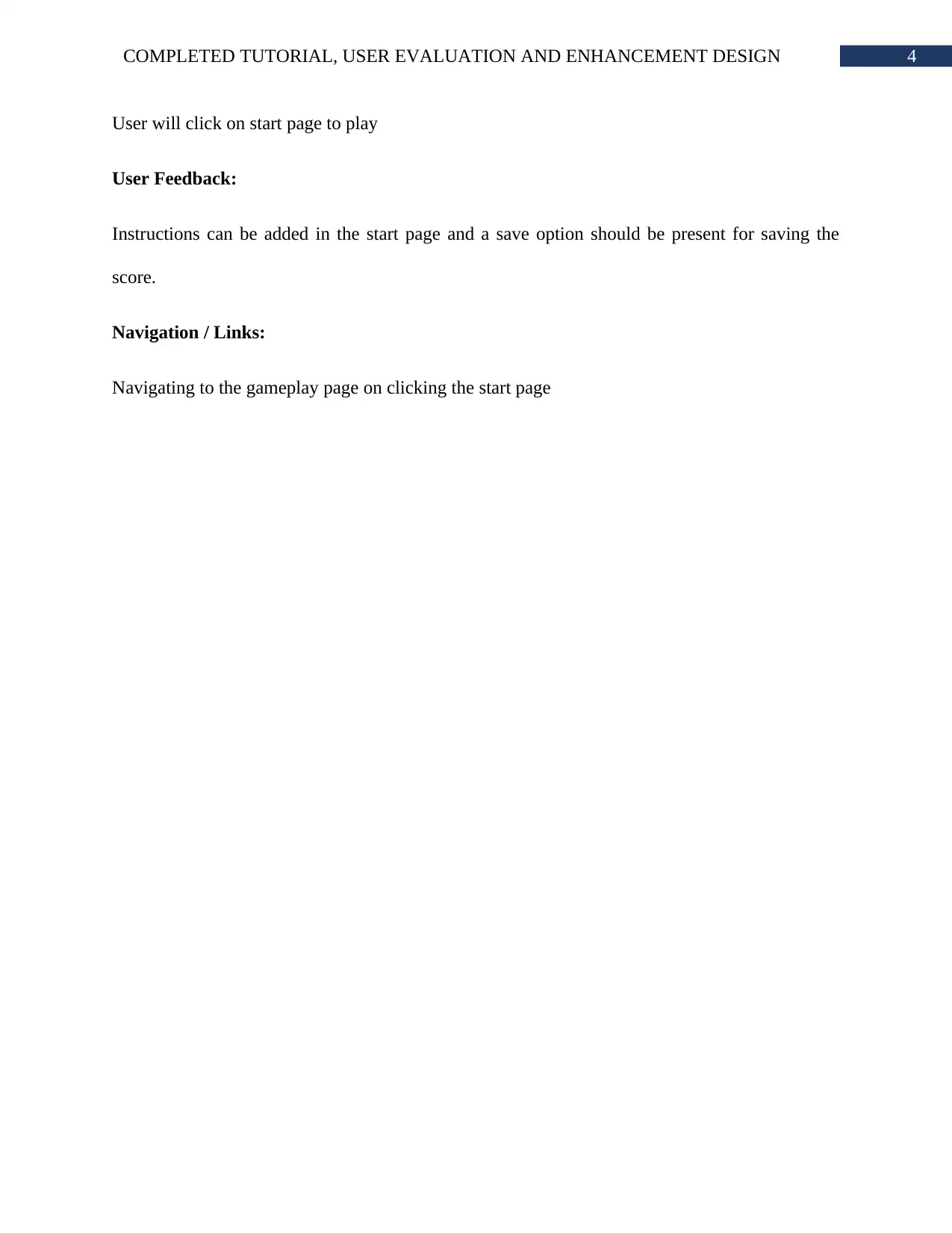
Story Board:
Title: Game Start Page Frame ID: Before Star
Dimensions:
Confirmation for playing the game
Media Used:
Touch, Image
Buttons:
Play Game, Back to Home
Background:
Panda image
Content:
Image and touch
Description (purpose / objectives):
The start page shows an attractive illumination for playing the game on a single touch. This is a
simple game that the user can start playing without reading the instructions.
Animations:
Logo animation
User Interactions Required:
tabler-icon-diamond-filled.svg

Paraphrase This Document

Need a fresh take? Get an instant paraphrase of this document with our AI Paraphraser
Document Page
4COMPLETED TUTORIAL, USER EVALUATION AND ENHANCEMENT DESIGN
User will click on start page to play
User Feedback:
Instructions can be added in the start page and a save option should be present for saving the
score.
Navigation / Links:
Navigating to the gameplay page on clicking the start page
chevron_up_icon
1 out of 5
circle_padding
hide_on_mobile
zoom_out_icon
[object Object]