MSCC/MSCBD - Interactive GPU Database: System Documentation Project

Verified

Added on  2023/06/14

|4
|771
|154
Project
AI Summary
This document details the implementation of an interactive Graphics Processing Unit (GPU) database system using Flask, a Python framework, and MongoDB, a NoSQL database. The project focuses on creating a system capable of adding, editing, and searching GPUs based on their features. The implementation process includes setting up the necessary software such as Flask, Flask-PyMongo, and MongoDB, followed by coding the application logic using Python and HTML templates. The system allows users to register and log in, populate the database with GPU information, and interact with GPU features. The project successfully achieves its objective of building a simple interactive GPU processing unit system with features that can be edited, deleted, and linked to other pages.
Document Page
Running head: Graphics Processing Unit system documentation 1
Graphics Processing Unit system documentation
Student Name
University of affiliation
tabler-icon-diamond-filled.svg

Paraphrase This Document

Need a fresh take? Get an instant paraphrase of this document with our AI Paraphraser
Document Page
Running head: Graphics Processing Unit system documentation 2
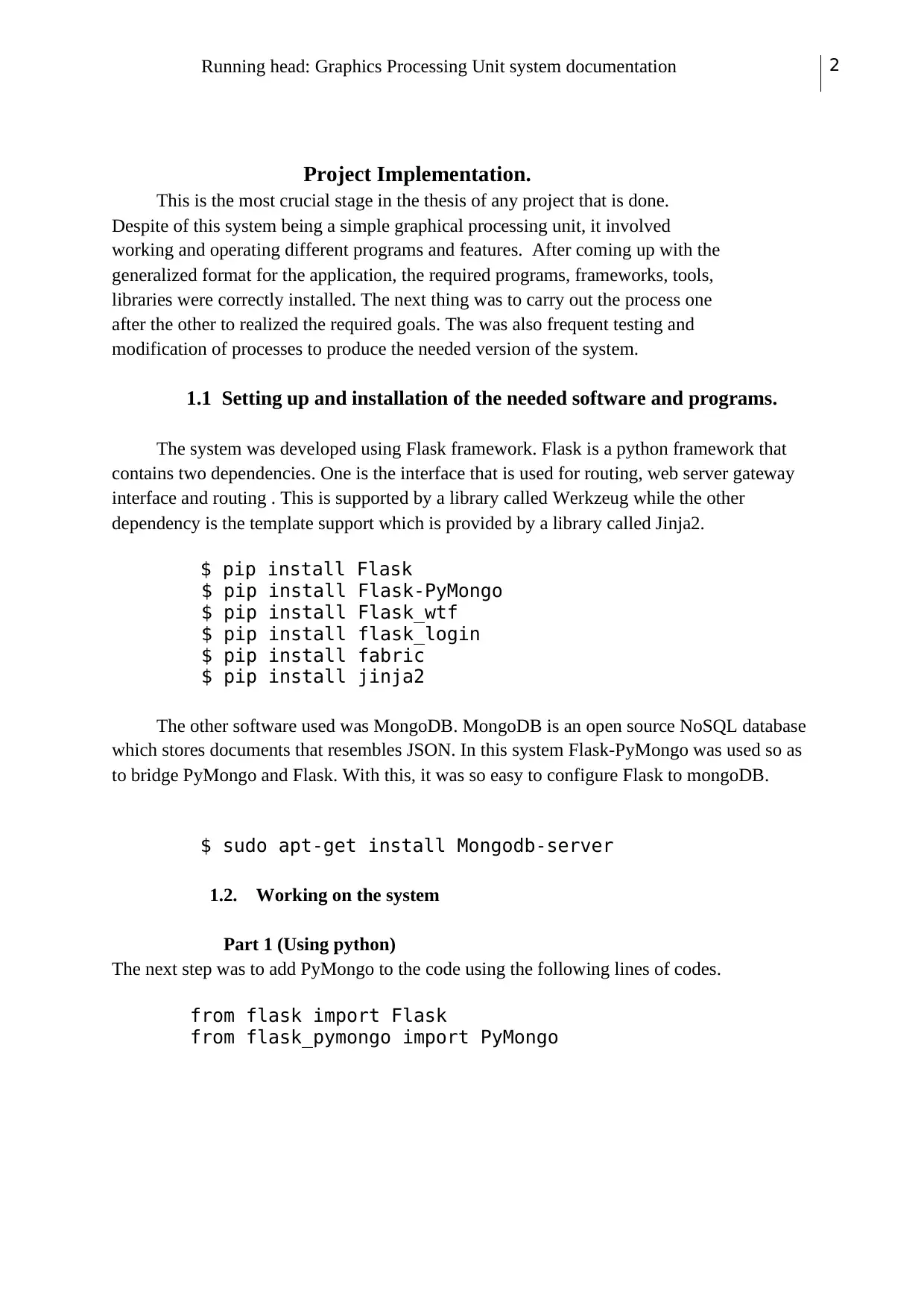
Project Implementation.
This is the most crucial stage in the thesis of any project that is done.
Despite of this system being a simple graphical processing unit, it involved
working and operating different programs and features. After coming up with the
generalized format for the application, the required programs, frameworks, tools,
libraries were correctly installed. The next thing was to carry out the process one
after the other to realized the required goals. The was also frequent testing and
modification of processes to produce the needed version of the system.
1.1 Setting up and installation of the needed software and programs.
The system was developed using Flask framework. Flask is a python framework that
contains two dependencies. One is the interface that is used for routing, web server gateway
interface and routing . This is supported by a library called Werkzeug while the other
dependency is the template support which is provided by a library called Jinja2.
$ pip install Flask
$ pip install Flask-PyMongo
$ pip install Flask_wtf
$ pip install flask_login
$ pip install fabric
$ pip install jinja2
The other software used was MongoDB. MongoDB is an open source NoSQL database
which stores documents that resembles JSON. In this system Flask-PyMongo was used so as
to bridge PyMongo and Flask. With this, it was so easy to configure Flask to mongoDB.
$ sudo apt-get install Mongodb-server
1.2. Working on the system
Part 1 (Using python)
The next step was to add PyMongo to the code using the following lines of codes.
from flask import Flask
from flask_pymongo import PyMongo
Document Page
Running head: Graphics Processing Unit system documentation 3
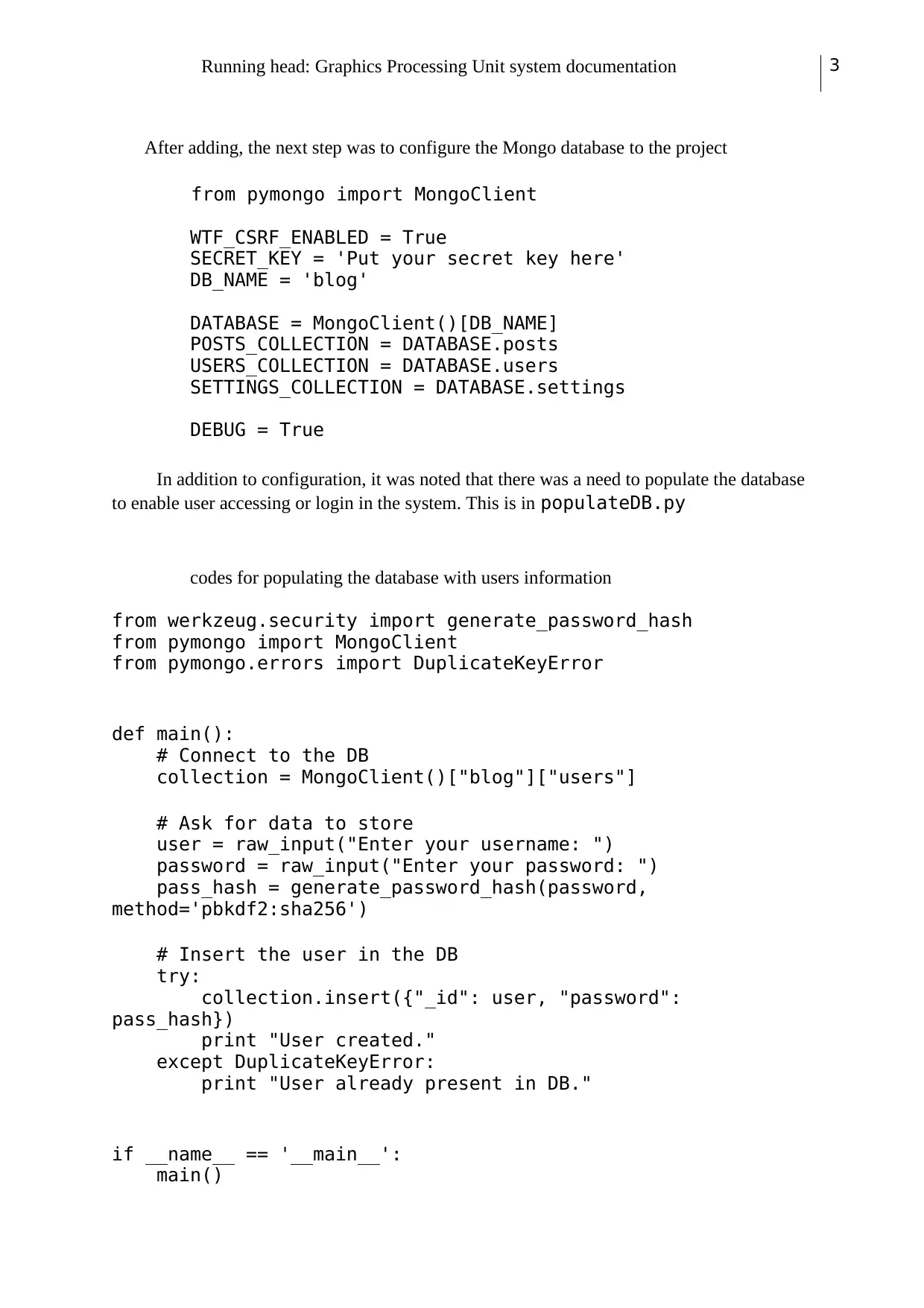
After adding, the next step was to configure the Mongo database to the project
from pymongo import MongoClient
WTF_CSRF_ENABLED = True
SECRET_KEY = 'Put your secret key here'
DB_NAME = 'blog'
DATABASE = MongoClient()[DB_NAME]
POSTS_COLLECTION = DATABASE.posts
USERS_COLLECTION = DATABASE.users
SETTINGS_COLLECTION = DATABASE.settings
DEBUG = True
In addition to configuration, it was noted that there was a need to populate the database
to enable user accessing or login in the system. This is in populateDB.py
codes for populating the database with users information
from werkzeug.security import generate_password_hash
from pymongo import MongoClient
from pymongo.errors import DuplicateKeyError
def main():
# Connect to the DB
collection = MongoClient()["blog"]["users"]
# Ask for data to store
user = raw_input("Enter your username: ")
password = raw_input("Enter your password: ")
pass_hash = generate_password_hash(password,
method='pbkdf2:sha256')
# Insert the user in the DB
try:
collection.insert({"_id": user, "password":
pass_hash})
print "User created."
except DuplicateKeyError:
print "User already present in DB."
if __name__ == '__main__':
main()
Document Page
Running head: Graphics Processing Unit system documentation 4
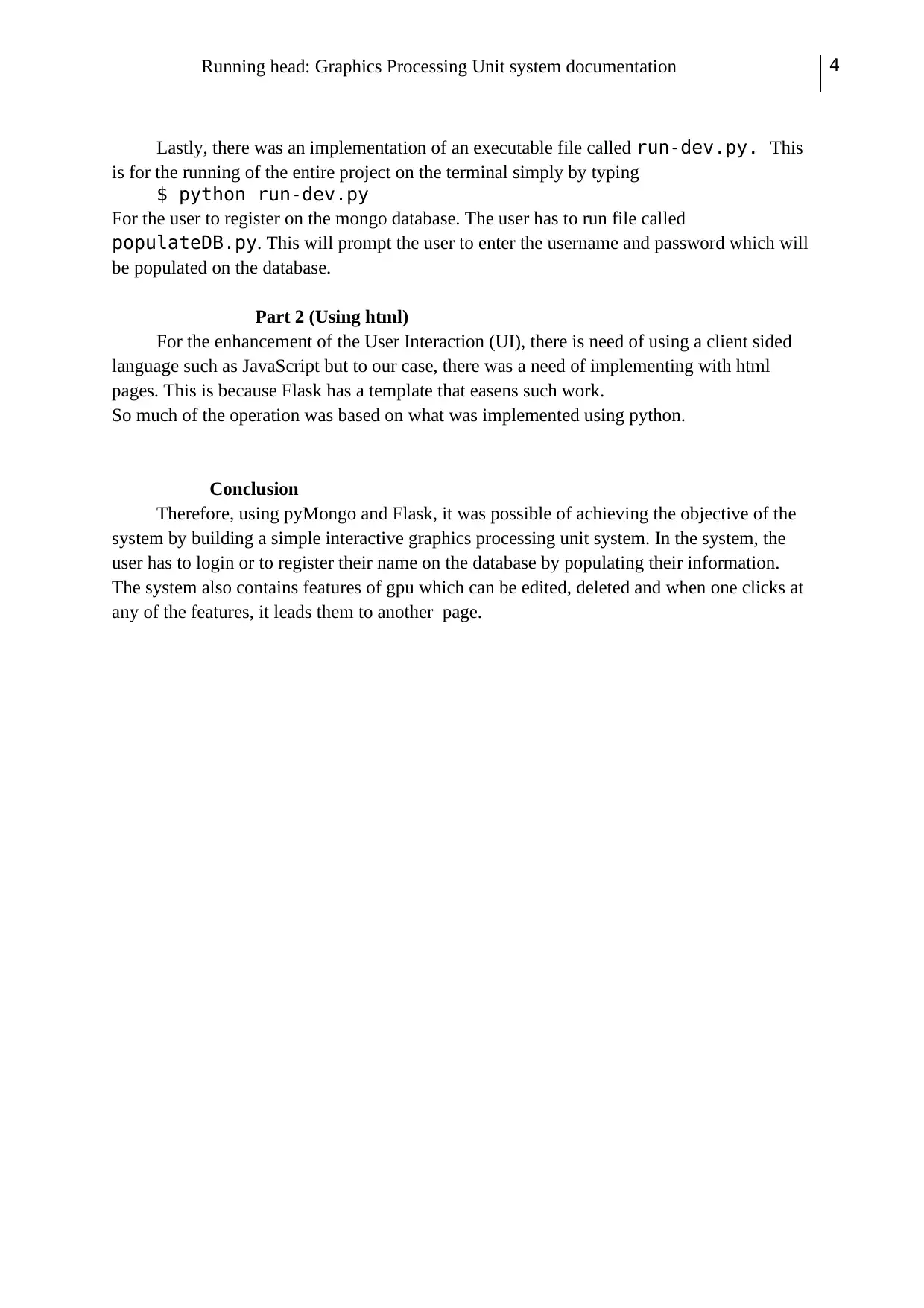
Lastly, there was an implementation of an executable file called run-dev.py. This
is for the running of the entire project on the terminal simply by typing
$ python run-dev.py
For the user to register on the mongo database. The user has to run file called
populateDB.py. This will prompt the user to enter the username and password which will
be populated on the database.
Part 2 (Using html)
For the enhancement of the User Interaction (UI), there is need of using a client sided
language such as JavaScript but to our case, there was a need of implementing with html
pages. This is because Flask has a template that easens such work.
So much of the operation was based on what was implemented using python.
Conclusion
Therefore, using pyMongo and Flask, it was possible of achieving the objective of the
system by building a simple interactive graphics processing unit system. In the system, the
user has to login or to register their name on the database by populating their information.
The system also contains features of gpu which can be edited, deleted and when one clicks at
any of the features, it leads them to another page.
chevron_up_icon
1 out of 4
circle_padding
hide_on_mobile
zoom_out_icon
[object Object]