1805ICT - HCI Design Brief: Westfield ePortfolio Project
VerifiedAdded on 2023/01/19
|31
|5863
|25
Project
AI Summary
This HCI Design Brief presents a comprehensive ePortfolio project focused on designing an innovative app for Westfield, a major shopping mall. The project encompasses a detailed exploration of the target audience, human factors, and user research to inform the design process. The brief outlines specific usability objectives, visual design choices, and the development of a prototype. It also covers user involvement, a thorough testing plan, and analysis of test results. The project also considers accessibility, various domains, and the integration of emerging technologies such as voice shopping and augmented reality, including the use of a humanoid robot. The document demonstrates the design process, from initial sketches and wireframes to server and API considerations, all aimed at creating a user-friendly and effective app for both retailers and customers. The brief also addresses feedback gathering and iterative improvements, culminating in recommendations for refining the design and functionality of the Westfield app.

HCI Design Brief - ePortfolio

Paraphrase This Document
Need a fresh take? Get an instant paraphrase of this document with our AI Paraphraser
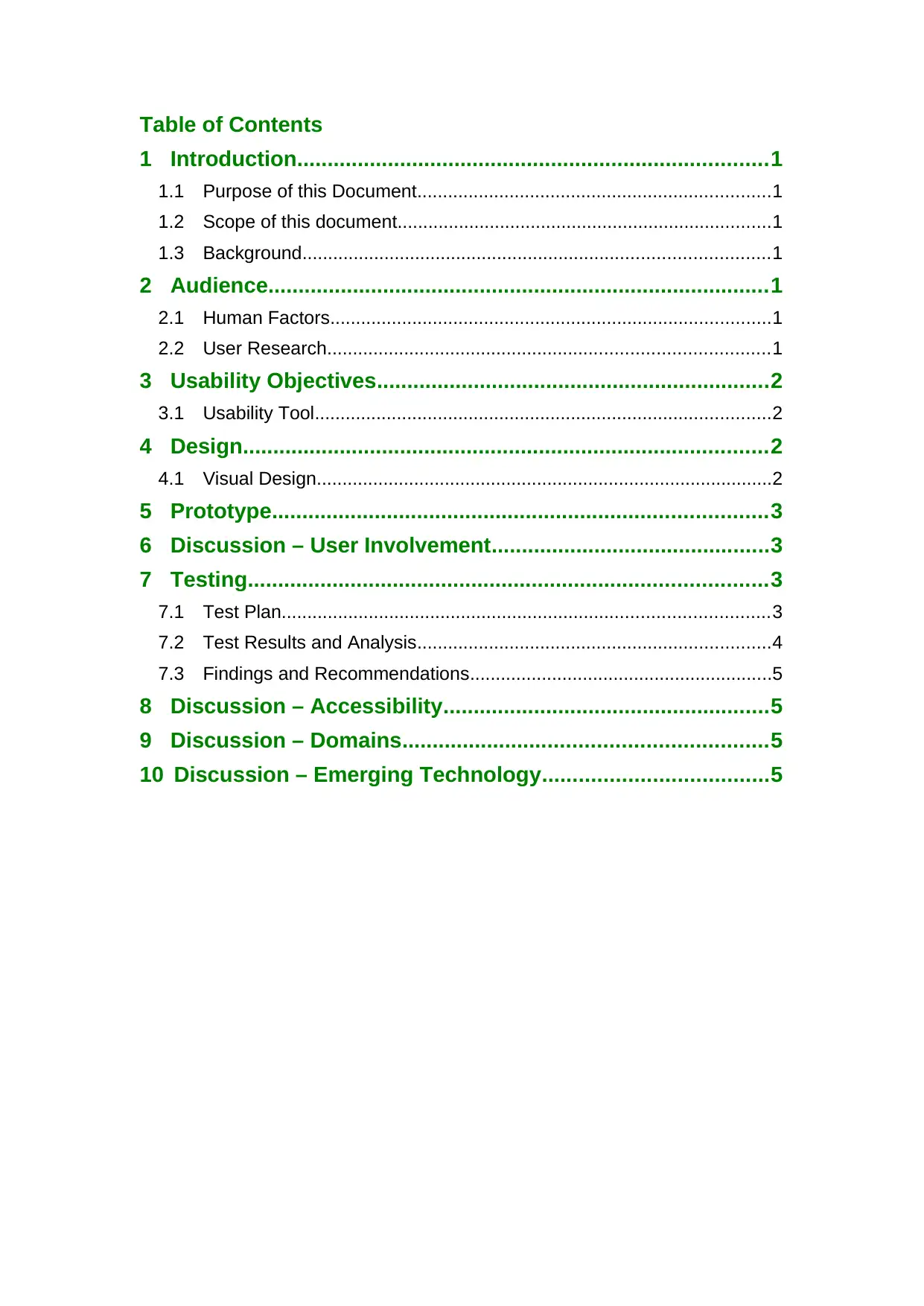
Table of Contents
1 Introduction..............................................................................1
1.1 Purpose of this Document.....................................................................1
1.2 Scope of this document.........................................................................1
1.3 Background...........................................................................................1
2 Audience...................................................................................1
2.1 Human Factors......................................................................................1
2.2 User Research......................................................................................1
3 Usability Objectives.................................................................2
3.1 Usability Tool.........................................................................................2
4 Design.......................................................................................2
4.1 Visual Design.........................................................................................2
5 Prototype..................................................................................3
6 Discussion – User Involvement..............................................3
7 Testing......................................................................................3
7.1 Test Plan...............................................................................................3
7.2 Test Results and Analysis.....................................................................4
7.3 Findings and Recommendations...........................................................5
8 Discussion – Accessibility......................................................5
9 Discussion – Domains............................................................5
10 Discussion – Emerging Technology.....................................5
1 Introduction..............................................................................1
1.1 Purpose of this Document.....................................................................1
1.2 Scope of this document.........................................................................1
1.3 Background...........................................................................................1
2 Audience...................................................................................1
2.1 Human Factors......................................................................................1
2.2 User Research......................................................................................1
3 Usability Objectives.................................................................2
3.1 Usability Tool.........................................................................................2
4 Design.......................................................................................2
4.1 Visual Design.........................................................................................2
5 Prototype..................................................................................3
6 Discussion – User Involvement..............................................3
7 Testing......................................................................................3
7.1 Test Plan...............................................................................................3
7.2 Test Results and Analysis.....................................................................4
7.3 Findings and Recommendations...........................................................5
8 Discussion – Accessibility......................................................5
9 Discussion – Domains............................................................5
10 Discussion – Emerging Technology.....................................5
1 Introduction
1.1 Purpose of this Document
In this era, human now totally bound with technology in every way.
Technology going so far by developing itself. Shopping malls play a significant
role in their customer to deliver customer needs. Westfield is one of the
busiest shopping malls in Australia so far. Westfield is planning to expand its
interface to the whole world. They bound with 60 shopping centres all over
Australia. This project is all about an innovative technology what Westfield
need most. Moreover, this project is going to design an app with innovative
technologies to support Westfield to enter into the technology world. The app
will help Westfield retailers and as well as for the customers in an individual
way. Westfield retailers liking to improve their customer service to provide
excellent service to their customer. They also trying to increase their sales
rate to be profitable by providing better service to their customer. On the other
hand, customers always like to get the best service and also they don’t want
to waste their time so for this reason they always look better options. As we
know this app is bound with retailers and as well with customers, retailers will
use this app to get feedbacks, customer’s favourite lists to improve their sales.
Customer will be benefited too because they’ll get the best service from
retailers every time and they will also get some innovative features in this app
which will be so easy to use. Scope, audience, human factors, usability,
design, prototype, user involvement, testing, recommendations all will be
discussed in a particular way to build up the whole project for this app.
Westfield has a large number of research guides to gather suitable
information. Admittedly, tools and research guides needed most to complete
this proposal. Moreover, The app will be tested before delivery to its clients
because this portfolio needs to be done completely before deliver it to the
clients. Although this project is not going to implement this app, it’s just a
design portfolio which will be made to send it to Westfield client.
1.2 The scope of this document
This portfolio going to demonstrate the design of an app with innovative
technologies. There will be sketches with ideas of designs to set the goal first.
The wireframes of design will be created then according to sketches. These
wireframes will show the functionality more clearly.
Buttons, icons, graphics, colour palette all will be demonstrate here clearly.
There will be around 5-10 wireframes and so many icons to build up this
project. Coloured icons, attractive colour palette, stylish screens will be used
in wireframes. According to wireframes, servers, APIs and data diagram will
need to be selected to build the app. So many tools will have to be used in a
particular way as for support. This app will be designed for mobile and tablet
Page 1
1.1 Purpose of this Document
In this era, human now totally bound with technology in every way.
Technology going so far by developing itself. Shopping malls play a significant
role in their customer to deliver customer needs. Westfield is one of the
busiest shopping malls in Australia so far. Westfield is planning to expand its
interface to the whole world. They bound with 60 shopping centres all over
Australia. This project is all about an innovative technology what Westfield
need most. Moreover, this project is going to design an app with innovative
technologies to support Westfield to enter into the technology world. The app
will help Westfield retailers and as well as for the customers in an individual
way. Westfield retailers liking to improve their customer service to provide
excellent service to their customer. They also trying to increase their sales
rate to be profitable by providing better service to their customer. On the other
hand, customers always like to get the best service and also they don’t want
to waste their time so for this reason they always look better options. As we
know this app is bound with retailers and as well with customers, retailers will
use this app to get feedbacks, customer’s favourite lists to improve their sales.
Customer will be benefited too because they’ll get the best service from
retailers every time and they will also get some innovative features in this app
which will be so easy to use. Scope, audience, human factors, usability,
design, prototype, user involvement, testing, recommendations all will be
discussed in a particular way to build up the whole project for this app.
Westfield has a large number of research guides to gather suitable
information. Admittedly, tools and research guides needed most to complete
this proposal. Moreover, The app will be tested before delivery to its clients
because this portfolio needs to be done completely before deliver it to the
clients. Although this project is not going to implement this app, it’s just a
design portfolio which will be made to send it to Westfield client.
1.2 The scope of this document
This portfolio going to demonstrate the design of an app with innovative
technologies. There will be sketches with ideas of designs to set the goal first.
The wireframes of design will be created then according to sketches. These
wireframes will show the functionality more clearly.
Buttons, icons, graphics, colour palette all will be demonstrate here clearly.
There will be around 5-10 wireframes and so many icons to build up this
project. Coloured icons, attractive colour palette, stylish screens will be used
in wireframes. According to wireframes, servers, APIs and data diagram will
need to be selected to build the app. So many tools will have to be used in a
particular way as for support. This app will be designed for mobile and tablet
Page 1
⊘ This is a preview!⊘
Do you want full access?
Subscribe today to unlock all pages.

Trusted by 1+ million students worldwide
users. IOS and Android users could use this app but some features they won’t
get similar because their operating system is not the same.
The Secondary goal will be getting feedback from clients and users to make
the app more attractive. Criticism needs here most. This criticism won’t stop
building the app, diversely It will be used to getting a better idea to build it. A
developer will be set who will work on servers, databases and APIs. Now the
time will come for UI designer. The user interface is a very significant part of
the app. The users always like attractive colours, graphics. Graphics will need
to be meet high resolutions skins for a better user interface. Users have the
power to run this app long or they have the rights to uninstall it anytime if it
doesn’t work well. The testing plan will be created to test the app to get the
bugs and issues to solve every time unless it works flawlessly. Some testing
platforms will be used to test the app. The test will be done to check the
screens of apps works well or not. Moreover, functions of this app will be
checked after test whether it’s work or need to be work on it more. Battery life
is very important for devices nowadays. How much battery life consumption
happens it will check too. If the app takes too much battery life then it needs
to be fixed up must. After successfully testing done then the app will be in the
development phase to examine it. The app will be handed to the clients to get
more feedback to develop the app more. Beta testing will come after that.
IOS platforms are strict in beta testing, they invite another beta tester to check
the app before publishing it live. Android made a beta testing process easier
for app builder in this way.
1.3 Background
The functions of this app will be so complicated because some functions will
be so highly configurated. Most innovative technologies especially voice
shopping, 3d reality, parking sensors will be used here. This app will be
engaged with so many devices with Westfield wifi connections to work
flawlessly. Customers of different ages could use this app in their needs and
some features will be really attractive to them to use. In this era, technology
related to robots now in many ways. In this app, a humanoid robot will be
used to get customer attractions mostly. This robot will be functioned to
connect via Westfield wifi anytime by this app and it could get customer’s
questions and will serve them according to their askings. Some customers
could be failed to finding out their products in Westfield but this robot could
easily find out customer’s searching product and will give them navigations to
the stores too. Retailers really need this technology because they don’t even
know which customer is looking at their products. Moreover, by using voice
assistant function in this app, people could easily get what they need and they
also could process their checkout too by their voice. Retailers will try to get
customer’s searchings in this function to sort of their products too. Most of the
people in Westfield waste their time looking for parking. Parking sensor
function will get them rid out of it. Some customer could be face problem
using this app but this app won’t let them down because they’ll see a
customer assistant feature in the app to ask their questions. This function will
generate an automatic message according to customer questions. Sometimes
Page 2
get similar because their operating system is not the same.
The Secondary goal will be getting feedback from clients and users to make
the app more attractive. Criticism needs here most. This criticism won’t stop
building the app, diversely It will be used to getting a better idea to build it. A
developer will be set who will work on servers, databases and APIs. Now the
time will come for UI designer. The user interface is a very significant part of
the app. The users always like attractive colours, graphics. Graphics will need
to be meet high resolutions skins for a better user interface. Users have the
power to run this app long or they have the rights to uninstall it anytime if it
doesn’t work well. The testing plan will be created to test the app to get the
bugs and issues to solve every time unless it works flawlessly. Some testing
platforms will be used to test the app. The test will be done to check the
screens of apps works well or not. Moreover, functions of this app will be
checked after test whether it’s work or need to be work on it more. Battery life
is very important for devices nowadays. How much battery life consumption
happens it will check too. If the app takes too much battery life then it needs
to be fixed up must. After successfully testing done then the app will be in the
development phase to examine it. The app will be handed to the clients to get
more feedback to develop the app more. Beta testing will come after that.
IOS platforms are strict in beta testing, they invite another beta tester to check
the app before publishing it live. Android made a beta testing process easier
for app builder in this way.
1.3 Background
The functions of this app will be so complicated because some functions will
be so highly configurated. Most innovative technologies especially voice
shopping, 3d reality, parking sensors will be used here. This app will be
engaged with so many devices with Westfield wifi connections to work
flawlessly. Customers of different ages could use this app in their needs and
some features will be really attractive to them to use. In this era, technology
related to robots now in many ways. In this app, a humanoid robot will be
used to get customer attractions mostly. This robot will be functioned to
connect via Westfield wifi anytime by this app and it could get customer’s
questions and will serve them according to their askings. Some customers
could be failed to finding out their products in Westfield but this robot could
easily find out customer’s searching product and will give them navigations to
the stores too. Retailers really need this technology because they don’t even
know which customer is looking at their products. Moreover, by using voice
assistant function in this app, people could easily get what they need and they
also could process their checkout too by their voice. Retailers will try to get
customer’s searchings in this function to sort of their products too. Most of the
people in Westfield waste their time looking for parking. Parking sensor
function will get them rid out of it. Some customer could be face problem
using this app but this app won’t let them down because they’ll see a
customer assistant feature in the app to ask their questions. This function will
generate an automatic message according to customer questions. Sometimes
Page 2
Paraphrase This Document
Need a fresh take? Get an instant paraphrase of this document with our AI Paraphraser
it could not recognize their askings then it will send customer care number to
them. 3D augmented reality is a new technology developed in recent years.
Customer will use this feature to see how’s the store, how’s the product and
how’s the food of restaurants before going there. They also could try on
dresses virtually. In this case, the app will use it's mobile’s camera viewer. So
many customers feel hesitate about their home furniture but now this
hesitation will be gone by using this feature because now they will get to know
how’ll their home look like with those store’s furniture. Overall, these functions
will be used specifically to build up a better app for Westfield. This project will
cover all of the retailers and customers of Westfield in a shade. It will try to
prioritize user feedbacks most and will test it upon them consequently.
Designs of this app will be parted to make it easier to understand for the
clients.
2 Audience
This app targeted all kinds of people to use this app for their needs. They’ll
get most priority in this app because Westfield is totally depended on their
customers. They want to engage with every customer who comes to visit
Westfield.
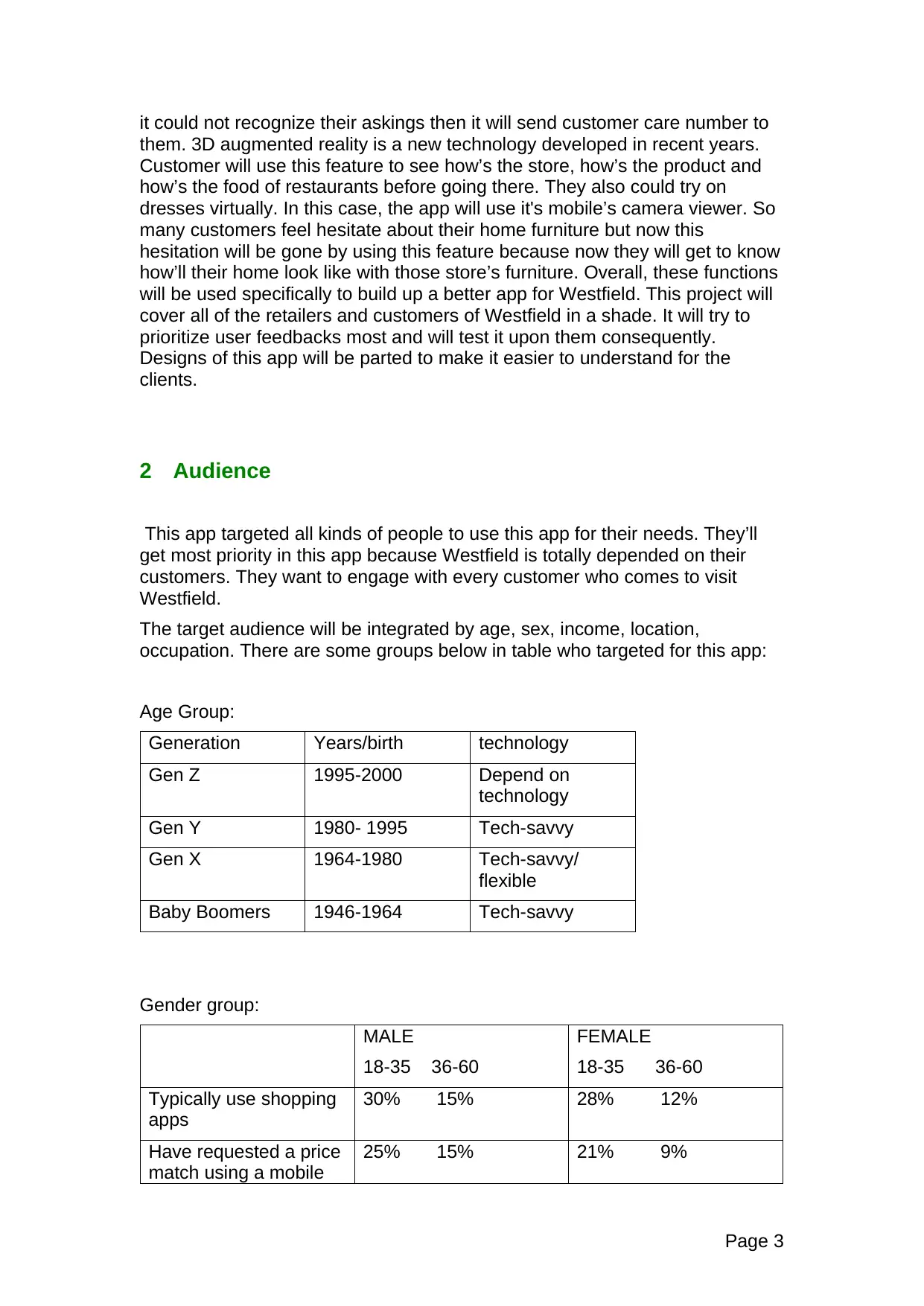
The target audience will be integrated by age, sex, income, location,
occupation. There are some groups below in table who targeted for this app:
Age Group:
Generation Years/birth technology
Gen Z 1995-2000 Depend on
technology
Gen Y 1980- 1995 Tech-savvy
Gen X 1964-1980 Tech-savvy/
flexible
Baby Boomers 1946-1964 Tech-savvy
Gender group:
MALE
18-35 36-60
FEMALE
18-35 36-60
Typically use shopping
apps
30% 15% 28% 12%
Have requested a price
match using a mobile
25% 15% 21% 9%
Page 3
them. 3D augmented reality is a new technology developed in recent years.
Customer will use this feature to see how’s the store, how’s the product and
how’s the food of restaurants before going there. They also could try on
dresses virtually. In this case, the app will use it's mobile’s camera viewer. So
many customers feel hesitate about their home furniture but now this
hesitation will be gone by using this feature because now they will get to know
how’ll their home look like with those store’s furniture. Overall, these functions
will be used specifically to build up a better app for Westfield. This project will
cover all of the retailers and customers of Westfield in a shade. It will try to
prioritize user feedbacks most and will test it upon them consequently.
Designs of this app will be parted to make it easier to understand for the
clients.
2 Audience
This app targeted all kinds of people to use this app for their needs. They’ll
get most priority in this app because Westfield is totally depended on their
customers. They want to engage with every customer who comes to visit
Westfield.
The target audience will be integrated by age, sex, income, location,
occupation. There are some groups below in table who targeted for this app:
Age Group:
Generation Years/birth technology
Gen Z 1995-2000 Depend on
technology
Gen Y 1980- 1995 Tech-savvy
Gen X 1964-1980 Tech-savvy/
flexible
Baby Boomers 1946-1964 Tech-savvy
Gender group:
MALE
18-35 36-60
FEMALE
18-35 36-60
Typically use shopping
apps
30% 15% 28% 12%
Have requested a price
match using a mobile
25% 15% 21% 9%
Page 3
phone
Shop typically and buy
products using mobile
phone
24% 13% 19% 7%
Source: DDB WORLDWIDE, “DDB LIFESTYLE STUDY” as cited by Adweek,
April 24, 2013
Level of Education:
Level of
education
Percentage
Elementary 5
High school 20
University 40
Graduate level 30
Missing 5
Total 100
Type of occupation:
Type of
occupation
Percentage
Retired 15
Employed 30
Housewife 35
Student 20
Total 100
2.1 Human Factors
This app related to humans in every way. This app will be testified upon users
and client various time to get to know their needs most. Clients could be face
problem using this app and these problems will be sort of to develop the app
better. Weaknesses and threats of using this app will be figured out by letting
the user use this app at first.
Clients and users are very important here. Features and functions of this app
will try to be cleared to understand for user and clients. Users and clients may
face difficulties in navigations of this app. In this case, there will be meetings
arranged with them to make it understandable to them.
Page 4
Shop typically and buy
products using mobile
phone
24% 13% 19% 7%
Source: DDB WORLDWIDE, “DDB LIFESTYLE STUDY” as cited by Adweek,
April 24, 2013
Level of Education:
Level of
education
Percentage
Elementary 5
High school 20
University 40
Graduate level 30
Missing 5
Total 100
Type of occupation:
Type of
occupation
Percentage
Retired 15
Employed 30
Housewife 35
Student 20
Total 100
2.1 Human Factors
This app related to humans in every way. This app will be testified upon users
and client various time to get to know their needs most. Clients could be face
problem using this app and these problems will be sort of to develop the app
better. Weaknesses and threats of using this app will be figured out by letting
the user use this app at first.
Clients and users are very important here. Features and functions of this app
will try to be cleared to understand for user and clients. Users and clients may
face difficulties in navigations of this app. In this case, there will be meetings
arranged with them to make it understandable to them.
Page 4
⊘ This is a preview!⊘
Do you want full access?
Subscribe today to unlock all pages.
Trusted by 1+ million students worldwide
In this app, a technology used called ‘Augmented reality’ used which had
innovated in recent years. This technology is not familiar with everyone. Users
and as well as clients could have issues using this technology. In this
technology, human will interact with their eyes, hands. People’s imagination
will go so far by using this technology. Now people won’t be confused about
anything before buying. This technology will be described to users and clients
by practically in a theatre or in a setup room as well to make it easier to
understand.
Voice shopping is also a technology which will be used in this app. People will
have to interact with their clear voice to get the best service. There will be
some common keywords needed to be used before asking questions to this
function. This function is configured with these keywords to deliver the best
solution to users. This voice shopping function only understands the English
language as a major preference.
The most innovative part is “INO” the wonder robot here. Human will interact
with a robot and the robot will try to get the user’s every asking to deliver the
solution… Ths robot has small wheels to walk, run whenever needs. This
robot will be used as a navigation map too. This robot will be programmed
with so many solutions as it will know all the product name with the price of
Westfield. It will greet human as a friend does to another friend.
Disable people also target for this app. Some disabled people aren’t able to
walk they could easily do shopping with their voice without going around the
whole store.
2.2 User Research
Nowadays, people are fully depended on the internet. The internet is the key
to activate all type of apps, software everything in the market. More than 50%
of the audience of this app would use the internet. So, using internet
information could be gathered from the audience. First of all, the survey is a
common way to gather information about users. Survey work well in some
cases. However, people not like to waste their time in such a thing where they
don’t have benefit. So, a little bit of value will have to be added to attract users
to use this activity for them.
There is another way to get such information from users. How about
Facebook? Facebook plays a significant role in social media. Everyone uses
facebook nowadays. A page will be created with this app name and it will post
about this app. The user will definitely comment, those comments will be
filtered to get the best feedback and will be so helpful in building this app.
The survey may not work well sometime because people don’t want to waste
their time without getting any values. However, if value-added then it could be
so helpful but facebook is a free platform and best way to gather information.
Page 5
innovated in recent years. This technology is not familiar with everyone. Users
and as well as clients could have issues using this technology. In this
technology, human will interact with their eyes, hands. People’s imagination
will go so far by using this technology. Now people won’t be confused about
anything before buying. This technology will be described to users and clients
by practically in a theatre or in a setup room as well to make it easier to
understand.
Voice shopping is also a technology which will be used in this app. People will
have to interact with their clear voice to get the best service. There will be
some common keywords needed to be used before asking questions to this
function. This function is configured with these keywords to deliver the best
solution to users. This voice shopping function only understands the English
language as a major preference.
The most innovative part is “INO” the wonder robot here. Human will interact
with a robot and the robot will try to get the user’s every asking to deliver the
solution… Ths robot has small wheels to walk, run whenever needs. This
robot will be used as a navigation map too. This robot will be programmed
with so many solutions as it will know all the product name with the price of
Westfield. It will greet human as a friend does to another friend.
Disable people also target for this app. Some disabled people aren’t able to
walk they could easily do shopping with their voice without going around the
whole store.
2.2 User Research
Nowadays, people are fully depended on the internet. The internet is the key
to activate all type of apps, software everything in the market. More than 50%
of the audience of this app would use the internet. So, using internet
information could be gathered from the audience. First of all, the survey is a
common way to gather information about users. Survey work well in some
cases. However, people not like to waste their time in such a thing where they
don’t have benefit. So, a little bit of value will have to be added to attract users
to use this activity for them.
There is another way to get such information from users. How about
Facebook? Facebook plays a significant role in social media. Everyone uses
facebook nowadays. A page will be created with this app name and it will post
about this app. The user will definitely comment, those comments will be
filtered to get the best feedback and will be so helpful in building this app.
The survey may not work well sometime because people don’t want to waste
their time without getting any values. However, if value-added then it could be
so helpful but facebook is a free platform and best way to gather information.
Page 5
Paraphrase This Document
Need a fresh take? Get an instant paraphrase of this document with our AI Paraphraser
3 Usability Objectives
Usability is one of the terms of user experience. How the user will use the
product that is the main thing here. By using usability, user’s issues, feedback
will be figured out. There will be some tool to figure out the user’s usability
about this app. the
The app has options available for the users and will use simple graphics to
highlight differences between choices.
Home screen-
The home screen will show the user of the different function needs to do at
Westfield. This may include:
-westfield location
-technologies etc.
The app will use block tiles.
Navigation-
The app will use bottom navigation just to back from any function. This app
has buttons to navigate the app but If the user goes through any button they
could get back from that function by clicking on ‘back’ button which will be
appearing at the below.
Text-
Fonts will be used here, segoe ui,cooper. Using colourful, bold an italics text
will be used in a suitable situation.
Colour-
The app will have a colour theme of white and black including the Westfield
logo.
Images-
Page 6
Usability is one of the terms of user experience. How the user will use the
product that is the main thing here. By using usability, user’s issues, feedback
will be figured out. There will be some tool to figure out the user’s usability
about this app. the
The app has options available for the users and will use simple graphics to
highlight differences between choices.
Home screen-
The home screen will show the user of the different function needs to do at
Westfield. This may include:
-westfield location
-technologies etc.
The app will use block tiles.
Navigation-
The app will use bottom navigation just to back from any function. This app
has buttons to navigate the app but If the user goes through any button they
could get back from that function by clicking on ‘back’ button which will be
appearing at the below.
Text-
Fonts will be used here, segoe ui,cooper. Using colourful, bold an italics text
will be used in a suitable situation.
Colour-
The app will have a colour theme of white and black including the Westfield
logo.
Images-
Page 6
The app will show related images with the text to make it clear to the user
use.
This app will be designed simply so that the user can use it as fast as they
can. Functions will be set to work efficiently. Some functions may work slowly
in Android compared by ios and it totally depends on these two operating
systems. This app will be tested upon some user to navigate the app first.
Some user will navigate this app in probably 1minute and so, in this case, the
goal will be set to 30 seconds to increase the usability more for users. Users
nowadays don’t want to waste their time in anything and also there will be so
many apps in the market as a rival too. So to keep this app on top of the
market it will need to be more fast and efficient in working. As this is an online
app so the bug could attack the app anytime. Bugs are not fixed they could be
visible after fixing bug too. So the app will take time for maintenance after
every two months to fix bugs. There is four technology used in this app to
deliver better service to Westfield shoppers. Augmented reality is one of them.
In this feature, the user will see how will their product look like without getting
it in reality. As an example user likes to buy furniture for their house so by
using this feature they can see how will this furniture will look like in their
house with buying or moving it to their house or they could see a product or
foods of restaurants without going there physically. This feature needs a
user’s camera access. All device camera doesn’t carry the same resolutions,
the colour so in this-this app targeted their best to improve user’s camera by
this app. This app will automatically high up device brightness for the camera
and also the resolutions too to work well. The main target for this app is to
keep the all Westfield shoppers in a shade.
Usability Tool
The survey is one of the ways of gathering information from users about this
app. There would be so many questions to ask in a survey to gather
information. Three major questions will be asked first to take a suitable person
for this survey. If people don’t meet the first three question’s requirements
then they won’t be able to continue to get more questions.
Survey questions:
Opening question- WHAT IS YOUR DATE OF BIRTH?
GENDER?
HOW WOULD YOU LIKE TO SHOPPING?
If people successfully answered these question then they will be forwarded to
complete the full survey.
Other questions:
Page 7
use.
This app will be designed simply so that the user can use it as fast as they
can. Functions will be set to work efficiently. Some functions may work slowly
in Android compared by ios and it totally depends on these two operating
systems. This app will be tested upon some user to navigate the app first.
Some user will navigate this app in probably 1minute and so, in this case, the
goal will be set to 30 seconds to increase the usability more for users. Users
nowadays don’t want to waste their time in anything and also there will be so
many apps in the market as a rival too. So to keep this app on top of the
market it will need to be more fast and efficient in working. As this is an online
app so the bug could attack the app anytime. Bugs are not fixed they could be
visible after fixing bug too. So the app will take time for maintenance after
every two months to fix bugs. There is four technology used in this app to
deliver better service to Westfield shoppers. Augmented reality is one of them.
In this feature, the user will see how will their product look like without getting
it in reality. As an example user likes to buy furniture for their house so by
using this feature they can see how will this furniture will look like in their
house with buying or moving it to their house or they could see a product or
foods of restaurants without going there physically. This feature needs a
user’s camera access. All device camera doesn’t carry the same resolutions,
the colour so in this-this app targeted their best to improve user’s camera by
this app. This app will automatically high up device brightness for the camera
and also the resolutions too to work well. The main target for this app is to
keep the all Westfield shoppers in a shade.
Usability Tool
The survey is one of the ways of gathering information from users about this
app. There would be so many questions to ask in a survey to gather
information. Three major questions will be asked first to take a suitable person
for this survey. If people don’t meet the first three question’s requirements
then they won’t be able to continue to get more questions.
Survey questions:
Opening question- WHAT IS YOUR DATE OF BIRTH?
GENDER?
HOW WOULD YOU LIKE TO SHOPPING?
If people successfully answered these question then they will be forwarded to
complete the full survey.
Other questions:
Page 7
⊘ This is a preview!⊘
Do you want full access?
Subscribe today to unlock all pages.
Trusted by 1+ million students worldwide
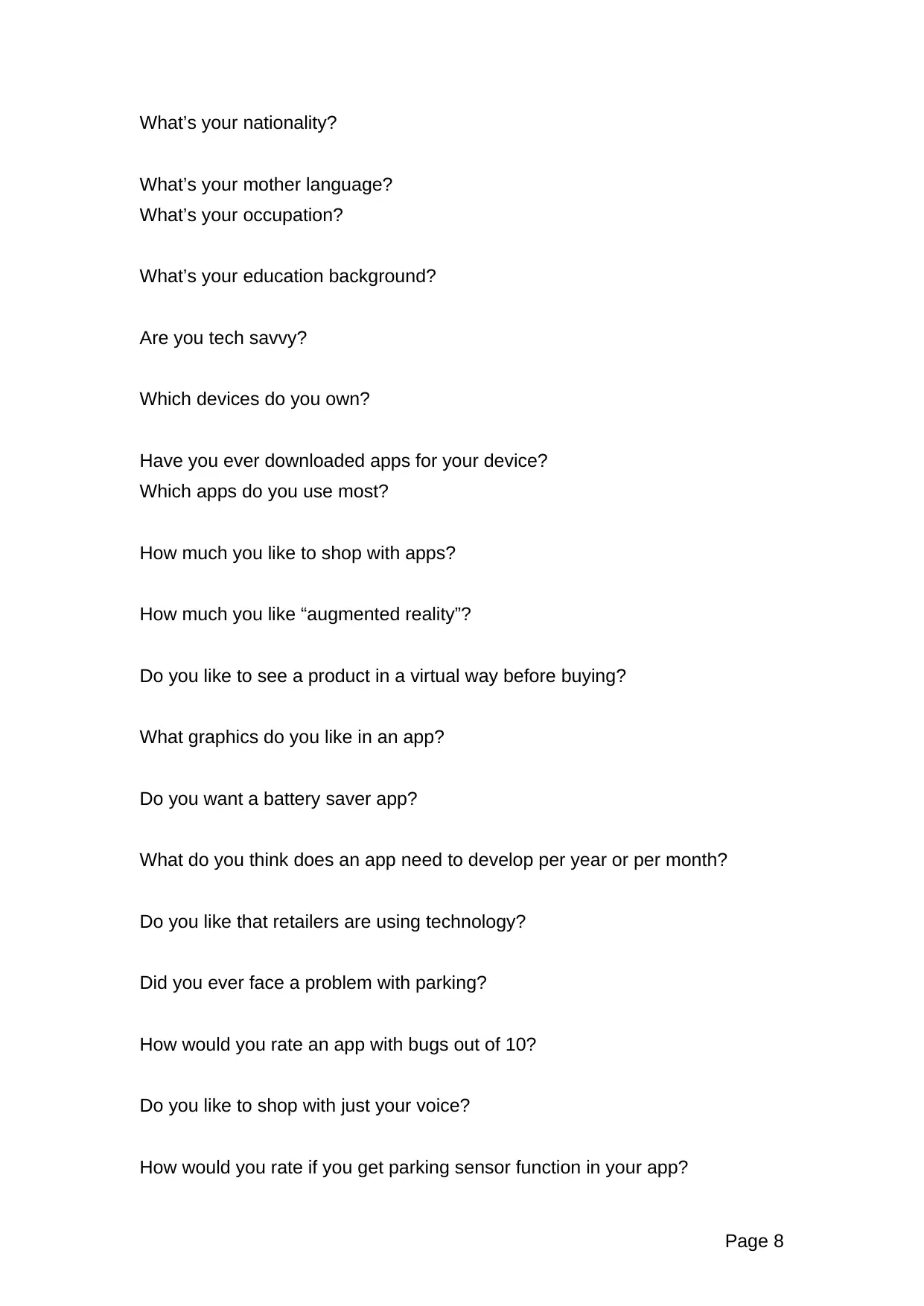
What’s your nationality?
What’s your mother language?
What’s your occupation?
What’s your education background?
Are you tech savvy?
Which devices do you own?
Have you ever downloaded apps for your device?
Which apps do you use most?
How much you like to shop with apps?
How much you like “augmented reality”?
Do you like to see a product in a virtual way before buying?
What graphics do you like in an app?
Do you want a battery saver app?
What do you think does an app need to develop per year or per month?
Do you like that retailers are using technology?
Did you ever face a problem with parking?
How would you rate an app with bugs out of 10?
Do you like to shop with just your voice?
How would you rate if you get parking sensor function in your app?
Page 8
What’s your mother language?
What’s your occupation?
What’s your education background?
Are you tech savvy?
Which devices do you own?
Have you ever downloaded apps for your device?
Which apps do you use most?
How much you like to shop with apps?
How much you like “augmented reality”?
Do you like to see a product in a virtual way before buying?
What graphics do you like in an app?
Do you want a battery saver app?
What do you think does an app need to develop per year or per month?
Do you like that retailers are using technology?
Did you ever face a problem with parking?
How would you rate an app with bugs out of 10?
Do you like to shop with just your voice?
How would you rate if you get parking sensor function in your app?
Page 8
Paraphrase This Document
Need a fresh take? Get an instant paraphrase of this document with our AI Paraphraser
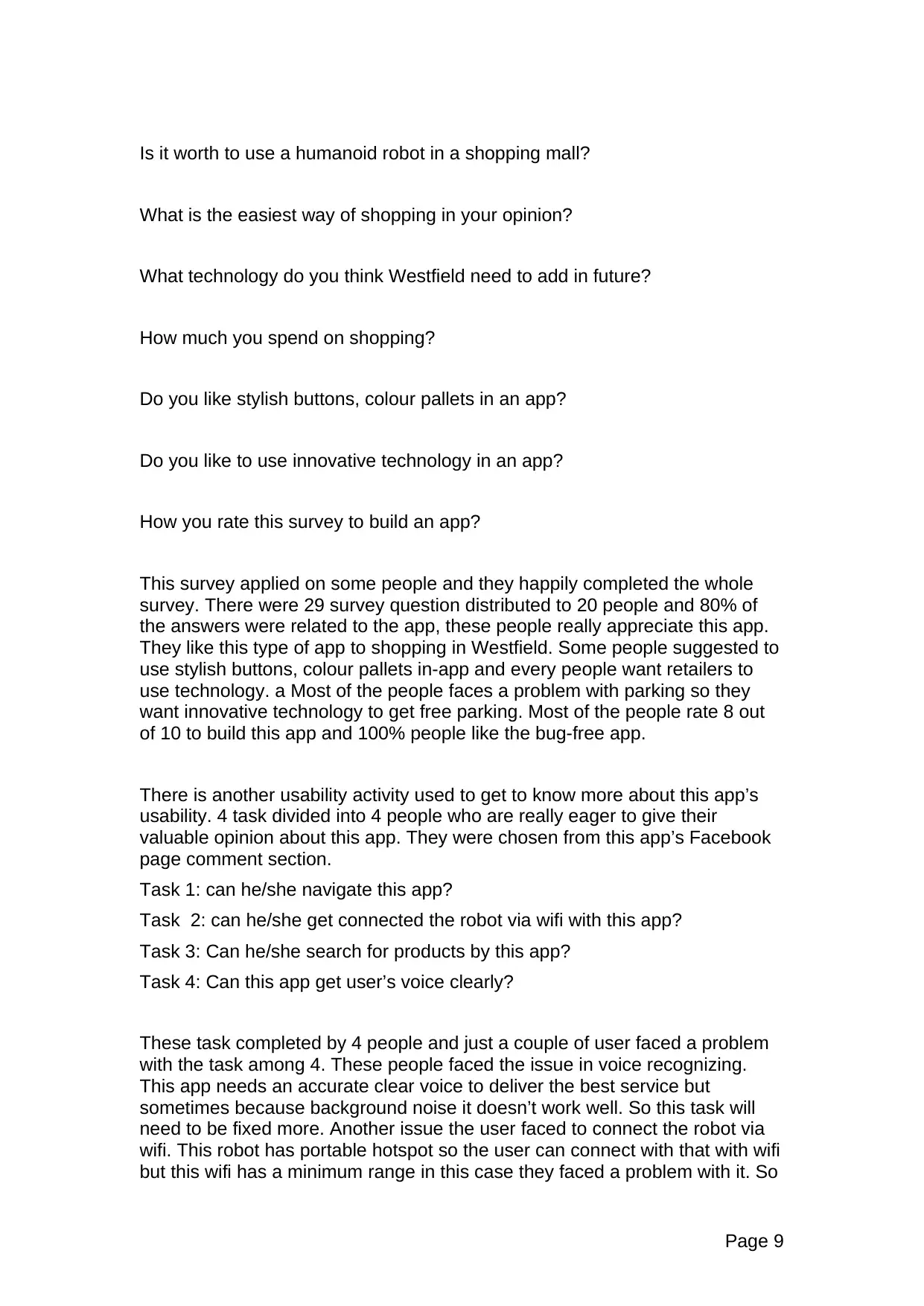
Is it worth to use a humanoid robot in a shopping mall?
What is the easiest way of shopping in your opinion?
What technology do you think Westfield need to add in future?
How much you spend on shopping?
Do you like stylish buttons, colour pallets in an app?
Do you like to use innovative technology in an app?
How you rate this survey to build an app?
This survey applied on some people and they happily completed the whole
survey. There were 29 survey question distributed to 20 people and 80% of
the answers were related to the app, these people really appreciate this app.
They like this type of app to shopping in Westfield. Some people suggested to
use stylish buttons, colour pallets in-app and every people want retailers to
use technology. a Most of the people faces a problem with parking so they
want innovative technology to get free parking. Most of the people rate 8 out
of 10 to build this app and 100% people like the bug-free app.
There is another usability activity used to get to know more about this app’s
usability. 4 task divided into 4 people who are really eager to give their
valuable opinion about this app. They were chosen from this app’s Facebook
page comment section.
Task 1: can he/she navigate this app?
Task 2: can he/she get connected the robot via wifi with this app?
Task 3: Can he/she search for products by this app?
Task 4: Can this app get user’s voice clearly?
These task completed by 4 people and just a couple of user faced a problem
with the task among 4. These people faced the issue in voice recognizing.
This app needs an accurate clear voice to deliver the best service but
sometimes because background noise it doesn’t work well. So this task will
need to be fixed more. Another issue the user faced to connect the robot via
wifi. This robot has portable hotspot so the user can connect with that with wifi
but this wifi has a minimum range in this case they faced a problem with it. So
Page 9
What is the easiest way of shopping in your opinion?
What technology do you think Westfield need to add in future?
How much you spend on shopping?
Do you like stylish buttons, colour pallets in an app?
Do you like to use innovative technology in an app?
How you rate this survey to build an app?
This survey applied on some people and they happily completed the whole
survey. There were 29 survey question distributed to 20 people and 80% of
the answers were related to the app, these people really appreciate this app.
They like this type of app to shopping in Westfield. Some people suggested to
use stylish buttons, colour pallets in-app and every people want retailers to
use technology. a Most of the people faces a problem with parking so they
want innovative technology to get free parking. Most of the people rate 8 out
of 10 to build this app and 100% people like the bug-free app.
There is another usability activity used to get to know more about this app’s
usability. 4 task divided into 4 people who are really eager to give their
valuable opinion about this app. They were chosen from this app’s Facebook
page comment section.
Task 1: can he/she navigate this app?
Task 2: can he/she get connected the robot via wifi with this app?
Task 3: Can he/she search for products by this app?
Task 4: Can this app get user’s voice clearly?
These task completed by 4 people and just a couple of user faced a problem
with the task among 4. These people faced the issue in voice recognizing.
This app needs an accurate clear voice to deliver the best service but
sometimes because background noise it doesn’t work well. So this task will
need to be fixed more. Another issue the user faced to connect the robot via
wifi. This robot has portable hotspot so the user can connect with that with wifi
but this wifi has a minimum range in this case they faced a problem with it. So
Page 9
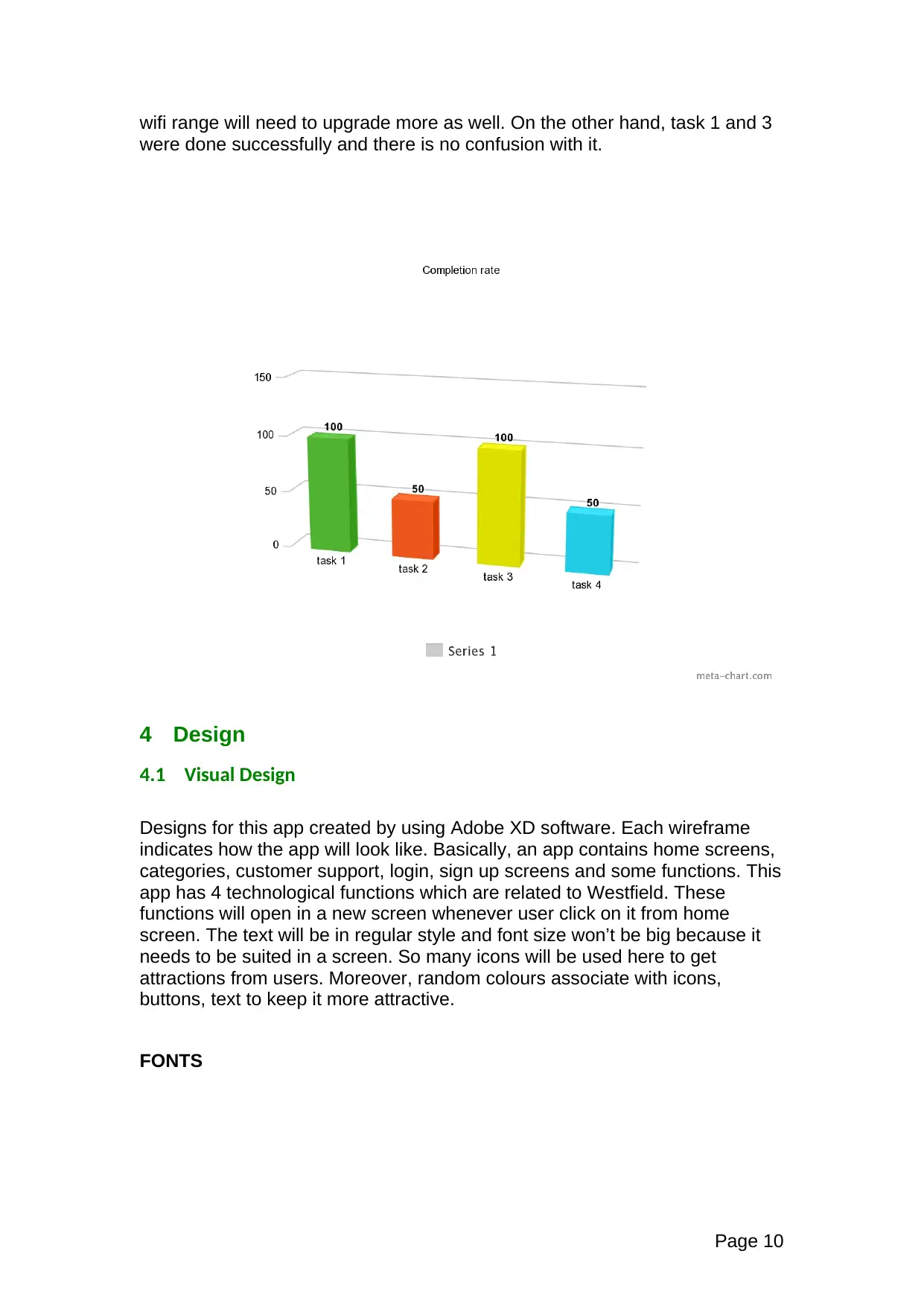
wifi range will need to upgrade more as well. On the other hand, task 1 and 3
were done successfully and there is no confusion with it.
4 Design
4.1 Visual Design
Designs for this app created by using Adobe XD software. Each wireframe
indicates how the app will look like. Basically, an app contains home screens,
categories, customer support, login, sign up screens and some functions. This
app has 4 technological functions which are related to Westfield. These
functions will open in a new screen whenever user click on it from home
screen. The text will be in regular style and font size won’t be big because it
needs to be suited in a screen. So many icons will be used here to get
attractions from users. Moreover, random colours associate with icons,
buttons, text to keep it more attractive.
FONTS
Page 10
were done successfully and there is no confusion with it.
4 Design
4.1 Visual Design
Designs for this app created by using Adobe XD software. Each wireframe
indicates how the app will look like. Basically, an app contains home screens,
categories, customer support, login, sign up screens and some functions. This
app has 4 technological functions which are related to Westfield. These
functions will open in a new screen whenever user click on it from home
screen. The text will be in regular style and font size won’t be big because it
needs to be suited in a screen. So many icons will be used here to get
attractions from users. Moreover, random colours associate with icons,
buttons, text to keep it more attractive.
FONTS
Page 10
⊘ This is a preview!⊘
Do you want full access?
Subscribe today to unlock all pages.
Trusted by 1+ million students worldwide

1 out of 31


Related Documents


Your All-in-One AI-Powered Toolkit for Academic Success.
+13062052269
info@desklib.com
Available 24*7 on WhatsApp / Email
![[object Object]](/_next/static/media/star-bottom.7253800d.svg)
Unlock your academic potential
Copyright © 2020–2026 A2Z Services. All Rights Reserved. Developed and managed by ZUCOL.