Analysis and Design of a Hospital Information System Project

Verified

Added on  2023/04/04

|25
|3438
|318
Project
AI Summary
This project presents a comprehensive analysis and design of a Hospital Information System (HIS). It begins by outlining various use cases, including patient registration, login, emergency patient registration, store management, e-prescription, and viewing patient medical records, each with detailed descriptions. The project then visually represents the HIS through a context diagram and a Level 0 Data Flow Diagram (DFD), illustrating the system's components and data flow. An Entity Relationship Diagram (ERD) is provided to depict the database structure, entities, attributes, and relationships. A CRUD diagram categorizes the system's processes. Furthermore, the project includes a discussion on the benefits of incorporating DevOps methodologies in the HIS development. The report also references several academic papers to support the analysis and design choices.

Document Page
Name
University
Course
Instructor
tabler-icon-diamond-filled.svg

Paraphrase This Document

Need a fresh take? Get an instant paraphrase of this document with our AI Paraphraser
Document Page
Table of Contents
Introduction...............................................................................................................................................3
Patient Registration Use case....................................................................................................................4
Use case description for patient registration use case.........................................................................4
Patient login use case.................................................................................................................................6
Use case description for patient login...................................................................................................6
Use case description for emergency patient registration....................................................................9
Store management use case.....................................................................................................................11
Use case description for store management use case........................................................................11
E-Prescription use case...........................................................................................................................13
Use case description for E-prescription use case...............................................................................13
Viewing patient medical records use case..............................................................................................15
Use case description for viewing patient medical records................................................................15
Hospital information system context Diagram......................................................................................17
Level 0 Data flow diagram for hospital information system................................................................18
Entity Relationship Diagram for hospital information system database............................................19
CRUD diagram for the hospital information system processes...........................................................20
Details of individual group member’s contribution..............................................................................21
Individual discussion on how Hospital Information system project would be done using DevOps. .21
Benefits of DevOps..............................................................................................................................22
Conclusion................................................................................................................................................22
References................................................................................................................................................23
2
Document Page
Introduction
This report is an analysis and design of the hospital information system. It identifies and gives a
brief description of all the use cases involved in the hospital information system, it depicts the
entities and processes involved in the hospital information system through a context diagram and
a level 0 dataflow diagram, it identifies all the entities, with attributes and relationships, involved
in the hospital information system’s database through an entity relationship diagram, it
categorizes all the processes in the hospital information system as create, read, update or delete
through the CRUD diagram and discusses the benefits of using DevOps in the development of
the hospital information system.
3
Document Page
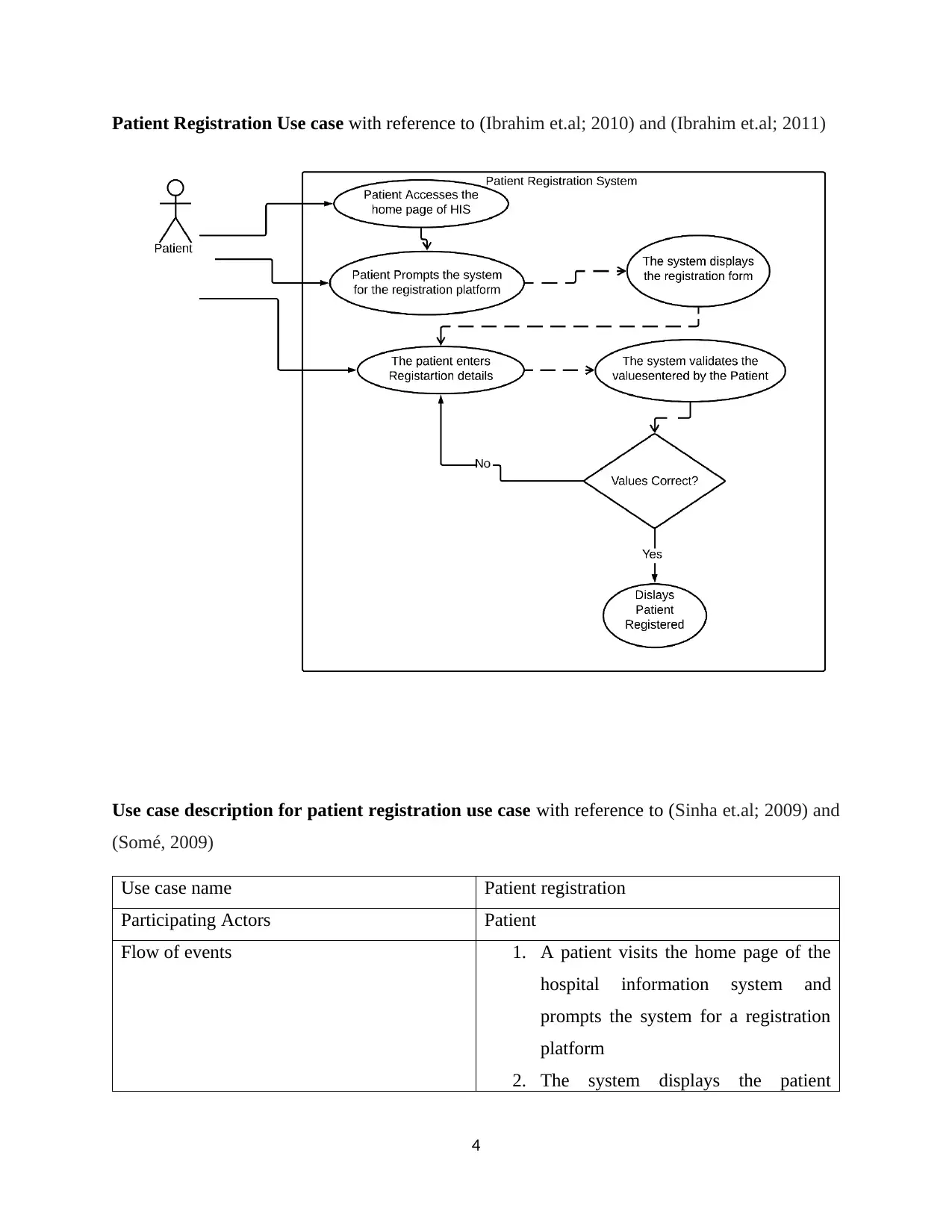
Patient Registration Use case with reference to (Ibrahim et.al; 2010) and (Ibrahim et.al; 2011)
Use case description for patient registration use case with reference to (Sinha et.al; 2009) and
(Somé, 2009)
Use case name Patient registration
Participating Actors Patient
Flow of events 1. A patient visits the home page of the
hospital information system and
prompts the system for a registration
platform
2. The system displays the patient
4
tabler-icon-diamond-filled.svg

Paraphrase This Document

Need a fresh take? Get an instant paraphrase of this document with our AI Paraphraser
Document Page
registration form and prompts the
patient to enter details.
3. The patient enters registration details
4. The system validates the values
entered by the Patient. When the
values are not valid the system
prompts the patient to reenter values.
When the values are valid the system
displays a registration success
message.
Entry Condition A patient prompts the hospital information
system for the patient registration form
Exit Condition The system displays the patient has been
successfully registered.
Quality Requirements The Patient gets registered successfully.
5
Document Page
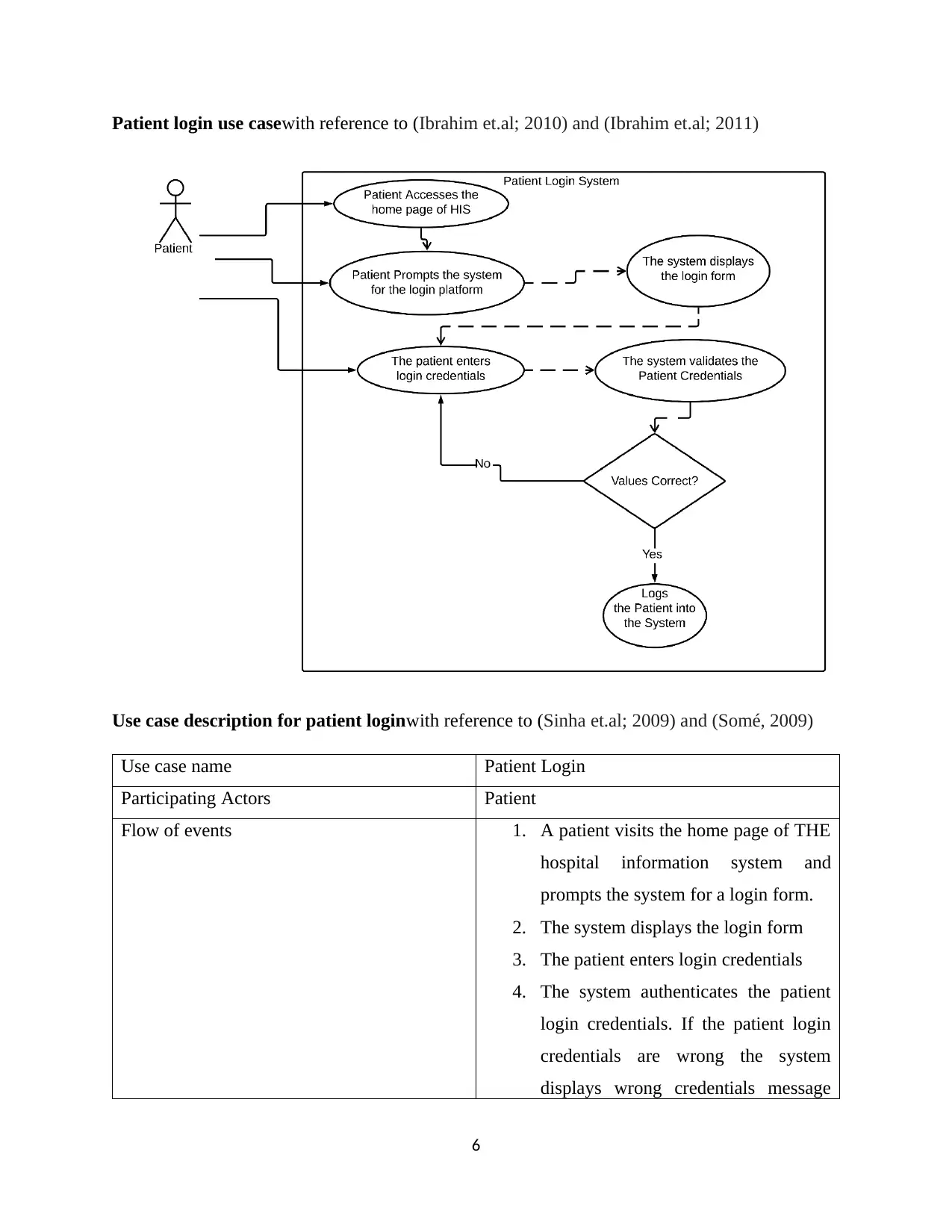
Patient login use casewith reference to (Ibrahim et.al; 2010) and (Ibrahim et.al; 2011)
Use case description for patient loginwith reference to (Sinha et.al; 2009) and (Somé, 2009)
Use case name Patient Login
Participating Actors Patient
Flow of events 1. A patient visits the home page of THE
hospital information system and
prompts the system for a login form.
2. The system displays the login form
3. The patient enters login credentials
4. The system authenticates the patient
login credentials. If the patient login
credentials are wrong the system
displays wrong credentials message
6
Document Page
and prompts the patient to reenter his
or her login credentials. If the patient
login credentials are correct, the
system logs the patients in.
Entry Condition The patient prompts the system for the login
form.
Exit Condition The patient is logged in.
Quality Requirements The system logs in the patient with correct
login credentials and does not log in the one
with the wrong login credentials.
7
tabler-icon-diamond-filled.svg

Paraphrase This Document

Need a fresh take? Get an instant paraphrase of this document with our AI Paraphraser
Document Page
8
Document Page
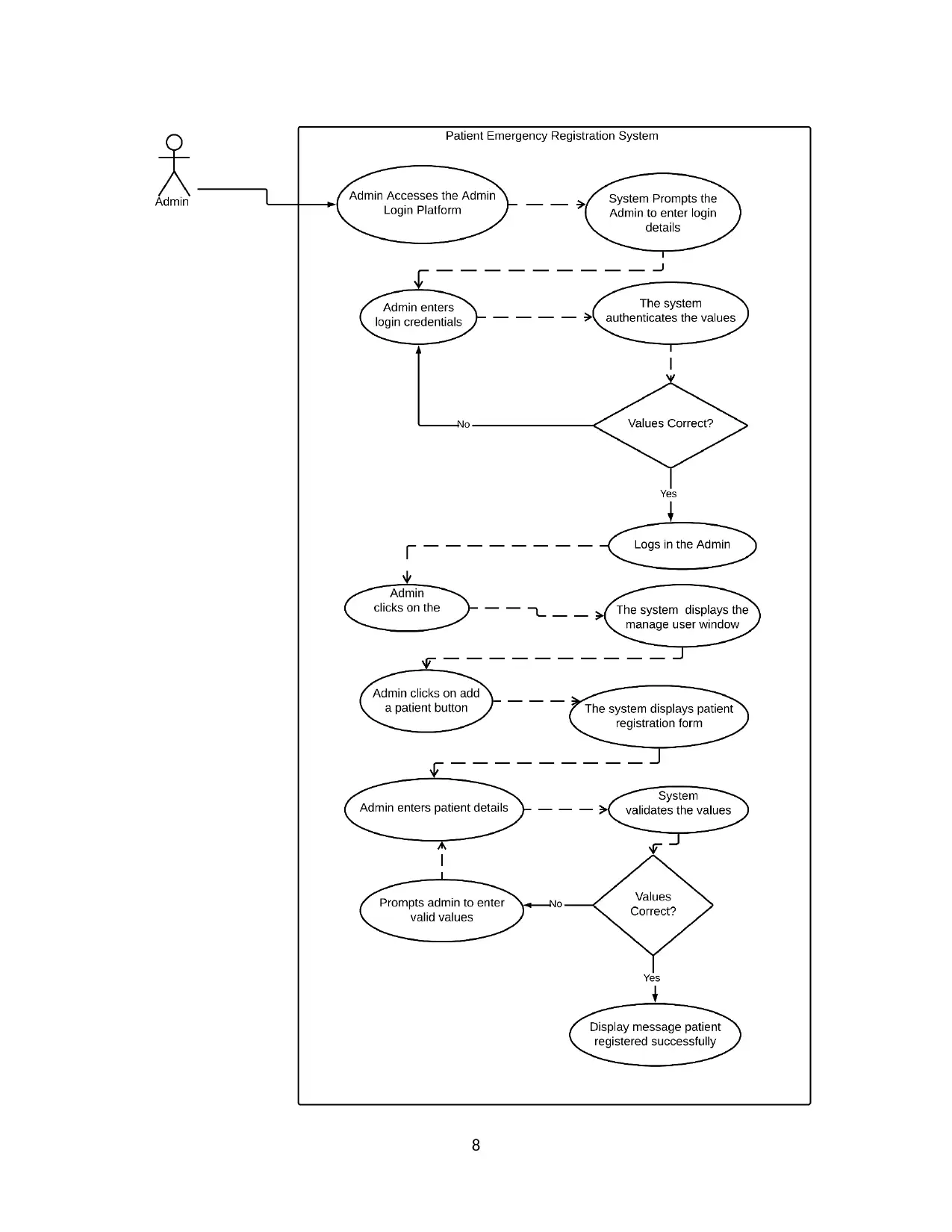
Use case description for emergency patient registrationwith reference to (Sinha et.al; 2009)
and (Somé, 2009)
Use case name Emergency Patient Registration
Participating Actors Administrator
Flow of events 1. The administrator accesses the admin
login webpage.
2. The login webpage prompts the admin
to enter his or her login credentials.
3. Admin enters his or her login
credentials; username and password.
4. The system authenticates the validity
of the login credentials entered by the
admin. If the login credentials are
wrong the system displays an error
message and prompts the admin to
reenter login credentials. If the login
credentials are correct the system logs
in the admin.
5. Once logged in the admin clicks on
the manage user menu item.
6. The system displays the manage user
webpage
7. Admin clicks on the add user button.
8. The system displays the emergency
user registration webpage and prompts
the admin to enter patient registration
details.
9. Admin enters the patient registration
details.
10. The system validates the values
entered by the admin. If the values are
9
Document Page
not valid the system displays an error
message and prompts the admin to
reenter values. If the values are correct
the system displays a registration
success message and saves the patient
details in the patient table.
Entry Condition Admin clicks on the add user button in the
manage user webpage.
Exit Condition The system displays the registration success
message and saves patient details in the
patient table.
Quality Requirements The system registers the patient in the
emergency
Store management use casewith reference to (Ibrahim et.al; 2010) and (Ibrahim et.al; 2011)
10
tabler-icon-diamond-filled.svg

Paraphrase This Document

Need a fresh take? Get an instant paraphrase of this document with our AI Paraphraser
Document Page
Use case description for store management use casewith reference to (Sinha et.al; 2009) and
(Somé, 2009)
Use case name Store management
Participating Actors Admin
Flow of events 1. Admin logs in to the system
2. Admin clicks on the manage store
menu item in the administrator home
page.
3. The system displays the manage store
webpage
4. The system displays the medical
products in stock and those out of
stock. The system displays the
medical products that are being
11
Document Page
consumed slowly.
5. Admin deduces and inputs the order
quantity for medical products out of
stock.
6. The system saves the order quantity
and products that are being consumed
slowly.
Entry Condition Admin clicks on the manage store menu item
in the admin home page.
Exit Condition The system saves the order quantity for
medical products out of stock and keeps a
record of the medical products that are being
consumed slowly.
Quality Requirements The system displays medical products in
stock and those out of stock.
The system displays medical products that
are consumed slowly.
12
chevron_up_icon
1 out of 25
circle_padding
hide_on_mobile
zoom_out_icon
[object Object]