An Analysis of Cloud Computing Service Models: IaaS, PaaS, and SaaS

Verified

Added on  2023/02/07

|3
|925
|64
Report
AI Summary
This report provides a comprehensive overview of three primary cloud service models: Infrastructure as a Service (IaaS), Platform as a Service (PaaS), and Software as a Service (SaaS). It details the characteristics, benefits, and use cases of each model, helping readers understand their differences. IaaS offers the most flexibility, providing full control over hardware resources, making it suitable for cost-conscious organizations and those with unpredictable storage demands. PaaS provides an environment for building, testing, and deploying software applications, simplifying development processes and reducing costs for developers. SaaS is a centrally hosted and managed software model, ideal for running applications with minimal user input. The report also includes a comparative analysis highlighting the level of user management required for each model, emphasizing the cloud provider's and user's shared responsibilities, and common examples of each service model are provided. This analysis is crucial for businesses considering cloud adoption or migration, enabling them to choose the most appropriate model based on their specific needs and objectives. The report is designed to provide a clear understanding of cloud computing concepts and their practical applications.
Document Page
Many images come to mind when we hear the word "Cloud." This is a
huge and vast topic in and of itself, covering virtually every internet
business service available today. Fundamentals Of Cloud Computing - Part
One
As a result, when an organisation considers adopting cloud services or
shifting to the cloud, there are various models to choose from, and each
one offers a unique set of features that must be taken into account. So,
we'll be talking about three alternative cloud service models in this article.
Models of Cloud Services
The three cloud service models are as follows.
IaaS
PaaS
SaaS
Infrastructure as a service (IaaS)
This is the most flexible model and it gives you full control over your
hardware resources. As the name says, it gives us the infrastructure in
terms of service. So here, you don’t have the infrastructure on your
premise; instead, it is there on the cloud managed by the cloud services
providers.
Here, we don’t own the hardware resources but we pay as we use, i.e., in
simple terms, we rent it. This is an instant computing infrastructure
solution.
In this model, the cloud provider ensures that the hardware is functional
and is available for your use and the cloud users of this service (IaaS)
have to manage the configurations on the hardware to make it work
correctly. So, it is a shared responsibility of both - cloud provider and
cloud user - to make things work and make it available for their end
customers.
Use Cases
There could be different use cases when you can think of considering
IaaS. Some of them are:
When you have a limitation in terms of cost and you don’t want
the hassle to manage your on-premise hardware, then you can
think of moving to cloud using their infrastructure and can
reduce your expenses, as using cloud infrastructure is cheaper
than managing your own.
This can also be useful when you have unpredictable storage
demands.
For rapidly growing companies or startups, IaaS can be a good
option as you don’t have to spend time to buy new hardware as
your needs change and evolve and you would be looking to only
purchase how much you actually want to consume.
tabler-icon-diamond-filled.svg

Paraphrase This Document

Need a fresh take? Get an instant paraphrase of this document with our AI Paraphraser
Document Page
IaaS clients have more control over their infrastructure than users of PaaS
or SaaS services do.
Platform as a service (IaaS)
PaaS provides an environment for building, testing, and deploying
software applications. For example, if you want to deploy a web
application using a PaaS model, then you don't need to install an
operating system, a web server, or updates to the OS.
This means that with this model, the user doesn’t need to manage the
server or infrastructure. Users can focus on creating and running
applications rather than constructing and maintaining infrastructure and
services.
Like IaaS, PaaS includes infrastructure—servers, storage and networking—
but also middleware, development tools, business intelligence (BI)
services, database management systems and more.
One of the main benefits of this approach is there are no initial costs as
they have to pay for only what they use and also avoid the expense and
complexity of buying and managing software licenses, it is really simple
and easy to use.
Here you manage the applications and services you develop, and the
cloud service provider manages everything else. It makes the
development, testing, and deployment of applications quick, simple, and
cost-effective.
Use Cases
PaaS is the most cost-effective and time-effective way for a developer to
create an application.
It allows the developer to focus on the creative side of app development,
as opposed to other tasks such as managing software updates, etc. All of
their time and brainpower will go into creating, testing, and deploying the
app.
Software as a service (SaaS)
SaaS is software that is centrally hosted and managed by the cloud
provider for their end customers. Here, one version of the application is
used by all customers and licensed through a monthly or annual
subscription.
You can access the software from any device, anytime provided your
internet connection is working. Different people may have different access
or privileges depending on their needs or roles.
Document Page
Use Cases
You should use this model when you want to run an application with
minimal input. Some of the common examples include Dropbox, Slack,
GoToMeeting, Google Drive and many more.
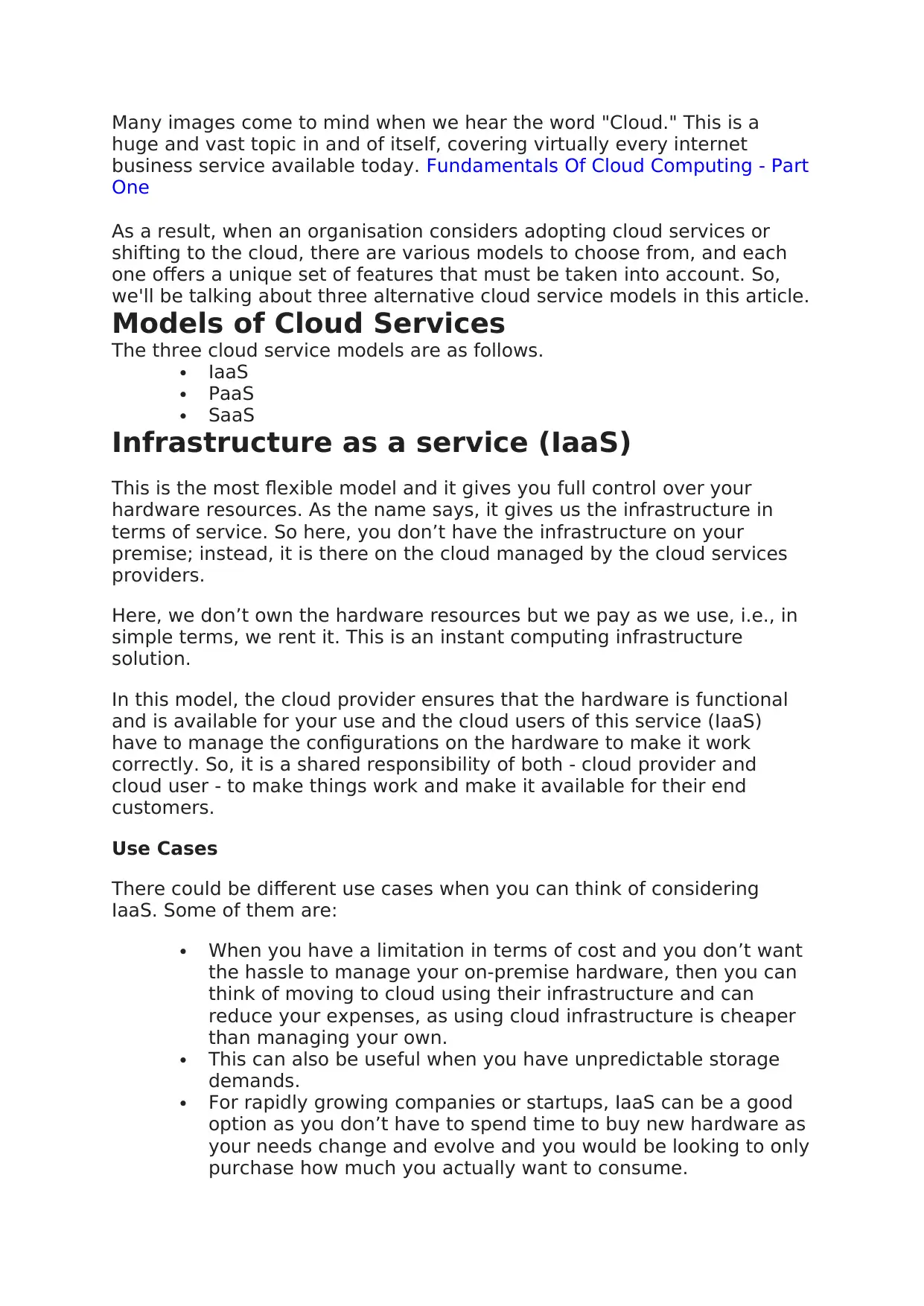
Now, let’s quickly see the comparison between all three models, as shown
below.
IaaS requires the most user management of all the cloud
services. The user is responsible for managing the operating
systems, data, and applications.
PaaS requires less user management. The cloud provider
manages the operating systems, and the user is responsible for
the applications and data they run and store.
SaaS requires the least amount of user management. The cloud
provider is responsible for managing everything, and the end
user just uses the software.
chevron_up_icon
1 out of 3
circle_padding
hide_on_mobile
zoom_out_icon
[object Object]