Network Analysis Lab: ICMP and IP Protocol Examination (MITS4004)

Verified

Added on  2022/12/15

|23
|1613
|478
Practical Assignment
AI Summary
This assignment, a practical lab report for the MITS4004 course, focuses on the analysis of ICMP and IP protocols using Wireshark. The lab is divided into three parts: pinging a website, tracerouting a website, and using PingPlotter. Part A involves pinging a website hosted in Europe and analyzing the ICMP echo request and reply packets, examining fields such as IP addresses, ICMP types and codes, and byte sizes. Part B involves tracerouting a website, exploring ICMP error packets and the differences between them and echo packets, and analyzing delays in the network path. Part C utilizes PingPlotter to trace a website with varying packet sizes, analyzing IP header fields, fragmentation, and the values of fields that change or remain constant across different ICMP messages. The report includes screenshots, explanations, and answers to specific questions about the network traffic, providing a detailed examination of network protocols and packet structures. The assignment concludes with a bibliography of relevant resources.
Document Page
Running head: RESEARCH AND ANALYSIS OF NETWORKS
Research and Analysis of Networks
Name of the Student
Name of the University
Author Note
tabler-icon-diamond-filled.svg

Paraphrase This Document

Need a fresh take? Get an instant paraphrase of this document with our AI Paraphraser
Document Page
1
RESEARCH AND ANALYSIS OF NETWORKS
Part A – Pinging website beyond the continent
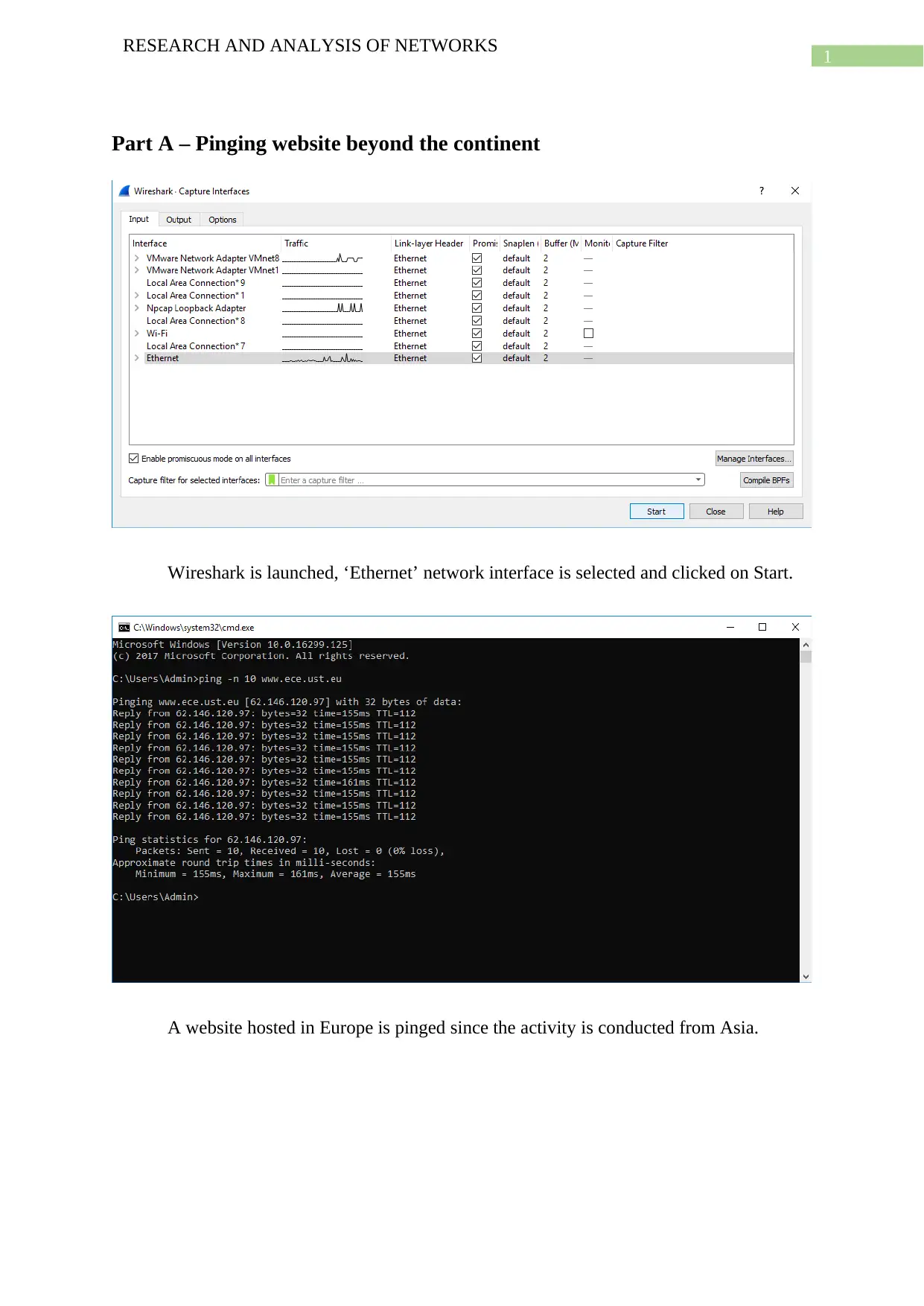
Wireshark is launched, ‘Ethernet’ network interface is selected and clicked on Start.
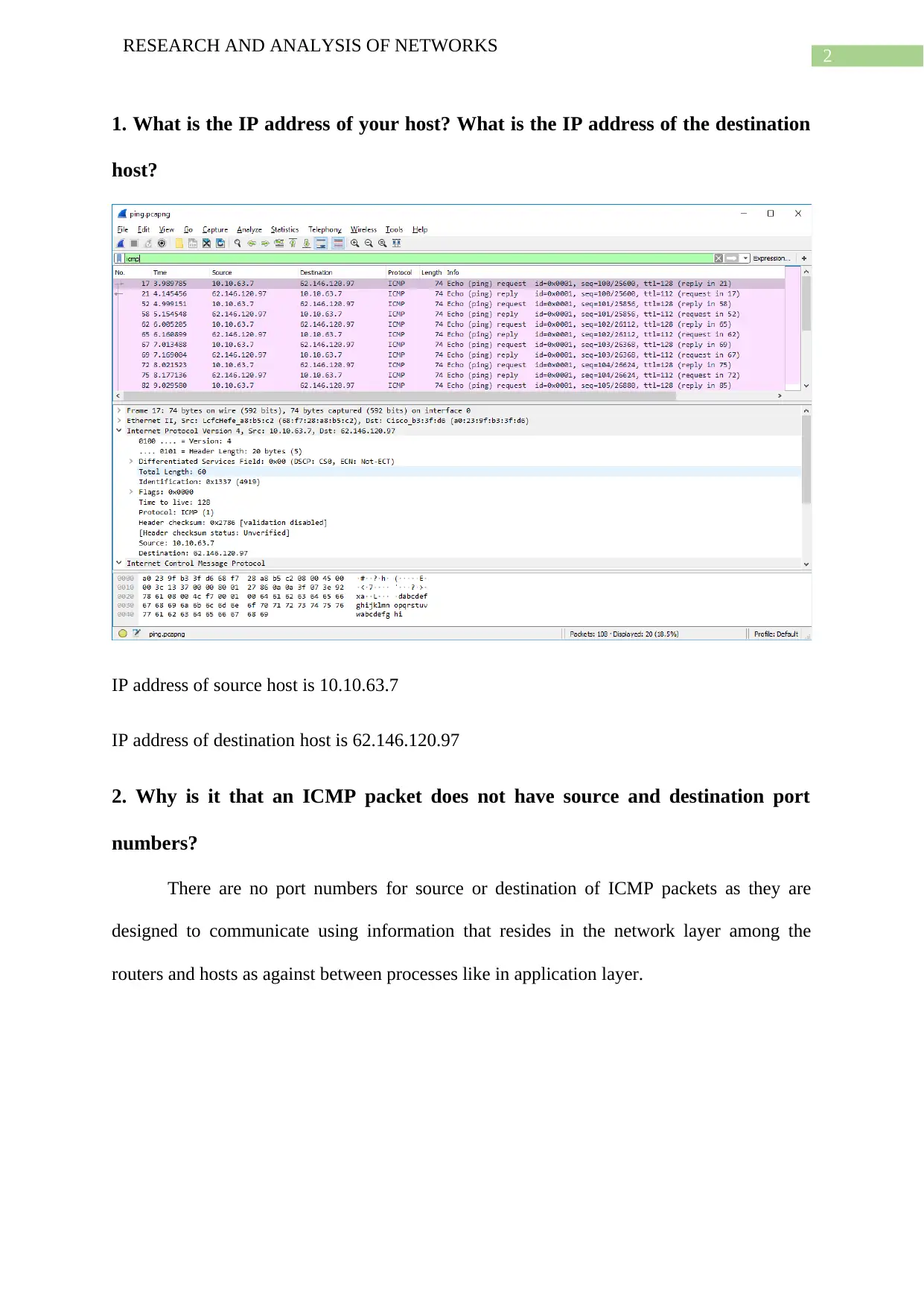
A website hosted in Europe is pinged since the activity is conducted from Asia.
Document Page
2
RESEARCH AND ANALYSIS OF NETWORKS
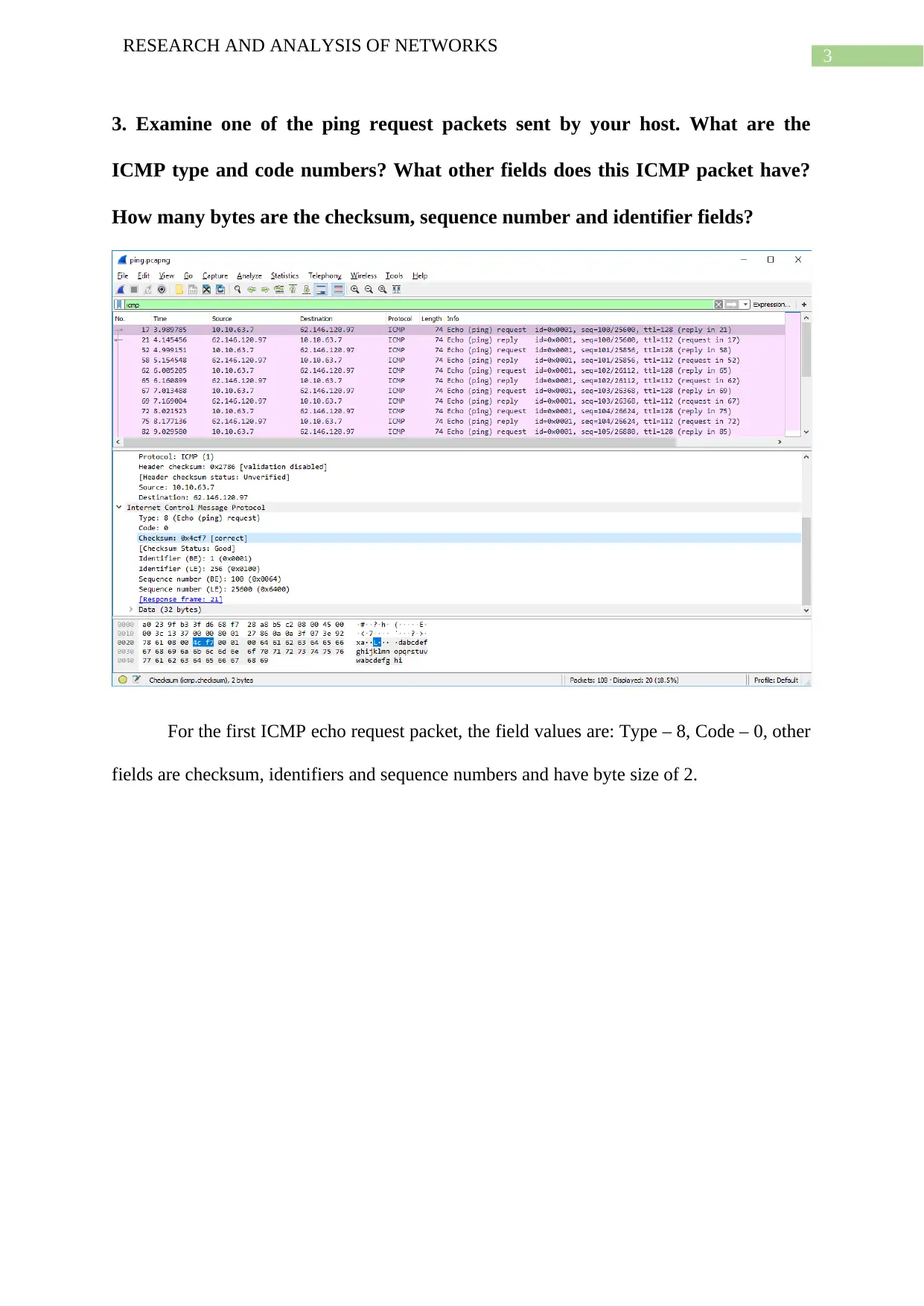
1. What is the IP address of your host? What is the IP address of the destination
host?
IP address of source host is 10.10.63.7
IP address of destination host is 62.146.120.97
2. Why is it that an ICMP packet does not have source and destination port
numbers?
There are no port numbers for source or destination of ICMP packets as they are
designed to communicate using information that resides in the network layer among the
routers and hosts as against between processes like in application layer.
Document Page
3
RESEARCH AND ANALYSIS OF NETWORKS
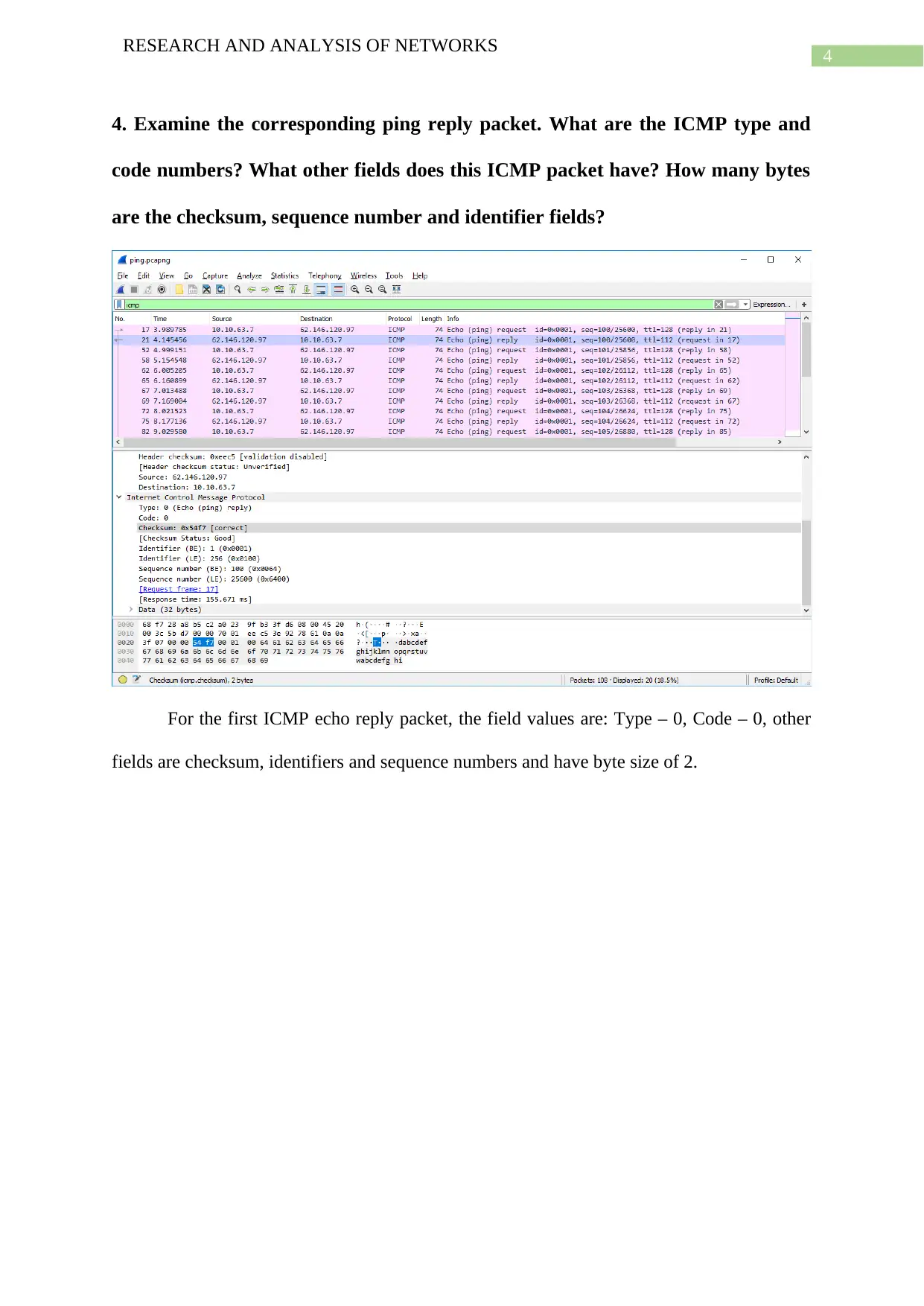
3. Examine one of the ping request packets sent by your host. What are the
ICMP type and code numbers? What other fields does this ICMP packet have?
How many bytes are the checksum, sequence number and identifier fields?
For the first ICMP echo request packet, the field values are: Type – 8, Code – 0, other
fields are checksum, identifiers and sequence numbers and have byte size of 2.
tabler-icon-diamond-filled.svg

Paraphrase This Document

Need a fresh take? Get an instant paraphrase of this document with our AI Paraphraser
Document Page
4
RESEARCH AND ANALYSIS OF NETWORKS
4. Examine the corresponding ping reply packet. What are the ICMP type and
code numbers? What other fields does this ICMP packet have? How many bytes
are the checksum, sequence number and identifier fields?
For the first ICMP echo reply packet, the field values are: Type – 0, Code – 0, other
fields are checksum, identifiers and sequence numbers and have byte size of 2.
Document Page
5
RESEARCH AND ANALYSIS OF NETWORKS
Part B – Traceroute of website beyond the continent
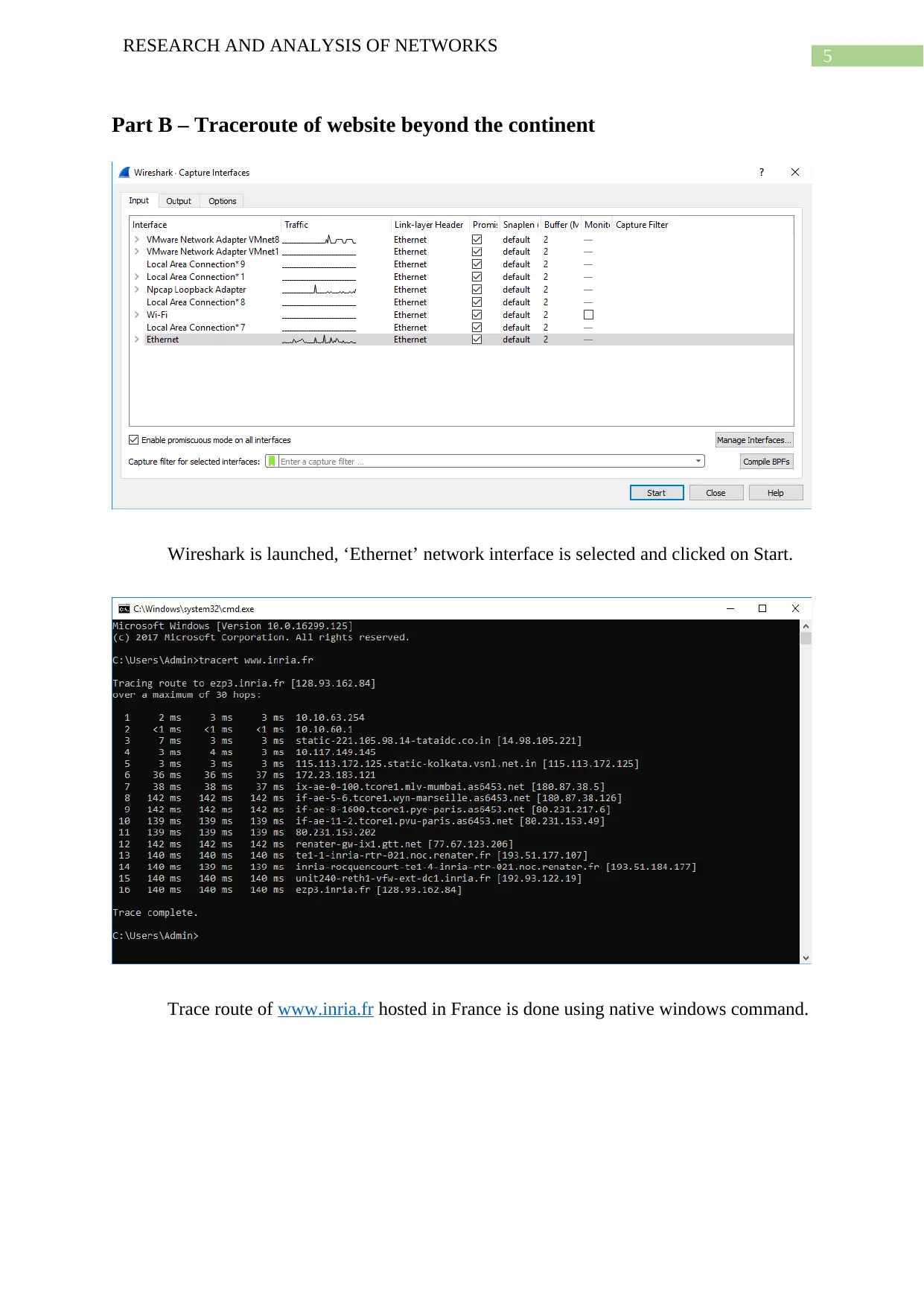
Wireshark is launched, ‘Ethernet’ network interface is selected and clicked on Start.
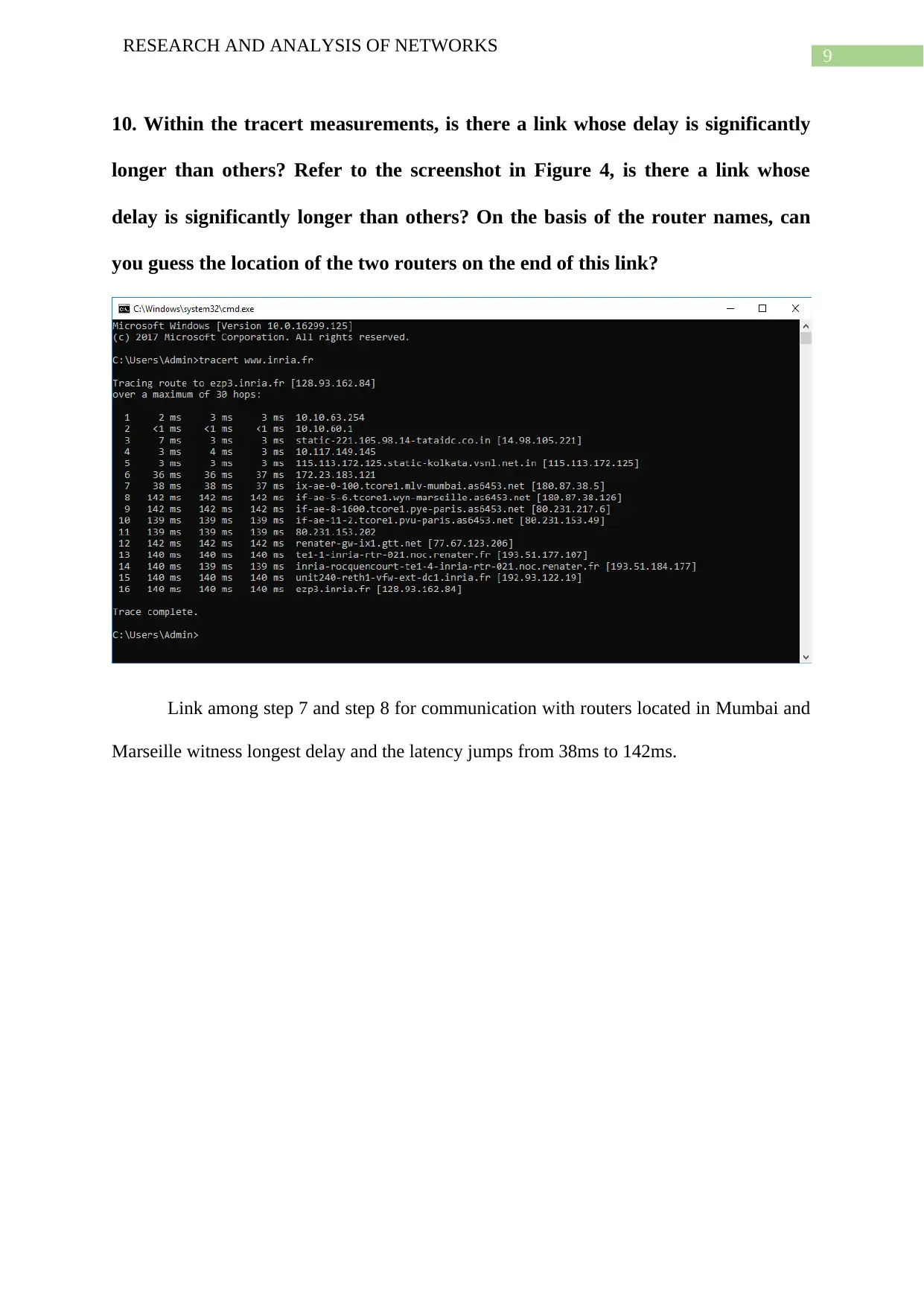
Trace route of www.inria.fr hosted in France is done using native windows command.
Document Page
6
RESEARCH AND ANALYSIS OF NETWORKS
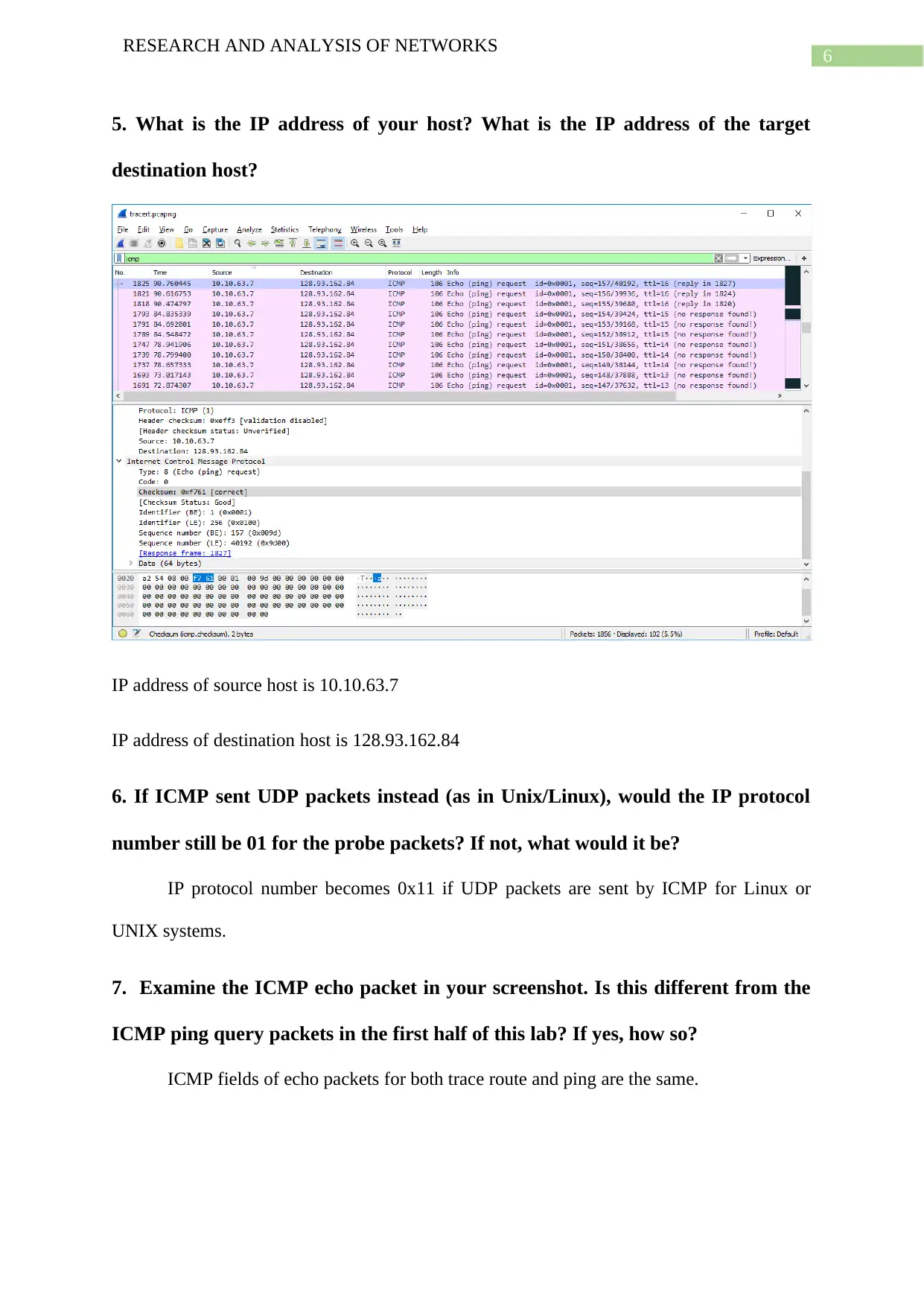
5. What is the IP address of your host? What is the IP address of the target
destination host?
IP address of source host is 10.10.63.7
IP address of destination host is 128.93.162.84
6. If ICMP sent UDP packets instead (as in Unix/Linux), would the IP protocol
number still be 01 for the probe packets? If not, what would it be?
IP protocol number becomes 0x11 if UDP packets are sent by ICMP for Linux or
UNIX systems.
7. Examine the ICMP echo packet in your screenshot. Is this different from the
ICMP ping query packets in the first half of this lab? If yes, how so?
ICMP fields of echo packets for both trace route and ping are the same.
tabler-icon-diamond-filled.svg

Paraphrase This Document

Need a fresh take? Get an instant paraphrase of this document with our AI Paraphraser
Document Page
7
RESEARCH AND ANALYSIS OF NETWORKS
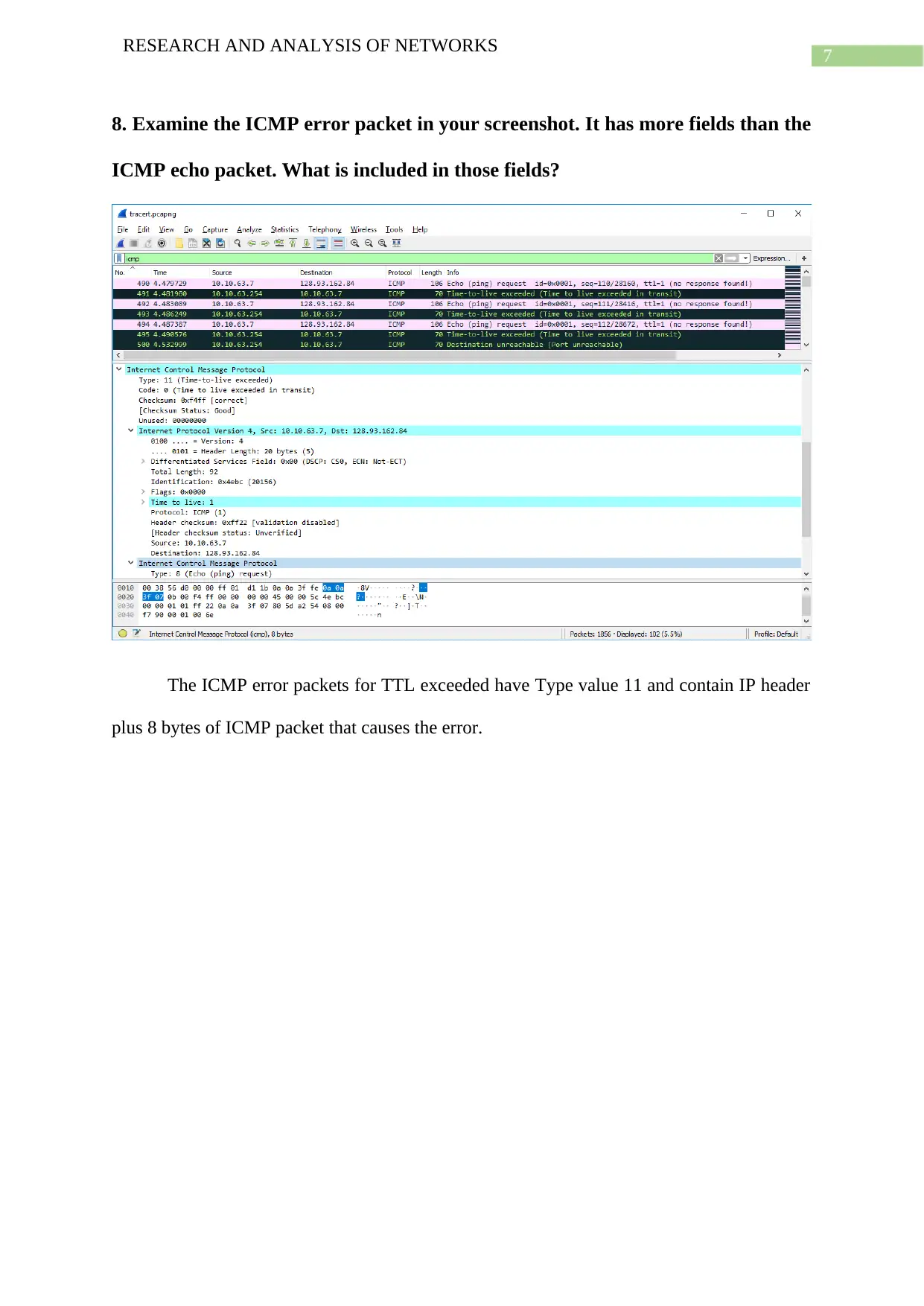
8. Examine the ICMP error packet in your screenshot. It has more fields than the
ICMP echo packet. What is included in those fields?
The ICMP error packets for TTL exceeded have Type value 11 and contain IP header
plus 8 bytes of ICMP packet that causes the error.
Document Page
8
RESEARCH AND ANALYSIS OF NETWORKS
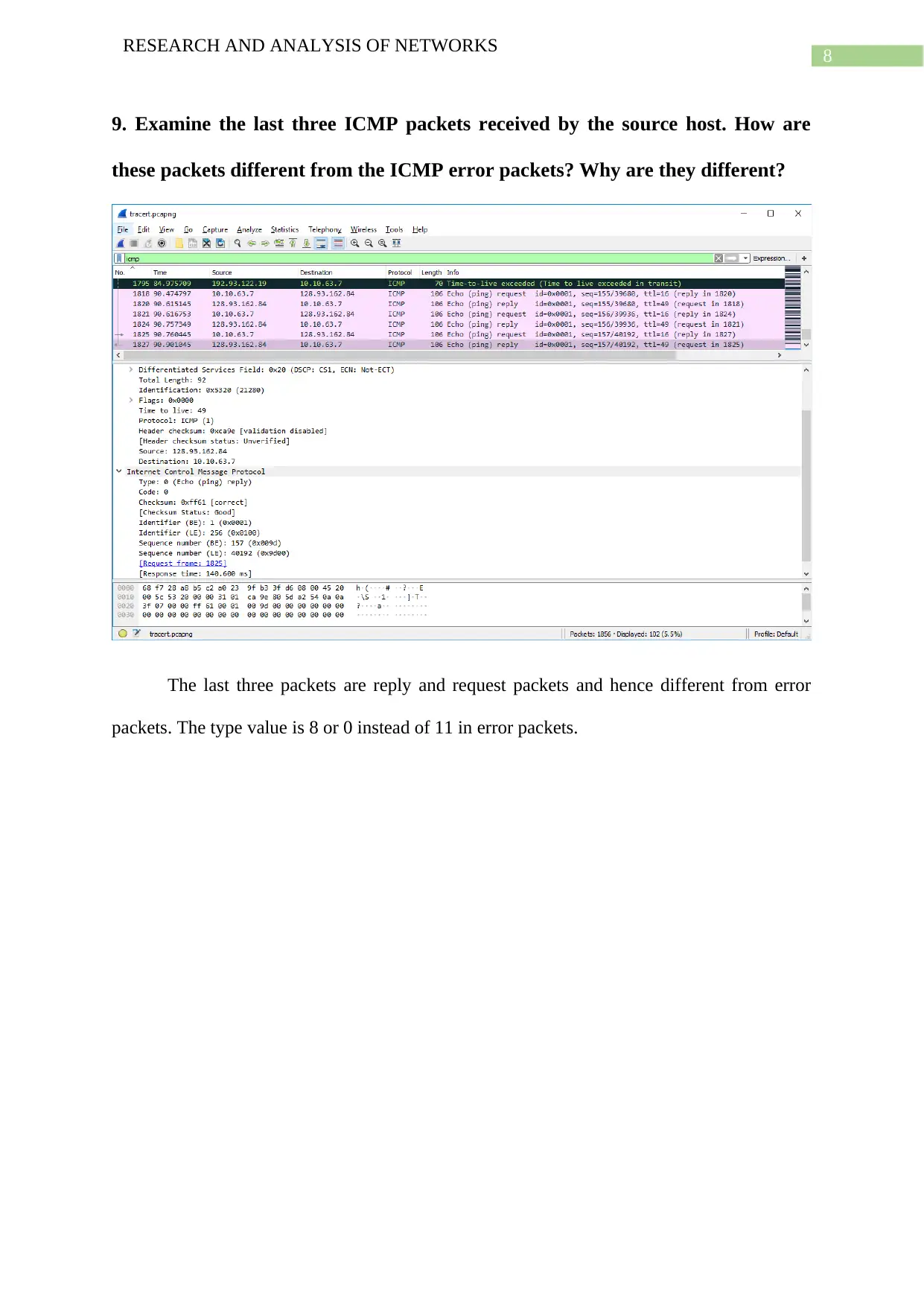
9. Examine the last three ICMP packets received by the source host. How are
these packets different from the ICMP error packets? Why are they different?
The last three packets are reply and request packets and hence different from error
packets. The type value is 8 or 0 instead of 11 in error packets.
Document Page
9
RESEARCH AND ANALYSIS OF NETWORKS
10. Within the tracert measurements, is there a link whose delay is significantly
longer than others? Refer to the screenshot in Figure 4, is there a link whose
delay is significantly longer than others? On the basis of the router names, can
you guess the location of the two routers on the end of this link?
Link among step 7 and step 8 for communication with routers located in Mumbai and
Marseille witness longest delay and the latency jumps from 38ms to 142ms.
tabler-icon-diamond-filled.svg

Paraphrase This Document

Need a fresh take? Get an instant paraphrase of this document with our AI Paraphraser
Document Page
10
RESEARCH AND ANALYSIS OF NETWORKS
Part C – PingPlotter Trace with Latency Graph
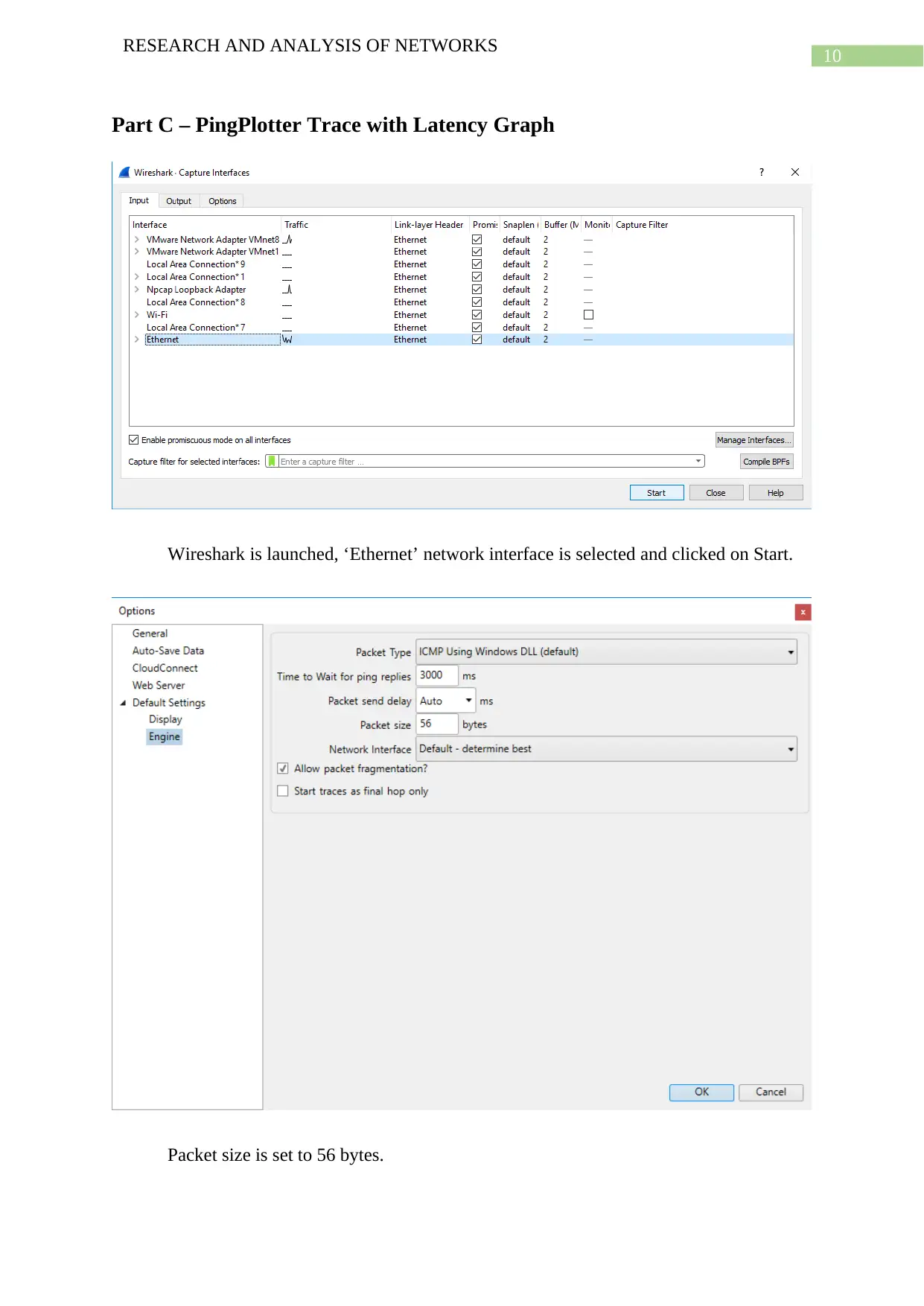
Wireshark is launched, ‘Ethernet’ network interface is selected and clicked on Start.
Packet size is set to 56 bytes.
Document Page
11
RESEARCH AND ANALYSIS OF NETWORKS
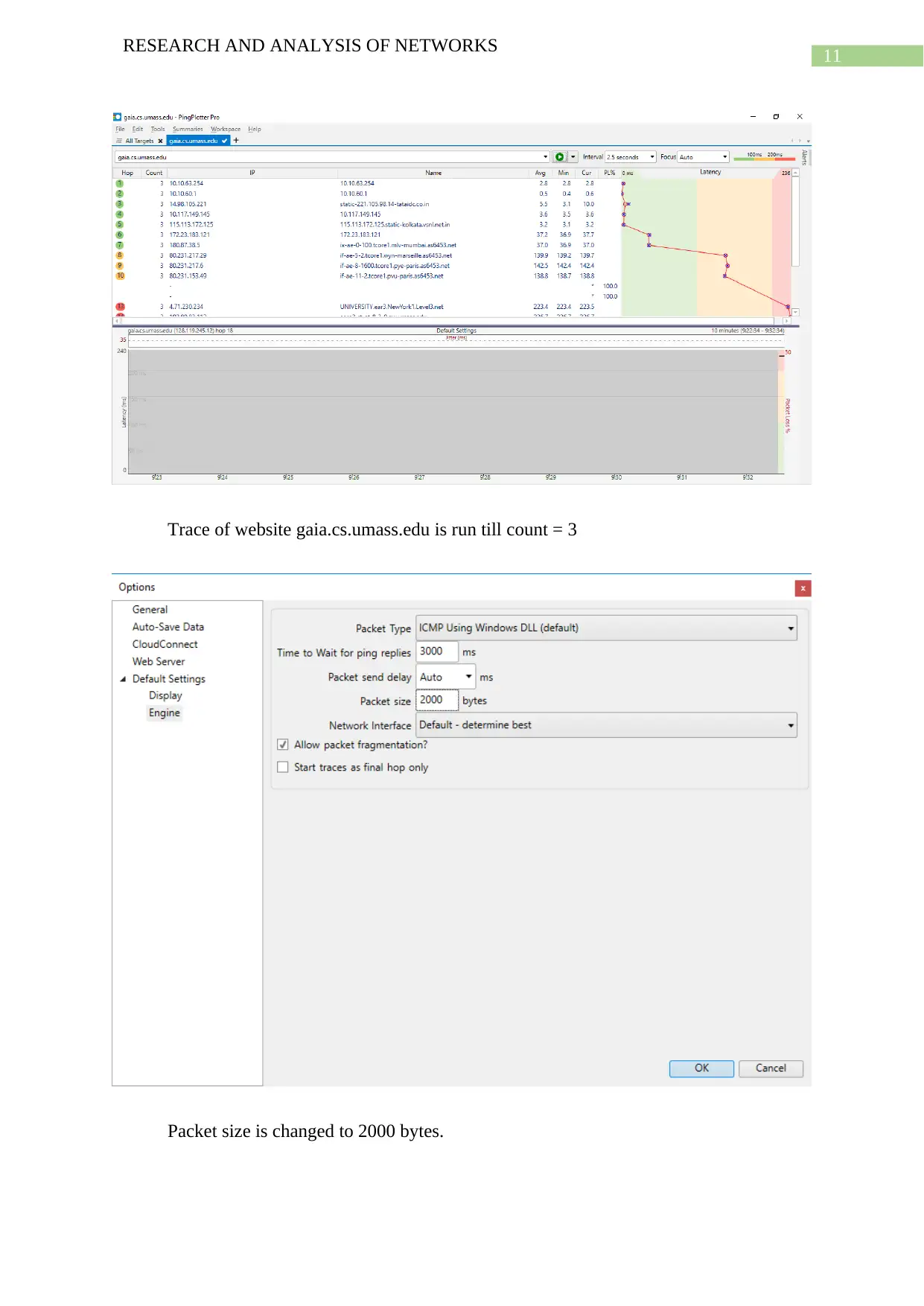
Trace of website gaia.cs.umass.edu is run till count = 3
Packet size is changed to 2000 bytes.
chevron_up_icon
1 out of 23
circle_padding
hide_on_mobile
zoom_out_icon
[object Object]