De Montfort University: IMAT5209 Usability Evaluation of iTunes Report
VerifiedAdded on 2022/10/04
|18
|4614
|12
Report
AI Summary
This report presents a usability evaluation of the iTunes application, focusing on its interactive system and user experience. The evaluation employs a heuristic methodology, involving three evaluators who assessed the application against nine usability principles. The report details the system's functionality, use cases, and usability requirements, identifying inconsistencies in language, button visibility, and the absence of tooltips as key areas for improvement. The evaluation methodology, including severity and ease-of-fixing ratings, is outlined, with findings categorized into eleven problem areas. The report highlights critical issues impacting user experience, such as inconsistencies in the user interface and the lack of clear visual cues. The report emphasizes the importance of addressing these issues to enhance the overall usability and user satisfaction of the iTunes application, ultimately providing recommendations for design improvements to optimize user interaction.
Running head: HUMAN FACTORS AND SYSTEM DESIGN
Human Factors and System Design
Name of Student-
Name of University-
Author’s Note-
Human Factors and System Design
Name of Student-
Name of University-
Author’s Note-

Paraphrase This Document
Need a fresh take? Get an instant paraphrase of this document with our AI Paraphraser
1HUMAN FACTORS AND SYSTEM DESIGN
Table of Contents
Part One: Interactive System and its Users......................................................................................1
Part Two: Use cases.........................................................................................................................2
Part Three: Usability Requirements.................................................................................................3
Part Four: Evaluation Methodology................................................................................................4
Part Five: Evaluation.......................................................................................................................6
Part Six: Findings of Evaluation....................................................................................................12
Bibliography..................................................................................................................................15
Table of Contents
Part One: Interactive System and its Users......................................................................................1
Part Two: Use cases.........................................................................................................................2
Part Three: Usability Requirements.................................................................................................3
Part Four: Evaluation Methodology................................................................................................4
Part Five: Evaluation.......................................................................................................................6
Part Six: Findings of Evaluation....................................................................................................12
Bibliography..................................................................................................................................15
2HUMAN FACTORS AND SYSTEM DESIGN
Part One: Interactive System and its Users
The interactive system that is being evaluated in this report is the system of iTunes which
is digital music application of Apple (Nascimento et al. 2017). The evaluation was done with the
help of heuristic evaluation including different usability method. This heuristics method of
evaluation includes many evaluators stating predefined usability principles for a particular
application as well as principles of website to complete this task.
The interactive iTunes is music application that can be used with Windows as well as the
Mac users. This interactive system helps to manage digital music library in the computer system.
With this system, the users can listen songs as per their choice from their CDs and they can store
all those songs as MP3 music on the music library. The users can also create their mixes so that
they can create playlist which are customizable. This includes smart playlists and the users using
the iTunes can also record all those songs to CDs. At the time is listening to the music, the users
using the iTunes can also watch visuals on the window of iTunes or can watch video as full
screen. The system of iTunes are also compatible with iPod, MP3 music player of Apple. The
users can transfer songs between the interfaces of the system. Songs can also be transferred to
computer system or in mobile device system (Schnall et al. 2016). This system of iTunes has a
unique feature which enables the users to search music. The users can search for music suing the
iTunes Music Store and can also buy those music at the rate 99 cents. The best thing that system
provides is that the users does not have to subscribe for taking the advantage of the features. The
application of iTunes is free of cost can be downloaded from the official website of Apple.
This interactive system’s target users are those people who uses MacOS X on their
computer system or uses Windows 2000 or uses Windows XP for their listening to music. There
Part One: Interactive System and its Users
The interactive system that is being evaluated in this report is the system of iTunes which
is digital music application of Apple (Nascimento et al. 2017). The evaluation was done with the
help of heuristic evaluation including different usability method. This heuristics method of
evaluation includes many evaluators stating predefined usability principles for a particular
application as well as principles of website to complete this task.
The interactive iTunes is music application that can be used with Windows as well as the
Mac users. This interactive system helps to manage digital music library in the computer system.
With this system, the users can listen songs as per their choice from their CDs and they can store
all those songs as MP3 music on the music library. The users can also create their mixes so that
they can create playlist which are customizable. This includes smart playlists and the users using
the iTunes can also record all those songs to CDs. At the time is listening to the music, the users
using the iTunes can also watch visuals on the window of iTunes or can watch video as full
screen. The system of iTunes are also compatible with iPod, MP3 music player of Apple. The
users can transfer songs between the interfaces of the system. Songs can also be transferred to
computer system or in mobile device system (Schnall et al. 2016). This system of iTunes has a
unique feature which enables the users to search music. The users can search for music suing the
iTunes Music Store and can also buy those music at the rate 99 cents. The best thing that system
provides is that the users does not have to subscribe for taking the advantage of the features. The
application of iTunes is free of cost can be downloaded from the official website of Apple.
This interactive system’s target users are those people who uses MacOS X on their
computer system or uses Windows 2000 or uses Windows XP for their listening to music. There
⊘ This is a preview!⊘
Do you want full access?
Subscribe today to unlock all pages.

Trusted by 1+ million students worldwide
3HUMAN FACTORS AND SYSTEM DESIGN
are another target people of iTunes that is people who listens to the music, organizes the music,
as well as downloads music to be a part of the target population (Kölling and McKay 2016). No
specific demographic targets are not carried out while using conducting this evaluation testing.
Part Two: Use cases
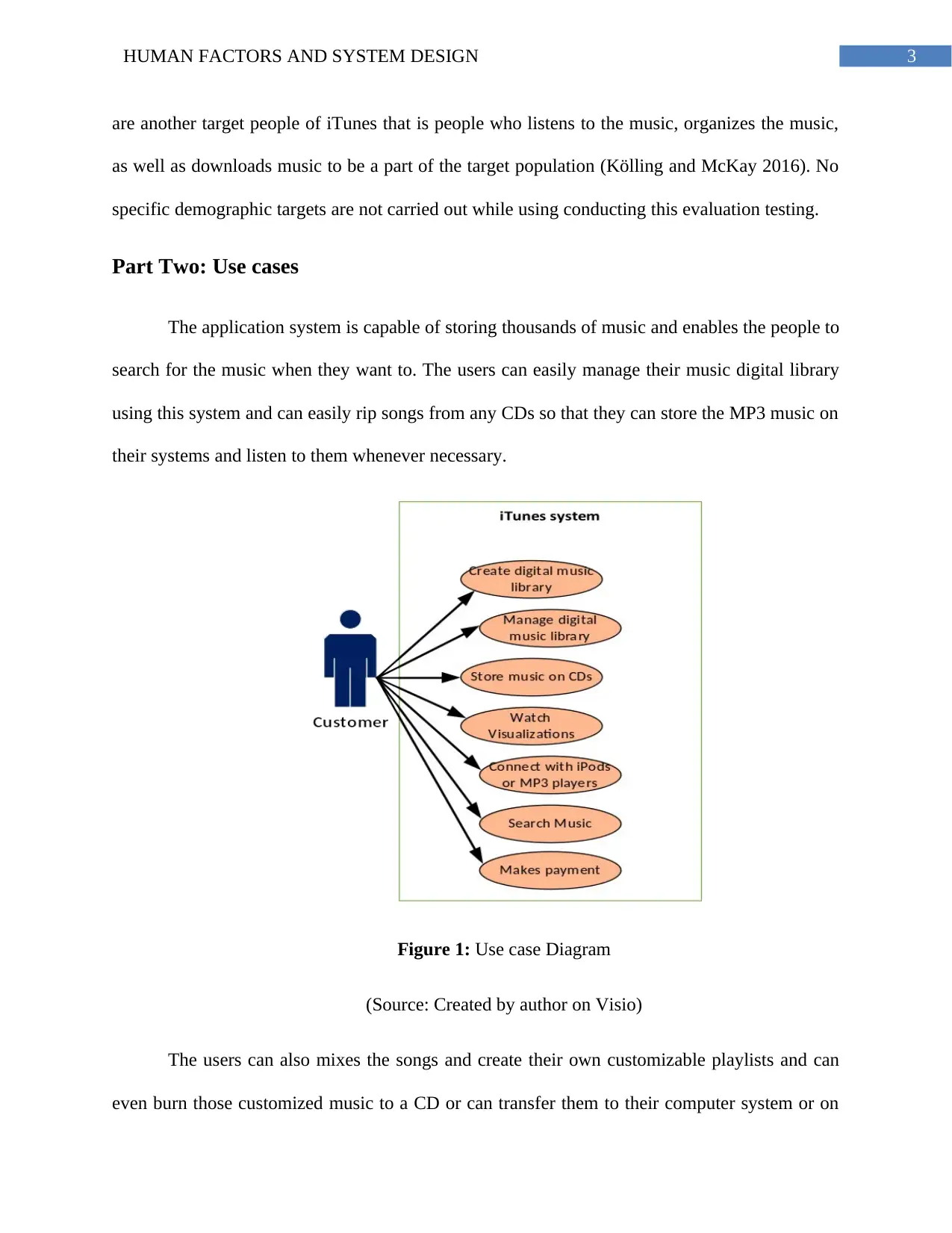
The application system is capable of storing thousands of music and enables the people to
search for the music when they want to. The users can easily manage their music digital library
using this system and can easily rip songs from any CDs so that they can store the MP3 music on
their systems and listen to them whenever necessary.
Figure 1: Use case Diagram
(Source: Created by author on Visio)
The users can also mixes the songs and create their own customizable playlists and can
even burn those customized music to a CD or can transfer them to their computer system or on
are another target people of iTunes that is people who listens to the music, organizes the music,
as well as downloads music to be a part of the target population (Kölling and McKay 2016). No
specific demographic targets are not carried out while using conducting this evaluation testing.
Part Two: Use cases
The application system is capable of storing thousands of music and enables the people to
search for the music when they want to. The users can easily manage their music digital library
using this system and can easily rip songs from any CDs so that they can store the MP3 music on
their systems and listen to them whenever necessary.
Figure 1: Use case Diagram
(Source: Created by author on Visio)
The users can also mixes the songs and create their own customizable playlists and can
even burn those customized music to a CD or can transfer them to their computer system or on
Paraphrase This Document
Need a fresh take? Get an instant paraphrase of this document with our AI Paraphraser
4HUMAN FACTORS AND SYSTEM DESIGN
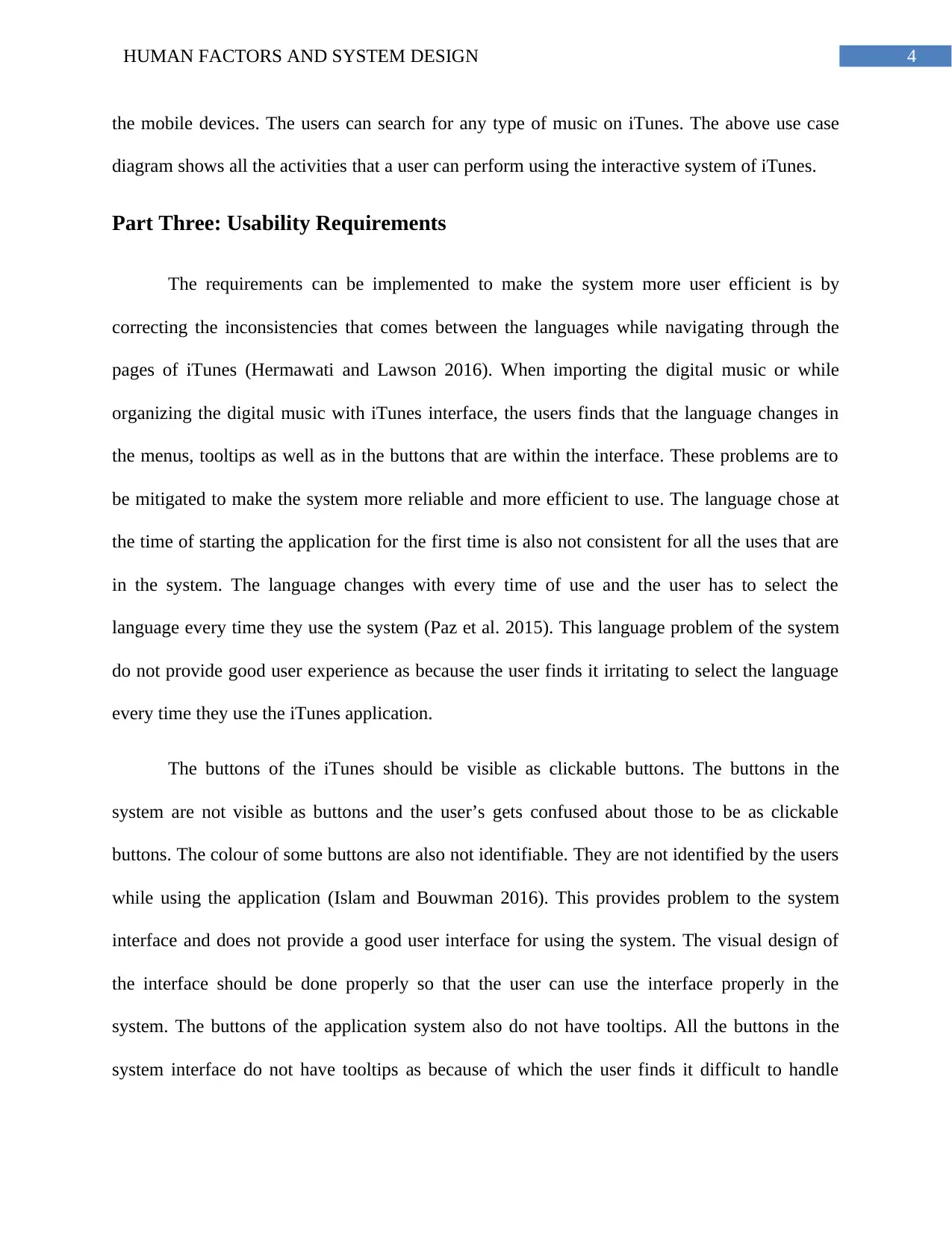
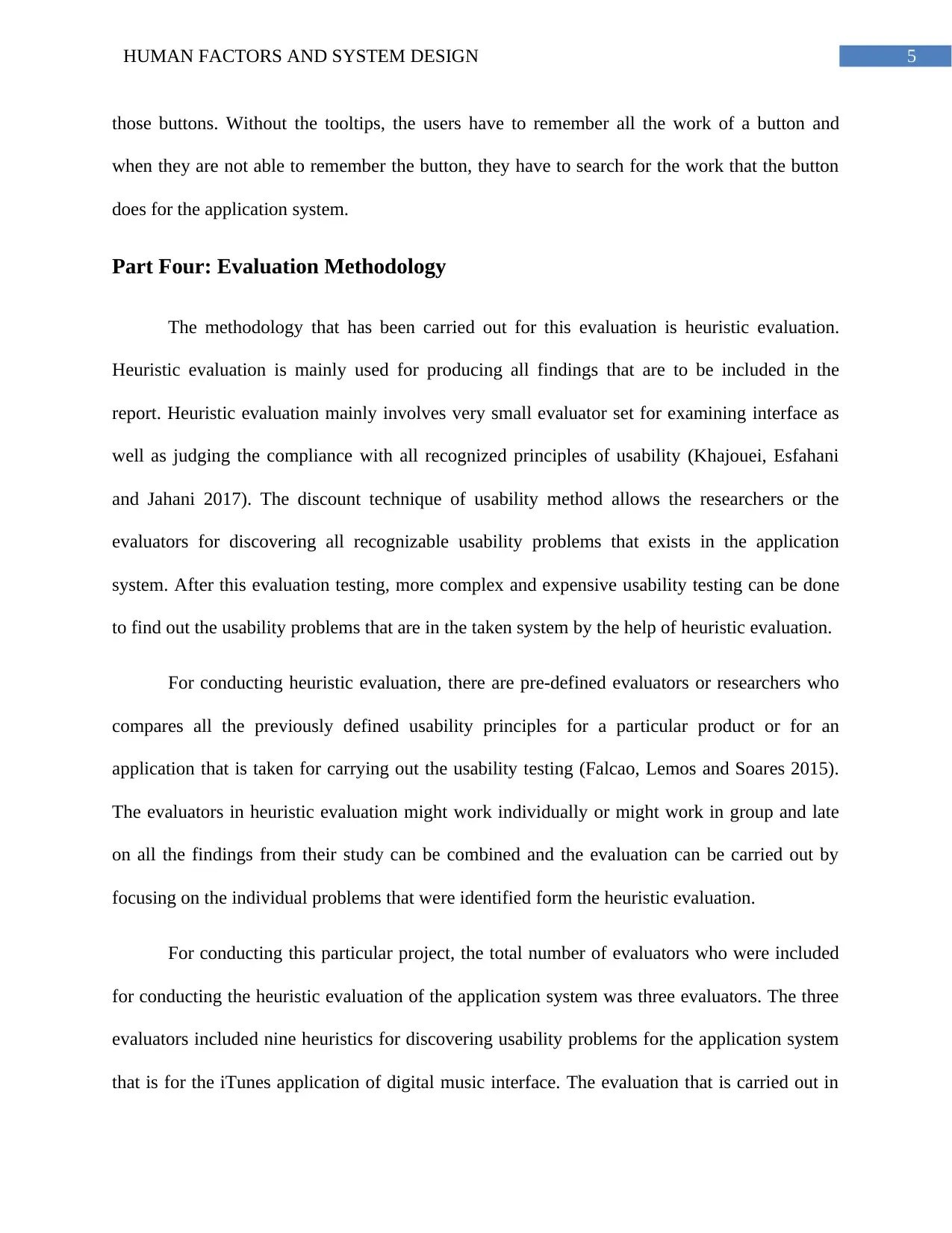
the mobile devices. The users can search for any type of music on iTunes. The above use case
diagram shows all the activities that a user can perform using the interactive system of iTunes.
Part Three: Usability Requirements
The requirements can be implemented to make the system more user efficient is by
correcting the inconsistencies that comes between the languages while navigating through the
pages of iTunes (Hermawati and Lawson 2016). When importing the digital music or while
organizing the digital music with iTunes interface, the users finds that the language changes in
the menus, tooltips as well as in the buttons that are within the interface. These problems are to
be mitigated to make the system more reliable and more efficient to use. The language chose at
the time of starting the application for the first time is also not consistent for all the uses that are
in the system. The language changes with every time of use and the user has to select the
language every time they use the system (Paz et al. 2015). This language problem of the system
do not provide good user experience as because the user finds it irritating to select the language
every time they use the iTunes application.
The buttons of the iTunes should be visible as clickable buttons. The buttons in the
system are not visible as buttons and the user’s gets confused about those to be as clickable
buttons. The colour of some buttons are also not identifiable. They are not identified by the users
while using the application (Islam and Bouwman 2016). This provides problem to the system
interface and does not provide a good user interface for using the system. The visual design of
the interface should be done properly so that the user can use the interface properly in the
system. The buttons of the application system also do not have tooltips. All the buttons in the
system interface do not have tooltips as because of which the user finds it difficult to handle
the mobile devices. The users can search for any type of music on iTunes. The above use case
diagram shows all the activities that a user can perform using the interactive system of iTunes.
Part Three: Usability Requirements
The requirements can be implemented to make the system more user efficient is by
correcting the inconsistencies that comes between the languages while navigating through the
pages of iTunes (Hermawati and Lawson 2016). When importing the digital music or while
organizing the digital music with iTunes interface, the users finds that the language changes in
the menus, tooltips as well as in the buttons that are within the interface. These problems are to
be mitigated to make the system more reliable and more efficient to use. The language chose at
the time of starting the application for the first time is also not consistent for all the uses that are
in the system. The language changes with every time of use and the user has to select the
language every time they use the system (Paz et al. 2015). This language problem of the system
do not provide good user experience as because the user finds it irritating to select the language
every time they use the iTunes application.
The buttons of the iTunes should be visible as clickable buttons. The buttons in the
system are not visible as buttons and the user’s gets confused about those to be as clickable
buttons. The colour of some buttons are also not identifiable. They are not identified by the users
while using the application (Islam and Bouwman 2016). This provides problem to the system
interface and does not provide a good user interface for using the system. The visual design of
the interface should be done properly so that the user can use the interface properly in the
system. The buttons of the application system also do not have tooltips. All the buttons in the
system interface do not have tooltips as because of which the user finds it difficult to handle
5HUMAN FACTORS AND SYSTEM DESIGN
those buttons. Without the tooltips, the users have to remember all the work of a button and
when they are not able to remember the button, they have to search for the work that the button
does for the application system.
Part Four: Evaluation Methodology
The methodology that has been carried out for this evaluation is heuristic evaluation.
Heuristic evaluation is mainly used for producing all findings that are to be included in the
report. Heuristic evaluation mainly involves very small evaluator set for examining interface as
well as judging the compliance with all recognized principles of usability (Khajouei, Esfahani
and Jahani 2017). The discount technique of usability method allows the researchers or the
evaluators for discovering all recognizable usability problems that exists in the application
system. After this evaluation testing, more complex and expensive usability testing can be done
to find out the usability problems that are in the taken system by the help of heuristic evaluation.
For conducting heuristic evaluation, there are pre-defined evaluators or researchers who
compares all the previously defined usability principles for a particular product or for an
application that is taken for carrying out the usability testing (Falcao, Lemos and Soares 2015).
The evaluators in heuristic evaluation might work individually or might work in group and late
on all the findings from their study can be combined and the evaluation can be carried out by
focusing on the individual problems that were identified form the heuristic evaluation.
For conducting this particular project, the total number of evaluators who were included
for conducting the heuristic evaluation of the application system was three evaluators. The three
evaluators included nine heuristics for discovering usability problems for the application system
that is for the iTunes application of digital music interface. The evaluation that is carried out in
those buttons. Without the tooltips, the users have to remember all the work of a button and
when they are not able to remember the button, they have to search for the work that the button
does for the application system.
Part Four: Evaluation Methodology
The methodology that has been carried out for this evaluation is heuristic evaluation.
Heuristic evaluation is mainly used for producing all findings that are to be included in the
report. Heuristic evaluation mainly involves very small evaluator set for examining interface as
well as judging the compliance with all recognized principles of usability (Khajouei, Esfahani
and Jahani 2017). The discount technique of usability method allows the researchers or the
evaluators for discovering all recognizable usability problems that exists in the application
system. After this evaluation testing, more complex and expensive usability testing can be done
to find out the usability problems that are in the taken system by the help of heuristic evaluation.
For conducting heuristic evaluation, there are pre-defined evaluators or researchers who
compares all the previously defined usability principles for a particular product or for an
application that is taken for carrying out the usability testing (Falcao, Lemos and Soares 2015).
The evaluators in heuristic evaluation might work individually or might work in group and late
on all the findings from their study can be combined and the evaluation can be carried out by
focusing on the individual problems that were identified form the heuristic evaluation.
For conducting this particular project, the total number of evaluators who were included
for conducting the heuristic evaluation of the application system was three evaluators. The three
evaluators included nine heuristics for discovering usability problems for the application system
that is for the iTunes application of digital music interface. The evaluation that is carried out in
⊘ This is a preview!⊘
Do you want full access?
Subscribe today to unlock all pages.
Trusted by 1+ million students worldwide
6HUMAN FACTORS AND SYSTEM DESIGN
this system mainly focused on all the main functionality of iTunes application. The functionality
that were considered for this evaluation is importing the application, organizing songs in the
application, as well as playing digital music as well as making CDs consisting of the customized
songs selected by the users (Quiñones, Rusu and Rusu 2018). The investigation that was not
considered was interaction with the iPod player as well as interaction with the iTunes music
store. These investigations were not carried out.
The three evaluators prepared the evaluation as two different heuristics results
individually and all the results that the three evaluators found out were combined with product
walk through. There are many problem areas as well as severities who have reached the results
through group consensus. The tool that was used for heuristic evaluation are not specified in this
report. The main of this heuristic evaluation is identifying the usability flaws that are on iTunes
application of digital music. This evaluation is done with techniques included in heuristic
evaluation and this evaluation provided controversial situations where the iTunes application
disrupts the traditional heuristics and remaining usable remained for the actual users of the
application.
There are many common heuristic list of evaluation that are included in evaluating the
websites or evaluating any application. As the application of the iTunes that is taken for the
study is a computer application, there are many different interface as well as includes different
style of navigation compared to traditional some traditional website. For accommodating all
these needs, a combination of 10 heuristic evaluation provided by an author and included nine
principles of design suggested by another author. To protect the evaluation process, heuristics
evaluation includes more supplemented as well as includes descriptive notes for carrying out the
this system mainly focused on all the main functionality of iTunes application. The functionality
that were considered for this evaluation is importing the application, organizing songs in the
application, as well as playing digital music as well as making CDs consisting of the customized
songs selected by the users (Quiñones, Rusu and Rusu 2018). The investigation that was not
considered was interaction with the iPod player as well as interaction with the iTunes music
store. These investigations were not carried out.
The three evaluators prepared the evaluation as two different heuristics results
individually and all the results that the three evaluators found out were combined with product
walk through. There are many problem areas as well as severities who have reached the results
through group consensus. The tool that was used for heuristic evaluation are not specified in this
report. The main of this heuristic evaluation is identifying the usability flaws that are on iTunes
application of digital music. This evaluation is done with techniques included in heuristic
evaluation and this evaluation provided controversial situations where the iTunes application
disrupts the traditional heuristics and remaining usable remained for the actual users of the
application.
There are many common heuristic list of evaluation that are included in evaluating the
websites or evaluating any application. As the application of the iTunes that is taken for the
study is a computer application, there are many different interface as well as includes different
style of navigation compared to traditional some traditional website. For accommodating all
these needs, a combination of 10 heuristic evaluation provided by an author and included nine
principles of design suggested by another author. To protect the evaluation process, heuristics
evaluation includes more supplemented as well as includes descriptive notes for carrying out the
Paraphrase This Document
Need a fresh take? Get an instant paraphrase of this document with our AI Paraphraser
7HUMAN FACTORS AND SYSTEM DESIGN
evaluation. All nine heuristics that is used for evaluating the application of iTunes are listed
below in table 1.
Serial Number Broad Heuristic Evaluation
1. Using aesthetic as well as includes minimalist design
2. Using Effective command structure or menu structure
3. Using simple as well as natural language
4. Minimizing the memory load of user
5. Being consistent
6. Providing Feedback for the evaluation
7. Providing Exists that are marked clearly
8. Dealing with the errors to bring a positive number
9. Providing help
Table 1: Nine Heuristic principles
(Source: Nascimento et al. 2017)
Part Five: Evaluation
For finding out the heuristic evaluation of the application of iTunes used by the
evaluators, the findings or the results of the evaluation study in eleven classified problem areas.
For further understanding the impact of all those problems, the severity as well as ease problem
solving was taken in to account. The severity of the testing was evaluated with the usability
principles included in the system (Kushniruk et al. 2015). The problem severity ratings of the
evaluation testing was impacted with frequency which stated the problems that occurred in the
application system. The ease of solving the problems encountered in the system and the problem
evaluation. All nine heuristics that is used for evaluating the application of iTunes are listed
below in table 1.
Serial Number Broad Heuristic Evaluation
1. Using aesthetic as well as includes minimalist design
2. Using Effective command structure or menu structure
3. Using simple as well as natural language
4. Minimizing the memory load of user
5. Being consistent
6. Providing Feedback for the evaluation
7. Providing Exists that are marked clearly
8. Dealing with the errors to bring a positive number
9. Providing help
Table 1: Nine Heuristic principles
(Source: Nascimento et al. 2017)
Part Five: Evaluation
For finding out the heuristic evaluation of the application of iTunes used by the
evaluators, the findings or the results of the evaluation study in eleven classified problem areas.
For further understanding the impact of all those problems, the severity as well as ease problem
solving was taken in to account. The severity of the testing was evaluated with the usability
principles included in the system (Kushniruk et al. 2015). The problem severity ratings of the
evaluation testing was impacted with frequency which stated the problems that occurred in the
application system. The ease of solving the problems encountered in the system and the problem
8HUMAN FACTORS AND SYSTEM DESIGN
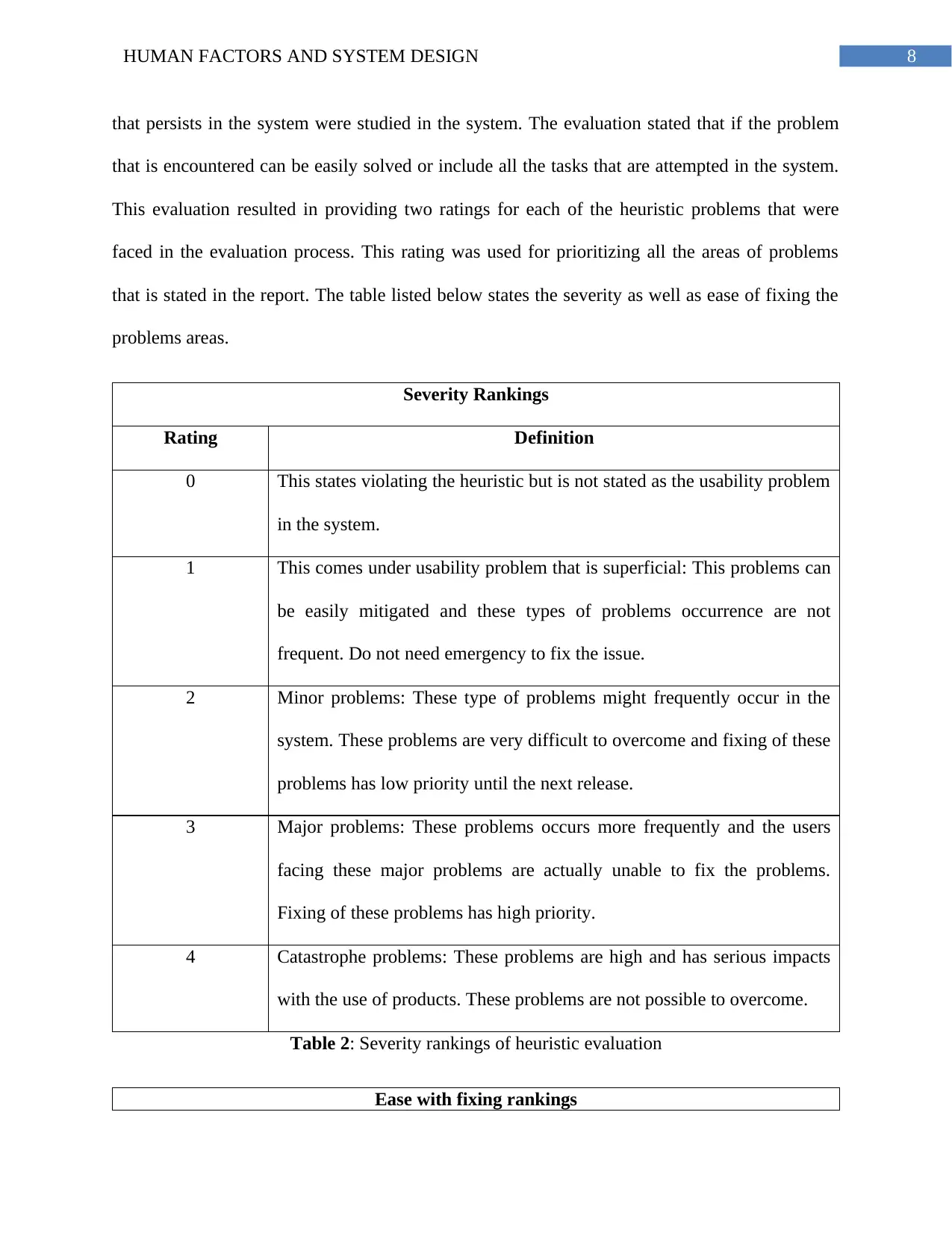
that persists in the system were studied in the system. The evaluation stated that if the problem
that is encountered can be easily solved or include all the tasks that are attempted in the system.
This evaluation resulted in providing two ratings for each of the heuristic problems that were
faced in the evaluation process. This rating was used for prioritizing all the areas of problems
that is stated in the report. The table listed below states the severity as well as ease of fixing the
problems areas.
Severity Rankings
Rating Definition
0 This states violating the heuristic but is not stated as the usability problem
in the system.
1 This comes under usability problem that is superficial: This problems can
be easily mitigated and these types of problems occurrence are not
frequent. Do not need emergency to fix the issue.
2 Minor problems: These type of problems might frequently occur in the
system. These problems are very difficult to overcome and fixing of these
problems has low priority until the next release.
3 Major problems: These problems occurs more frequently and the users
facing these major problems are actually unable to fix the problems.
Fixing of these problems has high priority.
4 Catastrophe problems: These problems are high and has serious impacts
with the use of products. These problems are not possible to overcome.
Table 2: Severity rankings of heuristic evaluation
Ease with fixing rankings
that persists in the system were studied in the system. The evaluation stated that if the problem
that is encountered can be easily solved or include all the tasks that are attempted in the system.
This evaluation resulted in providing two ratings for each of the heuristic problems that were
faced in the evaluation process. This rating was used for prioritizing all the areas of problems
that is stated in the report. The table listed below states the severity as well as ease of fixing the
problems areas.
Severity Rankings
Rating Definition
0 This states violating the heuristic but is not stated as the usability problem
in the system.
1 This comes under usability problem that is superficial: This problems can
be easily mitigated and these types of problems occurrence are not
frequent. Do not need emergency to fix the issue.
2 Minor problems: These type of problems might frequently occur in the
system. These problems are very difficult to overcome and fixing of these
problems has low priority until the next release.
3 Major problems: These problems occurs more frequently and the users
facing these major problems are actually unable to fix the problems.
Fixing of these problems has high priority.
4 Catastrophe problems: These problems are high and has serious impacts
with the use of products. These problems are not possible to overcome.
Table 2: Severity rankings of heuristic evaluation
Ease with fixing rankings
⊘ This is a preview!⊘
Do you want full access?
Subscribe today to unlock all pages.
Trusted by 1+ million students worldwide
9HUMAN FACTORS AND SYSTEM DESIGN
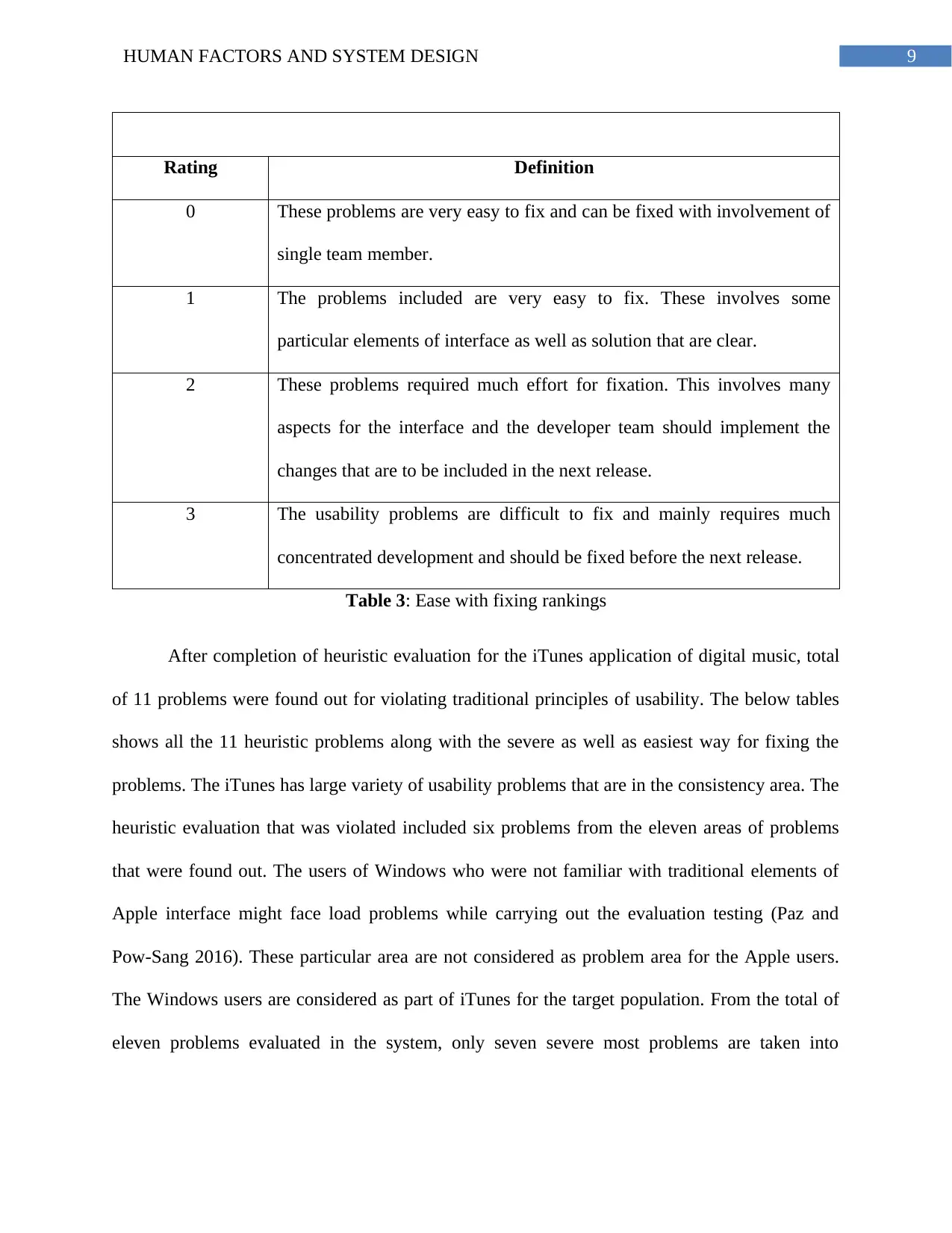
Rating Definition
0 These problems are very easy to fix and can be fixed with involvement of
single team member.
1 The problems included are very easy to fix. These involves some
particular elements of interface as well as solution that are clear.
2 These problems required much effort for fixation. This involves many
aspects for the interface and the developer team should implement the
changes that are to be included in the next release.
3 The usability problems are difficult to fix and mainly requires much
concentrated development and should be fixed before the next release.
Table 3: Ease with fixing rankings
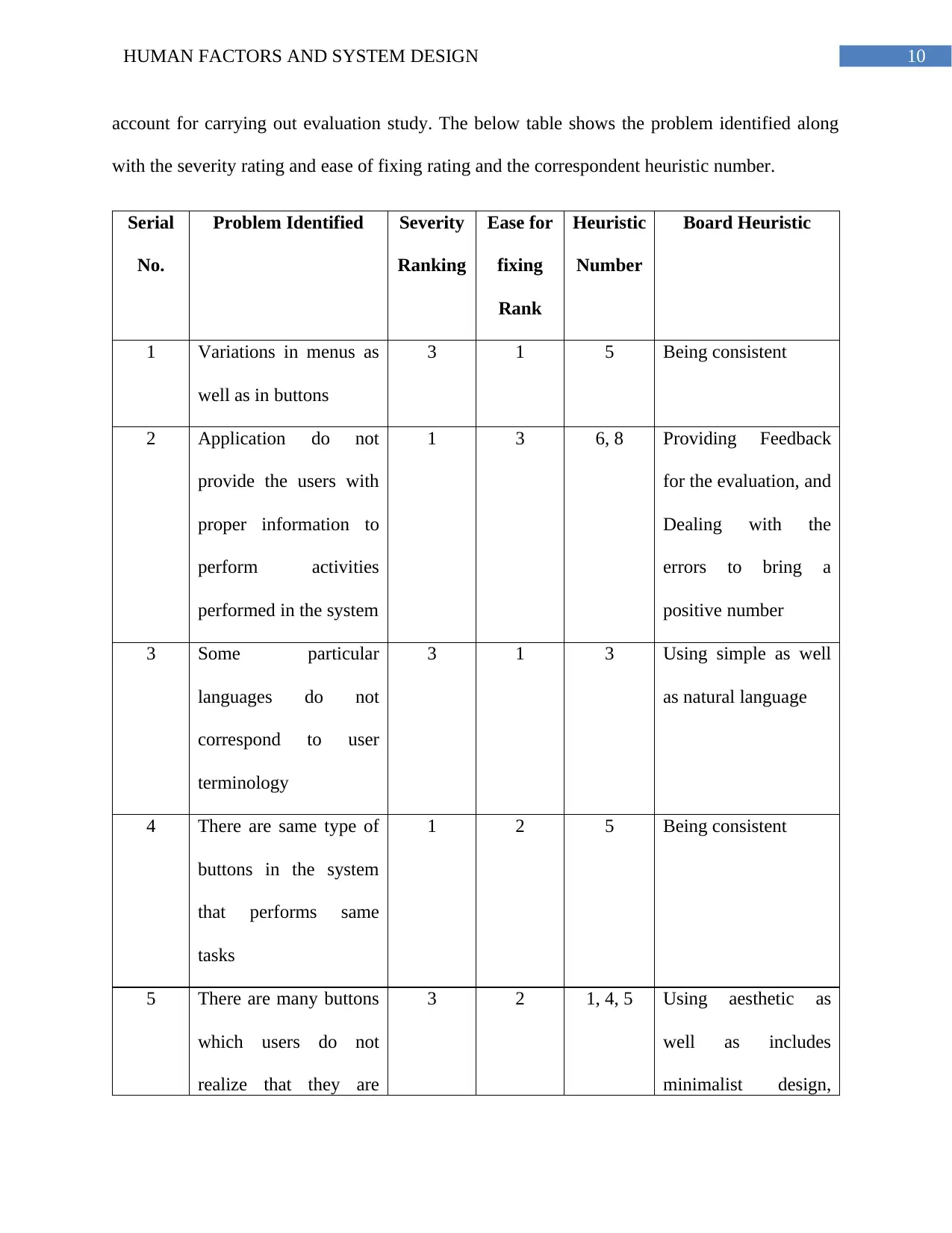
After completion of heuristic evaluation for the iTunes application of digital music, total
of 11 problems were found out for violating traditional principles of usability. The below tables
shows all the 11 heuristic problems along with the severe as well as easiest way for fixing the
problems. The iTunes has large variety of usability problems that are in the consistency area. The
heuristic evaluation that was violated included six problems from the eleven areas of problems
that were found out. The users of Windows who were not familiar with traditional elements of
Apple interface might face load problems while carrying out the evaluation testing (Paz and
Pow-Sang 2016). These particular area are not considered as problem area for the Apple users.
The Windows users are considered as part of iTunes for the target population. From the total of
eleven problems evaluated in the system, only seven severe most problems are taken into
Rating Definition
0 These problems are very easy to fix and can be fixed with involvement of
single team member.
1 The problems included are very easy to fix. These involves some
particular elements of interface as well as solution that are clear.
2 These problems required much effort for fixation. This involves many
aspects for the interface and the developer team should implement the
changes that are to be included in the next release.
3 The usability problems are difficult to fix and mainly requires much
concentrated development and should be fixed before the next release.
Table 3: Ease with fixing rankings
After completion of heuristic evaluation for the iTunes application of digital music, total
of 11 problems were found out for violating traditional principles of usability. The below tables
shows all the 11 heuristic problems along with the severe as well as easiest way for fixing the
problems. The iTunes has large variety of usability problems that are in the consistency area. The
heuristic evaluation that was violated included six problems from the eleven areas of problems
that were found out. The users of Windows who were not familiar with traditional elements of
Apple interface might face load problems while carrying out the evaluation testing (Paz and
Pow-Sang 2016). These particular area are not considered as problem area for the Apple users.
The Windows users are considered as part of iTunes for the target population. From the total of
eleven problems evaluated in the system, only seven severe most problems are taken into
Paraphrase This Document
Need a fresh take? Get an instant paraphrase of this document with our AI Paraphraser
10HUMAN FACTORS AND SYSTEM DESIGN
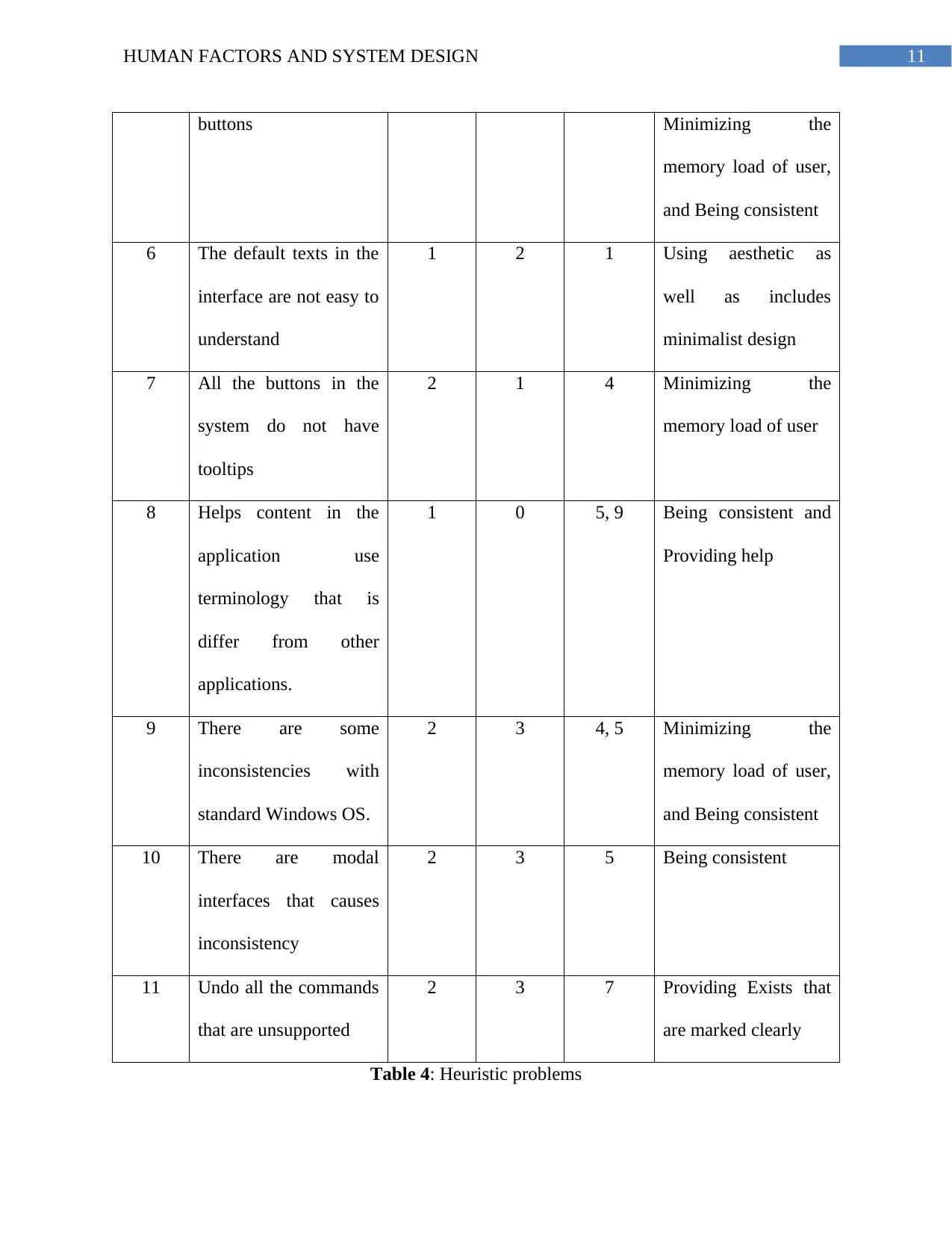
account for carrying out evaluation study. The below table shows the problem identified along
with the severity rating and ease of fixing rating and the correspondent heuristic number.
Serial
No.
Problem Identified Severity
Ranking
Ease for
fixing
Rank
Heuristic
Number
Board Heuristic
1 Variations in menus as
well as in buttons
3 1 5 Being consistent
2 Application do not
provide the users with
proper information to
perform activities
performed in the system
1 3 6, 8 Providing Feedback
for the evaluation, and
Dealing with the
errors to bring a
positive number
3 Some particular
languages do not
correspond to user
terminology
3 1 3 Using simple as well
as natural language
4 There are same type of
buttons in the system
that performs same
tasks
1 2 5 Being consistent
5 There are many buttons
which users do not
realize that they are
3 2 1, 4, 5 Using aesthetic as
well as includes
minimalist design,
account for carrying out evaluation study. The below table shows the problem identified along
with the severity rating and ease of fixing rating and the correspondent heuristic number.
Serial
No.
Problem Identified Severity
Ranking
Ease for
fixing
Rank
Heuristic
Number
Board Heuristic
1 Variations in menus as
well as in buttons
3 1 5 Being consistent
2 Application do not
provide the users with
proper information to
perform activities
performed in the system
1 3 6, 8 Providing Feedback
for the evaluation, and
Dealing with the
errors to bring a
positive number
3 Some particular
languages do not
correspond to user
terminology
3 1 3 Using simple as well
as natural language
4 There are same type of
buttons in the system
that performs same
tasks
1 2 5 Being consistent
5 There are many buttons
which users do not
realize that they are
3 2 1, 4, 5 Using aesthetic as
well as includes
minimalist design,
11HUMAN FACTORS AND SYSTEM DESIGN
buttons Minimizing the
memory load of user,
and Being consistent
6 The default texts in the
interface are not easy to
understand
1 2 1 Using aesthetic as
well as includes
minimalist design
7 All the buttons in the
system do not have
tooltips
2 1 4 Minimizing the
memory load of user
8 Helps content in the
application use
terminology that is
differ from other
applications.
1 0 5, 9 Being consistent and
Providing help
9 There are some
inconsistencies with
standard Windows OS.
2 3 4, 5 Minimizing the
memory load of user,
and Being consistent
10 There are modal
interfaces that causes
inconsistency
2 3 5 Being consistent
11 Undo all the commands
that are unsupported
2 3 7 Providing Exists that
are marked clearly
Table 4: Heuristic problems
buttons Minimizing the
memory load of user,
and Being consistent
6 The default texts in the
interface are not easy to
understand
1 2 1 Using aesthetic as
well as includes
minimalist design
7 All the buttons in the
system do not have
tooltips
2 1 4 Minimizing the
memory load of user
8 Helps content in the
application use
terminology that is
differ from other
applications.
1 0 5, 9 Being consistent and
Providing help
9 There are some
inconsistencies with
standard Windows OS.
2 3 4, 5 Minimizing the
memory load of user,
and Being consistent
10 There are modal
interfaces that causes
inconsistency
2 3 5 Being consistent
11 Undo all the commands
that are unsupported
2 3 7 Providing Exists that
are marked clearly
Table 4: Heuristic problems
⊘ This is a preview!⊘
Do you want full access?
Subscribe today to unlock all pages.
Trusted by 1+ million students worldwide

1 out of 18


Related Documents


Your All-in-One AI-Powered Toolkit for Academic Success.
+13062052269
info@desklib.com
Available 24*7 on WhatsApp / Email
![[object Object]](/_next/static/media/star-bottom.7253800d.svg)
Unlock your academic potential
Copyright © 2020–2026 A2Z Services. All Rights Reserved. Developed and managed by ZUCOL.