Data Analysis with Impala: Architecture, Features, and Implementation
VerifiedAdded on 2021/05/31
|34
|5657
|33
Report
AI Summary
This report provides a detailed analysis of Apache Impala, a high-performance SQL query engine for big data processing. It begins by introducing the concept of big data and the challenges associated with processing large and complex datasets, highlighting Impala's role in addressing these challenges. The report then delves into the architecture of Impala, explaining its components, including the Impala daemon, metadata, and statestore. It also explores the features of Impala, such as its open-source nature, SQL query support, and integration with Hadoop components. The report outlines the data analysis process using Impala, including data loading/ingesting, cleaning, analysis, and visualization, with practical examples using Sqoop for file conversion and Matplotlib for visualization. The report also discusses the installation of Cloudera QuickStart on VMware for setting up an Impala environment and provides steps for processing CSV files on Impala. This document is contributed by a student to be published on the website Desklib, a platform which provides all the necessary AI based study tools for students.
1. Introduction
Big data is generally used for collecting large set of data and complex data which are difficult to
process using traditional applications and tools. The volume of data and complexity always
based upon the structure of data. There are many tools and engines are used to store and process
the bulk amount of data. One of the major SQL Engine is Impala, which is used to store and
manage the large amount of data and complex query structures for processing the data
efficiently. The goal of the Impala is to express the complicated queries directly with a familiar
and flexible of SQL syntax. The processing speed is enough to get an answer to an unexpected
question and complex queries. Impala brings a high degree of flexibility to the familiar database
and ETL process. Apache impala is used to manage the standard data analysis process in big
data. Apache Spark is also the fastest-growing analytics platform that can be used to replace
many older Hadoop-based frameworks. The spark using a machine optimized processing
method which is used for constructing the data frames for manipulating the data in memory table
and also analyzing the process of data. It is majorly used for evolving the processing method
of restructuring large volume data.
2. IMPALA
Impala
Apache impala is used for processing large amount of data that is stored in a computer cluster. And
also it is an open source massive parallel processing (MPP) SQL query engine. It is runs on an
Apache Hadoop. For Hadoop, it provides low latency and high performance when compared to the
other SQL engines. It is described as the open source software which is written in java and C++.The
Hadoop software like MapReduce, Apache Pig and Apache Hive are integrate the impala with
Hadoop to use the same data formats and files, resource management frameworks, metadata and
security.
1
Big data is generally used for collecting large set of data and complex data which are difficult to
process using traditional applications and tools. The volume of data and complexity always
based upon the structure of data. There are many tools and engines are used to store and process
the bulk amount of data. One of the major SQL Engine is Impala, which is used to store and
manage the large amount of data and complex query structures for processing the data
efficiently. The goal of the Impala is to express the complicated queries directly with a familiar
and flexible of SQL syntax. The processing speed is enough to get an answer to an unexpected
question and complex queries. Impala brings a high degree of flexibility to the familiar database
and ETL process. Apache impala is used to manage the standard data analysis process in big
data. Apache Spark is also the fastest-growing analytics platform that can be used to replace
many older Hadoop-based frameworks. The spark using a machine optimized processing
method which is used for constructing the data frames for manipulating the data in memory table
and also analyzing the process of data. It is majorly used for evolving the processing method
of restructuring large volume data.
2. IMPALA
Impala
Apache impala is used for processing large amount of data that is stored in a computer cluster. And
also it is an open source massive parallel processing (MPP) SQL query engine. It is runs on an
Apache Hadoop. For Hadoop, it provides low latency and high performance when compared to the
other SQL engines. It is described as the open source software which is written in java and C++.The
Hadoop software like MapReduce, Apache Pig and Apache Hive are integrate the impala with
Hadoop to use the same data formats and files, resource management frameworks, metadata and
security.
1

Paraphrase This Document
Need a fresh take? Get an instant paraphrase of this document with our AI Paraphraser
Features of Impala
Features of impala are given below:
Impala is an open source software under the Apache licenses
By using impala, we can access the data by the SQL queries
We can store the data in storage systems such as Amazon s3, HDFS and Apache HBase
It supports the data processing in memory and Hadoop security.
From Apache Hive, Impala uses metadata, SQLsyntax and ODBC driver.
It supports various file formats like RCFile, Sequence File, Parquet, LZO and Avro.
Impala integrated with the Zoom data, Pentaho, Tableau and Micro Strategy. These are
the business intelligences.
Reasons for using Impala
Based on daemon processes, impala implements a distributed architecture that run on the
same machines.
It not based on MapReduce algorithms like Apache Hive.
Impala integrates a multi-user performance of a traditional analytic database and the
multi-user performance with the flexibility and scalability of Apache Hadoop, by
applying standard components like Metastore, Sentry, HDFS, yarn and HBase.
It reduces the latency of utilizing MapReduce.
Impala uses the user interface as Apache Hive, SQL syntax, same metadata and ODBC
driver to providing a unified and familiar platform for real-time queries or batch-oriented.
It can read all the file formats like Avro, Parquet and RCfile.
By using impala, users can communicate with HBase or HDFS using SQL queries.
2
Features of impala are given below:
Impala is an open source software under the Apache licenses
By using impala, we can access the data by the SQL queries
We can store the data in storage systems such as Amazon s3, HDFS and Apache HBase
It supports the data processing in memory and Hadoop security.
From Apache Hive, Impala uses metadata, SQLsyntax and ODBC driver.
It supports various file formats like RCFile, Sequence File, Parquet, LZO and Avro.
Impala integrated with the Zoom data, Pentaho, Tableau and Micro Strategy. These are
the business intelligences.
Reasons for using Impala
Based on daemon processes, impala implements a distributed architecture that run on the
same machines.
It not based on MapReduce algorithms like Apache Hive.
Impala integrates a multi-user performance of a traditional analytic database and the
multi-user performance with the flexibility and scalability of Apache Hadoop, by
applying standard components like Metastore, Sentry, HDFS, yarn and HBase.
It reduces the latency of utilizing MapReduce.
Impala uses the user interface as Apache Hive, SQL syntax, same metadata and ODBC
driver to providing a unified and familiar platform for real-time queries or batch-oriented.
It can read all the file formats like Avro, Parquet and RCfile.
By using impala, users can communicate with HBase or HDFS using SQL queries.
2
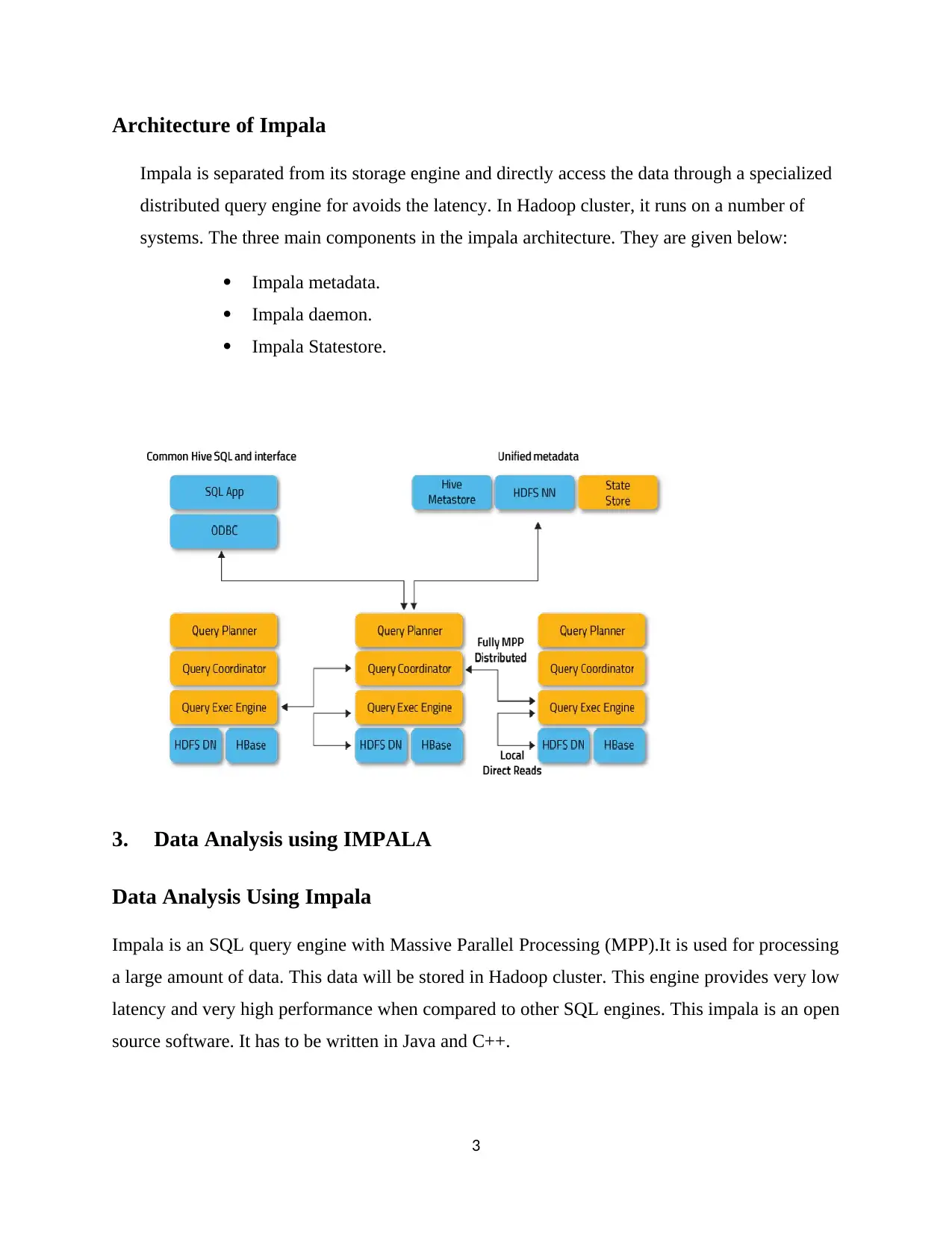
Architecture of Impala
Impala is separated from its storage engine and directly access the data through a specialized
distributed query engine for avoids the latency. In Hadoop cluster, it runs on a number of
systems. The three main components in the impala architecture. They are given below:
Impala metadata.
Impala daemon.
Impala Statestore.
3. Data Analysis using IMPALA
Data Analysis Using Impala
Impala is an SQL query engine with Massive Parallel Processing (MPP).It is used for processing
a large amount of data. This data will be stored in Hadoop cluster. This engine provides very low
latency and very high performance when compared to other SQL engines. This impala is an open
source software. It has to be written in Java and C++.
3
Impala is separated from its storage engine and directly access the data through a specialized
distributed query engine for avoids the latency. In Hadoop cluster, it runs on a number of
systems. The three main components in the impala architecture. They are given below:
Impala metadata.
Impala daemon.
Impala Statestore.
3. Data Analysis using IMPALA
Data Analysis Using Impala
Impala is an SQL query engine with Massive Parallel Processing (MPP).It is used for processing
a large amount of data. This data will be stored in Hadoop cluster. This engine provides very low
latency and very high performance when compared to other SQL engines. This impala is an open
source software. It has to be written in Java and C++.
3
⊘ This is a preview!⊘
Do you want full access?
Subscribe today to unlock all pages.

Trusted by 1+ million students worldwide
Steps for Analyzing Data
Loading/Ingesting the data to be analyzed
Preparing/Cleaning the data
Analyzing the data
Visualizing results/Generating report
Step 1: Loading or ingesting the data to be analyzed
The first process is to store the in to Hadoop Distributed File System(HDFS).Then Impala starts
processing this data. If the data won’t be processed then perform Extract Transform Load (ETL)
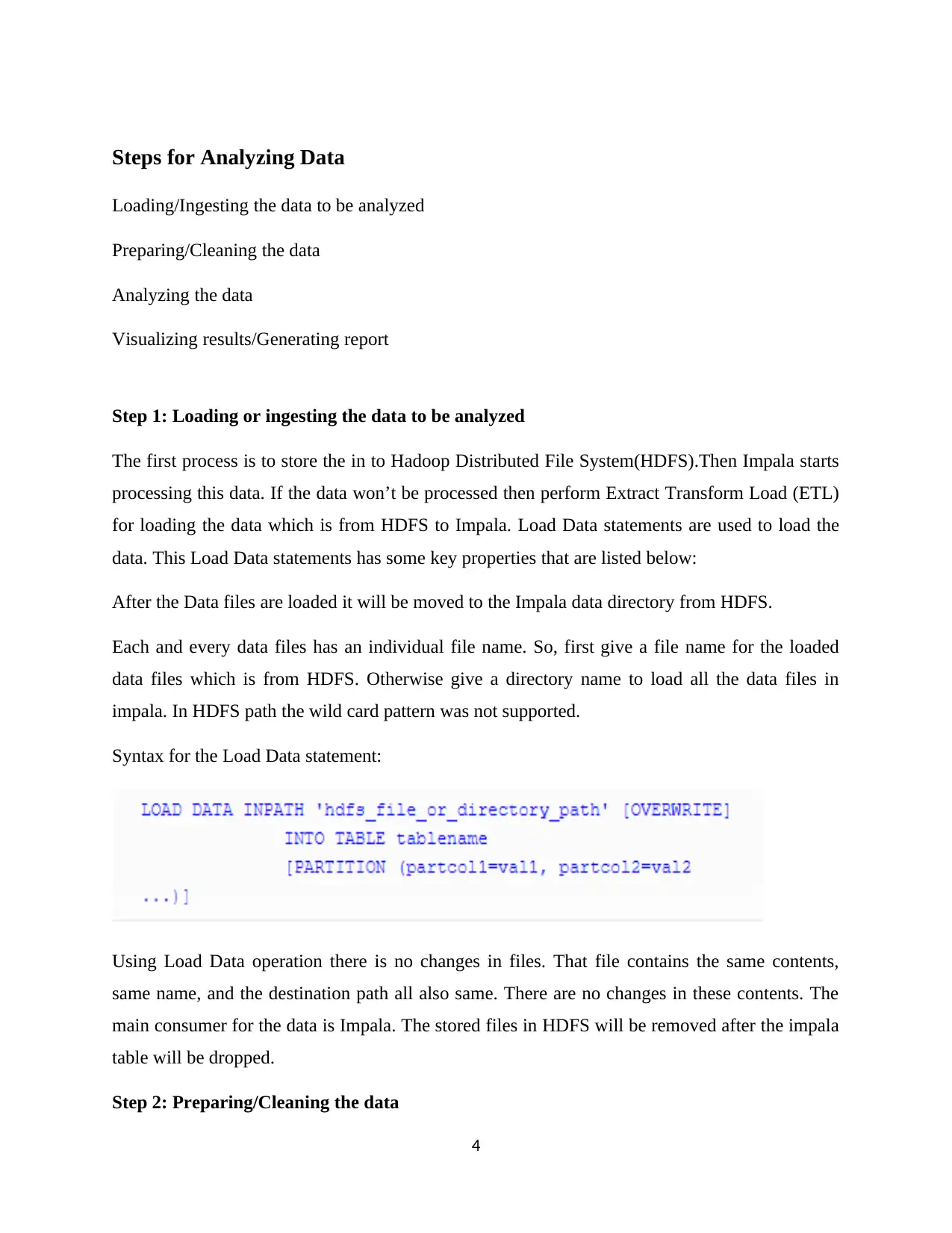
for loading the data which is from HDFS to Impala. Load Data statements are used to load the
data. This Load Data statements has some key properties that are listed below:
After the Data files are loaded it will be moved to the Impala data directory from HDFS.
Each and every data files has an individual file name. So, first give a file name for the loaded
data files which is from HDFS. Otherwise give a directory name to load all the data files in
impala. In HDFS path the wild card pattern was not supported.
Syntax for the Load Data statement:
Using Load Data operation there is no changes in files. That file contains the same contents,
same name, and the destination path all also same. There are no changes in these contents. The
main consumer for the data is Impala. The stored files in HDFS will be removed after the impala
table will be dropped.
Step 2: Preparing/Cleaning the data
4
Loading/Ingesting the data to be analyzed
Preparing/Cleaning the data
Analyzing the data
Visualizing results/Generating report
Step 1: Loading or ingesting the data to be analyzed
The first process is to store the in to Hadoop Distributed File System(HDFS).Then Impala starts
processing this data. If the data won’t be processed then perform Extract Transform Load (ETL)
for loading the data which is from HDFS to Impala. Load Data statements are used to load the
data. This Load Data statements has some key properties that are listed below:
After the Data files are loaded it will be moved to the Impala data directory from HDFS.
Each and every data files has an individual file name. So, first give a file name for the loaded
data files which is from HDFS. Otherwise give a directory name to load all the data files in
impala. In HDFS path the wild card pattern was not supported.
Syntax for the Load Data statement:
Using Load Data operation there is no changes in files. That file contains the same contents,
same name, and the destination path all also same. There are no changes in these contents. The
main consumer for the data is Impala. The stored files in HDFS will be removed after the impala
table will be dropped.
Step 2: Preparing/Cleaning the data
4
Paraphrase This Document
Need a fresh take? Get an instant paraphrase of this document with our AI Paraphraser
Data cleaning is the important phase in impala. Because this dataset contains some errors and
outliers. Some kind of dataset in only depend on the type of quantitative but it is not qualitative.
And more over this dataset contains some discrepancies in their codes or names. And it lacks our
attributes of interest for analyzing process.
The data preparation is most important task. Because it is used to correct the inconsistency of
data in the dataset. And it is also used for smooth the noise data in that dataset and fill the
missing values or missing attributes in that dataset. Sometimes dataset contains duplicate records
or inconsistent data or errors in random manner. These kind of issues will be solved in the part of
data preparation or cleaning. The main advantage for doing this data cleaning was to provide
data quality. In impala various noisy data’s are find out manually or cleaned manually by this
technique. Missing values will be cleaned by either removing those rows or filling values in that
row.
The basics steps for cleaning or preparing the data:
Editing: It is used to correct the inconsistent data, incomplete data illegible data that are stored
in the impala table for processing.
Cleaning: It is used to clean the data from inconsistent data. If any fault logics or queries will be
applied it will removed using cleaning. It is used to remove the extreme values in the table.
Questionnaire checking: It is used to eliminate the unwanted questionnaires. If the
questionnaires may be little variant from another, instructions could not be followed or it may be
incomplete.
Coding: It is used to verify if the code is typically assigns a numeric codes to answer. And check
that if the statistical techniques will be applied or not.
Transcribing: It is used to transfer the data for easy accessing by people.
Strategy selection for analysis: choose the appropriate data analysis strategy for further
processing.
Statistical adjustments: It was the most important step in data cleaning. It is used to require the
correct scale transformations weighting for the analyzed data.
5
outliers. Some kind of dataset in only depend on the type of quantitative but it is not qualitative.
And more over this dataset contains some discrepancies in their codes or names. And it lacks our
attributes of interest for analyzing process.
The data preparation is most important task. Because it is used to correct the inconsistency of
data in the dataset. And it is also used for smooth the noise data in that dataset and fill the
missing values or missing attributes in that dataset. Sometimes dataset contains duplicate records
or inconsistent data or errors in random manner. These kind of issues will be solved in the part of
data preparation or cleaning. The main advantage for doing this data cleaning was to provide
data quality. In impala various noisy data’s are find out manually or cleaned manually by this
technique. Missing values will be cleaned by either removing those rows or filling values in that
row.
The basics steps for cleaning or preparing the data:
Editing: It is used to correct the inconsistent data, incomplete data illegible data that are stored
in the impala table for processing.
Cleaning: It is used to clean the data from inconsistent data. If any fault logics or queries will be
applied it will removed using cleaning. It is used to remove the extreme values in the table.
Questionnaire checking: It is used to eliminate the unwanted questionnaires. If the
questionnaires may be little variant from another, instructions could not be followed or it may be
incomplete.
Coding: It is used to verify if the code is typically assigns a numeric codes to answer. And check
that if the statistical techniques will be applied or not.
Transcribing: It is used to transfer the data for easy accessing by people.
Strategy selection for analysis: choose the appropriate data analysis strategy for further
processing.
Statistical adjustments: It was the most important step in data cleaning. It is used to require the
correct scale transformations weighting for the analyzed data.
5
Step 3: Analyzing the data
Data Analysis is used for cleaning, modelling the data, inspect the data and transforming the
data.DA can be classified into two types called confirmatory data analysis and explanatory data
analysis. This CDA is used to confirm the hypotheses. If the data can be prepared and cleaned
and then it can be analyzed. In this EDA is used to find out the message that are contained in the
data. With the help of exploration it performs additional data cleaning process.
Step 4: Visualizing results/Generating report
Here visualizing results with the help of the Matplotlib in python. It is the data
visualization library with multi-platform. The main feature of this Matplotlib is it has the ability
to work with multiple graphical back ends and multiple operating system. It is more flexible to
provide the format of the output types that the user will be needed. Because it has the multiple
output types and back ends for getting process. This Matplotlib is a cross platform. It follows
approach called everything to everyone. And it was the one of the greatest strength in Matplotlib.
This Matplotlib contains the large developer base and user base.
Work with Matplotlib:
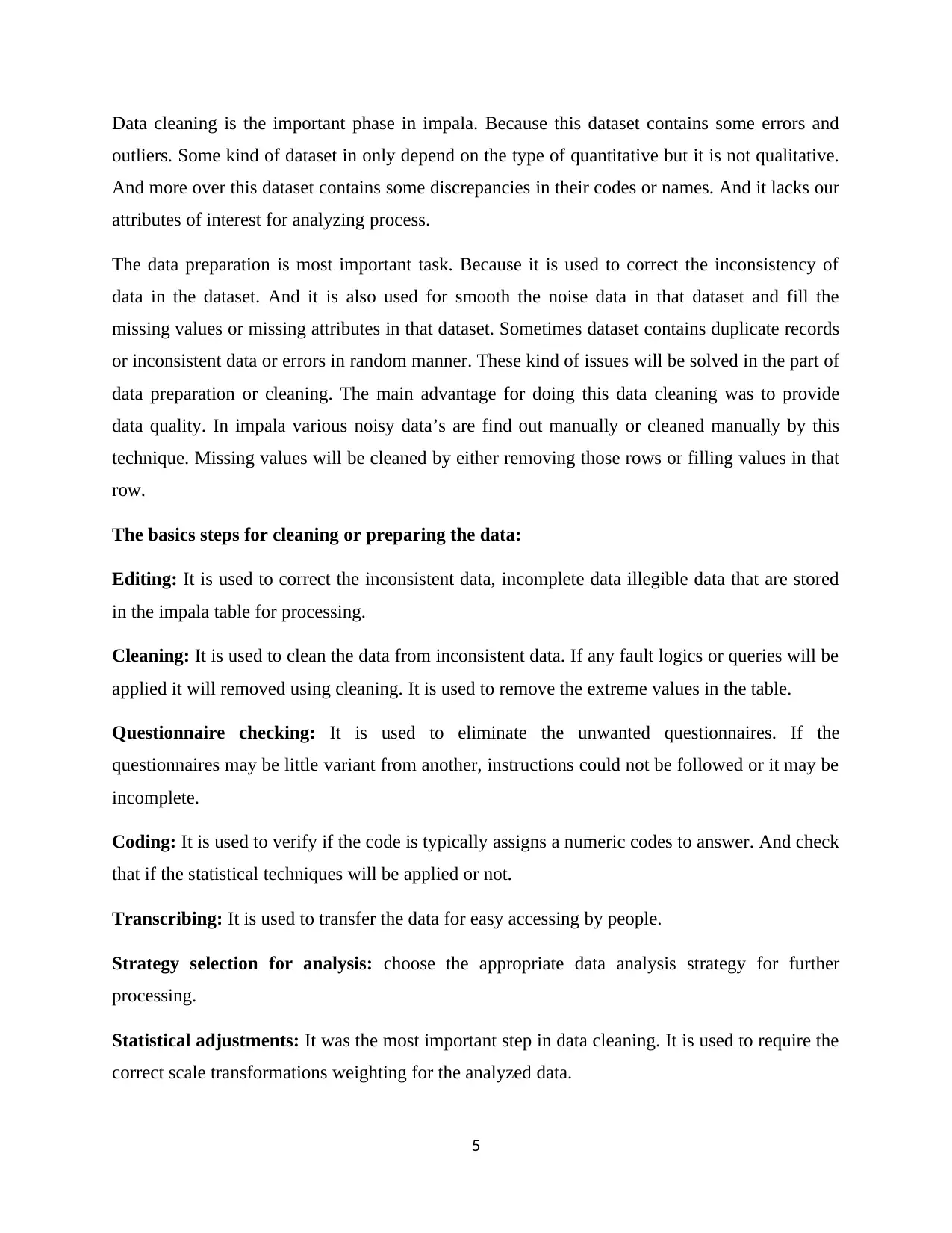
Importing Matplotlib: Here NumPy will be used by the short form of np and Pandas will be
used by the short form of pd. Matplotlib uses some standard shorthand’s.
Here plt is an interface.
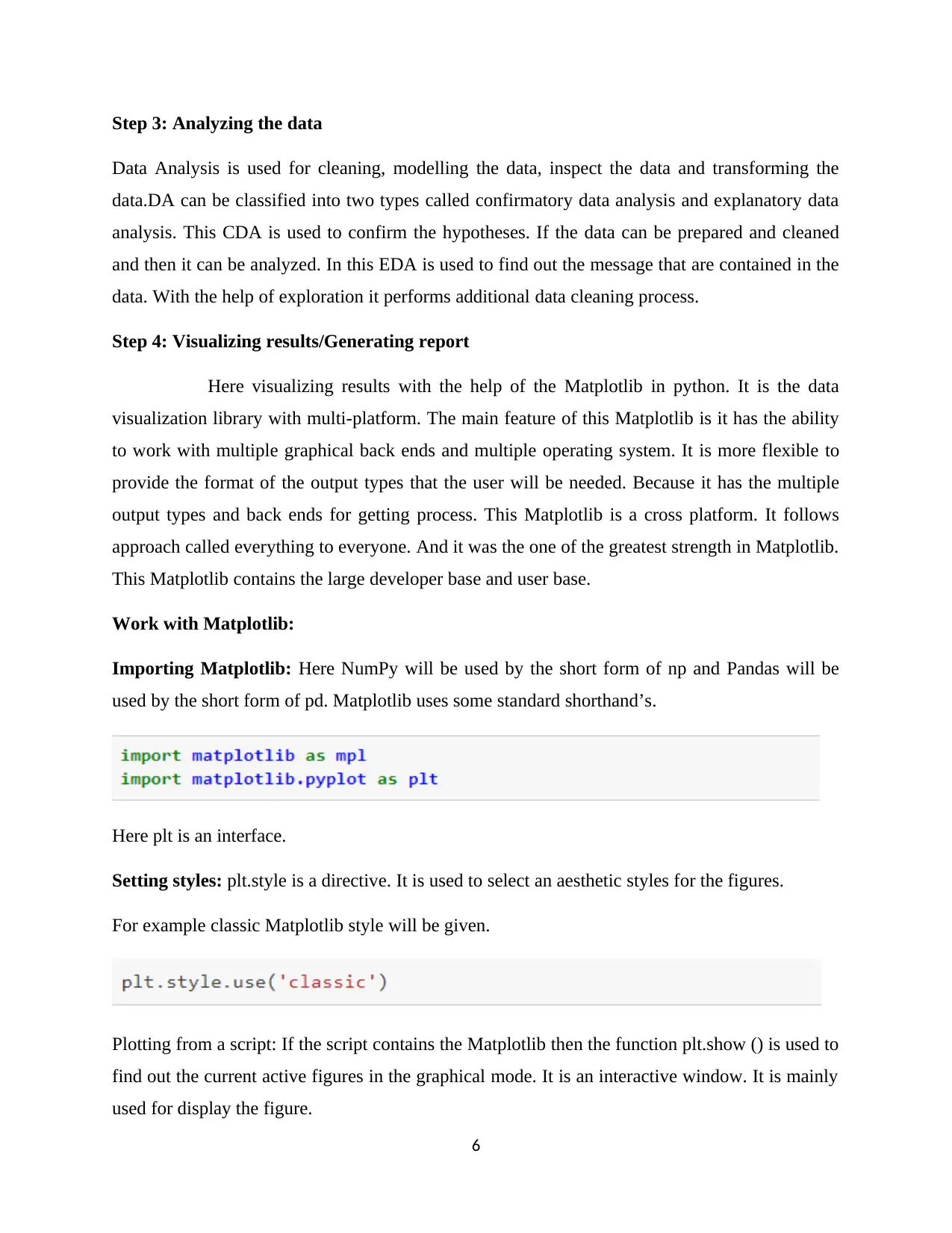
Setting styles: plt.style is a directive. It is used to select an aesthetic styles for the figures.
For example classic Matplotlib style will be given.
Plotting from a script: If the script contains the Matplotlib then the function plt.show () is used to
find out the current active figures in the graphical mode. It is an interactive window. It is mainly
used for display the figure.
6
Data Analysis is used for cleaning, modelling the data, inspect the data and transforming the
data.DA can be classified into two types called confirmatory data analysis and explanatory data
analysis. This CDA is used to confirm the hypotheses. If the data can be prepared and cleaned
and then it can be analyzed. In this EDA is used to find out the message that are contained in the
data. With the help of exploration it performs additional data cleaning process.
Step 4: Visualizing results/Generating report
Here visualizing results with the help of the Matplotlib in python. It is the data
visualization library with multi-platform. The main feature of this Matplotlib is it has the ability
to work with multiple graphical back ends and multiple operating system. It is more flexible to
provide the format of the output types that the user will be needed. Because it has the multiple
output types and back ends for getting process. This Matplotlib is a cross platform. It follows
approach called everything to everyone. And it was the one of the greatest strength in Matplotlib.
This Matplotlib contains the large developer base and user base.
Work with Matplotlib:
Importing Matplotlib: Here NumPy will be used by the short form of np and Pandas will be
used by the short form of pd. Matplotlib uses some standard shorthand’s.
Here plt is an interface.
Setting styles: plt.style is a directive. It is used to select an aesthetic styles for the figures.
For example classic Matplotlib style will be given.
Plotting from a script: If the script contains the Matplotlib then the function plt.show () is used to
find out the current active figures in the graphical mode. It is an interactive window. It is mainly
used for display the figure.
6
⊘ This is a preview!⊘
Do you want full access?
Subscribe today to unlock all pages.
Trusted by 1+ million students worldwide
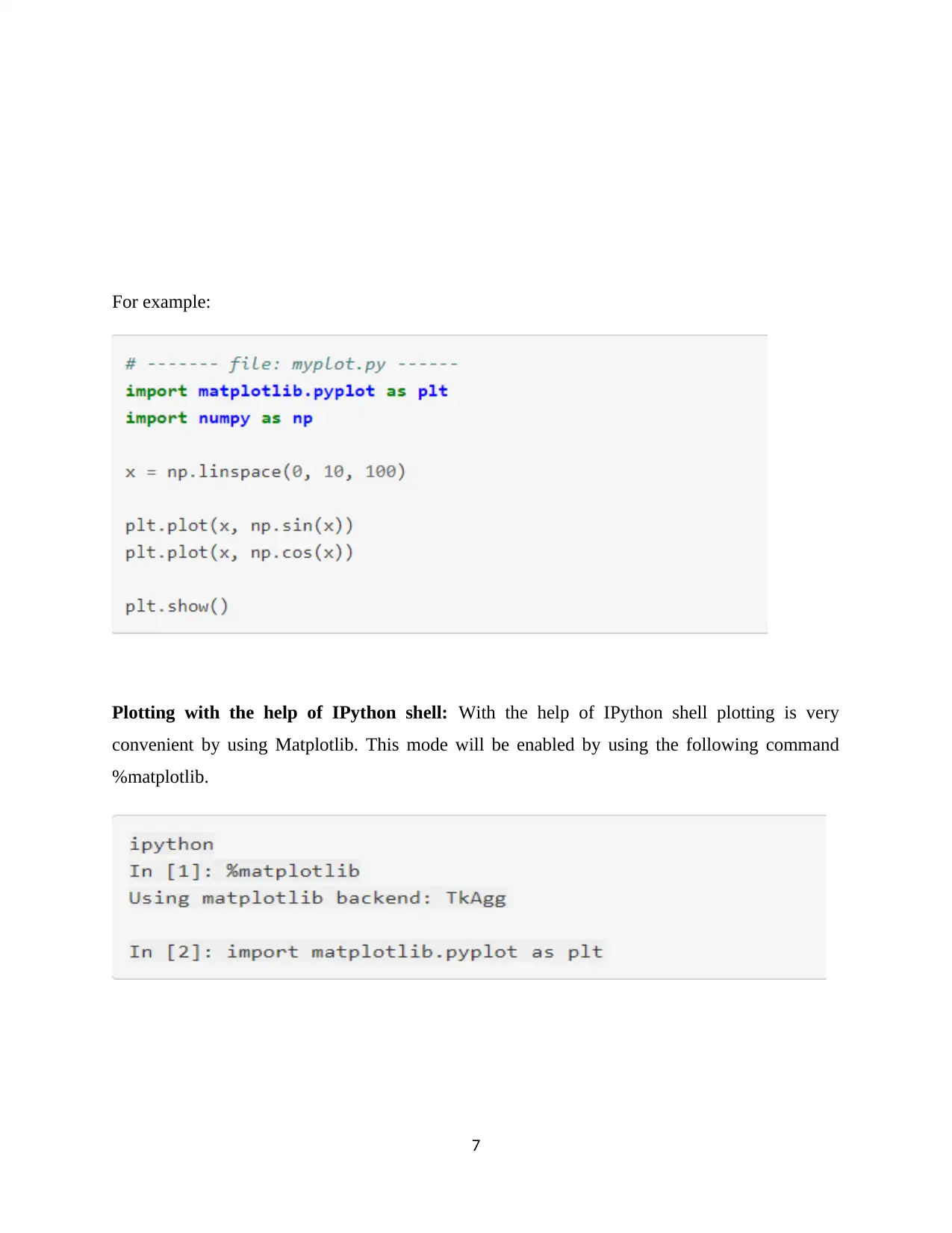
For example:
Plotting with the help of IPython shell: With the help of IPython shell plotting is very
convenient by using Matplotlib. This mode will be enabled by using the following command
%matplotlib.
7
Plotting with the help of IPython shell: With the help of IPython shell plotting is very
convenient by using Matplotlib. This mode will be enabled by using the following command
%matplotlib.
7
Paraphrase This Document
Need a fresh take? Get an instant paraphrase of this document with our AI Paraphraser
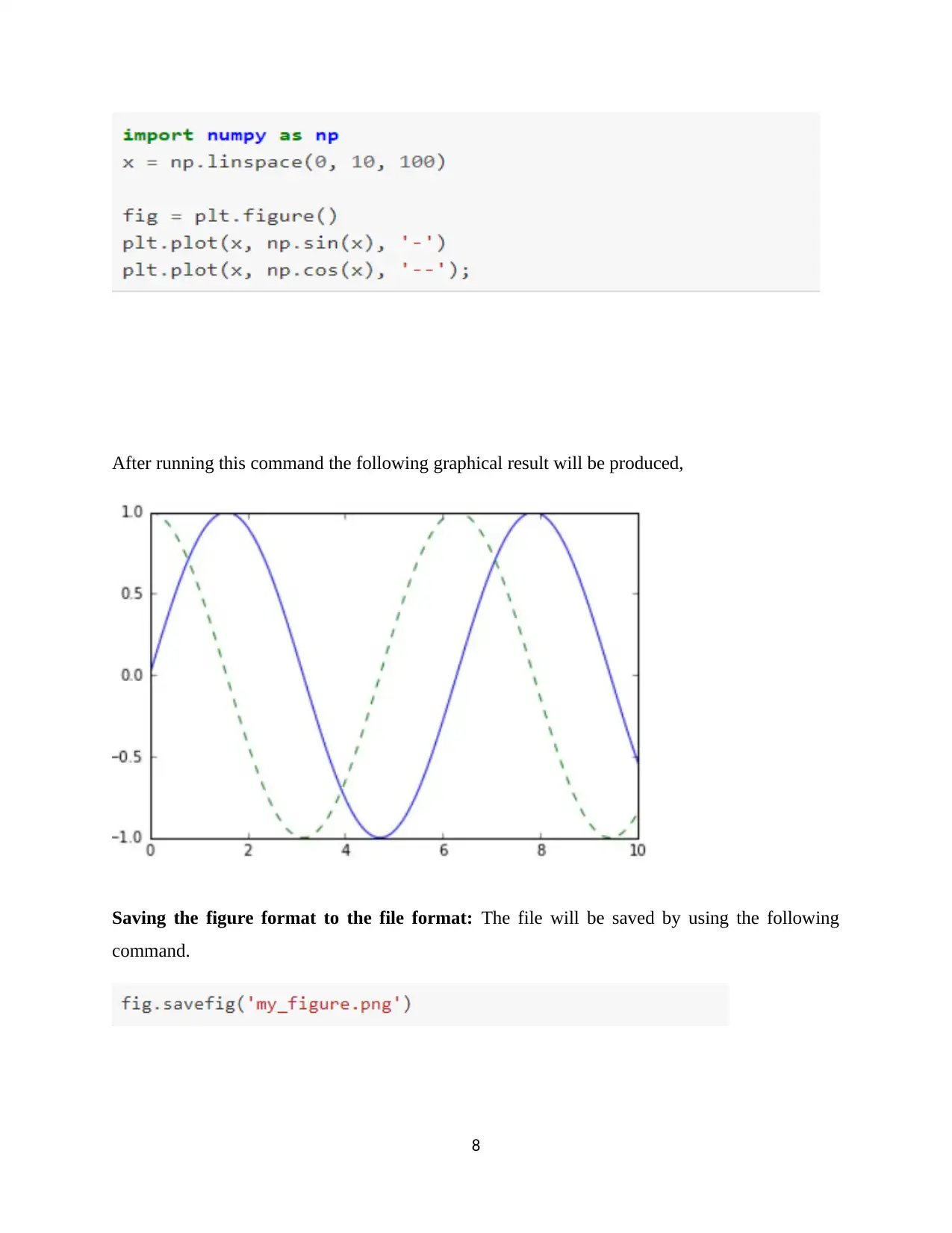
After running this command the following graphical result will be produced,
Saving the figure format to the file format: The file will be saved by using the following
command.
8
Saving the figure format to the file format: The file will be saved by using the following
command.
8
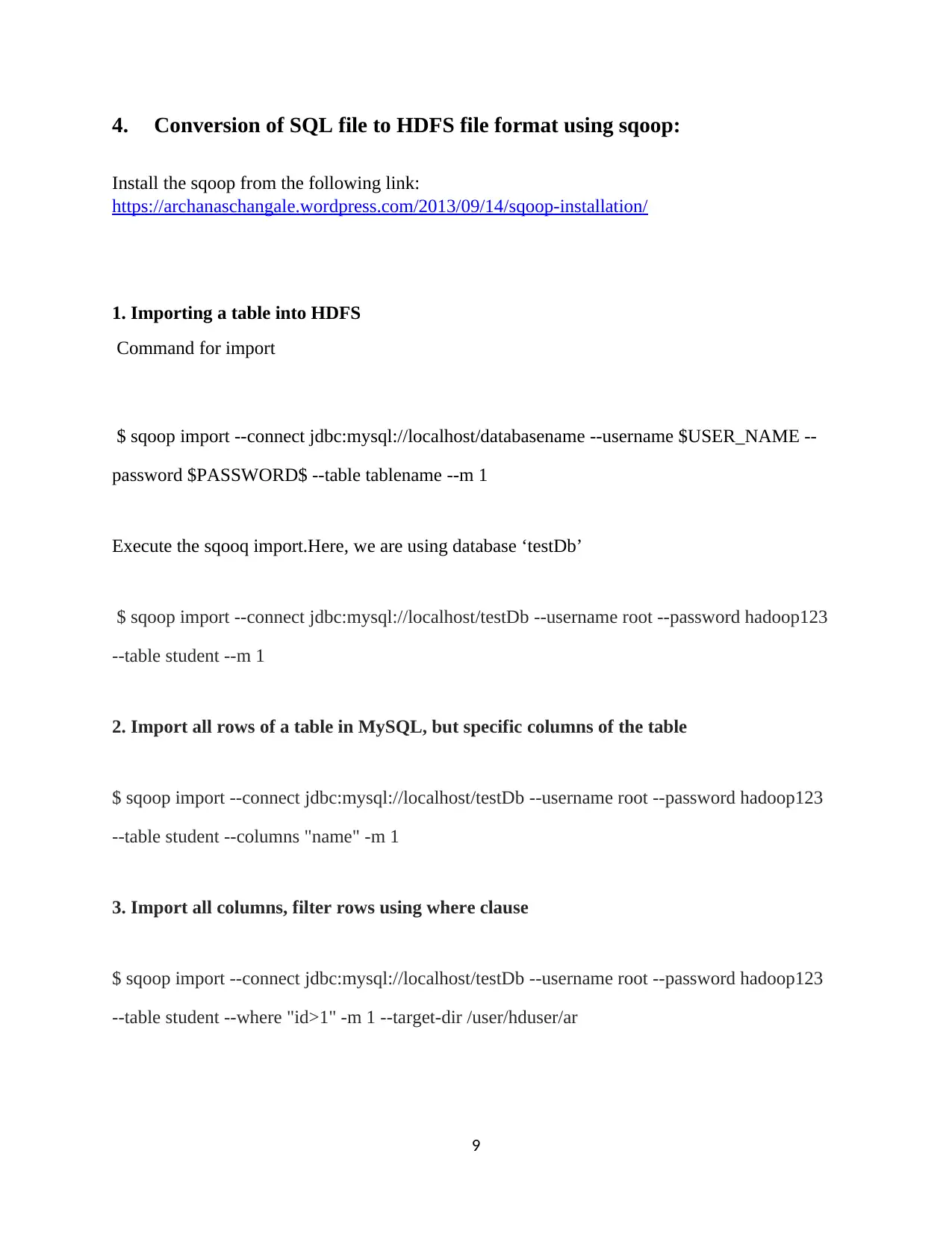
4. Conversion of SQL file to HDFS file format using sqoop:
Install the sqoop from the following link:
https://archanaschangale.wordpress.com/2013/09/14/sqoop-installation/
1. Importing a table into HDFS
Command for import
$ sqoop import --connect jdbc:mysql://localhost/databasename --username $USER_NAME --
password $PASSWORD$ --table tablename --m 1
Execute the sqooq import.Here, we are using database ‘testDb’
$ sqoop import --connect jdbc:mysql://localhost/testDb --username root --password hadoop123
--table student --m 1
2. Import all rows of a table in MySQL, but specific columns of the table
$ sqoop import --connect jdbc:mysql://localhost/testDb --username root --password hadoop123
--table student --columns "name" -m 1
3. Import all columns, filter rows using where clause
$ sqoop import --connect jdbc:mysql://localhost/testDb --username root --password hadoop123
--table student --where "id>1" -m 1 --target-dir /user/hduser/ar
9
Install the sqoop from the following link:
https://archanaschangale.wordpress.com/2013/09/14/sqoop-installation/
1. Importing a table into HDFS
Command for import
$ sqoop import --connect jdbc:mysql://localhost/databasename --username $USER_NAME --
password $PASSWORD$ --table tablename --m 1
Execute the sqooq import.Here, we are using database ‘testDb’
$ sqoop import --connect jdbc:mysql://localhost/testDb --username root --password hadoop123
--table student --m 1
2. Import all rows of a table in MySQL, but specific columns of the table
$ sqoop import --connect jdbc:mysql://localhost/testDb --username root --password hadoop123
--table student --columns "name" -m 1
3. Import all columns, filter rows using where clause
$ sqoop import --connect jdbc:mysql://localhost/testDb --username root --password hadoop123
--table student --where "id>1" -m 1 --target-dir /user/hduser/ar
9
⊘ This is a preview!⊘
Do you want full access?
Subscribe today to unlock all pages.
Trusted by 1+ million students worldwide
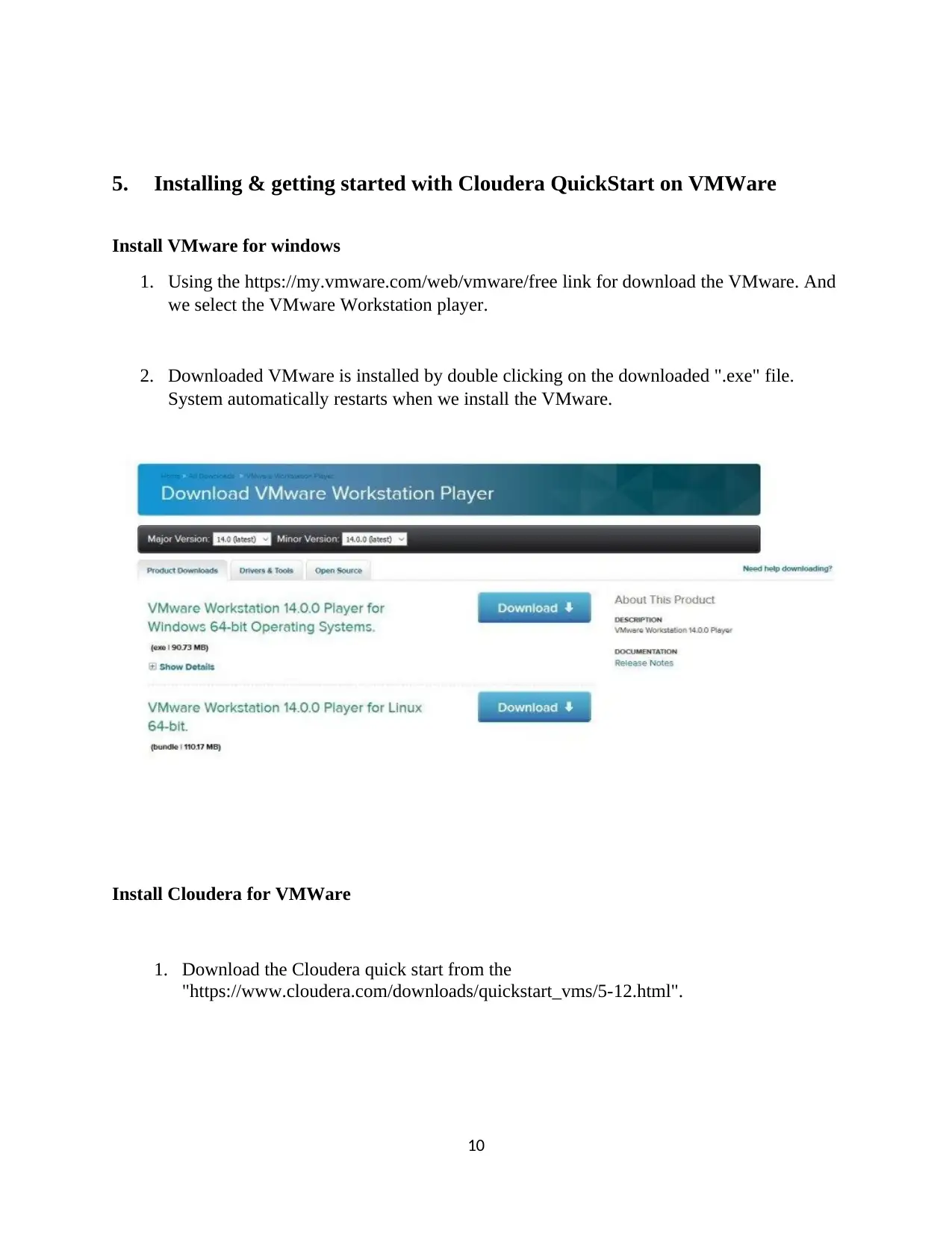
5. Installing & getting started with Cloudera QuickStart on VMWare
Install VMware for windows
1. Using the https://my.vmware.com/web/vmware/free link for download the VMware. And
we select the VMware Workstation player.
2. Downloaded VMware is installed by double clicking on the downloaded ".exe" file.
System automatically restarts when we install the VMware.
Install Cloudera for VMWare
1. Download the Cloudera quick start from the
"https://www.cloudera.com/downloads/quickstart_vms/5-12.html".
10
Install VMware for windows
1. Using the https://my.vmware.com/web/vmware/free link for download the VMware. And
we select the VMware Workstation player.
2. Downloaded VMware is installed by double clicking on the downloaded ".exe" file.
System automatically restarts when we install the VMware.
Install Cloudera for VMWare
1. Download the Cloudera quick start from the
"https://www.cloudera.com/downloads/quickstart_vms/5-12.html".
10
Paraphrase This Document
Need a fresh take? Get an instant paraphrase of this document with our AI Paraphraser
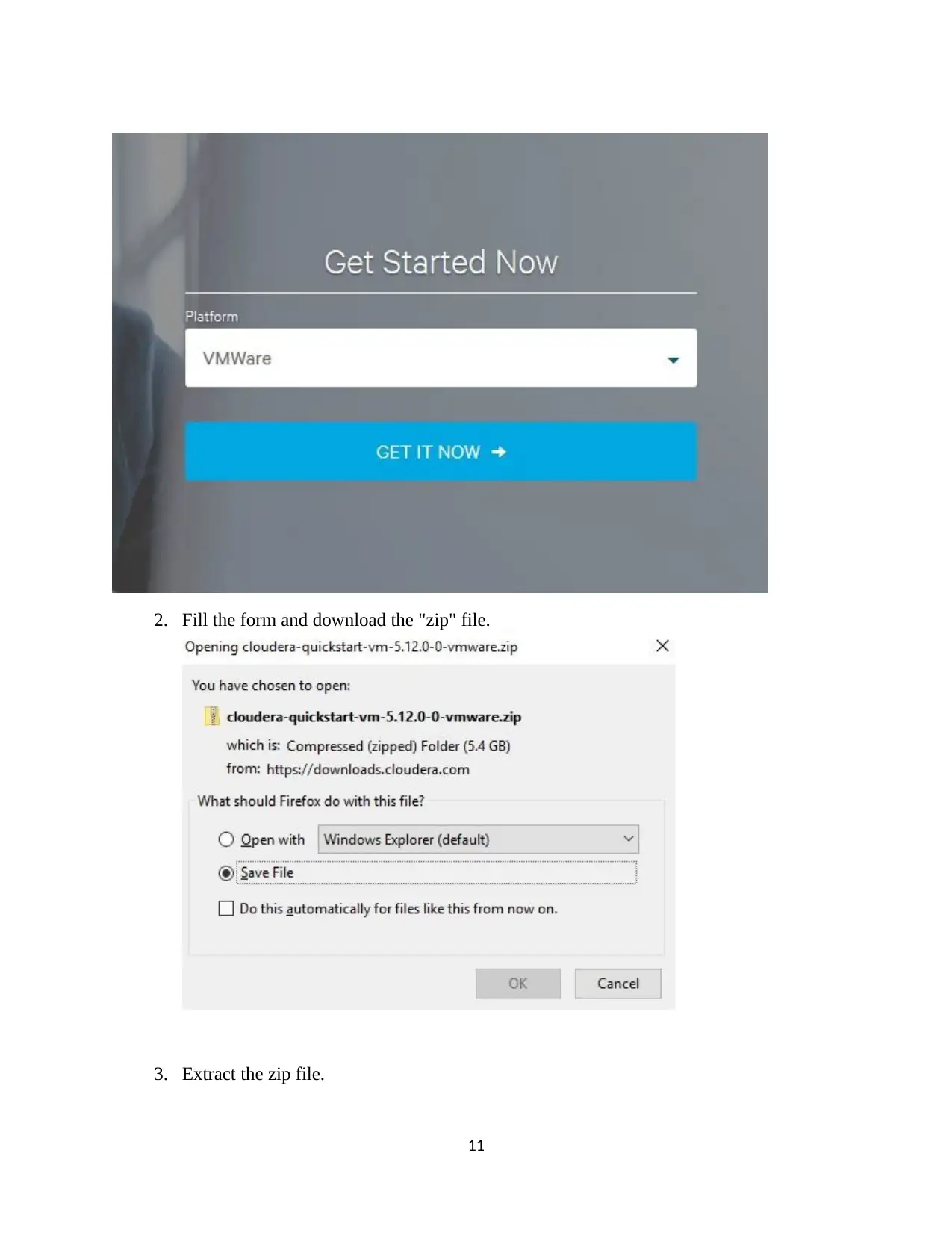
2. Fill the form and download the "zip" file.
3. Extract the zip file.
11
3. Extract the zip file.
11
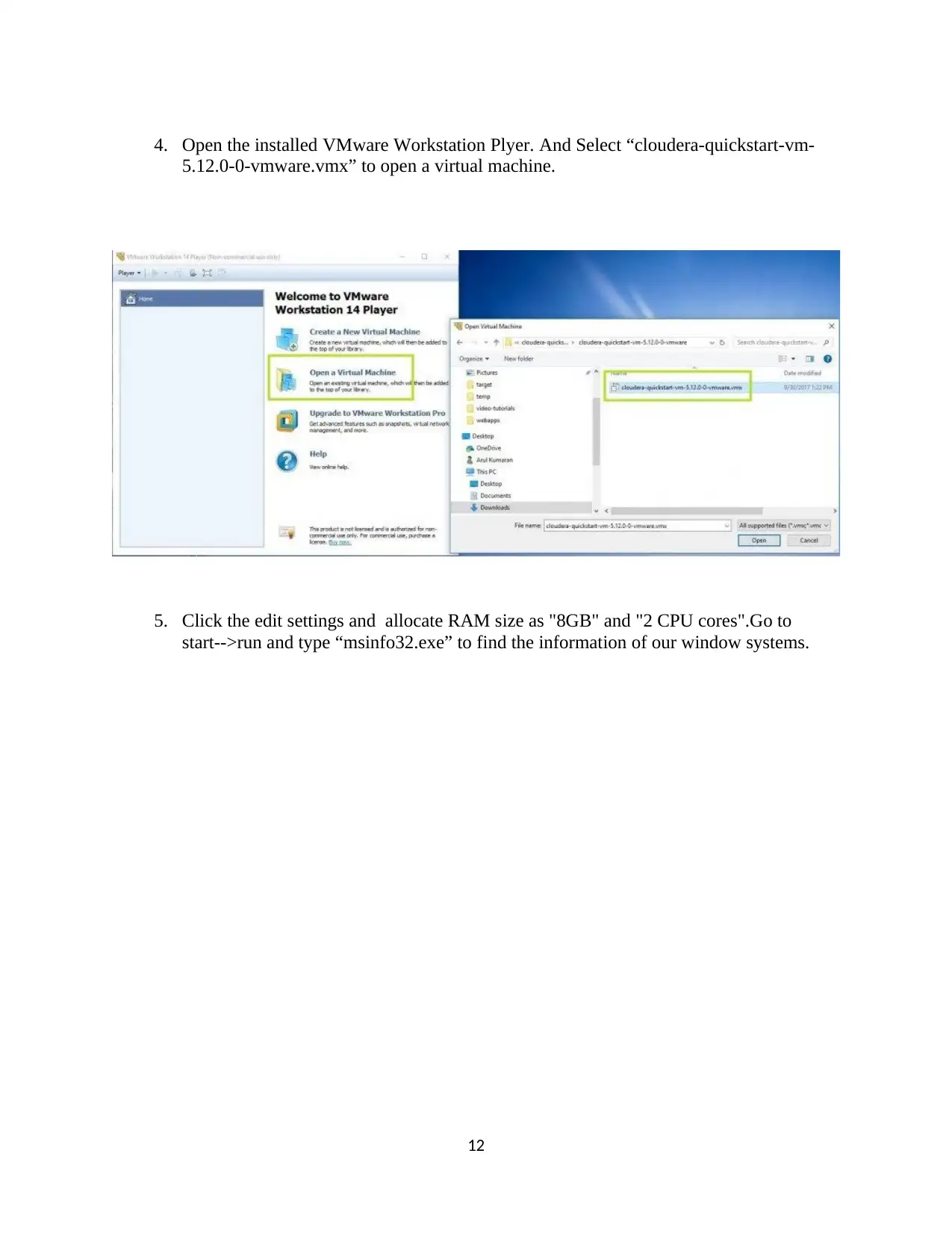
4. Open the installed VMware Workstation Plyer. And Select “cloudera-quickstart-vm-
5.12.0-0-vmware.vmx” to open a virtual machine.
5. Click the edit settings and allocate RAM size as "8GB" and "2 CPU cores".Go to
start-->run and type “msinfo32.exe” to find the information of our window systems.
12
5.12.0-0-vmware.vmx” to open a virtual machine.
5. Click the edit settings and allocate RAM size as "8GB" and "2 CPU cores".Go to
start-->run and type “msinfo32.exe” to find the information of our window systems.
12
⊘ This is a preview!⊘
Do you want full access?
Subscribe today to unlock all pages.
Trusted by 1+ million students worldwide

1 out of 34


Your All-in-One AI-Powered Toolkit for Academic Success.
+13062052269
info@desklib.com
Available 24*7 on WhatsApp / Email
![[object Object]](/_next/static/media/star-bottom.7253800d.svg)
Unlock your academic potential
Copyright © 2020–2026 A2Z Services. All Rights Reserved. Developed and managed by ZUCOL.