Grocery Store Queue Simulation

Verified

Added on  2019/09/22

|2
|601
|291
Practical Assignment
AI Summary
This practical assignment involves creating a Java program to simulate customer queue management in a grocery store with two cashier counters. The program uses a `Customer` class to represent customers with attributes like ID, number of items, and total price. A `Cashier` class manages customer queues using methods for adding customers, serving customers, getting queue length, cloning queues, checking for empty/full queues, and displaying queue details. The main application provides a menu-driven interface for customer checkout, cashier service, reporting queue status, manager queue adjustment (balancing queue lengths), merging queues (when a cashier closes), and closing the store (reporting total sales). The program starts by prompting the user for the queue capacity, which is used to create the cashier queues. The program continues until the user chooses to close the store.
Document Page
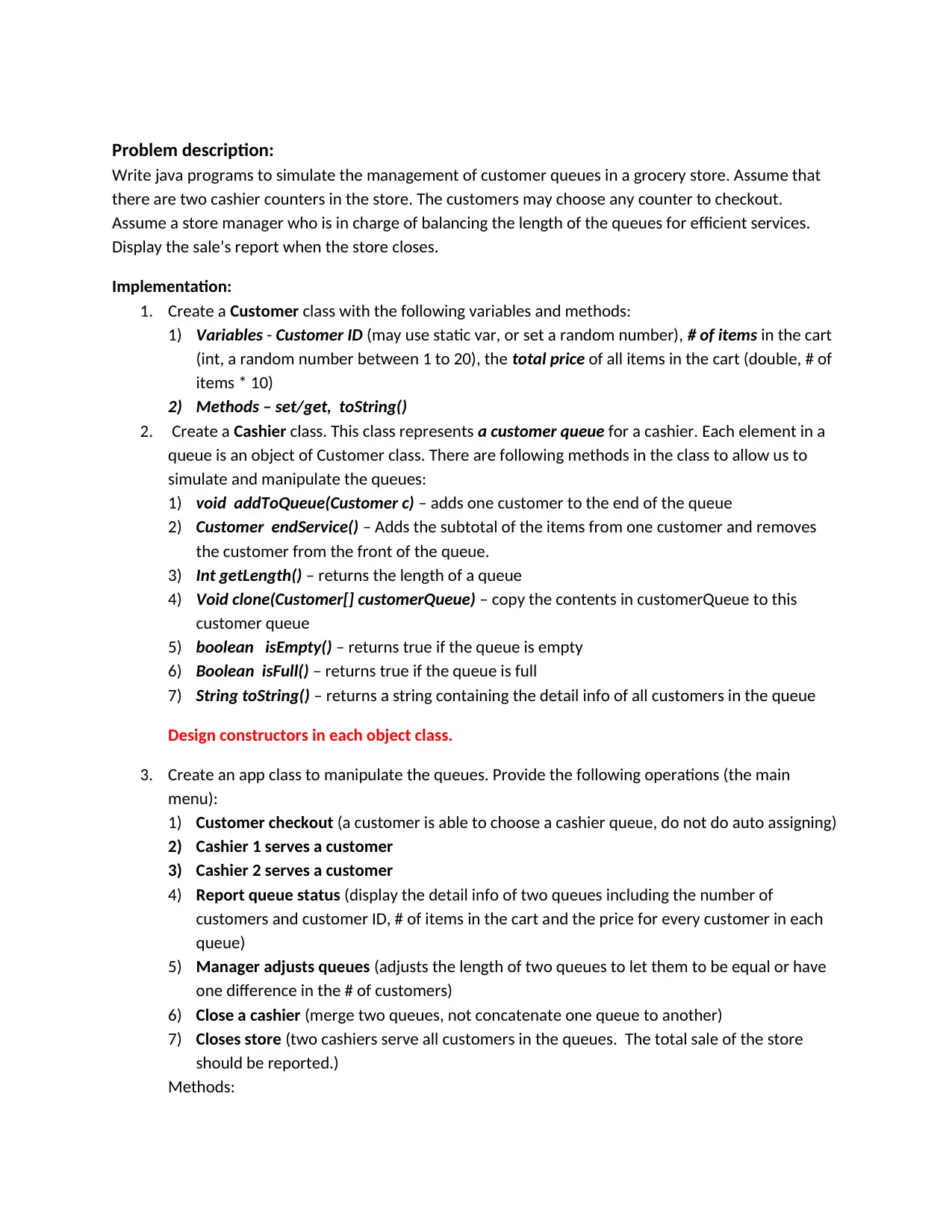
Problem description:
Write java programs to simulate the management of customer queues in a grocery store. Assume that
there are two cashier counters in the store. The customers may choose any counter to checkout.
Assume a store manager who is in charge of balancing the length of the queues for efficient services.
Display the sale’s report when the store closes.
Implementation:
1. Create a Customer class with the following variables and methods:
1) Variables - Customer ID (may use static var, or set a random number), # of items in the cart
(int, a random number between 1 to 20), the total price of all items in the cart (double, # of
items * 10)
2) Methods – set/get, toString()
2. Create a Cashier class. This class represents a customer queue for a cashier. Each element in a
queue is an object of Customer class. There are following methods in the class to allow us to
simulate and manipulate the queues:
1) void addToQueue(Customer c) – adds one customer to the end of the queue
2) Customer endService() – Adds the subtotal of the items from one customer and removes
the customer from the front of the queue.
3) Int getLength() – returns the length of a queue
4) Void clone(Customer[] customerQueue) – copy the contents in customerQueue to this
customer queue
5) boolean isEmpty() – returns true if the queue is empty
6) Boolean isFull() – returns true if the queue is full
7) String toString() – returns a string containing the detail info of all customers in the queue
Design constructors in each object class.
3. Create an app class to manipulate the queues. Provide the following operations (the main
menu):
1) Customer checkout (a customer is able to choose a cashier queue, do not do auto assigning)
2) Cashier 1 serves a customer
3) Cashier 2 serves a customer
4) Report queue status (display the detail info of two queues including the number of
customers and customer ID, # of items in the cart and the price for every customer in each
queue)
5) Manager adjusts queues (adjusts the length of two queues to let them to be equal or have
one difference in the # of customers)
6) Close a cashier (merge two queues, not concatenate one queue to another)
7) Closes store (two cashiers serve all customers in the queues. The total sale of the store
should be reported.)
Methods:
tabler-icon-diamond-filled.svg

Paraphrase This Document

Need a fresh take? Get an instant paraphrase of this document with our AI Paraphraser
Document Page
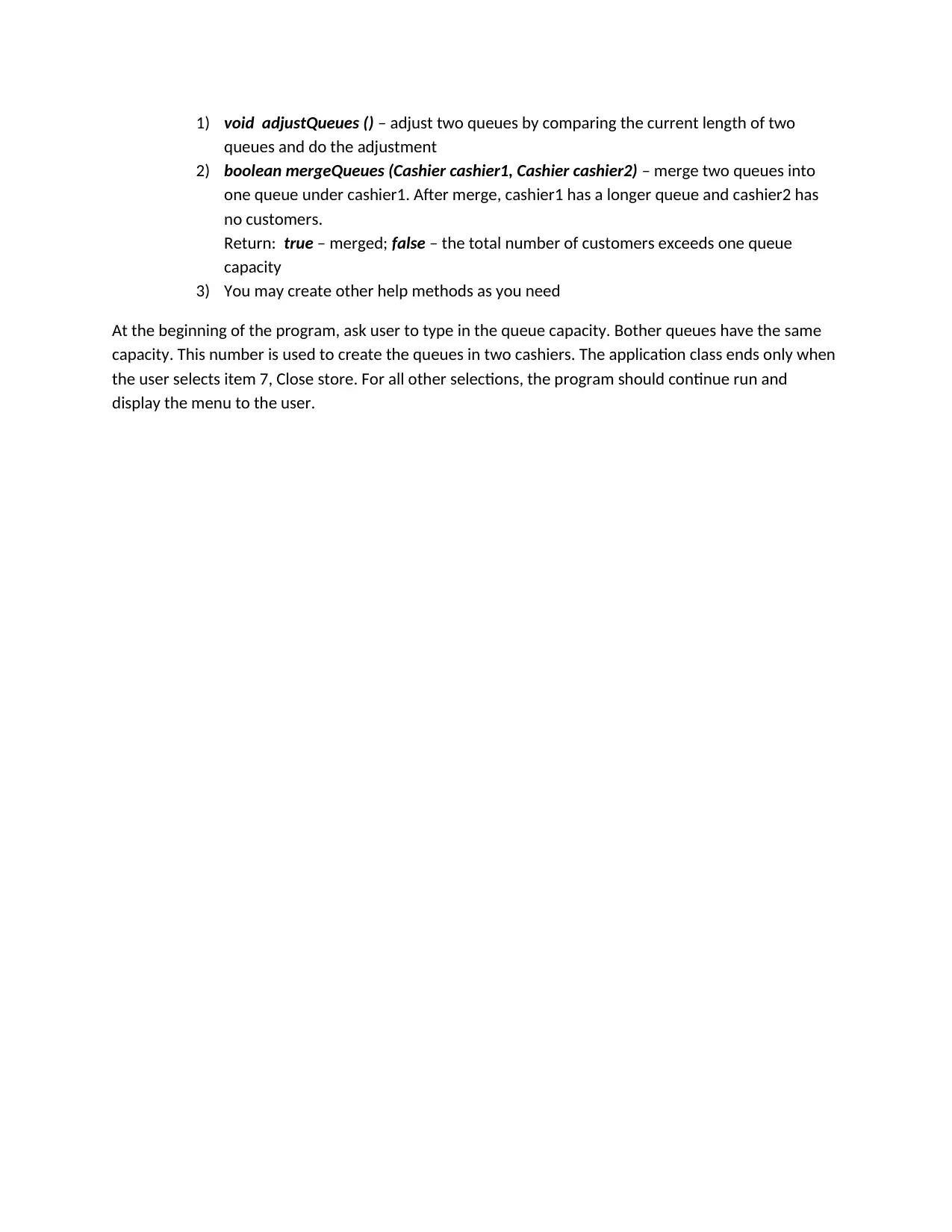
1) void adjustQueues () – adjust two queues by comparing the current length of two
queues and do the adjustment
2) boolean mergeQueues (Cashier cashier1, Cashier cashier2) – merge two queues into
one queue under cashier1. After merge, cashier1 has a longer queue and cashier2 has
no customers.
Return: true – merged; false – the total number of customers exceeds one queue
capacity
3) You may create other help methods as you need
At the beginning of the program, ask user to type in the queue capacity. Bother queues have the same
capacity. This number is used to create the queues in two cashiers. The application class ends only when
the user selects item 7, Close store. For all other selections, the program should continue run and
display the menu to the user.
chevron_up_icon
1 out of 2
circle_padding
hide_on_mobile
zoom_out_icon
[object Object]