Object-Oriented Programming: CT619 Workshop 2 Rectangle Implementation

Verified

Added on  2023/04/17

|11
|1306
|421
Homework Assignment
AI Summary
This document presents a comprehensive solution for Workshop 2 of the CT619 Object-Oriented Programming course at NUI Galway, focusing on the implementation and testing of Rectangle and Cartesian Rectangle classes in Java. The assignment involves creating a `Rectangle` class that calculates area and perimeter, including methods for setting and retrieving length and width, and handling invalid input. The solution includes a `RectangleTest` class for testing various scenarios, such as default rectangles, integer and float types, and error handling. Furthermore, the assignment extends to a `Cartesian Rectangle` class, defining rectangles using coordinate points, with methods to calculate length, width, area, and perimeter, and determine if the shape is a rectangle or square. This solution incorporates validation to ensure coordinate values are within specified ranges and provides a `RectangleTest` class for the `Cartesian Rectangle` class as well. The solution also contains a table of contents and references used. This document provides valuable insights into object-oriented programming principles and practical Java coding techniques for students.
Document Page
Worshop 2 CT619-Alan Burke
Diploma in Software Engineering
Student Name: Alan Burke
NUI Galway ID Number: 04417461
Course: CT619- Object Orientated Programming
Workshop No: Week 02
Assignments: Workshop 2- Questions 1-3
Date of Submission: 23/03/19
1
tabler-icon-diamond-filled.svg

Paraphrase This Document

Need a fresh take? Get an instant paraphrase of this document with our AI Paraphraser
Document Page
Worshop 2 CT619-Alan Burke
Table of Contents
Class Rectangle Test..............................................................................................................................3
Cartesian Rectangle Test.......................................................................................................................3
Code:.....................................................................................................................................................4
Class Rectangle..................................................................................................................................4
RectangleTest....................................................................................................................................6
Cartesian Rectangle...........................................................................................................................6
RectangleTest..................................................................................................................................10
References...........................................................................................................................................11
2
Document Page
Worshop 2 CT619-Alan Burke
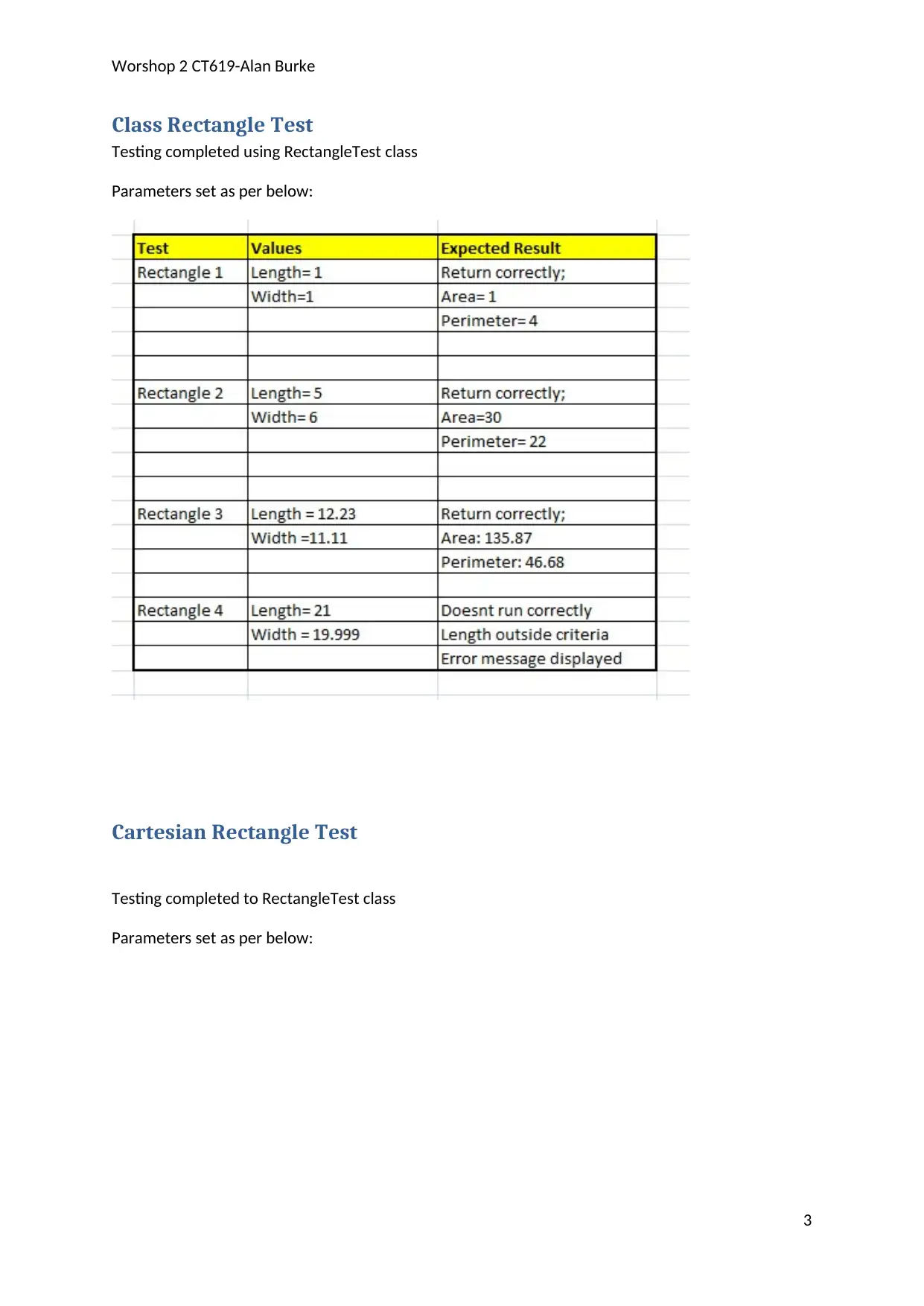
Class Rectangle Test
Testing completed using RectangleTest class
Parameters set as per below:
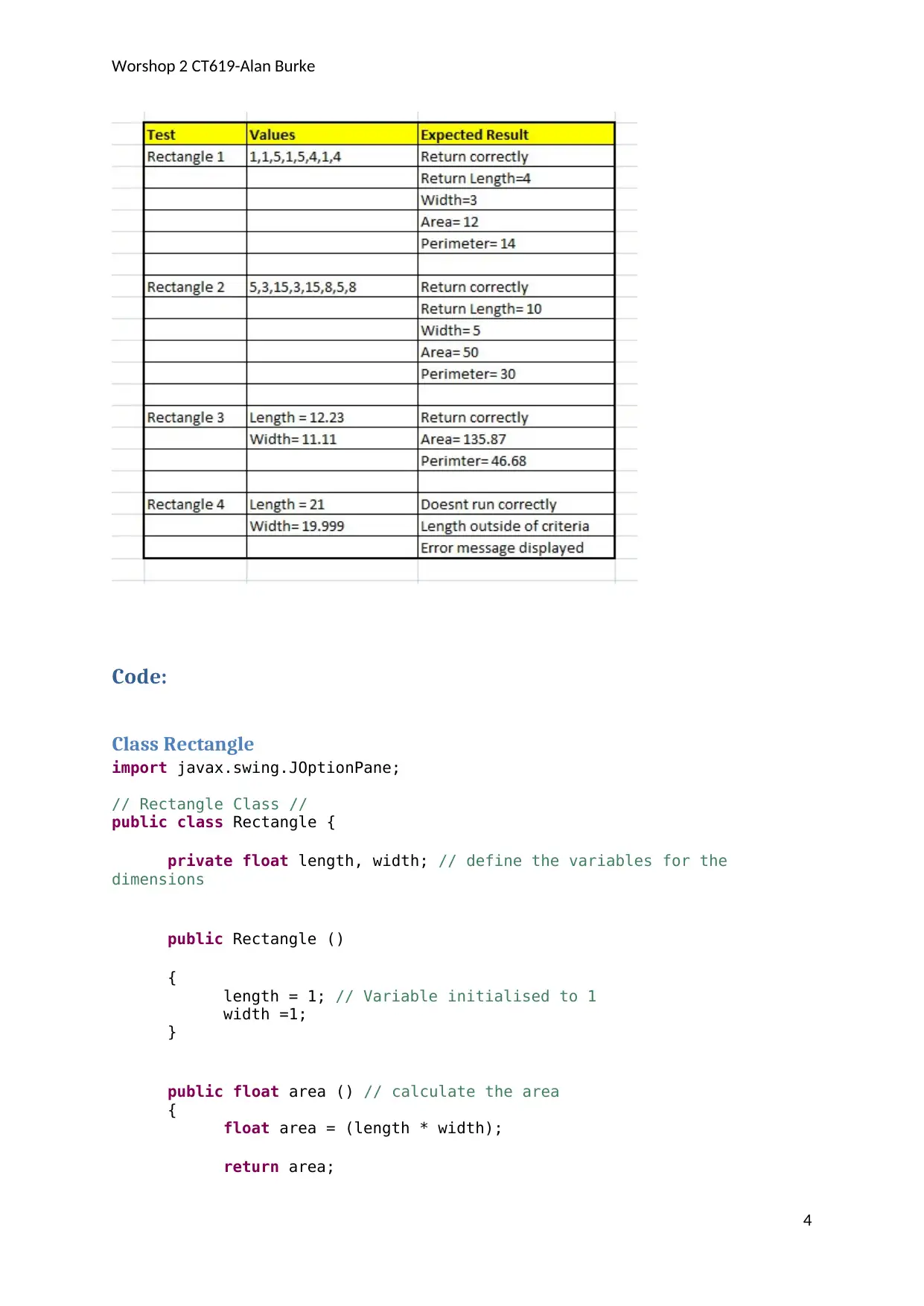
Cartesian Rectangle Test
Testing completed to RectangleTest class
Parameters set as per below:
3
Document Page
Worshop 2 CT619-Alan Burke
Code:
Class Rectangle
import javax.swing.JOptionPane;
// Rectangle Class //
public class Rectangle {
private float length, width; // define the variables for the
dimensions
public Rectangle ()
{
length = 1; // Variable initialised to 1
width =1;
}
public float area () // calculate the area
{
float area = (length * width);
return area;
4
tabler-icon-diamond-filled.svg

Paraphrase This Document

Need a fresh take? Get an instant paraphrase of this document with our AI Paraphraser
Document Page
Worshop 2 CT619-Alan Burke
/* JOptionPane.showMessageDialog(null, "Area of the Rectangle
is "+ area);*/ //* get the area of the rectangle
}
public float perimeter () //calculate the perimeter
{
float perimeter; //perimeter variable
perimeter = (2* length) + (2 * width);
return perimeter;
/* JOptionPane.showMessageDialog(null, "perimeter of the
rectangle is " + perimeter); */ //* display the perimeter of the rectangle
}
public Rectangle (float l, float w) //set the length and width of the
rectangle
{
length = ((l > 0.0 && l <20.0) ? l:(float) 0.0); // validate
the dimensions of the length and width, set to 0 if outside defined ranges
width = ((w > 0.0 && w < 20.0) ? w:(float) 0.0);
}
public float getlength () //get length
{
return length;
}
public float getwidth () //get width
{
return width;
}
public String toString () //set values into a string format
{
if (length ==0 || width ==0 ) //check errors, if length / width
entered are 0 display error message.
{
5
Document Page
Worshop 2 CT619-Alan Burke
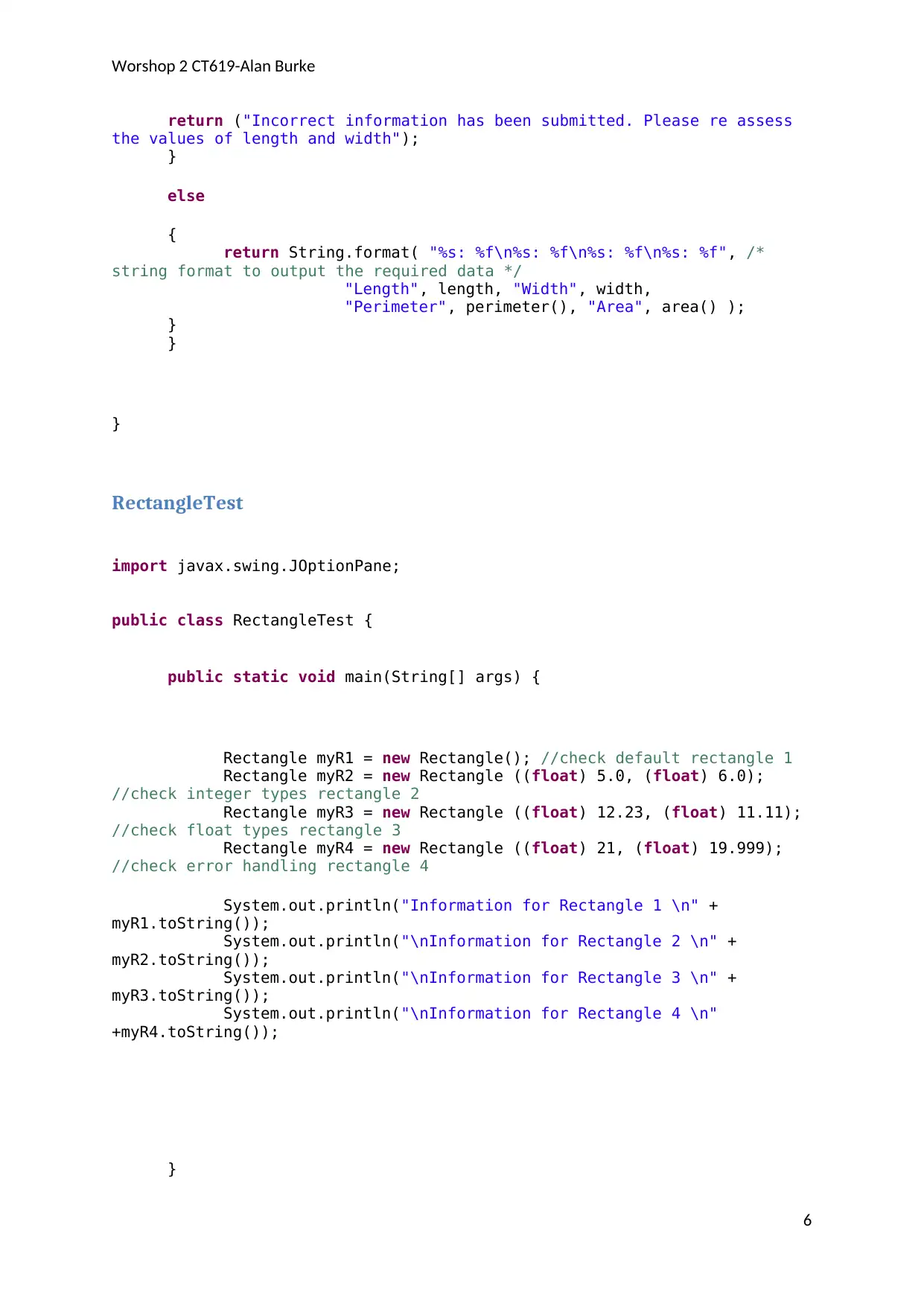
return ("Incorrect information has been submitted. Please re assess
the values of length and width");
}
else
{
return String.format( "%s: %f\n%s: %f\n%s: %f\n%s: %f", /*
string format to output the required data */
"Length", length, "Width", width,
"Perimeter", perimeter(), "Area", area() );
}
}
}
RectangleTest
import javax.swing.JOptionPane;
public class RectangleTest {
public static void main(String[] args) {
Rectangle myR1 = new Rectangle(); //check default rectangle 1
Rectangle myR2 = new Rectangle ((float) 5.0, (float) 6.0);
//check integer types rectangle 2
Rectangle myR3 = new Rectangle ((float) 12.23, (float) 11.11);
//check float types rectangle 3
Rectangle myR4 = new Rectangle ((float) 21, (float) 19.999);
//check error handling rectangle 4
System.out.println("Information for Rectangle 1 \n" +
myR1.toString());
System.out.println("\nInformation for Rectangle 2 \n" +
myR2.toString());
System.out.println("\nInformation for Rectangle 3 \n" +
myR3.toString());
System.out.println("\nInformation for Rectangle 4 \n"
+myR4.toString());
}
6
Document Page
Worshop 2 CT619-Alan Burke
}
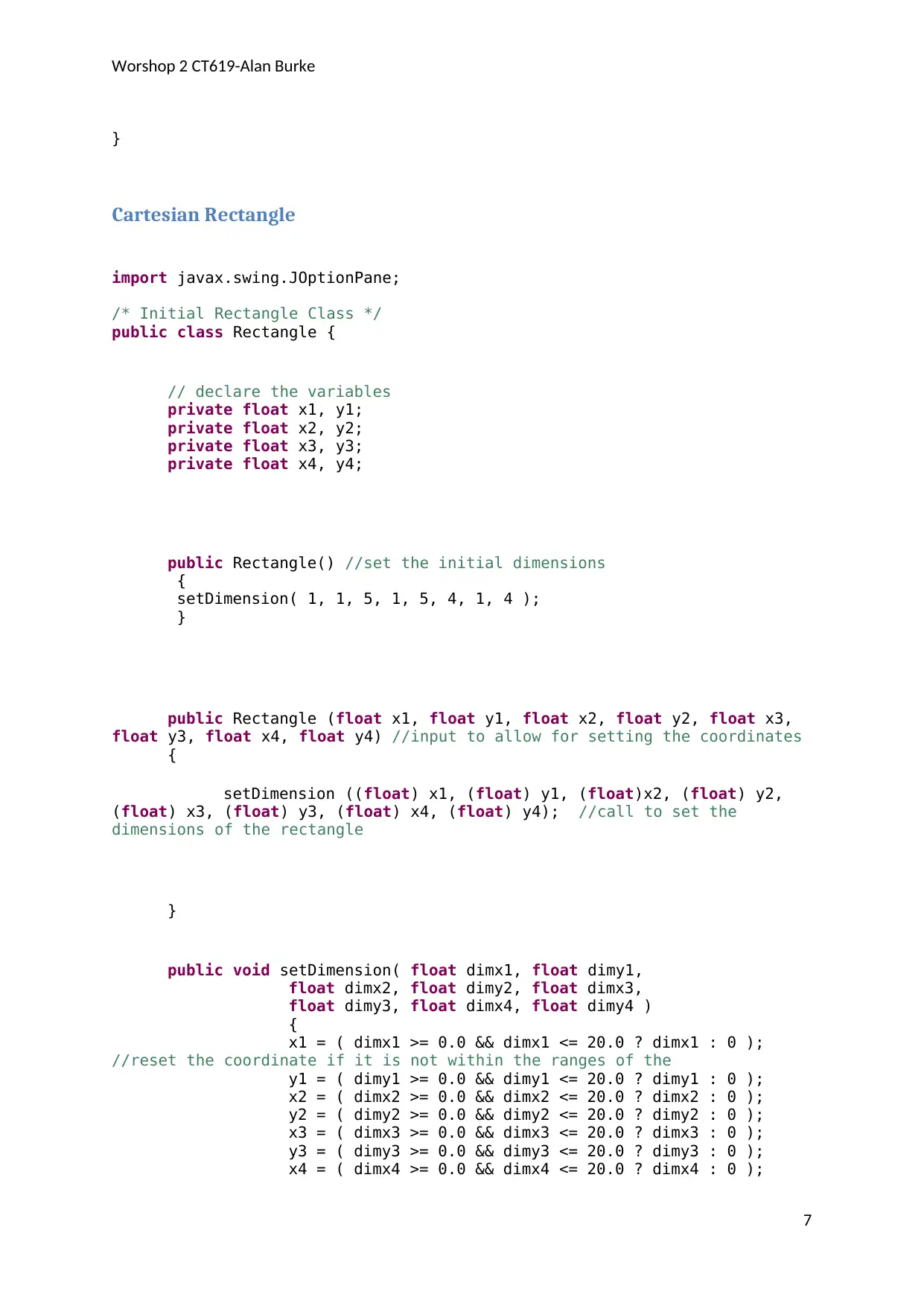
Cartesian Rectangle
import javax.swing.JOptionPane;
/* Initial Rectangle Class */
public class Rectangle {
// declare the variables
private float x1, y1;
private float x2, y2;
private float x3, y3;
private float x4, y4;
public Rectangle() //set the initial dimensions
{
setDimension( 1, 1, 5, 1, 5, 4, 1, 4 );
}
public Rectangle (float x1, float y1, float x2, float y2, float x3,
float y3, float x4, float y4) //input to allow for setting the coordinates
{
setDimension ((float) x1, (float) y1, (float)x2, (float) y2,
(float) x3, (float) y3, (float) x4, (float) y4); //call to set the
dimensions of the rectangle
}
public void setDimension( float dimx1, float dimy1,
float dimx2, float dimy2, float dimx3,
float dimy3, float dimx4, float dimy4 )
{
x1 = ( dimx1 >= 0.0 && dimx1 <= 20.0 ? dimx1 : 0 );
//reset the coordinate if it is not within the ranges of the
y1 = ( dimy1 >= 0.0 && dimy1 <= 20.0 ? dimy1 : 0 );
x2 = ( dimx2 >= 0.0 && dimx2 <= 20.0 ? dimx2 : 0 );
y2 = ( dimy2 >= 0.0 && dimy2 <= 20.0 ? dimy2 : 0 );
x3 = ( dimx3 >= 0.0 && dimx3 <= 20.0 ? dimx3 : 0 );
y3 = ( dimy3 >= 0.0 && dimy3 <= 20.0 ? dimy3 : 0 );
x4 = ( dimx4 >= 0.0 && dimx4 <= 20.0 ? dimx4 : 0 );
7
tabler-icon-diamond-filled.svg

Paraphrase This Document

Need a fresh take? Get an instant paraphrase of this document with our AI Paraphraser
Document Page
Worshop 2 CT619-Alan Burke
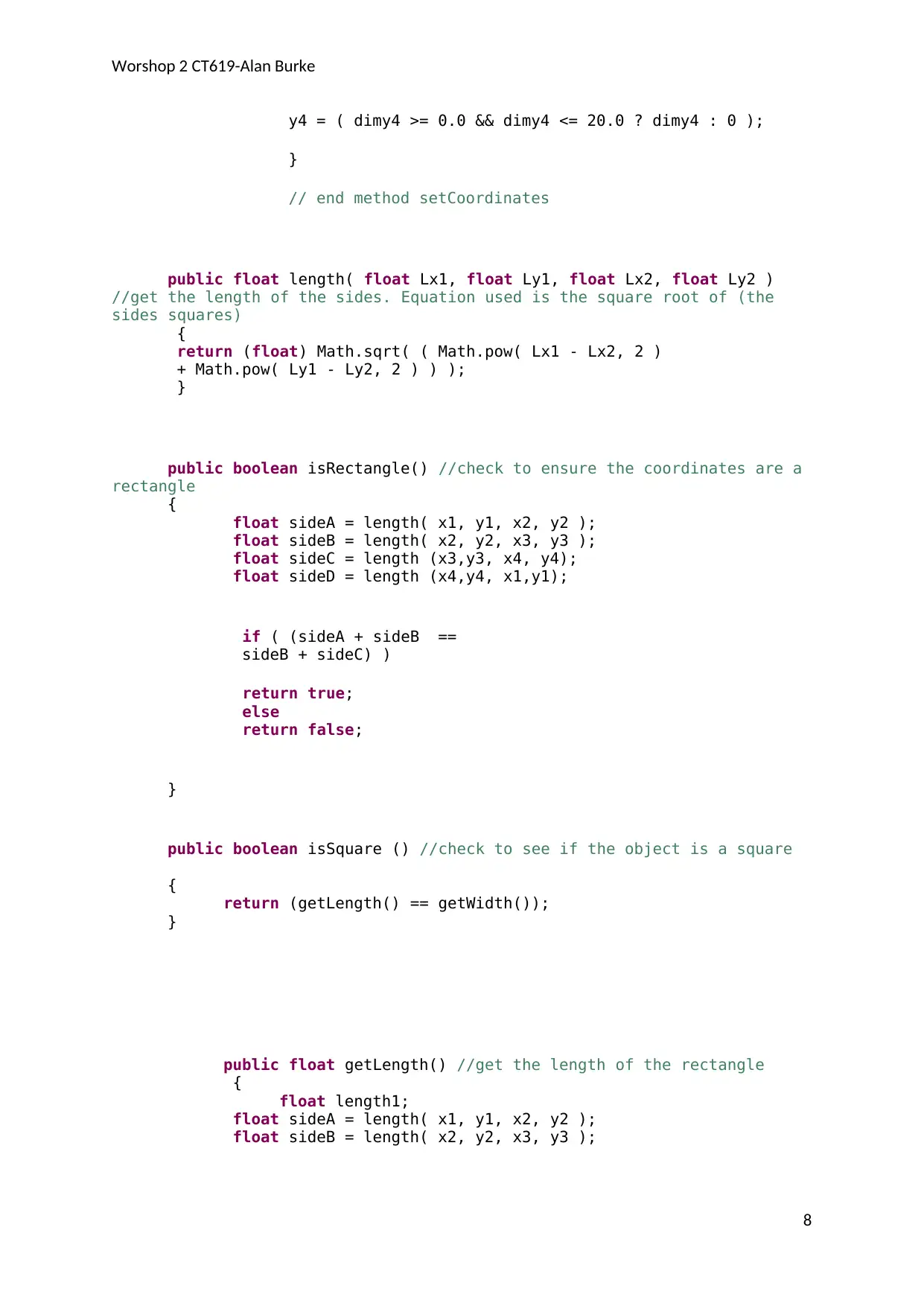
y4 = ( dimy4 >= 0.0 && dimy4 <= 20.0 ? dimy4 : 0 );
}
// end method setCoordinates
public float length( float Lx1, float Ly1, float Lx2, float Ly2 )
//get the length of the sides. Equation used is the square root of (the
sides squares)
{
return (float) Math.sqrt( ( Math.pow( Lx1 - Lx2, 2 )
+ Math.pow( Ly1 - Ly2, 2 ) ) );
}
public boolean isRectangle() //check to ensure the coordinates are a
rectangle
{
float sideA = length( x1, y1, x2, y2 );
float sideB = length( x2, y2, x3, y3 );
float sideC = length (x3,y3, x4, y4);
float sideD = length (x4,y4, x1,y1);
if ( (sideA + sideB ==
sideB + sideC) )
return true;
else
return false;
}
public boolean isSquare () //check to see if the object is a square
{
return (getLength() == getWidth());
}
public float getLength() //get the length of the rectangle
{
float length1;
float sideA = length( x1, y1, x2, y2 );
float sideB = length( x2, y2, x3, y3 );
8
Document Page
Worshop 2 CT619-Alan Burke
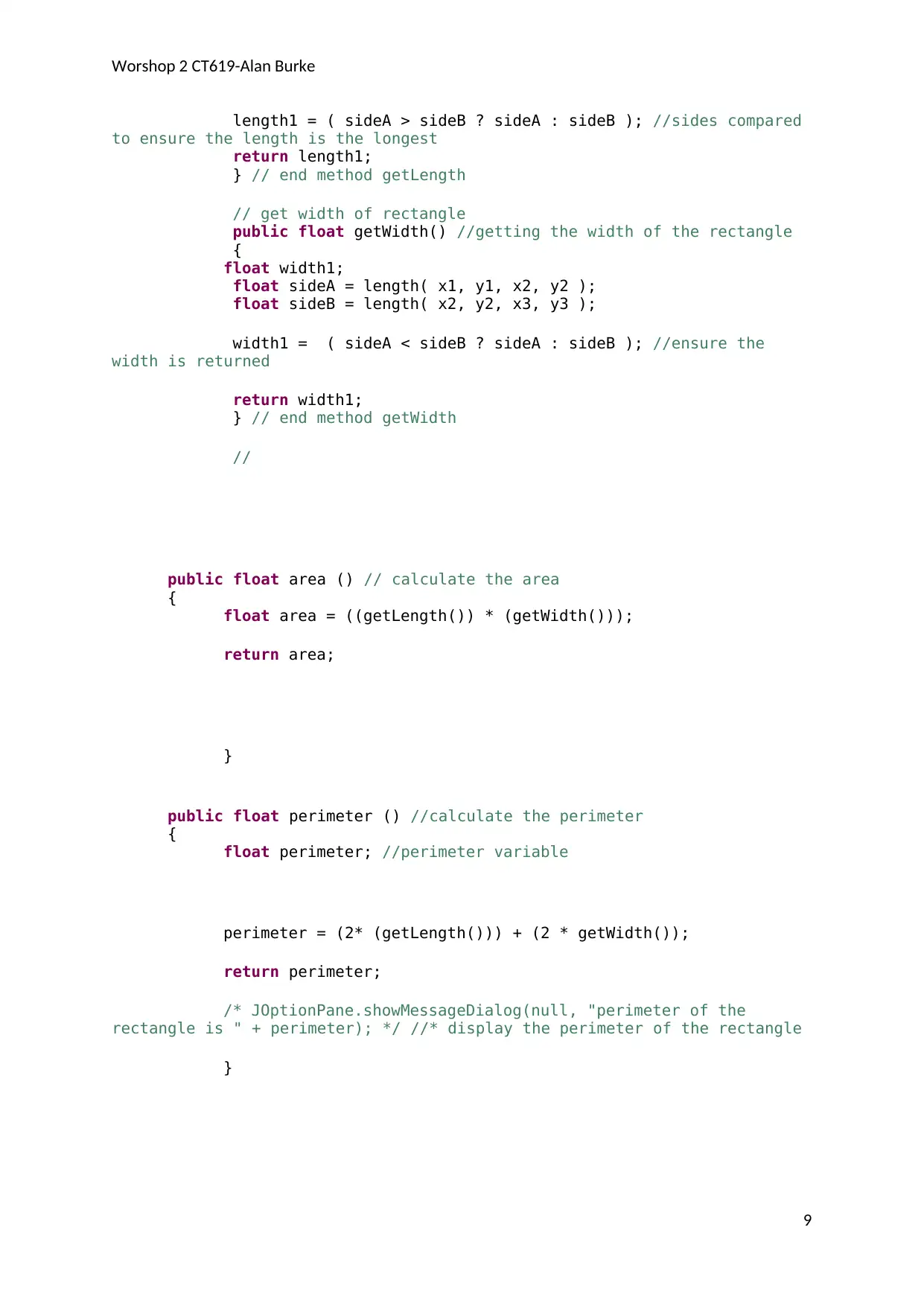
length1 = ( sideA > sideB ? sideA : sideB ); //sides compared
to ensure the length is the longest
return length1;
} // end method getLength
// get width of rectangle
public float getWidth() //getting the width of the rectangle
{
float width1;
float sideA = length( x1, y1, x2, y2 );
float sideB = length( x2, y2, x3, y3 );
width1 = ( sideA < sideB ? sideA : sideB ); //ensure the
width is returned
return width1;
} // end method getWidth
//
public float area () // calculate the area
{
float area = ((getLength()) * (getWidth()));
return area;
}
public float perimeter () //calculate the perimeter
{
float perimeter; //perimeter variable
perimeter = (2* (getLength())) + (2 * getWidth());
return perimeter;
/* JOptionPane.showMessageDialog(null, "perimeter of the
rectangle is " + perimeter); */ //* display the perimeter of the rectangle
}
9
Document Page
Worshop 2 CT619-Alan Burke
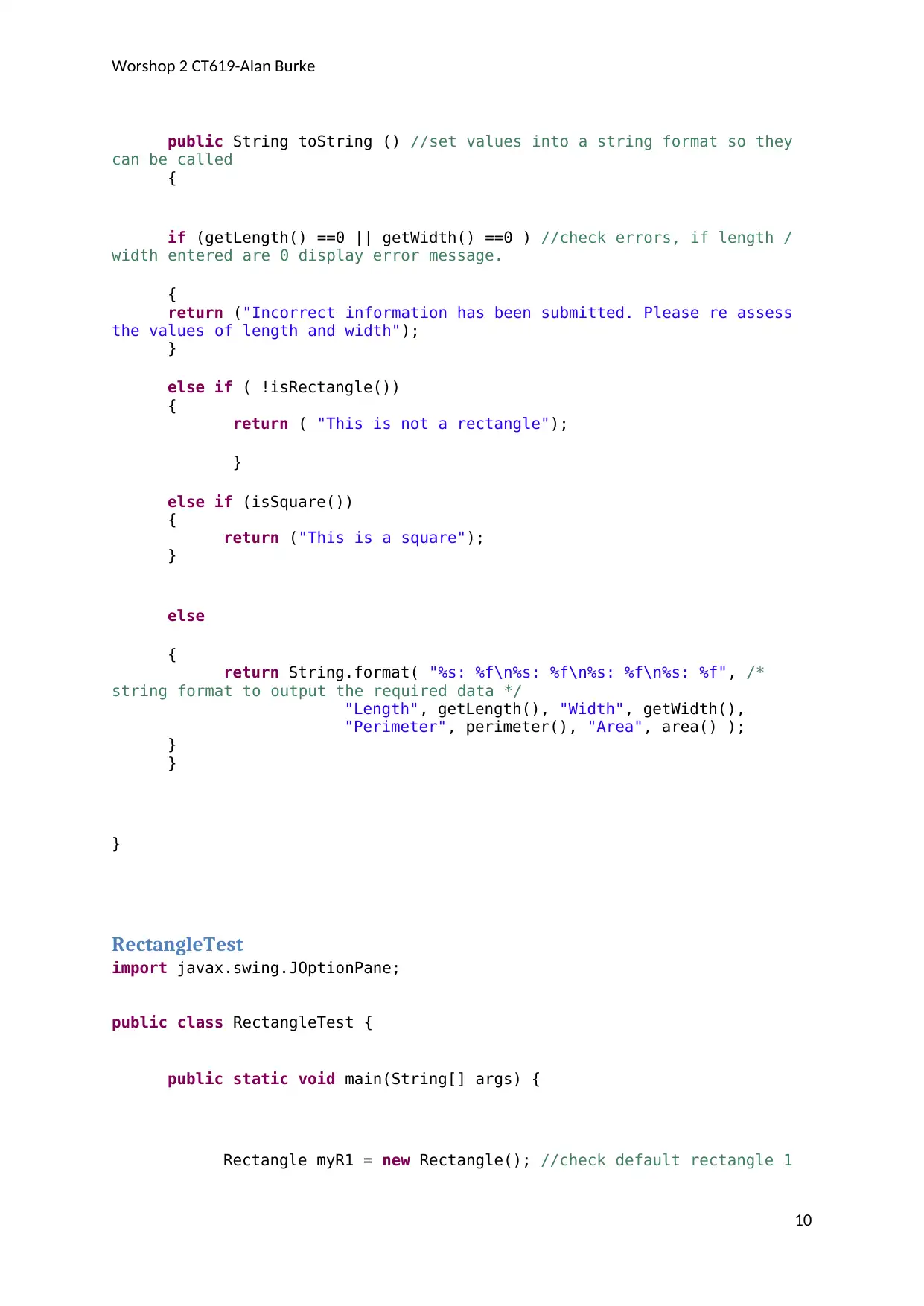
public String toString () //set values into a string format so they
can be called
{
if (getLength() ==0 || getWidth() ==0 ) //check errors, if length /
width entered are 0 display error message.
{
return ("Incorrect information has been submitted. Please re assess
the values of length and width");
}
else if ( !isRectangle())
{
return ( "This is not a rectangle");
}
else if (isSquare())
{
return ("This is a square");
}
else
{
return String.format( "%s: %f\n%s: %f\n%s: %f\n%s: %f", /*
string format to output the required data */
"Length", getLength(), "Width", getWidth(),
"Perimeter", perimeter(), "Area", area() );
}
}
}
RectangleTest
import javax.swing.JOptionPane;
public class RectangleTest {
public static void main(String[] args) {
Rectangle myR1 = new Rectangle(); //check default rectangle 1
10
tabler-icon-diamond-filled.svg

Paraphrase This Document

Need a fresh take? Get an instant paraphrase of this document with our AI Paraphraser
Document Page
Worshop 2 CT619-Alan Burke
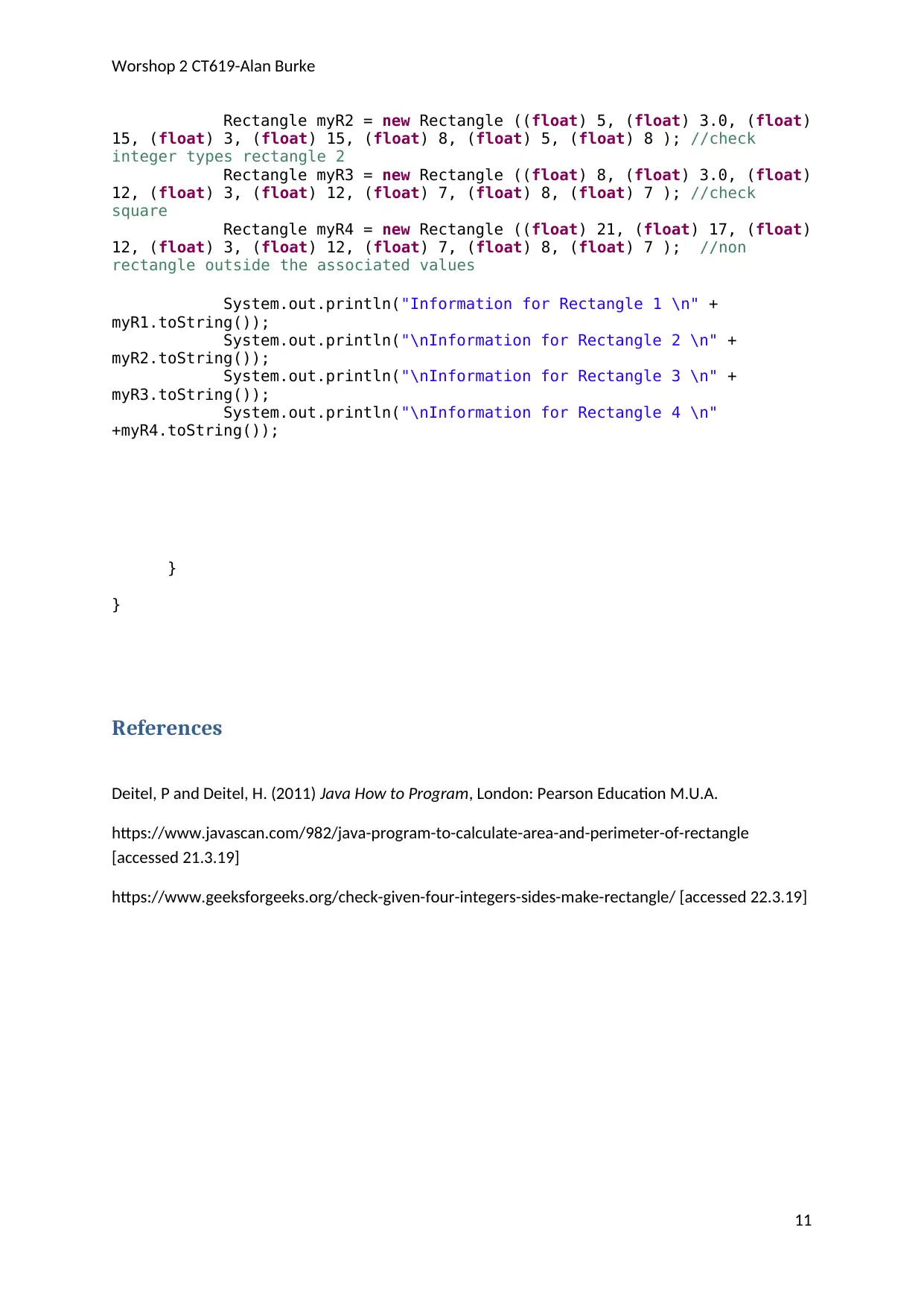
Rectangle myR2 = new Rectangle ((float) 5, (float) 3.0, (float)
15, (float) 3, (float) 15, (float) 8, (float) 5, (float) 8 ); //check
integer types rectangle 2
Rectangle myR3 = new Rectangle ((float) 8, (float) 3.0, (float)
12, (float) 3, (float) 12, (float) 7, (float) 8, (float) 7 ); //check
square
Rectangle myR4 = new Rectangle ((float) 21, (float) 17, (float)
12, (float) 3, (float) 12, (float) 7, (float) 8, (float) 7 ); //non
rectangle outside the associated values
System.out.println("Information for Rectangle 1 \n" +
myR1.toString());
System.out.println("\nInformation for Rectangle 2 \n" +
myR2.toString());
System.out.println("\nInformation for Rectangle 3 \n" +
myR3.toString());
System.out.println("\nInformation for Rectangle 4 \n"
+myR4.toString());
}
}
References
Deitel, P and Deitel, H. (2011) Java How to Program, London: Pearson Education M.U.A.
https://www.javascan.com/982/java-program-to-calculate-area-and-perimeter-of-rectangle
[accessed 21.3.19]
https://www.geeksforgeeks.org/check-given-four-integers-sides-make-rectangle/ [accessed 22.3.19]
11
chevron_up_icon
1 out of 11
circle_padding
hide_on_mobile
zoom_out_icon
[object Object]