M28CDE - Ethical Hacking: Penetration Testing and Countermeasures
VerifiedAdded on 2023/06/13
|17
|1703
|348
Report
AI Summary
This report presents a comprehensive penetration testing assignment focused on ethical hacking principles and techniques. It begins with an introduction to ethical hacking, its scope, ethical considerations, and legal implications. The methodology involves scanning, penetrating a desktop environment, and cracking passwords within a virtual machine setup. Tools like Nmap, Tomcat, SSL, Keystore, Tshark, and Portpoof are utilized and analyzed. The penetration testing process includes reconnaissance, scanning, gaining access, maintaining access, and covering tracks. The report concludes with investigated countermeasures and references, offering a detailed overview of the ethical hacking process and system vulnerability assessment. Desklib provides access to similar assignments and study resources for students.
Table of Contents
1. Introduction.................................................................................................................................2
2. Scanning.......................................................................................................................................2
Findings................................................................................................................................................3
3. Penetrating the Desktop............................................................................................................10
4. Cracking the passwords............................................................................................................11
5. Conclusion..................................................................................................................................11
6. References..................................................................................................................................12
1
1. Introduction.................................................................................................................................2
2. Scanning.......................................................................................................................................2
Findings................................................................................................................................................3
3. Penetrating the Desktop............................................................................................................10
4. Cracking the passwords............................................................................................................11
5. Conclusion..................................................................................................................................11
6. References..................................................................................................................................12
1
Paraphrase This Document
Need a fresh take? Get an instant paraphrase of this document with our AI Paraphraser

1. Introduction
Scope of ethcal hacking will be investigated. Ethical issues will be studied and the legal
issues will be discussed. Methodology and the penetrating tools will be studied and
investaigated. One system penetration test will be done in a virtual machine. The weeknesses
of the virtual machine will be investigated. Penetration tests will be done. Suitable counter
measures will be investigated.
2. VM Scanning
2
Scope of ethcal hacking will be investigated. Ethical issues will be studied and the legal
issues will be discussed. Methodology and the penetrating tools will be studied and
investaigated. One system penetration test will be done in a virtual machine. The weeknesses
of the virtual machine will be investigated. Penetration tests will be done. Suitable counter
measures will be investigated.
2. VM Scanning
2

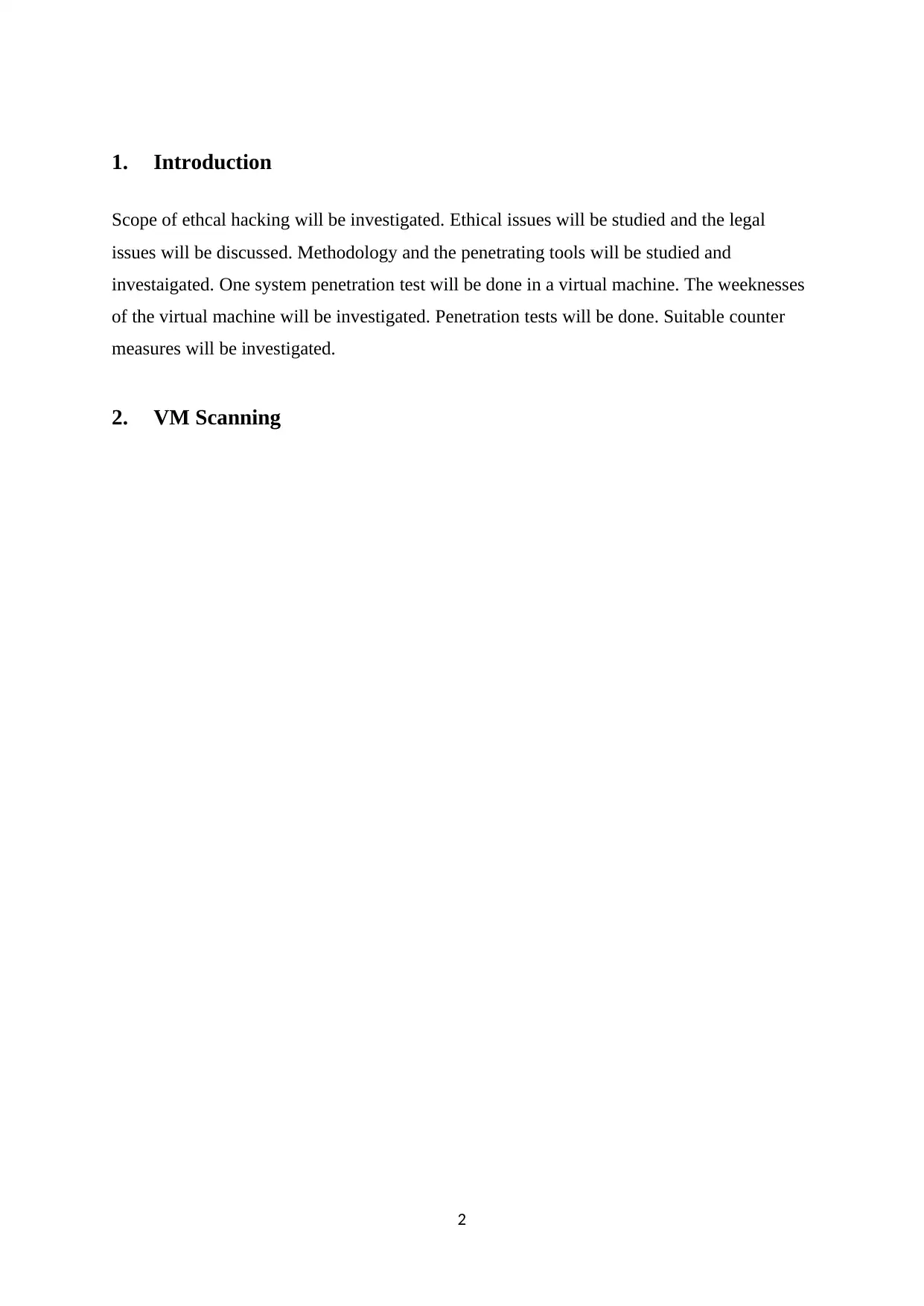
Do the necessary technical tasks and opened the VM in virtual box. VM Workstation was slow.
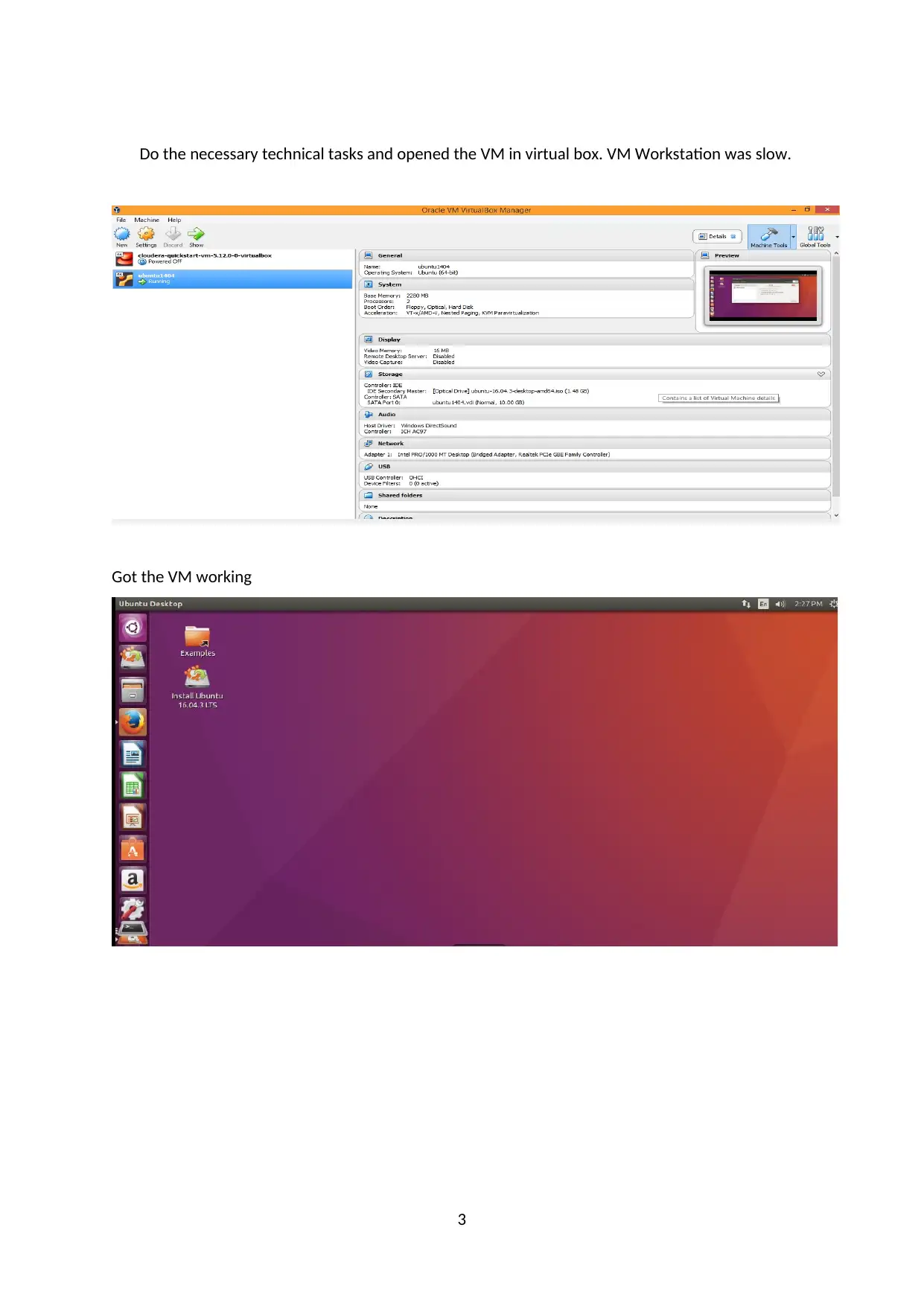
Got the VM working
3
Got the VM working
3
⊘ This is a preview!⊘
Do you want full access?
Subscribe today to unlock all pages.

Trusted by 1+ million students worldwide

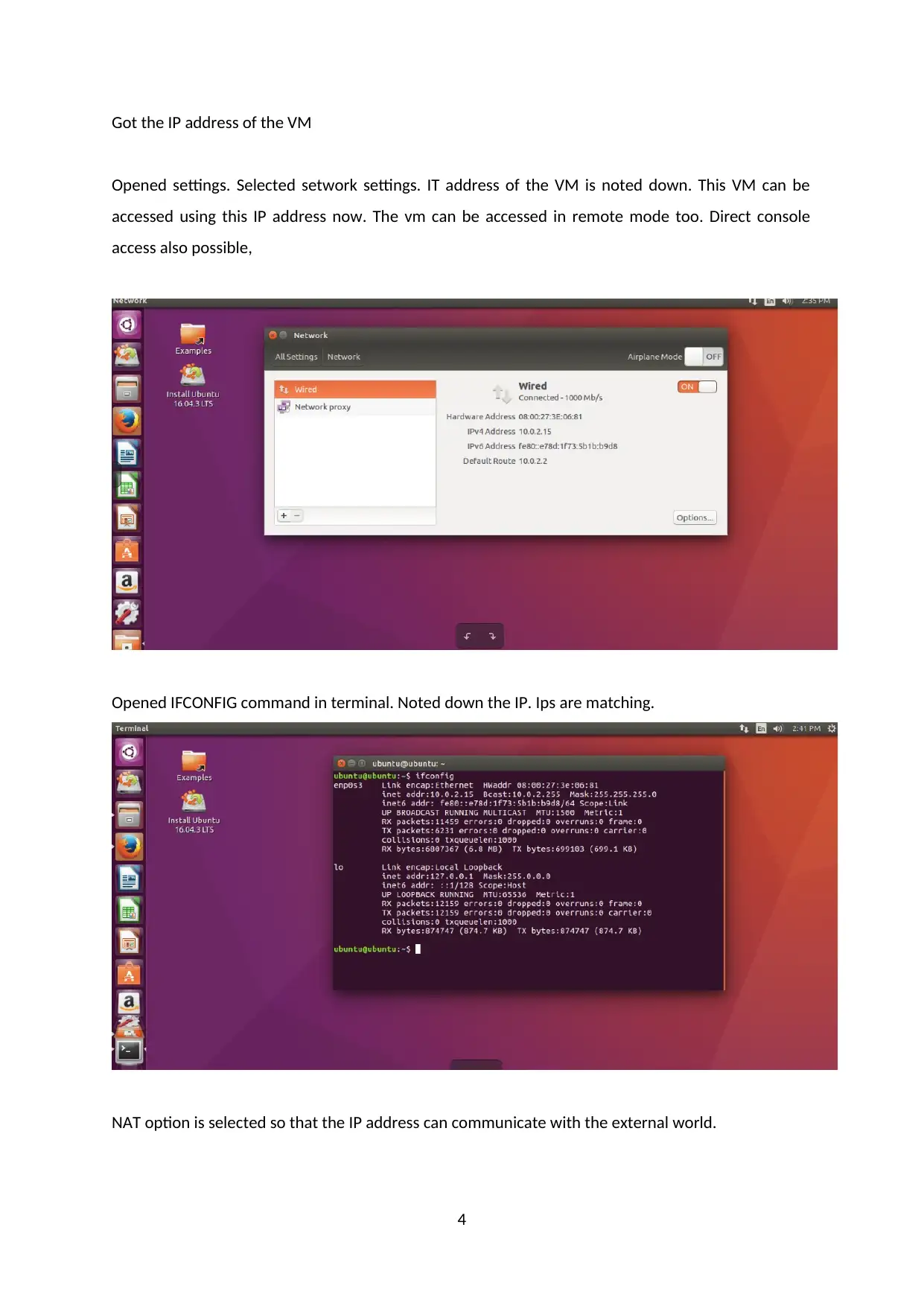
Got the IP address of the VM
Opened settings. Selected setwork settings. IT address of the VM is noted down. This VM can be
accessed using this IP address now. The vm can be accessed in remote mode too. Direct console
access also possible,
Opened IFCONFIG command in terminal. Noted down the IP. Ips are matching.
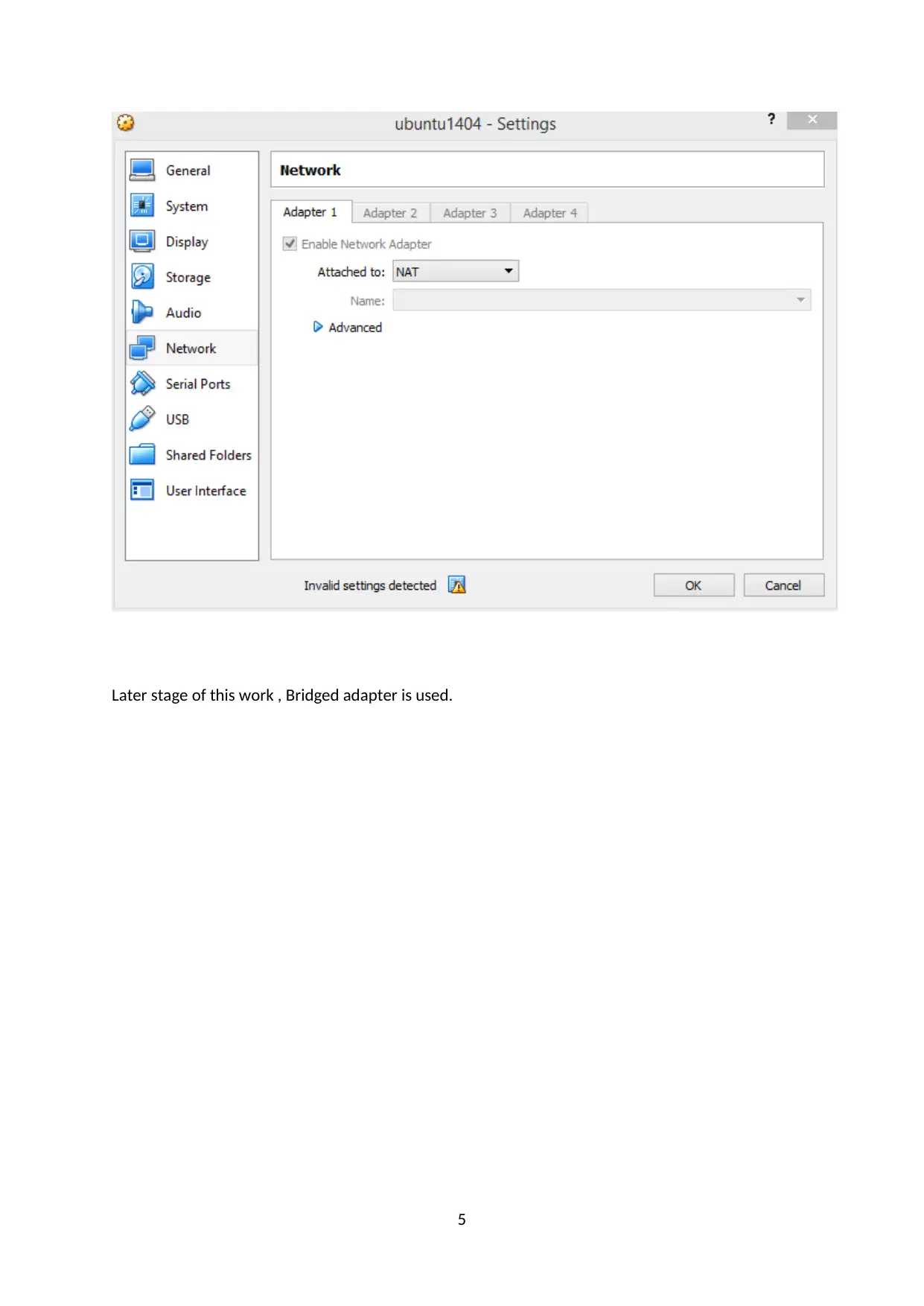
NAT option is selected so that the IP address can communicate with the external world.
4
Opened settings. Selected setwork settings. IT address of the VM is noted down. This VM can be
accessed using this IP address now. The vm can be accessed in remote mode too. Direct console
access also possible,
Opened IFCONFIG command in terminal. Noted down the IP. Ips are matching.
NAT option is selected so that the IP address can communicate with the external world.
4
Paraphrase This Document
Need a fresh take? Get an instant paraphrase of this document with our AI Paraphraser

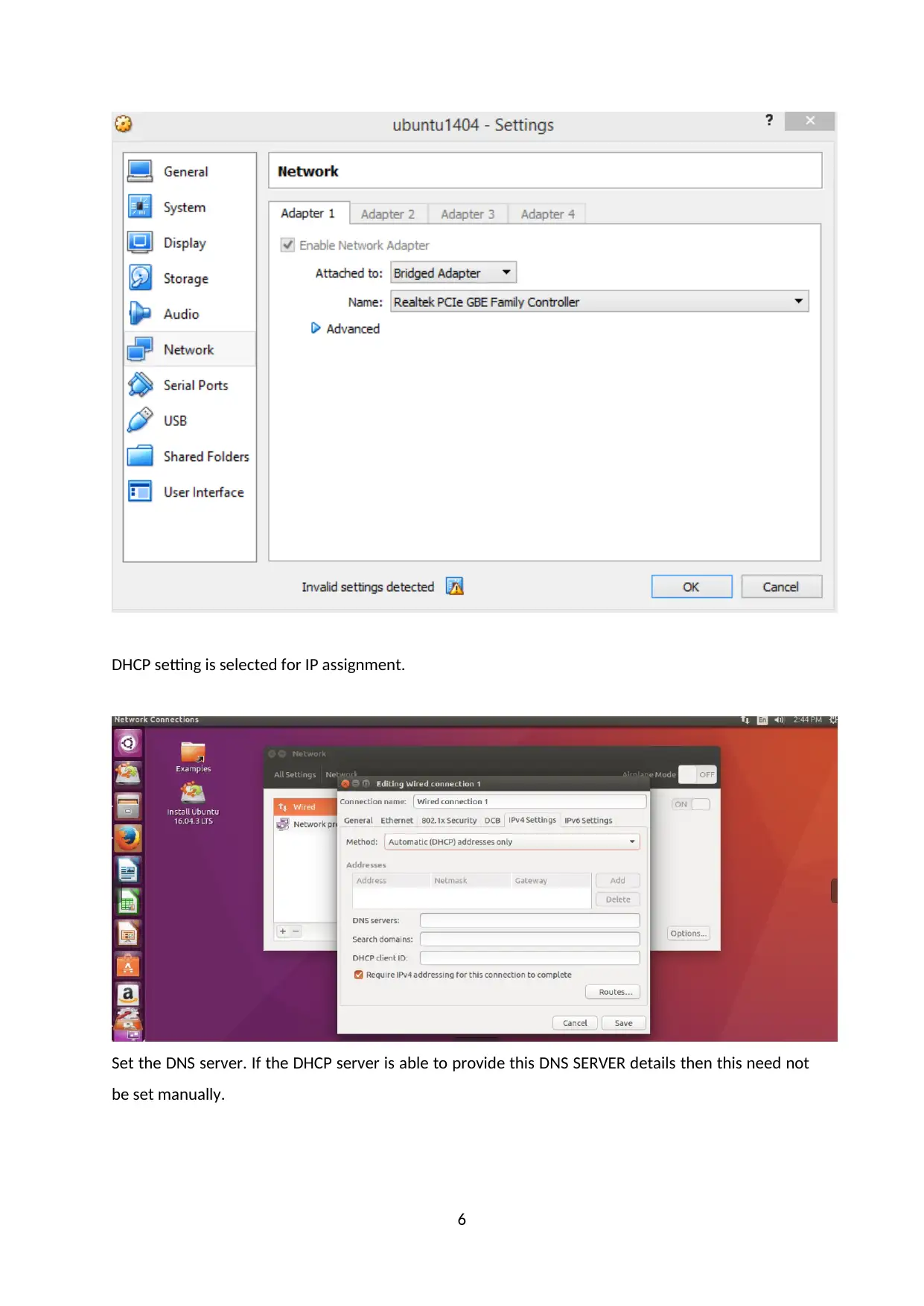
Later stage of this work , Bridged adapter is used.
5
5

DHCP setting is selected for IP assignment.
Set the DNS server. If the DHCP server is able to provide this DNS SERVER details then this need not
be set manually.
6
Set the DNS server. If the DHCP server is able to provide this DNS SERVER details then this need not
be set manually.
6
⊘ This is a preview!⊘
Do you want full access?
Subscribe today to unlock all pages.

Trusted by 1+ million students worldwide

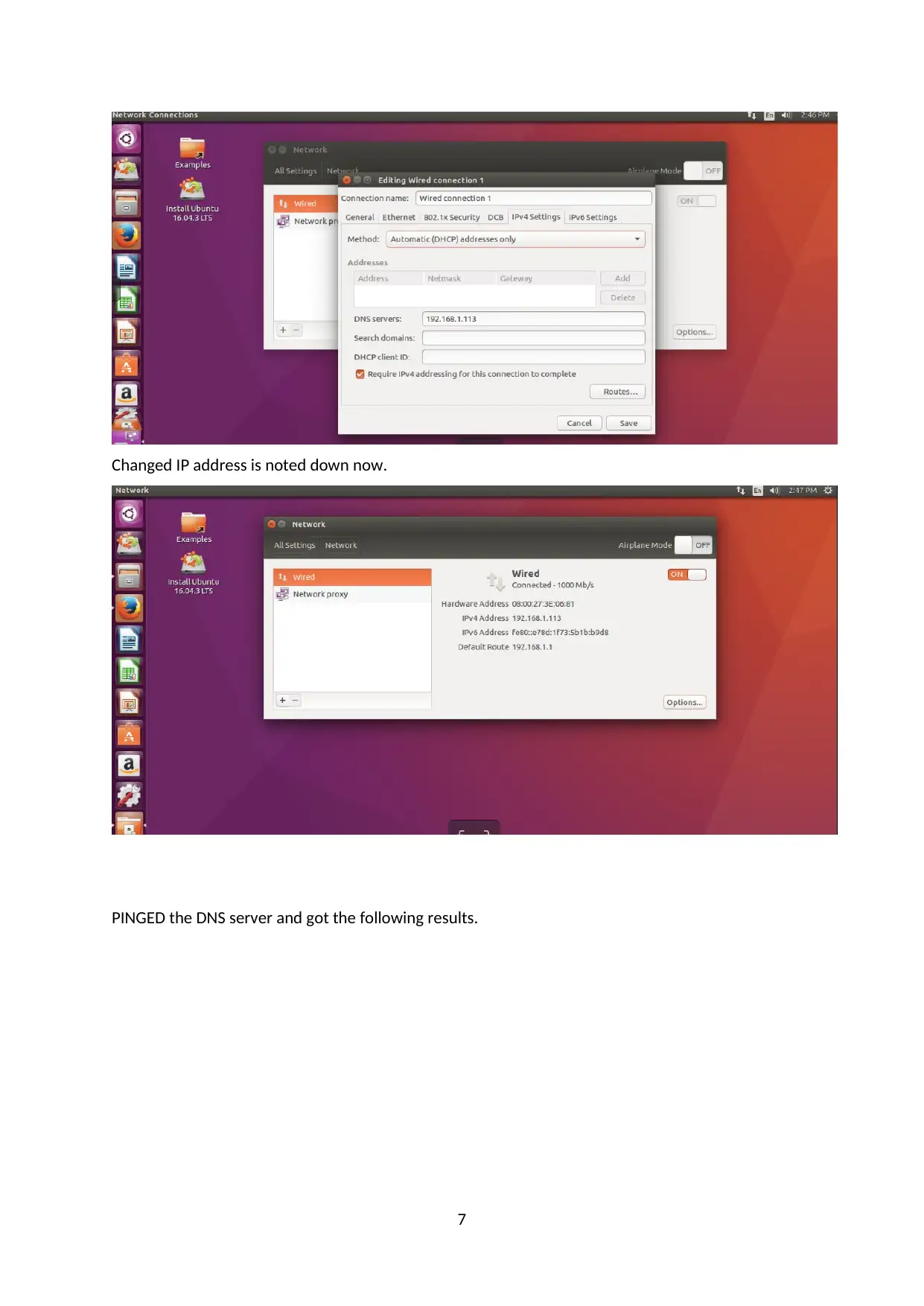
Changed IP address is noted down now.
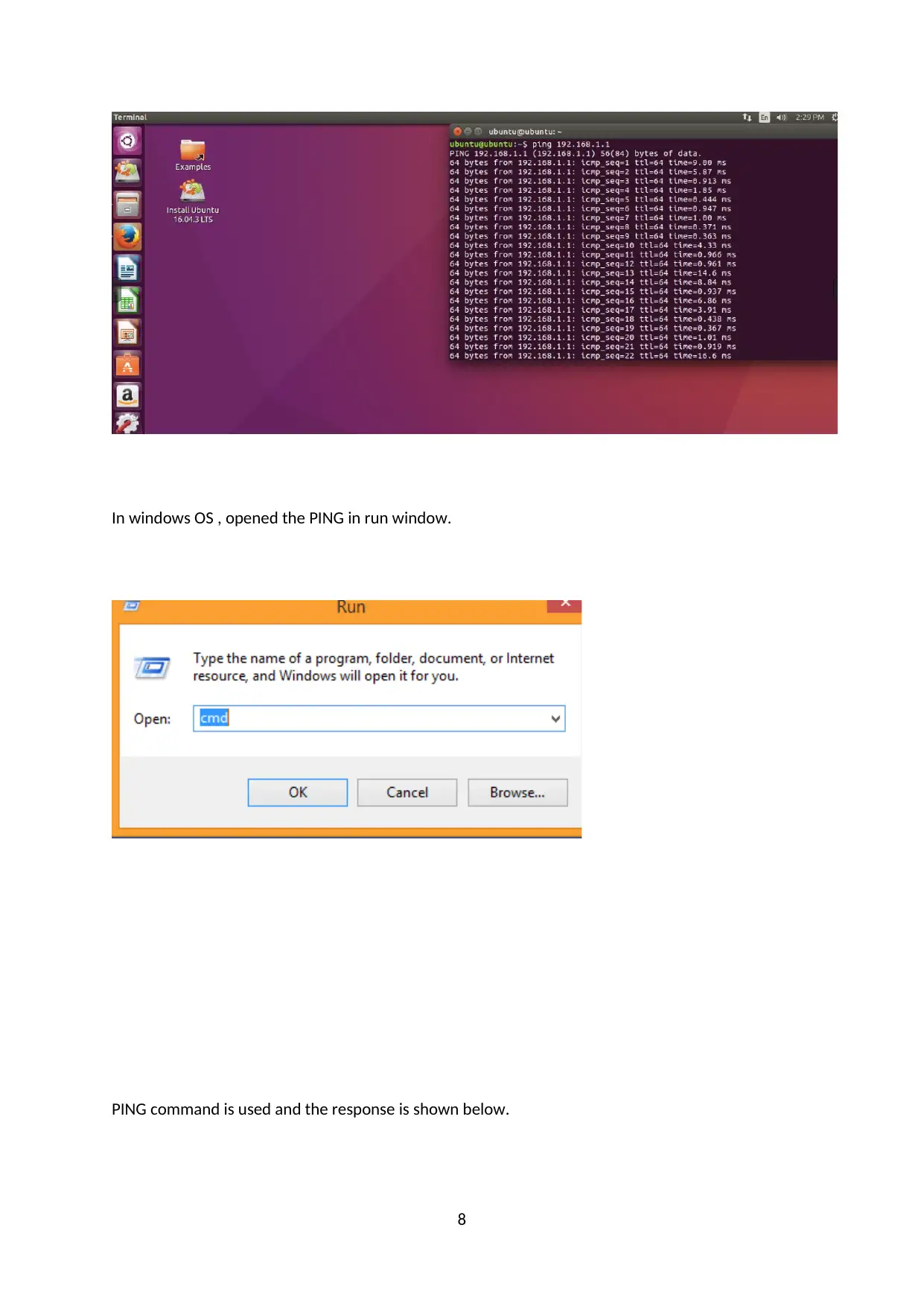
PINGED the DNS server and got the following results.
7
PINGED the DNS server and got the following results.
7
Paraphrase This Document
Need a fresh take? Get an instant paraphrase of this document with our AI Paraphraser

In windows OS , opened the PING in run window.
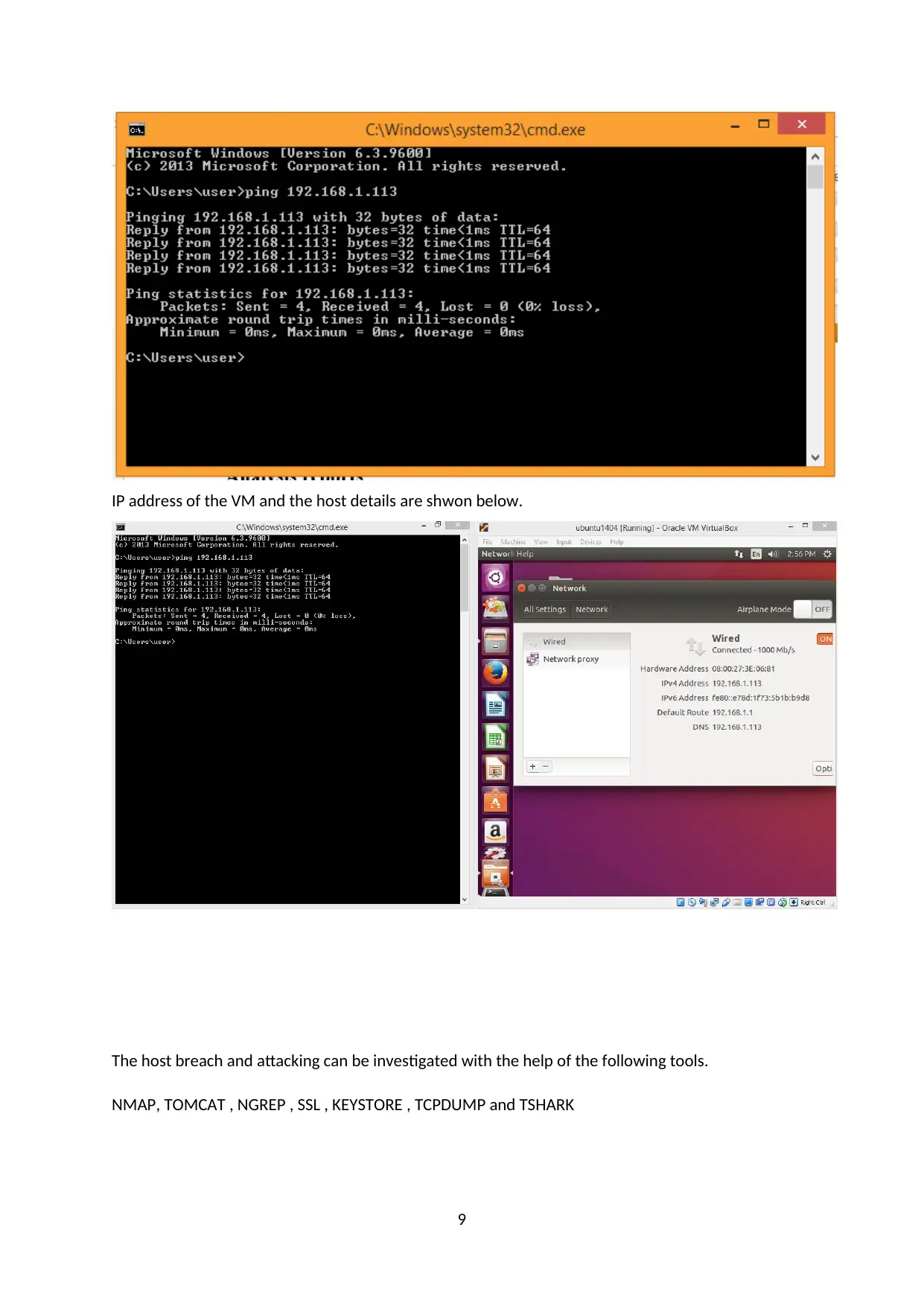
PING command is used and the response is shown below.
8
PING command is used and the response is shown below.
8

IP address of the VM and the host details are shwon below.
The host breach and attacking can be investigated with the help of the following tools.
NMAP, TOMCAT , NGREP , SSL , KEYSTORE , TCPDUMP and TSHARK
9
The host breach and attacking can be investigated with the help of the following tools.
NMAP, TOMCAT , NGREP , SSL , KEYSTORE , TCPDUMP and TSHARK
9
⊘ This is a preview!⊘
Do you want full access?
Subscribe today to unlock all pages.

Trusted by 1+ million students worldwide

3. Penetrating the Desktop
The following procedures are used.
Reconnaissance
The black hat hacking is learning from different sources that targets a buisness. It is perfomed
in the operations such as internet searches,social engineering,non-intrusive network
scan,dumpster diving and domain name management. This phase are difficult to hacker and
defend against.
Scanning
The network weekness can be open port ,open services,malicious applications,week security
of data transfer and worst LAN and WAN equipment. Using scanning activity , The attacker
understands the the week points to get the data easily.
Prevention of the information
The unexpected port needs to shutdwon. Imporatant data and the only approved devices
should be allowed. Patching and LAN/WAN security will be maintained properly. End to
End process can be used to monitor so the so the information securely transferd.
Gaining access
The attacker get access to the resources. It gain some position of access to one or more
network connectivity devices. security managers try to access the unauthorized user entering
the network to access the information. The security managers may monitor the domain and
local admin access to the server. If the highley important data and keys may be hacked. The
network security may be week so it can be easily attacked and the sensitivity information
may be lost. If the encryption key is good it can't decrypted by the hacker.
10
The following procedures are used.
Reconnaissance
The black hat hacking is learning from different sources that targets a buisness. It is perfomed
in the operations such as internet searches,social engineering,non-intrusive network
scan,dumpster diving and domain name management. This phase are difficult to hacker and
defend against.
Scanning
The network weekness can be open port ,open services,malicious applications,week security
of data transfer and worst LAN and WAN equipment. Using scanning activity , The attacker
understands the the week points to get the data easily.
Prevention of the information
The unexpected port needs to shutdwon. Imporatant data and the only approved devices
should be allowed. Patching and LAN/WAN security will be maintained properly. End to
End process can be used to monitor so the so the information securely transferd.
Gaining access
The attacker get access to the resources. It gain some position of access to one or more
network connectivity devices. security managers try to access the unauthorized user entering
the network to access the information. The security managers may monitor the domain and
local admin access to the server. If the highley important data and keys may be hacked. The
network security may be week so it can be easily attacked and the sensitivity information
may be lost. If the encryption key is good it can't decrypted by the hacker.
10
Paraphrase This Document
Need a fresh take? Get an instant paraphrase of this document with our AI Paraphraser

Maintaing Access
The attacker get a access permission to enter the network. This part is very critical to findout
the attacker's vulnerability to detection. The intrusions can be detected using the device IDS
and IPS.
Covering tracks
The attackers get the information and hide the intrusion because they can visit the victims in
the future. The unusual activity and unexpected behaviour of the system can be tracked. The
security team already will be having some knoweledge about how the hacker hack the victims
so they can try to prevent.
The tools are tested in order for the project to be analyzed. The tools’ analysis is utilized in the
breach in Digital Forensics. Their brief descriptions are found below.
Nmap
Nmap, preferred by many worldwide, is an online port scanner that hosts security
tools. It can scan your network servers as well as your devices from an independent source or
from outside your firewall.
It supports the operations of the functioning frameworks. Nmap is more compatible
and faster on Linux but can also be used on Windows framework. With Linux frameworks, it
offers users easier and better access to security apparatus options.
Steps for using Nmap in Linux
Step-1: Operating system Installation
Step-2: Ubuntu Installation
Step-3: Nmap Installation from source
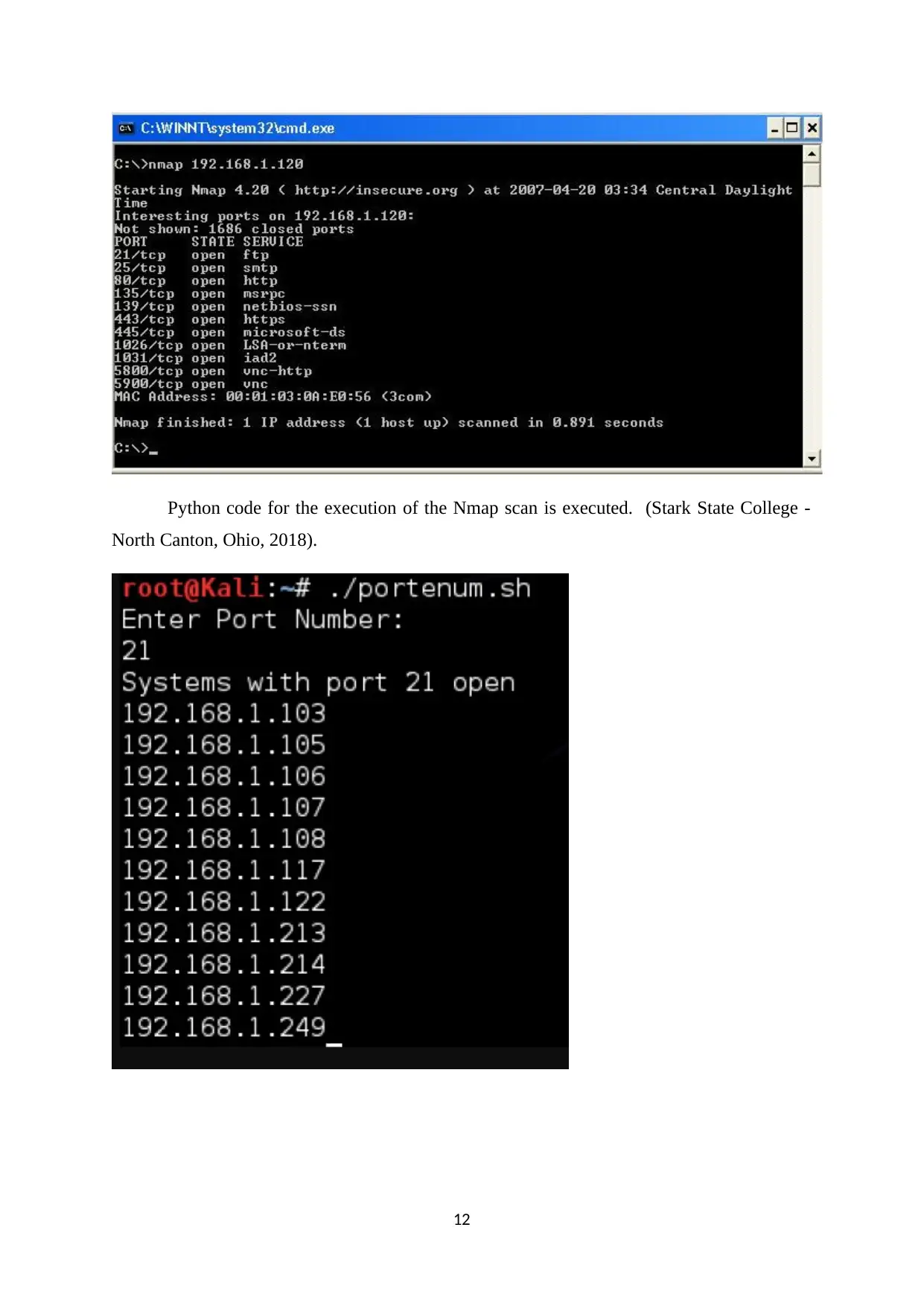
Nmap scan categories, as shown in the next picture, is primarily needed.
11
The attacker get a access permission to enter the network. This part is very critical to findout
the attacker's vulnerability to detection. The intrusions can be detected using the device IDS
and IPS.
Covering tracks
The attackers get the information and hide the intrusion because they can visit the victims in
the future. The unusual activity and unexpected behaviour of the system can be tracked. The
security team already will be having some knoweledge about how the hacker hack the victims
so they can try to prevent.
The tools are tested in order for the project to be analyzed. The tools’ analysis is utilized in the
breach in Digital Forensics. Their brief descriptions are found below.
Nmap
Nmap, preferred by many worldwide, is an online port scanner that hosts security
tools. It can scan your network servers as well as your devices from an independent source or
from outside your firewall.
It supports the operations of the functioning frameworks. Nmap is more compatible
and faster on Linux but can also be used on Windows framework. With Linux frameworks, it
offers users easier and better access to security apparatus options.
Steps for using Nmap in Linux
Step-1: Operating system Installation
Step-2: Ubuntu Installation
Step-3: Nmap Installation from source
Nmap scan categories, as shown in the next picture, is primarily needed.
11

Python code for the execution of the Nmap scan is executed. (Stark State College -
North Canton, Ohio, 2018).
12
North Canton, Ohio, 2018).
12
⊘ This is a preview!⊘
Do you want full access?
Subscribe today to unlock all pages.

Trusted by 1+ million students worldwide
1 out of 17
Related Documents
Your All-in-One AI-Powered Toolkit for Academic Success.
+13062052269
info@desklib.com
Available 24*7 on WhatsApp / Email
Unlock your academic potential
Copyright © 2020–2026 A2Z Services. All Rights Reserved. Developed and managed by ZUCOL.