Assessment Item 2: M2M Network Architecture Design and Analysis
VerifiedAdded on 2020/02/24
|19
|4211
|42
Project
AI Summary
This project focuses on designing and analyzing the network architecture for M2M, a medium-scale organization in Sydney, Australia. The project involves designing a network topology for M2M's various branches, including Head Office, IT, Finance, Research, Sales, and Transport offices. The design includes the use of switches, workstations, and static IP addresses. The project details subnetting strategies, IP addressing, and device setup. The project also addresses potential issues arising from an increase in the number of workstations. Furthermore, it delves into network analysis, covering the use of network analyzers, analysis processes, and network protocols to optimize the network's performance and address potential bottlenecks. The project uses tools like Network Notepad and Cisco Packet Tracer for network diagramming and simulation, ensuring a practical understanding of network design principles. The project explores the implications of exceeding the current host limits within the network and the challenges that may arise. Recommendations are provided to ensure the efficient operation of the network.

Running head: ASSESSMENT ITEM 2
Assignment Number
Assignment Title: Assessment Item 2
Student Name:
Student ID:
Student Email:
Assignment Number
Assignment Title: Assessment Item 2
Student Name:
Student ID:
Student Email:

Paraphrase This Document
Need a fresh take? Get an instant paraphrase of this document with our AI Paraphraser

1ASSESSMENT ITEM 2
Executive Summary
M2M is situated in Sydney, Australia and it has deployed the expansion of the operations for increasing
their proficiency as a medium scale organization. The organization has spread its branches across the six
countries of Australia. The branch offices of M2M are Head Office, Information Technology, Finance
Office, Research Office, Sales Office, and Transport Office. However, some time back, all these branches
were located in a single building that would cause hindrance in covering of the large market shares. The
division of the market would be implied for interacting with the development of the effective and
improved stimulation of the business operations. The workstations would be facilitated by the
deployment of the innovative and appropriate facilities that has summed to 1200 in total. The
workstations would utilize the static IP for developing the effective communication within the
organization. The control of the operations would be facilitated for integrating the operations of the
improvement and development.
Student Name Student Number
Executive Summary
M2M is situated in Sydney, Australia and it has deployed the expansion of the operations for increasing
their proficiency as a medium scale organization. The organization has spread its branches across the six
countries of Australia. The branch offices of M2M are Head Office, Information Technology, Finance
Office, Research Office, Sales Office, and Transport Office. However, some time back, all these branches
were located in a single building that would cause hindrance in covering of the large market shares. The
division of the market would be implied for interacting with the development of the effective and
improved stimulation of the business operations. The workstations would be facilitated by the
deployment of the innovative and appropriate facilities that has summed to 1200 in total. The
workstations would utilize the static IP for developing the effective communication within the
organization. The control of the operations would be facilitated for integrating the operations of the
improvement and development.
Student Name Student Number
2ASSESSMENT ITEM 2
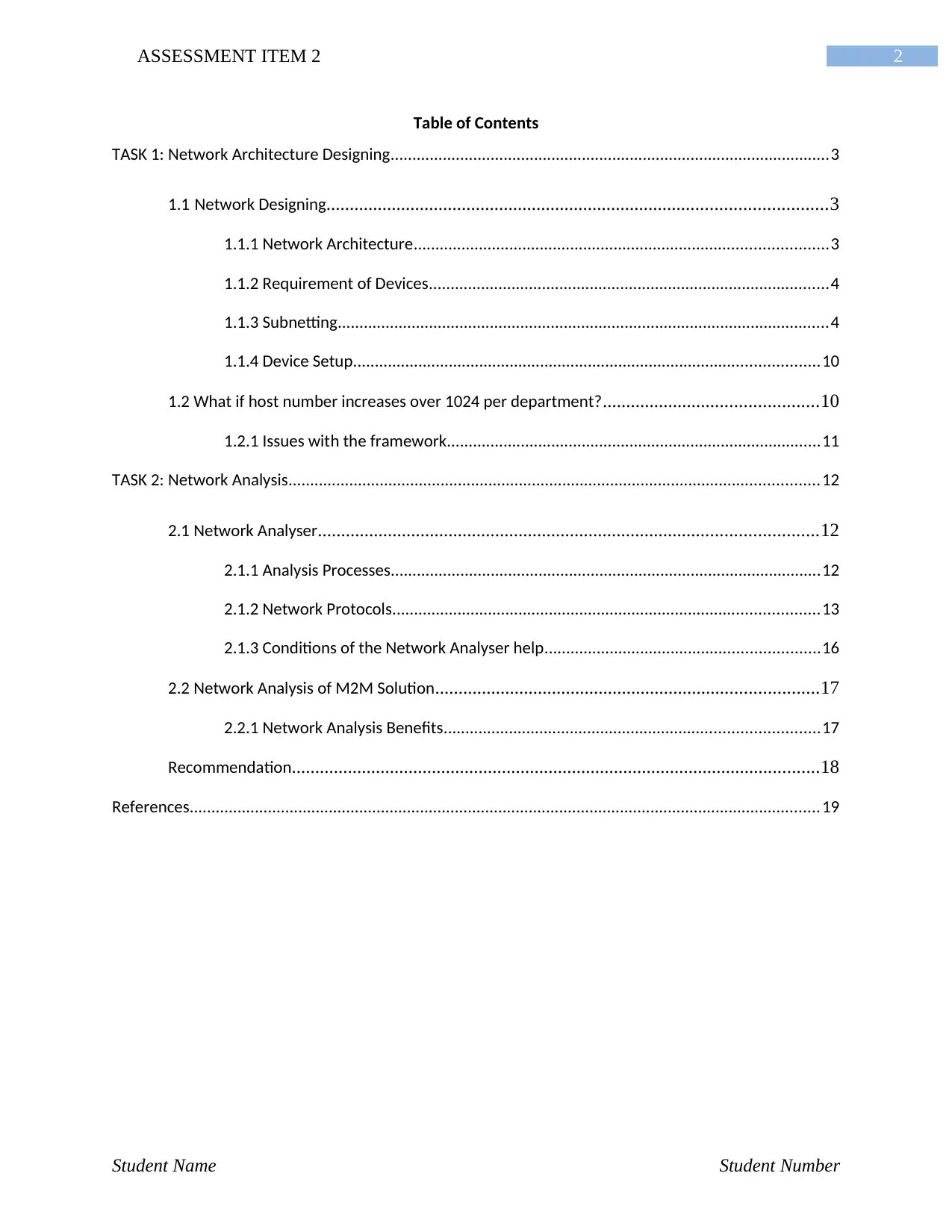
Table of Contents
TASK 1: Network Architecture Designing.....................................................................................................3
1.1 Network Designing...........................................................................................................3
1.1.1 Network Architecture...............................................................................................3
1.1.2 Requirement of Devices............................................................................................4
1.1.3 Subnetting.................................................................................................................4
1.1.4 Device Setup...........................................................................................................10
1.2 What if host number increases over 1024 per department?..............................................10
1.2.1 Issues with the framework......................................................................................11
TASK 2: Network Analysis..........................................................................................................................12
2.1 Network Analyser...........................................................................................................12
2.1.1 Analysis Processes...................................................................................................12
2.1.2 Network Protocols..................................................................................................13
2.1.3 Conditions of the Network Analyser help...............................................................16
2.2 Network Analysis of M2M Solution..................................................................................17
2.2.1 Network Analysis Benefits......................................................................................17
Recommendation.................................................................................................................18
References.................................................................................................................................................19
Student Name Student Number
Table of Contents
TASK 1: Network Architecture Designing.....................................................................................................3
1.1 Network Designing...........................................................................................................3
1.1.1 Network Architecture...............................................................................................3
1.1.2 Requirement of Devices............................................................................................4
1.1.3 Subnetting.................................................................................................................4
1.1.4 Device Setup...........................................................................................................10
1.2 What if host number increases over 1024 per department?..............................................10
1.2.1 Issues with the framework......................................................................................11
TASK 2: Network Analysis..........................................................................................................................12
2.1 Network Analyser...........................................................................................................12
2.1.1 Analysis Processes...................................................................................................12
2.1.2 Network Protocols..................................................................................................13
2.1.3 Conditions of the Network Analyser help...............................................................16
2.2 Network Analysis of M2M Solution..................................................................................17
2.2.1 Network Analysis Benefits......................................................................................17
Recommendation.................................................................................................................18
References.................................................................................................................................................19
Student Name Student Number
⊘ This is a preview!⊘
Do you want full access?
Subscribe today to unlock all pages.

Trusted by 1+ million students worldwide
3ASSESSMENT ITEM 2
TASK 1: Network Architecture Designing
1.1 Network Designing
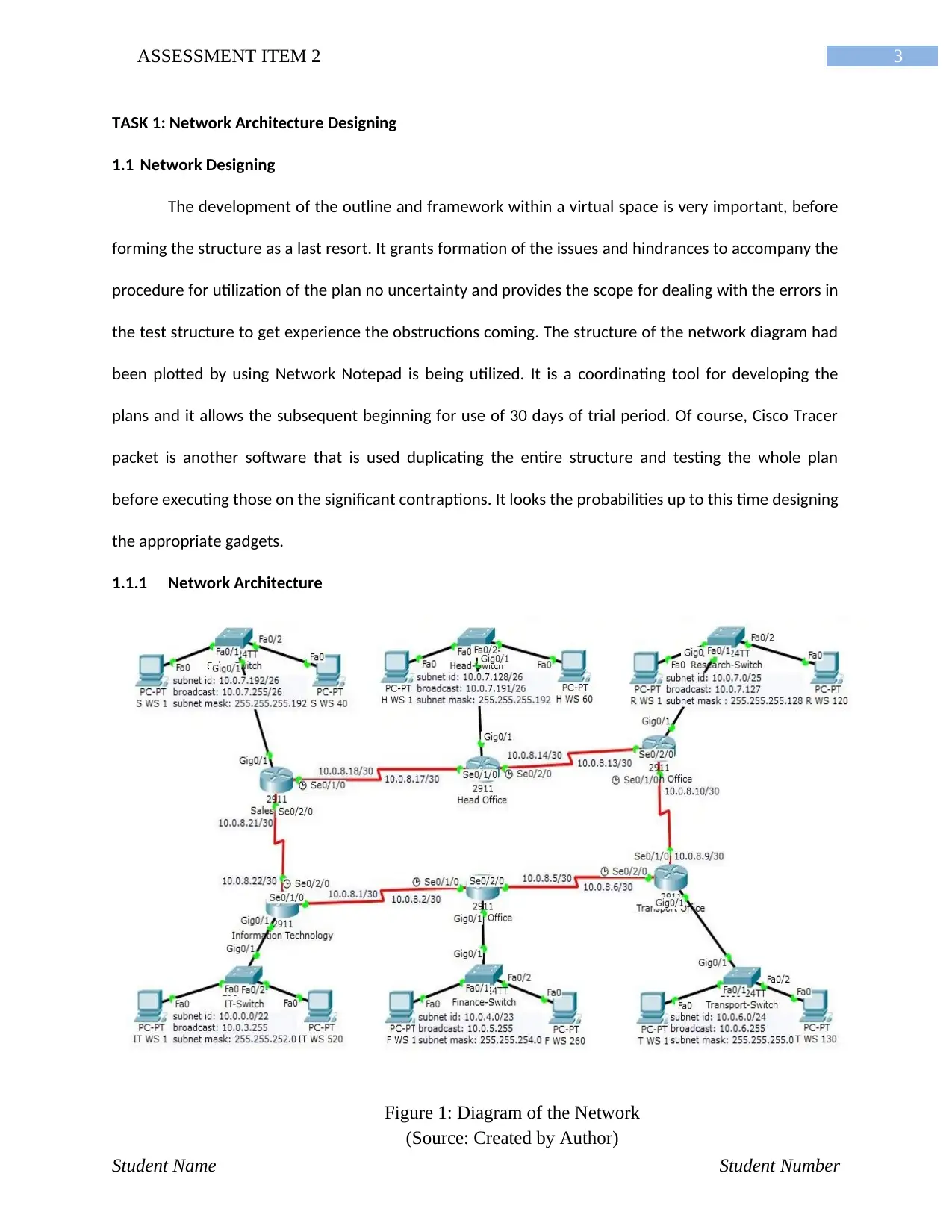
The development of the outline and framework within a virtual space is very important, before
forming the structure as a last resort. It grants formation of the issues and hindrances to accompany the
procedure for utilization of the plan no uncertainty and provides the scope for dealing with the errors in
the test structure to get experience the obstructions coming. The structure of the network diagram had
been plotted by using Network Notepad is being utilized. It is a coordinating tool for developing the
plans and it allows the subsequent beginning for use of 30 days of trial period. Of course, Cisco Tracer
packet is another software that is used duplicating the entire structure and testing the whole plan
before executing those on the significant contraptions. It looks the probabilities up to this time designing
the appropriate gadgets.
1.1.1 Network Architecture
Student Name Student Number
Figure 1: Diagram of the Network
(Source: Created by Author)
TASK 1: Network Architecture Designing
1.1 Network Designing
The development of the outline and framework within a virtual space is very important, before
forming the structure as a last resort. It grants formation of the issues and hindrances to accompany the
procedure for utilization of the plan no uncertainty and provides the scope for dealing with the errors in
the test structure to get experience the obstructions coming. The structure of the network diagram had
been plotted by using Network Notepad is being utilized. It is a coordinating tool for developing the
plans and it allows the subsequent beginning for use of 30 days of trial period. Of course, Cisco Tracer
packet is another software that is used duplicating the entire structure and testing the whole plan
before executing those on the significant contraptions. It looks the probabilities up to this time designing
the appropriate gadgets.
1.1.1 Network Architecture
Student Name Student Number
Figure 1: Diagram of the Network
(Source: Created by Author)
Paraphrase This Document
Need a fresh take? Get an instant paraphrase of this document with our AI Paraphraser
4ASSESSMENT ITEM 2
1.1.2 Requirement of Devices
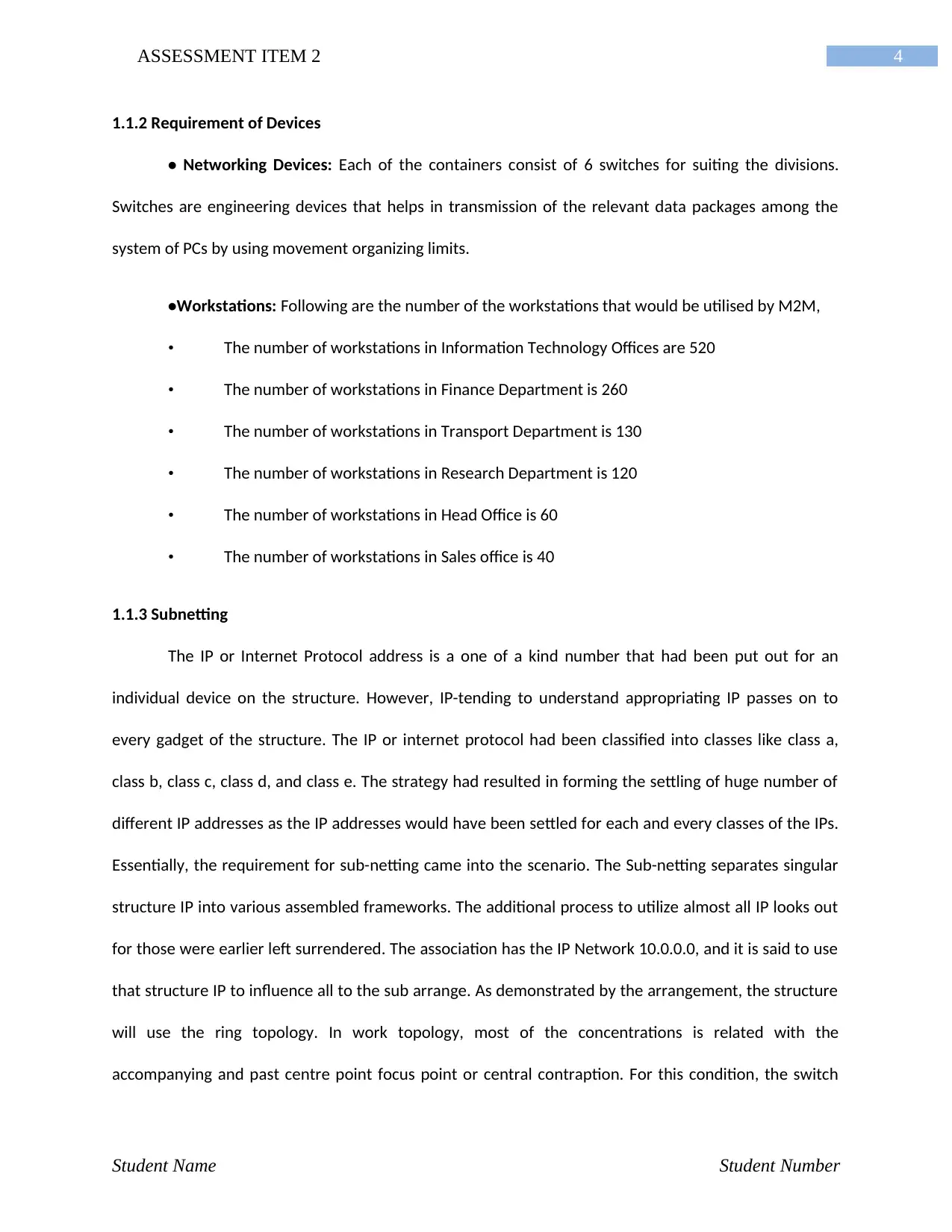
• Networking Devices: Each of the containers consist of 6 switches for suiting the divisions.
Switches are engineering devices that helps in transmission of the relevant data packages among the
system of PCs by using movement organizing limits.
•Workstations: Following are the number of the workstations that would be utilised by M2M,
• The number of workstations in Information Technology Offices are 520
• The number of workstations in Finance Department is 260
• The number of workstations in Transport Department is 130
• The number of workstations in Research Department is 120
• The number of workstations in Head Office is 60
• The number of workstations in Sales office is 40
1.1.3 Subnetting
The IP or Internet Protocol address is a one of a kind number that had been put out for an
individual device on the structure. However, IP-tending to understand appropriating IP passes on to
every gadget of the structure. The IP or internet protocol had been classified into classes like class a,
class b, class c, class d, and class e. The strategy had resulted in forming the settling of huge number of
different IP addresses as the IP addresses would have been settled for each and every classes of the IPs.
Essentially, the requirement for sub-netting came into the scenario. The Sub-netting separates singular
structure IP into various assembled frameworks. The additional process to utilize almost all IP looks out
for those were earlier left surrendered. The association has the IP Network 10.0.0.0, and it is said to use
that structure IP to influence all to the sub arrange. As demonstrated by the arrangement, the structure
will use the ring topology. In work topology, most of the concentrations is related with the
accompanying and past centre point focus point or central contraption. For this condition, the switch
Student Name Student Number
1.1.2 Requirement of Devices
• Networking Devices: Each of the containers consist of 6 switches for suiting the divisions.
Switches are engineering devices that helps in transmission of the relevant data packages among the
system of PCs by using movement organizing limits.
•Workstations: Following are the number of the workstations that would be utilised by M2M,
• The number of workstations in Information Technology Offices are 520
• The number of workstations in Finance Department is 260
• The number of workstations in Transport Department is 130
• The number of workstations in Research Department is 120
• The number of workstations in Head Office is 60
• The number of workstations in Sales office is 40
1.1.3 Subnetting
The IP or Internet Protocol address is a one of a kind number that had been put out for an
individual device on the structure. However, IP-tending to understand appropriating IP passes on to
every gadget of the structure. The IP or internet protocol had been classified into classes like class a,
class b, class c, class d, and class e. The strategy had resulted in forming the settling of huge number of
different IP addresses as the IP addresses would have been settled for each and every classes of the IPs.
Essentially, the requirement for sub-netting came into the scenario. The Sub-netting separates singular
structure IP into various assembled frameworks. The additional process to utilize almost all IP looks out
for those were earlier left surrendered. The association has the IP Network 10.0.0.0, and it is said to use
that structure IP to influence all to the sub arrange. As demonstrated by the arrangement, the structure
will use the ring topology. In work topology, most of the concentrations is related with the
accompanying and past centre point focus point or central contraption. For this condition, the switch
Student Name Student Number

5ASSESSMENT ITEM 2
organized in the head office is the essential contraption or switch that is related with five direct channels
with various switches orchestrated in diverse workplaces. In this way, 6 rooms and 5 conferred channels
demonstrate the requirement of the eleven sub-systems. The central strategy in sub-netting is to sort
the structure as showed by the essential IP addresses in dropping asking. In this way in the wake of
dealing with Information Technology office with 520 workstations for beginning with the out of context
things, by the back office with 260 workstations come next after that Transport office with 130
workstations come third, by then Research office with 120 workstations approach, after that the head
office with 60 workstations proceed with fifth, and the business office comes last at sixth. Starting there
forward, the five unmistakable correspondence channels are counted. The IP address is a 32-bit address,
it is limited to parts the shrouded section is the framework part, and the rest is the host part. The IP
address course of action begins at 00000000.00000000.00000000.00000000 , That is 0.0.0.0 and
Moreover, the last IP address is 11111111.11111111.11111111.11111111 That is 255.255.255.255 in
Decimal independently. There is an including strategy to pick how much bits to be gotten from the host
part. That is 2n-2. This gathers on the off chance that you get 2 bits you will get 22-2=2 IP addresses if 3
bits are gotten you will get 23-2=6 IP addresses.
Information Technology – 520 workstation
The given IP address is 10.0.0.0 or 00001010.00000000.00000000.00000000 in binary. If we
borrow 9 bits from right then we will get 29-2=512-2=510 IP Addresses and it is not possible to configure
520 workstation using 510 IPs. Therefore, 10 bits are borrowed from the right. Now, the available IPs are
210-2 = 1022
Information Technelogy Department
CIDR/22 Binary Decimal
Network ID 00001010.00000000.000000|00.00000000 10.0.0.0
First Available IP 00001010.00000000.000000|00.00000001 10.0.0.1
Last Available IP 00001010.00000000.000000|11.11111110 10.0.3.254
Broadcast Address 00001010.00000000.000000|11.11111111 10.0.3.255
Student Name Student Number
organized in the head office is the essential contraption or switch that is related with five direct channels
with various switches orchestrated in diverse workplaces. In this way, 6 rooms and 5 conferred channels
demonstrate the requirement of the eleven sub-systems. The central strategy in sub-netting is to sort
the structure as showed by the essential IP addresses in dropping asking. In this way in the wake of
dealing with Information Technology office with 520 workstations for beginning with the out of context
things, by the back office with 260 workstations come next after that Transport office with 130
workstations come third, by then Research office with 120 workstations approach, after that the head
office with 60 workstations proceed with fifth, and the business office comes last at sixth. Starting there
forward, the five unmistakable correspondence channels are counted. The IP address is a 32-bit address,
it is limited to parts the shrouded section is the framework part, and the rest is the host part. The IP
address course of action begins at 00000000.00000000.00000000.00000000 , That is 0.0.0.0 and
Moreover, the last IP address is 11111111.11111111.11111111.11111111 That is 255.255.255.255 in
Decimal independently. There is an including strategy to pick how much bits to be gotten from the host
part. That is 2n-2. This gathers on the off chance that you get 2 bits you will get 22-2=2 IP addresses if 3
bits are gotten you will get 23-2=6 IP addresses.
Information Technology – 520 workstation
The given IP address is 10.0.0.0 or 00001010.00000000.00000000.00000000 in binary. If we
borrow 9 bits from right then we will get 29-2=512-2=510 IP Addresses and it is not possible to configure
520 workstation using 510 IPs. Therefore, 10 bits are borrowed from the right. Now, the available IPs are
210-2 = 1022
Information Technelogy Department
CIDR/22 Binary Decimal
Network ID 00001010.00000000.000000|00.00000000 10.0.0.0
First Available IP 00001010.00000000.000000|00.00000001 10.0.0.1
Last Available IP 00001010.00000000.000000|11.11111110 10.0.3.254
Broadcast Address 00001010.00000000.000000|11.11111111 10.0.3.255
Student Name Student Number
⊘ This is a preview!⊘
Do you want full access?
Subscribe today to unlock all pages.
Trusted by 1+ million students worldwide
6ASSESSMENT ITEM 2
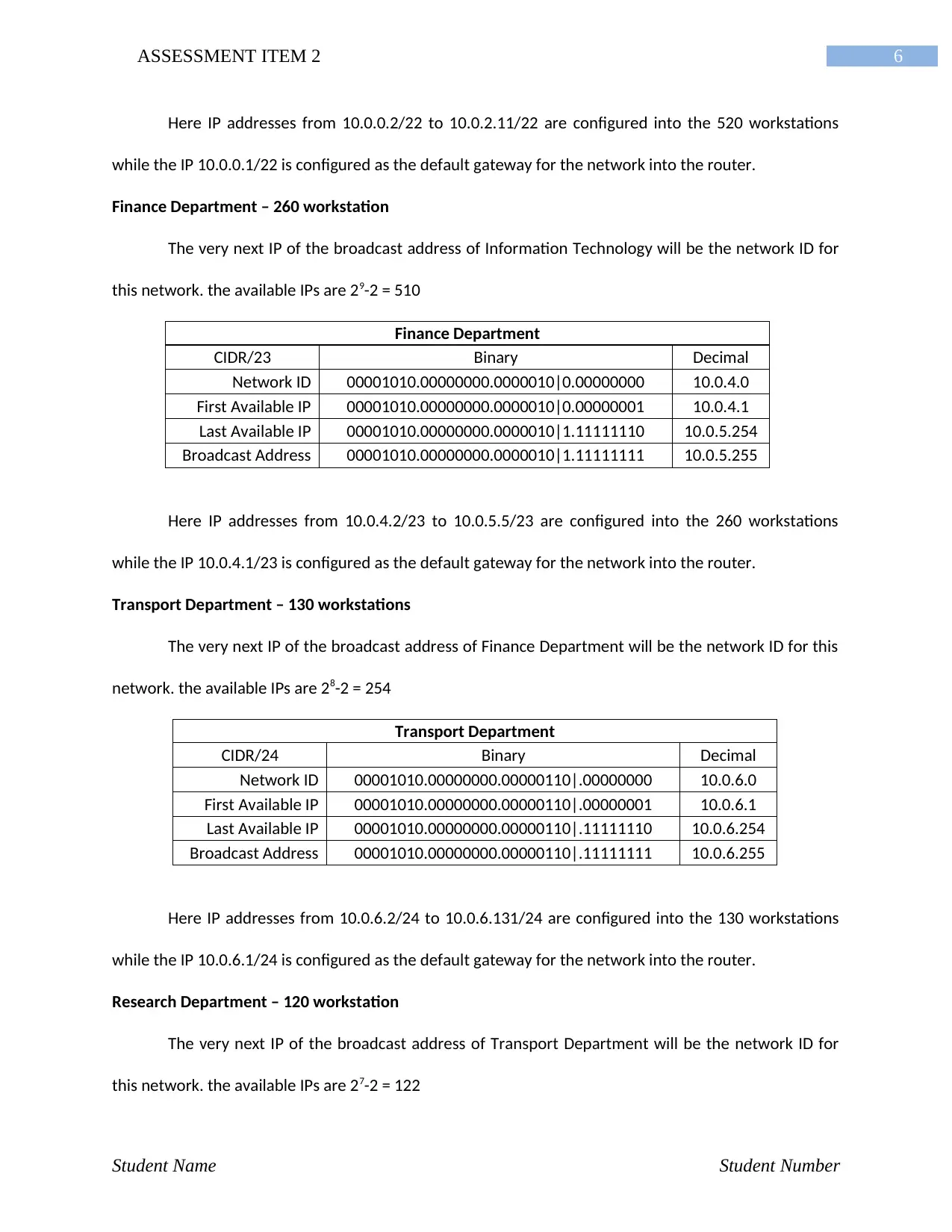
Here IP addresses from 10.0.0.2/22 to 10.0.2.11/22 are configured into the 520 workstations
while the IP 10.0.0.1/22 is configured as the default gateway for the network into the router.
Finance Department – 260 workstation
The very next IP of the broadcast address of Information Technology will be the network ID for
this network. the available IPs are 29-2 = 510
Finance Department
CIDR/23 Binary Decimal
Network ID 00001010.00000000.0000010|0.00000000 10.0.4.0
First Available IP 00001010.00000000.0000010|0.00000001 10.0.4.1
Last Available IP 00001010.00000000.0000010|1.11111110 10.0.5.254
Broadcast Address 00001010.00000000.0000010|1.11111111 10.0.5.255
Here IP addresses from 10.0.4.2/23 to 10.0.5.5/23 are configured into the 260 workstations
while the IP 10.0.4.1/23 is configured as the default gateway for the network into the router.
Transport Department – 130 workstations
The very next IP of the broadcast address of Finance Department will be the network ID for this
network. the available IPs are 28-2 = 254
Transport Department
CIDR/24 Binary Decimal
Network ID 00001010.00000000.00000110|.00000000 10.0.6.0
First Available IP 00001010.00000000.00000110|.00000001 10.0.6.1
Last Available IP 00001010.00000000.00000110|.11111110 10.0.6.254
Broadcast Address 00001010.00000000.00000110|.11111111 10.0.6.255
Here IP addresses from 10.0.6.2/24 to 10.0.6.131/24 are configured into the 130 workstations
while the IP 10.0.6.1/24 is configured as the default gateway for the network into the router.
Research Department – 120 workstation
The very next IP of the broadcast address of Transport Department will be the network ID for
this network. the available IPs are 27-2 = 122
Student Name Student Number
Here IP addresses from 10.0.0.2/22 to 10.0.2.11/22 are configured into the 520 workstations
while the IP 10.0.0.1/22 is configured as the default gateway for the network into the router.
Finance Department – 260 workstation
The very next IP of the broadcast address of Information Technology will be the network ID for
this network. the available IPs are 29-2 = 510
Finance Department
CIDR/23 Binary Decimal
Network ID 00001010.00000000.0000010|0.00000000 10.0.4.0
First Available IP 00001010.00000000.0000010|0.00000001 10.0.4.1
Last Available IP 00001010.00000000.0000010|1.11111110 10.0.5.254
Broadcast Address 00001010.00000000.0000010|1.11111111 10.0.5.255
Here IP addresses from 10.0.4.2/23 to 10.0.5.5/23 are configured into the 260 workstations
while the IP 10.0.4.1/23 is configured as the default gateway for the network into the router.
Transport Department – 130 workstations
The very next IP of the broadcast address of Finance Department will be the network ID for this
network. the available IPs are 28-2 = 254
Transport Department
CIDR/24 Binary Decimal
Network ID 00001010.00000000.00000110|.00000000 10.0.6.0
First Available IP 00001010.00000000.00000110|.00000001 10.0.6.1
Last Available IP 00001010.00000000.00000110|.11111110 10.0.6.254
Broadcast Address 00001010.00000000.00000110|.11111111 10.0.6.255
Here IP addresses from 10.0.6.2/24 to 10.0.6.131/24 are configured into the 130 workstations
while the IP 10.0.6.1/24 is configured as the default gateway for the network into the router.
Research Department – 120 workstation
The very next IP of the broadcast address of Transport Department will be the network ID for
this network. the available IPs are 27-2 = 122
Student Name Student Number
Paraphrase This Document
Need a fresh take? Get an instant paraphrase of this document with our AI Paraphraser
7ASSESSMENT ITEM 2
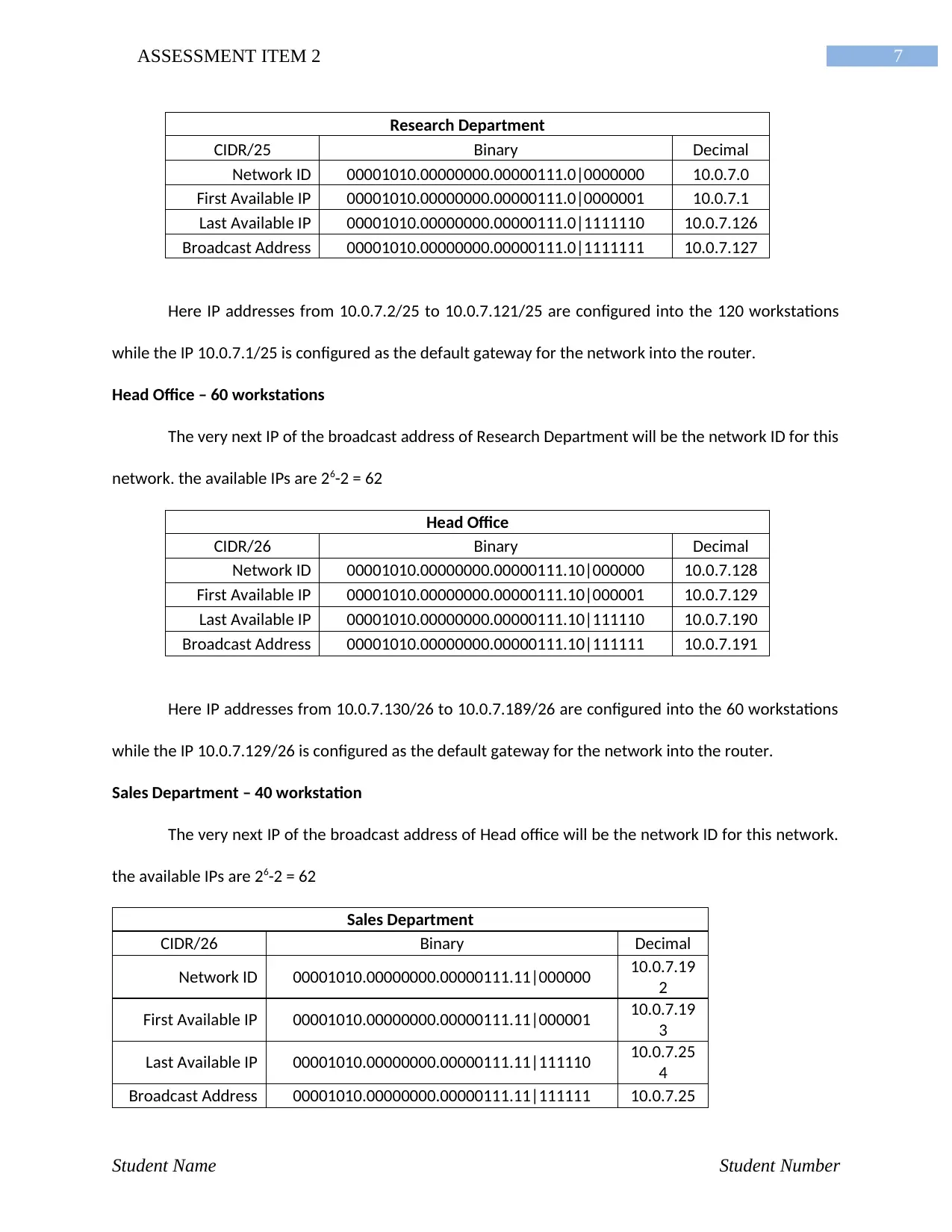
Research Department
CIDR/25 Binary Decimal
Network ID 00001010.00000000.00000111.0|0000000 10.0.7.0
First Available IP 00001010.00000000.00000111.0|0000001 10.0.7.1
Last Available IP 00001010.00000000.00000111.0|1111110 10.0.7.126
Broadcast Address 00001010.00000000.00000111.0|1111111 10.0.7.127
Here IP addresses from 10.0.7.2/25 to 10.0.7.121/25 are configured into the 120 workstations
while the IP 10.0.7.1/25 is configured as the default gateway for the network into the router.
Head Office – 60 workstations
The very next IP of the broadcast address of Research Department will be the network ID for this
network. the available IPs are 26-2 = 62
Head Office
CIDR/26 Binary Decimal
Network ID 00001010.00000000.00000111.10|000000 10.0.7.128
First Available IP 00001010.00000000.00000111.10|000001 10.0.7.129
Last Available IP 00001010.00000000.00000111.10|111110 10.0.7.190
Broadcast Address 00001010.00000000.00000111.10|111111 10.0.7.191
Here IP addresses from 10.0.7.130/26 to 10.0.7.189/26 are configured into the 60 workstations
while the IP 10.0.7.129/26 is configured as the default gateway for the network into the router.
Sales Department – 40 workstation
The very next IP of the broadcast address of Head office will be the network ID for this network.
the available IPs are 26-2 = 62
Sales Department
CIDR/26 Binary Decimal
Network ID 00001010.00000000.00000111.11|000000 10.0.7.19
2
First Available IP 00001010.00000000.00000111.11|000001 10.0.7.19
3
Last Available IP 00001010.00000000.00000111.11|111110 10.0.7.25
4
Broadcast Address 00001010.00000000.00000111.11|111111 10.0.7.25
Student Name Student Number
Research Department
CIDR/25 Binary Decimal
Network ID 00001010.00000000.00000111.0|0000000 10.0.7.0
First Available IP 00001010.00000000.00000111.0|0000001 10.0.7.1
Last Available IP 00001010.00000000.00000111.0|1111110 10.0.7.126
Broadcast Address 00001010.00000000.00000111.0|1111111 10.0.7.127
Here IP addresses from 10.0.7.2/25 to 10.0.7.121/25 are configured into the 120 workstations
while the IP 10.0.7.1/25 is configured as the default gateway for the network into the router.
Head Office – 60 workstations
The very next IP of the broadcast address of Research Department will be the network ID for this
network. the available IPs are 26-2 = 62
Head Office
CIDR/26 Binary Decimal
Network ID 00001010.00000000.00000111.10|000000 10.0.7.128
First Available IP 00001010.00000000.00000111.10|000001 10.0.7.129
Last Available IP 00001010.00000000.00000111.10|111110 10.0.7.190
Broadcast Address 00001010.00000000.00000111.10|111111 10.0.7.191
Here IP addresses from 10.0.7.130/26 to 10.0.7.189/26 are configured into the 60 workstations
while the IP 10.0.7.129/26 is configured as the default gateway for the network into the router.
Sales Department – 40 workstation
The very next IP of the broadcast address of Head office will be the network ID for this network.
the available IPs are 26-2 = 62
Sales Department
CIDR/26 Binary Decimal
Network ID 00001010.00000000.00000111.11|000000 10.0.7.19
2
First Available IP 00001010.00000000.00000111.11|000001 10.0.7.19
3
Last Available IP 00001010.00000000.00000111.11|111110 10.0.7.25
4
Broadcast Address 00001010.00000000.00000111.11|111111 10.0.7.25
Student Name Student Number
8ASSESSMENT ITEM 2
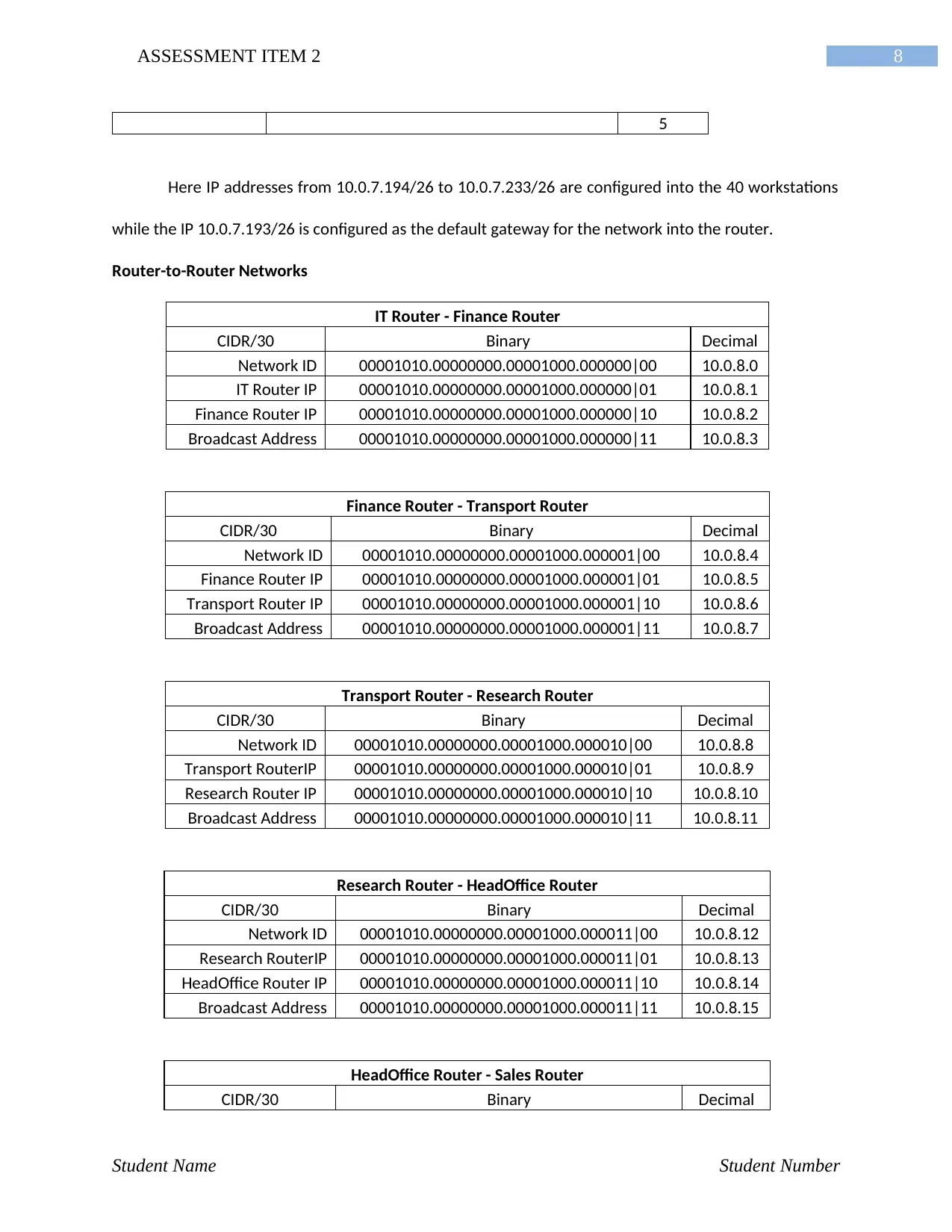
5
Here IP addresses from 10.0.7.194/26 to 10.0.7.233/26 are configured into the 40 workstations
while the IP 10.0.7.193/26 is configured as the default gateway for the network into the router.
Router-to-Router Networks
IT Router - Finance Router
CIDR/30 Binary Decimal
Network ID 00001010.00000000.00001000.000000|00 10.0.8.0
IT Router IP 00001010.00000000.00001000.000000|01 10.0.8.1
Finance Router IP 00001010.00000000.00001000.000000|10 10.0.8.2
Broadcast Address 00001010.00000000.00001000.000000|11 10.0.8.3
Finance Router - Transport Router
CIDR/30 Binary Decimal
Network ID 00001010.00000000.00001000.000001|00 10.0.8.4
Finance Router IP 00001010.00000000.00001000.000001|01 10.0.8.5
Transport Router IP 00001010.00000000.00001000.000001|10 10.0.8.6
Broadcast Address 00001010.00000000.00001000.000001|11 10.0.8.7
Transport Router - Research Router
CIDR/30 Binary Decimal
Network ID 00001010.00000000.00001000.000010|00 10.0.8.8
Transport RouterIP 00001010.00000000.00001000.000010|01 10.0.8.9
Research Router IP 00001010.00000000.00001000.000010|10 10.0.8.10
Broadcast Address 00001010.00000000.00001000.000010|11 10.0.8.11
Research Router - HeadOffice Router
CIDR/30 Binary Decimal
Network ID 00001010.00000000.00001000.000011|00 10.0.8.12
Research RouterIP 00001010.00000000.00001000.000011|01 10.0.8.13
HeadOffice Router IP 00001010.00000000.00001000.000011|10 10.0.8.14
Broadcast Address 00001010.00000000.00001000.000011|11 10.0.8.15
HeadOffice Router - Sales Router
CIDR/30 Binary Decimal
Student Name Student Number
5
Here IP addresses from 10.0.7.194/26 to 10.0.7.233/26 are configured into the 40 workstations
while the IP 10.0.7.193/26 is configured as the default gateway for the network into the router.
Router-to-Router Networks
IT Router - Finance Router
CIDR/30 Binary Decimal
Network ID 00001010.00000000.00001000.000000|00 10.0.8.0
IT Router IP 00001010.00000000.00001000.000000|01 10.0.8.1
Finance Router IP 00001010.00000000.00001000.000000|10 10.0.8.2
Broadcast Address 00001010.00000000.00001000.000000|11 10.0.8.3
Finance Router - Transport Router
CIDR/30 Binary Decimal
Network ID 00001010.00000000.00001000.000001|00 10.0.8.4
Finance Router IP 00001010.00000000.00001000.000001|01 10.0.8.5
Transport Router IP 00001010.00000000.00001000.000001|10 10.0.8.6
Broadcast Address 00001010.00000000.00001000.000001|11 10.0.8.7
Transport Router - Research Router
CIDR/30 Binary Decimal
Network ID 00001010.00000000.00001000.000010|00 10.0.8.8
Transport RouterIP 00001010.00000000.00001000.000010|01 10.0.8.9
Research Router IP 00001010.00000000.00001000.000010|10 10.0.8.10
Broadcast Address 00001010.00000000.00001000.000010|11 10.0.8.11
Research Router - HeadOffice Router
CIDR/30 Binary Decimal
Network ID 00001010.00000000.00001000.000011|00 10.0.8.12
Research RouterIP 00001010.00000000.00001000.000011|01 10.0.8.13
HeadOffice Router IP 00001010.00000000.00001000.000011|10 10.0.8.14
Broadcast Address 00001010.00000000.00001000.000011|11 10.0.8.15
HeadOffice Router - Sales Router
CIDR/30 Binary Decimal
Student Name Student Number
⊘ This is a preview!⊘
Do you want full access?
Subscribe today to unlock all pages.
Trusted by 1+ million students worldwide
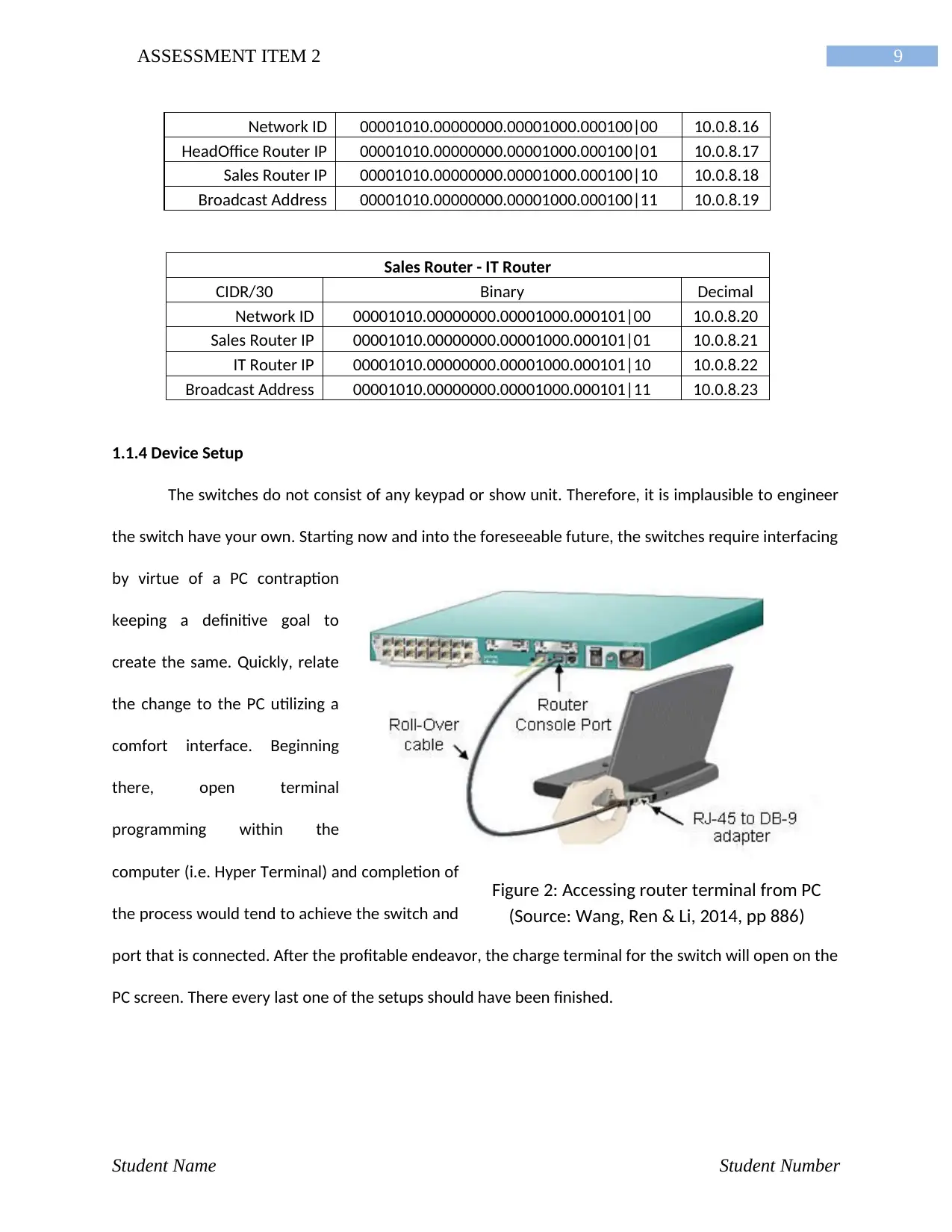
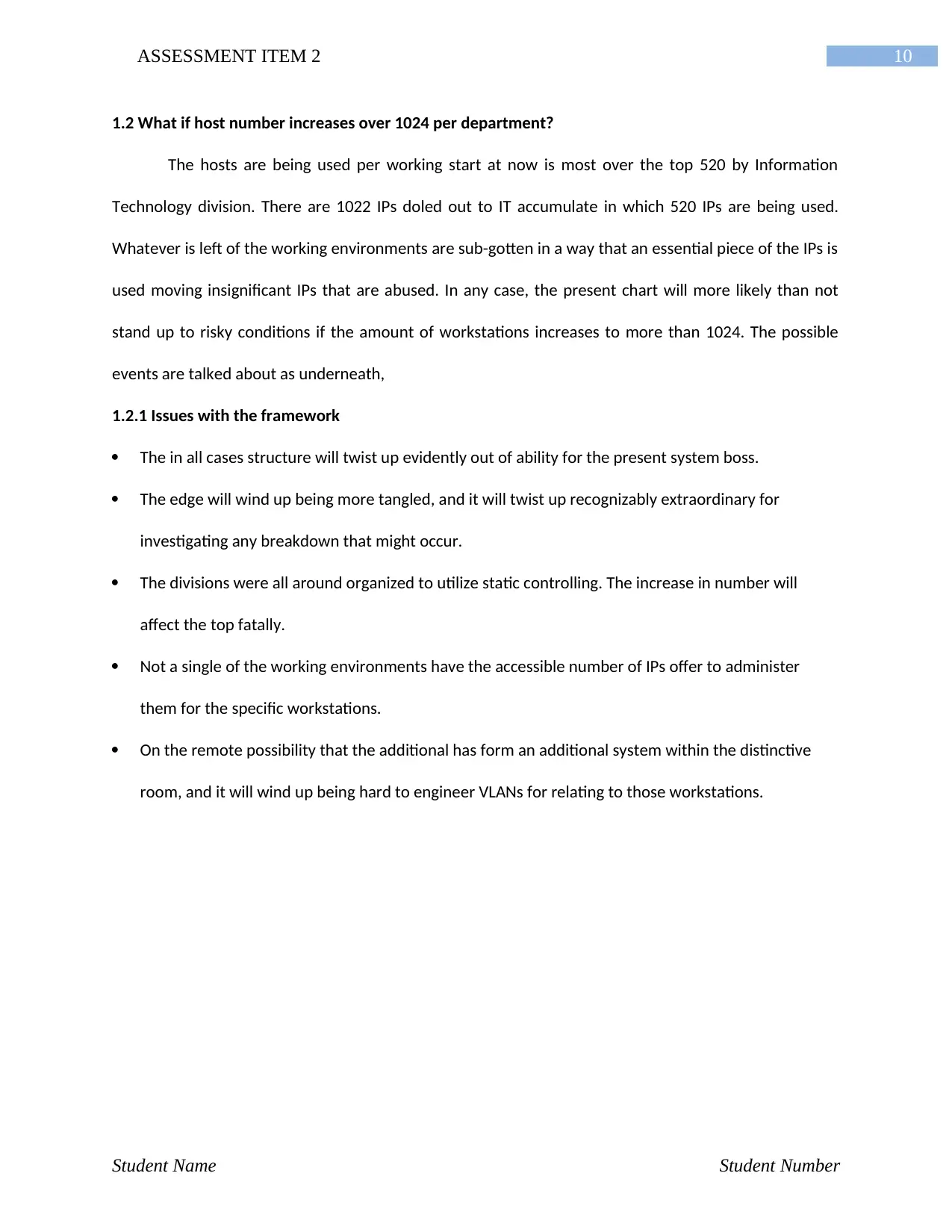
Figure 2: Accessing router terminal from PC
(Source: Wang, Ren & Li, 2014, pp 886)
9ASSESSMENT ITEM 2
Network ID 00001010.00000000.00001000.000100|00 10.0.8.16
HeadOffice Router IP 00001010.00000000.00001000.000100|01 10.0.8.17
Sales Router IP 00001010.00000000.00001000.000100|10 10.0.8.18
Broadcast Address 00001010.00000000.00001000.000100|11 10.0.8.19
Sales Router - IT Router
CIDR/30 Binary Decimal
Network ID 00001010.00000000.00001000.000101|00 10.0.8.20
Sales Router IP 00001010.00000000.00001000.000101|01 10.0.8.21
IT Router IP 00001010.00000000.00001000.000101|10 10.0.8.22
Broadcast Address 00001010.00000000.00001000.000101|11 10.0.8.23
1.1.4 Device Setup
The switches do not consist of any keypad or show unit. Therefore, it is implausible to engineer
the switch have your own. Starting now and into the foreseeable future, the switches require interfacing
by virtue of a PC contraption
keeping a definitive goal to
create the same. Quickly, relate
the change to the PC utilizing a
comfort interface. Beginning
there, open terminal
programming within the
computer (i.e. Hyper Terminal) and completion of
the process would tend to achieve the switch and
port that is connected. After the profitable endeavor, the charge terminal for the switch will open on the
PC screen. There every last one of the setups should have been finished.
Student Name Student Number
(Source: Wang, Ren & Li, 2014, pp 886)
9ASSESSMENT ITEM 2
Network ID 00001010.00000000.00001000.000100|00 10.0.8.16
HeadOffice Router IP 00001010.00000000.00001000.000100|01 10.0.8.17
Sales Router IP 00001010.00000000.00001000.000100|10 10.0.8.18
Broadcast Address 00001010.00000000.00001000.000100|11 10.0.8.19
Sales Router - IT Router
CIDR/30 Binary Decimal
Network ID 00001010.00000000.00001000.000101|00 10.0.8.20
Sales Router IP 00001010.00000000.00001000.000101|01 10.0.8.21
IT Router IP 00001010.00000000.00001000.000101|10 10.0.8.22
Broadcast Address 00001010.00000000.00001000.000101|11 10.0.8.23
1.1.4 Device Setup
The switches do not consist of any keypad or show unit. Therefore, it is implausible to engineer
the switch have your own. Starting now and into the foreseeable future, the switches require interfacing
by virtue of a PC contraption
keeping a definitive goal to
create the same. Quickly, relate
the change to the PC utilizing a
comfort interface. Beginning
there, open terminal
programming within the
computer (i.e. Hyper Terminal) and completion of
the process would tend to achieve the switch and
port that is connected. After the profitable endeavor, the charge terminal for the switch will open on the
PC screen. There every last one of the setups should have been finished.
Student Name Student Number
Paraphrase This Document
Need a fresh take? Get an instant paraphrase of this document with our AI Paraphraser
10ASSESSMENT ITEM 2
1.2 What if host number increases over 1024 per department?
The hosts are being used per working start at now is most over the top 520 by Information
Technology division. There are 1022 IPs doled out to IT accumulate in which 520 IPs are being used.
Whatever is left of the working environments are sub-gotten in a way that an essential piece of the IPs is
used moving insignificant IPs that are abused. In any case, the present chart will more likely than not
stand up to risky conditions if the amount of workstations increases to more than 1024. The possible
events are talked about as underneath,
1.2.1 Issues with the framework
The in all cases structure will twist up evidently out of ability for the present system boss.
The edge will wind up being more tangled, and it will twist up recognizably extraordinary for
investigating any breakdown that might occur.
The divisions were all around organized to utilize static controlling. The increase in number will
affect the top fatally.
Not a single of the working environments have the accessible number of IPs offer to administer
them for the specific workstations.
On the remote possibility that the additional has form an additional system within the distinctive
room, and it will wind up being hard to engineer VLANs for relating to those workstations.
Student Name Student Number
1.2 What if host number increases over 1024 per department?
The hosts are being used per working start at now is most over the top 520 by Information
Technology division. There are 1022 IPs doled out to IT accumulate in which 520 IPs are being used.
Whatever is left of the working environments are sub-gotten in a way that an essential piece of the IPs is
used moving insignificant IPs that are abused. In any case, the present chart will more likely than not
stand up to risky conditions if the amount of workstations increases to more than 1024. The possible
events are talked about as underneath,
1.2.1 Issues with the framework
The in all cases structure will twist up evidently out of ability for the present system boss.
The edge will wind up being more tangled, and it will twist up recognizably extraordinary for
investigating any breakdown that might occur.
The divisions were all around organized to utilize static controlling. The increase in number will
affect the top fatally.
Not a single of the working environments have the accessible number of IPs offer to administer
them for the specific workstations.
On the remote possibility that the additional has form an additional system within the distinctive
room, and it will wind up being hard to engineer VLANs for relating to those workstations.
Student Name Student Number
11ASSESSMENT ITEM 2
TASK 2: Network Analysis
2.1 Network Analyser
The network analyzer can be considered as a packet analyser or convention analyser and it is a
blend of programming and gear. Now and again stays just equipment contraptions can be presented in a
PC or framework to enhance protection against noxious development. Framework analysers can
supplement firewalls, hostile to contamination tasks, and spyware acknowledgment programs.
2.1.1 Analysis Processes
Analysis Processes are not planned to displace or harm the firewalls, antagonistic to infection
projects, or spyware acknowledgment programs. Regardless, the use of a system analyser despite
various countermeasures might restrain the likelihood that a strike may happen, and can energize fast
reaction in the event an assault begins. The beneath specified are the undertakings that a system
analyser performs:
Arrange alerts for described perils.
Distinguish anomalous levels of framework movement.
Do application-specific modules.
Give point by guide bits of knowledge toward present and late activity on the system.
Look for specific data strings in groups.
Monitoring information exchange utilized as a part of time.
Recognize package sources or objectives.
Show all estimations on a straightforward control board.
Test unfriendly to malware projects and pinpoint potential vulnerabilities
Student Name Student Number
TASK 2: Network Analysis
2.1 Network Analyser
The network analyzer can be considered as a packet analyser or convention analyser and it is a
blend of programming and gear. Now and again stays just equipment contraptions can be presented in a
PC or framework to enhance protection against noxious development. Framework analysers can
supplement firewalls, hostile to contamination tasks, and spyware acknowledgment programs.
2.1.1 Analysis Processes
Analysis Processes are not planned to displace or harm the firewalls, antagonistic to infection
projects, or spyware acknowledgment programs. Regardless, the use of a system analyser despite
various countermeasures might restrain the likelihood that a strike may happen, and can energize fast
reaction in the event an assault begins. The beneath specified are the undertakings that a system
analyser performs:
Arrange alerts for described perils.
Distinguish anomalous levels of framework movement.
Do application-specific modules.
Give point by guide bits of knowledge toward present and late activity on the system.
Look for specific data strings in groups.
Monitoring information exchange utilized as a part of time.
Recognize package sources or objectives.
Show all estimations on a straightforward control board.
Test unfriendly to malware projects and pinpoint potential vulnerabilities
Student Name Student Number
⊘ This is a preview!⊘
Do you want full access?
Subscribe today to unlock all pages.
Trusted by 1+ million students worldwide

1 out of 19


Related Documents


Your All-in-One AI-Powered Toolkit for Academic Success.
+13062052269
info@desklib.com
Available 24*7 on WhatsApp / Email
![[object Object]](/_next/static/media/star-bottom.7253800d.svg)
Unlock your academic potential
Copyright © 2020–2026 A2Z Services. All Rights Reserved. Developed and managed by ZUCOL.