Designing and Configuring a Network: Perth Network Implementation
VerifiedAdded on  2020/04/01
|21
|2328
|33
Practical Assignment
AI Summary
This assignment details the design and configuration of a local area network (LAN) for a Perth network, including two domains: one for normal users and another for administrators. The project involves implementing various technologies such as setting up DHCP servers for both user and administrator domains to automatically assign IP addresses, subnet masks, and default gateways. It also includes the configuration of web servers to provide web pages to connected clients via HTTP and DNS servers to enable users to access the web pages using domain names. The assignment outlines the network design, router configurations, and the steps involved in setting up the DHCP, web, and DNS servers. It also covers testing the functionality of these servers and setting domain privileges to ensure different authentication for users and administrators. The document provides a detailed, step-by-step guide to the implementation process, including network diagrams, code snippets, and screenshots to illustrate each configuration step. The project aims to create a centralized network infrastructure that improves resource sharing and reduces infrastructure costs for the organization.
DESIGNING AND CONFIGURING A NETWORK.
Submitted to
[lecture name]
Support for windows servers in the Local Area Network (LAN) with many domains.
[Date]
By
[Student name]
Table of Content
Submitted to
[lecture name]
Support for windows servers in the Local Area Network (LAN) with many domains.
[Date]
By
[Student name]
Table of Content
Paraphrase This Document
Need a fresh take? Get an instant paraphrase of this document with our AI Paraphraser

s
TECHNOLOGY USED..............................................................................................................................3
IMPLIMENTING TECHNOLOGIES.........................................................................................................4
Creation Of The Two Domains...............................................................................................................4
Setting up of a DHCP server...................................................................................................................8
i. Configuring the users DHCP server.............................................................................................8
ii. Configuring the administrators DHCP server............................................................................11
iii. Testing of the DHCP servers................................................................................................13
Setting up of the WEB servers...............................................................................................................14
Setting up of the DNS servers................................................................................................................15
Setting the domains privileges...............................................................................................................17
References.................................................................................................................................................21
TECHNOLOGY USED..............................................................................................................................3
IMPLIMENTING TECHNOLOGIES.........................................................................................................4
Creation Of The Two Domains...............................................................................................................4
Setting up of a DHCP server...................................................................................................................8
i. Configuring the users DHCP server.............................................................................................8
ii. Configuring the administrators DHCP server............................................................................11
iii. Testing of the DHCP servers................................................................................................13
Setting up of the WEB servers...............................................................................................................14
Setting up of the DNS servers................................................................................................................15
Setting the domains privileges...............................................................................................................17
References.................................................................................................................................................21

TECHNOLOGY USED
In the field of computing there are various technologies that are employed to improve on
the services delivery to the clients, among these technologies is installation of the organization
network which will enable centralization of the resources and also enables the organization to cut
on infrastructure cost since most of the resources are shared among the network users.
For our case there will be a network called Perth where init there will be two domains one for
normal users and the other one for the administrators ,this network will be implemented by help
of various technologies which will be as follows.
i. Setting up of a DHCP server.
ii. By creation of the two domains.
iii. By setting up of the WEB servers
iv. By setting up of the DNS servers.
The above technology will be used to install all the services to the local area network the
DNS server will be installed in the network to ensure that there is corresponding name that is
easily understood by the human being from the machine readable formats which is in form of IP
address .
Therefore this domain will enable the use of various names of some domains including
the emails sending and receiving service.
However the DHCP server will be implemented and it is in form of clients to servers
protocols and generally they are used in provision of the IP addresses to the network
clients ,other information provided by the DHCP includes the subnet masks and also the default
gateways as well.
Therefore the implementation of the DHCP server will enable quick and easy
configurations and also ease the work of the administrators to set and configure ip addresses for
each hosts in the network.
The network webs server will be installed this is to make it easy to provide web pages to
the connected clients by help of the HTTP and as the server responds the clients on the other side
get the web pages displayed .
In the field of computing there are various technologies that are employed to improve on
the services delivery to the clients, among these technologies is installation of the organization
network which will enable centralization of the resources and also enables the organization to cut
on infrastructure cost since most of the resources are shared among the network users.
For our case there will be a network called Perth where init there will be two domains one for
normal users and the other one for the administrators ,this network will be implemented by help
of various technologies which will be as follows.
i. Setting up of a DHCP server.
ii. By creation of the two domains.
iii. By setting up of the WEB servers
iv. By setting up of the DNS servers.
The above technology will be used to install all the services to the local area network the
DNS server will be installed in the network to ensure that there is corresponding name that is
easily understood by the human being from the machine readable formats which is in form of IP
address .
Therefore this domain will enable the use of various names of some domains including
the emails sending and receiving service.
However the DHCP server will be implemented and it is in form of clients to servers
protocols and generally they are used in provision of the IP addresses to the network
clients ,other information provided by the DHCP includes the subnet masks and also the default
gateways as well.
Therefore the implementation of the DHCP server will enable quick and easy
configurations and also ease the work of the administrators to set and configure ip addresses for
each hosts in the network.
The network webs server will be installed this is to make it easy to provide web pages to
the connected clients by help of the HTTP and as the server responds the clients on the other side
get the web pages displayed .
⊘ This is a preview!⊘
Do you want full access?
Subscribe today to unlock all pages.

Trusted by 1+ million students worldwide

In order to install the web server in the network the server machine will be installed with
web server’s applications like the apaches and the IIS.
Therefore below will be the technique to be used in order to do the implementation and the
various steps followed.
IMPLIMENTING TECHNOLOGIES.
During the Perth network implementation process all the technologies will be involved
where each will be fully implemented and tested, these technologies will be implemented
procedurally to ensure all the set services are met.
Below are the set steps to do the network implementation process where the various steps
followed will be clearly illustrated and the steps followed will be illustrated as follows.
Creation Of The Two Domains.
The very initial step of the network implementation will be the creation of the network
domains where these domains will be created by first creating the network design and then
configuring the two domains .
The network will consist of the administrators and the users domains where the administrator
domain will be 10.106.160.1/23 and mask address of 255.255.254.0 while the users domain will
be 10.107.170.1/23 and the mask address will be 255.255.254.0 respectively and the
implementation will take following procedures.
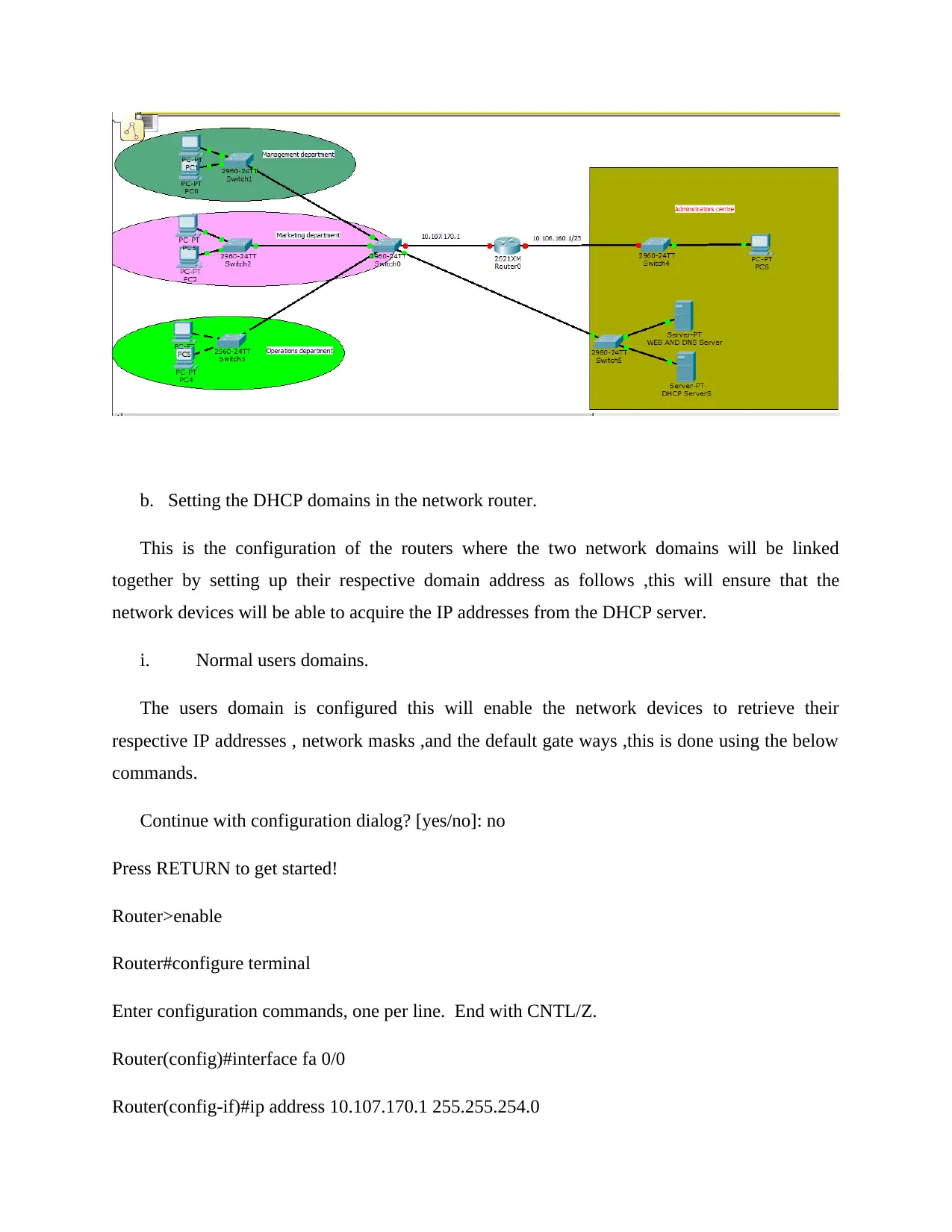
a. The network designing.
The below is the network design of the Perth network with the various sections as follows in
the design that is shown below where there will be the management department, marketing
department ,operations department and the administration location where all will form the
network design.
web server’s applications like the apaches and the IIS.
Therefore below will be the technique to be used in order to do the implementation and the
various steps followed.
IMPLIMENTING TECHNOLOGIES.
During the Perth network implementation process all the technologies will be involved
where each will be fully implemented and tested, these technologies will be implemented
procedurally to ensure all the set services are met.
Below are the set steps to do the network implementation process where the various steps
followed will be clearly illustrated and the steps followed will be illustrated as follows.
Creation Of The Two Domains.
The very initial step of the network implementation will be the creation of the network
domains where these domains will be created by first creating the network design and then
configuring the two domains .
The network will consist of the administrators and the users domains where the administrator
domain will be 10.106.160.1/23 and mask address of 255.255.254.0 while the users domain will
be 10.107.170.1/23 and the mask address will be 255.255.254.0 respectively and the
implementation will take following procedures.
a. The network designing.
The below is the network design of the Perth network with the various sections as follows in
the design that is shown below where there will be the management department, marketing
department ,operations department and the administration location where all will form the
network design.
Paraphrase This Document
Need a fresh take? Get an instant paraphrase of this document with our AI Paraphraser

b. Setting the DHCP domains in the network router.
This is the configuration of the routers where the two network domains will be linked
together by setting up their respective domain address as follows ,this will ensure that the
network devices will be able to acquire the IP addresses from the DHCP server.
i. Normal users domains.
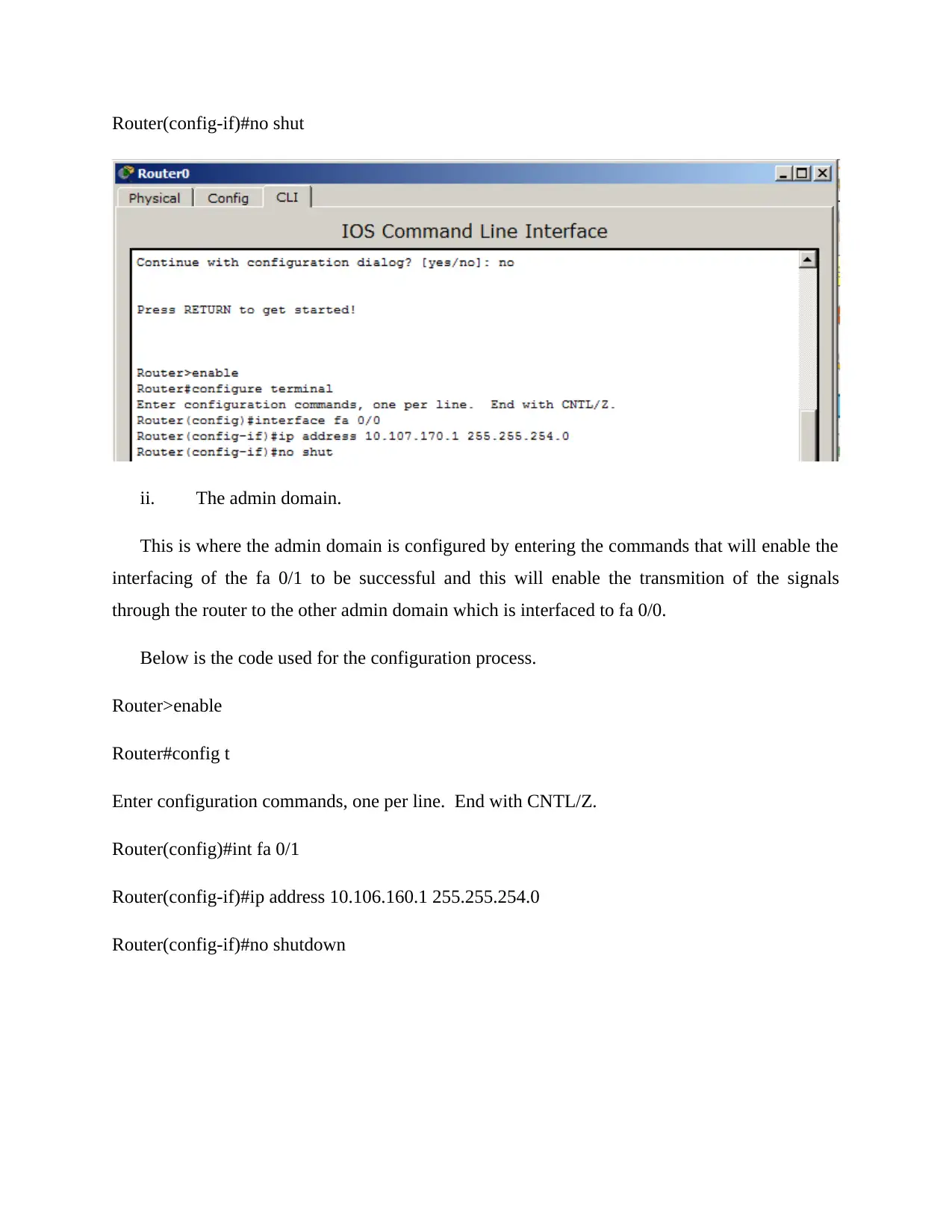
The users domain is configured this will enable the network devices to retrieve their
respective IP addresses , network masks ,and the default gate ways ,this is done using the below
commands.
Continue with configuration dialog? [yes/no]: no
Press RETURN to get started!
Router>enable
Router#configure terminal
Enter configuration commands, one per line. End with CNTL/Z.
Router(config)#interface fa 0/0
Router(config-if)#ip address 10.107.170.1 255.255.254.0
This is the configuration of the routers where the two network domains will be linked
together by setting up their respective domain address as follows ,this will ensure that the
network devices will be able to acquire the IP addresses from the DHCP server.
i. Normal users domains.
The users domain is configured this will enable the network devices to retrieve their
respective IP addresses , network masks ,and the default gate ways ,this is done using the below
commands.
Continue with configuration dialog? [yes/no]: no
Press RETURN to get started!
Router>enable
Router#configure terminal
Enter configuration commands, one per line. End with CNTL/Z.
Router(config)#interface fa 0/0
Router(config-if)#ip address 10.107.170.1 255.255.254.0

Router(config-if)#no shut
ii. The admin domain.
This is where the admin domain is configured by entering the commands that will enable the
interfacing of the fa 0/1 to be successful and this will enable the transmition of the signals
through the router to the other admin domain which is interfaced to fa 0/0.
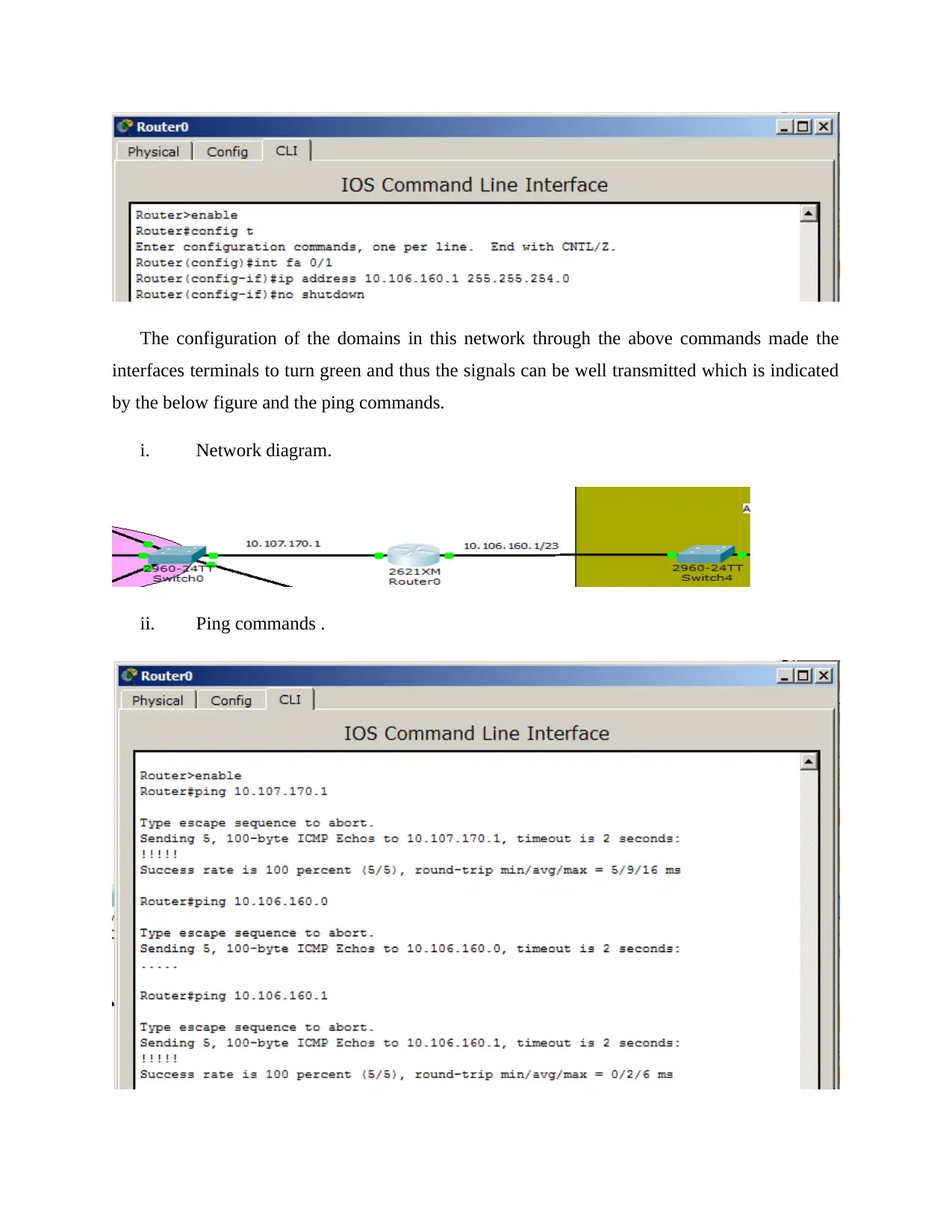
Below is the code used for the configuration process.
Router>enable
Router#config t
Enter configuration commands, one per line. End with CNTL/Z.
Router(config)#int fa 0/1
Router(config-if)#ip address 10.106.160.1 255.255.254.0
Router(config-if)#no shutdown
ii. The admin domain.
This is where the admin domain is configured by entering the commands that will enable the
interfacing of the fa 0/1 to be successful and this will enable the transmition of the signals
through the router to the other admin domain which is interfaced to fa 0/0.
Below is the code used for the configuration process.
Router>enable
Router#config t
Enter configuration commands, one per line. End with CNTL/Z.
Router(config)#int fa 0/1
Router(config-if)#ip address 10.106.160.1 255.255.254.0
Router(config-if)#no shutdown
⊘ This is a preview!⊘
Do you want full access?
Subscribe today to unlock all pages.

Trusted by 1+ million students worldwide

The configuration of the domains in this network through the above commands made the
interfaces terminals to turn green and thus the signals can be well transmitted which is indicated
by the below figure and the ping commands.
i. Network diagram.
ii. Ping commands .
interfaces terminals to turn green and thus the signals can be well transmitted which is indicated
by the below figure and the ping commands.
i. Network diagram.
ii. Ping commands .
Paraphrase This Document
Need a fresh take? Get an instant paraphrase of this document with our AI Paraphraser

Setting up of a DHCP server.
The Perth network will require the DHCP server ,this is to make it easy for the allocation
of the IP addresses to the various devices connected to the network.
However it makes the administration of the networks quite easy and thus it is
recommended for this network.
The implementation for this case will take two main steps which includes:
i. Configuring the users DHCP server.
The DHCP configuration for the use by the users domain will take some steps where it will
involve adding of the server on the Perth network and then giving the settings, below are the
steps followed to set up the DHCP server for the users.
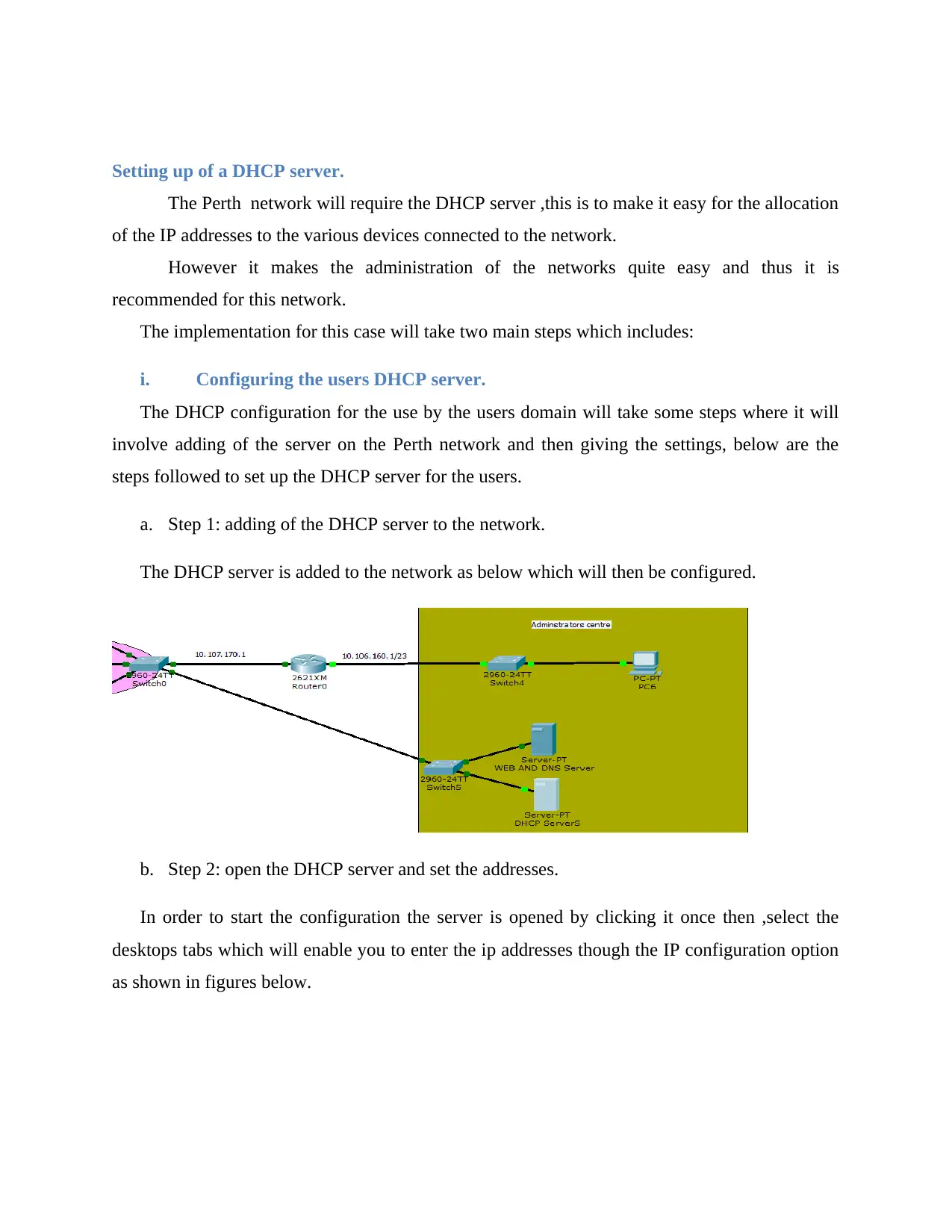
a. Step 1: adding of the DHCP server to the network.
The DHCP server is added to the network as below which will then be configured.
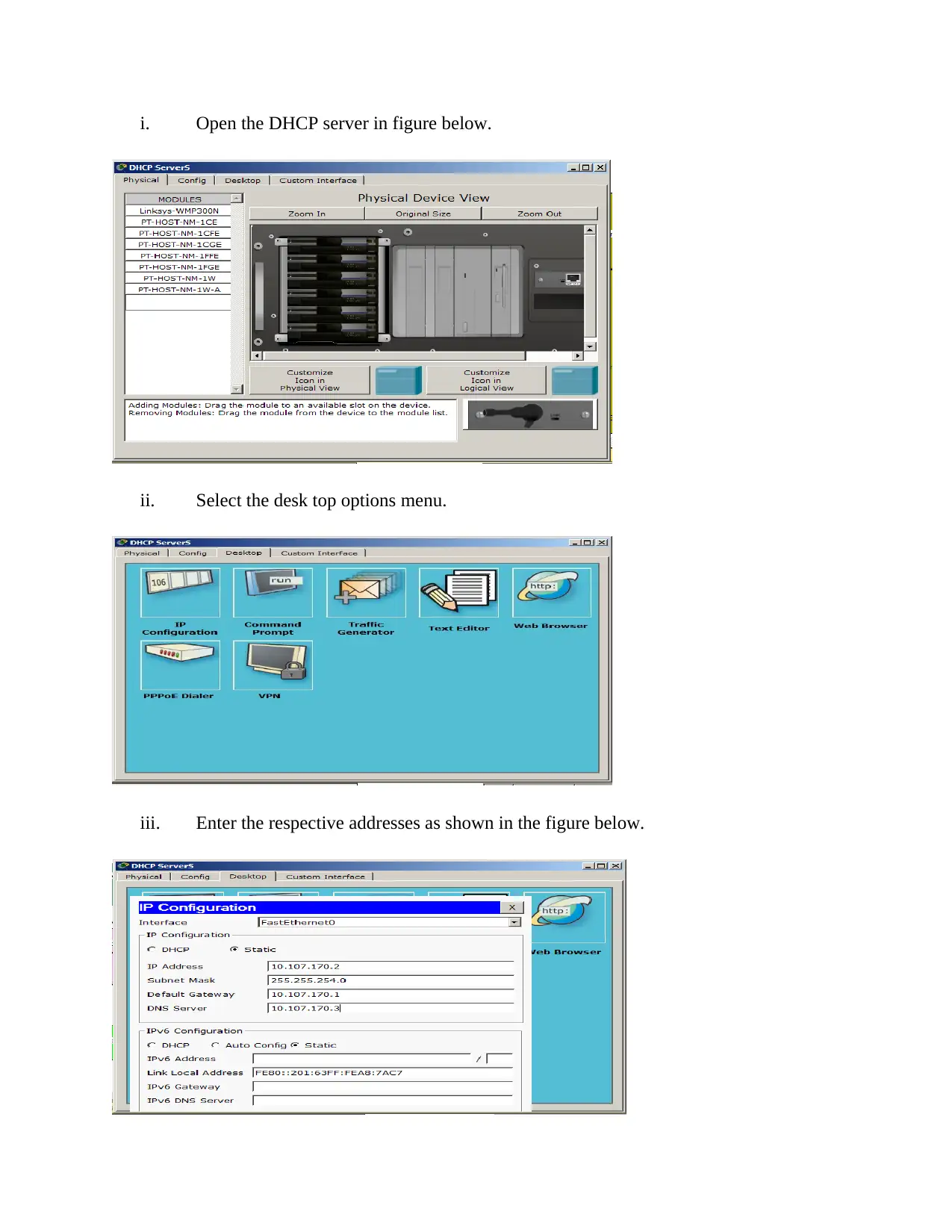
b. Step 2: open the DHCP server and set the addresses.
In order to start the configuration the server is opened by clicking it once then ,select the
desktops tabs which will enable you to enter the ip addresses though the IP configuration option
as shown in figures below.
The Perth network will require the DHCP server ,this is to make it easy for the allocation
of the IP addresses to the various devices connected to the network.
However it makes the administration of the networks quite easy and thus it is
recommended for this network.
The implementation for this case will take two main steps which includes:
i. Configuring the users DHCP server.
The DHCP configuration for the use by the users domain will take some steps where it will
involve adding of the server on the Perth network and then giving the settings, below are the
steps followed to set up the DHCP server for the users.
a. Step 1: adding of the DHCP server to the network.
The DHCP server is added to the network as below which will then be configured.
b. Step 2: open the DHCP server and set the addresses.
In order to start the configuration the server is opened by clicking it once then ,select the
desktops tabs which will enable you to enter the ip addresses though the IP configuration option
as shown in figures below.

i. Open the DHCP server in figure below.
ii. Select the desk top options menu.
iii. Enter the respective addresses as shown in the figure below.
ii. Select the desk top options menu.
iii. Enter the respective addresses as shown in the figure below.
⊘ This is a preview!⊘
Do you want full access?
Subscribe today to unlock all pages.

Trusted by 1+ million students worldwide

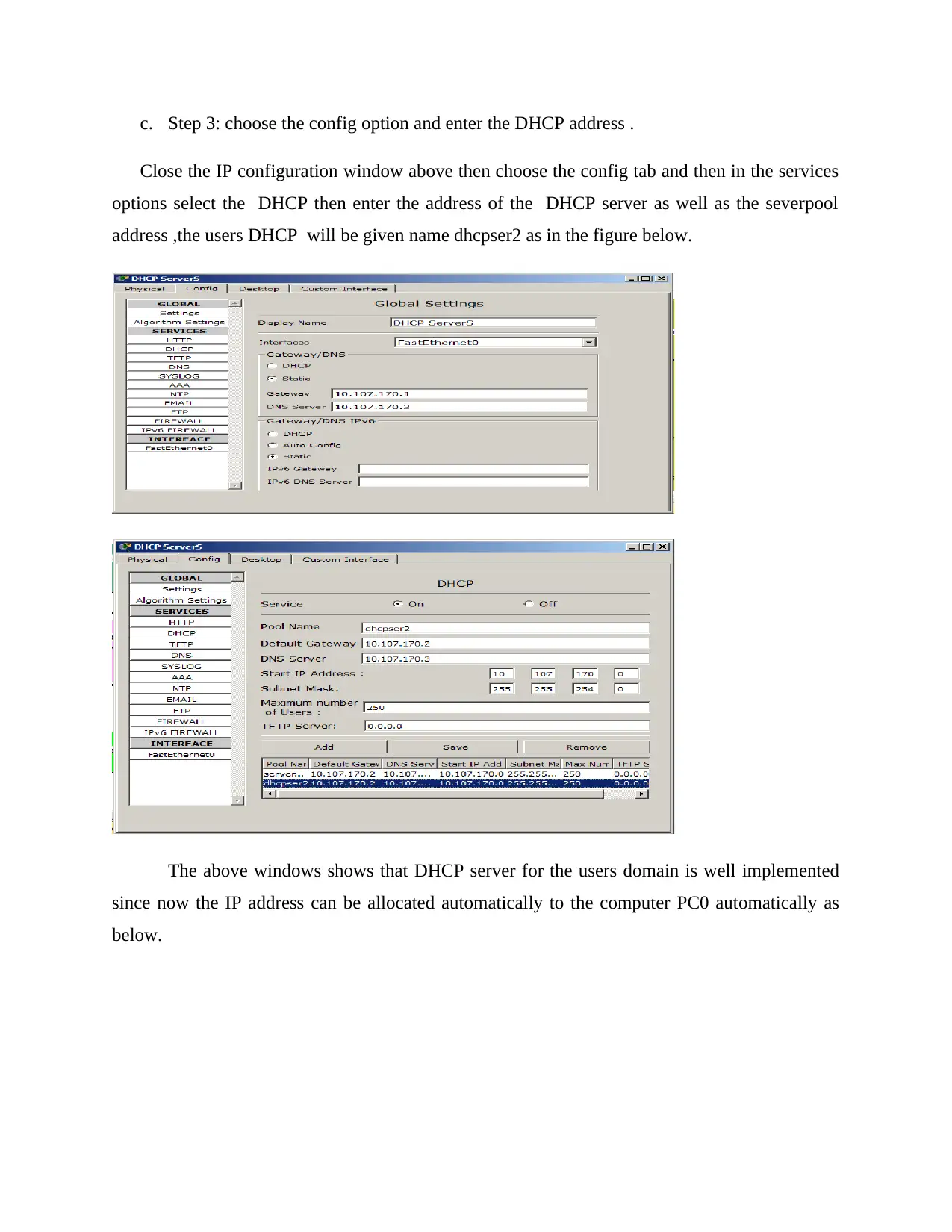
c. Step 3: choose the config option and enter the DHCP address .
Close the IP configuration window above then choose the config tab and then in the services
options select the DHCP then enter the address of the DHCP server as well as the severpool
address ,the users DHCP will be given name dhcpser2 as in the figure below.
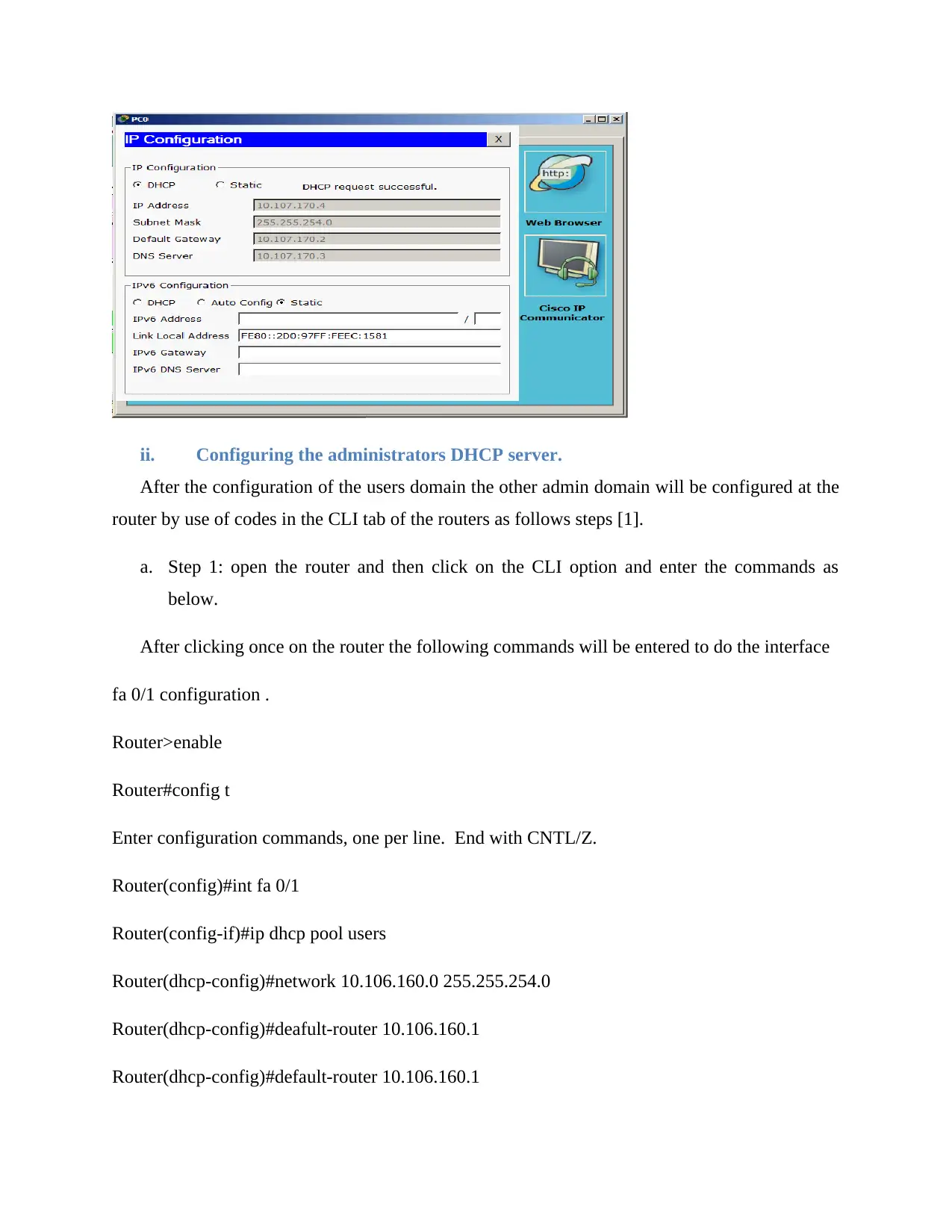
The above windows shows that DHCP server for the users domain is well implemented
since now the IP address can be allocated automatically to the computer PC0 automatically as
below.
Close the IP configuration window above then choose the config tab and then in the services
options select the DHCP then enter the address of the DHCP server as well as the severpool
address ,the users DHCP will be given name dhcpser2 as in the figure below.
The above windows shows that DHCP server for the users domain is well implemented
since now the IP address can be allocated automatically to the computer PC0 automatically as
below.
Paraphrase This Document
Need a fresh take? Get an instant paraphrase of this document with our AI Paraphraser

ii. Configuring the administrators DHCP server.
After the configuration of the users domain the other admin domain will be configured at the
router by use of codes in the CLI tab of the routers as follows steps [1].
a. Step 1: open the router and then click on the CLI option and enter the commands as
below.
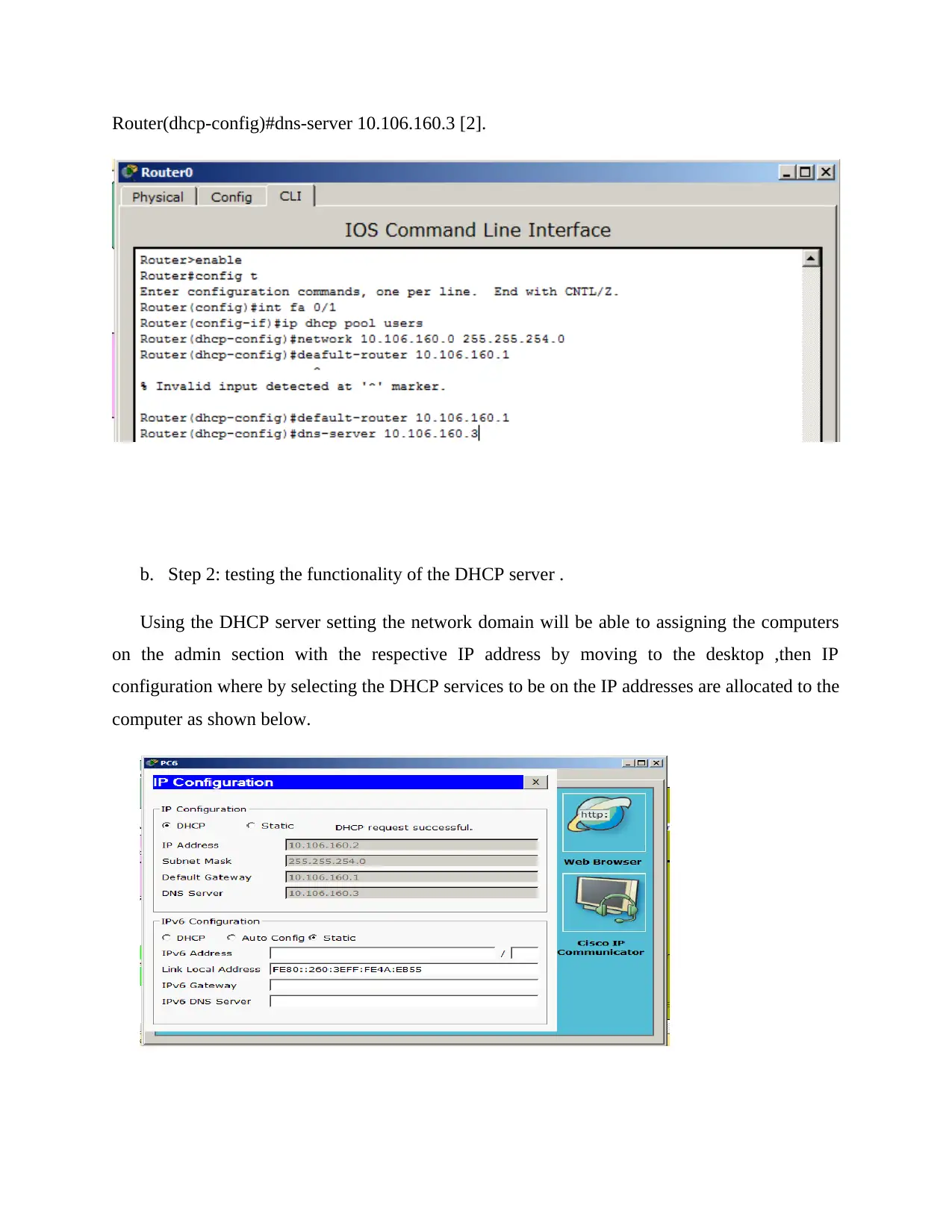
After clicking once on the router the following commands will be entered to do the interface
fa 0/1 configuration .
Router>enable
Router#config t
Enter configuration commands, one per line. End with CNTL/Z.
Router(config)#int fa 0/1
Router(config-if)#ip dhcp pool users
Router(dhcp-config)#network 10.106.160.0 255.255.254.0
Router(dhcp-config)#deafult-router 10.106.160.1
Router(dhcp-config)#default-router 10.106.160.1
After the configuration of the users domain the other admin domain will be configured at the
router by use of codes in the CLI tab of the routers as follows steps [1].
a. Step 1: open the router and then click on the CLI option and enter the commands as
below.
After clicking once on the router the following commands will be entered to do the interface
fa 0/1 configuration .
Router>enable
Router#config t
Enter configuration commands, one per line. End with CNTL/Z.
Router(config)#int fa 0/1
Router(config-if)#ip dhcp pool users
Router(dhcp-config)#network 10.106.160.0 255.255.254.0
Router(dhcp-config)#deafult-router 10.106.160.1
Router(dhcp-config)#default-router 10.106.160.1

Router(dhcp-config)#dns-server 10.106.160.3 [2].
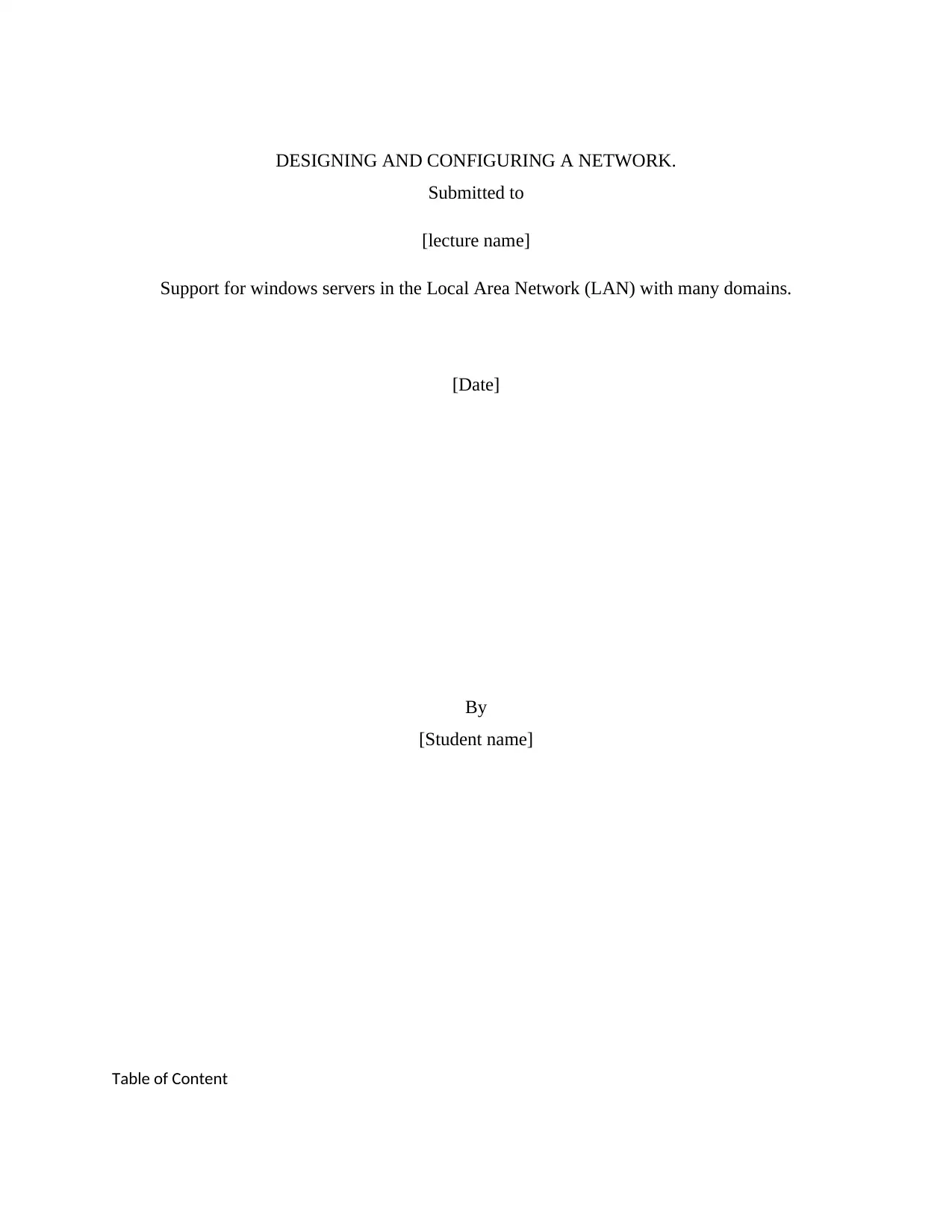
b. Step 2: testing the functionality of the DHCP server .
Using the DHCP server setting the network domain will be able to assigning the computers
on the admin section with the respective IP address by moving to the desktop ,then IP
configuration where by selecting the DHCP services to be on the IP addresses are allocated to the
computer as shown below.
b. Step 2: testing the functionality of the DHCP server .
Using the DHCP server setting the network domain will be able to assigning the computers
on the admin section with the respective IP address by moving to the desktop ,then IP
configuration where by selecting the DHCP services to be on the IP addresses are allocated to the
computer as shown below.
⊘ This is a preview!⊘
Do you want full access?
Subscribe today to unlock all pages.

Trusted by 1+ million students worldwide
1 out of 21
Related Documents
Your All-in-One AI-Powered Toolkit for Academic Success.
 +13062052269
info@desklib.com
Available 24*7 on WhatsApp / Email
Unlock your academic potential
Copyright © 2020–2026 A2Z Services. All Rights Reserved. Developed and managed by ZUCOL.