Detailed Report: Online Examination & Management System Development

Verified

Added on  2022/10/04

|14
|1142
|421
Report
AI Summary
This report details the design and analysis of an online examination and management system. It begins with an introduction highlighting the inefficiencies of traditional examination methods and the benefits of an online system, including cost-efficiency, increased capacity, and improved data security. The report outlines the project's scope, focusing on academic institutions, and includes a financial feasibility analysis and a project schedule. UML diagrams, such as use case, sequence, data flow, context, and entity-relationship diagrams, are utilized to illustrate the system's functionality and structure. Screen interfaces for the home, input, and report screens are presented to demonstrate user interaction. A Gantt chart is also included to represent the project's timeline. The report concludes by emphasizing the system's potential to meet stakeholder requirements and streamline examination processes, ultimately maximizing institutional profits by optimizing resource allocation. References to relevant academic literature are provided to support the report's findings.
Document Page
The Online Examinination & Management System
Student’s name
Institution
Location
Lecture’s Name
Date
tabler-icon-diamond-filled.svg

Paraphrase This Document

Need a fresh take? Get an instant paraphrase of this document with our AI Paraphraser
Document Page
Contents
1.0 Introduction...........................................................................................................................3
2.0 Validation.............................................................................................................................3
2.1 Benefits..................................................................................................................................3
3.0 Project scope..............................................................................................................................3
4.0 Finacial feasibility and schedule................................................................................................4
5.0 UML diagrams...........................................................................................................................4
5.1 Use case.................................................................................................................................4
5.2 Sequence diagram..................................................................................................................6
5.3 Data flow diagram.................................................................................................................7
5.4 Context diagram.....................................................................................................................8
6.0 Entity relationship diagram....................................................................................................9
6.1 Screen interfaces..................................................................................................................10
1. Home screen................................................................................................................10
2. Input screen.................................................................................................................11
3. Report screen...............................................................................................................12
6.2Gantt chart............................................................................................................................12
7.0 Conclusion...............................................................................................................................13
References......................................................................................................................................13
Document Page
1.0 Introduction
The key objecting of every learning institution is to ensure that the student gin the required skill
(Salmon, 2013). To ensure this is achieved, several assessment cats and tests have to be
administered. This process is tiresome if not properly handled. The traditional methods of
administering these exams are ineffective and inefficient since it consumes a lot of energy. The
proposed examination system will meet the requirements and solve the current challenges.
2.0 Validation
Based on the information from the introduction, this system will comprise of modules that will
enhance efficiency and ensure effectiveness. The efficiency will reduce the amount of work and
workforce enforced in administering examinations. The implementation of the proposed system
will ensure the process is properly handled.
2.1 Benefits
The advantages that are associated with the proposed system will overweigh the disadvantages of
the system to the institution. The target institution is the learning institution that has not
implemented an online system, more so the private institution whose aim is mainly in making
huge profits and attracting students. Below are the advantages associated with the proposed
system:
i. The system will ensure cost-efficiency. The system requires less employee who need to
be deployed for this process. The wages paid to their services will reduce greatly.
ii. The system’s capasity is vast compred to traditional methods. This is because the
system’s function can serve them simultaneously.
iii. The database that will be used will assist the institution in safeguarding their information.
This is because the information can be used in the future to make decisions and
references.
iv. Reliability- With comparison to personnel, the system will be accessible as long as there
is an internet connection. Man can be subject to being away from duty thus causing a stop
in the institution's operations.
Document Page
3.0 Project scope
The boundaries of this projected are constricted to an online examination & management system,
this system will is developed to serve academic and learning institutions in administering and
managing the examination information. The stakeholders of the system include the lecturers,
professors, the administrator and the students. The system will have a simple user interface that
will increase usability.
4.0 Finacial feasibility and schedule
TITLES COST
Technicians 140 $
Raw material 290 $
Summation 3890 $
The system schedule is as below
Services System
Systsem-rotations 1200
Referencing information 2200
Institution maintemance and other services 700
Accumulative amount 3900
This is a tabular representation of the financial feasibility of the system. This is a tabulation of
the cost of the entire project. The system use schedule, on the other hand, represents how the
system will be manipulated to perform the institution’s operations.
5.0 UML diagrams
The UML diagram is used as communication tools to show the properties and behavior of the
system to the developers and other stakeholders in the project (Dennis, Wixom and Tegarden,
2009).
5.1 Use case
tabler-icon-diamond-filled.svg

Paraphrase This Document

Need a fresh take? Get an instant paraphrase of this document with our AI Paraphraser
Document Page
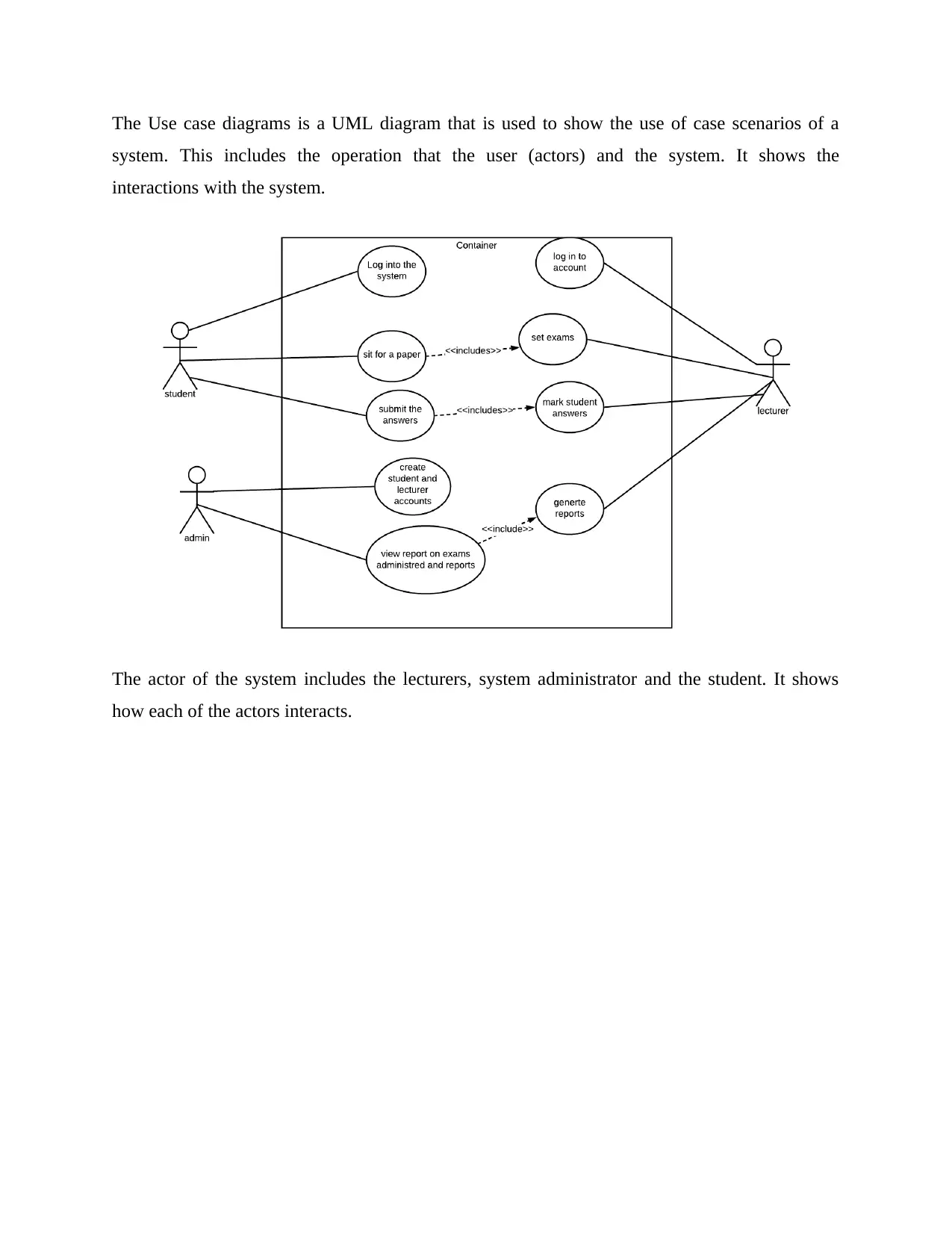
The Use case diagrams is a UML diagram that is used to show the use of case scenarios of a
system. This includes the operation that the user (actors) and the system. It shows the
interactions with the system.
The actor of the system includes the lecturers, system administrator and the student. It shows
how each of the actors interacts.
Document Page
5.2 Sequence diagram
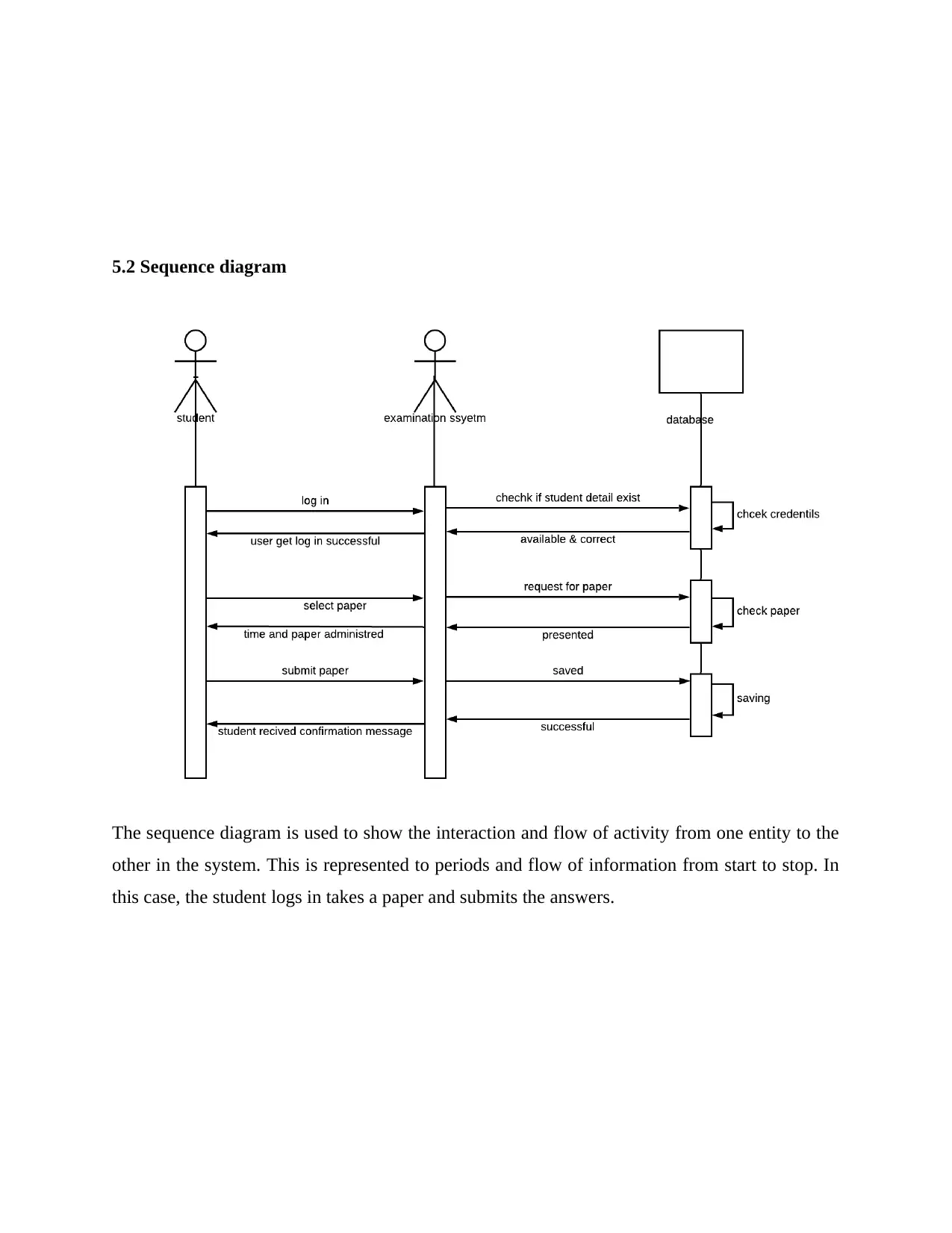
The sequence diagram is used to show the interaction and flow of activity from one entity to the
other in the system. This is represented to periods and flow of information from start to stop. In
this case, the student logs in takes a paper and submits the answers.
Document Page
5.3 Data flow diagram
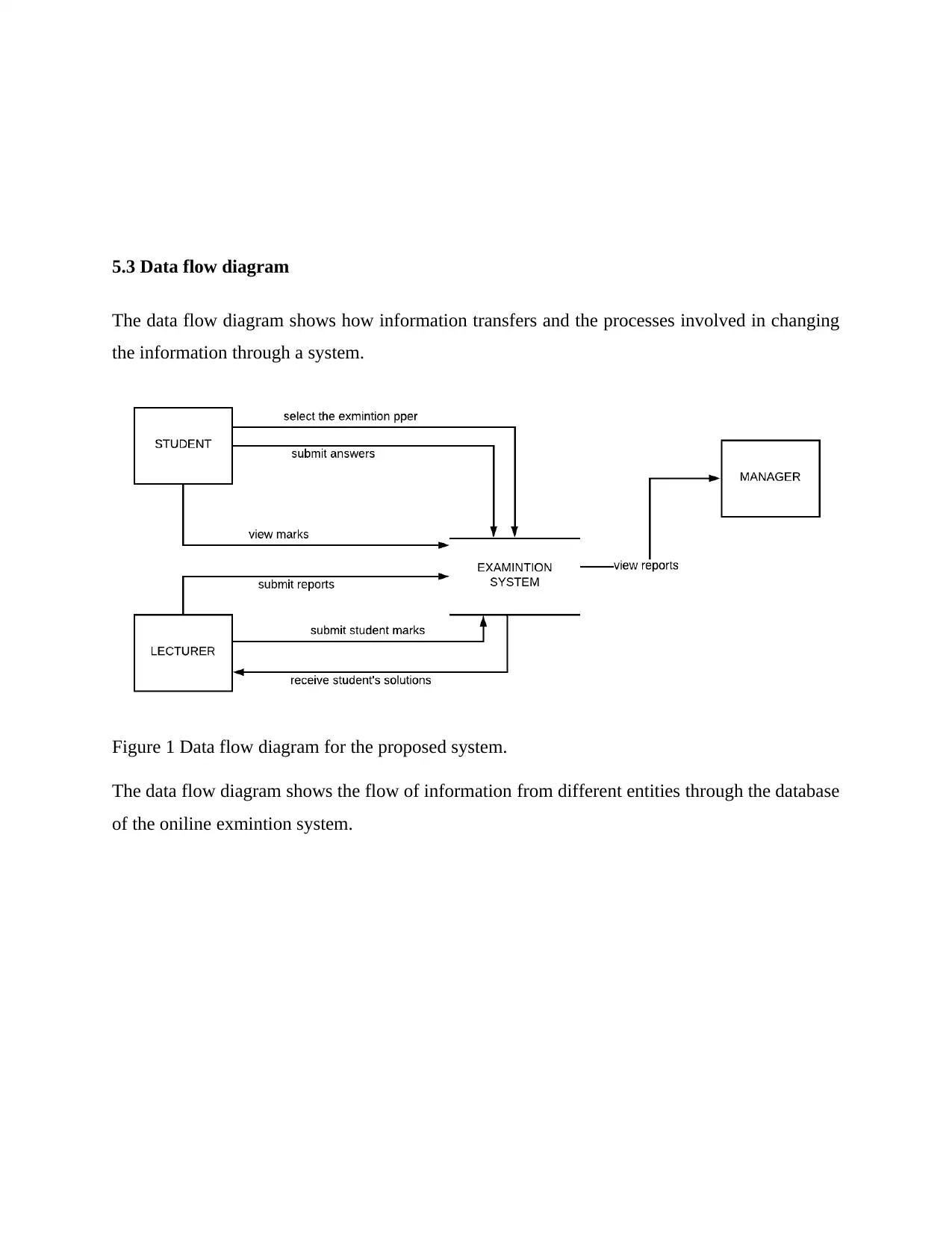
The data flow diagram shows how information transfers and the processes involved in changing
the information through a system.
Figure 1 Data flow diagram for the proposed system.
The data flow diagram shows the flow of information from different entities through the database
of the oniline exmintion system.
tabler-icon-diamond-filled.svg

Paraphrase This Document

Need a fresh take? Get an instant paraphrase of this document with our AI Paraphraser
Document Page
5.4 Context diagram
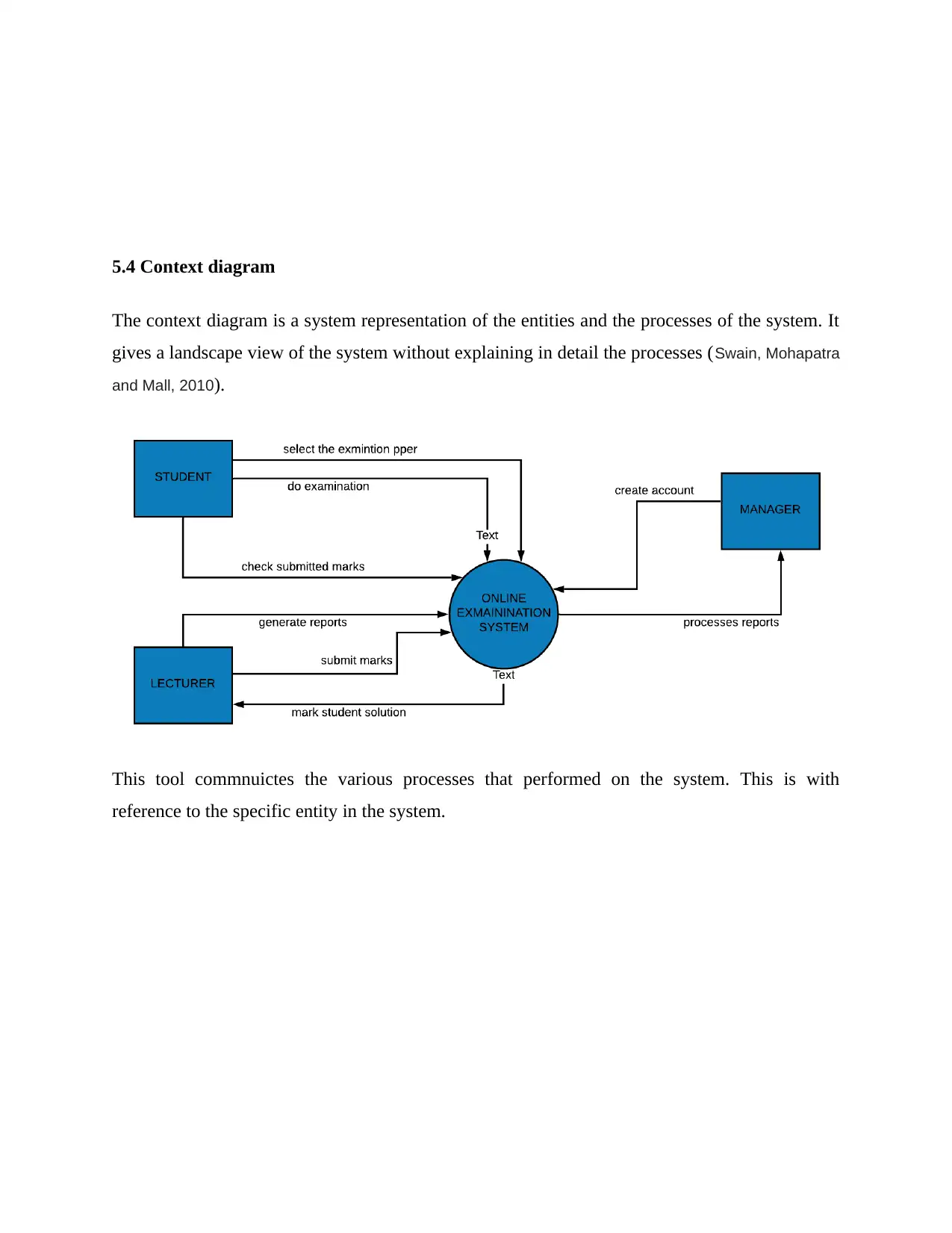
The context diagram is a system representation of the entities and the processes of the system. It
gives a landscape view of the system without explaining in detail the processes (Swain, Mohapatra
and Mall, 2010).
This tool commnuictes the various processes that performed on the system. This is with
reference to the specific entity in the system.
Document Page
6.0 Entity relationship diagram
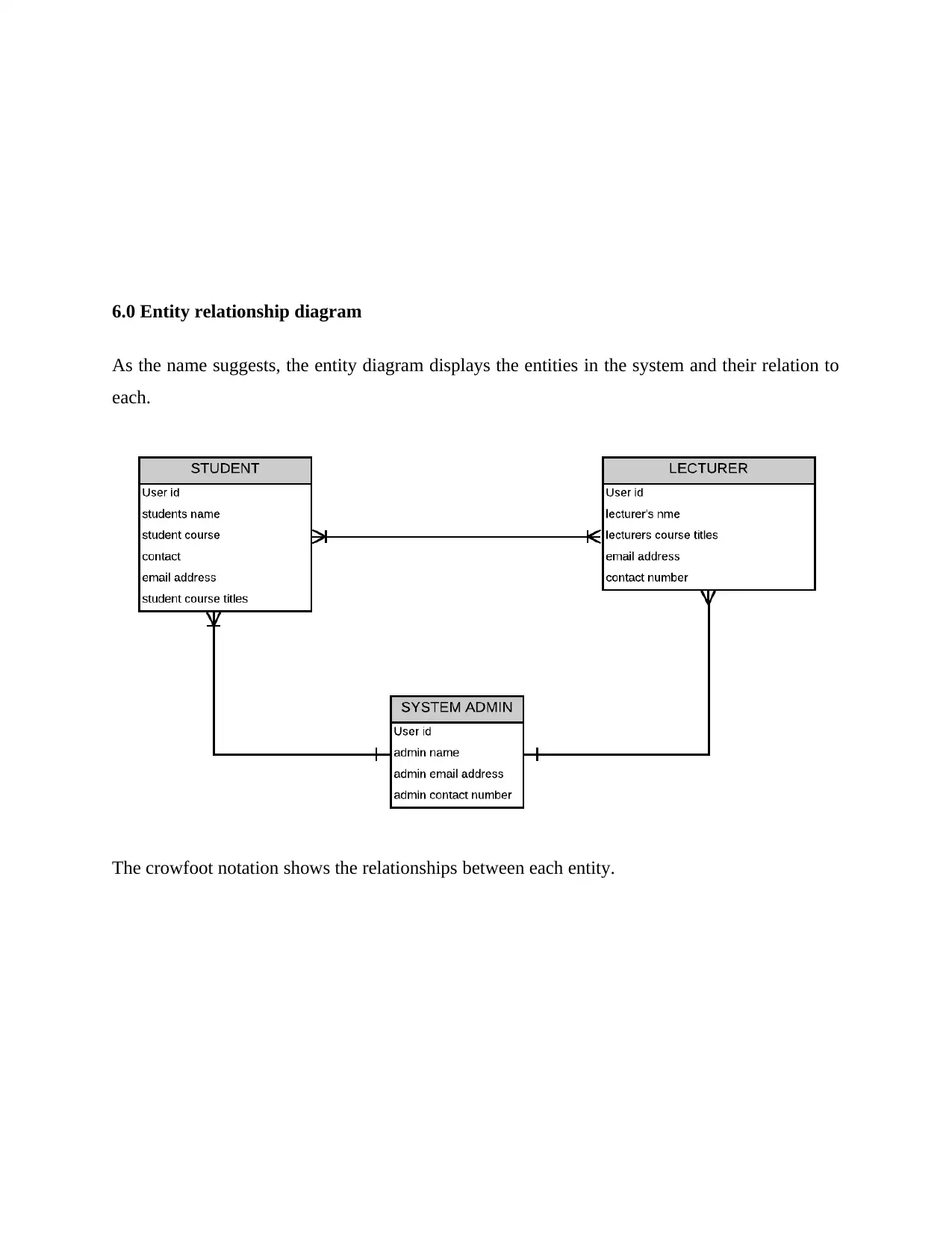
As the name suggests, the entity diagram displays the entities in the system and their relation to
each.
The crowfoot notation shows the relationships between each entity.
Document Page
6.1 Screen interfaces
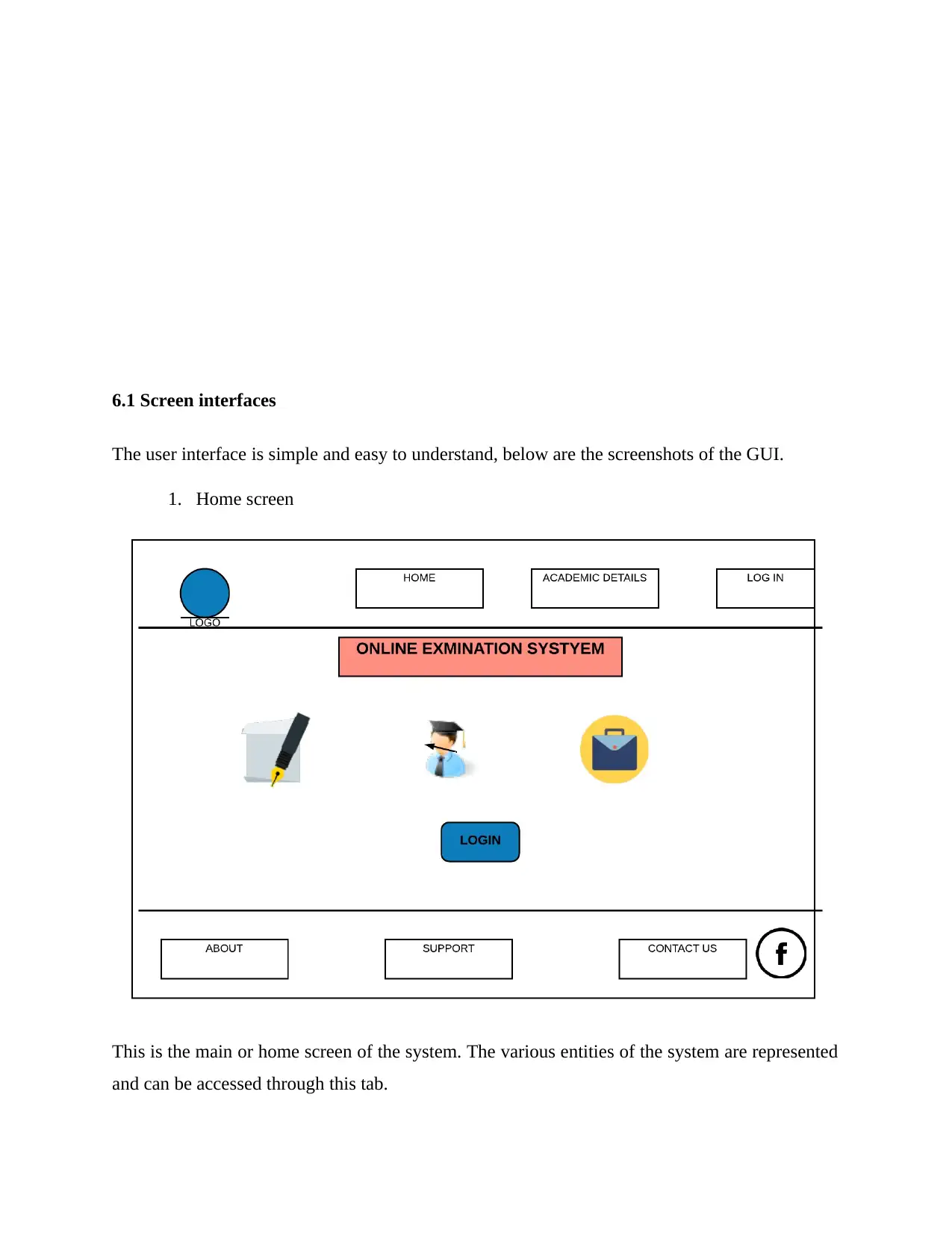
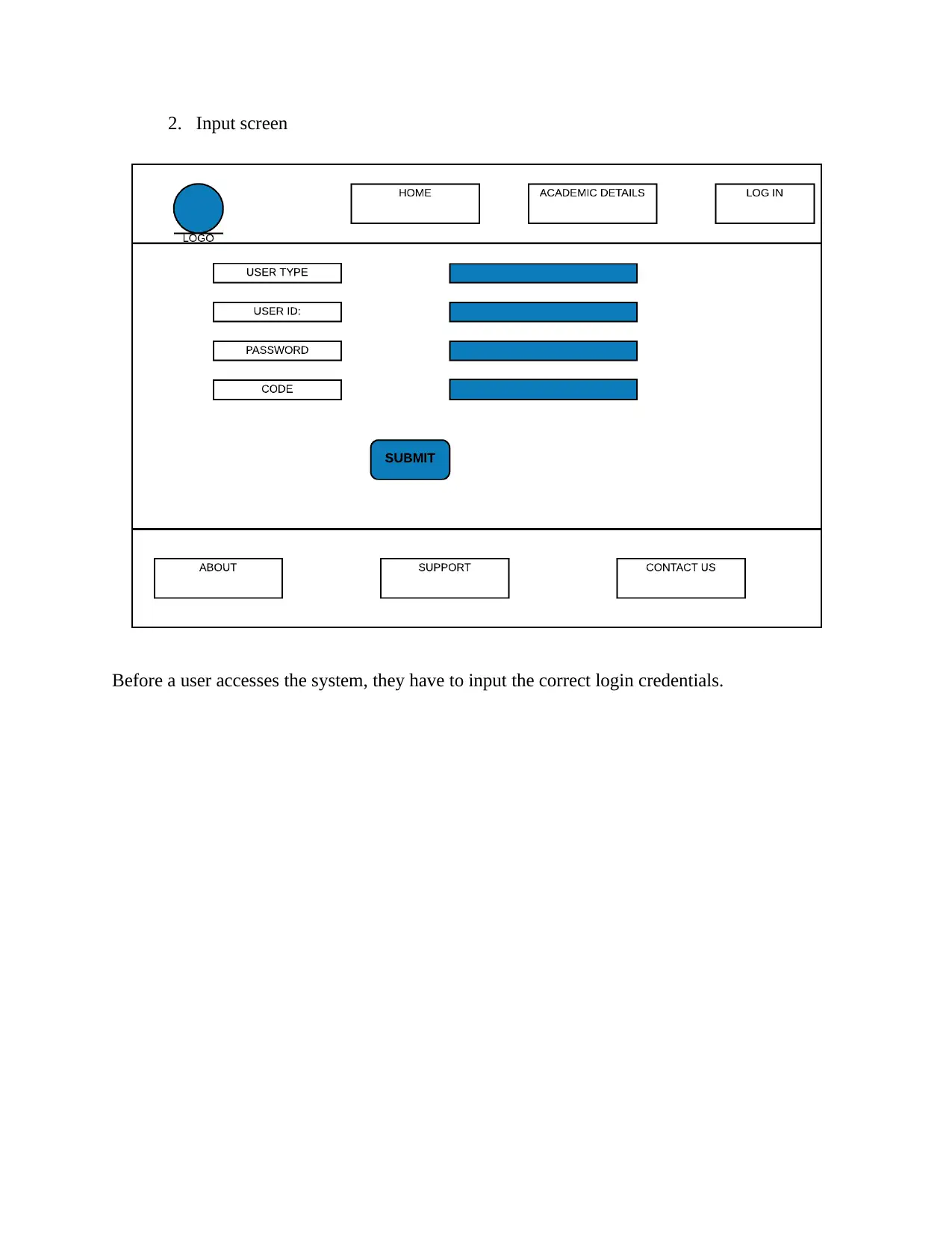
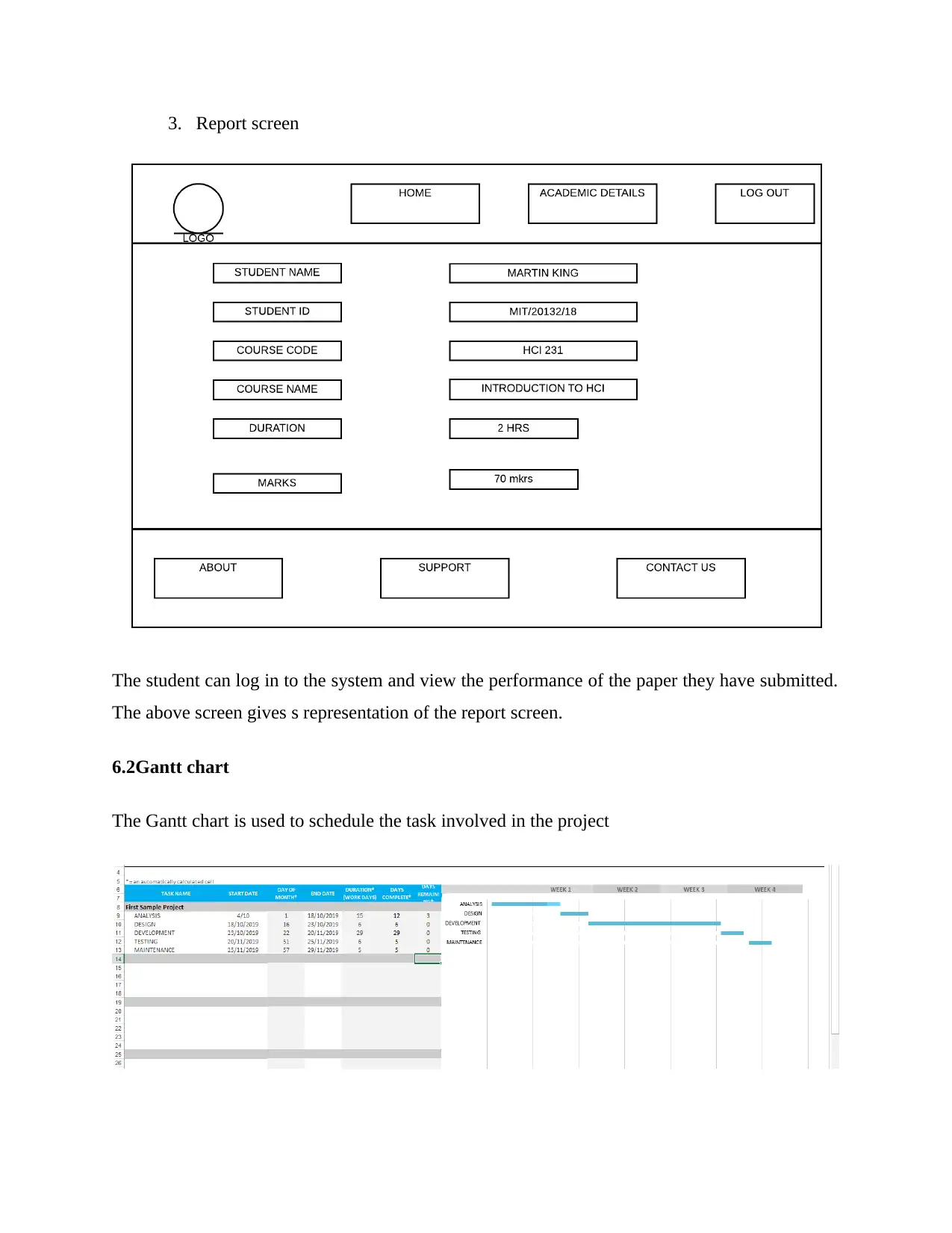
The user interface is simple and easy to understand, below are the screenshots of the GUI.
1. Home screen
This is the main or home screen of the system. The various entities of the system are represented
and can be accessed through this tab.
tabler-icon-diamond-filled.svg

Paraphrase This Document

Need a fresh take? Get an instant paraphrase of this document with our AI Paraphraser
Document Page
2. Input screen
Before a user accesses the system, they have to input the correct login credentials.
Document Page
3. Report screen
The student can log in to the system and view the performance of the paper they have submitted.
The above screen gives s representation of the report screen.
6.2Gantt chart
The Gantt chart is used to schedule the task involved in the project
chevron_up_icon
1 out of 14
circle_padding
hide_on_mobile
zoom_out_icon
[object Object]