INFT 5033: Operating Systems and Application Security Hardening Report
VerifiedAdded on 2022/10/09
|18
|2365
|27
Report
AI Summary
This report, prepared for the INFT 5033 Operating Systems and Application Security course, focuses on designing and implementing a secure operating system and application environment for a corporate file storage and sharing solution. The report begins by outlining the security management requirements for the environment, referencing cybersecurity frameworks like the NIST Cybersecurity Framework. It then details the specific security hardening controls implemented in a virtual machine environment using VMware Workstation Pro. The implementation covers various aspects, including strong password policies, restrictions on virtual machines, updating virtual machines, configuring display preferences, and cloning virtual machines. Common hardening techniques for both Windows and Linux are discussed, along with specifics for each operating system. The report includes screenshots and annotations of the implementation process, demonstrating a practical approach to system hardening. The case study involves a fictional organization, LargeCorp, with multiple physical sites and a mix of Linux and Windows servers and clients, requiring secure file sharing through the SMB protocol. The report emphasizes the importance of defense-in-depth strategies and highlights techniques like programs clean-up, group policies, and configuration baselines to enhance system security. References are provided to support the decisions made in the report.
Operating Systems and Application Security
1
INFT 5033 – OPERATING SYSTEMS AND APPLICATION SECURITY
By (Student’s Name)
(Course Name)
(Tutor’s Name)
(Date)
1
INFT 5033 – OPERATING SYSTEMS AND APPLICATION SECURITY
By (Student’s Name)
(Course Name)
(Tutor’s Name)
(Date)
Paraphrase This Document
Need a fresh take? Get an instant paraphrase of this document with our AI Paraphraser

Operating Systems and Application Security
2
Table of Contents
Introduction......................................................................................................................................2
Overview of the case study..............................................................................................................2
Part one: Security hardening requirements and controls.................................................................3
Common hardening techniques for both windows and Linux.....................................................3
Specifics for hardening Linux operating systems........................................................................5
Specifics for hardening window based operating system............................................................5
Part two: Implementation Plan........................................................................................................6
Overview of VMWare workstation..............................................................................................6
Implementation 1: Strong passwords...........................................................................................7
Implementation 2: Setting up of restrictions on VMs................................................................11
Implementation 3: Updating Virtual machines..........................................................................11
Implementation 4: Configuring Virtual machine.......................................................................12
Implementation 5: Cloning the Virtual machine........................................................................12
Implementation 6: disabling unnecessary services....................................................................14
References......................................................................................................................................15
2
Table of Contents
Introduction......................................................................................................................................2
Overview of the case study..............................................................................................................2
Part one: Security hardening requirements and controls.................................................................3
Common hardening techniques for both windows and Linux.....................................................3
Specifics for hardening Linux operating systems........................................................................5
Specifics for hardening window based operating system............................................................5
Part two: Implementation Plan........................................................................................................6
Overview of VMWare workstation..............................................................................................6
Implementation 1: Strong passwords...........................................................................................7
Implementation 2: Setting up of restrictions on VMs................................................................11
Implementation 3: Updating Virtual machines..........................................................................11
Implementation 4: Configuring Virtual machine.......................................................................12
Implementation 5: Cloning the Virtual machine........................................................................12
Implementation 6: disabling unnecessary services....................................................................14
References......................................................................................................................................15

Operating Systems and Application Security
3
Introduction
System hardening is a collection of techniques, best practices and tools to reduce
weaknesses in technology applications, firmware, and systems. The major aim of hardening is to
reduce security risk by eliminating potential attacks and considering system’s attack surface.
NIST has developed a voluntary framework which consists of guidelines and standards to
manage cybersecurity risks. The computer security framework developed by NIST provides
guidance of how public and private organizations in the US can improve their ability to detect,
respond, and private computer related attacks. This report will document comprehensively
security control implementation in a virtual machine; this will consist of one file server, one
internal managed windows client, one internal Linux client, and one unmanaged device. This
paper will utilize VMWare workstation pro software to create the virtual machines
Overview of the case study
LargeCorp is a fictional organization with three physical sites across a variety of
geographical locations. The internal division of the organization includes human resource,
information technology sector, finance, manufacturing, and research and development section.
The organization supports both Linux and windows servers and clients. The organization has
specified that files must be provided only to the authorized users on the organization LAN
through SMB protocol. The files shared must be classified as restricted for internal use only or
highly confidential and public information.
3
Introduction
System hardening is a collection of techniques, best practices and tools to reduce
weaknesses in technology applications, firmware, and systems. The major aim of hardening is to
reduce security risk by eliminating potential attacks and considering system’s attack surface.
NIST has developed a voluntary framework which consists of guidelines and standards to
manage cybersecurity risks. The computer security framework developed by NIST provides
guidance of how public and private organizations in the US can improve their ability to detect,
respond, and private computer related attacks. This report will document comprehensively
security control implementation in a virtual machine; this will consist of one file server, one
internal managed windows client, one internal Linux client, and one unmanaged device. This
paper will utilize VMWare workstation pro software to create the virtual machines
Overview of the case study
LargeCorp is a fictional organization with three physical sites across a variety of
geographical locations. The internal division of the organization includes human resource,
information technology sector, finance, manufacturing, and research and development section.
The organization supports both Linux and windows servers and clients. The organization has
specified that files must be provided only to the authorized users on the organization LAN
through SMB protocol. The files shared must be classified as restricted for internal use only or
highly confidential and public information.
⊘ This is a preview!⊘
Do you want full access?
Subscribe today to unlock all pages.

Trusted by 1+ million students worldwide

Operating Systems and Application Security
4
Part one: Security hardening requirements and controls
Common hardening techniques for both windows and Linux
Cyber-related attacks are very common nowadays. Hackers attack websites and
information systems using various cyber-attack techniques which are referred to as attack
vectors. To prevent such attacks, operating systems needs to get hardened. Hardening is the
process that assist in the enhancement of operating systems. Proper operating system hardening
shields an organization from cyber related attacks in turn reduces them as well.
Operating system hardening is a process that assists in reducing cyber related attacks
surface of an information system by disabling functionalities which are not required while at the
same time maintaining minimum functionality which is required. According to NIST, operating
system hardening is the process of making an operating system bulletproof; not leaving the
operating system exposed to the general public on the wide area network without any form of
protection. There are various techniques which are applied to harden an operating system. First,
a system administrator needs to keep all operating system updated with the latest version and the
most robust version. This can be achieved by making sure that security patches and all the hot
fixes are constantly updated. Second, LargeCorp needs to install the latest service pack for
operating systems for all windows-based version. Third all, the organization switches and
routers need to be protected with a strong password. For Linux based operating system an
organization needs to remove all the unnecessary drivers which are not in use. This also applies
to window-based operating system. To all the user computer one needs not to create two
accounts in the administrator groups. Also one needs to disable and delete unnecessary accounts
quarterly and disable non-essential services. In addition, an organization needs to enable audit
4
Part one: Security hardening requirements and controls
Common hardening techniques for both windows and Linux
Cyber-related attacks are very common nowadays. Hackers attack websites and
information systems using various cyber-attack techniques which are referred to as attack
vectors. To prevent such attacks, operating systems needs to get hardened. Hardening is the
process that assist in the enhancement of operating systems. Proper operating system hardening
shields an organization from cyber related attacks in turn reduces them as well.
Operating system hardening is a process that assists in reducing cyber related attacks
surface of an information system by disabling functionalities which are not required while at the
same time maintaining minimum functionality which is required. According to NIST, operating
system hardening is the process of making an operating system bulletproof; not leaving the
operating system exposed to the general public on the wide area network without any form of
protection. There are various techniques which are applied to harden an operating system. First,
a system administrator needs to keep all operating system updated with the latest version and the
most robust version. This can be achieved by making sure that security patches and all the hot
fixes are constantly updated. Second, LargeCorp needs to install the latest service pack for
operating systems for all windows-based version. Third all, the organization switches and
routers need to be protected with a strong password. For Linux based operating system an
organization needs to remove all the unnecessary drivers which are not in use. This also applies
to window-based operating system. To all the user computer one needs not to create two
accounts in the administrator groups. Also one needs to disable and delete unnecessary accounts
quarterly and disable non-essential services. In addition, an organization needs to enable audit
Paraphrase This Document
Need a fresh take? Get an instant paraphrase of this document with our AI Paraphraser

Operating Systems and Application Security
5
logs to capture failed and successful login efforts which are elevated from usage privileges and
any kind of unauthorized activities. In addition, an organization needs to secure CMOS settings
and ensure file and directory protection via the use of access control lists (ACLs) and file
permissions. Also, the organization system administrator needs to ensure that all the log all
activity, warnings and errors are configured appropriately and at the same tighten NTFS and
registry partitions (Mani, 2016).
LargeCorp needs to use strong passwords in all the machines and ensure that services are
running with least-privileged accounts. The organization needs also to disable all the
unnecessary file sharing and remove administrative shares if not they are needed.
To adopt the above hardening techniques an organization needs to completely align with defense
in depth strategy. This strategy ensures that security is hardened at host level, the operating
system level, the application level, user level, and the physical level. Defense in Depth approach
includes security measures at each of the above layers.
Other common techniques are programs clean-up, this process usually removes
unnecessary programs which, it is important to note that every program is potential entrance
point by hackers, Cleaning these programs assists in limiting the number of ways a hacker can
enter into a computer. Also an organization needs to ensure group policies; here a system
administrator needs to define groups can’t or can access and also maintain these rules. Most are
the times user error that leads to a cyber-attack. To meet this operating system hardening
technique and organization needs to establish and ensure that all users are aware and complies
with the laid procedures about group policy. An example, every employee at LargeCorp needs to
implement strong passwords on their user accounts. Configuration baselines is another
5
logs to capture failed and successful login efforts which are elevated from usage privileges and
any kind of unauthorized activities. In addition, an organization needs to secure CMOS settings
and ensure file and directory protection via the use of access control lists (ACLs) and file
permissions. Also, the organization system administrator needs to ensure that all the log all
activity, warnings and errors are configured appropriately and at the same tighten NTFS and
registry partitions (Mani, 2016).
LargeCorp needs to use strong passwords in all the machines and ensure that services are
running with least-privileged accounts. The organization needs also to disable all the
unnecessary file sharing and remove administrative shares if not they are needed.
To adopt the above hardening techniques an organization needs to completely align with defense
in depth strategy. This strategy ensures that security is hardened at host level, the operating
system level, the application level, user level, and the physical level. Defense in Depth approach
includes security measures at each of the above layers.
Other common techniques are programs clean-up, this process usually removes
unnecessary programs which, it is important to note that every program is potential entrance
point by hackers, Cleaning these programs assists in limiting the number of ways a hacker can
enter into a computer. Also an organization needs to ensure group policies; here a system
administrator needs to define groups can’t or can access and also maintain these rules. Most are
the times user error that leads to a cyber-attack. To meet this operating system hardening
technique and organization needs to establish and ensure that all users are aware and complies
with the laid procedures about group policy. An example, every employee at LargeCorp needs to
implement strong passwords on their user accounts. Configuration baselines is another

Operating Systems and Application Security
6
technique; this is the process of measuring changes in a network, software, and hardware. To
create baselines means selecting something to measure and measuring it consistently for a period
of time (Smith, 2019).
Specifics for hardening Linux operating systems
LargeCorp needs to use SELinux and other specified Linux extensions. This enforces
limitations on a network and other related programs. SELinux provides a flexible Mandatory
Access Control. Here one had to run Kernel to protect the operating system from malicious or
any flawed applications which can damage or destroy Linux Operating system. Second,
LargeCorp needs to set-up passwords which are aging for Linux users to ensure a better security.
Here the chage command in Linux changes the number of days between the data of the last
password change. This information is usually used by the Linux system to determine when a
Linux user ought to change their password. Here one ought to disable password aging. In
addition, on passwords one can restrict users from the use of the previous old passwords. This
enables by Pam_Unix module parameter which can be used to configure the number of previous
passwords which cannot be reused. Third on Linux LargeCorp can look user accounts which
have already logged in. This can be achieved by using the faillog command, this displays faillog
records or sets the logins failure limits. Forth, one can disable root login; here one should use
sudo to execute root level command as when it is required, sudo enhances the security of the
operating system without having to share root password with other admins and users. The
command sudo provides simple tracking and auditing features. Lastly, an organization needs to
disable unwanted Linux services and daemons (FedoraLinux, 2019).
6
technique; this is the process of measuring changes in a network, software, and hardware. To
create baselines means selecting something to measure and measuring it consistently for a period
of time (Smith, 2019).
Specifics for hardening Linux operating systems
LargeCorp needs to use SELinux and other specified Linux extensions. This enforces
limitations on a network and other related programs. SELinux provides a flexible Mandatory
Access Control. Here one had to run Kernel to protect the operating system from malicious or
any flawed applications which can damage or destroy Linux Operating system. Second,
LargeCorp needs to set-up passwords which are aging for Linux users to ensure a better security.
Here the chage command in Linux changes the number of days between the data of the last
password change. This information is usually used by the Linux system to determine when a
Linux user ought to change their password. Here one ought to disable password aging. In
addition, on passwords one can restrict users from the use of the previous old passwords. This
enables by Pam_Unix module parameter which can be used to configure the number of previous
passwords which cannot be reused. Third on Linux LargeCorp can look user accounts which
have already logged in. This can be achieved by using the faillog command, this displays faillog
records or sets the logins failure limits. Forth, one can disable root login; here one should use
sudo to execute root level command as when it is required, sudo enhances the security of the
operating system without having to share root password with other admins and users. The
command sudo provides simple tracking and auditing features. Lastly, an organization needs to
disable unwanted Linux services and daemons (FedoraLinux, 2019).
⊘ This is a preview!⊘
Do you want full access?
Subscribe today to unlock all pages.

Trusted by 1+ million students worldwide

Operating Systems and Application Security
7
Specifics for hardening window based operating system
To harden window based operating system, the very first technique is remove all the
executable and registry entries. By forgetting to remove unneeded executables and all the
registry entries usually allows a hacker to invoke something which has been previous disabled.
Second, LargeCorp needs to apply the appropriately restrictive permissions to services, end
points, and files. Inappropriate permissions usually gives an attacker permissions to an opening
Justified high level security design
Part two: Implementation Plan
Overview of VMWare workstation
In this section, this paper will highlight how to go about implementing the above
discussed techniques using VMware workstation. To start with VMWARE is a hosted hypervisor
which runs on 64 bits version of Linux and windows operating system. The software enables
uses to set-up virtual machines on a single physical machine and use them simultaneously along
with the actual machine. Each of the virtual machine has the ability of executing its own
operating system which includes versions of Microsoft windows, MS-DOS, BSD, and Linux.
VMWare workstation was first developed and sold by VMware Inc. which is one division of
Dell technologies. The initial release of the software was in 1999, where the programming
languages which was used was C programming language. One of the reasons as to why this
paper has gone for VMWare workstation is because it can save the state of virtual machine at
any instant. Other reasons is because, the software has high-performance that supports DirectX
10 and OpenGL. The software also support resolution display, and helpful snapshots. It also
7
Specifics for hardening window based operating system
To harden window based operating system, the very first technique is remove all the
executable and registry entries. By forgetting to remove unneeded executables and all the
registry entries usually allows a hacker to invoke something which has been previous disabled.
Second, LargeCorp needs to apply the appropriately restrictive permissions to services, end
points, and files. Inappropriate permissions usually gives an attacker permissions to an opening
Justified high level security design
Part two: Implementation Plan
Overview of VMWare workstation
In this section, this paper will highlight how to go about implementing the above
discussed techniques using VMware workstation. To start with VMWARE is a hosted hypervisor
which runs on 64 bits version of Linux and windows operating system. The software enables
uses to set-up virtual machines on a single physical machine and use them simultaneously along
with the actual machine. Each of the virtual machine has the ability of executing its own
operating system which includes versions of Microsoft windows, MS-DOS, BSD, and Linux.
VMWare workstation was first developed and sold by VMware Inc. which is one division of
Dell technologies. The initial release of the software was in 1999, where the programming
languages which was used was C programming language. One of the reasons as to why this
paper has gone for VMWare workstation is because it can save the state of virtual machine at
any instant. Other reasons is because, the software has high-performance that supports DirectX
10 and OpenGL. The software also support resolution display, and helpful snapshots. It also
Paraphrase This Document
Need a fresh take? Get an instant paraphrase of this document with our AI Paraphraser

Operating Systems and Application Security
8
offers cross-compatibility which can run across various platforms such as windows and Linux-
based. It also has the restricted access feature to virtual machine.
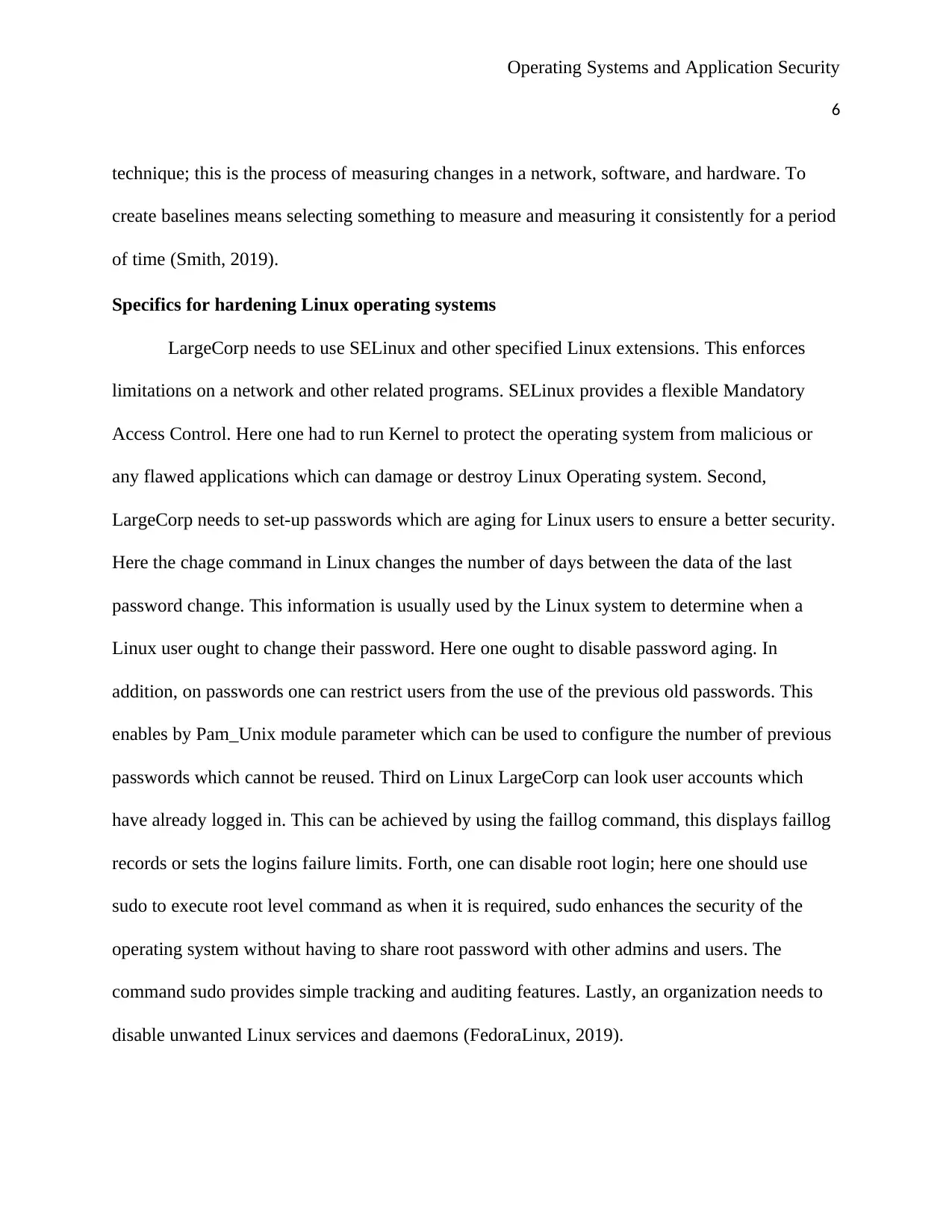
Figure 1: The look of VMWare workstation pro
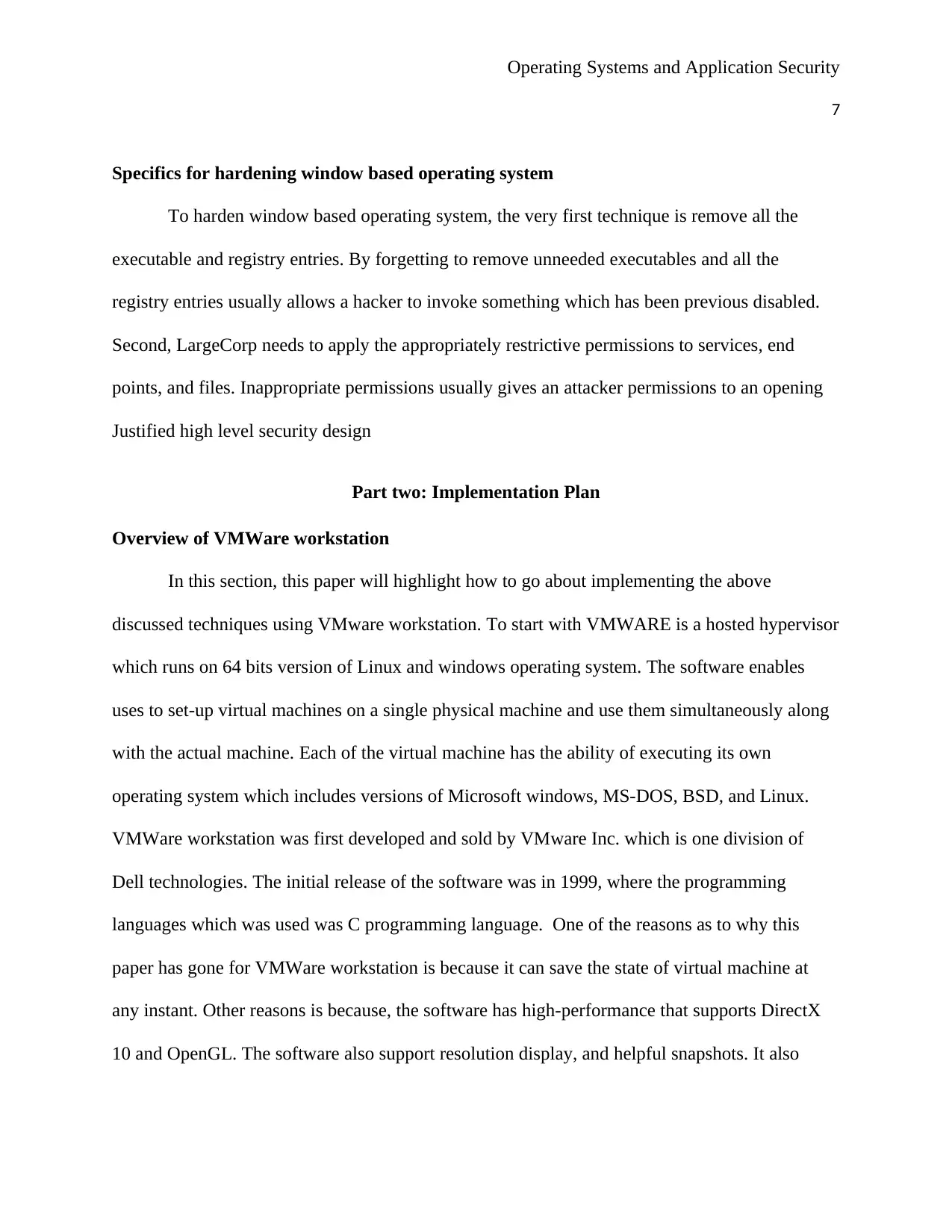
The installed devices is as shown by the figure below
Figure 2: Samples virtual machines which have been installed
8
offers cross-compatibility which can run across various platforms such as windows and Linux-
based. It also has the restricted access feature to virtual machine.
Figure 1: The look of VMWare workstation pro
The installed devices is as shown by the figure below
Figure 2: Samples virtual machines which have been installed

Operating Systems and Application Security
9
Implementation 1: Strong passwords
To implement this feature is very simple since one only puts some restrictions on them.
Vmware workstation software has done a lot of work as one is able to share the VMs and even
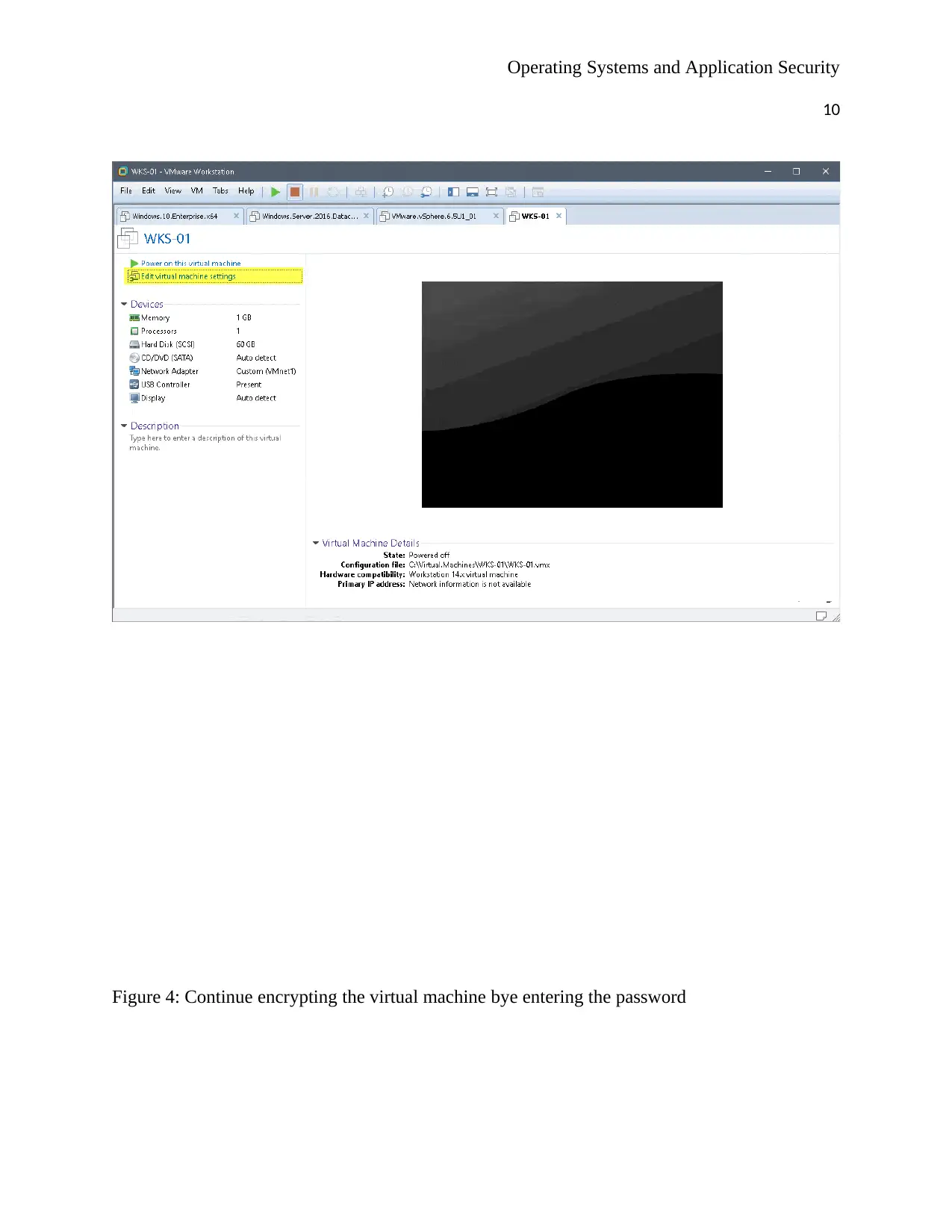
apply restrictions. To apply password restriction one just goes on VM tab then settings as
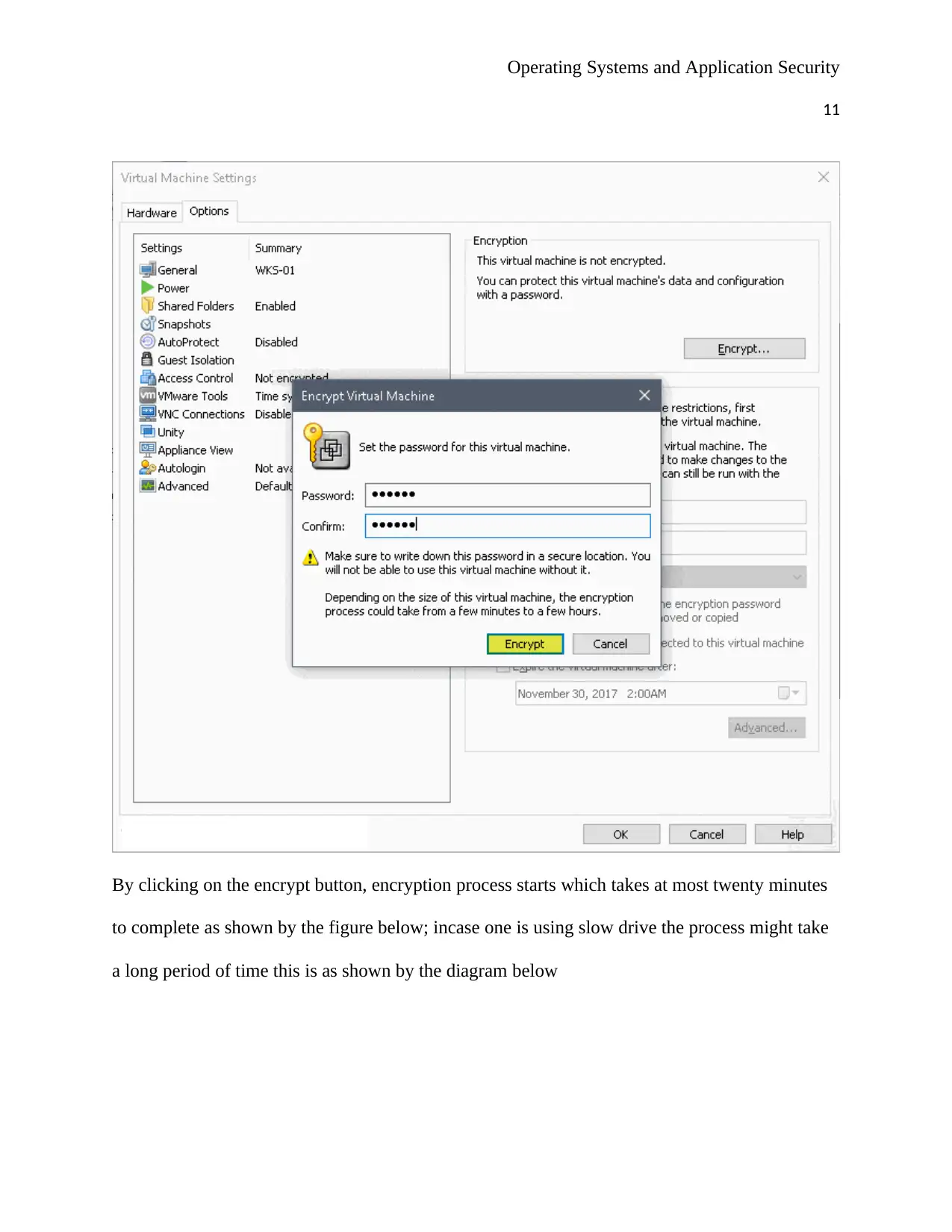
shown , then options tab, then access control, then encryption control, and then encrypt. One is
then prompted to enter password and confirm by clicking Ok and the closing the Vmware
workstation console. This is shown by the figures shown below
Figure 3: Start by editing the virtual machine settings
9
Implementation 1: Strong passwords
To implement this feature is very simple since one only puts some restrictions on them.
Vmware workstation software has done a lot of work as one is able to share the VMs and even
apply restrictions. To apply password restriction one just goes on VM tab then settings as
shown , then options tab, then access control, then encryption control, and then encrypt. One is
then prompted to enter password and confirm by clicking Ok and the closing the Vmware
workstation console. This is shown by the figures shown below
Figure 3: Start by editing the virtual machine settings
⊘ This is a preview!⊘
Do you want full access?
Subscribe today to unlock all pages.

Trusted by 1+ million students worldwide

Operating Systems and Application Security
10
Figure 4: Continue encrypting the virtual machine bye entering the password
10
Figure 4: Continue encrypting the virtual machine bye entering the password
Paraphrase This Document
Need a fresh take? Get an instant paraphrase of this document with our AI Paraphraser

Operating Systems and Application Security
11
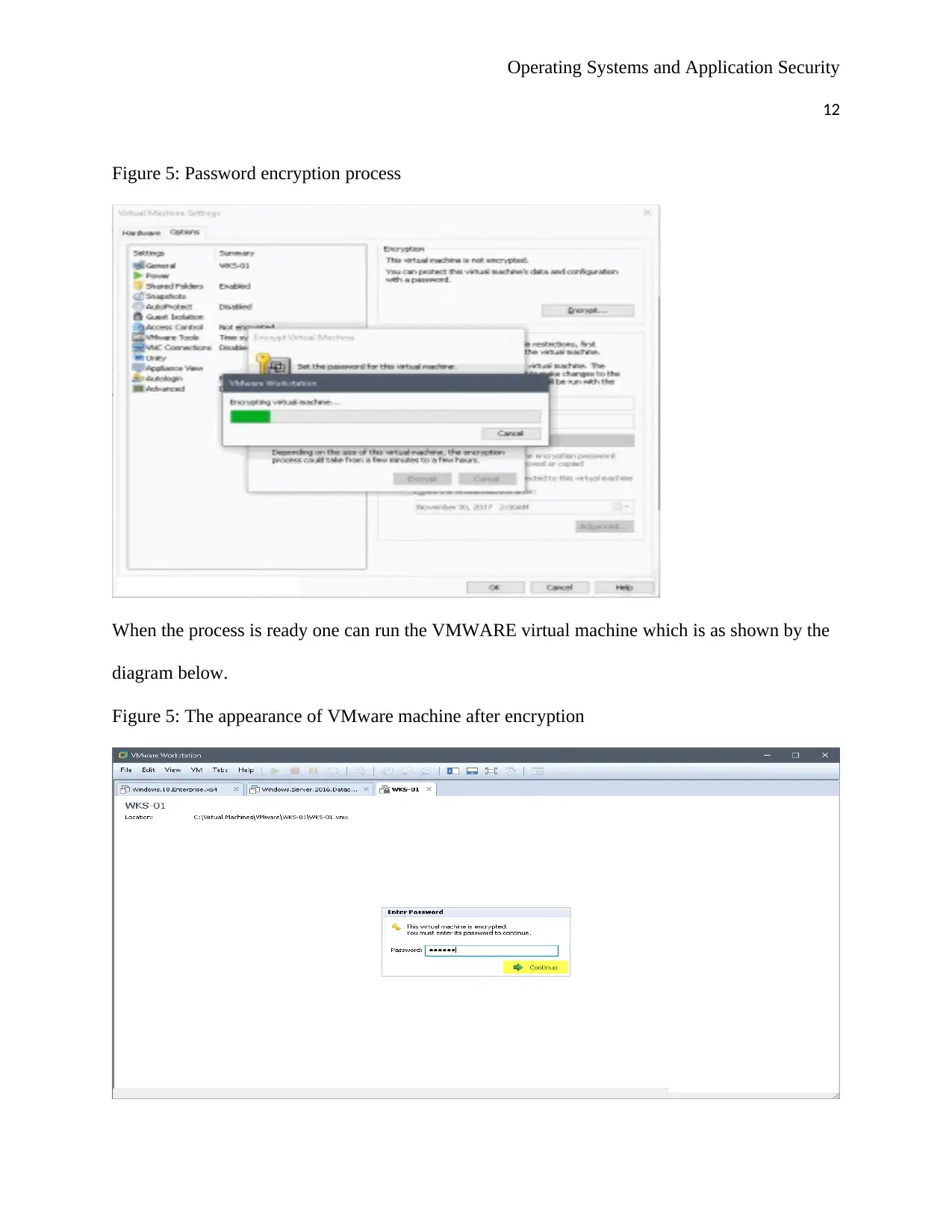
By clicking on the encrypt button, encryption process starts which takes at most twenty minutes
to complete as shown by the figure below; incase one is using slow drive the process might take
a long period of time this is as shown by the diagram below
11
By clicking on the encrypt button, encryption process starts which takes at most twenty minutes
to complete as shown by the figure below; incase one is using slow drive the process might take
a long period of time this is as shown by the diagram below

Operating Systems and Application Security
12
Figure 5: Password encryption process
When the process is ready one can run the VMWARE virtual machine which is as shown by the
diagram below.
Figure 5: The appearance of VMware machine after encryption
12
Figure 5: Password encryption process
When the process is ready one can run the VMWARE virtual machine which is as shown by the
diagram below.
Figure 5: The appearance of VMware machine after encryption
⊘ This is a preview!⊘
Do you want full access?
Subscribe today to unlock all pages.

Trusted by 1+ million students worldwide
1 out of 18
Related Documents
Your All-in-One AI-Powered Toolkit for Academic Success.
+13062052269
info@desklib.com
Available 24*7 on WhatsApp / Email
Unlock your academic potential
Copyright © 2020–2026 A2Z Services. All Rights Reserved. Developed and managed by ZUCOL.