JIC MIT173: PC Building and Maintenance Assignment Analysis
VerifiedAdded on  2022/09/25
|5
|1805
|21
Homework Assignment
AI Summary
This assignment from Jubail Industrial College's Management & Information Technology Department (MIT173) delves into PC building and maintenance. It begins with a comparative analysis of Solid State Drives (SSDs) and magnetic hard disks (HDDs), examining characteristics such as controller, technical base, read/write/erase operations, data organization, OS interaction, weaknesses, supported interfaces, speed, size, power consumption, and technology trends. The assignment then explores PC specification features, considering elements like processors, RAM, storage, display, OS, and various peripherals. Finally, based on the preceding analysis, the assignment identifies the compatible computer specifications tailored for a Gaming PC, detailing components such as processors, RAM, storage, and graphics cards, and other related components to provide a comprehensive understanding of the PC building process.
Jubail Industrial Collage
Management & Information Technology Department
PC Building & Maintenance (MIT173)
________________________________________________________________
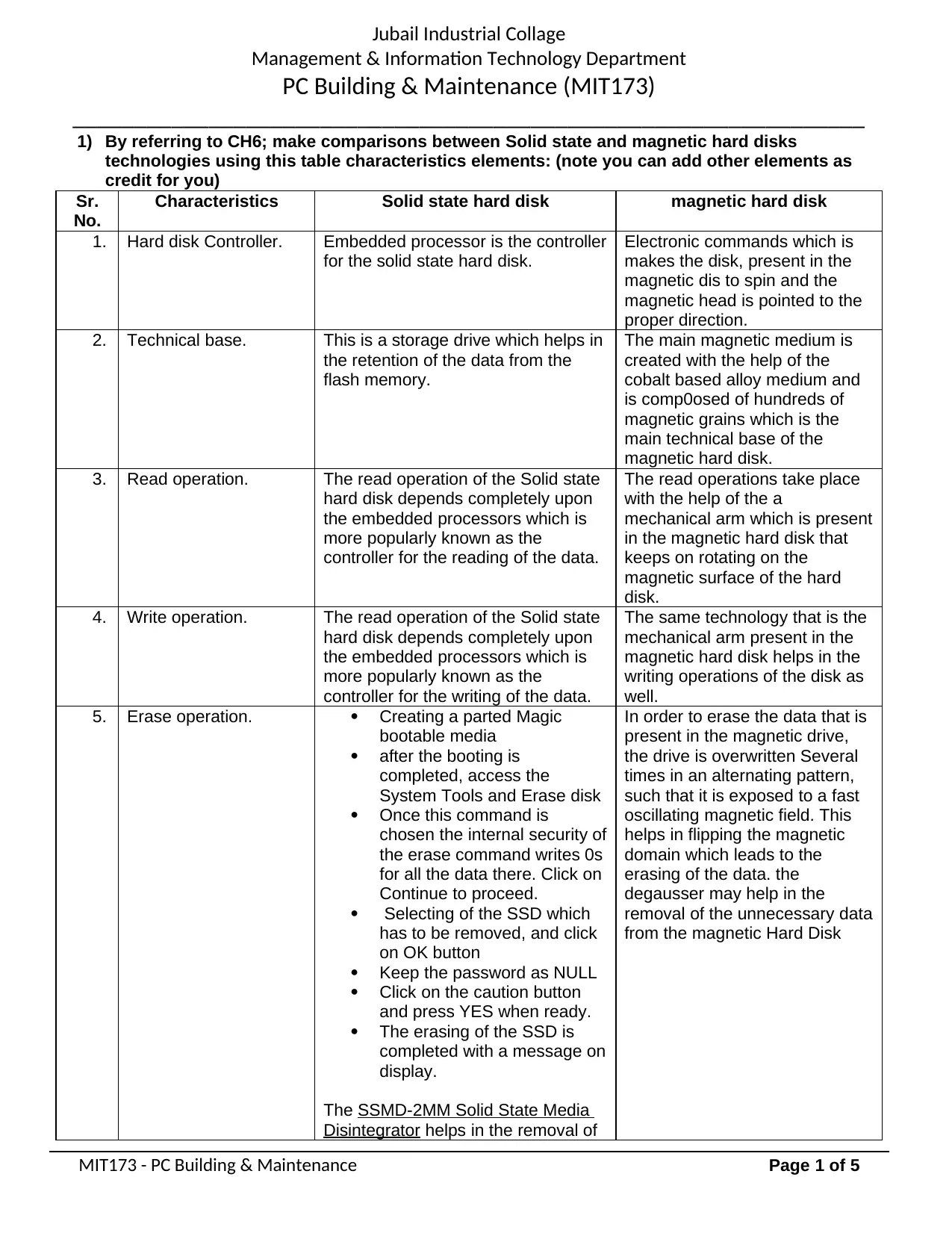
1) By referring to CH6; make comparisons between Solid state and magnetic hard disks
technologies using this table characteristics elements: (note you can add other elements as
credit for you)
Sr.
No.
Characteristics Solid state hard disk magnetic hard disk
1. Hard disk Controller. Embedded processor is the controller
for the solid state hard disk.
Electronic commands which is
makes the disk, present in the
magnetic dis to spin and the
magnetic head is pointed to the
proper direction.
2. Technical base. This is a storage drive which helps in
the retention of the data from the
flash memory.
The main magnetic medium is
created with the help of the
cobalt based alloy medium and
is comp0osed of hundreds of
magnetic grains which is the
main technical base of the
magnetic hard disk.
3. Read operation. The read operation of the Solid state
hard disk depends completely upon
the embedded processors which is
more popularly known as the
controller for the reading of the data.
The read operations take place
with the help of the a
mechanical arm which is present
in the magnetic hard disk that
keeps on rotating on the
magnetic surface of the hard
disk.
4. Write operation. The read operation of the Solid state
hard disk depends completely upon
the embedded processors which is
more popularly known as the
controller for the writing of the data.
The same technology that is the
mechanical arm present in the
magnetic hard disk helps in the
writing operations of the disk as
well.
5. Erase operation. ï‚· Creating a parted Magic
bootable media
ï‚· after the booting is
completed, access the
System Tools and Erase disk
ï‚· Once this command is
chosen the internal security of
the erase command writes 0s
for all the data there. Click on
Continue to proceed.
ï‚· Selecting of the SSD which
has to be removed, and click
on OK button
ï‚· Keep the password as NULL
ï‚· Click on the caution button
and press YES when ready.
ï‚· The erasing of the SSD is
completed with a message on
display.
The SSMD-2MM Solid State Media
Disintegrator helps in the removal of
In order to erase the data that is
present in the magnetic drive,
the drive is overwritten Several
times in an alternating pattern,
such that it is exposed to a fast
oscillating magnetic field. This
helps in flipping the magnetic
domain which leads to the
erasing of the data. the
degausser may help in the
removal of the unnecessary data
from the magnetic Hard Disk
MIT173 - PC Building & Maintenance Page 1 of 5
Management & Information Technology Department
PC Building & Maintenance (MIT173)
________________________________________________________________
1) By referring to CH6; make comparisons between Solid state and magnetic hard disks
technologies using this table characteristics elements: (note you can add other elements as
credit for you)
Sr.
No.
Characteristics Solid state hard disk magnetic hard disk
1. Hard disk Controller. Embedded processor is the controller
for the solid state hard disk.
Electronic commands which is
makes the disk, present in the
magnetic dis to spin and the
magnetic head is pointed to the
proper direction.
2. Technical base. This is a storage drive which helps in
the retention of the data from the
flash memory.
The main magnetic medium is
created with the help of the
cobalt based alloy medium and
is comp0osed of hundreds of
magnetic grains which is the
main technical base of the
magnetic hard disk.
3. Read operation. The read operation of the Solid state
hard disk depends completely upon
the embedded processors which is
more popularly known as the
controller for the reading of the data.
The read operations take place
with the help of the a
mechanical arm which is present
in the magnetic hard disk that
keeps on rotating on the
magnetic surface of the hard
disk.
4. Write operation. The read operation of the Solid state
hard disk depends completely upon
the embedded processors which is
more popularly known as the
controller for the writing of the data.
The same technology that is the
mechanical arm present in the
magnetic hard disk helps in the
writing operations of the disk as
well.
5. Erase operation. ï‚· Creating a parted Magic
bootable media
ï‚· after the booting is
completed, access the
System Tools and Erase disk
ï‚· Once this command is
chosen the internal security of
the erase command writes 0s
for all the data there. Click on
Continue to proceed.
ï‚· Selecting of the SSD which
has to be removed, and click
on OK button
ï‚· Keep the password as NULL
ï‚· Click on the caution button
and press YES when ready.
ï‚· The erasing of the SSD is
completed with a message on
display.
The SSMD-2MM Solid State Media
Disintegrator helps in the removal of
In order to erase the data that is
present in the magnetic drive,
the drive is overwritten Several
times in an alternating pattern,
such that it is exposed to a fast
oscillating magnetic field. This
helps in flipping the magnetic
domain which leads to the
erasing of the data. the
degausser may help in the
removal of the unnecessary data
from the magnetic Hard Disk
MIT173 - PC Building & Maintenance Page 1 of 5
Paraphrase This Document
Need a fresh take? Get an instant paraphrase of this document with our AI Paraphraser

Jubail Industrial Collage
Management & Information Technology Department
PC Building & Maintenance (MIT173)
________________________________________________________________
the data.
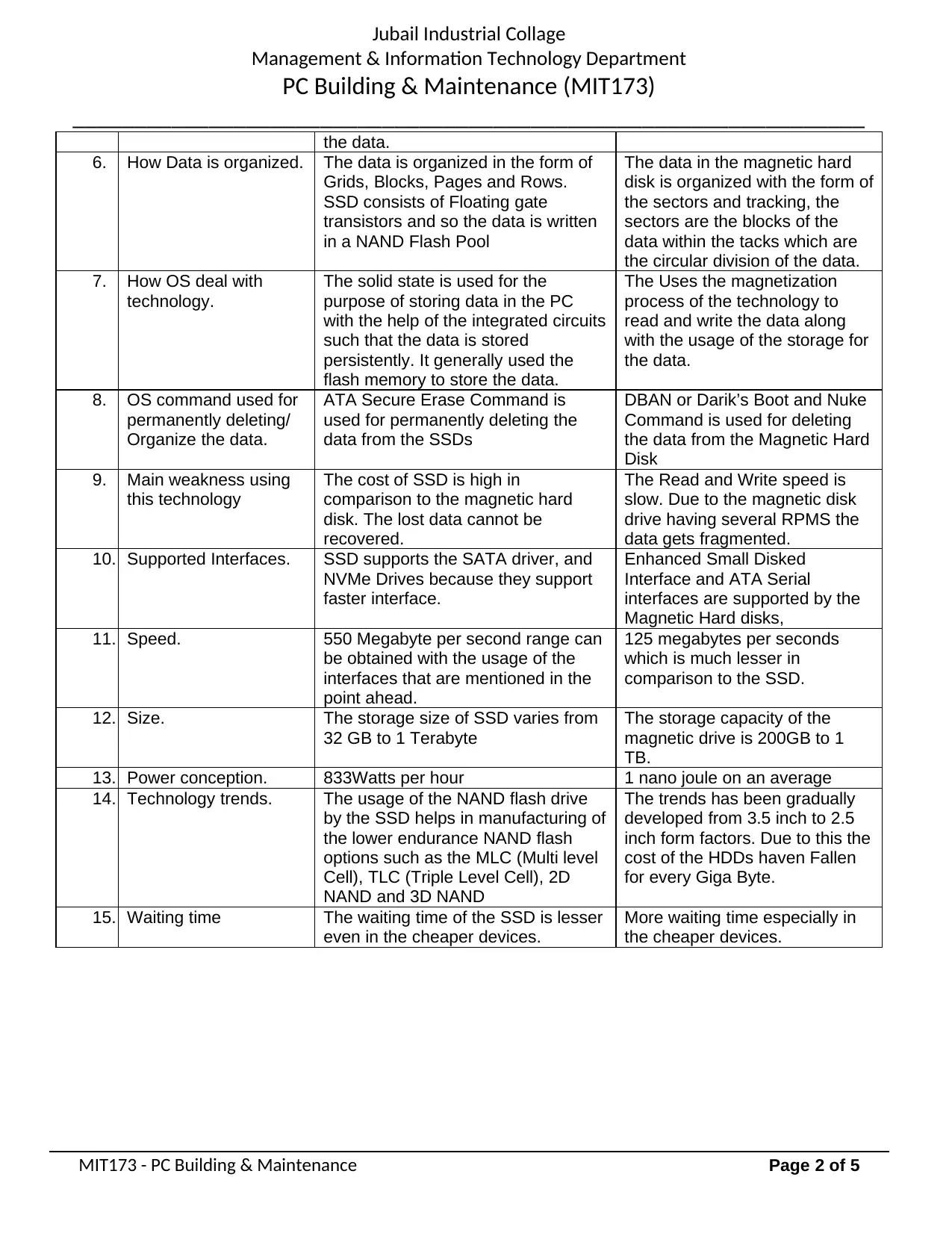
6. How Data is organized. The data is organized in the form of
Grids, Blocks, Pages and Rows.
SSD consists of Floating gate
transistors and so the data is written
in a NAND Flash Pool
The data in the magnetic hard
disk is organized with the form of
the sectors and tracking, the
sectors are the blocks of the
data within the tacks which are
the circular division of the data.
7. How OS deal with
technology.
The solid state is used for the
purpose of storing data in the PC
with the help of the integrated circuits
such that the data is stored
persistently. It generally used the
flash memory to store the data.
The Uses the magnetization
process of the technology to
read and write the data along
with the usage of the storage for
the data.
8. OS command used for
permanently deleting/
Organize the data.
ATA Secure Erase Command is
used for permanently deleting the
data from the SSDs
DBAN or Darik’s Boot and Nuke
Command is used for deleting
the data from the Magnetic Hard
Disk
9. Main weakness using
this technology
The cost of SSD is high in
comparison to the magnetic hard
disk. The lost data cannot be
recovered.
The Read and Write speed is
slow. Due to the magnetic disk
drive having several RPMS the
data gets fragmented.
10. Supported Interfaces. SSD supports the SATA driver, and
NVMe Drives because they support
faster interface.
Enhanced Small Disked
Interface and ATA Serial
interfaces are supported by the
Magnetic Hard disks,
11. Speed. 550 Megabyte per second range can
be obtained with the usage of the
interfaces that are mentioned in the
point ahead.
125 megabytes per seconds
which is much lesser in
comparison to the SSD.
12. Size. The storage size of SSD varies from
32 GB to 1 Terabyte
The storage capacity of the
magnetic drive is 200GB to 1
TB.
13. Power conception. 833Watts per hour 1 nano joule on an average
14. Technology trends. The usage of the NAND flash drive
by the SSD helps in manufacturing of
the lower endurance NAND flash
options such as the MLC (Multi level
Cell), TLC (Triple Level Cell), 2D
NAND and 3D NAND
The trends has been gradually
developed from 3.5 inch to 2.5
inch form factors. Due to this the
cost of the HDDs haven Fallen
for every Giga Byte.
15. Waiting time The waiting time of the SSD is lesser
even in the cheaper devices.
More waiting time especially in
the cheaper devices.
MIT173 - PC Building & Maintenance Page 2 of 5
Management & Information Technology Department
PC Building & Maintenance (MIT173)
________________________________________________________________
the data.
6. How Data is organized. The data is organized in the form of
Grids, Blocks, Pages and Rows.
SSD consists of Floating gate
transistors and so the data is written
in a NAND Flash Pool
The data in the magnetic hard
disk is organized with the form of
the sectors and tracking, the
sectors are the blocks of the
data within the tacks which are
the circular division of the data.
7. How OS deal with
technology.
The solid state is used for the
purpose of storing data in the PC
with the help of the integrated circuits
such that the data is stored
persistently. It generally used the
flash memory to store the data.
The Uses the magnetization
process of the technology to
read and write the data along
with the usage of the storage for
the data.
8. OS command used for
permanently deleting/
Organize the data.
ATA Secure Erase Command is
used for permanently deleting the
data from the SSDs
DBAN or Darik’s Boot and Nuke
Command is used for deleting
the data from the Magnetic Hard
Disk
9. Main weakness using
this technology
The cost of SSD is high in
comparison to the magnetic hard
disk. The lost data cannot be
recovered.
The Read and Write speed is
slow. Due to the magnetic disk
drive having several RPMS the
data gets fragmented.
10. Supported Interfaces. SSD supports the SATA driver, and
NVMe Drives because they support
faster interface.
Enhanced Small Disked
Interface and ATA Serial
interfaces are supported by the
Magnetic Hard disks,
11. Speed. 550 Megabyte per second range can
be obtained with the usage of the
interfaces that are mentioned in the
point ahead.
125 megabytes per seconds
which is much lesser in
comparison to the SSD.
12. Size. The storage size of SSD varies from
32 GB to 1 Terabyte
The storage capacity of the
magnetic drive is 200GB to 1
TB.
13. Power conception. 833Watts per hour 1 nano joule on an average
14. Technology trends. The usage of the NAND flash drive
by the SSD helps in manufacturing of
the lower endurance NAND flash
options such as the MLC (Multi level
Cell), TLC (Triple Level Cell), 2D
NAND and 3D NAND
The trends has been gradually
developed from 3.5 inch to 2.5
inch form factors. Due to this the
cost of the HDDs haven Fallen
for every Giga Byte.
15. Waiting time The waiting time of the SSD is lesser
even in the cheaper devices.
More waiting time especially in
the cheaper devices.
MIT173 - PC Building & Maintenance Page 2 of 5

Jubail Industrial Collage
Management & Information Technology Department
PC Building & Maintenance (MIT173)
________________________________________________________________
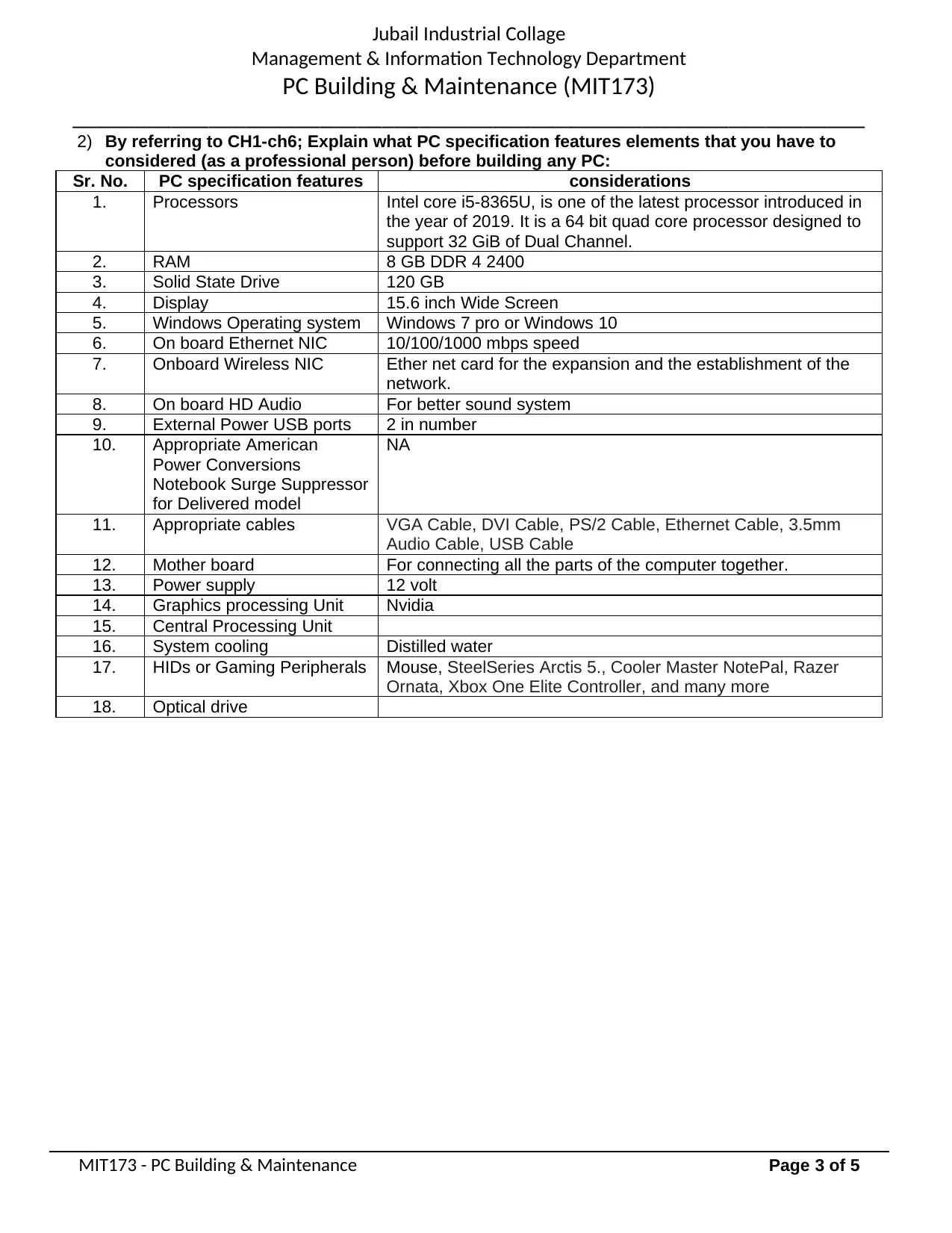
2) By referring to CH1-ch6; Explain what PC specification features elements that you have to
considered (as a professional person) before building any PC:
Sr. No. PC specification features considerations
1. Processors Intel core i5-8365U, is one of the latest processor introduced in
the year of 2019. It is a 64 bit quad core processor designed to
support 32 GiB of Dual Channel.
2. RAM 8 GB DDR 4 2400
3. Solid State Drive 120 GB
4. Display 15.6 inch Wide Screen
5. Windows Operating system Windows 7 pro or Windows 10
6. On board Ethernet NIC 10/100/1000 mbps speed
7. Onboard Wireless NIC Ether net card for the expansion and the establishment of the
network.
8. On board HD Audio For better sound system
9. External Power USB ports 2 in number
10. Appropriate American
Power Conversions
Notebook Surge Suppressor
for Delivered model
NA
11. Appropriate cables VGA Cable, DVI Cable, PS/2 Cable, Ethernet Cable, 3.5mm
Audio Cable, USB Cable
12. Mother board For connecting all the parts of the computer together.
13. Power supply 12 volt
14. Graphics processing Unit Nvidia
15. Central Processing Unit
16. System cooling Distilled water
17. HIDs or Gaming Peripherals Mouse, SteelSeries Arctis 5., Cooler Master NotePal, Razer
Ornata, Xbox One Elite Controller, and many more
18. Optical drive
MIT173 - PC Building & Maintenance Page 3 of 5
Management & Information Technology Department
PC Building & Maintenance (MIT173)
________________________________________________________________
2) By referring to CH1-ch6; Explain what PC specification features elements that you have to
considered (as a professional person) before building any PC:
Sr. No. PC specification features considerations
1. Processors Intel core i5-8365U, is one of the latest processor introduced in
the year of 2019. It is a 64 bit quad core processor designed to
support 32 GiB of Dual Channel.
2. RAM 8 GB DDR 4 2400
3. Solid State Drive 120 GB
4. Display 15.6 inch Wide Screen
5. Windows Operating system Windows 7 pro or Windows 10
6. On board Ethernet NIC 10/100/1000 mbps speed
7. Onboard Wireless NIC Ether net card for the expansion and the establishment of the
network.
8. On board HD Audio For better sound system
9. External Power USB ports 2 in number
10. Appropriate American
Power Conversions
Notebook Surge Suppressor
for Delivered model
NA
11. Appropriate cables VGA Cable, DVI Cable, PS/2 Cable, Ethernet Cable, 3.5mm
Audio Cable, USB Cable
12. Mother board For connecting all the parts of the computer together.
13. Power supply 12 volt
14. Graphics processing Unit Nvidia
15. Central Processing Unit
16. System cooling Distilled water
17. HIDs or Gaming Peripherals Mouse, SteelSeries Arctis 5., Cooler Master NotePal, Razer
Ornata, Xbox One Elite Controller, and many more
18. Optical drive
MIT173 - PC Building & Maintenance Page 3 of 5
⊘ This is a preview!⊘
Do you want full access?
Subscribe today to unlock all pages.

Trusted by 1+ million students worldwide

Jubail Industrial Collage
Management & Information Technology Department
PC Building & Maintenance (MIT173)
________________________________________________________________
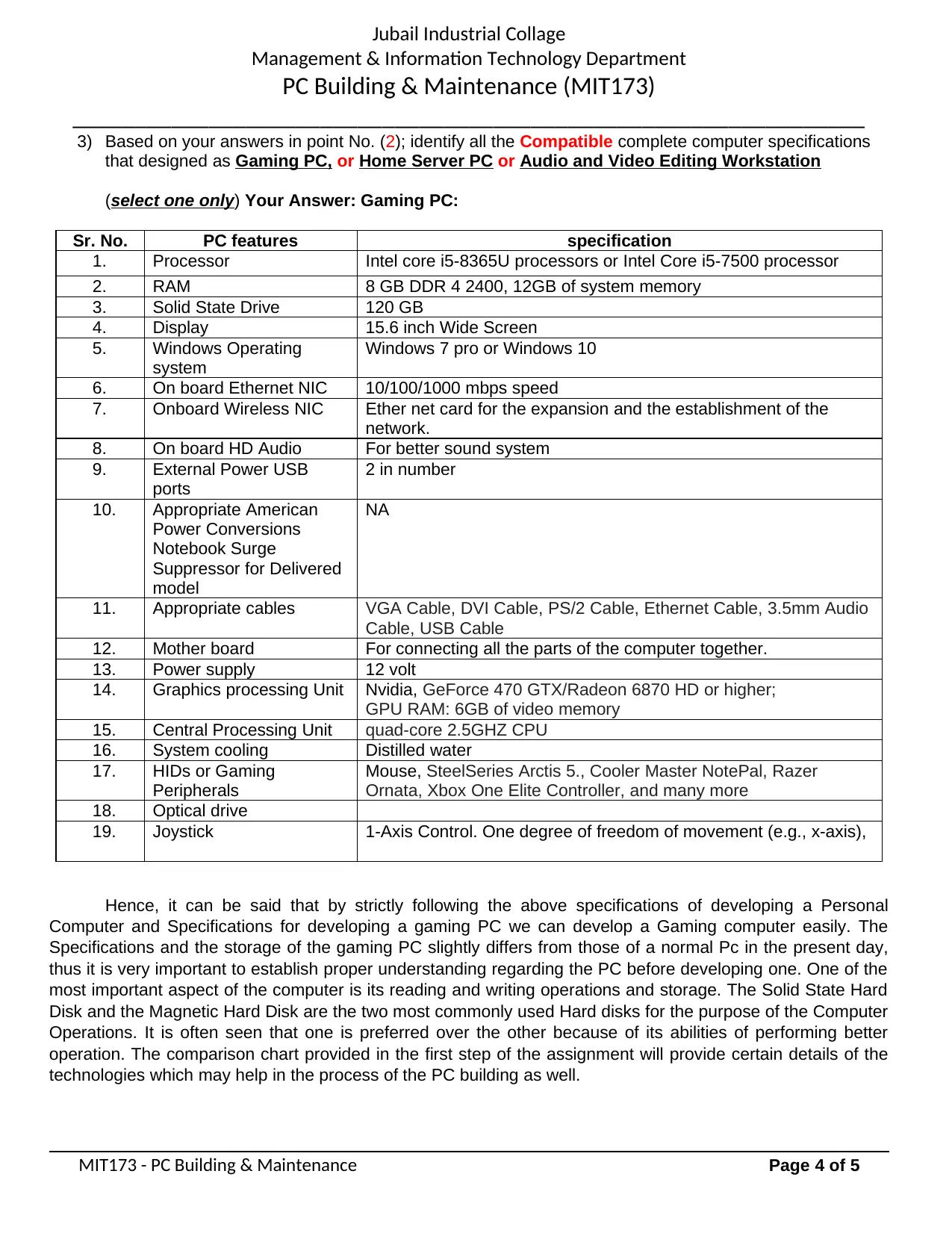
3) Based on your answers in point No. (2); identify all the Compatible complete computer specifications
that designed as Gaming PC, or Home Server PC or Audio and Video Editing Workstation
(select one only) Your Answer: Gaming PC:
Sr. No. PC features specification
1. Processor Intel core i5-8365U processors or Intel Core i5-7500 processor
2. RAM 8 GB DDR 4 2400, 12GB of system memory
3. Solid State Drive 120 GB
4. Display 15.6 inch Wide Screen
5. Windows Operating
system
Windows 7 pro or Windows 10
6. On board Ethernet NIC 10/100/1000 mbps speed
7. Onboard Wireless NIC Ether net card for the expansion and the establishment of the
network.
8. On board HD Audio For better sound system
9. External Power USB
ports
2 in number
10. Appropriate American
Power Conversions
Notebook Surge
Suppressor for Delivered
model
NA
11. Appropriate cables VGA Cable, DVI Cable, PS/2 Cable, Ethernet Cable, 3.5mm Audio
Cable, USB Cable
12. Mother board For connecting all the parts of the computer together.
13. Power supply 12 volt
14. Graphics processing Unit Nvidia, GeForce 470 GTX/Radeon 6870 HD or higher;
GPU RAM: 6GB of video memory
15. Central Processing Unit quad-core 2.5GHZ CPU
16. System cooling Distilled water
17. HIDs or Gaming
Peripherals
Mouse, SteelSeries Arctis 5., Cooler Master NotePal, Razer
Ornata, Xbox One Elite Controller, and many more
18. Optical drive
19. Joystick 1-Axis Control. One degree of freedom of movement (e.g., x-axis),
Hence, it can be said that by strictly following the above specifications of developing a Personal
Computer and Specifications for developing a gaming PC we can develop a Gaming computer easily. The
Specifications and the storage of the gaming PC slightly differs from those of a normal Pc in the present day,
thus it is very important to establish proper understanding regarding the PC before developing one. One of the
most important aspect of the computer is its reading and writing operations and storage. The Solid State Hard
Disk and the Magnetic Hard Disk are the two most commonly used Hard disks for the purpose of the Computer
Operations. It is often seen that one is preferred over the other because of its abilities of performing better
operation. The comparison chart provided in the first step of the assignment will provide certain details of the
technologies which may help in the process of the PC building as well.
MIT173 - PC Building & Maintenance Page 4 of 5
Management & Information Technology Department
PC Building & Maintenance (MIT173)
________________________________________________________________
3) Based on your answers in point No. (2); identify all the Compatible complete computer specifications
that designed as Gaming PC, or Home Server PC or Audio and Video Editing Workstation
(select one only) Your Answer: Gaming PC:
Sr. No. PC features specification
1. Processor Intel core i5-8365U processors or Intel Core i5-7500 processor
2. RAM 8 GB DDR 4 2400, 12GB of system memory
3. Solid State Drive 120 GB
4. Display 15.6 inch Wide Screen
5. Windows Operating
system
Windows 7 pro or Windows 10
6. On board Ethernet NIC 10/100/1000 mbps speed
7. Onboard Wireless NIC Ether net card for the expansion and the establishment of the
network.
8. On board HD Audio For better sound system
9. External Power USB
ports
2 in number
10. Appropriate American
Power Conversions
Notebook Surge
Suppressor for Delivered
model
NA
11. Appropriate cables VGA Cable, DVI Cable, PS/2 Cable, Ethernet Cable, 3.5mm Audio
Cable, USB Cable
12. Mother board For connecting all the parts of the computer together.
13. Power supply 12 volt
14. Graphics processing Unit Nvidia, GeForce 470 GTX/Radeon 6870 HD or higher;
GPU RAM: 6GB of video memory
15. Central Processing Unit quad-core 2.5GHZ CPU
16. System cooling Distilled water
17. HIDs or Gaming
Peripherals
Mouse, SteelSeries Arctis 5., Cooler Master NotePal, Razer
Ornata, Xbox One Elite Controller, and many more
18. Optical drive
19. Joystick 1-Axis Control. One degree of freedom of movement (e.g., x-axis),
Hence, it can be said that by strictly following the above specifications of developing a Personal
Computer and Specifications for developing a gaming PC we can develop a Gaming computer easily. The
Specifications and the storage of the gaming PC slightly differs from those of a normal Pc in the present day,
thus it is very important to establish proper understanding regarding the PC before developing one. One of the
most important aspect of the computer is its reading and writing operations and storage. The Solid State Hard
Disk and the Magnetic Hard Disk are the two most commonly used Hard disks for the purpose of the Computer
Operations. It is often seen that one is preferred over the other because of its abilities of performing better
operation. The comparison chart provided in the first step of the assignment will provide certain details of the
technologies which may help in the process of the PC building as well.
MIT173 - PC Building & Maintenance Page 4 of 5
Paraphrase This Document
Need a fresh take? Get an instant paraphrase of this document with our AI Paraphraser

Jubail Industrial Collage
Management & Information Technology Department
PC Building & Maintenance (MIT173)
________________________________________________________________
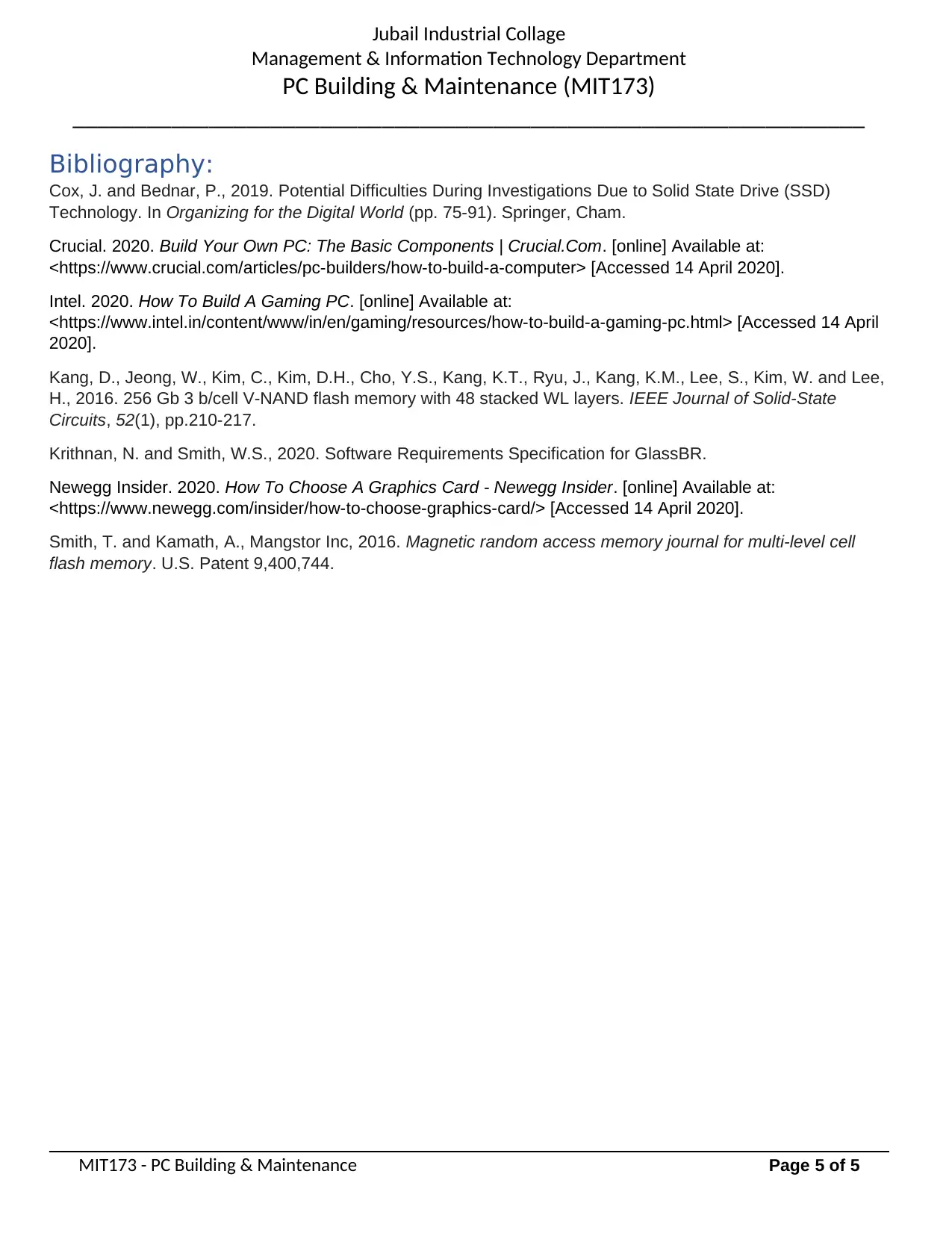
Bibliography:
Cox, J. and Bednar, P., 2019. Potential Difficulties During Investigations Due to Solid State Drive (SSD)
Technology. In Organizing for the Digital World (pp. 75-91). Springer, Cham.
Crucial. 2020. Build Your Own PC: The Basic Components | Crucial.Com. [online] Available at:
<https://www.crucial.com/articles/pc-builders/how-to-build-a-computer> [Accessed 14 April 2020].
Intel. 2020. How To Build A Gaming PC. [online] Available at:
<https://www.intel.in/content/www/in/en/gaming/resources/how-to-build-a-gaming-pc.html> [Accessed 14 April
2020].
Kang, D., Jeong, W., Kim, C., Kim, D.H., Cho, Y.S., Kang, K.T., Ryu, J., Kang, K.M., Lee, S., Kim, W. and Lee,
H., 2016. 256 Gb 3 b/cell V-NAND flash memory with 48 stacked WL layers. IEEE Journal of Solid-State
Circuits, 52(1), pp.210-217.
Krithnan, N. and Smith, W.S., 2020. Software Requirements Specification for GlassBR.
Newegg Insider. 2020. How To Choose A Graphics Card - Newegg Insider. [online] Available at:
<https://www.newegg.com/insider/how-to-choose-graphics-card/> [Accessed 14 April 2020].
Smith, T. and Kamath, A., Mangstor Inc, 2016. Magnetic random access memory journal for multi-level cell
flash memory. U.S. Patent 9,400,744.
MIT173 - PC Building & Maintenance Page 5 of 5
Management & Information Technology Department
PC Building & Maintenance (MIT173)
________________________________________________________________
Bibliography:
Cox, J. and Bednar, P., 2019. Potential Difficulties During Investigations Due to Solid State Drive (SSD)
Technology. In Organizing for the Digital World (pp. 75-91). Springer, Cham.
Crucial. 2020. Build Your Own PC: The Basic Components | Crucial.Com. [online] Available at:
<https://www.crucial.com/articles/pc-builders/how-to-build-a-computer> [Accessed 14 April 2020].
Intel. 2020. How To Build A Gaming PC. [online] Available at:
<https://www.intel.in/content/www/in/en/gaming/resources/how-to-build-a-gaming-pc.html> [Accessed 14 April
2020].
Kang, D., Jeong, W., Kim, C., Kim, D.H., Cho, Y.S., Kang, K.T., Ryu, J., Kang, K.M., Lee, S., Kim, W. and Lee,
H., 2016. 256 Gb 3 b/cell V-NAND flash memory with 48 stacked WL layers. IEEE Journal of Solid-State
Circuits, 52(1), pp.210-217.
Krithnan, N. and Smith, W.S., 2020. Software Requirements Specification for GlassBR.
Newegg Insider. 2020. How To Choose A Graphics Card - Newegg Insider. [online] Available at:
<https://www.newegg.com/insider/how-to-choose-graphics-card/> [Accessed 14 April 2020].
Smith, T. and Kamath, A., Mangstor Inc, 2016. Magnetic random access memory journal for multi-level cell
flash memory. U.S. Patent 9,400,744.
MIT173 - PC Building & Maintenance Page 5 of 5
1 out of 5
Related Documents
Your All-in-One AI-Powered Toolkit for Academic Success.
 +13062052269
info@desklib.com
Available 24*7 on WhatsApp / Email
Unlock your academic potential
Copyright © 2020–2026 A2Z Services. All Rights Reserved. Developed and managed by ZUCOL.