Personal Financial Management Software Design & Prediction Tool

Verified

Added on  2023/06/03

|18
|1350
|490
Project
AI Summary
This document details the design of a personal financial management software, encompassing requirement specifications, user interface designs, use case diagrams and descriptions, class responsibilities and collaborations (CRC), a domain model, collaboration diagrams, and activity diagrams. The software aims to allow users to record income and expenses, generate financial reports, and predict future financial status based on expense patterns. Functional requirements include expense entry with payee/payer details, financial report generation with balance tracking, and financial prediction based on user-defined dates. Non-functional requirements specify the application must run on Windows, be implemented using C# and Windows Forms, display error messages, and allow easy navigation. The design covers various use cases such as adding new payees/payers, entering income/expense records, retrieving financial reports, and generating predicted financial balances, each detailing actors, pre-conditions, post-conditions, triggers, and main case scenarios. The CRC cards outline the classes (PayPerson, Transaction, PersonalFinanceManager, and various View forms), their responsibilities, and collaborations. The document also presents collaboration diagrams for each use case and activity diagrams illustrating the workflow of key processes.

Document Page
Running head: PERSONAL FINANCIAL MANAGEMENT SOFTWARE
Personal Financial Management Software
Name of the Student:
Name of the University:
Author note:
tabler-icon-diamond-filled.svg

Paraphrase This Document

Need a fresh take? Get an instant paraphrase of this document with our AI Paraphraser
Document Page
1
PERSONAL FINANCIAL MANAGEMENT SOFTWARE
Table of Contents
Part A: Requirement Specifications...........................................................................................2
User Interface Designs...........................................................................................................4
Part B: Use Case.........................................................................................................................7
Use Case Diagram..................................................................................................................7
Use Case Descriptions............................................................................................................7
Part C: Classes..........................................................................................................................10
CRC (Classes, Responsibilities, and Collaborations)..........................................................10
Domain Model.....................................................................................................................12
Part D: Collaboration...............................................................................................................12
Task E: Activity.......................................................................................................................17
Document Page
2
PERSONAL FINANCIAL MANAGEMENT SOFTWARE
Part A: Requirement Specifications
Following is the list of functional requirements that are required to define the core
functionalities of the Personal Financial Management software:
R1: The software shall allow the user to enter expenses for a certain date.
R1.1: The software should allow for the entering details of a payer or a payee.
This will allow the users to enter the details of a new payer or payer into the
system. This will allow them to be referred to in-case of income/expenditure data
entry.
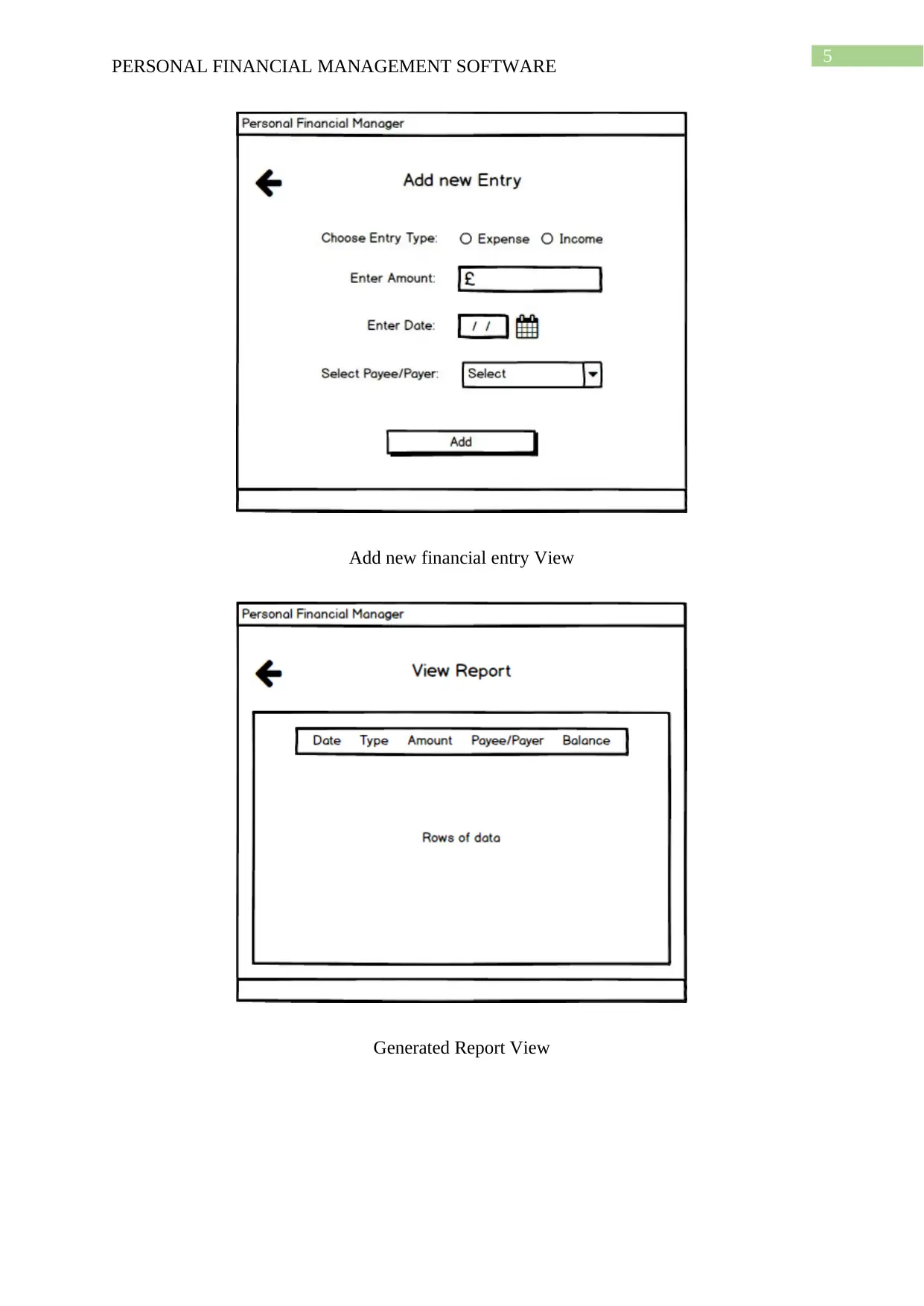
R1.2: The software should provide a form for the entry of expenses or income.
The user must be able to fill-in a form with all the necessary data in order to
create a new income/expenditure record.
R1.3: The software must verify the validity of the date entered by the user.
The date entered by the user should be checked and validated.
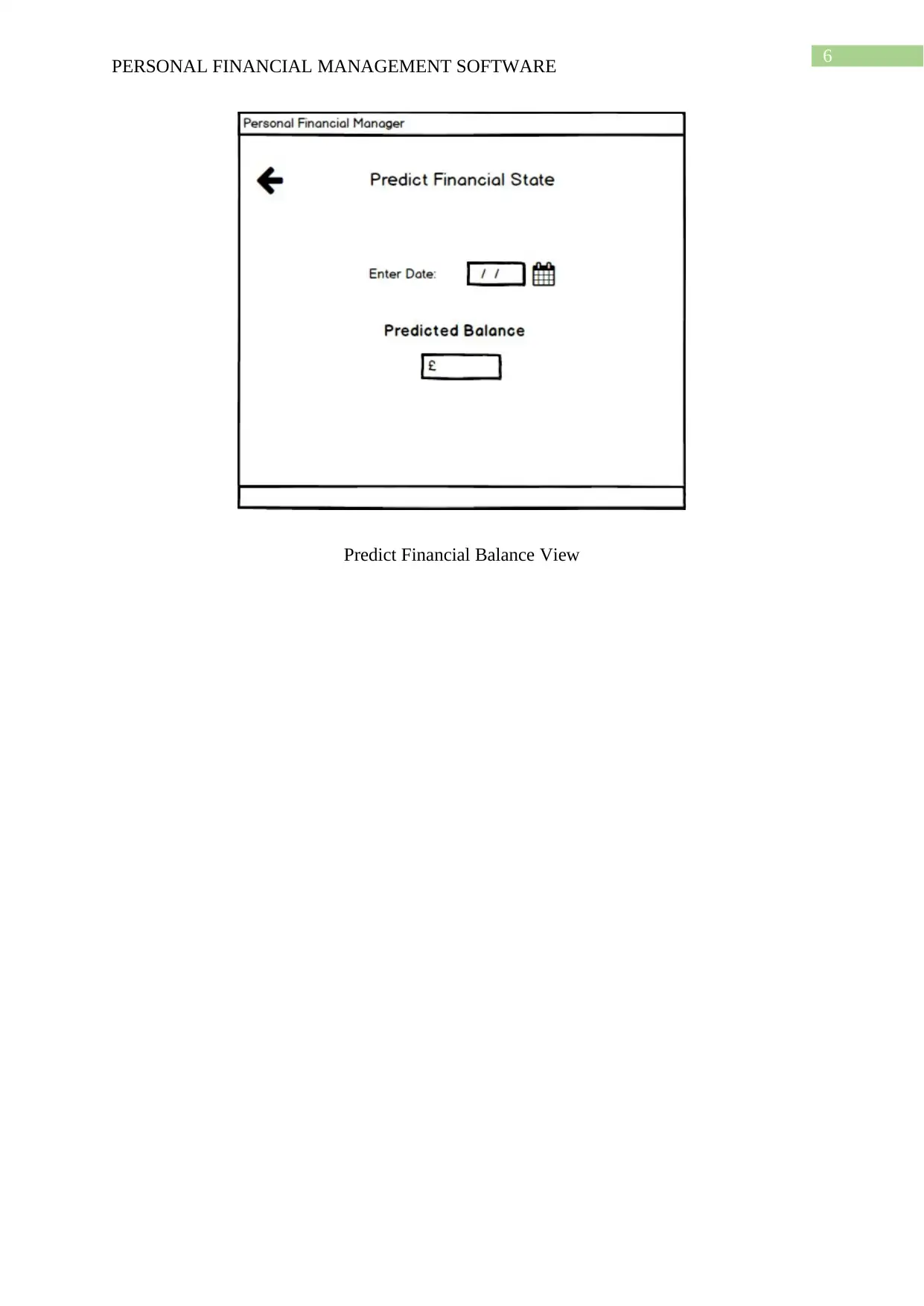
R2: Allow the user to produce a financial report.
R2.1: The report should consist of all expenses made by the user.
All expense data details should be presented.
R2.2: The report should consist of all income made by the user.
All income data details should be presented.
R2.3: The report should consist of all the details of data entered.
R2.4: The report should consist of the balance after each transaction.
Document Page
3
PERSONAL FINANCIAL MANAGEMENT SOFTWARE
Each income or expense transaction record should consist of the balance at the
end of it.
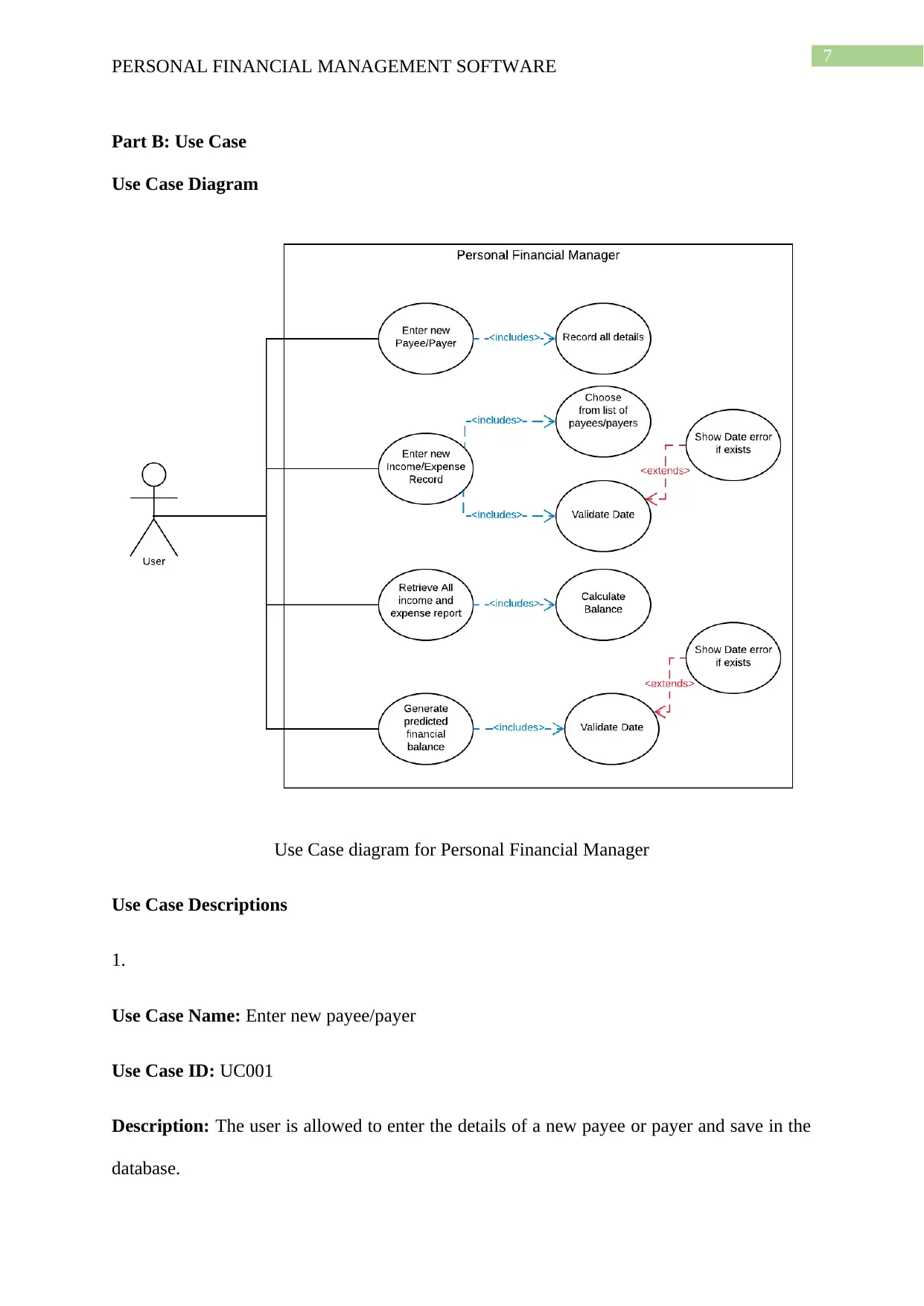
R3: Allow the user to produce financial prediction for a certain date.
R3.1: The software must verify the validity of the date entered by the user.
The user’s date entry should be validated.
R3.2: Produce on-screen out of the prediction showing the financial balance of the
user.
The predicted balance should be calculated properly and displayed within the
output textbox, appropriately.
The non-functional requirements are as follows:
NF1: The application must run on windows.
NF2: The application must be implemented using c# and windows forms.
NF3: The application must display valid error messages to indicate erroneous user inputs.
NF4: Users should be allowed to navigate between the pages of the software easily.
tabler-icon-diamond-filled.svg

Paraphrase This Document

Need a fresh take? Get an instant paraphrase of this document with our AI Paraphraser
Document Page
4
PERSONAL FINANCIAL MANAGEMENT SOFTWARE
User Interface Designs
Home View
Add new Payee or Payer View
Document Page
5
PERSONAL FINANCIAL MANAGEMENT SOFTWARE
Add new financial entry View
Generated Report View
Document Page
6
PERSONAL FINANCIAL MANAGEMENT SOFTWARE
Predict Financial Balance View
tabler-icon-diamond-filled.svg

Paraphrase This Document

Need a fresh take? Get an instant paraphrase of this document with our AI Paraphraser
Document Page
7
PERSONAL FINANCIAL MANAGEMENT SOFTWARE
Part B: Use Case
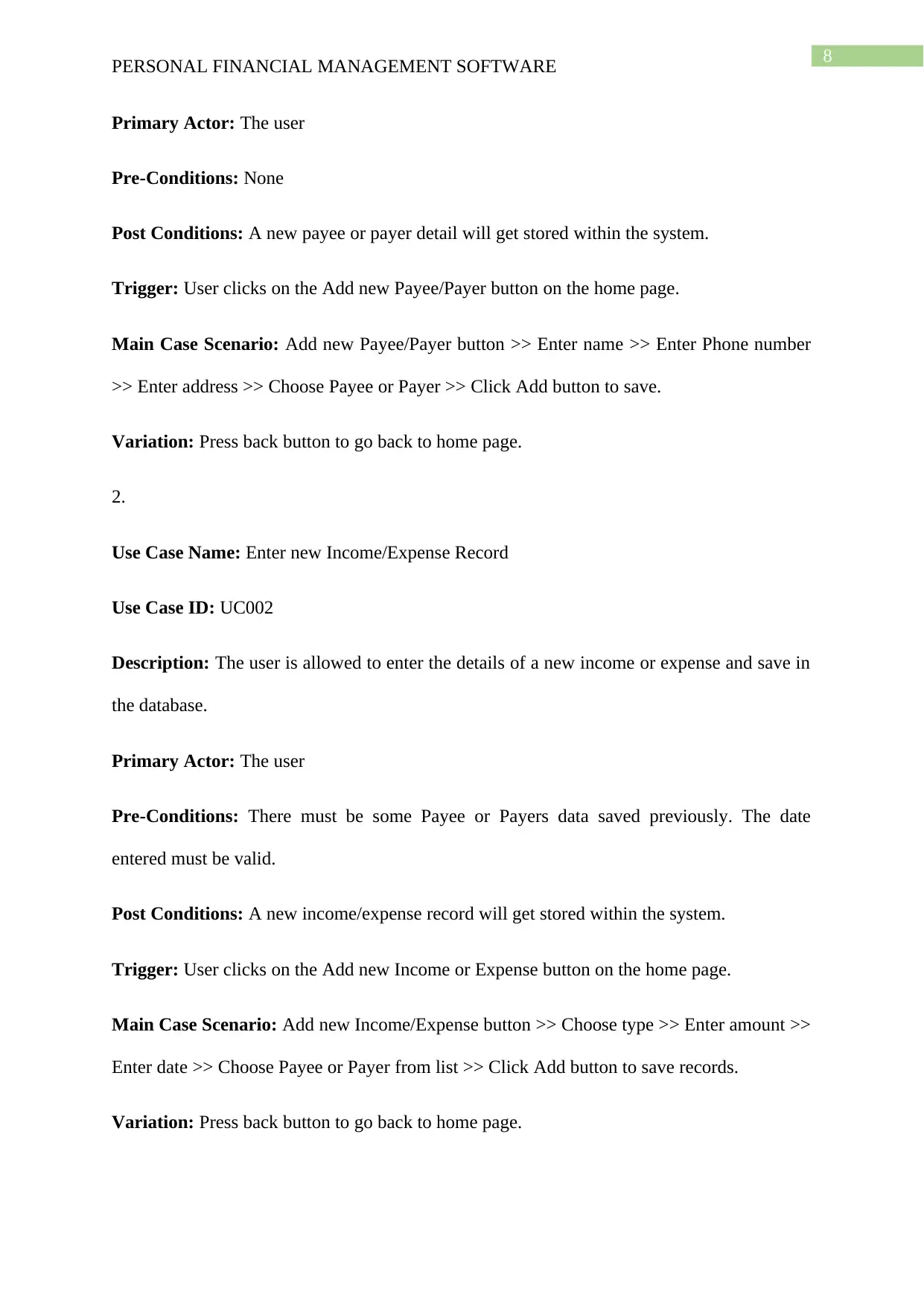
Use Case Diagram
Use Case diagram for Personal Financial Manager
Use Case Descriptions
1.
Use Case Name: Enter new payee/payer
Use Case ID: UC001
Description: The user is allowed to enter the details of a new payee or payer and save in the
database.
Document Page
8
PERSONAL FINANCIAL MANAGEMENT SOFTWARE
Primary Actor: The user
Pre-Conditions: None
Post Conditions: A new payee or payer detail will get stored within the system.
Trigger: User clicks on the Add new Payee/Payer button on the home page.
Main Case Scenario: Add new Payee/Payer button >> Enter name >> Enter Phone number
>> Enter address >> Choose Payee or Payer >> Click Add button to save.
Variation: Press back button to go back to home page.
2.
Use Case Name: Enter new Income/Expense Record
Use Case ID: UC002
Description: The user is allowed to enter the details of a new income or expense and save in
the database.
Primary Actor: The user
Pre-Conditions: There must be some Payee or Payers data saved previously. The date
entered must be valid.
Post Conditions: A new income/expense record will get stored within the system.
Trigger: User clicks on the Add new Income or Expense button on the home page.
Main Case Scenario: Add new Income/Expense button >> Choose type >> Enter amount >>
Enter date >> Choose Payee or Payer from list >> Click Add button to save records.
Variation: Press back button to go back to home page.
Document Page
9
PERSONAL FINANCIAL MANAGEMENT SOFTWARE
3.
Use Case Name: Retrieve all income and expense report
Use Case ID: UC003
Description: The user is allowed to view all his income and expenditure data that he has
previously entered. This will also allow the viewing of the updated balance at each stage.
Primary Actor: The user
Pre-Conditions: There must be some Payee or Payers data saved. Also there must be some
income/expense data saved previously.
Post Conditions: Data is retrieved from the database and the balance is calculated, before
reporting the same on the screen.
Trigger: User clicks on the View Financial Report button on the home page.
Main Case Scenario: View Financial Report button >> View data
Variation: Press back button to go back to home page.
4.
Use Case Name: Generate predicted financial balance
Use Case ID: UC004
Description: The user will enter a date and the system will predict the balance output based
on the income/expenditure trend.
Primary Actor: The user
Pre-Conditions: There must be some Payee or Payers data saved. Also there must be some
income/expense data saved previously. The date entered must be valid.
tabler-icon-diamond-filled.svg

Paraphrase This Document

Need a fresh take? Get an instant paraphrase of this document with our AI Paraphraser
Document Page
10
PERSONAL FINANCIAL MANAGEMENT SOFTWARE
Post Conditions: Data gets calculated as per built-in algorithms and displayed on the screen.
Trigger: User clicks on the Predict Financial Status button on the home page.
Main Case Scenario: Predict Financial Status button >> View predicted balance
Variation: Press back button to go back to home page.
Part C: Classes
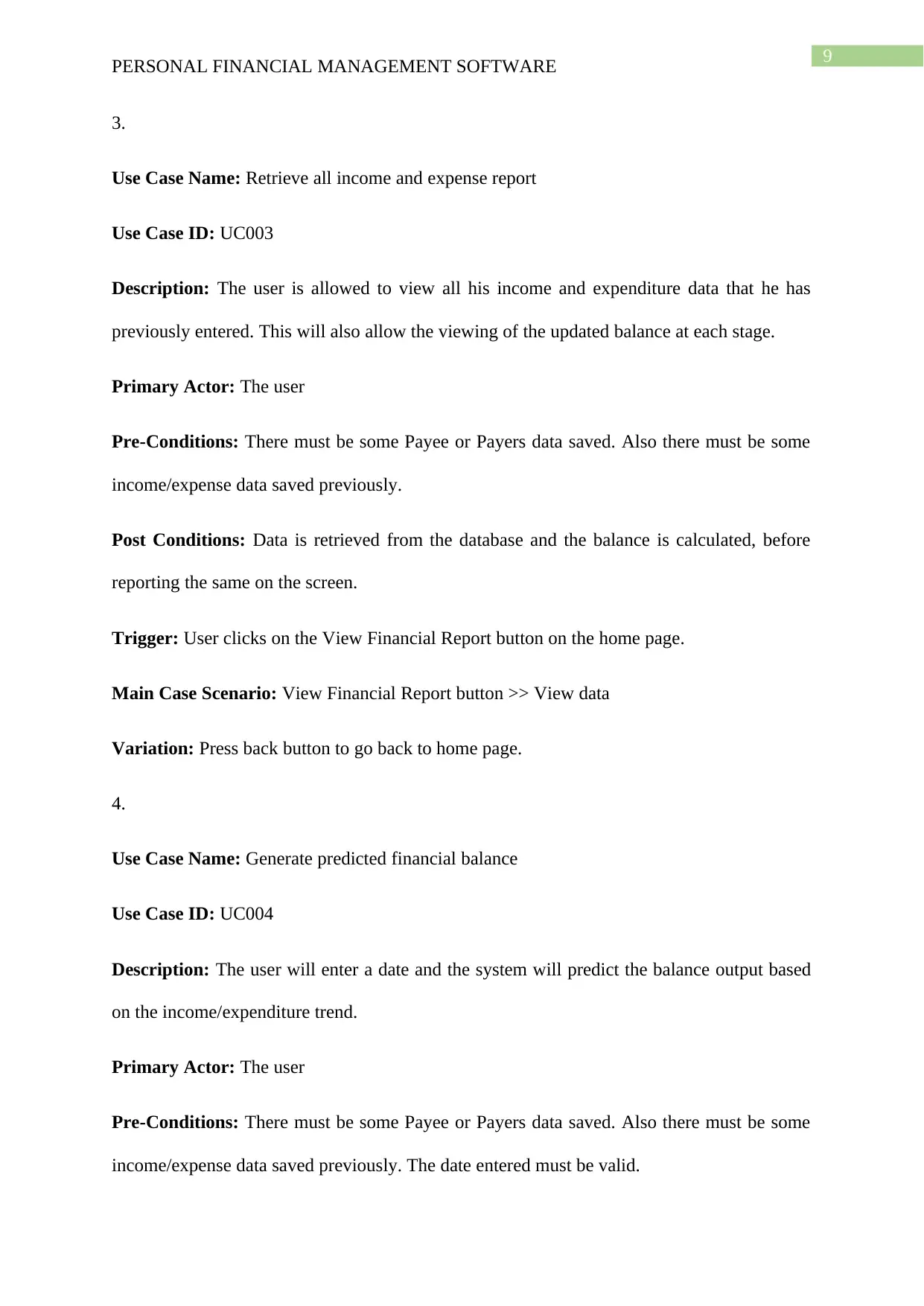
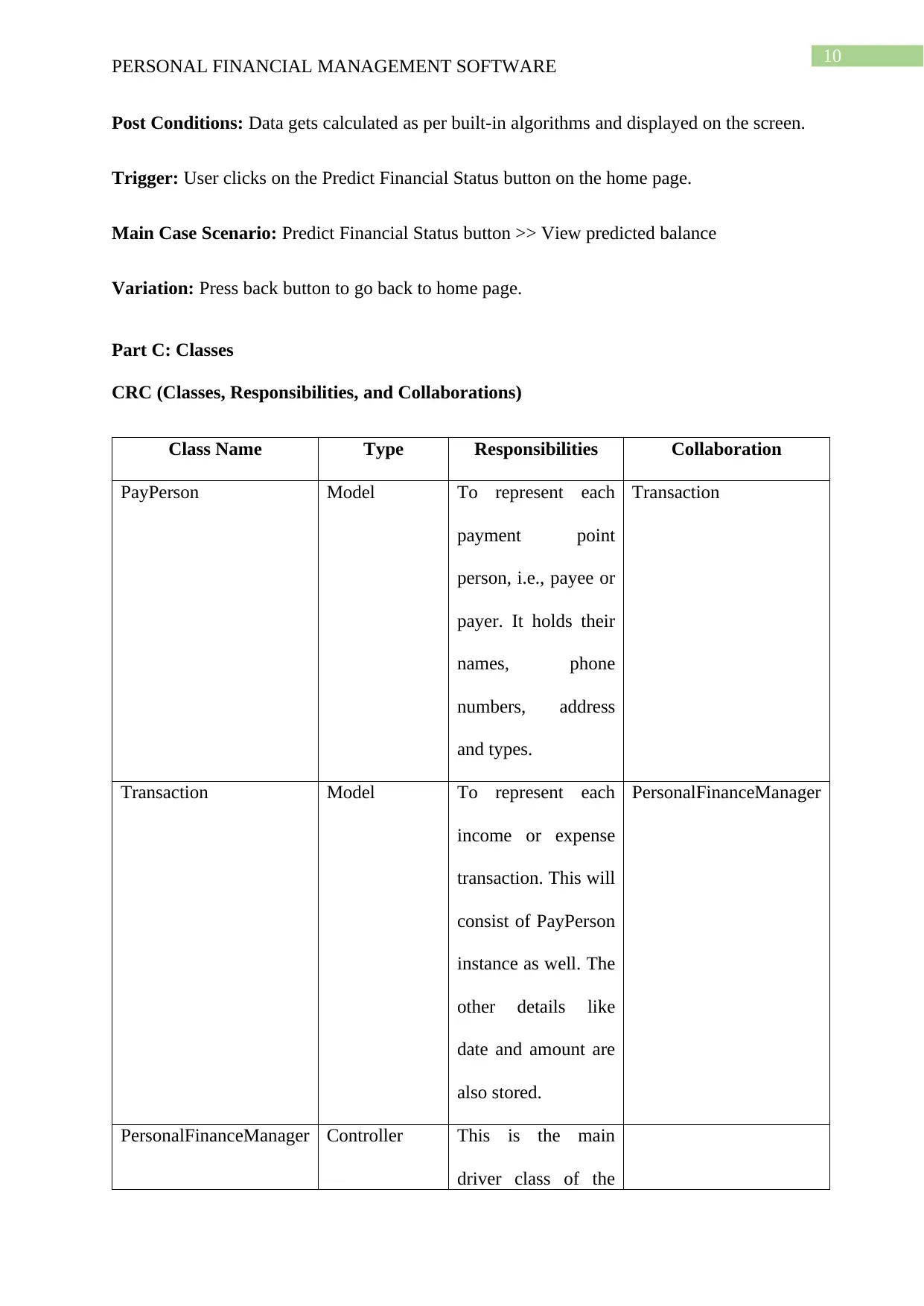
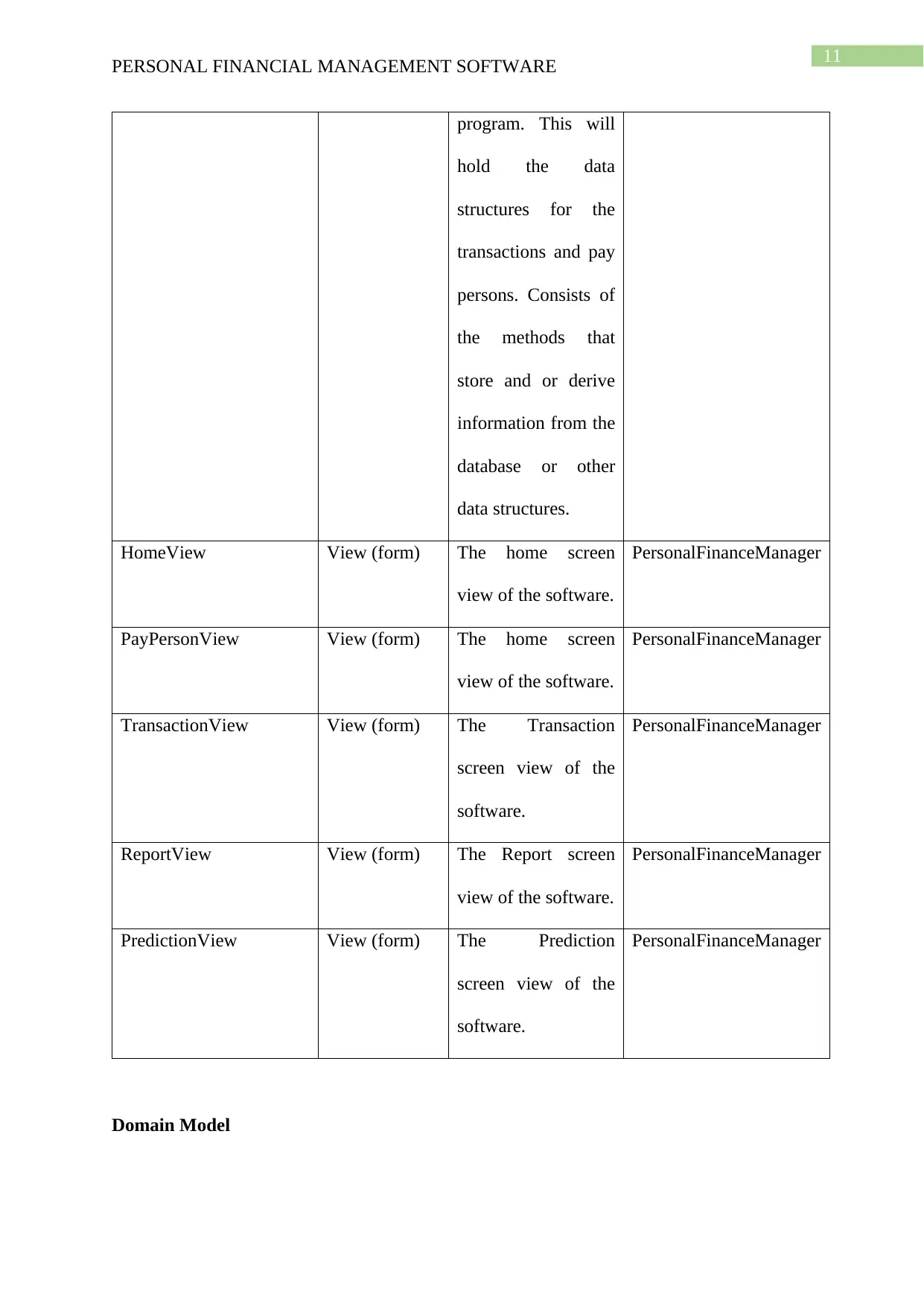
CRC (Classes, Responsibilities, and Collaborations)
Class Name Type Responsibilities Collaboration
PayPerson Model To represent each
payment point
person, i.e., payee or
payer. It holds their
names, phone
numbers, address
and types.
Transaction
Transaction Model To represent each
income or expense
transaction. This will
consist of PayPerson
instance as well. The
other details like
date and amount are
also stored.
PersonalFinanceManager
PersonalFinanceManager Controller This is the main
driver class of the
Document Page
11
PERSONAL FINANCIAL MANAGEMENT SOFTWARE
program. This will
hold the data
structures for the
transactions and pay
persons. Consists of
the methods that
store and or derive
information from the
database or other
data structures.
HomeView View (form) The home screen
view of the software.
PersonalFinanceManager
PayPersonView View (form) The home screen
view of the software.
PersonalFinanceManager
TransactionView View (form) The Transaction
screen view of the
software.
PersonalFinanceManager
ReportView View (form) The Report screen
view of the software.
PersonalFinanceManager
PredictionView View (form) The Prediction
screen view of the
software.
PersonalFinanceManager
Domain Model
chevron_up_icon
1 out of 18
circle_padding
hide_on_mobile
zoom_out_icon
[object Object]