MN503 Internetworking: Designing a Primary School Network
VerifiedAdded on 2023/06/11
|16
|1462
|361
Report
AI Summary
This project report outlines the design and implementation of a primary school network with guest access, including network simulation, IP addressing, subnetting, and device configurations. The network is designed to allow school users to communicate with an FTP server while restricting guest user access. The report details the IP address table, subnetting scheme, device configurations for switches and routers (Cisco), DHCP configuration for school and guest users, and access control lists (ACL) to restrict FTP server access for guest users. Static routing is implemented for communication between the school network and the FTP server. The report concludes with a discussion of the limitations of static routing and suggestions for future implementation of dynamic routing protocols. Desklib provides access to this and other solved assignments to aid students in their studies.
Primary School Network
Overview of Internetworking
Student Name
(Student ID)
Overview of Internetworking
Student Name
(Student ID)
Paraphrase This Document
Need a fresh take? Get an instant paraphrase of this document with our AI Paraphraser

Project Scope
This project describes to design the Primary School network design with guest network. Before
real time implementation, we make the network simulation for these network. After analyzing the
network traffic, we will implement this network using network devices such as cisco, netgear and etc.
Project Requirements
We need to design the small network in school environment for School and Guest User. School
user can communicate with FTP Server, but not Guest User. First, we need to design the network
address using subnetting concepts. After that we need to configure the IP address to specified devices
and test the communication those devices.
Network Design using User-Centric Concepts
School campus is the center of the network communication. All the user communicate through
School Router Device. Guest and School user can communicate through School Router. Another one,
School User can upload/download the files from/to FTP Server via School Router
This project describes to design the Primary School network design with guest network. Before
real time implementation, we make the network simulation for these network. After analyzing the
network traffic, we will implement this network using network devices such as cisco, netgear and etc.
Project Requirements
We need to design the small network in school environment for School and Guest User. School
user can communicate with FTP Server, but not Guest User. First, we need to design the network
address using subnetting concepts. After that we need to configure the IP address to specified devices
and test the communication those devices.
Network Design using User-Centric Concepts
School campus is the center of the network communication. All the user communicate through
School Router Device. Guest and School user can communicate through School Router. Another one,
School User can upload/download the files from/to FTP Server via School Router

IP Address Table including netmask
Subnetting
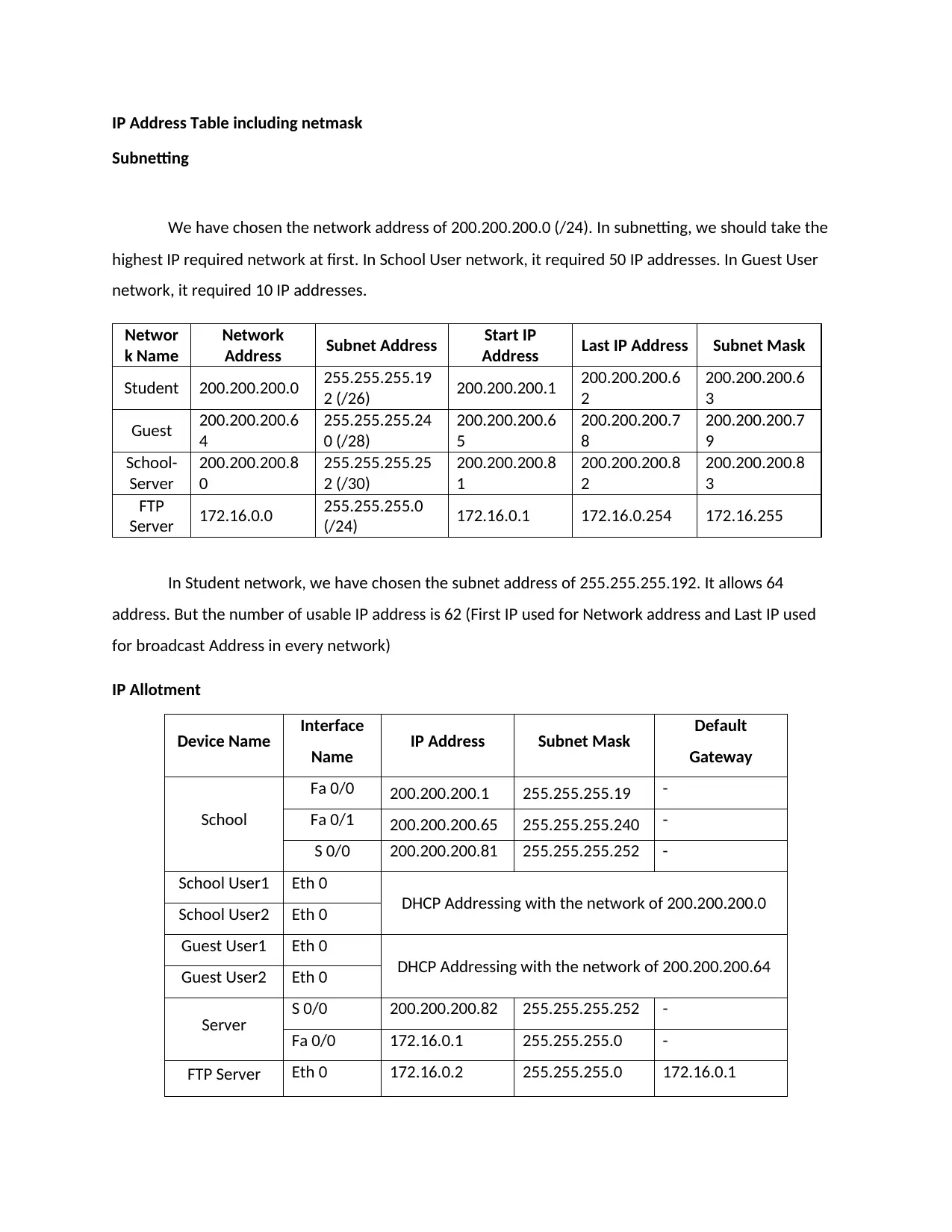
We have chosen the network address of 200.200.200.0 (/24). In subnetting, we should take the
highest IP required network at first. In School User network, it required 50 IP addresses. In Guest User
network, it required 10 IP addresses.
Networ
k Name
Network
Address Subnet Address Start IP
Address Last IP Address Subnet Mask
Student 200.200.200.0 255.255.255.19
2 (/26) 200.200.200.1 200.200.200.6
2
200.200.200.6
3
Guest 200.200.200.6
4
255.255.255.24
0 (/28)
200.200.200.6
5
200.200.200.7
8
200.200.200.7
9
School-
Server
200.200.200.8
0
255.255.255.25
2 (/30)
200.200.200.8
1
200.200.200.8
2
200.200.200.8
3
FTP
Server 172.16.0.0 255.255.255.0
(/24) 172.16.0.1 172.16.0.254 172.16.255
In Student network, we have chosen the subnet address of 255.255.255.192. It allows 64
address. But the number of usable IP address is 62 (First IP used for Network address and Last IP used
for broadcast Address in every network)
IP Allotment
Device Name Interface
Name IP Address Subnet Mask Default
Gateway
School
Fa 0/0 200.200.200.1 255.255.255.19 -
Fa 0/1 200.200.200.65 255.255.255.240 -
S 0/0 200.200.200.81 255.255.255.252 -
School User1 Eth 0
DHCP Addressing with the network of 200.200.200.0
School User2 Eth 0
Guest User1 Eth 0
DHCP Addressing with the network of 200.200.200.64
Guest User2 Eth 0
Server S 0/0 200.200.200.82 255.255.255.252 -
Fa 0/0 172.16.0.1 255.255.255.0 -
FTP Server Eth 0 172.16.0.2 255.255.255.0 172.16.0.1
Subnetting
We have chosen the network address of 200.200.200.0 (/24). In subnetting, we should take the
highest IP required network at first. In School User network, it required 50 IP addresses. In Guest User
network, it required 10 IP addresses.
Networ
k Name
Network
Address Subnet Address Start IP
Address Last IP Address Subnet Mask
Student 200.200.200.0 255.255.255.19
2 (/26) 200.200.200.1 200.200.200.6
2
200.200.200.6
3
Guest 200.200.200.6
4
255.255.255.24
0 (/28)
200.200.200.6
5
200.200.200.7
8
200.200.200.7
9
School-
Server
200.200.200.8
0
255.255.255.25
2 (/30)
200.200.200.8
1
200.200.200.8
2
200.200.200.8
3
FTP
Server 172.16.0.0 255.255.255.0
(/24) 172.16.0.1 172.16.0.254 172.16.255
In Student network, we have chosen the subnet address of 255.255.255.192. It allows 64
address. But the number of usable IP address is 62 (First IP used for Network address and Last IP used
for broadcast Address in every network)
IP Allotment
Device Name Interface
Name IP Address Subnet Mask Default
Gateway
School
Fa 0/0 200.200.200.1 255.255.255.19 -
Fa 0/1 200.200.200.65 255.255.255.240 -
S 0/0 200.200.200.81 255.255.255.252 -
School User1 Eth 0
DHCP Addressing with the network of 200.200.200.0
School User2 Eth 0
Guest User1 Eth 0
DHCP Addressing with the network of 200.200.200.64
Guest User2 Eth 0
Server S 0/0 200.200.200.82 255.255.255.252 -
Fa 0/0 172.16.0.1 255.255.255.0 -
FTP Server Eth 0 172.16.0.2 255.255.255.0 172.16.0.1
⊘ This is a preview!⊘
Do you want full access?
Subscribe today to unlock all pages.

Trusted by 1+ million students worldwide

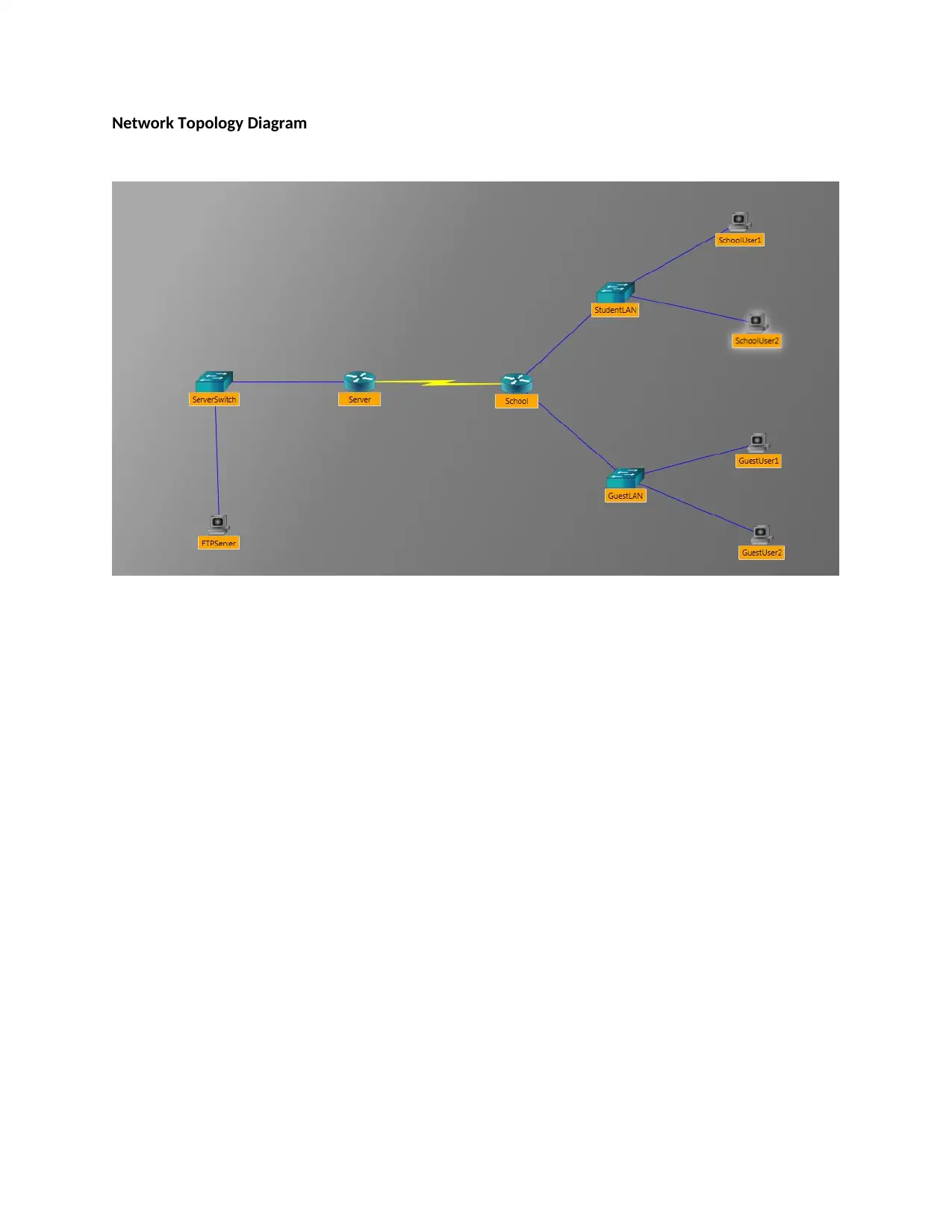
Network Topology Diagram
Paraphrase This Document
Need a fresh take? Get an instant paraphrase of this document with our AI Paraphraser

i) Switch Configuration
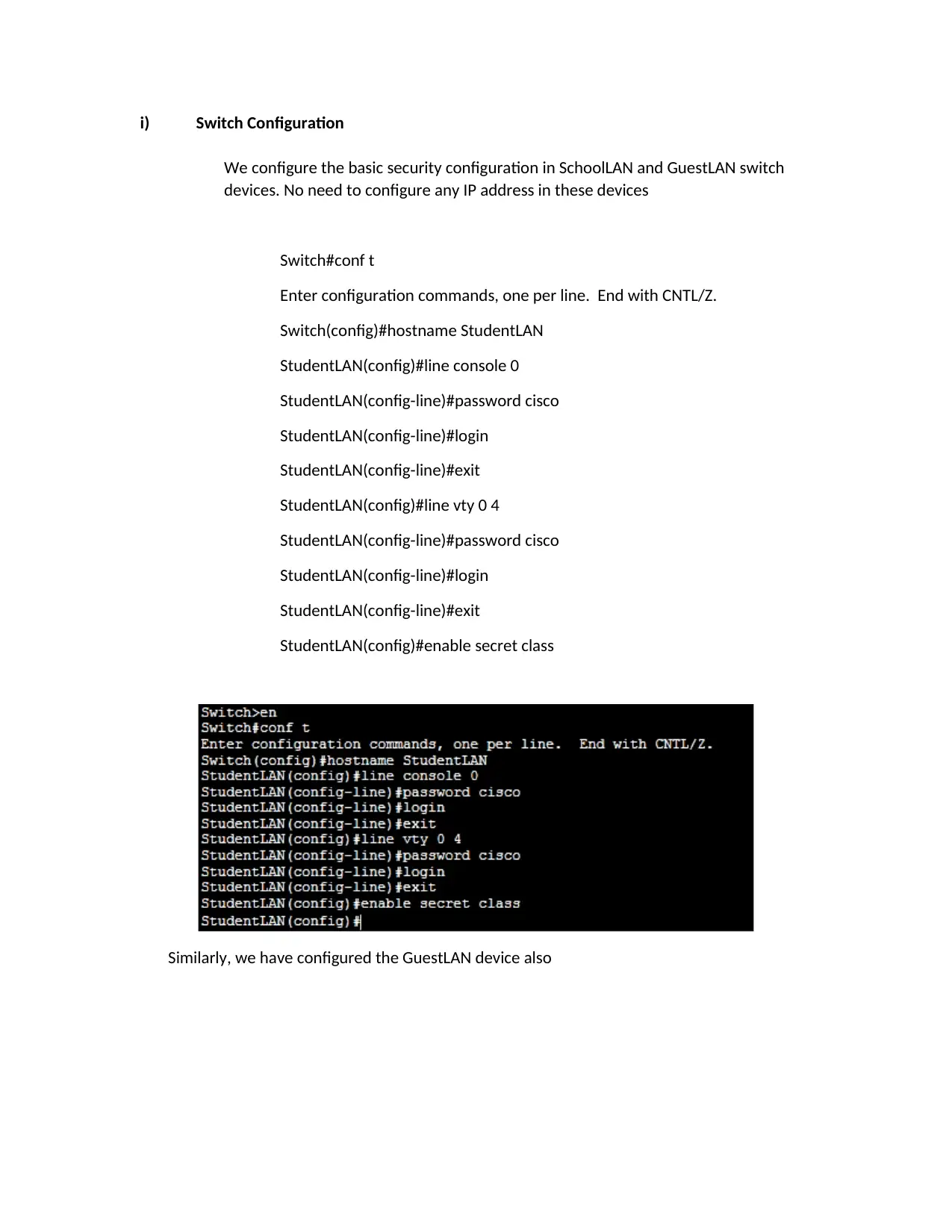
We configure the basic security configuration in SchoolLAN and GuestLAN switch
devices. No need to configure any IP address in these devices
Switch#conf t
Enter configuration commands, one per line. End with CNTL/Z.
Switch(config)#hostname StudentLAN
StudentLAN(config)#line console 0
StudentLAN(config-line)#password cisco
StudentLAN(config-line)#login
StudentLAN(config-line)#exit
StudentLAN(config)#line vty 0 4
StudentLAN(config-line)#password cisco
StudentLAN(config-line)#login
StudentLAN(config-line)#exit
StudentLAN(config)#enable secret class
Similarly, we have configured the GuestLAN device also
We configure the basic security configuration in SchoolLAN and GuestLAN switch
devices. No need to configure any IP address in these devices
Switch#conf t
Enter configuration commands, one per line. End with CNTL/Z.
Switch(config)#hostname StudentLAN
StudentLAN(config)#line console 0
StudentLAN(config-line)#password cisco
StudentLAN(config-line)#login
StudentLAN(config-line)#exit
StudentLAN(config)#line vty 0 4
StudentLAN(config-line)#password cisco
StudentLAN(config-line)#login
StudentLAN(config-line)#exit
StudentLAN(config)#enable secret class
Similarly, we have configured the GuestLAN device also

ii) Router Configuration
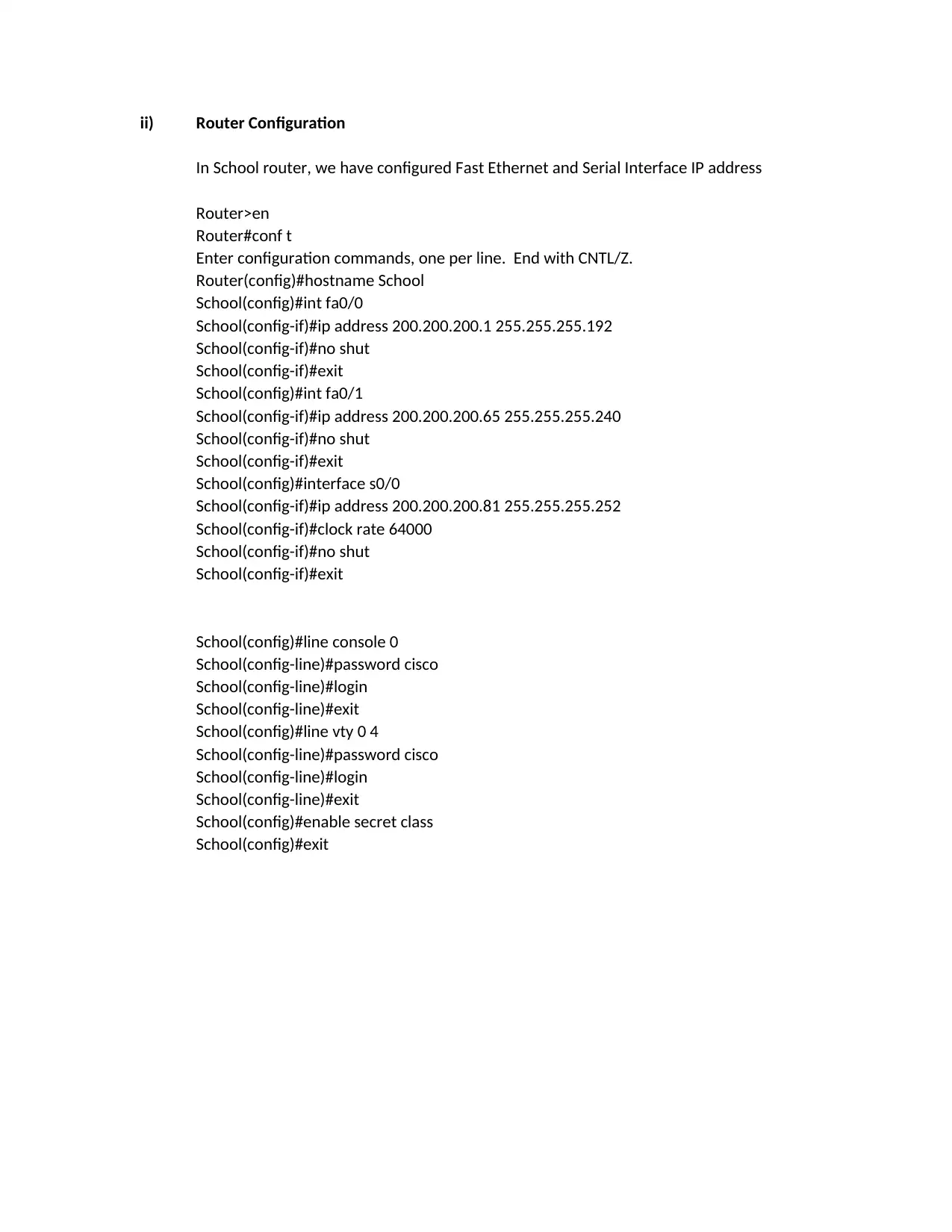
In School router, we have configured Fast Ethernet and Serial Interface IP address
Router>en
Router#conf t
Enter configuration commands, one per line. End with CNTL/Z.
Router(config)#hostname School
School(config)#int fa0/0
School(config-if)#ip address 200.200.200.1 255.255.255.192
School(config-if)#no shut
School(config-if)#exit
School(config)#int fa0/1
School(config-if)#ip address 200.200.200.65 255.255.255.240
School(config-if)#no shut
School(config-if)#exit
School(config)#interface s0/0
School(config-if)#ip address 200.200.200.81 255.255.255.252
School(config-if)#clock rate 64000
School(config-if)#no shut
School(config-if)#exit
School(config)#line console 0
School(config-line)#password cisco
School(config-line)#login
School(config-line)#exit
School(config)#line vty 0 4
School(config-line)#password cisco
School(config-line)#login
School(config-line)#exit
School(config)#enable secret class
School(config)#exit
In School router, we have configured Fast Ethernet and Serial Interface IP address
Router>en
Router#conf t
Enter configuration commands, one per line. End with CNTL/Z.
Router(config)#hostname School
School(config)#int fa0/0
School(config-if)#ip address 200.200.200.1 255.255.255.192
School(config-if)#no shut
School(config-if)#exit
School(config)#int fa0/1
School(config-if)#ip address 200.200.200.65 255.255.255.240
School(config-if)#no shut
School(config-if)#exit
School(config)#interface s0/0
School(config-if)#ip address 200.200.200.81 255.255.255.252
School(config-if)#clock rate 64000
School(config-if)#no shut
School(config-if)#exit
School(config)#line console 0
School(config-line)#password cisco
School(config-line)#login
School(config-line)#exit
School(config)#line vty 0 4
School(config-line)#password cisco
School(config-line)#login
School(config-line)#exit
School(config)#enable secret class
School(config)#exit
⊘ This is a preview!⊘
Do you want full access?
Subscribe today to unlock all pages.

Trusted by 1+ million students worldwide

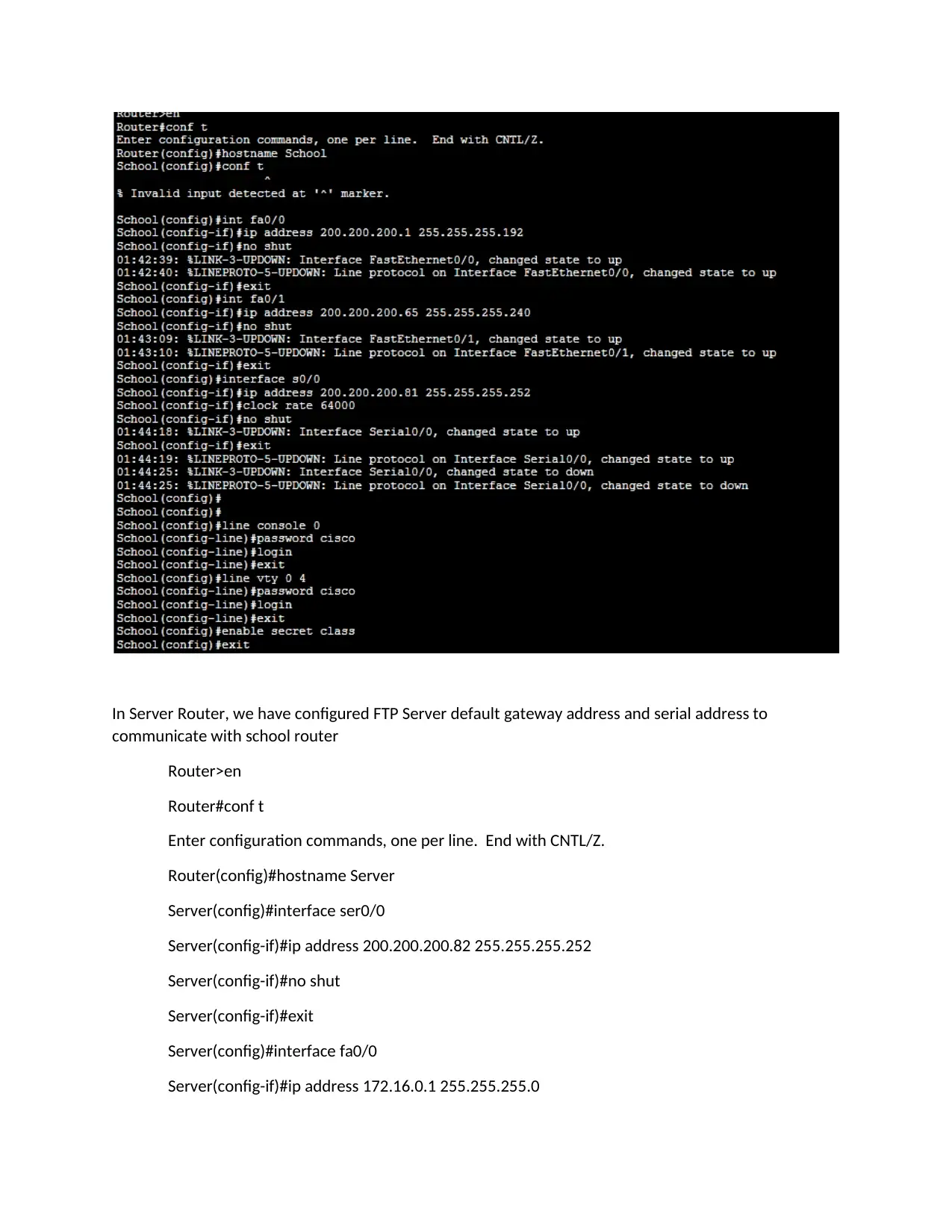
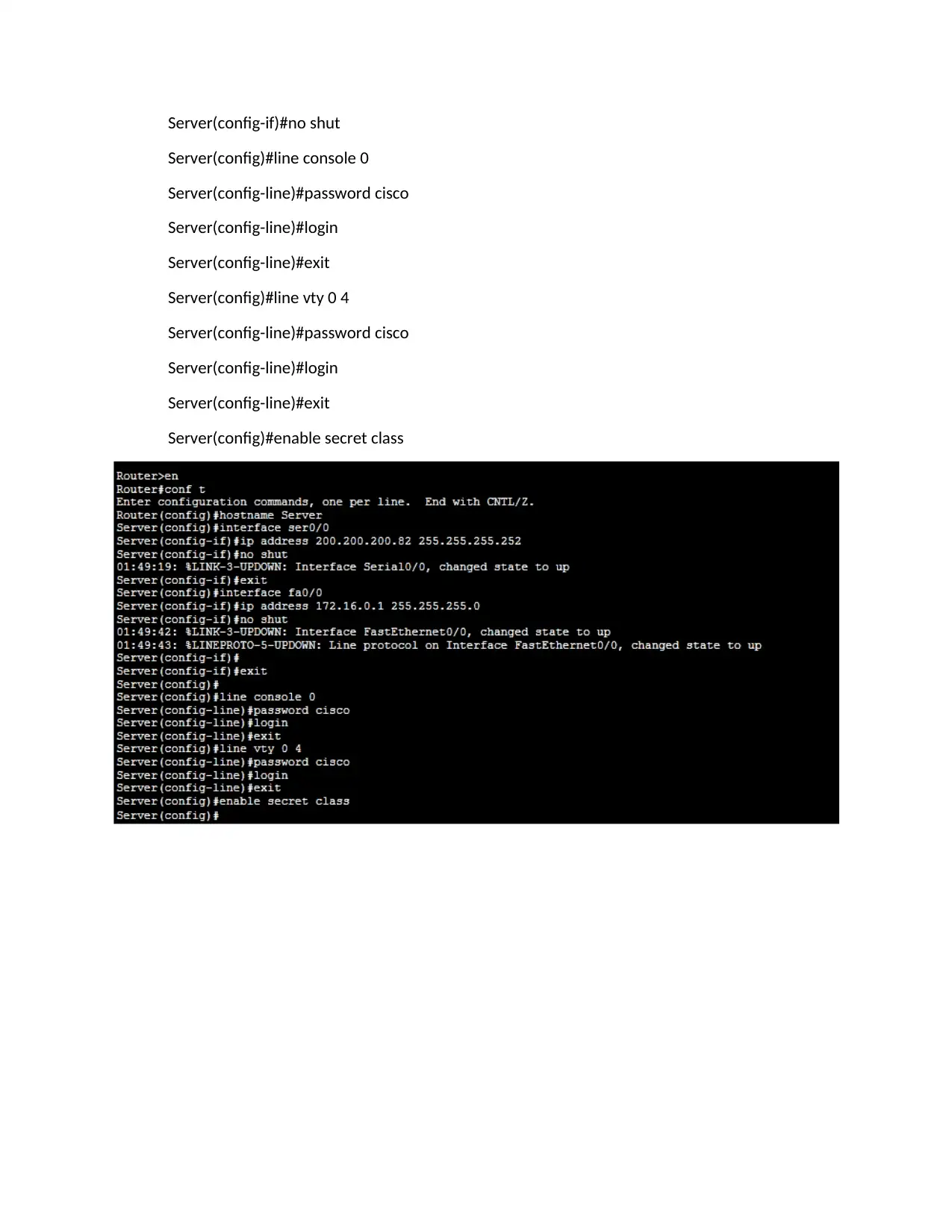
In Server Router, we have configured FTP Server default gateway address and serial address to
communicate with school router
Router>en
Router#conf t
Enter configuration commands, one per line. End with CNTL/Z.
Router(config)#hostname Server
Server(config)#interface ser0/0
Server(config-if)#ip address 200.200.200.82 255.255.255.252
Server(config-if)#no shut
Server(config-if)#exit
Server(config)#interface fa0/0
Server(config-if)#ip address 172.16.0.1 255.255.255.0
communicate with school router
Router>en
Router#conf t
Enter configuration commands, one per line. End with CNTL/Z.
Router(config)#hostname Server
Server(config)#interface ser0/0
Server(config-if)#ip address 200.200.200.82 255.255.255.252
Server(config-if)#no shut
Server(config-if)#exit
Server(config)#interface fa0/0
Server(config-if)#ip address 172.16.0.1 255.255.255.0
Paraphrase This Document
Need a fresh take? Get an instant paraphrase of this document with our AI Paraphraser

Server(config-if)#no shut
Server(config)#line console 0
Server(config-line)#password cisco
Server(config-line)#login
Server(config-line)#exit
Server(config)#line vty 0 4
Server(config-line)#password cisco
Server(config-line)#login
Server(config-line)#exit
Server(config)#enable secret class
Server(config)#line console 0
Server(config-line)#password cisco
Server(config-line)#login
Server(config-line)#exit
Server(config)#line vty 0 4
Server(config-line)#password cisco
Server(config-line)#login
Server(config-line)#exit
Server(config)#enable secret class

iii) DHCP Configuration
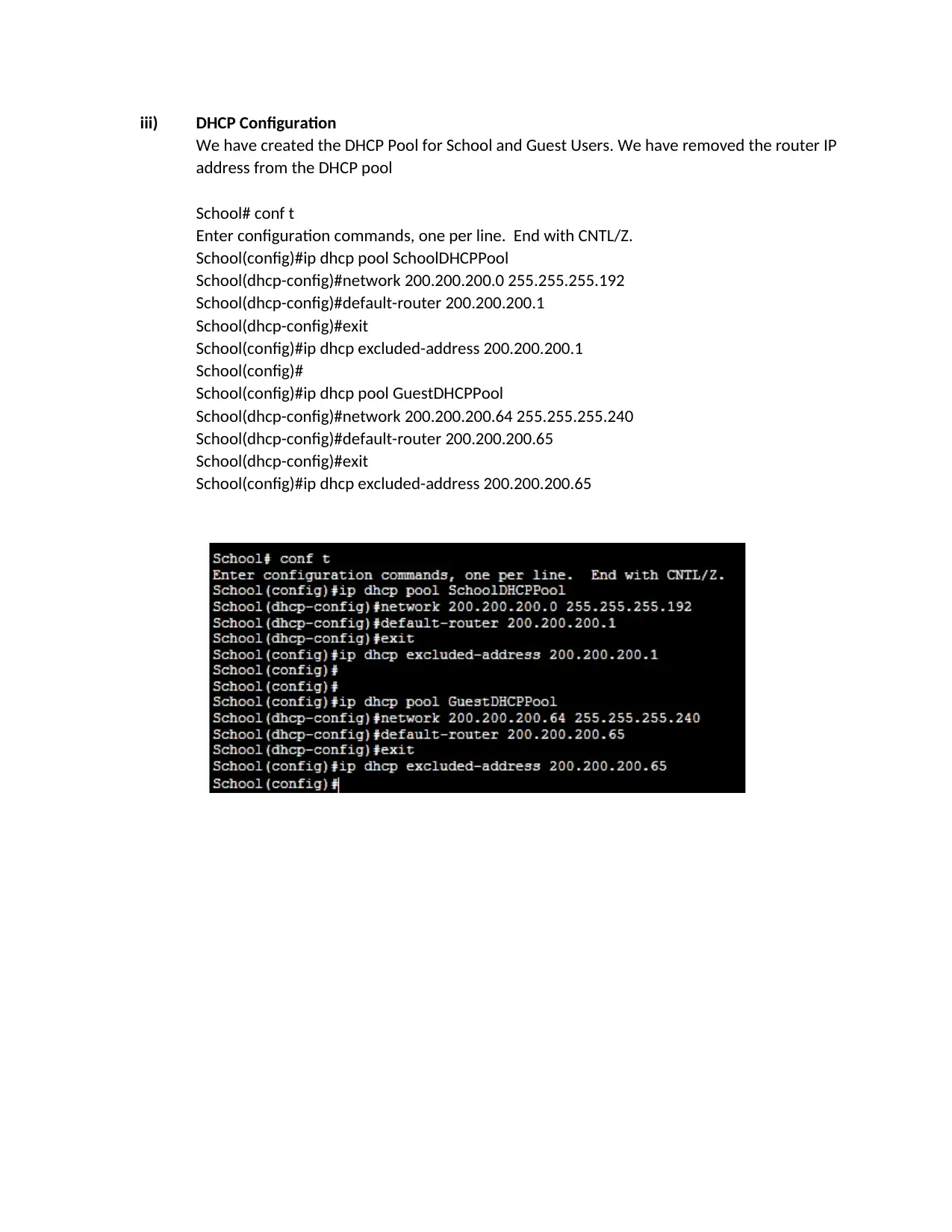
We have created the DHCP Pool for School and Guest Users. We have removed the router IP
address from the DHCP pool
School# conf t
Enter configuration commands, one per line. End with CNTL/Z.
School(config)#ip dhcp pool SchoolDHCPPool
School(dhcp-config)#network 200.200.200.0 255.255.255.192
School(dhcp-config)#default-router 200.200.200.1
School(dhcp-config)#exit
School(config)#ip dhcp excluded-address 200.200.200.1
School(config)#
School(config)#ip dhcp pool GuestDHCPPool
School(dhcp-config)#network 200.200.200.64 255.255.255.240
School(dhcp-config)#default-router 200.200.200.65
School(dhcp-config)#exit
School(config)#ip dhcp excluded-address 200.200.200.65
We have created the DHCP Pool for School and Guest Users. We have removed the router IP
address from the DHCP pool
School# conf t
Enter configuration commands, one per line. End with CNTL/Z.
School(config)#ip dhcp pool SchoolDHCPPool
School(dhcp-config)#network 200.200.200.0 255.255.255.192
School(dhcp-config)#default-router 200.200.200.1
School(dhcp-config)#exit
School(config)#ip dhcp excluded-address 200.200.200.1
School(config)#
School(config)#ip dhcp pool GuestDHCPPool
School(dhcp-config)#network 200.200.200.64 255.255.255.240
School(dhcp-config)#default-router 200.200.200.65
School(dhcp-config)#exit
School(config)#ip dhcp excluded-address 200.200.200.65
⊘ This is a preview!⊘
Do you want full access?
Subscribe today to unlock all pages.

Trusted by 1+ million students worldwide

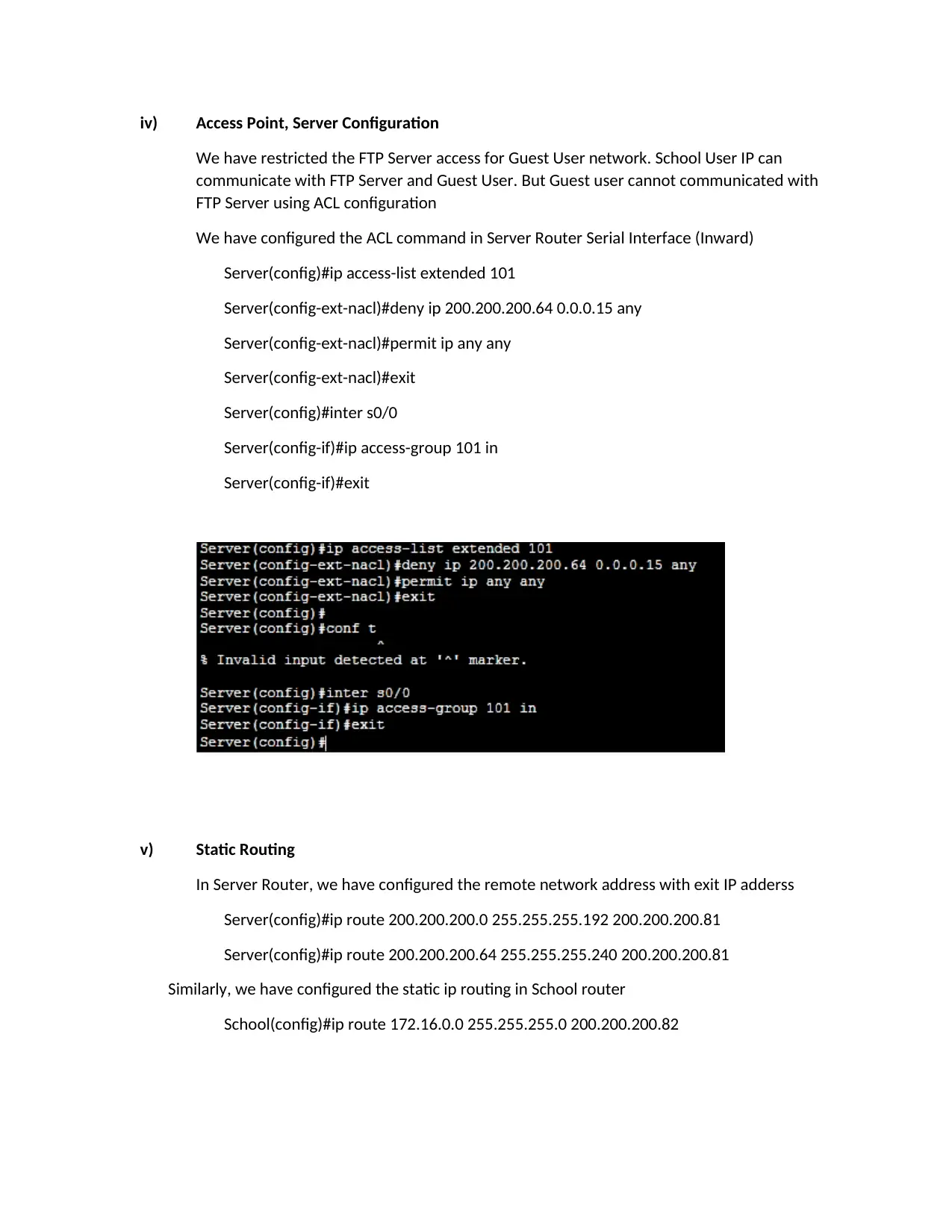
iv) Access Point, Server Configuration
We have restricted the FTP Server access for Guest User network. School User IP can
communicate with FTP Server and Guest User. But Guest user cannot communicated with
FTP Server using ACL configuration
We have configured the ACL command in Server Router Serial Interface (Inward)
Server(config)#ip access-list extended 101
Server(config-ext-nacl)#deny ip 200.200.200.64 0.0.0.15 any
Server(config-ext-nacl)#permit ip any any
Server(config-ext-nacl)#exit
Server(config)#inter s0/0
Server(config-if)#ip access-group 101 in
Server(config-if)#exit
v) Static Routing
In Server Router, we have configured the remote network address with exit IP adderss
Server(config)#ip route 200.200.200.0 255.255.255.192 200.200.200.81
Server(config)#ip route 200.200.200.64 255.255.255.240 200.200.200.81
Similarly, we have configured the static ip routing in School router
School(config)#ip route 172.16.0.0 255.255.255.0 200.200.200.82
We have restricted the FTP Server access for Guest User network. School User IP can
communicate with FTP Server and Guest User. But Guest user cannot communicated with
FTP Server using ACL configuration
We have configured the ACL command in Server Router Serial Interface (Inward)
Server(config)#ip access-list extended 101
Server(config-ext-nacl)#deny ip 200.200.200.64 0.0.0.15 any
Server(config-ext-nacl)#permit ip any any
Server(config-ext-nacl)#exit
Server(config)#inter s0/0
Server(config-if)#ip access-group 101 in
Server(config-if)#exit
v) Static Routing
In Server Router, we have configured the remote network address with exit IP adderss
Server(config)#ip route 200.200.200.0 255.255.255.192 200.200.200.81
Server(config)#ip route 200.200.200.64 255.255.255.240 200.200.200.81
Similarly, we have configured the static ip routing in School router
School(config)#ip route 172.16.0.0 255.255.255.0 200.200.200.82
Paraphrase This Document
Need a fresh take? Get an instant paraphrase of this document with our AI Paraphraser

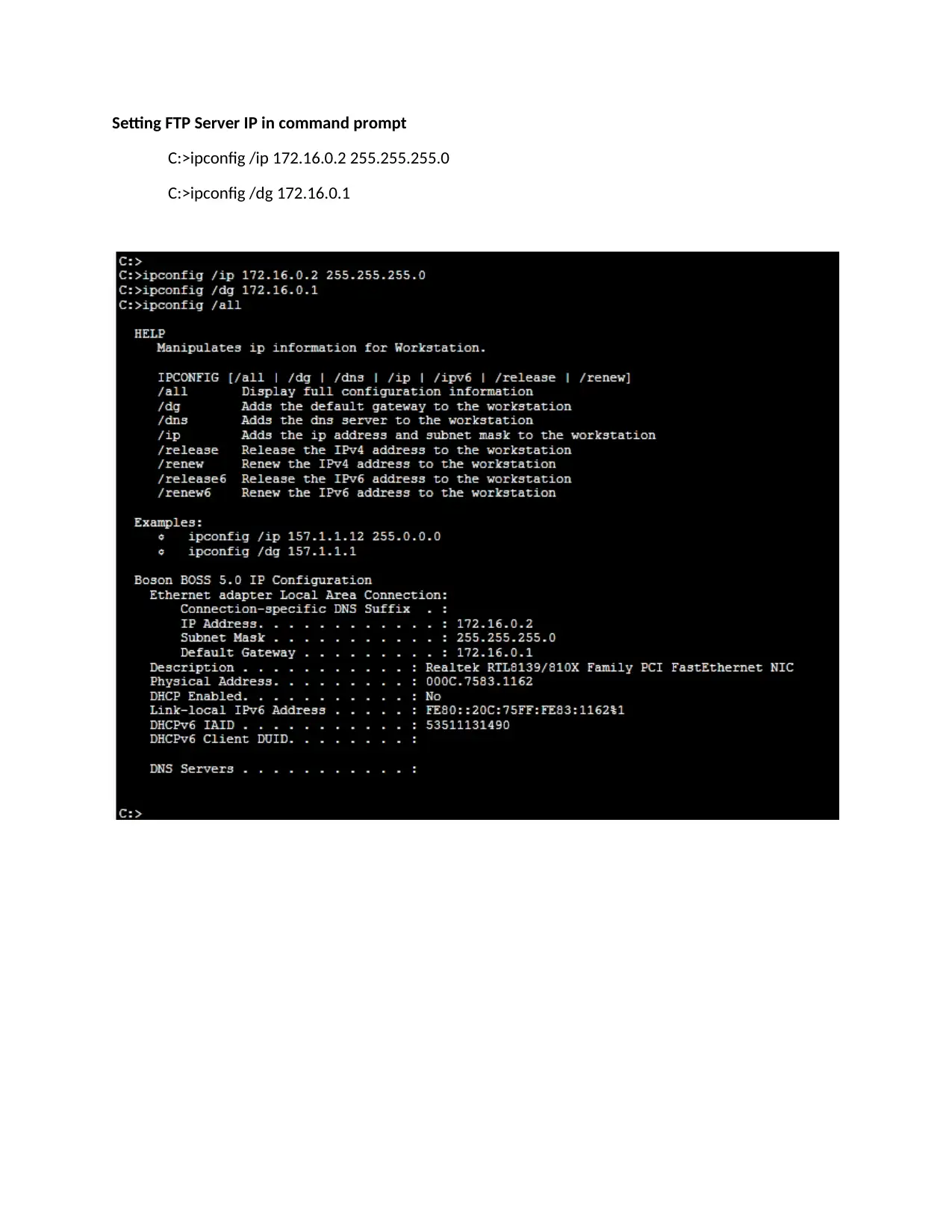
Setting FTP Server IP in command prompt
C:>ipconfig /ip 172.16.0.2 255.255.255.0
C:>ipconfig /dg 172.16.0.1
C:>ipconfig /ip 172.16.0.2 255.255.255.0
C:>ipconfig /dg 172.16.0.1

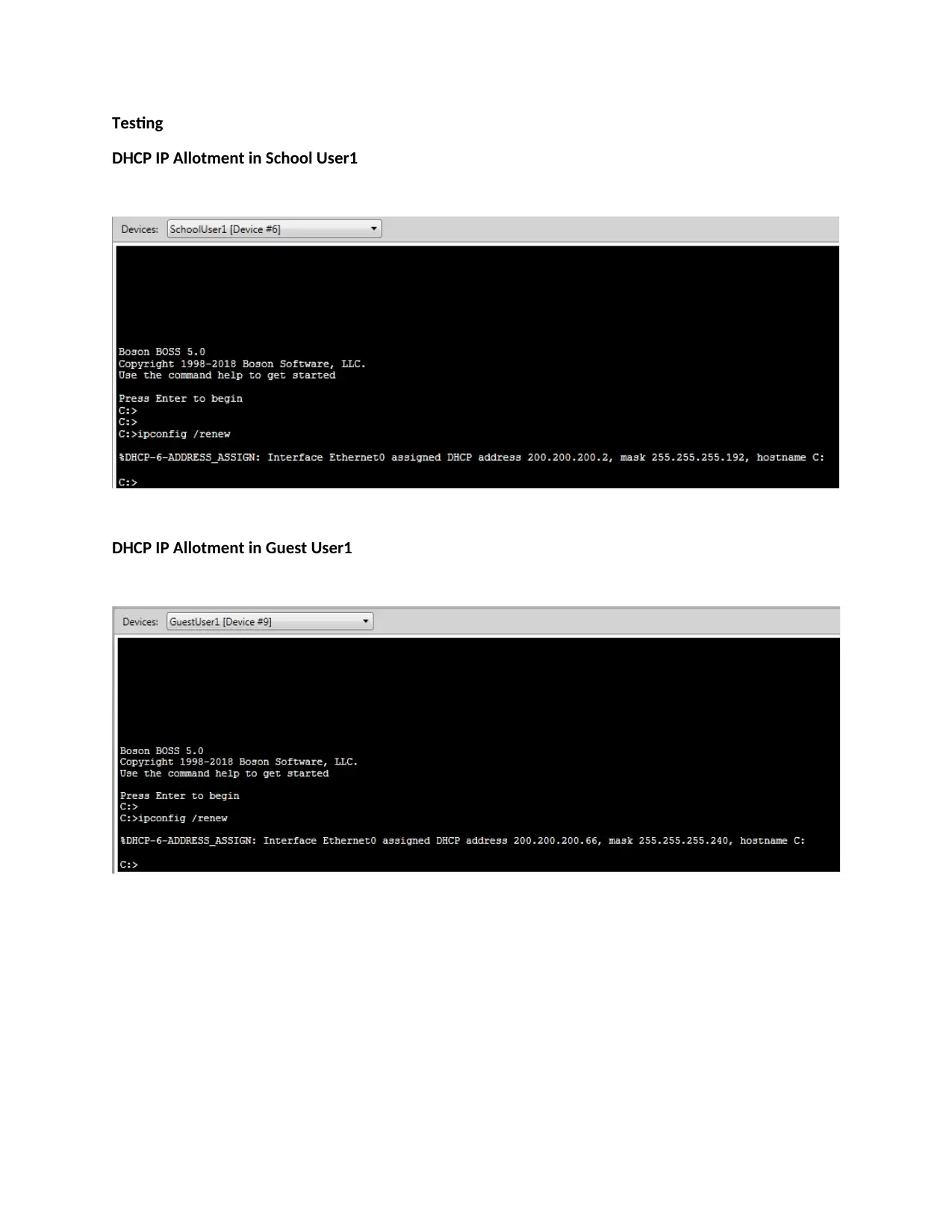
Testing
DHCP IP Allotment in School User1
DHCP IP Allotment in Guest User1
DHCP IP Allotment in School User1
DHCP IP Allotment in Guest User1
⊘ This is a preview!⊘
Do you want full access?
Subscribe today to unlock all pages.

Trusted by 1+ million students worldwide
1 out of 16
Related Documents
Your All-in-One AI-Powered Toolkit for Academic Success.
+13062052269
info@desklib.com
Available 24*7 on WhatsApp / Email
Unlock your academic potential
Copyright © 2020–2025 A2Z Services. All Rights Reserved. Developed and managed by ZUCOL.